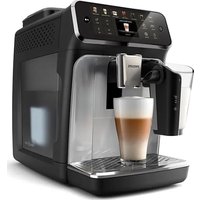
4400 Series EP4446 - Coffee machine PHILIPS - Free user manual and instructions
Find the device manual for free 4400 Series EP4446 PHILIPS in PDF.


Pick your language and provide your email: we'll send you a specifically translated version.
| Product type | Automatic coffee machine |
| Brand | Philips |
| Model | 4400 Series EP4446 |
| Dimensions (W x H x D) | 246 x 372 x 433 mm |
| Weight | 9.2 kg |
| Power supply | 220-240 V, 50 Hz, 1500 W |
| Pump pressure | 15 bar |
| Water tank capacity | 1.8 L |
| Bean hopper capacity | 250 g |
| Milk system | LatteGo (integrated milk frother) |
| Steam wand | Yes, adjustable |
| Noise level | < 60 dB |
| Main functions | Whole bean coffee, ground coffee, hot water, steam |
| Settings | Coffee strength, temperature, water quantity |
| Maintenance and cleaning | Automatic descaling, rinse program, dishwasher-safe parts |
| Safety | Automatic shut-off, safety lock |
| Repairability score | 8.5 / 10 |
| Spare parts available | Yes (filters, seals, tanks) |
| Warranty | 2 years |
Frequently Asked Questions - 4400 Series EP4446 PHILIPS
How do I descale my Philips 4400 Series machine?
Use the automatic descaling program. Pour the descaling solution into the water tank, select 'Descaling' from the menu, and follow the on-screen instructions. The process takes about 20 minutes.
How do I adjust the coffee strength?
Press the 'Strength' button to choose from predefined levels (light, medium, strong) or customize via the menu Settings > Coffee strength.
How do I clean the LatteGo milk system?
Disassemble the LatteGo and rinse it with warm water immediately after use. All parts are dishwasher-safe (top rack). An automatic cleaning cycle is also available.
What type of beans should I use?
Use whole roasted coffee beans, without additives. Beans that are too oily or caramelized can clog the grinder. Avoid ground coffee except in pre-ground coffee mode.
How do I set the water hardness?
Go to menu Settings > Water hardness. Perform a test with the provided test strip, then select the corresponding level (1-4). This optimizes the descaling frequency.
Why is my coffee not hot enough?
Check that the temperature is set to maximum (Settings > Temperature). Pre-heat the cup with hot water. If the problem persists, descaling may be necessary.
How do I reset my machine?
Hold the stop button for 5 seconds until 'Reset' appears. Confirm with OK. All settings return to factory defaults.
Can I use ground coffee?
Yes, activate pre-ground coffee mode. Open the pre-ground coffee compartment (located on top), add one scoop (max 1 scoop) and select your beverage.
How do I change the display language?
Go to menu Settings > Language. Scroll through options with the arrows and confirm with OK. This setting is only available when the machine is on.
How do I replace the AquaClean water filter?
Remove the old filter by turning a quarter turn. Insert the new filter by pushing it in and turning until it stops. Activate it in the menu Settings > Water filter > Activate.
User questions about 4400 Series EP4446 PHILIPS
0 question about this device. Answer the ones you know or ask your own.
Ask a new question about this device
No questions yet. Be the first to ask one.
Download the instructions for your Coffee machine in PDF format for free! Find your manual 4400 Series EP4446 - PHILIPS and take your electronic device back in hand. On this page are published all the documents necessary for the use of your device. 4400 Series EP4446 by PHILIPS.
USER MANUAL 4400 Series EP4446 PHILIPS
Manual assistant
Powered by Anthropic
Waiting for your message
Product information
Brand : PHILIPS
Model : 4400 Series EP4446
Category : Coffee machine