
ER-4 - Network card / adapter Ubiquiti Networks - Free user manual and instructions
Find the device manual for free ER-4 Ubiquiti Networks in PDF.


| Product Type | Network Router / EdgeRouter |
| Model | ER-4 (EdgeRouter 4) |
| Ports | 4x Gigabit Ethernet RJ45, 1x SFP |
| Processor | Dual-core 500 MHz MIPS64 |
| Memory | 256 MB DDR3 RAM, 256 MB NAND flash |
| Dimensions | 134.5 x 95 x 25 mm (5.3 x 3.74 x 0.98 in) |
| Weight | 270 g (9.5 oz) |
| Power Supply | 12V DC, 2A (24W max), external adapter |
| Cooling | Passive (fanless) |
| Mounting | Desktop or rack-mount with optional bracket |
| Operating Temperature | -10 to 45 °C (14 to 113 °F) |
| Routing Performance | Up to 1 Mpps for 64-byte packets |
| Throughput | Up to 2 Gbps (line rate) |
| Software | EdgeOS (Linux-based) |
| Firewall Features | Stateful firewall, ACL, NAT, VPN (IPsec, OpenVPN, L2TP) |
| Maintenance | No user-serviceable parts; firmware updates via web UI or CLI |
| Security | HTTPS, SSH, VLAN support, 802.1X authentication |
| Spare Parts & Repairability | Limited; power adapter replaceable, internal components not field-replaceable |
| Certifications | CE, FCC, IC |
Frequently Asked Questions - ER-4 Ubiquiti Networks
User questions about ER-4 Ubiquiti Networks
0 question about this device. Answer the ones you know or ask your own.
Ask a new question about this device
Download the instructions for your Network card / adapter in PDF format for free! Find your manual ER-4 - Ubiquiti Networks and take your electronic device back in hand. On this page are published all the documents necessary for the use of your device. ER-4 by Ubiquiti Networks.
USER MANUAL ER-4 Ubiquiti Networks
natural_image
Black Edge Router 4 device with four Ethernet ports and indicator lights (no visible text or symbols on the device body)EdgeRouter4
4-Port Gigabit Router
with 1 SFP Port
Model: ER-4
Introduction
Thank you for purchasing the Ubiquiti Networks® EdgeRouter™. This Quick Start Guide is designed to guide you through installation and also includes warranty terms.
Package Contents

EdgeRouter ER-4

Wall Mount Screws
(Qty. 2)

Wall Mount Anchors
(Qty. 2)

natural_image
Coiled black cable with two connectors (no text or symbols visible)
Power Cord Quick Start Guide
TERMS OF USE: All Ethernet cabling runs must use CAT5 (or above). It is the professional installer's responsibility to follow local country regulations, including operation within legal frequency channels, output power, indoor cabling requirements, and Dynamic Frequency Selection (DFS) requirements.
Installation Requirements
- For indoor applications, use Category 5 (or above) UTP cabling approved for indoor use.
- For outdoor applications, shielded Category 5 (or above) cabling should be used for all wired Ethernet connections and should be grounded through the AC ground of the power supply.
We recommend that you protect your networks from harmful outdoor environments and destructive ESD events with industrial-grade, shielded Ethernet cable from Ubiquiti Networks. For more details, visit:
www.ubnt.com/toughcable

WARNING: To reduce the risk of fire or electric shock, do not expose the EdgeRouter to rain or moisture.

Note: Although the cabling can be located outdoors, the EdgeRouter itself should be housed inside a protective enclosure.
Hardware Overview
Front Panel Ports

| Interface Description | |
| Console | RJ45 serial console port for Command Line Interface (CLI) management. Use an RJ45-to-DB9, serial console cable, also known as a rollover cable, to connect the Console port to your computer. (If your computer does not have a DB9 port, then you will also need a DB9 adapter.) Then configure the following settings as needed:·Baud rate 115200·Data bits 8·Parity NONE·Stop bits 1·Flow control NONE |
| USB Reserved for future use. | |
| RJ45 (eth0-eth2) | RJ45 ports support 10/100/1000 Ethernet connections. |
| SFP (eth3) | SFP port is hot-swappable and supports Gigabit fiber SFP modules. |
Front Panel Button

| Button Description | |
| Reset | There are two methods to reset the EdgeRouter to factory defaults: ·Runtime reset (recommended) The EdgeRouter should be running after bootup is complete. Press and hold the Reset button for about 10 seconds until the LED for port eth3 starts flashing and then becomes solidly lit. After a few seconds, the LED will turn off, and the EdgeRouter will automatically reboot. ·Power-on reset Disconnect the Power Cord from the Power Adapter. Press and hold the Reset button while connecting the power (refer to Connecting Power for details). Keep holding the button until the LED for port eth3 starts flashing and then stops flashing after a few seconds. |
Front Panel LEDs

| LED State Status | |||
| System | Blue Bootup in Progress | ||
| White Ready for Use | |||
| RJ45 (eth0-2) | Speed/Link/Act | Off No Link | |
| Amber | Link Established at 10/100 Mbps | ||
| Amber Flashing | Link Activity at 10/100 Mbps | ||
| Green | Link Established at 1000 Mbps | ||
| Green Flashing | Link Activity at 1000 Mbps | ||
| SFP (eth3) | Link/Act | Off No Link | |
| Green | Link Established at 1 Gbps | ||
| Green Flashing Link Activity at 1 Gbps | |||
Back Panel
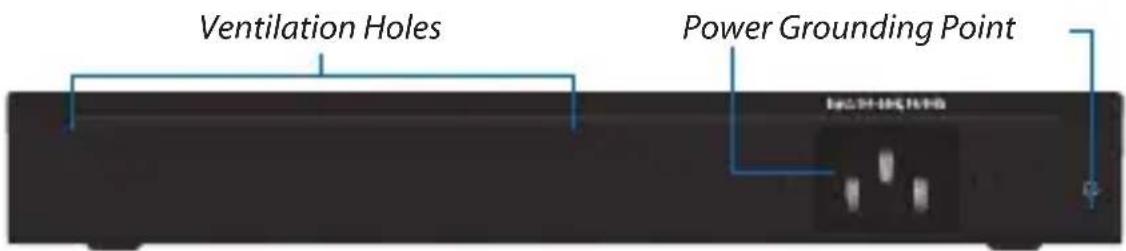

Note: There are additional ventilation holes on the sides of the EdgeRouter.
Hardware Installation

WARNING: FAILURE TO PROVIDE PROPER VENTILATION MAY CAUSE FIRE HAZARD. KEEP AT LEAST 20 MM OF CLEARANCE NEXT TO THE VENTILATION HOLES FOR ADEQUATE AIRFLOW.
Wall Mounting
To mount the EdgeRouter on a wall, you will need a drill, a 6 mm drill bit, and a Phillips screwdriver.
- Use a 6 mm drill bit to drill two holes 125 mm apart.
- Insert the Wall Mount Anchors into the holes. Use a Phillips screwdriver to secure a Wall Mount Screw to each anchor. Leave a clearance of approximately 3 mm between each screw head and its anchor.


Note: You can also mount the EdgeRouter in a vertical orientation.
- Position the EdgeRouter with the Ethernet ports facing down. Place the wall-mount slots of the EdgeRouter over the screw heads on the wall. Then slide the EdgeRouter down to lock it into place.

Grounding the EdgeRouter (Recommended)
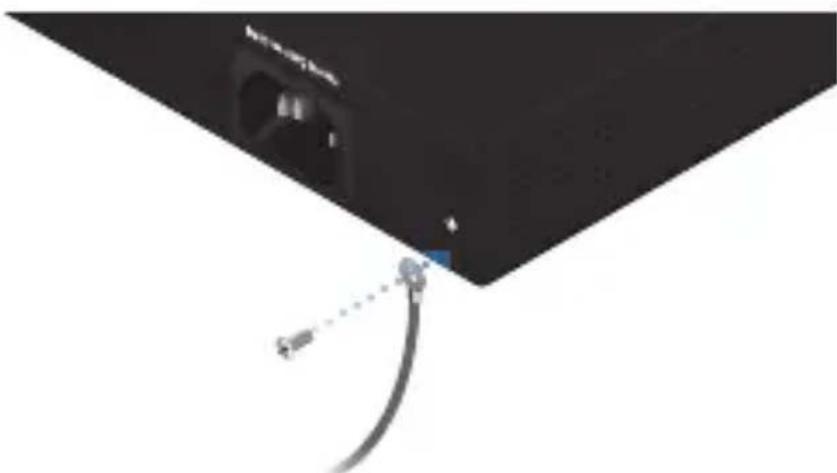
The EdgeRouter is grounded through the Power Cord; however, you can add optional ESD grounding for enhanced ESD protection.
- Attach a screw (not included) to secure a ground wire (not included) to the Grounding Point.
natural_image
Close-up of a black electronic device with a cable and connector, no visible text or symbols- Secure the other end of the ground wire to a grounding block.
Connecting Power
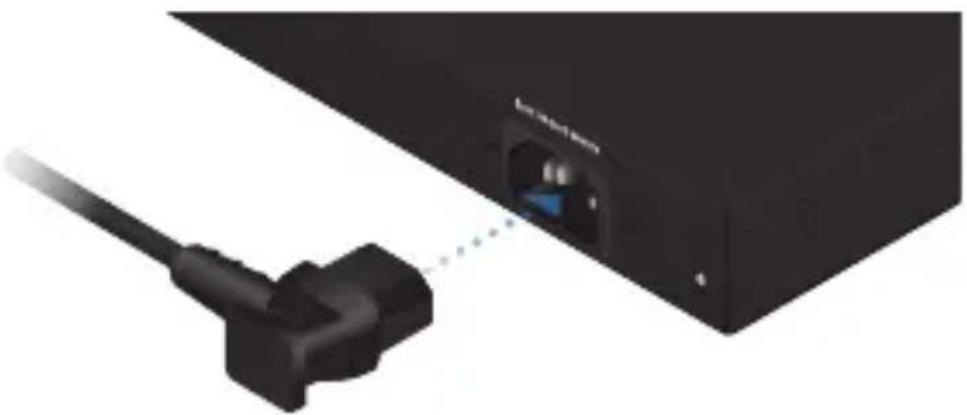
- Connect the Power Cord to the Power port.
natural_image
Close-up of a black USB cable inserted into a black device labeled 'Lokovo' (no additional text or symbols visible)- Connect the other end of the Power Cord to a power outlet.

natural_image
Exterior view of a black rectangular electronic power outlet with multiple slots and a cable (no text or symbols visible)Using SFP Ports
To use an SFP port:
- Remove the protective plug covering the SFP port.
- Plug a fiber SFP module into the SFP port.

natural_image
Exterior view of a black EdgeRouter 4 network switch with ports and a USB cable (no text or symbols visible)- Connect a fiber optic cable to the fiber SFP module. Then connect the other end of the cable to another fiber device.
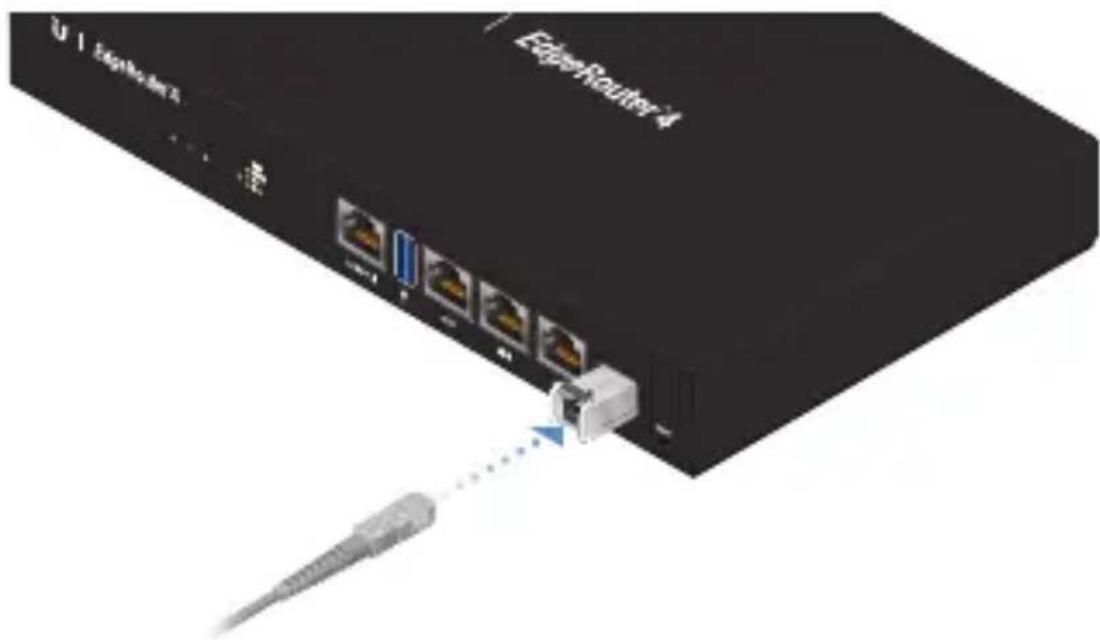
For information about compatible fiber SFP modules, visit: community.ubnt.com/edgemax
Accessing the EdgeOS Configuration Interface
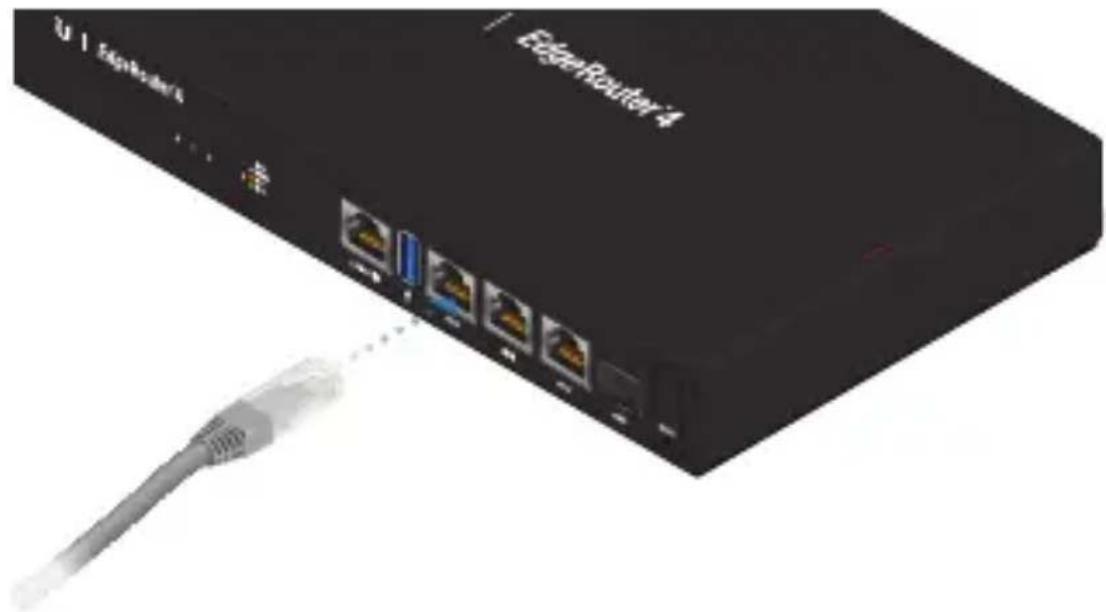
- Connect an Ethernet cable from the Ethernet port of your computer to the port labeled eth0 on the EdgeRouter.
natural_image
Black EdgeRouter 4 network device with four ports and a cable, no visible text or symbols on the device body.- Configure the Ethernet adapter on your host system with a static IP address on the 192.168.1.x subnet.
- Launch your web browser. Type https://192.168.1.1 in the address field. Press enter (PC) or return (Mac).
- The login screen will appear. Enter ubnt in the Username and Password fields. Read the Ubiquiti License Agreement, and check the box next to I agree to the terms of this License Agreement to accept it. Click Login.
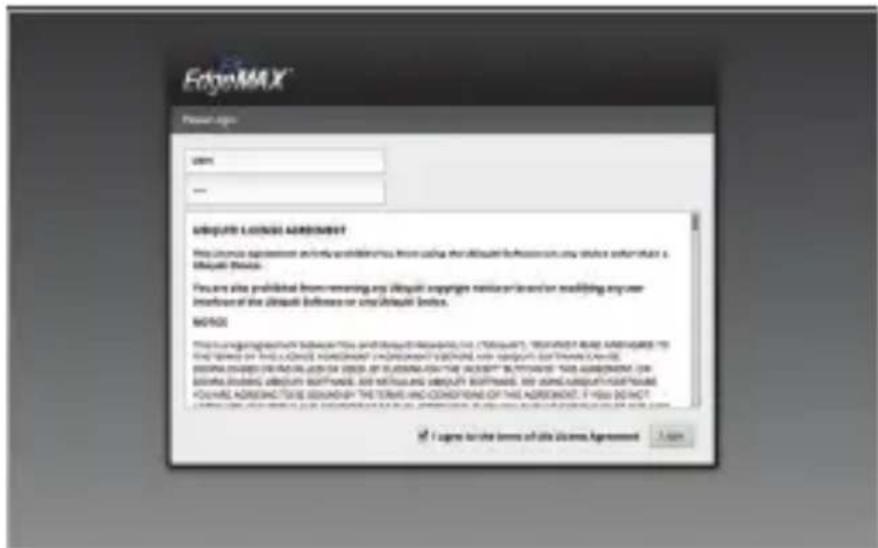
The EdgeOS® Configuration Interface will appear, allowing you to customize your settings as needed. You can click the Wizards tab to access the Setup Wizard.
For more information, refer to the EdgeOS User Guide, which is available at www.ubnt.com/download/edgemax
Specifications
| ER-4 | |
| Dimensions 229 x 136.5 x 31.1 mm | (9.02 x 5.37 x 1.22") |
| Weight 0.8 kg (1.76 lb) | |
| Max. Power Consumption 13W | |
| Power Method Universal AC | |
| Power Supply Internal AC Power Adapter | |
| Supported Voltage Range | 100-240V 50/60Hz Universal AC Adapter |
| Button Reset | |
| LEDs | |
| Data Ports | Speed/Link/Activity |
| SFP Data Port | Link/Activity |
| Processor 4-Core 1 GHz MIPS64 | |
| System Memory 1 GB DDR3 RAM | |
| On-Board Flash Storage 4 GB eMMC, 8 MB SPI NOR | |
| Operating Temperature -10 to 50°C (14 to 122°F) | |
| Operating Humidity 10 - 90% Noncondensing | |
| ESD/EMP Protection Air: ± 24 kV, Contact: ± 24 kV | |
| Interfaces | |
| Management | (1) RJ45 Serial Port |
| (4) Ethernet Ports (Default eth0) | |
| Networking | (3) 10/100/1000 RJ45 Ports |
| (1) 1 Gbps SFP Port | |
| Certifications CE, FCC, IC | |
Safety Notices
- Read, follow, and keep these instructions.
- Heed all warnings.
- Only use attachments/accessories specified by the manufacturer.

WARNING: Failure to provide proper ventilation may cause fire hazard. Keep at least 20 mm of clearance next to the ventilation holes for adequate airflow.

WARNING: To reduce the risk of fire or electric shock, do not expose this product to rain or moisture.

WARNING: Do not use this product in location that can be submerged by water.

WARNING: Avoid using this product during an electrical storm. There may be a remote risk of electric shock from lightning.
Electrical Safety Information
- Compliance is required with respect to voltage, frequency, and current requirements indicated on the manufacturer's label. Connection to a different power source than those specified may result in improper operation, damage to the equipment or pose a fire hazard if the limitations are not followed.
- There are no operator serviceable parts inside this equipment. Service should be provided only by a qualified service technician.
- This equipment is provided with a detachable power cord which has an integral safety ground wire intended for connection to a grounded safety outlet.
a. Do not substitute the power cord with one that is not the provided approved type. Never use an adapter plug to connect to a 2-wire outlet as this will defeat the continuity of the grounding wire.
b. The equipment requires the use of the ground wire as a part of the safety certification, modification or misuse can provide a shock hazard that can result in serious injury or death.
c. Contact a qualified electrician or the manufacturer if there are questions about the installation prior to connecting the equipment.
d. Protective earthing is provided by Listed AC adapter. Building installation shall provide appropriate short-circuit backup protection.
e. Protective bonding must be installed in accordance with local national wiring rules and regulations.
Limited Warranty
UBIQUITI NETWORKS, Inc ("UBIQUITI NETWORKS") warrants that the product(s) furnished hereunder (the "Product(s)") shall be free from defects in material and workmanship for a period of one (1) year from the date of shipment by UBIQUITI NETWORKS under normal use and operation. UBIQUITI NETWORKS' sole and exclusive obligation and liability under the foregoing warranty shall be for UBIQUITI NETWORKS, at its discretion, to repair or replace any Product that fails to conform to the above warranty during the above warranty period. The expense of removal and reinstallation of any Product is not included in this warranty. The warranty period of any repaired or replaced Product shall not extend beyond its original term.
Warranty Conditions
The above warranty does not apply if the Product:
(I) has been modified and/or altered, or an addition made thereto, except by Ubiquiti Networks, or Ubiquiti Networks' authorized representatives, or as approved by Ubiquiti Networks in writing;
(II) has been painted, rebranded or physically modified in any way;
(III) has been damaged due to errors or defects in cabling;
(IV) has been subjected to misuse, abuse, negligence, abnormal physical, electromagnetic or electrical stress, including lightning strikes, or accident;
(V) has been damaged or impaired as a result of using third party firmware;
(VI) has no original Ubiquiti MAC label, or is missing any other original Ubiquiti label(s); or
(VII) has not been received by Ubiquiti within 30 days of issuance of the RMA.
In addition, the above warranty shall apply only if: the product has been properly installed and used at all times in accordance, and in all material respects, with the applicable Product documentation; all Ethernet cabling runs use CAT5 (or above), and for outdoor installations, shielded Ethernet cabling is used, and for indoor installations, indoor cabling requirements are followed.
Returns
No Products will be accepted for replacement or repair without obtaining a Return Materials Authorization (RMA) number from UBIQUITI NETWORKS during the warranty period, and the Products being received at UBIQUITI NETWORKS' facility freight prepaid in accordance with the RMA process of UBIQUITI NETWORKS. Products returned without an RMA number will not be processed and will be returned freight collect or subject to disposal. Information on the RMA process and obtaining an RMA number can be found at: www.ubnt.com/support/warranty
Disclaimer
EXCEPT FOR ANY EXPRESS WARRANTIES PROVIDED HEREIN, UBIQUITI NETWORKS, ITS AFFILIATES, AND ITS AND THEIR THIRD PARTY DATA, SERVICE, SOFTWARE AND HARDWARE PROVIDERS HEREBY DISCLAIM AND MAKE NO OTHER REPRESENTATION OR WARRANTY OF ANY KIND, EXPRESS, IMPLIED OR STATUTORY, INCLUDING, BUT NOT LIMITED TO, REPRESENTATIONS, GUARANTEES, OR WARRANTIES OF MERCHANTABILITY, ACCURACY, QUALITY OF SERVICE OR RESULTS, AVAILABILITY, SATISFACTORY QUALITY, LACK OF VIRUSES, QUIET ENJOYMENT, FITNESS FOR A PARTICULAR PURPOSE AND NON-INFRINGEMENT AND ANY WARRANTIES ARISING FROM ANY COURSE OF DEALING, USAGE OR TRADE PRACTICE IN CONNECTION WITH SUCH PRODUCTS AND SERVICES. BUYER ACKNOWLEDGES THAT NEITHER UBIQUITI NETWORKS NOR ITS THIRD PARTY PROVIDERS CONTROL BUYER'S EQUIPMENT OR THE TRANSFER OF DATA OVER COMMUNICATIONS FACILITIES, INCLUDING THE INTERNET, AND THAT THE PRODUCTS AND SERVICES MAY BE SUBJECT TO LIMITATIONS, INTERRUPTIONS, DELAYS, CANCELLATIONS AND OTHER PROBLEMS INHERENT IN THE USE OF COMMUNICATIONS FACILITIES. UBIQUITI NETWORKS, ITS AFFILIATES AND ITS AND THEIR THIRD PARTY PROVIDERS ARE NOT RESPONSIBLE FOR ANY INTERRUPTIONS, DELAYS, CANCELLATIONS, DELIVERY FAILURES, DATA LOSS, CONTENT CORRUPTION, PACKET LOSS, OR OTHER DAMAGE RESULTING FROM ANY OF THE FOREGOING. In addition, UBIQUITI NETWORKS does not warrant that the operation of the Products will be error-free or that operation will be uninterrupted. In no event shall UBIQUITI NETWORKS be responsible for damages or claims of any nature or description relating to system performance, including coverage, buyer's selection of products (including the Products) for buyer's application and/or failure of products (including the Products) to meet government or regulatory requirements.
Limitation of Liability
EXCEPT TO THE EXTENT PROHIBITED BY LOCAL LAW, IN NO EVENT WILL UBIQUITI OR ITS SUBSIDIARIES, AFFILIATES OR SUPPLIERS BE LIABLE FOR DIRECT, SPECIAL, INCIDENTAL, CONSEQUENTIAL OR OTHER DAMAGES (INCLUDING LOST PROFIT, LOST DATA, OR DOWNTIME COSTS), ARISING OUT OF THE USE, INABILITY TO USE, OR THE RESULTS OF USE OF THE PRODUCT, WHETHER BASED IN WARRANTY, CONTRACT, TORT OR OTHER LEGAL THEORY, AND WHETHER OR NOT ADVISED OF THE POSSIBILITY OF SUCH DAMAGES.
Note
Some countries, states and provinces do not allow exclusions of implied warranties or conditions, so the above exclusion may not apply to you. You may have other rights that vary from country to country, state to state, or province to province. Some countries, states and provinces do not allow the exclusion or limitation of liability for incidental or consequential damages, so the above limitation may not apply to you. EXCEPT TO THE EXTENT ALLOWED BY LOCAL LAW, THESE WARRANTY TERMS DO NOT EXCLUDE, RESTRICT OR MODIFY, AND ARE IN ADDITION TO, THE
MANDATORY STATUTORY RIGHTS APPLICABLE TO THE LICENSE OF ANY SOFTWARE (EMBEDDED IN THE PRODUCT) TO YOU. The United Nations Convention on Contracts for the International Sale of Goods shall not apply to any transactions regarding the sale of the Products.
Compliance
FCC
Changes or modifications not expressly approved by the party responsible for compliance could void the user's authority to operate the equipment.
This device complies with Part 15 of the FCC Rules. Operation is subject to the following two conditions.
- This device may not cause harmful interference, and
- This device must accept any interference received, including interference that may cause undesired operation.
This equipment has been tested and found to comply with the limits for a Class A digital device, pursuant to Part 15 of the FCC Rules. These limits are designed to provide reasonable protection against harmful interference when the equipment is operated in a commercial environment. This equipment generates, uses, and can radiate radio frequency energy and, if not installed and used in accordance with the instruction manual, may cause harmful interference to radio communications. Operations of this equipment in a residential area is likely to cause harmful interference in which case the user will be required to correct the interference at his own expense.
ISED Canada
CAN ICES-3(A)/NMB-3(A)
This Class A digital apparatus complies with Canadian CAN ICES-003.
CAN ICES-3(A)/NMB-3(A)
Australia and New Zealand

Warning: This is a Class A product. In a domestic environment this product may cause radio interference in which case the user may be required to take adequate measures.
CE Marking
CE marking on this product represents the product is in compliance with all directives that are applicable to it.
RoHS/WEEE Compliance Statement

English
European Directive 2012/19/EU requires that the equipment bearing this symbol on the product and/or its packaging must not be disposed of with unsorted municipal waste. The symbol indicates that this product should be disposed of separately from regular household waste streams. It is your responsibility to dispose of this and other electric and electronic equipment via designated collection facilities appointed by the government or local authorities. Correct disposal and recycling will help prevent potential negative consequences to the environment and human health. For more detailed information about the disposal of your old equipment, please contact your local authorities, waste disposal service, or the shop where you purchased the product.
Deutsch
Declaration of Conformity
www.ubnt.com/compliance
www.ubnt.com/compliance
Support help.ubnt.com
Community community.ubnt.com
Downloads downloads.ubnt.com

UBIQUITI
NETWORKS
Ubiquiti Networks, Inc.
685 Third Avenue, 27th Floor
New York, NY 10017
USA
©2017 Ubiquiti Networks, Inc. All rights reserved. Ubiquiti, Ubiquiti Networks, the Ubiquiti U logo, the Ubiquiti beam logo, EdgeMAX, EdgeOS, EdgeRouter, and TOUGHCable are trademarks or registered trademarks of Ubiquiti Networks, Inc. in the United States and in other countries. All other trademarks are the property of their respective owners.


- EdgeRouter4
- Introduction
- Package Contents
- Installation Requirements
- Hardware Overview
- Front Panel Ports
- Back Panel
- Hardware Installation
- Wall Mounting
- Grounding the EdgeRouter (Recommended)
- Connecting Power
- Using SFP Ports
- Accessing the EdgeOS Configuration Interface
- Safety Notices
- Electrical Safety Information
- Limited Warranty
- Warranty Conditions
- Returns
- Disclaimer
- Limitation of Liability
- Note
- Compliance
- FCC
- ISED Canada
- CAN ICES-3(A)/NMB-3(A)
- Australia and New Zealand
- CE Marking
- RoHS/WEEE Compliance Statement
- English
- Deutsch
- Declaration of Conformity
Brand : Ubiquiti Networks
Model : ER-4
Category : Network card / adapter