
SHWM10000 - Smart Home ABUS - Free user manual and instructions
Find the device manual for free SHWM10000 ABUS in PDF.


| Product Type | Smart Home Hub |
| Brand | ABUS |
| Model | SHWM10000 |
| Dimensions (H x W x D) | 120 mm x 80 mm x 25 mm |
| Weight | 150 g |
| Power Supply | 5V DC via micro USB |
| Wireless Connectivity | Wi-Fi 802.11 b/g/n (2.4 GHz), Bluetooth 4.2 |
| Supported Protocols | Zigbee, Z-Wave (optional) |
| Smart Home Platform | ABUS Smart Home App (iOS/Android) |
| Voice Control | Amazon Alexa, Google Assistant |
| Main Functions | Home automation, alarm system, remote monitoring, scene control |
| Number of Supported Devices | Up to 100 |
| Security Features | Encrypted communication (AES-128), two-factor authentication |
| Operating Temperature | 0°C to 40°C |
| Storage Temperature | -20°C to 60°C |
| Humidity Range | 5% to 90% (non-condensing) |
| LED Indicators | Power, Wi-Fi, alarm status |
| Reset Button | Yes (pinhole) |
| Mounting Type | Tabletop or wall mount (bracket included) |
| Compatibility | ABUS sensors, cameras, and third-party Zigbee devices |
| Warranty | 2 years |
| Cleaning Instructions | Wipe with dry or slightly damp cloth; do not use solvents |
| Spare Parts Availability | Power cable and mounting kit available separately |
Frequently Asked Questions - SHWM10000 ABUS
User questions about SHWM10000 ABUS
0 question about this device. Answer the ones you know or ask your own.
Ask a new question about this device
Download the instructions for your Smart Home in PDF format for free! Find your manual SHWM10000 - ABUS and take your electronic device back in hand. On this page are published all the documents necessary for the use of your device. SHWM10000 by ABUS.
USER MANUAL SHWM10000 ABUS
SHWM10000 ABUS Z-Wave Waterleak detector

natural_image
White USB device with coiled cable and spherical head (no text or symbols visible)Important information and FAQs about this product and other products can be found on the website
www.abus.com
Version 1.3
Original operating instructions in English.
Keep for future use!
Introduction
Dear customer,
We are pleased that you have chosen our product and thank you for your trust! You made a good choice.
This water detector (hereinafter referred to as the "device") has been developed and manufactured with the utmost care. Please read these operating instructions completely and observe all operating and safety instructions, as this ensures the best possible handling of the device. This document is an installation and maintenance manual.
If you have any questions, please contact your specialist trade partner or contact our customer service:
Mail: ABUS Support, Linker Kreuthweg 5, 86444 Affing, Germany
E-mail: support@abus-sc.com
Phone: +49 8207 959 90 888
Hotline opening hours: Mon-Thu: 08 - 17 h; Fri: 08 - 14 h
ABUS Security-Center hereby declares that the enclosed product comply with the requirements of the following directives
RED Directive (2014/53/EU), EMC Directive (2014/30/EU), Low Voltage Directive (2014/35/EU) and RoHS Directive (2011/65/EU). The full EU Declaration of Conformity text can be found at:
www.abus.com/product/SHWM10000
It can also be obtained at the following adress:
All contained company names and product designations are trademarks of the respective owners. All rights reserved.

Disclaimer of Liability
These operating instructions have been prepared with the greatest care. Should you nevertheless notice omissions or inaccuracies, please inform us in writing at the above address.
Your rights are limited to the repair or replacement of this product as delivered. ABUS Security Center assumes no liability for any special, incidental or consequential damages, including but not limited to loss of revenue, loss of profit, restrictions in the use of the software, loss or recovery of data, costs for replacement equipment, downtime, property damage and claims of third parties, as a result of and in connection with the use of the software.a. warranty, contractual, legal or claims for damages notwithstanding other limited or implied warranty provisions or in the event that the limited warranty does not apply, the scope of liability of ABUS Security Center is limited to the purchase price of the product.
The contents of this manual are subject to change without notice.
© ABUS Security-Center GmbH & Co. KG, 09/2018
Important Safety Informations
Intended Use
Only use the device for the purpose for which it was built and designed. Any other use is considered unintended.
All guarantee claims are invalid in the event of damage caused by non-compliance with this safety information. We cannot be held liable for resulting damage.
Unboxing
Handle the device with extreme care when unpacking it.
Packaging and packaging aids can be reused and, as far as possible, should be sent for recycling.
If the original packaging has been damaged, inspect the device first. If the device shows signs of damage, return it in the original packaging and inform the delivery service.
Installation location / operating environment
Do not place any heavy objects on the device. The device is only designed for operation in spaces with appropriate temperatures or humidity (e.g. not for bathrooms). Do also not place the device in areas with excessive accumulation of dust. Please refer to the individual devices' technical data for more detailed information. Ensure that: adequate ventilation is always guaranteed; no direct sources of heat can affect the device; interior devices are not exposed to direct sunlight or strong artificial light; the device is not in the immediate vicinity of magnetic fields (e.g. loudspeakers); no naked flames (e.g. lit candles) are placed on or next to the device; sprayed or dripping water is prevented from coming into contact with interior devices and caustic fluids are avoided; the device is not operated in the vicinity of water, in particular, the device should never be submerged (do not place objects containing fluids, e.g. vases or drinks, on or near the device); no foreign bodies penetrate the device; the device is not exposed to wide temperature variations, as otherwise there may be condensation from humidity causing electrical short circuits; the device is not exposed to excessive shock or vibration.
Children
Keep electrical devices out of reach of children. Never allow children to use electrical devices unsupervised. Children may not always properly identify possible hazards. Small parts may be fatal if swallowed. Keep packaging film away from children. There is a risk of suffocation. This device is not intended for children. If used incorrectly, parts under spring tension may fly out and cause injury to children (e.g. to eyes).
Information on handling batteries
- Make sure that batteries are kept away from small children. Children may put batteries in their mouths and swallow them. This can cause serious harm to their health. If this happens, consult a doctor immediately.
- Do not charge normal batteries, heat them up or throw them into naked flames (they may explode).
- The battery must not be directly exposed to heat or sunlight, and must not be stored in a place with a very high temperature.
- The battery must not come into contact with water.
- The battery must not be dismantled, pierced or otherwise damaged.
- The battery contacts must not be short-circuited.
- Change low batteries in good time.
■ Always change all the batteries at the same time and use batteries of the same type. - Leaky or damaged batteries can cause chemical burns on contact with the skin. In this case, wear protective gloves. Clean the battery compartment with a dry cloth.
Important information on battery disposal
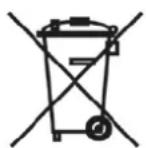
Batteries with this label do not contain harmful substances such as cadmium, lead and mercury. However, used batteries must not be disposed of along with household waste in accordance with the battery directive. To protect natural resources and promote the recycling of materials, separate the batteries from other waste and deposit them at a local recycling center. An additional label with the chemical symbols for Hg, Cd or Pb means that the batteries contain quantities of mercury, cadmium or lead which exceed the restrictions set by the EU Directive 2006/66/EG. If batteries are not disposed of properly, these substances can cause harm to human health or the environment
Cleaning
- Dusty devices must be cleaned. You can clean dust from the air vents using a vacuum cleaner or compressed air. If necessary, you can remove the dust with a brush.
- You can clean the surface using a cloth slightly dampened in soapy water. Only use suitable microfiber cloths for high-gloss surfaces.
- Do not allow water to penetrate the device.
- Do not clean the device in a dishwasher.
- Do not use sharp, pointed, abrasive or corrosive cleaning materials or hard brushes.
- Do not use chemicals.
- Do not use flammable liquids for cleaning the device.
Information on device disposal

Important: The EU Directive 2012/19/EU regulates the proper return, treatment and recycling of used electronic devices. This symbol means that in the interest of environmental protection the device must be disposed of separately from household or industrial waste at the end of its service life in accordance with applicable local legal guidelines. Disposing of used devices can be done at official recycling centers in your country. Obey local regulations when disposing of material. Further details on returns (also for non-European countries) can be obtained at your local authority. Separate collection and recycling saves natural resources and ensures that all the provisions for protecting health and environment are observed when recycling the product.
Table of contents
1. Product introduction .... 6
1.1. Scope of Delivery....6
1.2. Device features....6
1.3. Operating principle 6
1.4. Performance Features....7
1.5. Use in systems of different manufacturers 7
2. Overview of functions 8
2.1. Inclusion / Add Device 8
2.2. Mounting & Installation 9
2.3. Exclusion / Remove Device 9
2.4. Reset (Factory-Reset) 10
3. Advanced Z-Wave Parameter 11
3.1. Association Group Information 11
3.2. Command Classes 12
4. Technical Specifications.... 13
1. Product introduction
1.1. Scope of Delivery
■ ABUS Z-Wave Waterleak Detector
- Quickguide & Safety instructions
1.2. Device features

| Nr | Label Comment | |
| 1 | Device | |
| 2 | Status-LED | Serves as status display for various processes |
| 3 | Leakdetector | Recognizes liquidity |
| 4 | Tamper-Button | For inclusion / exclusion of the detector in a Z-Wave gateway, factory reset and tamper alarm |
| 5 | Battery case | For CR2 Batterien (3V DC) |
1.3. Operating principle
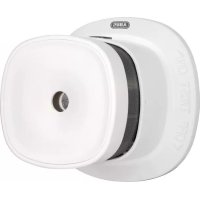
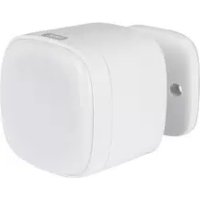
The SHWM10000 was developed for use in home automation systems that use the Z-Wave wireless standard. It consists of a base unit (detector) and a water sensor (sensor), which are connected via a cable. If the sensor comes into contact with water, the detector informs the gateway and an alarm is triggered.
In conjunction with configurable scenes, smart functions can also be initiated in addition to monitoring, e.g. water leakage at the washing machine, power will be switched off. The integrated sabotage button also reliably reports possible manipulation attempts to the gateway.
1.4. Performance Features
The ABUS Z-Wave SHWM10000...:
- ...is a battery-operated radio waterleak detector
- ...is Z-Wave PLUS compatible & certified
■ ...supports the Z-Wave S2 Standard (Security 2) - ...reliably detects leaking water
- ...detects tampering when the housing is opened
- ...has a battery-empty warning function
- ...was developed for indoor installation
1.5. Use in systems of different manufacturers
Communication is via the Z-Wave EU frequency (868.42 Mhz). You can integrate the device into any Z-Wave network with a certified Z-Wave gateway, regardless of manufacturer. All non-battery powered nodes in the network act as repeater to increase the durability of the network.
2. Overview of functions
2.1. Inclusion / Add Device

Slide the base unit from the mounting plate and remove the safety strip from the battery compartment
Click the + (Add) button in your Z-Wave App and follow the further instructions
Press the Tamper-button 3 times within 1.5 seconds and the Status-LED on the base unit front will flash 3 times
The App will show if the Add device process was successful and the Status-LED will turn off
Repeat the inclusion process if it was not successful.
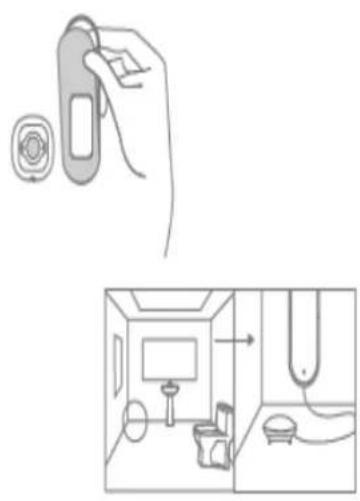
2.2. Mounting & Installation
natural_image
Illustration showing a hand holding a device with a circular button, alongside a close-up of a room interior with a monitor and wall-mounted fixture (no text or symbols)Mount the base unit to the wall by using the adhesive strip
Place the sensor contact on an flat surface on the floor in the vicinity of the most likely sources of leaks
The Detector is triggered as soon as the two sensor tips come into contact with moisture
2.3. Exclusion / Remove Device

natural_image
Illustration of a hand interacting with a speech bubble and a smartphone displaying a grid interface (no text or symbols present)Click the - (Remove) button in your Z-Wave App and follow the further instructions

Press the Tamper-button 3 times within 1.5 seconds and the Status-LED on the base unit front will flash 3 times
The App will show if the Remove device process was successful and the Status-LED on device will flash 6 times
Repeat the exclusion process if it was not successful.
2.4. Reset (Factory-Reset)

Press and hold the tamper button while inserting the battery.
The device is now restored to factory settings
Note:
This procedure should only be used if the primary gateway is not capable of acting.
If the device is set to the factory setting, the status is set to "not included", the association settings and possible configurations are reset to default.
3. Advanced Z-Wave Parameter
3.1. Association Group Information
Z-Wave devices can control other devices directly. This direct control is called in Z-Wave association. For this purpose, the device ID of the device to be controlled must be stored in the controlling devices. This is done in so-called association groups. An association group is always linked to an event in the controlling device (pressing a key or triggering a sensor). When this event occurs, a control command - usually a BASIC SET - is sent to all devices stored in an association group.
The device supports the following association group:
| Group Number | Maximum Devices | Transmitted Content |
| Group 1 | 5(0x05) | Lifeline association groupInclude command classe: Battery report, Notification report, and Device Reset Locally notification, Binary report. |
| Group 2 | 5(0x05) | Root Device group (Binary Sensor)Binary Sensor Command Class:Compatible with 300 series· Binary Sensor reports status of open or close door via Lifeline.· When the sensor detects status change between close door and open door, the device will be triggered. |
| Group 3 | 5(0x05) | Root Device group (Binary Sensor)Binary Sensor Command Class:Compatible with 300 series· Binary Sensor reports the removed status of door sensor.· When the sensor detects status change of tamper, the device will be triggered. |
| Group 4 | 5(0x05) | Root Device group (Notification)· Notification report open door or close status via Lifeline.· When the sensor detects status change between close door and open door, the device will be triggered. |
| Group 5 | 5(0x05) | Root Device group (Notification)· Binary Sensor reports the removed status of door sensor.· When the sensor detects status change of tamper, the device will be triggered. |
3.2. Command Classes
- Z-Wave plus Info Version 2
- Notification Version 8
- Association Version 2
- Association Group Info Version 1
- Transport Service Version 2
- Version Version 3
- Manufacturer Specific Version 2
- Device Reset Locally Version 1
- Powerlevel Version 1
- Battery Version 1
- Security 2 Version 1
- Supervision Version 1
-
Wake Up Version 2
-
Technical Specifications
| Parameters | Unit | SHWM10000 |
| Dimensions | mm | 72 x 21 x 26 (Body) / 28,5 x 26,7 x 13,5 (Sensor) |
| Weight g 45 | ||
| Operating Temperature | °C | 0 – 40 |
| Max. Humidity % 95 | ||
| IP Class 20 | ||
| Radio frequency | MHz | 868,42 (Z-Wave PLUS, Europe) |
| Modulation | FSK/GFSK | |
| Transmission power: | db | < 4,5 |
| Power supply | 3 V DC | |
| Battery type CR2 | ||
| Power consumption standby | mA | 0,005 |
| Power consumption trigger | mA | 38 |
| Battery-life | 3 Years (10 triggers per day) | |
| Range (open field) | m | 100 |
| Range (building) | m | 20, related to material of walls |
| Tamper protection | Yes | |
| Firmware updateable | No | |
| Support Z-Wave Beaming | No | |
| SmartStart supported | No | |
| Z-Wave Network Security | Yes | |
| Z-Wave AES-128 Security | Yes | |
| Z-Wave Plus | Yes | |
| Security S2 Classes | Yes | |
| Z-Wave Chip Generation | 500 | |
| Z-Wave Sensor-Typ | Open/Closed (Binary) | |
| Zwave library type | Routing Slave | |
| Device Type / Role type | Notification sensor / Reporting sleeping slave | |

- SHWM10000 ABUS Z-Wave Waterleak detector
- Introduction
- If you have any questions, please contact your specialist trade partner or contact our customer service:
- Important Safety Informations
- Intended Use
- Unboxing
- Installation location / operating environment
- Children
- Information on handling batteries
- Important information on battery disposal
- Cleaning
- Information on device disposal
- Table of contents
- Product introduction .... 6
- Overview of functions 8
- Advanced Z-Wave Parameter 11
- Technical Specifications.... 13
- Product introduction
- Scope of Delivery
- Device features
- Operating principle
- Performance Features
- Use in systems of different manufacturers
- Overview of functions
- Inclusion / Add Device
- Mounting & Installation
- Exclusion / Remove Device
- Reset (Factory-Reset)
- Note:
- Advanced Z-Wave Parameter
- Association Group Information
- Command Classes
Brand : ABUS
Model : SHWM10000
Category : Smart Home