00523 - Thermostat AcuRite - Free user manual and instructions
Find the device manual for free 00523 AcuRite in PDF.


| Product Type | Indoor/Outdoor Thermostat & Hygrometer |
| Model | 00523 |
| Brand | AcuRite |
| Dimensions (Main Unit) | 3.5 x 2.5 x 1.2 inches |
| Display Type | LCD with large digits |
| Temperature Range | -40°F to 158°F (-40°C to 70°C) |
| Humidity Range | 1% to 99% RH |
| Accuracy (Temperature) | ±2°F (±1°C) |
| Accuracy (Humidity) | ±5% RH |
| Power Source | 2 x AAA batteries (not included) |
| Wireless Range | Up to 165 feet (50 meters) open air |
| Number of Outdoor Sensors Supported | Up to 2 (sold separately) |
| Mounting Options | Tabletop or wall-mountable |
| Compatible Sensors | AcuRite 06002 or 06004 |
| Main Functions | Indoor/outdoor temperature and humidity display, min/max memory, trend arrows |
| Maintenance | Clean display with soft dry cloth; avoid liquids; replace batteries annually |
| Safety Precautions | Keep away from water; do not expose to extreme heat; use only specified batteries |
| Battery Life | Approximately 12 months for main unit |
| Weight (Main Unit) | 3.5 oz (100 g) |
| Included Accessories | Main unit, outdoor sensor, mounting hardware, user manual |
Frequently Asked Questions - 00523 AcuRite
User questions about 00523 AcuRite
0 question about this device. Answer the ones you know or ask your own.
Ask a new question about this device
Download the instructions for your Thermostat in PDF format for free! Find your manual 00523 - AcuRite and take your electronic device back in hand. On this page are published all the documents necessary for the use of your device. 00523 by AcuRite.
USER MANUAL 00523 AcuRite
Digital Refrigerator/Freezer Thermometer
model 00515/00523

natural_image
Two white handheld devices labeled 'ACU-RITE' with circular tops and control buttons, no visible text or symbols on the device body.CONTENTS
Unpacking Instructions ...... 2
Package Contents 2
Product Registration ...... 2
Features & Benefits: Sensors ... 2
Features & Benefits: Display ....3
Setup 4
Install or Replace Batteries..... 4
Temperature Units 4
Placement Guidelines .... 5
Using the Thermometer......6
Calibration ....
Troubleshooting 7
Care & Maintenance 8
Specifications......8
FCC Information 8
Customer Support 9
Warranty....9
Questions? We're here to help!
Visit us online at www.acurite.com/support
SAVE THIS MANUAL FOR FUTURE REFERENCE.
ACU▶RITE®
Congratulations on your new AcuRite product. To ensure the best possible product performance, please read this manual in its entirety and retain it for future reference.
Unpacking Instructions
Rem
product. Locate the tab and peel off to remove.
Package Contents
- Display
- Wireless Sensors (2)
- Instruction Manual
IMPORTANT
PRODUCT MUST BE REGISTERED TO RECEIVE WARRANTY SERVICE
PRODUCT REGISTRATION
Register online to receive 1 year warranty protection www.AcuRite.com
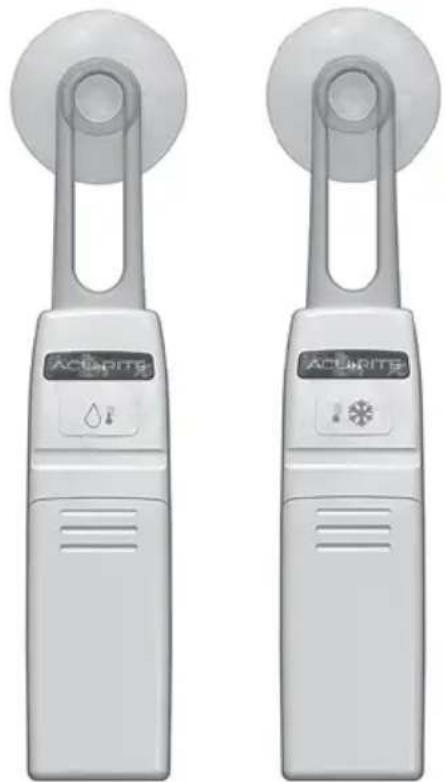
Features & Benefits: Sensors

- Refrigerator Sensor
- Freezer Sensor
- Suction Cup / Shelf Clip
For versatile mounting options. - A-B-C Switch
ID code that must match display's A-B-C switch to ensure units synchronize. - Battery Compartment
- Wireless Signal Indicator
Flashes when data is being sent to the display.
Features & Benefits
Display

1. ∨ & ^ Buttons
For setup preferences and to view all-time records.
2. SET Button
For alarm setup preferences.
3. Freezer Sensor Signal Strength
4. Freezer Sensor Low Battery Indicator
5. Wireless Signal Indicators
Flashes when sensor has lost signal from display.
6. Alarm ON Indicator
7. Min/Max Records
Highest and lowest temperatures from the past 24 hours.
8. Freezer Sensor Current Temperature
9. & Buttons
For alarm and records settings.
10. Refrigerator Sensor Current Temperature
11. Display Low Battery Indicator
12. Refrigerator Sensor Low Battery Indicator
13. Refrigerator Sensor Signal Strength
14. Button
For alarm setup preferences.
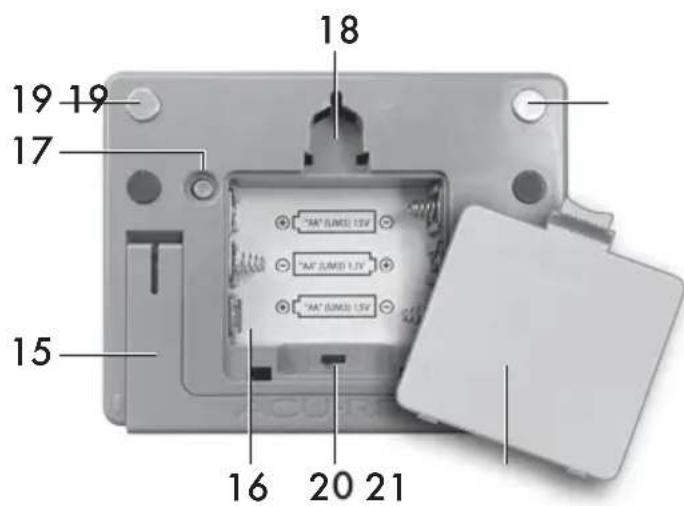
15. Fold-out Stand
16. Battery Compartment
17. °C/°F Button
Select between degrees Celsius or Fahrenheit.
18. Integrated Hang Hole For easy wall mounting.
19. Magnet Mount
20. A-B-C Switch
ID code that must match sensor's A-B-C switch to ensure units synchronize.
21. Battery Compartment Cover
Install or Replace Batteries
AcuRite recommends high quality alkaline batteries for the best product performance. Heavy duty or rechargeable batteries are not recommended.
The freezer sensor requires lithium batteries for low temperature conditions. Cold temperatures can cause alkaline batteries to function improperly. Use lithium batteries in the freezer sensor for temperatures below -4°F / -20°C.

natural_image
Close-up of a medical device with a circular head and battery pack, showing internal components (no visible text or symbols)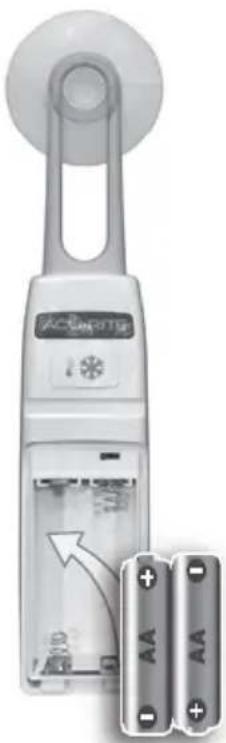
natural_image
Close-up of a white handheld device with a circular head and battery pack, showing internal components and an arrow indicating rotation (no text or symbols visible)Thermometer Display
- Lift up the battery door and slide off the battery compartment cover.
- Insert 3 x AA batteries into the battery compartment. Follow the polarity (+/-) diagram in the battery compartment.
- Replace the battery cover.
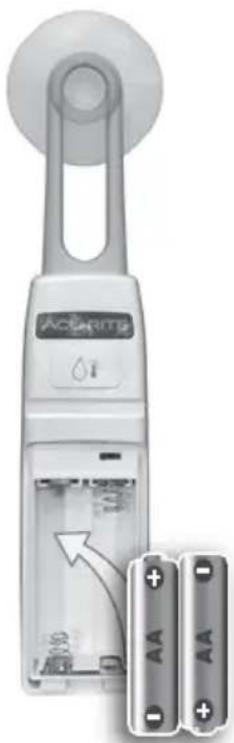
Sensors
- Slide off the battery compartment covers, located on the front of the units.
- Insert 2 x AA batteries into the battery compartment. Follow the polarity (+/-) diagram in the battery compartment.
- Replace the battery cover.
LITHIUM BATTERIES
-40°F (-40°C) (37°C) 100°F
ALKALINE BATTERIES
-4°F (-20°C) (37°C) 100°F
Select Degrees Fahrenheit or Celsius
To select between degrees Fahrenheit (°F) or Celsius (°C) temperature units, press and release the "°C/°F" button, located on the back of the thermometer display.

PLEASE DISPOSE OF OLD OR DEFECTIVE BATTERIES IN AN ENVIRONMENTALLY SAFE WAY AND IN ACCORDANCE WITH YOUR LOCAL LAWS AND REGULATIONS.
BATTERY SAFETY: Clean the battery contacts and also those of the device prior to battery installation. Remove batteries from equipment which is not to
be used for an extended period of time. Follow the polarity (+/-) diagram in the battery compartment. Promptly remove dead batteries from the device. Dispose of used batteries properly. Only batteries of the same or equivalent type as recommended are to be used. DO NOT incinerate used batteries. DO NOT dispose of batteries in fire, as batteries may explode or leak. DO NOT mix old and new batteries or types of batteries (alkaline/standard). DO NOT use rechargeable batteries. DO NOT recharge non-rechargeable batteries. DO NOT short-circuit the supply terminals.
Display Placement
Place display in a dry area free of dirt and dust. Display is magnet mountable and has a fold-out stand for tabletop use. For wall mounting, hang using the keyhole located on the back of the unit.
Sensor Placement
- Both sensors will work in either the refrigerator or freezer, however the default alerts are set based on the sensor's indicated use (see page 2).
• Each sensor is equipped with a silicon band to securely attach to a wire shelf.
• Each sensor also includes a detachable suction cup that can be used to attach the sensor to the interior surface of the refrigerator. Please note: suction cups do not adhere well to freezing surfaces. - Display and sensors must be located within 75 ft (23 m) of each other.
Using the Thermometer
High & Low Records
The thermometer displays high and low temperature records for all-time and the past 24 hours (rolling). All-time records reflect the highest and lowest temperatures recorded since the batteries were inserted or the records have been cleared. High and low records for the past 24 hours are shown on the display, by default.
Press and the release the “^” or “∨” button to view all-time records. If no buttons are pressed for 5 seconds, the display will return to normal operation mode.
To clear the high records, press and hold the “^” button for 5 seconds while viewing the record you wish to clear. To clear the low records, press and hold the “∨” button for 5 seconds while viewing the records you wish to clear. Dashes display to confirm you have cleared the record(s).
Programmable Alarms
Programmable alarms notify you audibly and visually when temperatures exceed your preset minimum / maximum temperature range. An alert is triggered when a temperature is out of range for longer than 5 minutes. This prevents false alarms due to the fridge/freezer door being held open while new items are being loaded/unloaded.
To enable alerts for both sensors, press and hold the “◀” button for 5 seconds until “◀” is shown next to the current temperatures.
To enable alerts for a select sensor, press the “ 🔊” or “ ✕ ” button first, then press the “ 🔕 ” button once to enable alarm. Disable the alarms at any time by following the same steps until “ 🔕 ” is shown next to the current temperature. The default temperature alarm settings for the refrigerator thermometer are minimum 33°F / maximum 40°F. The default temperature alarm settings the freezer thermometer are minimum -20°F / maximum 32°F.
To customize temperature alarms:
- Select the sensor you want to customize by pressing the "◇" or "◆" button.
- Press and release the "SET" button; the minimum temperature alarm setting will blink.
- Press the “^” or “√” button to increase or decrease the minimum temperature alarm setting.
- Press the "SET" button to confirm the minimum temperature alarm setting.
- Press the “^” or “√” button to increase or decrease the maximum temperature alarm setting.
- Press the "SET" button to confirm the maximum temperature alarm setting.
NOTE: When thermometer is in normal operating mode (not in alarm setup mode), the min/max readings display the highest/lowest temperatures from the previous 24 hours.
Calibration
The temperature readings can be calibrated on the display to improve accuracy. Calibration can improve accuracy when product placement or environmental factors impact your data accuracy.
- To access calibration mode, press AND HOLD the “^”, “∨” and “SET” buttons simultaneously for at least 5 seconds.
- To adjust the currently selected item, press and release the “^” or “∨” buttons to calibrate the data value higher or lower from the actual reading.
- To save your adjustments, press and release the "SET" button to adjust the next reading. The calibration indicator (wrench) will remain under the calibrated values.
After 12-15 seconds of inactivity, the display will save the adjustments and exit calibration mode. Note: Calibrations will be erased if the batteries are removed.
Troubleshooting
| Temperatureis showing dashes | Relocate the display and/or the sensors.The units must be within 75 ft (23 m) of each other.Flashing of the temperature is generally an indication of wireless interference. Perform a hard reset to gain a strong connection between the units:Bring all 3 units together, side-by-side.Remove all batteries from all 3 units.Reinstall batteries in thermometer display first.Reinstall batteries into sensor #1.Reinstall batteries into sensor #2.The display should read temperatures from both sensors almost instantly. |
| Inaccurate temperature | Use standard alkaline batteries (or lithium batteries in sensor when temperature is below -4°F/-20°C). Do not use heavy duty or rechargeable batteries. |
| Display screennot working | Check that the batteries are installed correctly.Batteries may need to be replaced.Verify you're within the measurable temperature range (-40.0°F to 99.0°F; -40.0°C to 37.2°C). |
If your AcuRite product does not operate properly after trying the troubleshooting steps, visit www.AcuRite.com or email support@chaney-inst.com for assistance.
Care & Maintenance
Clean with a soft damp cloth. Do not use caustic cleaners or abrasives.
Specifications
| DISPLAY OPERATING TEMPERATURE RANGE | 32°F to 122°F; 0°C to 50°C |
| SENSOR TEMPERATURE RANGE | -40°F to 99°F; -40°C to 37.2°C |
| WIRELESS RANGE | 75 ft / 23 m(signal range is impacted by sensor location and may vary) |
| WIRELESS FREQUENCY | 433 MHz |
| POWER | Display: 3 x AA alkaline batteriesRefrigerator and Freezer Sensors:4 x AA alkaline or lithium batteries |
| DATA REPORTING | 60 second updates |
FCC Information
This device complies with part 15 of FCC rules. Operation is subject to the following two conditions:
1- This device may NOT cause harmful interference, and
2- This device must accept any interference received, including interference that may cause undesired operation.
WARNING: Changes or modifications to this unit not expressly approved by the party responsible for compliance could void the user's authority to operate the equipment.
NOTE: This equipment has been tested and found to comply with the limits for a Class B digital device, pursuant to Part 15 of the FCC rules. These limits are designed to provide reasonable protection against harmful interference in a residential installation. This equipment generates, uses and can radiate radio frequency energy and, if not installed and used in accordance with the instructions, may cause harmful interference to radio communications. However, There is no guarantee that interference will not occur in a particular installation. If this equipment does cause harmful interference to radio or television reception, which can be determined by turning the equipment off and on, the user is encouraged to try to correct the interference by one or more of the following measures:
• Reorient or relocate the receiving antenna.
- Increase the separation between the equipment and the receiver.
- Connect the equipment into an outlet on a circuit different from that to which the receiver is connected.
- Consult the dealer or an experienced radio/TV technician for help.
NOTE: The manufacturer is not responsible for any radio or TV interference caused by unauthorized modifications to this equipment.
Such modifications could void the user authority to operate the equipment.
This device complies with Industry Canada licence-exempt RSS standard(s).
Operation is subject to the following two conditions:
(1) This device may not cause interference, and
(2) This device must accept any interference received, including interference that may cause undesired operation of the device.
Customer Support
AcuRite customer support is committed to providing you with best-in-class service. For assistance, please have the model number of this product available and contact us by visiting acurite.com/support.
IMPORTANT
PRODUCT MUST BE REGISTERED TO RECEIVE WARRANTY SERVICE
PRODUCT REGISTRATION
Register online to receive 1-year warranty protection www.acurite.com/product-registration
Limited 1-Year Warranty
AcuRite is a wholly owned subsidiary of Chaney Instrument Company. For purchases of AcuRite products, AcuRite provides the benefits and services set forth herein. For purchases of Chaney products, Chaney provides the benefits and services set forth herein.
We warrant that all products we manufacture under this warranty are of good material and workmanship and, when properly installed and operated, will be free of defects for a period of one year from the date of purchase.
Any product which, under normal use and service, is proven to breach the warranty contained herein within ONE YEAR from date of sale will, upon examination by us, and at our sole option, be repaired or replaced by us. Transportation costs and charges for returned goods shall be paid for by the purchaser. We hereby disclaim all responsibility for such transportation costs and charges. This warranty will not be breached, and we will give no credit for products which have received normal wear and tear not affecting the functionality of the product, been damaged (including by acts of nature), tampered, abused, improperly installed, or repaired or altered by others than our authorized representatives.
Remedy for breach of this warranty is limited to repair or replacement of the defective item(s). If we determine that repair or replacement is not feasible, we may, at our option, refund the amount of the original purchase price.
THE ABOVE-DESCRIBED WARRANTY IS THE SOLE WARRANTY FOR THE PRODUCTS AND IS EXPRESSLY IN LIEU OF ALL OTHER WARRANTIES, EXPRESS OR IMPLIED. ALL OTHER WARRANTIES OTHER THAN THE EXPRESS WARRANTY SET FORTH HEREIN ARE HEREBY EXPRESSLY DISCLAIMED, INCLUDING WITHOUT LIMITATION THE IMPLIED WARRANTY OF MERCHANTABILITY AND THE IMPLIED WARRANTY OF FITNESS FOR A PARTICULAR PURPOSE.
We expressly disclaim all liability for special, consequential, or incidental damages, whether arising in tort or by contract from any breach of this warranty. Some states do not allow the exclusion or limitation of incidental or consequential damages, so the above limitation or exclusion may not apply to you.
We further disclaim liability from personal injury relating to our products to the extent permitted by law. By acceptance of any of our products, the purchaser assumes all liability for the consequences arising from their use or misuse. No person, firm or corporation is authorized to bind us to any other obligation or liability in connection with the sale of our products. Furthermore, no person, firm or corporation is authorized to modify or waive the terms of this warranty unless done in writing and signed by a duly authorized agent of ours.
In no case shall our liability for any claim relating to our products, your purchase or your use thereof, exceed the original purchase price paid for the product.
Applicability of Policy
This Return, Refund, and Warranty Policy applies only to purchases made in the United States and Canada. For purchases made in a country other than the United States or Canada, please consult the policies applicable to the country in which you made your purchase.
Additionally, this Policy applies only to the original purchaser of our products. We cannot and do not offer any return, refund, or warranty services if you buy products used or from resale sites such as eBay or Craigslist.
Governing Law
This Return, Refund, and Warranty Policy is governed by the laws of the United States and the State of Wisconsin. Any dispute relating to this Policy shall be brought exclusively in the federal or State courts having jurisdiction in Walworth County, Wisconsin; and purchaser consents to jurisdiction within the State of Wisconsin.
ACU RITE®
www.AcuRite.com
- Digital Refrigerator/Freezer Thermometer
- CONTENTS
- ACU▶RITE®
- Unpacking Instructions
- Package Contents
- IMPORTANT
- PRODUCT REGISTRATION
- Features & Benefits
- Display
- ∨ & ^ Buttons
- SET Button
- Freezer Sensor Signal Strength
- Freezer Sensor Low Battery Indicator
- Wireless Signal Indicators
- Alarm ON Indicator
- Min/Max Records
- Freezer Sensor Current Temperature
- & Buttons
- Refrigerator Sensor Current Temperature
- Display Low Battery Indicator
- Refrigerator Sensor Low Battery Indicator
- Refrigerator Sensor Signal Strength
- Button
- Fold-out Stand
- Battery Compartment
- °C/°F Button
- Integrated Hang Hole For easy wall mounting.
- Magnet Mount
- A-B-C Switch
- Battery Compartment Cover
- Install or Replace Batteries
- Thermometer Display
- Sensors
- Select Degrees Fahrenheit or Celsius
- PLEASE DISPOSE OF OLD OR DEFECTIVE BATTERIES IN AN ENVIRONMENTALLY SAFE WAY AND IN ACCORDANCE WITH YOUR LOCAL LAWS AND REGULATIONS.
- Display Placement
- Sensor Placement
- Using the Thermometer
- High & Low Records
- Programmable Alarms
- Calibration
- Care & Maintenance
- FCC Information
- Customer Support
- PRODUCT MUST BE REGISTERED TO RECEIVE WARRANTY SERVICE
- Limited 1-Year Warranty
- Applicability of Policy
- Governing Law
- ACU RITE®
Brand : AcuRite
Model : 00523
Category : Thermostat