Tiger 7RC - Lamp BeamZ - Free user manual and instructions
Find the device manual for free Tiger 7RC BeamZ in PDF.


Pick your language and provide your email: we'll send you a specifically translated version.
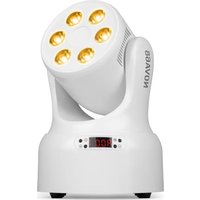
| Product type | Moving head light effect lamp |
| Brand | BeamZ |
| Model | Tiger 7RC |
| Light technology | 7 x 40W LED RGBW |
| Light source | LED quad-color (RGBW) 40W |
| Number of LEDs | 7 |
| Beam angle | 3° |
| Movement | Pan 540°, Tilt 270° |
| Control modes | DMX, automatic, master/slave, sound |
| DMX channels | 14/18/21 |
| Power supply | 100-240V AC, 50/60Hz |
| Power consumption | 300W |
| Dimensions | 330 x 230 x 410 mm |
| Weight | 11 kg |
| Housing material | Metal and plastic |
| Color temperature | Adjustable 2000-10000K |
| Connectors | DMX input/output (XLR 3-pin), Powercon input |
| Protection rating | IP20 (indoor use only) |
| Cooling | Forced fan |
| Main functions | Strobe, dimming, macros, color temperature adjustment |
| Maintenance and cleaning | Clean the lenses with a soft dry cloth. Do not use abrasive products or solvents. Check the fans regularly. |
| Safety | Do not look directly at the light beam. Use a suitable and secure stand. Respect the ambient operating temperature (0-40°C). Disconnect before servicing. |
| Spare parts and repairability | LEDs, fuses, connectors and electronic boards available from BeamZ after-sales service. Repair by a qualified technician recommended. |
| General information | Designed for stage lighting, disco and events. Supplied with power cable and quick start guide. |
Frequently Asked Questions - Tiger 7RC BeamZ
How to reset the Tiger 7RC to factory settings?
Press the Menu button until 'FACTORY' appears on the screen, then confirm with Enter. The device will restart automatically.
What is the number of DMX channels of the Tiger 7RC?
The Tiger 7RC offers several DMX modes: 14, 18 or 21 channels depending on the configuration selected in the menu.
How to connect multiple Tiger 7RC in master/slave mode?
Use DMX cables to connect the master DMX output to the slave DMX input. Set the first device to Master mode and the following ones to Slave mode via the menu.
What to do if the device does not react to sound?
Check that sound mode is activated in the menu and that the microphone is not obstructed. Increase the sound volume nearby or adjust the sensitivity in the settings.
Can I replace a defective LED myself?
Replacing an LED requires technical skills and may damage the device. It is highly recommended to contact BeamZ after-sales service or a certified technician.
What type of DMX cable to use?
Use a good quality standard 3-pin DMX cable (XLR). Avoid audio cables as they can cause interference.
How to set the DMX address?
Access the menu, select 'DMX Address', then use the arrows to choose the desired address. Confirm with Enter.
Does the device get very hot?
The Tiger 7RC is equipped with a cooling fan. It is normal for it to get warm during operation, but it should not become scorching. Ensure that the ventilation openings are not obstructed.
Can the Tiger 7RC be used outdoors?
No, the protection rating is IP20, meaning it is designed for indoor use only. Exposure to water or dust could damage it.
Where to find the full manual for the Tiger 7RC?
The full manual is available for free download in PDF format on the site notice-facile.com or on the official BeamZ website.
User questions about Tiger 7RC BeamZ
0 question about this device. Answer the ones you know or ask your own.
Ask a new question about this device
No questions yet. Be the first to ask one.
Download the instructions for your Lamp in PDF format for free! Find your manual Tiger 7RC - BeamZ and take your electronic device back in hand. On this page are published all the documents necessary for the use of your device. Tiger 7RC by BeamZ.
USER MANUAL Tiger 7RC BeamZ
Manual assistant
Powered by Anthropic
Waiting for your message
Product information
Brand : BeamZ
Model : Tiger 7RC
Category : Lamp