
AS-01 - Wall socket Savio - Free user manual and instructions
Find the device manual for free AS-01 Savio in PDF.


| Product Type | Wall Socket |
| Brand | Savio |
| Model | AS-01 |
| Rated Voltage | 250 V AC |
| Rated Current | 16 A |
| Socket Type | Type F (Schuko) |
| Number of Sockets | 1 |
| Material | Flame-retardant polycarbonate |
| Color | White |
| Child Protection | Integrated shutters |
| Mounting | Flush mount |
| Dimensions (H x W x D) | 80 x 80 x 40 mm |
| Weight | Approx. 100 g |
| Operating Temperature | -20°C to +40°C |
| Certifications | CE, RoHS |
| Features | Easy installation, screw terminals |
| Cleaning | Wipe with dry cloth |
| Safety | Earth pin, overload protection |
| IP Rating | IP20 (indoor use only) |
Frequently Asked Questions - AS-01 Savio
User questions about AS-01 Savio
0 question about this device. Answer the ones you know or ask your own.
Ask a new question about this device
Download the instructions for your Wall socket in PDF format for free! Find your manual AS-01 - Savio and take your electronic device back in hand. On this page are published all the documents necessary for the use of your device. AS-01 by Savio.
USER MANUAL AS-01 Savio
Thank you for choosing Savio product!

If our product meets your expectations, share your opinion with other people on the portal ceneo.pl, social media or on the website of the store where you made the purchase. If you want to show our device on SAVIO Facebook Page, we will be very pleased.

If there is something that we could improve on our products, please write to us at support@savio.net.pl
Thanks to your feedback, we will be able to better adapt the product to your expectations.
Before starting the use of purchased device it is recommended to read the whole manual.
1. Kit contents:
- Savio AS-01 socket
- User manual
2. Technical specification:
- Load rated current: 16 A
- Input voltage: 220 - 240 V\~, 50 Hz
- Load Rated Power: 3680 W
- Grounding: Yes
• Overload protection: Yes - Operating frequency range: Wi-Fi - 2400 - 2483.5 MHz
- The maximum power of the radio frequency emitted in the frequency range in which the device operates radio: Wi-Fi - 10 dBm
- System requirements: Android / iOS
• Control: Via mobile application (TUYA / Smart Life), voice (Google Assistant, Amazon Alexa), manually - Dimensions: 52 × 52 × 79 ~mm
- Weight: 82 g
- Plug: Type E/F
- Colour: White
3. Installing the TUYA / Smart Life app:
3.1 Download the Smart Life-Smart Living or TUYA Smart app in the Apple App Store for phones iPhone or Google Play for Android phones.
3.2 Launch the app and log in. New users must create a new account.
Register
Poland
Email Address
☐ I agree to the Privacy Policy User Agreement and Children's Privacy Statement
Get Verification License
4. Installation and configuration of the device:
Attention: The application requires access to the Bluetooth and Location functions, please enable them to work properly complete device setup.
4.1 Plug the Savio AS-01 into a power socket.
4.2 The LED will flash green (if the LED does not light, press the button for about 3 seconds).
Attention: If the LED does not respond,
please restart the device (check point 6).
4.3 Add a device using the Add device option or the 📋icons in the upper right corner.

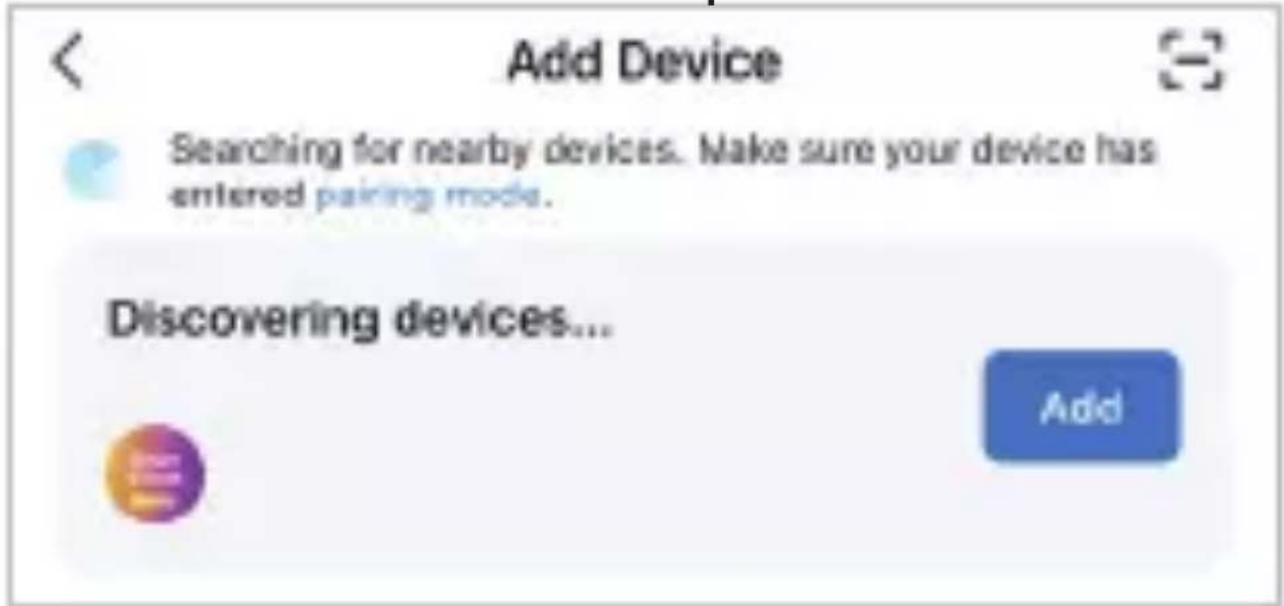
4.4 Savio AS-01 will be available in the "Discover devices field", to add them select the "Add" option.
Attention: App permission is required for
Android devices. Select "Go to Settings", after being redirected from the application to the settings on your smartphone, press "Permissions application", next "Nearby devices" and make sure you have "Allow" selected.
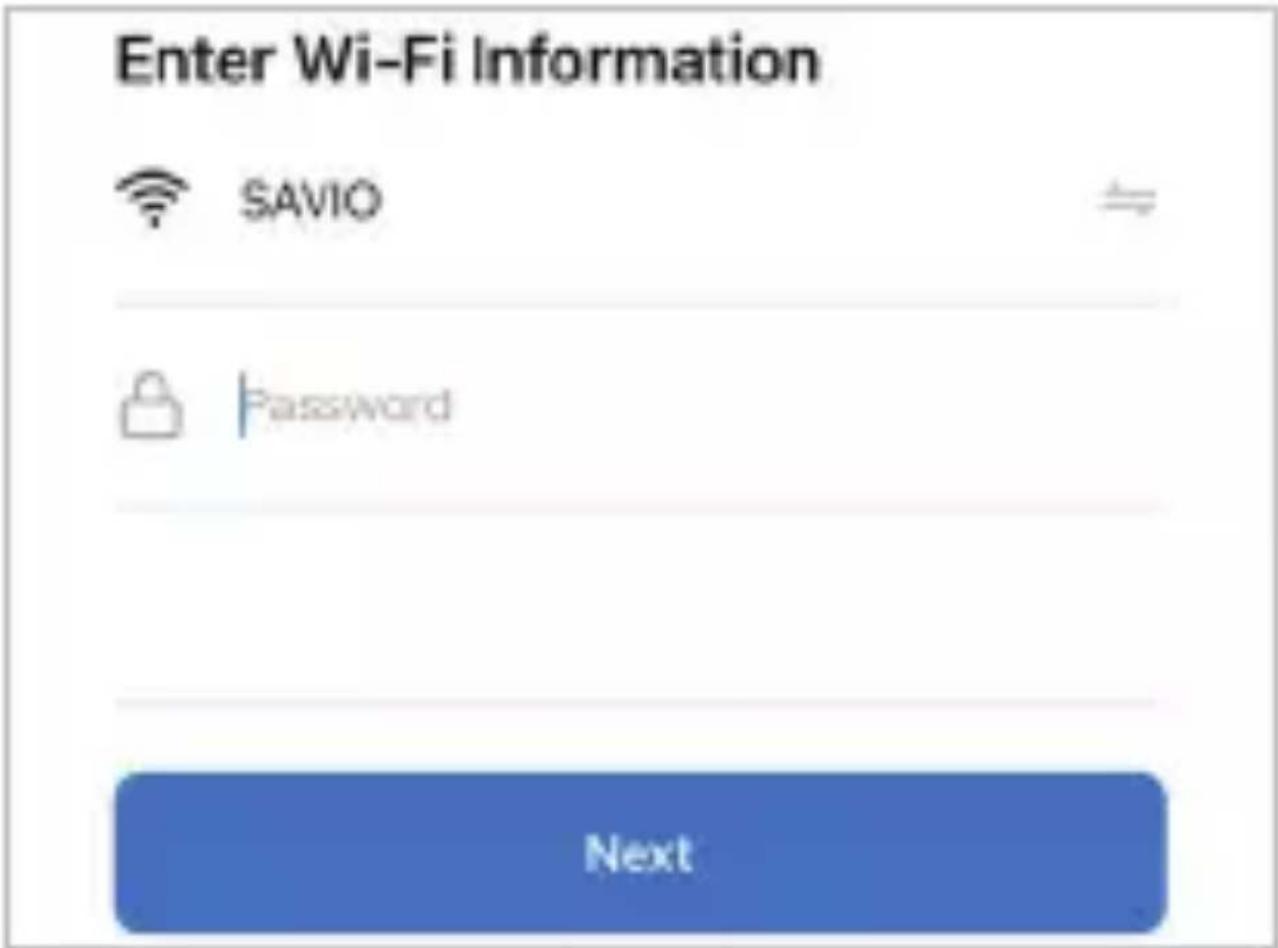
4.5 After completing the above steps, search for a Wi-Fi network and enter the password (remember that the device supports 2.4 GHz network only).
4.6 Accept the entered data by selecting "Next".
4.7 The device is ready for use.
5. Additional features:
The Smart Life / TUYA Smart application enables a number of the following functions:
5.1 Changing the device name
Go to the "My Home" tab to view a list of connected devices.
5.1.1 Select the edit icon after entering the edit panel modify the device name by clicking icon and enter a new name for the Wi-Fi smart plug.
Attention: If Savio AS-01 is controlled by Amazon Alexa or Google Assistant, select unambiguous, clear-sounding name.
5.2 Device sharing
This feature allows several people to use the same device. To share your device follow the steps below:
5.2.1 In the upper right corner of the control, press the edit icon ,select the option "Shared devices".
5.2.2 Then select "Add".
5.2.3 Select the device to share (account number / login).
5.2.4 Enter the phone number or email address of the person you want to share with.
5.2.5 Select "Confirm".
5.3 Setting the schedule
Schedules can be added to turn devices on and off at specific times and days of the week. Schedules can be one time or recur on specific days of the week.
To activate the schedule:
5.3.1 On the Apps screen, select your device name and then go to "Timer" in the bottom bar.
5.3.2 Configure the schedule (timer) according to your needs.
5.4 Current consumption measurement Thanks to this function, you can easily monitor the power consumption of the connected device. The values will be displayed in the application, thanks to which you will have easy access to them.
5.4.1 Access the main device control panel.
5.4.2 Select Electric to check the power consumption of the connected device.
5.5 Software update
In order to effectively use the Savio AS-01 socket, check regularly for updates software.
5.6 Disconnecting the device
5.6.1 To remove a device from the list of apps, tap "About (...) in the up-
per right corner of the app.
5.6.2 Select "Remove device" to remove the device.
6. Resetting:
If the Savio AS-01 socket does not re-spond, it will be necessary to reset it:
6.1 To reset the device, simply disconnect it from the power source.
6.2 Wait about 30 seconds, reconnect the smart socket to the power source.
6.3 Press and hold (approx. 6-7 sec.) until the socket turns off the ON / OFF button, then after this time, the LED indicator will flash green.
7. Safety conditions:
- Use the product in accordance with its intended use, as improper use may damage the product.
- Do not expose the device to moisture, heat or sunlight and do not use the product in a dusty environment.
- The device should be cleaned only with a dry cloth.
- Independent repairs and modification result in automatic loss of the warranty.
- Hitting or dropping may damage the product.
Information for customers and contractors and communication regarding complaints:
Pursuant to Article 13 section 1 and 2 of the General Data Protection Regulation (EU) 2016/679 of the European Parliament and of the Council of 27 April 2016 (hereinafter referred to as GDPR), please be advised that Elmak Sp. z o.o., with its registered seat at ul. Morgowa 81; 35-323 Rzeszów becomes the Administrator of your personal data. The Specialist for General Data Protection (SODO) can be contacted in writing to: SODO, Elmak Sp. z o.o., ul. Morgowa 81; 35-323 Rzeszów, via e-mail address: sodo@elmak.pl, and by phone at +48 (17) 854 98 14. Your personal data will be processed in order to perform the contract, in accordance with Article 6(1)(b) of
the aforementioned regulation, to the extent resulting from tax laws and financial regulations. Recipients of your personal data include entities authorized by legal regulations to obtain personal data as well as processing entities providing services to Elmak Sp. z o.o. Your personal data will be stored on the basis of Administrator's legitimate interest. You have the right to access your data, and the right to rectify, delete or limit processing of your data. You have the right to lodge a complaint to the supervisory body if you believe that the processing violates the GDPR. The provision of personal data is voluntary, however, a failure to provide such data may result in a refusal to conclude or in termination of a contract. Your personal data will not be subjected to automated decision making, including profiling referred to in Article 22 section 1 and 4 of the GDPR of April 27, 2016.
natural_image
Simple line drawing of a trash bin with two crossed lines and a solid black bar below (no text or symbols)Information of the utilization of electrical and electronic equipment
This symbol indicates that electrical appliances should not be discarded with other household waste. Used equipment should be handed over to a local collection point for this type of waste or to a recycling center. Please contact your local authorities for information about disposal methods available in your area. Waste electrical equipment may contain hazardous substances (e.g. mercury, lead, cadmium, chromium, phthaltes) which can get into air, soil and groundwater when leaking from used appliances. Environmental pollution with these substances leads to their bioaccumulation, causing lesion of disease in living organisms, which would pose a risk to human and animal health or life. Households may contribute to environmental protection by proper waste collection. In such way, hazardous substances from the equipment are neutralized and valuable secondary raw materials are reused for production of new equipment.
The warranty covers a period of 24 months. Independent repairs and modifications result
in automatic loss of the warranty. Warranty card is available for download on our website: www.savio.net.pl/en/service
Gwarancja:

- Kit contents:
- Technical specification:
- Installing the TUYA / Smart Life app:
- Register
- Installation and configuration of the device:
- Additional features:
- Setting the schedule
- Software update
- Disconnecting the device
- Resetting:
- Safety conditions:
- Information for customers and contractors and communication regarding complaints:
- Information of the utilization of electrical and electronic equipment
- Gwarancja:
Brand : Savio
Model : AS-01
Category : Wall socket