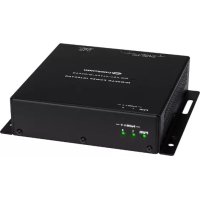
HD-TX-4KZ-101-1G - Audio/video extension Crestron - Free user manual and instructions
Find the device manual for free HD-TX-4KZ-101-1G Crestron in PDF.


Pick your language and provide your email: we'll send you a specifically translated version.
| Product Type | 4K HDMI Extender (Transmitter) |
| Model | HD-TX-4KZ-101-1G |
| Brand | Crestron |
| Video Resolution | Up to 4K@60Hz 4:4:4 |
| HDR Support | HDR10, Dolby Vision, HLG |
| HDCP Compliance | HDCP 2.2 & 1.4 |
| Transmission Distance | Up to 100 m (328 ft) over CAT6a/7 |
| Audio Support | Embedded audio up to 7.1ch, Dolby TrueHD, DTS-HD |
| Control Interfaces | IR pass-through, RS-232, Ethernet |
| Power Supply | PoE (IEEE 802.3af) or 48V external power supply (included) |
| Power Consumption | 15 W (max) |
| Dimensions (W x D x H) | 130 mm x 72 mm x 25 mm |
| Weight | 0.45 kg (1.0 lbs) |
| Operating Temperature | 0°C to 40°C (32°F to 104°F) |
| Mounting | Surface mount or rack-mountable with optional bracket |
| Material | Metal chassis |
| LED Indicators | Power, Link, HDCP, and Video signals |
| Cleaning Instructions | Wipe with a soft, dry cloth. Do not use liquids or solvents. |
| Safety Warnings | Avoid exposure to moisture or extreme heat. Use only with provided power supply. |
| Spare Parts & Repairability | No user-serviceable parts. Contact Crestron support for repairs. |
| Warranty | 3 years limited warranty |
Frequently Asked Questions - HD-TX-4KZ-101-1G Crestron
What is the maximum transmission distance for the HD-TX-4KZ-101-1G?
The extender supports transmission distances up to 100 meters (328 feet) over CAT6a or CAT7 cabling.
Does this device support 4K at 60Hz?
Yes, it supports 4K@60Hz 4:4:4 with full HDR and HDCP 2.2 compliance.
Can I control the system via IR or RS-232?
Yes, the transmitter includes IR pass-through and RS-232 control interfaces for remote device management.
What type of power supply is needed?
The device supports PoE (IEEE 802.3af) from a compatible switch or a 48V DC external power adapter (included).
Is HDMI Audio Return Channel supported?
No, the HD-TX-4KZ-101-1G is a one-way extender and does not support ARC/eARC.
What cable types are recommended for best performance?
Use solid-core CAT6a or CAT7 cables with proper shielding and termination for reliable 100m transmission.
Can I mount the device on a wall or rack?
Yes, the unit can be surface-mounted with screws or placed on a rack using an optional mounting bracket.
How do I clean the device?
Wipe gently with a soft, dry cloth. Avoid water, solvents, or abrasive materials.
What should I do if the device does not power on?
First check the power source. If using PoE, ensure the switch provides 802.3af. For external power, verify the adapter is plugged in and LED is lit. Contact support if issues persist.
Is the product user-serviceable?
No, the unit contains no user-serviceable components. All repairs must be carried out by qualified Crestron technicians.
User questions about HD-TX-4KZ-101-1G Crestron
0 question about this device. Answer the ones you know or ask your own.
Ask a new question about this device
No questions yet. Be the first to ask one.
Download the instructions for your Audio/video extension in PDF format for free! Find your manual HD-TX-4KZ-101-1G - Crestron and take your electronic device back in hand. On this page are published all the documents necessary for the use of your device. HD-TX-4KZ-101-1G by Crestron.
USER MANUAL HD-TX-4KZ-101-1G Crestron

Manual assistant
Powered by Anthropic
Waiting for your message
Product information
Brand : Crestron
Model : HD-TX-4KZ-101-1G
Category : Audio/video extension