
Tone Infinim HBS-920 - Earphones LG - Free user manual and instructions
Find the device manual for free Tone Infinim HBS-920 LG in PDF.


| Product Type | Bluetooth Neckband Earphones |
| Model | Tone Infinim HBS-920 |
| Brand | LG |
| Dimensions (Neckband) | 15.3 x 17.5 x 0.8 cm |
| Weight | 42 g |
| Driver Unit | 10 mm |
| Impedance | 16 Ω |
| Frequency Response | 20 Hz – 20 kHz |
| Sensitivity | 102 dB |
| Bluetooth Version | 4.1 |
| Bluetooth Profiles | HFP, HSP, A2DP, AVRCP |
| Battery Type | Rechargeable Lithium-ion |
| Battery Capacity | 220 mAh |
| Talk Time | Up to 16 hours |
| Standby Time | Up to 500 hours |
| Music Playback | Up to 10 hours |
| Charging Time | Approx 2 hours |
| Charging Port | Micro USB |
| Water Resistance | IPX4 (sweat-resistant) |
| Features | Retractable earbuds, Vibration alerts, Multi-point connection, Noise reduction |
| Included Accessories | Ear gels (S, M, L), Micro USB cable, Quick start guide |
| Maintenance | Clean with dry cloth; store in provided case |
| Safety | Do not expose to extreme temperatures or moisture; avoid dropping |
| Spare Parts & Repairability | Ear gels available as spare parts; battery not user-replaceable |
Frequently Asked Questions - Tone Infinim HBS-920 LG
User questions about Tone Infinim HBS-920 LG
0 question about this device. Answer the ones you know or ask your own.
Ask a new question about this device
Download the instructions for your Earphones in PDF format for free! Find your manual Tone Infinim HBS-920 - LG and take your electronic device back in hand. On this page are published all the documents necessary for the use of your device. Tone Infinim HBS-920 by LG.
USER MANUAL Tone Infinim HBS-920 LG
All rights reserved.
© 2017 LG Electronics Inc.
Please read the Important Safety Information for the proper use of this product.
After reading, store this User Manual in a place easily accessible to all users.
NOTE: Please read all information carefully prior to using the HBS-920 in order to enjoy the best performance and prevent damage to the product.
WARNING: This product contains chemicals known to the State of California to cause cancer and birth defects or other reproductive harm. Call (800) 243-0000 for more information.
Wash hands after handling.
HBS-920 www.lg.com
Contents
Safety Cautions....1
Precautions When Using the Product....2
HD Speaker....2
Qualcomm® aptX™ Audio....3
Product Components....3
Product Description....4
HBS-920 Pairing and Connecting....5
Indicator Lamp 6
Mobile Calling Functions....7
Playing Music....8
Battery Charging and Alerts 9
Vibration Alert Settings....10
Out of Range....10
LG Tone & Talk™ 10
Troubleshooting....12
Specifications and Features....12
Declaration of Confirmation....13
Additional Information....14
Limited Warranty....16
Important Safety Information 17
The LG TONE INFINIM (HBS-920) is a lightweight wireless stereo headset that uses Bluetooth technology.
This product can be used as an audio accessory for devices supporting either the A2DP or Hands-Free Bluetooth profile.
Safety Cautions

CAUTION
Do not disassemble, adjust, or repair the product arbitrarily. Do not place the product near excessive heat or flammable material. Do not arbitrarily replace the battery, as it may explode. The product may be damaged if an incompatible recharger is used. Make sure that an infant or child does not swallow a magnet or a small component of the product. Make sure that foreign objects do not enter the charger's connectors (charging port and power plug). Failure to do so may result in fire or electric shock. If you have a medical device implanted, contact your doctor before using this device. For your safety, do not remove the battery incorporated in the product. The lithium-ion polymer battery is a hazardous component which can cause injury. Battery replacement by an unqualified professional can cause damage to your device.

WARNING
Do not drop the product from a high place.
Make sure there is no water, alcohol, or benzene in contact with the product.
Do not store the product in a wet or dusty place.
Do not place heavy objects on the product.
This product is not waterproof. Avoid humidity and water.
Precautions When Using the Product
Refer to the following to use the product for its normal life span.
 | Do not pull the earphone cable with excessive force. |
 | If the product is exposed to excessive sweat, clean the product. |
 | Keep the earbuds clean. |
 | For your safety, do not wear the product while it is being charged. |
HD Speaker
If the communication network of the device you are connecting to supports HD Voice Calling, you can enjoy making voice calls in high definition.
Qualcomm® aptX™ Audio
LG HBS-920 is powered by Qualcomm aptX audio. Qualcomm aptX audio is Bluetooth wireless technology that provides clearer audio for listening to music and watching movies.
Qualcomm aptX audio is automatically enabled when a mobile phone or audio device supports it.
Product Components
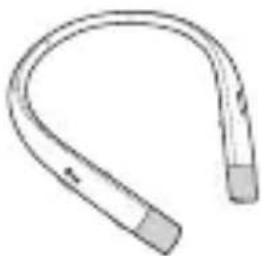
LG TONE INFINIM HBS-920 (medium ear gels installed)
Extra Ear Gels (small & large)
Micro USB Charging Cable

User Manual Warranty Card

NOTE: Actual product design may differ from images shown in manual.

CAUTION
Make sure authentic LG Electronics components are used. Using a non-authentic component may damage the product and thus void the warranty.
Product Description

NOTE: You will hear a sound with each press of the Volume jog switch, depending on the volume level: one beep (lower/middle levels) or a long tone (max levels).
HBS-920 Pairing and Connecting
Put in your earbuds to easily pair and connect by following the voice prompts.
If you hear that the battery is insufficient, recharge the battery before proceeding with pairing.
If pairing is not completed within three minutes, the power automatically turns off. If this happens, slide the Power switch from the OFF to the ON position to turn the power on.

Connecting Quickly


1. From the mobile phone's Settings menu, turn on Bluetooth. 2. On the HBS-920, slide the Power switch towards the ON position to turn on the power. 3. The blue Indicator lamp turns on, and the HBS-920 enters Search mode. 4. From the mobile phone, select LG HBS920 to connect. 5. A voice message will indicate that the connection is completed.
Connecting Manually (pairing with another phone or re-pairing)

1. From the mobile phone's Settings menu, turn on Bluetooth. 2. With the HBS-920's power off, press and hold the Call button and slide the Power switch to the ON position to turn it on. 3. The blue Indicator lamp turns on, and the HBS-920 enters Search mode. 4. From the mobile phone, select LG HBS920 to connect. 5. A voice message will indicate that the connection is completed.
Multiple Connections
The HBS-920 can be connected to a mobile phone and a PC simultaneously.
The HBS-920 can be connected to an additional device while it is already connected to a device.
1. With the HBS-920's power off, press and hold the Call button and slide the Power switch to the ON position to turn it on. 2. The blue Indicator lamp turns on, and the HBS-920 enters Search mode. 3. From the mobile phone or device list, select LG HBS920 to connect. 4. A voice message will indicate that the connection is completed. This device becomes the "Main Connected Device." 5. Try to connect to HBS-920 using a previously connected device. This device becomes the "Sub Connected Device."
NOTE: If the HBS-920 is simultaneously connected to two devices, the device that was connected most recently (or, as in the example above, a new connection versus a previous connection) is the Main Connected Device. The main functions work based on the Main Connected Device.
Automatic Reconnection
If simultaneously connected to two devices, it will automatically connect to the most recent (Main or Sub Connected Device) device it was connected to. (If a device cannot be found, Search mode will be activated.)
If the product does not automatically connect to the device you want, search for your product on the device you want to connect to and connect it manually.
Indicator Lamp
| HBS-920 Status Description | |
| Power On The blueIndicator lamp | flashes four times. |
| Power Off The blueIndicator lamp | flashes four times. |
| Search Mode The blueIndicator lamp | is on. |
| Connected to a Device | TheIndicator lampwill flash blue once every five seconds. |
| Call Connected or Playing Music | TheIndicator lampwill flash blue once every five seconds. |
Mobile Calling Functions

| Function Status Description | ||
| Answering Call Ringing | Briefly press theCall button.NOTE: The HBS-920 will not vibrate if the Vibration function has been turned off. | |
| Making a Call Idle | If you make a call using a mobile phone, the call is automatically connected to the HBS-920. | |
| Switching Calls | Talking | Briefly press thePlay/Pause button twice. |
| Redial Idle | Press and hold theCall buttonfor more than one second to place a call to the last number dialed. | |
| Voice Dial | Idle | Briefly press theCall buttonto active your headset's voice. |
| Receiving a Call While on the Phone | Talking | You can receive another call while on the phone by pressing and holding theCall buttonfor one second.The existing call switches to a call waiting status. Press and hold theCall buttonagain for one second to switch back to the previous call.Briefly press theCall buttonto end the existing call; briefly press it again to end the second call. (Performance may differ depending on the mobile phone settings.) |
| Rejecting a Call Ringing | Press and hold theCall buttonfor two seconds. | |
| Enabling/Disabling Mute | Talking | During a call, slide and hold theVolume jog switchto the volume up( ) direction, and slide and hold thePrevious/Next jog switchto the( × position for one second. |
CAUTION: Do not disable/enable the mute function while driving, as you need to use both hands.
NOTE: The Voice Dial and Redial functions work on the Main Connected Device or on the device on which you made the last call. (The Voice Dial and Redial functions may work differently depending on the mobile phone being used.)
Playing Music

| Function Status Description | ||
| Play | Idle | Briefly press the Play/Pause button. |
| Pause Music on Briefly press the Play/Pause button. | ||
| Play Previous/Next Song Music on | Slide the Previous/Next jog switch to the Previous ( ✉r Next ( ✉position. | |
| Fast Rewind/Forward Music on | Slide the Previous/Next jog switch to the ( ✉r ( ) position until you reach the desired part. | |
| Equalizer Music on | Briefly press the Play/Pause button twice to switch between Bass (Default), Normal, and Treble. | |
Tone Bass™

Rotate the back of the earbuds to turn Bass Boost mode on or off.
To enjoy richer, more powerful bass, turn the feature on with the Equalizer (EQ) set to "Bass".
Switching Music Players
To switch to a different music playback device when multiple devices are connected, stop the currently playing music and then play music from the device of your choice.
Battery Charging and Alerts
Open the Charging port cover and connect the charger to the Charging port.

| Indicator Lamp Red Purple Blue | ||
| Battery Status Charging 80% Completed |
Slide and hold the Volume jog switch in the volume down (—) direction for one second to check the Indicator lamp and battery level by voice.

| Battery Status | Sufficient Normal Insufficient | ||
| Indicator Lamp | Blue flashes three times | Purple flashes three times | Red flashes three times |
Vibration Alert Settings

The vibration alert is automatically set to the ON position when you turn on the power.
To activate or deactivate the vibration setting, slide and hold the Volume jog switch in the volume up ( ) direction for two seconds.
NOTE: When vibration is turned off, the HBS-920 will not vibrate when receiving an incoming call.
Out of Range
If the device connected to the product is out of effective communication range (33 feet/10 meters), the communication signal becomes weak and the communication is lost.
If the device comes back within effective communication range, the product automatically reconnects to the device. If the device is not automatically reconnected, press the Call button on the product to connect to it manually.
If a device that is not in use goes out of communication range when multiple devices are connected, a voice message will indicate that the connection is lost. In this case, the automatic reconnection function is not supported.
LG Tone & Talk™
Tone & Talk supports various functions, including text & voice directions and calling. To install Tone & Talk, scan the QR code to the right or go to the Google Play™ store and search for "LG Tone & Talk."
NOTE: Tone & Talk can be used on Android™ smartphones.

| Function Button/Description HBS-920 Action | ||
| Reading Recent Messages | Previous/Next jog switch | Slide to and hold in the ( *position for one second. |
| Using Speed Dial to Make a Call | Select a speed dial contact in Tone & Talk. - | |
| Call button (Making a call) Briefly press twice. | ||
| Using Favorites to Make a Call | Select a favorite contact in Tone & Talk. - | |
| Call button (Bringing up a favorite contact) Briefly press twice. | ||
| Select a contact with the Previous/Next jog switch. | Slide to and hold in the (or ( ) position for one second. | |
| Call button (Making a call) Briefly press twice. | ||
| Making a Call From Call History | Select call history in Tone & Talk. - | |
| Call button (Bringing up Call history) Briefly press twice. | ||
| Slide and hold the Previous/Next jog switch to select a Call History number. | Slide to and hold in the (or ( ) position for one second. | |
| Call button (Making a call) Briefly press twice. | ||
| Current Time Alert/ Voice Memo | Previous/Next jog switch (This feature may not be supported on some devices.) | Slide to and hold in the (position for one second. |
| Changing the Voice Prompt Language | Select Headset settings in Tone & Talk. - | |
| Select Voice prompt language menu. - | ||
| Find Me (Find My Phone) | Volume (jog switch and Previous ( ) jog switch/ Volume (jog switch and Next ( ) jog switch | Simultaneously slide to and hold in the same direction for one second. |
NOTE: The Current Time Alert and the Voice Memo functions cannot be used at the same time. You can only use one function at a time when you make selections in the Tone & Talk app.
Troubleshooting
| Problem Solution | |
| The power does not turn on Check the battery level and charge it. | |
| Cannot make a call with the HBS-920 | If the mobile phone does not support headset and hands-free functions, you cannot use the calling features.Check the battery level and charge it. |
| Cannot connect the HBS-920 to mobile phone | Check whether the HBS-920 is turned on.Check whether the HBS-920 is in Search mode.- Simultaneously press and hold the Call button and slide the Power switch to the ON position and the HBS-920 switches to Search mode. |
| The sound is low Control the sound level of the device connected to the HBS-920. | |
Specifications and Features
| Item Comments | |
| Bluetooth Specifications V 4.2 | (Headset/Hands-Free/A2DP/AVRCP) |
| Battery Battery 3.7 V / 220 m | Ah, lithium-ion polymer |
| Standby Time Up to 600 hours* | |
| Talk Time Up to 15 hours* | |
| Music Play Time Up to 12 hours* | |
| Charging Time Less than 2 hours | |
| Rated Input Voltage DC 4.75 V ~ 5.3 V, 400 mA | |
| Operating Temperature -10°C (+14°F) ~ +50°C (+122°F) | |
| Dimensions/Weight 6.3" (W) X 7.09" (L) X 0.56" (H) / 1.9 oz | |
| Operating Frequency 2402 MHz to 2480 MHz | |
*Duration of use may vary depending on the connected mobile device, features being used, settings, signal strength, operating temperature, frequency band, and other methods of use.
Declaration of Confirmation
FCC NOTICE TO USERS:
This device complies with part 15 of the FCC Rules.
Operation is subject to the following two conditions:
(1) This device may not cause harmful interference, and (2) This device must accept any interference received, including interference that may cause undesired operation.
Changes or modifications not expressly approved by the manufacturer (or party responsible) for compliance could void the user's authority to operate the equipment.
FCC Part 15.105 statement
This equipment has been tested and found to comply with the limits for a Class B digital device, pursuant to Part 15 of the FCC Rules.
These limits are designed to provide reasonable protection against harmful interference in a residential installation. This equipment generates, uses and can radiate radio frequency energy and, if not installed and used in accordance with the instructions, may cause harmful interference to radio communications.
However, there is no guarantee that interference will not occur in a particular installation. If this equipment does cause harmful interference to radio or television reception, which can be determined by turning the equipment off and on, the user is encouraged to try to correct the interference by one or more of the following measures:
- Reorient or relocate the receiving antenna.
- Increase the separation between the equipment and receiver.
- Connect the equipment into an outlet on a circuit different from that to which the receiver is connected.
- Consult the dealer or an experienced radio/TV technician for help.
IMPORTANT NOTE:
To comply with the FCC RF exposure compliance requirements, no change to the antenna or the device is permitted. Any change to the antenna or the device could result in the device exceeding the RF exposure requirements and void the user's authority to operate the device.
Bluetooth® is a registered trademark of Bluetooth SIG, Inc. worldwide.
Qualcomm® aptX™ audio is a product of Qualcomm Technologies International, Ltd.
Bluetooth®
FCC ID: ZNFHBS920
Additional Information
1. Radio frequency exposure
This Bluetooth Wireless Stereo Headset HBS-920 is a radio transmitter and receiver. When in operation it communicates with a Bluetooth-equipped mobile device by receiving and transmitting radio frequency (RF) electromagnetic fields (microwaves) in the frequency range 2.4 to 2.4835 GHz. Your Bluetooth headset is designed to operate in compliance with the RF exposure guidelines and limits set by national authorities and international health agencies when used with any compatible LG Electronics mobile phone.
2. Bluetooth connection precautions
The following environments affect the range and reception of Bluetooth signals:
- When walls, metal, human bodies, or other obstacles exist between the Bluetooth device and the connected device.
- When equipment that uses 2.4 GHz frequency signals (wireless LANs, wireless phones, microwave ovens, etc.) is placed near the devices being used.
3. Potentially explosive atmosphere
Turn off your electronic device when in any area with a potentially explosive atmosphere. Although this is uncommon, your electronic device could generate sparks. Sparks in such areas could cause an explosion or fire resulting in bodily injury or even death. Areas with a potentially explosive atmosphere are often but not always clearly marked.
4. Emergency calls
IMPORTANT!
This Bluetooth headset and the electronic device connected to the headset, operate using radio signals and mobile and landline networks, as well as user-programmed functions, which cannot guarantee connection under all conditions. Therefore you should never rely solely upon any electronic device for essential communications (e.g., medical emergencies). Remember, in order to make or receive calls, the headset and the electronic device connected to the headset must be switched on and in a service area with adequate mobile signal strength. Emergency calls may not be possible on all mobile phone networks or when certain network services and/or phone features are in use. Check with your local service provider.
5. Battery information
A rechargeable battery has a long service life if treated properly. A new battery or one that has not been used for a long period of time could have reduced capacity the first few times it is used. Do not expose the battery to extreme temperatures, never above +50°C (+122°F) or below -10°C (+14°F). For maximum battery capacity, use the battery at room temperature. If the battery is used in low temperatures, the battery capacity will be reduced. The battery can only be charged in temperatures between +10°C (+50°F) and +45°C (+113°F).
6. Recycling the battery in your Bluetooth headset
The battery in your Bluetooth headset must be disposed of properly and should never be placed in municipal waste. The LG Electronics service partner that removes the battery will dispose of it according to local regulations.
7. Conditions
- The warranty is valid only if the original receipt issued to the original purchaser by the dealer, specifying the date of purchase and serial number, is presented with the product to be repaired or replaced. LG Electronics reserves the right to refuse warranty service if this information has been removed or changed after the original purchase of the product from the dealer.
- If LG Electronics repairs or replaces the product, the repaired or replaced product shall be warranted for the remaining time of the original warranty period or for ninety (90) days from the date of repair, whichever is longer. Repair or replacement may involve the use of functionally equivalent reconditioned units. Replaced parts or components will become the property of LG Electronics.
- This warranty does not cover any failure of the product due to normal wear and tear, or due to misuse, including but not limited to use in other than the normal and customary manner, in accordance with instructions for use and maintenance of the product. Nor does this warranty cover any failure of the product due to accident, modification or adjustment, acts of God, or damage resulting from liquid.
- This warranty does not cover product failures due to improper repair installations, modifications, or service performed by a non-LG Electronics authorized person. Tampering with any of the seals on the product will void the warranty.
- THERE ARE NO EXPRESS WARRANTIES, WHETHER WRITTEN OR ORAL, OTHER THAN THIS PRINTED INCLUDING WITHOUT LIMITATION THE IMPLIED WARRANTIES OF MERCHANTABILITY OR FITNESS FOR A PARTICULAR PURPOSE, ARE LIMITED TO THE DURATION OF THIS LIMITED WARRANTY. IN NO EVENT SHALL LG ELECTRONICS OR ITS VENDORS BE LIABLE FOR INCIDENTAL OR CONSEQUENTIAL DAMAGES OF ANY NATURE WHATSOEVER, INCLUDING BUT NOT LIMITED TO LOST PROFITS OR COMMERCIAL LOSS, TO THE FULL EXTENT THOSE DAMAGES CAN BE DISCLAIMED BY LAW.
- Some countries/states do not allow the exclusion or limitation of incidental or consequential damages, or limitation of the duration of implied warranties, so the preceding limitations or exclusions may not apply to you. The warranty provided does not affect the consumer's statutory rights under applicable national legislation in force, nor the consumer's rights against the dealer arising from their sales/purchase contract.
Limited Warranty
Subject to the conditions of this Limited Warranty, LG Electronics warrants this product to be free from defects in design, material, and workmanship at the time of its original purchase by a consumer, and for a subsequent period of one (1) year. Should your product need warranty service, please return it to the dealer from whom it was purchased or contact your local LG Electronics contact center to get further information.
Important Safety Information
Avoiding hearing damage
Permanent hearing loss may occur if you use your headset at a high volume.
Set the volume to a safe level. Over time you can become accustomed to a higher volume that may sound normal but can be damaging to your hearing.
If you experience ringing in your ears or muffled speech, stop listening and have your hearing checked. The louder the volume, the less time that is required before your hearing could be affected.
Hearing experts suggest that to protect your hearing:
- Limit the amount of time you use the headset at a high volume.
- Avoid turning up the volume to block out noisy surroundings.
- Turn the volume down if you can't hear people speaking near you.
Using headsets safely
Use of headsets to listen to music while operating a vehicle is not recommended and is illegal in some areas. Be careful and attentive while driving. Stop using this device if you find it disruptive or distracting while operating any type of vehicle or performing any other activity that requires your full attention.


LG
Life's Good
© 2017 LG Electronics Inc.
Qualcomm® aptX™ Audio....3
Quick connection


Any modifications or changes to this manual due to typographical errors or inaccuracies of stated information shall only be made by LG Electronics Inc.


- CONTENTS
- SAFETY CAUTIONS
- CAUTION
- WARNING
- PRECAUTIONS WHEN USING THE PRODUCT
- HD SPEAKER
- QUALCOMM® APTX™ AUDIO
- PRODUCT COMPONENTS
- PRODUCT DESCRIPTION
- HBS-920 PAIRING AND CONNECTING
- CONNECTING QUICKLY
- CONNECTING MANUALLY (PAIRING WITH ANOTHER PHONE OR RE-PAIRING)
- MULTIPLE CONNECTIONS
- AUTOMATIC RECONNECTION
- MOBILE CALLING FUNCTIONS
- PLAYING MUSIC
- TONE BASS™
- SWITCHING MUSIC PLAYERS
- BATTERY CHARGING AND ALERTS
- VIBRATION ALERT SETTINGS
- OUT OF RANGE
- LG TONE & TALK™
- TROUBLESHOOTING
- SPECIFICATIONS AND FEATURES
- DECLARATION OF CONFIRMATION
- FCC NOTICE TO USERS
- FCC PART 15.105 STATEMENT
- IMPORTANT NOTE
- BLUETOOTH®
- FCC ID: ZNFHBS
- ADDITIONAL INFORMATION
- RADIO FREQUENCY EXPOSURE
- BLUETOOTH CONNECTION PRECAUTIONS
- POTENTIALLY EXPLOSIVE ATMOSPHERE
- EMERGENCY CALLS
- BATTERY INFORMATION
- RECYCLING THE BATTERY IN YOUR BLUETOOTH HEADSET
- CONDITIONS
- LIMITED WARRANTY
- IMPORTANT SAFETY INFORMATION
- AVOIDING HEARING DAMAGE
- USING HEADSETS SAFELY
- QUICK CONNECTION
Brand : LG
Model : Tone Infinim HBS-920
Category : Earphones