
Tone Free TONE-UT90Q - Earphones LG - Free user manual and instructions
Find the device manual for free Tone Free TONE-UT90Q LG in PDF.


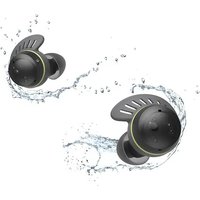
| Product Type | Wireless Earbuds |
| Brand | LG |
| Model | TONE-UT90Q |
| Color | Black |
| Bluetooth Version | 5.1 |
| Bluetooth Profiles | A2DP, AVRCP, HFP |
| Audio Codec | SBC, AAC |
| Driver Unit | 8mm Dynamic |
| Active Noise Cancellation | Yes |
| Microphone | Dual mic with ENC |
| Battery Life (ANC Off) | Up to 7 hours (earbuds) |
| Total Battery Life (with Case) | Up to 24 hours |
| Charging Time | 1.5 hours (case), 1.5 hours (earbuds) |
| Charging Interface | USB-C |
| Charging Case Features | UVnano (UV-C light) sanitization |
| Water Resistance | IPX4 (earbuds) |
| Earbud Weight | 5.2 g each |
| Case Weight | 40 g (approx.) |
| Dimensions (Earbuds) | 21.7 × 22.0 × 24.5 mm |
| Dimensions (Case) | 54.5 × 54.5 × 28.0 mm |
| Operating Temperature | 0°C to 40°C |
| Maintenance | Clean with dry cloth; UVnano case auto-cleans |
| Safety | Do not disassemble or expose to excessive heat |
| Repairability | No user-serviceable parts; contact LG service center |
| Additional Features | Multipoint connection, Fast Pair (Android), Find My Earbuds |
Frequently Asked Questions - Tone Free TONE-UT90Q LG
User questions about Tone Free TONE-UT90Q LG
0 question about this device. Answer the ones you know or ask your own.
Ask a new question about this device
Download the instructions for your Earphones in PDF format for free! Find your manual Tone Free TONE-UT90Q - LG and take your electronic device back in hand. On this page are published all the documents necessary for the use of your device. Tone Free TONE-UT90Q by LG.
USER MANUAL Tone Free TONE-UT90Q LG
Simple Owner's Manual
LG TONE Free
Bluetooth® LG Stereo Headset
NOTE: For the best performance and to prevent any damage to, or misuse of the headset, please read all of the information carefully prior to using the headset.
Any modifications or changes to this manual due to typographical errors or inaccuracies of stated information shall only be made by LG Electronics Inc.
Rev 3.0
GBR
TONE-UT90Q
www.lg.com
Copyright © 2022 - 2023 LG Electronics Inc. All Rights Reserved.
Product Components
ENGLISH

LG TONE Free® Earbuds (medium eargels installed) UV Charging Case

USB-C™ to AUX cable (LC0065/LC0067)

Extra Ear Gels (small & large)

Simple Owner's Manual

USB Type-C™ Charging and Data cable (LC0064/LC0066)

NOTE: Actual product design may differ from images shown in manual.

CAUTION
Make sure authentic LG Electronics components are used. Using a non-authentic component may damage the product. The LG limited warranty does not cover damage caused by the use of non-authentic components. Use the USB Type-C™ Charging and Data cable/USB-C™ to AUX cable provided with the product.

Download Manual
2
Overview
[Charging Case]

[Earbuds]
HS179N3


* Make sure that the Earbuds charging terminal is not soiled with foreign substance.
* The appearance and specifications of the actual product may differ depending on the model.
* To replace the ear gel, align the hole shape of the ear gel with the protrusion of the earbuds and fasten it.
Using the Earbuds
1 Connect the Earbuds to a mobile phone via Bluetooth
1 Tap the Setting [/] app on your mobile phone. Select and then turn on the Bluetooth function. ( Off > On)
2 Open the cover of the charging case with the earbuds mounted on the case. The battery status indicator on the front will blink blue.
If the battery status light does not blink blue, or if you want to connect a device other than the one already connected, press and hold the touchpad of the left or right earbud for 3 to 5 seconds.
![graph LR A["Smartphone"] --> B["Mobile Device"] B --> C["~1m Delay"] C --> D["Mobile Payment"] D --> E["Mobile Hand Icon"]](/content/2026/08/1626991/images/a08c7a3c63f4203724c28cd76e37fdb427abec2468be24de9ac0dfb6ccde161b.jpg)
3 When the Fast Pair connection pop-up appears on the bottom of the mobile phone screen, tap it to connect.
4 If the pop-up does not appear, select [TONE-T90Q] from the Bluetooth menu on the mobile phone and connect it.
- In the list of Bluetooth connected devices, TONE-T90Q_LE is not the correct model name for connection.
Check the model name in use and connect with the model name without "LE".
Bluetooth name of the product is "TONE-T90Q".
② Using the Earbuds with touch
Touch the earbuds to play or pause music, answer or reject calls. You can change how the function works in the touchpad settings of the "LG TONE Free" app.
| Description | Mobile Calling Functions | Playing Music | Plug and Wireless Mode | Listen to the Ambient Sound (LAS) / Active Noise Cancellation (ANC) |
| Touch once | Answering Calls | Play / Pause | Mute or Unmute | - |
| Touch twice | Ending Calls | Decrease volume (Touch the left) Increase volume (Touch the right) | - | |
| Touch three times | - | Play Next | Play Next song (Connecting with USB audio device) | - |
| Touch and hold | Rejecting Calls | - | - | Change the functions |
- When the charging case is connected to an analog device, touching it three times triggers no response.
- Connect the charging case to a USB audio device and then touch once to play/pause music.
3 Connecting to an External Device(Plug and Wireless Mode)
You can connect the charging case to an analog device (airplane seat audio, treadmill, cassette, radio, TV, etc.) or a USB audio device (PC) to listen to the sound with the earbuds.
[How to connect analog devices]
1 Connect the USB-C™ side of the included USB-C™ to AUX cable to the charging case.
2 Connect the AUX side to a device you want to use.
3 Wear the earbuds.
4 Push the Plug and Wireless Mode switch to the right to turn on the mode. The indicator on the charging case flashes in green.
5 Once the charging case is connected to the earbuds, the indicator turns off.
- To disconnect an external device, push the Plug and Wireless Mode switch to the left.
The indicator on the charging case flashes in blue and the earbuds reconnect to the device that was previously connected.
- If the device is not found, the earbuds enter the Connection Ready mode.
- Call function is not supported when connected to an analog device.
[How to connect USB audio device]
1 Connect the USB-C™ side of the included USB Type-C™ Charging and Data cable to the charging case.
2 Connect the USB-A side to a device you want to use.
3 Wear the earbuds.
4 Push the Plug and Wireless Mode switch to the right to turn on the mode.
The indicator on the charging case flashes in green.
5 Once the charging case is connected to the earbuds, the green indicator turns off and the case charging status is displayed.
- To disconnect an external device, push the Plug and Wireless Mode switch to the left.
The indicator on the charging case flashes in blue and the earbuds reconnect to the device that was previously connected.
- If the device is not found, the earbuds enter the Connection Ready mode.
4 Charging
[Wired Charging] With the earbuds mounted to the charging case, connect the charging cable to the charging case to charge. The earbuds and the charging case are charged at the same time.
- The UVnano LED operates for 10 minutes when mounted in the charging case while it is being charged.
[Wireless Charging] Align the bottom center of the charging case with the center of the wireless charger.
- When wirelessly charging, the UVnano LED sanitize the earbuds' ear gels for 10 minutes before charging.
CAUTION: Be aware that the temperature of the earbuds may rise while the UVnano LED is on.
5 Connecting the LG TONE Free app
1 Search for "LG TONE Free" in the Google Play Store or App Store on your mobile phone or scan the QR code below to install the LG TONE Free app.
2 Run the app to use various functions. (Check Earbud Battery, Voice Alert, Change Equalizer Mode, Check Last Connected Location Information, and Find My Earbuds function, etc.)


Dolby Atmos
Dolby, Dolby Atmos, and the double-D symbol are registered trademarks of Dolby Laboratories Licensing Corporation. Manufactured under license from Dolby Laboratories. Confidential unpublished works.
Copyright © 2012–2020 Dolby Laboratories. All rights reserved.

Snapdragon Sound is a product of Qualcomm Technologies, Inc. and/or its subsidiaries.
Snapdragon and Snapdragon Sound are trademarks or registered trademarks of Qualcomm Incorporated.

Qualcomm aptX Adaptive
The LG TONE Free (TONE-UT90Q) is a lightweight wireless headset that uses Bluetooth technology.
This product can be used as an audio accessory for devices supporting either the A2DP or Hands-Free Bluetooth Profile.
Safety Precautions
The following safety precautions are provided to prevent any unexpected accident or damage. Please familiarise yourself with the safety precautions. The safety precautions are classified into “WARNING” and “CAUTION”.
WARNING: Failing to comply with the instructions may result in serious injury or death.
CAUTION: Failing to comply with the instructions may result in minor injury or product damage.
WARNING
Do not drop the product from a high place.
Make sure there is no alcohol, or benzene in contact with the product.
Do not store the product in a wet or dusty place.
Do not place heavy objects on the product.
This product is waterproof to the IPX4 level (daily life waterproof). (The IPX4 waterproof rating applies to the earbud product only.)
Do not put the product under the water or use it in a humid location such as a bathroom.

CAUTION
Do not disassemble, adjust, or repair the product.
Do not place the product near excessive heat or flammable material.
The product may be damaged if an incompatible charger is used.
Keep small components of the product away from infants or children.
Make sure that foreign objects do not enter the charger's connectors (Case charging port and power plug). Foreign objects in the charger's connectors may result in fire or electric shock.
If you have a medical device implanted, contact your doctor before using this device.
For your safety, do not remove the battery incorporated in the product.
This product has a built-in battery, and the battery cannot be removed or replaced.
If you arbitrarily replace the battery or don't replace it correctly, it may explode.
The lithium-ion battery is a hazardous component that can cause injury.
Battery replacement by an unqualified professional can cause damage to your device.
Do not discard the battery arbitrarily. Follow the local procedure for discarding batteries.
In order to prevent unnecessary energy consumption, disconnect the device when fully charged. Always use an easily accessible power outlet for charging your device.
Risk of fire or explosion if the battery is replaced by an incorrect type.
Do not store or transport at pressures lower than 11.6 kPa and at above 15000 m altitude.
Replacement of a battery with an incorrect type that can defeat a safeguard (for example, in the case of some lithium battery types).
Disposal of a battery into fire or a hot oven, or mechanically crushing or cutting of a battery, may result in an explosion.
Leaving a battery in an extremely high temperature surrounding environment that can result in an explosion or the leakage of flammable liquid or gas.
A battery subjected to extremely low air pressure may result in an explosion or the leakage of flammable liquid or gas.
Do not carelessly throw away old batteries. It can cause an explosion or fire. The disposal method may vary by country and region. Dispose of it in an appropriate manner.
Precautions When Using the Product
If the product is exposed to excessive sweat, Clean the product with dry cloth. Keep the earbuds clean.
Wearing earbuds for a long time may cause pain, and if humidity inside ears continues for a long time, it may cause skin trouble.
HD Speaker
If the communication network of the device you are connecting to supports HD Voice Calling, you can enjoy making voice calls and listening to music in high definition.
Troubleshooting
If you see any of the following symptoms while using the product, make sure to recheck it. It may not be a malfunction.
HSI79N3
| Symptom Cause and Solution | |
| The power does not turn on | Check the battery level and charge it. |
| If unable to make a call with earbuds | If the mobile phone does not support headset and hands-free functions, you cannot use the calling features.Check the battery level and charge it. |
| If unable to register earbuds to mobile phone | Check whether power is turned on by opening the cover of the charging case.Check if the earbuds have entered the search mode.- While the earbuds are inserted in the charging case, press and hold the touch pad on the left or right earbud for 3 to 5 seconds to switch to the search mode.Check whether Plug and Wireless mode switch is turned on. |
| If you replaced the earbuds or there is a problem with the operation (Factory reset) | While the earbuds are inserted in the charging case, press and hold the touch pad on the left or right earbud for 10 seconds or more.- The battery status indicator of the charging case flashes red and the initialization to the factory status is carried out. After initialization to the factory status, reconnect the earbuds. |
- Factory reset and Search mode cannot be used in Plug and Wireless mode.
Specifications and Features
| Item Comments | |
| Bluetooth Specifications | V 5.3 (HSP/HFP/A2DP/AVRCP) |
| Battery | Earbud: 3.85 V / 51 mAh, Lithium-ionCharging case: 3.7 V / 390 mAh, Lithium-ion |
| Music Play Time Earbuds & With Charging case | ANC Off: Up to 9 & Up to 29 hours*ANC On: Up to 5 & Up to 16 hours* |
| Charging Time | Earbud: within an hour / Charging case: within 2 hoursFast Charging: 5 min charge for up to 60 min playtime*When charging wired at room temperature |
| Rated Input Voltage | Earbud: 5 V ---, 102 mACharging case: 5 V ---, 500 mA |
| Operating Temperature 0 °C ~ +40 °C | |
| Operating Humidity 5 % ~ 60 % | |
| Dimensions (mm) / Weight (g) | Earbud: 21.5 mm (W) X 27.7 mm (L) X 24.9 mm (H) / 5.3 g (One earbud)Charging case: 54.5 mm (W) X 54.5 mm (L) X 29.6 mm (H) / 39.3 g |
ENGLISH
HSI79NE
| Frequency range Output power (Max.) | |
| 2402 MHz to 2480 MHz | Earbud: 14 dBmCharging case: 14 dBm |
| 122.89 kHz to 176.49 kHz -5dBuA/m @10m | |
* Duration of use may vary depending on the connected mobile device, features being used, settings, signal strength, operating temperature, frequency band, and other methods of use.
Declaration of Confirmation
DECLARATION OF CONFORMITY:
Hereby, LG Electronics declares that the radio equipment type this headset is in compliance with the relevant statutory requirements. The full text of the UK declaration of conformity is available at the following internet address:
http://www.lg.com/global/support/cedoc/cedoc#
LG Electronics Inc. Single point of contact (EU/UK): Krijgsman 1, 1186 DM Amstelveen, The Netherlands.
UK Importer : LG Electronics U.K. Ltd, Velocity 2, Brooklands Drive, Weybridge, KT13 0SL
Hereby, LG Electronics declares that the radio equipment type this headset is in compliance with Directive 2014/53/EU. The full text of the EU declaration of conformity is available at the following internet address: http://www.lg.com/global/support/cedoc/cedoc#
Bluetooth ® is a registered trademark of Bluetooth SIG, Inc. worldwide. Android, Google Play, the Google Play logo, and other related marks and logos are trademarks of Google LLC.

Bluetooth®
UK CA
CE
Additional Information
1. Radio frequency exposure
This Bluetooth LG Stereo Headset is a radio transmitter and receiver. When in operation it communicates with a Bluetooth equipped mobile device by receiving and transmitting radio frequency (RF) electromagnetic fields (microwaves) in the frequency range 2402 to 2480 MHz. Your Bluetooth headset is designed to operate in compliance with the RF exposure guidelines and limits set by national authorities and international health agencies when used with any compatible LG Electronics mobile phone.
2. Bluetooth Connection Precautions
The following environments affect the range and reception of Bluetooth signals:
- When walls, metal, human bodies, or other obstacles exist between the Bluetooth device and the connected device
- When equipment that uses 2.4 GHz frequency signals (Wireless LANs, wireless phones, microwave ovens, etc.) is placed near the devices being used
- When using a Bluetooth device (TV, laptop, etc.) other than the mobile phone, the sound quality may be affected by the specifications and performance of the device
3. Potentially explosive atmosphere
Turn off your electronic device when in any area with a potentially explosive atmosphere. It is rare, but your electronic device could generate sparks.
Sparks in such areas could cause an explosion or fire resulting in bodily injury or even death. Areas with a potentially explosive atmosphere are often, but not always, clearly marked.
4. Battery information
A rechargeable battery has a long service life if treated properly. A new battery or one that has not been used for a long period of time could have reduced capacity the first few times it is used. Do not expose the battery to extreme temperatures, never above +50° or below -10°. For maximum battery capacity, use the battery in room temperature. If the battery is used in low temperatures, the battery capacity will be reduced. The battery can only be charged in temperatures between 0° and +45°.
5. Recycling the battery in your Bluetooth Headset
The battery in your Bluetooth Headset must be disposed of properly and should never be placed in municipal waste.
6. Conditions
-The warranty is valid only if the original receipt issued to the original purchaser by the dealer, specifying the date of purchase and serial number, is presented with the product to be repaired or replaced. LG Electronics reserves the right to refuse warranty service if this information has been removed or changed after the original purchase of the product from the dealer.
-This Warranty does not cover any failure of the product due to normal wear and tear, or due to misuse, including but not limited to use in other than the normal and customary manner, in accordance with instructions for use and maintenance of the product. Nor does this warranty cover any failure of the product due to accident, modification or adjustment,
acts of God or damage resulting from liquid.
-This warranty does not cover product failures due to improper repair installations, modifications or service performed by a non-LG Electronics authorised person. Tampering with any of the seals on the product will void the warranty.
Limited Warranty
SUBJECT TO THE CONDITIONS OF THIS LIMITED WARRANTY, LG ELECTRONICS WARRANTS THIS PRODUCT TO BE FREE FROM DEFECTS IN DESIGN, MATERIAL AND WORKMANSHIP AT THE TIME OF ITS ORIGINAL PURCHASE BY A CONSUMER, AND FOR A SUBSEQUENT PERIOD OF ONE (1) YEAR. SHOULD YOUR PRODUCT NEED WARRANTY SERVICE, PLEASE RETURN IT TO THE DEALER FROM WHOM IT WAS PURCHASED OR CONTACT YOUR LOCAL LG ELECTRONICS CONTACT CENTER TO GET FURTHER INFORMATION.
LG Electronics U.K. Ltd.
Service Division
Velocity 2, Brooklands Drive, Brooklands, Weybridge KT13 0SL
Phone +44-(0)344-847-5454
IE +353 -(0)1-686-9454
www.lg.com/uk
Important Safety Information
Avoiding hearing damage
Permanent hearing loss may occur if you use your Headset at a high volume. Set the volume to a safe level. You can adapt over time to a higher volume of sound that may sound normal but can be damaging to your hearing. If you experience ringing in your ears or muffled speech, stop listening and have your hearing checked. The louder the volume, the less time is required before your hearing could be affected. Hearing experts suggest that to protect your hearing:
- Limit the amount of time you use the headset at a high volume.
- Avoid turning up the volume to block out noisy surroundings.
- Turn the volume down if you can't hear people speaking near you.
Please refer to your handset user guide for more information on how to adjust listening levels on your handset.

Using headsets safely
Use of Headset to listen to music while operating a vehicle is not recommended and is illegal in some areas. Be careful and attentive while driving. Stop using this device if you find it disruptive or distracting while operating any type of vehicle or performing any other activity that requires your full attention.
Open Source Software Notice Information
To obtain the source code that is contained in this product, under GPL, LGPL, MPL, and other open source licenses that have the obligation to disclose source code, and to access all referred license terms, copyright notices and other relevant documents, please visit https://opensource.lge.com.
LG Electronics will also provide open source code to you on CD-ROM for a charge covering the cost of performing such distribution (such as the cost of media, shipping, and handling) upon email request to opensource@lge.com.
This offer is valid to anyone in receipt of this information for a period of three years after our last shipment of this product.
Battery

Disposal of waste batteries/accumulators
1 This symbol may be combined with chemical symbols for mercury (Hg), cadmium (Cd) or lead (Pb) if the battery contains more than 0.0005% of mercury, 0.002% of cadmium or 0.004% of lead.
2 All batteries/accumulators should be disposed separately from the municipal waste stream via designated collection facilities appointed by the government or the local authorities.
3 The correct disposal of your old batteries/accumulators will help to prevent potential negative consequences for the environment, animal and human health.
4 For more detailed information about disposal of your old batteries/accumulators, please contact your city office, waste disposal service or the shop where you purchased the product. (http://www.lg.com/global/sustainability/environment/take-back-recycling/global-network-europe)
Removal of waste batteries and accumulators
(Product with embedded battery ONLY)
-In case this product contains a battery incorporated within the product which cannot be readily removed by endusers, LG recommends that only qualified professionals remove the battery, either for replacement or for recycling at the end of this product's working life. To prevent damage to the product, and for their own safety, users should not attempt to remove the battery and should contact LG Service Helpline, or other independent service providers for advice.
-Removal of the battery will involve dismantling of the product case, disconnection of the electrical cables/contacts, and careful extraction of the battery cell using specialized tools. If you need the instructions for qualified professionals on how to remove the battery safely, please visit http://www.lge.com/global/sustainability/environment/take-back-recycling.
WEEE

Disposal of your old appliance
1 This crossed-out wheeled bin symbol indicates that waste electrical and electronic products (WEEE) should be disposed of separately from the municipal waste stream.
2 Old electrical products can contain hazardous substances so correct disposal of your old appliance will help prevent potential negative consequences for the environment and human health. Your old appliance may contain reusable parts that could be used to repair other products, and other valuable materials that can be recycled to conserve limited resources.
3 You can take your appliance either to the shop where you purchased the product, or contact your local government waste office for details of your nearest authorised WEEE collection point. For the most up to date information for your country please see www.lg.com/global/recycling
| RISK GROUP 3 | |
 | WARNING: UV-C EMITTED FROM THIS PRODUCT. AVOID EYE AND SKIN EXPOSURE TO UNSHIELDED PRODUCT. |
| WARNING: IF YOU DON'T DO CHARGING OR IF YOU OPEN THE CHARGING CASE, THE UVNANO FUNCTION IS NOT ACTIVATED. | |
Symbols
| ~ | Refers to alternating current (AC). |
| --- | Refers to direct current (DC). |
| ☐ | Refers to class II equipment. |
| ➊ | Refers to stand-by. |
| │ | Refers to “ON” (power). |
| ⚡ | Refers to dangerous voltage. |
The output level shall automatically return to an output level not exceeding RS1 when the power is switched off.


www.lg.com
SIMPLE_TONE-UT90Q.CGBRLBK_ENG_UG-T90Q-GBR-03.indd 28 2023-01-26 ☒ 9:52:30


- LG TONE FREE
- TONE-UT90Q
- PRODUCT COMPONENTS
- CAUTION
- OVERVIEW
- USING THE EARBUDS
- CONNECT THE EARBUDS TO A MOBILE PHONE VIA BLUETOOTH
- ② USING THE EARBUDS WITH TOUCH
- CONNECTING TO AN EXTERNAL DEVICE(PLUG AND WIRELESS MODE)
- [HOW TO CONNECT ANALOG DEVICES]
- [HOW TO CONNECT USB AUDIO DEVICE]
- CHARGING
- CONNECTING THE LG TONE FREE APP
- DOLBY ATMOS
- SAFETY PRECAUTIONS
- WARNING
- PRECAUTIONS WHEN USING THE PRODUCT
- HD SPEAKER
- TROUBLESHOOTING
- DECLARATION OF CONFIRMATION
- DECLARATION OF CONFORMITY
- BLUETOOTH®
- UK CA
- CE
- ADDITIONAL INFORMATION
- RADIO FREQUENCY EXPOSURE
- BLUETOOTH CONNECTION PRECAUTIONS
- POTENTIALLY EXPLOSIVE ATMOSPHERE
- BATTERY INFORMATION
- RECYCLING THE BATTERY IN YOUR BLUETOOTH HEADSET
- CONDITIONS
- LIMITED WARRANTY
- IMPORTANT SAFETY INFORMATION
- AVOIDING HEARING DAMAGE
- USING HEADSETS SAFELY
- OPEN SOURCE SOFTWARE NOTICE INFORMATION
- BATTERY
- DISPOSAL OF WASTE BATTERIES/ACCUMULATORS
- REMOVAL OF WASTE BATTERIES AND ACCUMULATORS
- WEEE
- DISPOSAL OF YOUR OLD APPLIANCE
Brand : LG
Model : Tone Free TONE-UT90Q
Category : Earphones