
FCB 360 TNF NE E - Refrigerator FRANKE - Free user manual and instructions
Find the device manual for free FCB 360 TNF NE E FRANKE in PDF.


| Product type | Ventilated refrigerator |
| Brand | Franke |
| Model | FCB 360 TNF NE E |
| Energy class | E (according to EU standard) |
| Total net volume | 360 liters (estimated) |
| Refrigerator net volume | 270 liters |
| Freezer net volume | 90 liters |
| Dimensions (H x W x D) | 185 x 59.5 x 65 cm (estimated) |
| Net weight | 65 kg (estimated) |
| Power supply | 220-240 V, 50 Hz |
| Annual energy consumption | 280 kWh/year (estimated) |
| Noise level | 42 dB (estimated) |
| Defrosting | Automatic (No Frost) |
| Thermostat | Electronic controls with digital display |
| Interior lighting | LED |
| Number of shelves | 4 adjustable glass shelves |
| Number of vegetable drawers | 1 humidity-controlled drawer |
| Door balconies | 5 balconies (including 1 for bottles) |
| Vacation function | Yes (energy saving mode) |
| Open door alarm | Yes |
| Adjustable feet | 2 adjustable front feet |
| Maintenance and cleaning | Clean with warm water and mild soap, avoid abrasive products |
| Child safety | Control lock function |
| Spare parts and repairability | Available via Franke after-sales service (repairability index: 7.5/10 estimated) |
Frequently Asked Questions - FCB 360 TNF NE E FRANKE
User questions about FCB 360 TNF NE E FRANKE
0 question about this device. Answer the ones you know or ask your own.
Ask a new question about this device
Download the instructions for your Refrigerator in PDF format for free! Find your manual FCB 360 TNF NE E - FRANKE and take your electronic device back in hand. On this page are published all the documents necessary for the use of your device. FCB 360 TNF NE E by FRANKE.
USER MANUAL FCB 360 TNF NE E FRANKE
FCB 360 TNF NE E
EN User and Installation manual Refrigerator



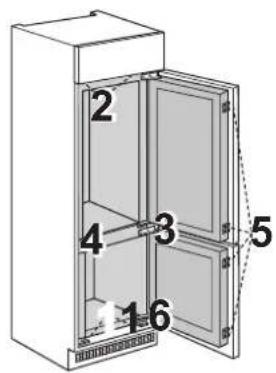

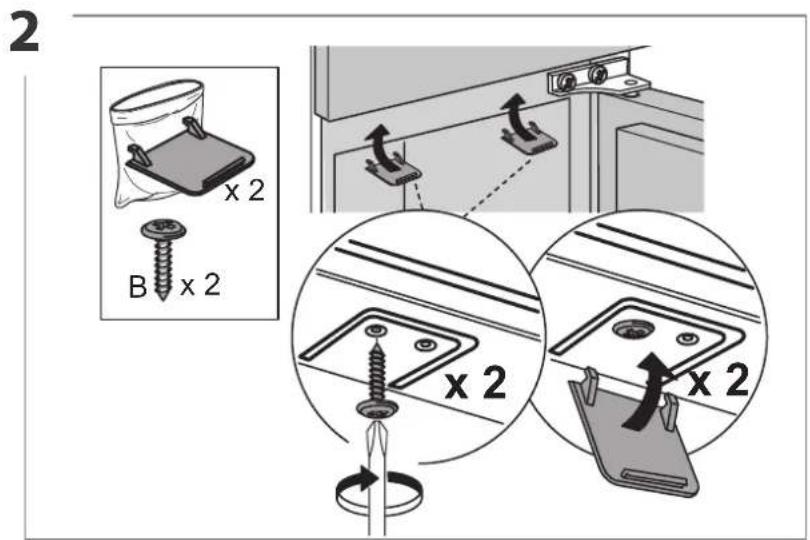
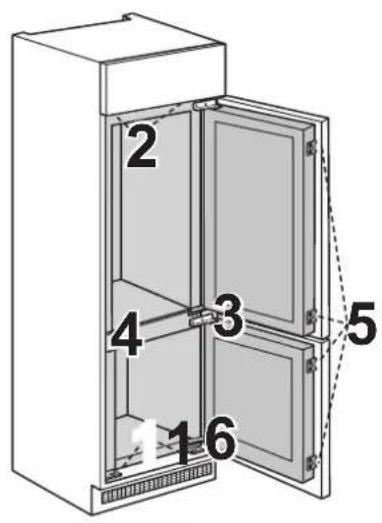
3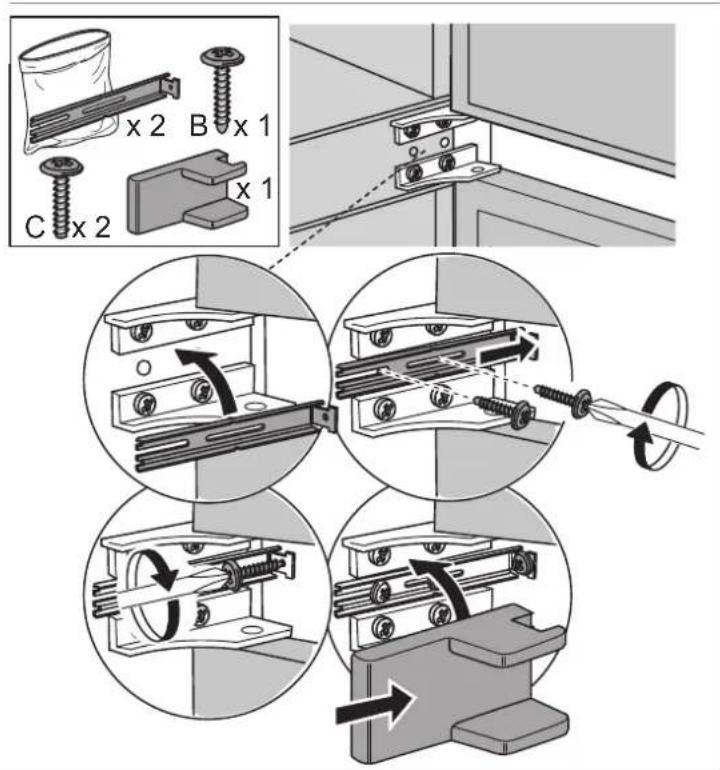
4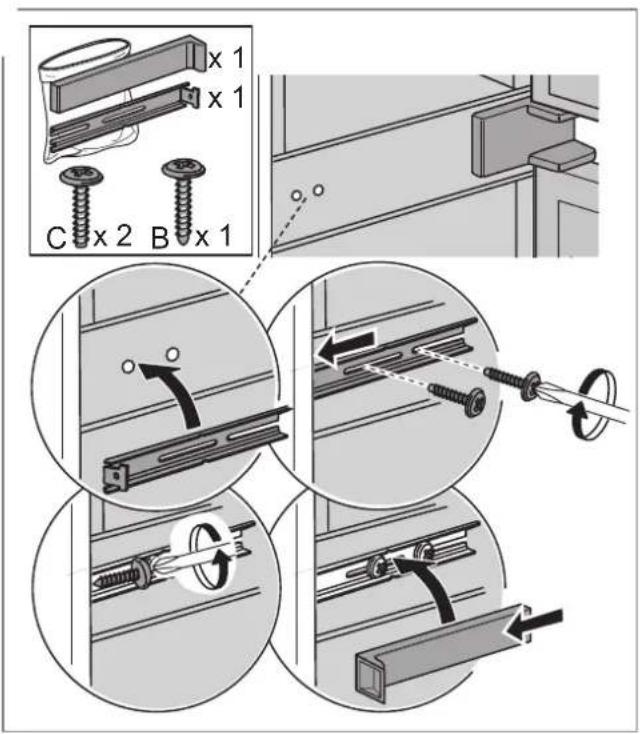
5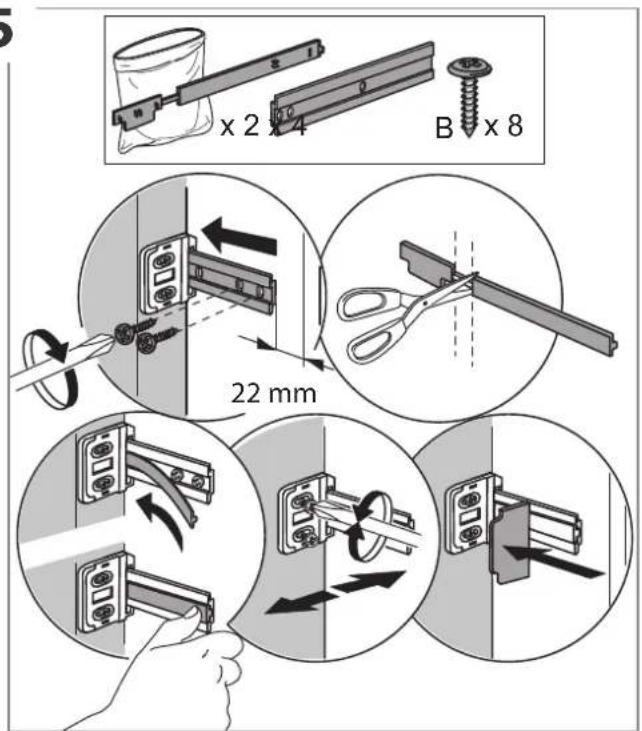
6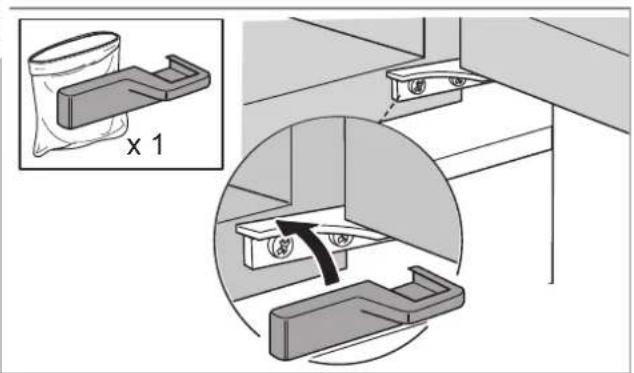
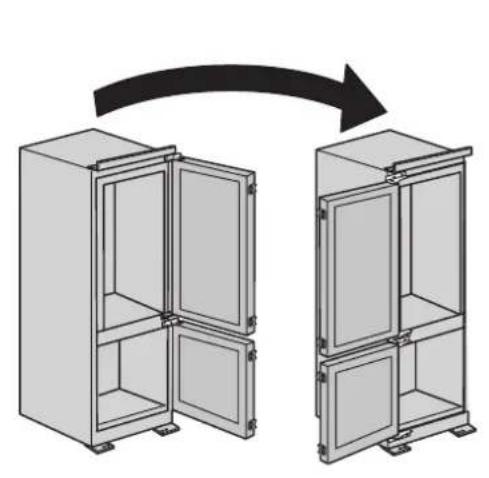
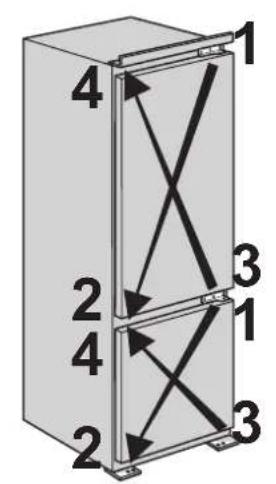

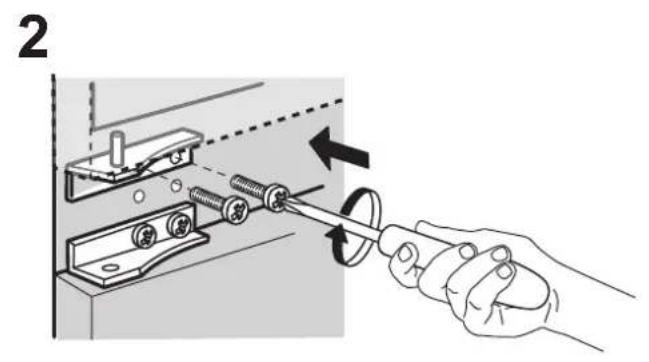
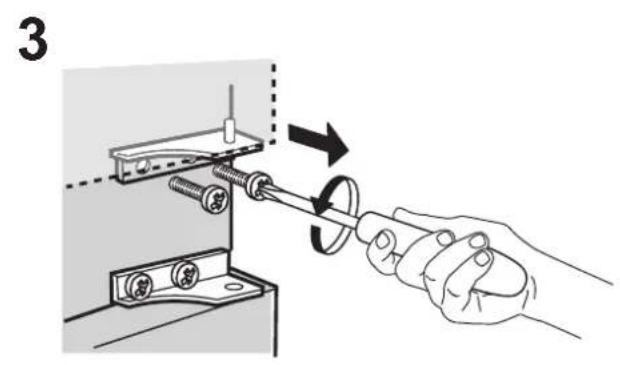
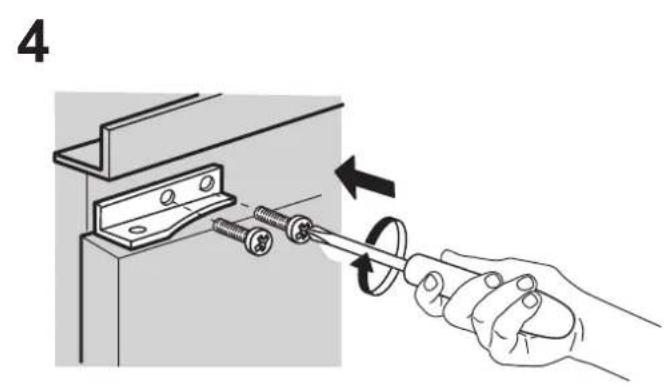


TABLE OF CONTENTS
OVERVIEW 8
General Information 8
Control panel....8
OPERATION....9
First time use....9
Refrigerator compartment and food storage 9
How to store fresh food and beverages....9
Freezer compartment food storage....10
Storage times for home frozen foods 10
Freezer compartment 10
Functional sounds....11
Recommendation in case of no use of the appliance....11
CLEANING AND MAINTENANCE....12
Refrigerator light 12
Shelves....12
Door 12
Removing the fridge drawer 13
TROUBLESHOOTING 15
SUPPORT 16
USER GUIDE
OVERVIEW
GENERAL INFORMATION
The drawers, baskets and shelves should be kept in their current position unless otherwise specified in this quick guide. The light system inside the refrigerator compartment uses LEDs, providing better lighting than traditional light bulbs and very low energy consumption.
CONTROL PANEL
![graph TD A["1: 300+ Sec"] --> B["Fridge"] B --> C["2: 300+ Sec"] C --> D["3: 300+ Sec"] D --> E["4: 300+ Sec"] E --> F["5: 300+ Sec"] F --> G["6: 300+ Sec"] B --> H["Freeze"] H --> I["Freezer"] I --> J["Freezer"] J --> K["300+ Sec"] style A fill:#f9f,stroke:#333 style K fill:#f9f,stroke:#333](/content/2026/06/1389274/images/dc302d60d6ac0925f15498bae045b2db81b10b9a87eb8af3b973ce5481e285ae.jpg)
SETTING THE TEMPERATURES
Press the Refrigerator Button ☐ to set a different temperature in the refrigerator compartment.
Recommended setting for Refrigerator compartment is MED
Press the Freezer Button ☐ to set a different temperature in the freezer compartment.
Recommended setting for Freezer compartment is MED
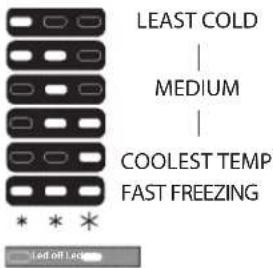
To avoid an increase of food waste, refer to recommended setting and Storage Time in OPERATION chapter
DISPOSAL
Doors and lids of the refrigeration appliance should be removed before disposal in the landfill, to avoid children or animals getting trapped inside.
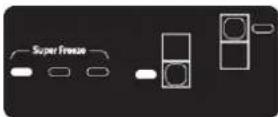
- Refrigerator Temperature / Stand By
- Temperature Indicator setting
- Refrigerator Indicator
- Alarm Indicator
- Freezer Indicator
- Freezer Temperature / Stop Alarm
ON/STAND-BY
Press the Refrigerator Temperature button for 3 seconds to turn the appliance on stand-by. When in Stand-by mode the light in the refrigerator compartment does not turn on. Press the button again briefly to reactivate the appliance.
FAST FREEZE FUNCTION
In order to preserve at best, please use the Fast Freeze function before putting a large quantity of food in the freezer cavity.
Press the button (6) until all the three leds are on in order to set the function.
The function turns off automatically after 26 hours, or manually by selecting different freezer temperature.
Note: Please avoid a direct contact between the fresh food and the food already frozen. To optimise the freezing speed, drawers can be removed and the food can be placed directly on the bottom of the compartment.
OPERATION
FIRST TIME USE
Wait at least two hours, after the installation, before connecting the appliance to the power supply. Connect the appliance to the power supply it starts the operation automatically. The ideal storage temperatures for the food are preset in the factory.
After turning the appliance on, you must wait for 4-6 hours for the correct storage temperature to be reached for a normally filled appliance. If the audible signal sounds, it means that the temperature alarm has intervened: press the button to switch off the acoustic alarms.
REFRIGERATOR COMPARTMENT AND FOOD STORAGE
The refrigerator compartment allows for the storage of fresh food and drink. The refrigerator compartment defrosts completely automatically. The occasional presence of drops of water on the internal back wall of the compartment is a sign of the automatic defrosting phase. The defrosting water is channelled into a drain and then collected in a container, where it evaporates.
Note: the ambient temperature, how often the doors are opened and the position of the appliance may affect the internal temperatures in the two compartments. Set the temperatures depending on these factors. In very humid conditions, condensation may form in the refrigerator compartment, especially on the glass shelves. In this case, it is recommended that you close containers with liquids in (e.g. a pot of stock), wrap up food with a high water content (e.g. vegetables) and turn on the fan, if there is one. All of the drawers, door shelves and shelves can be removed.
MULTIFLOW AIR DISTRIBUTION
The multiflow helps to distribute evenly the cold air in the cavity for a better food preservation. Foods can be placed on any shelf of the appliance. Please pay attention to not obstruct the air distribution vents thus ensuring its free movement.
LIGHT SYSTEM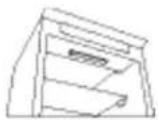
This product contains a top light source of energy efficiency class G
HOW TO STORE FRESH FOOD AND BEVERAGES
Foods which give off a large amount ethylene gas (apples, apricots, pears, peaches, avocado, figs, prunes, blueberries, mellons, beans) and those that are sensitive to this gas, such as fruit vegetables and salad, should always be separated or wrapped so as not to reduce the storage life; for example do not store tomatoes together with kiwi fruits or cabbage. Do not store food too close together to enable sufficient air circulation. Use recyclable plastic, metal, aluminum and glass containers and cling film to wrap foods. If you have a little quantity of food to store in the refrigerator, we recommend to use the shelves above the crisper for fruits and vegetables since this is the coolest area of the compartment. Always use closed containers for liquids and for food that may give off or be tainted by odor or flavor transfer or cover them. To avoid bottles falling over, you can use the bottle holder (available on selected models).

Legend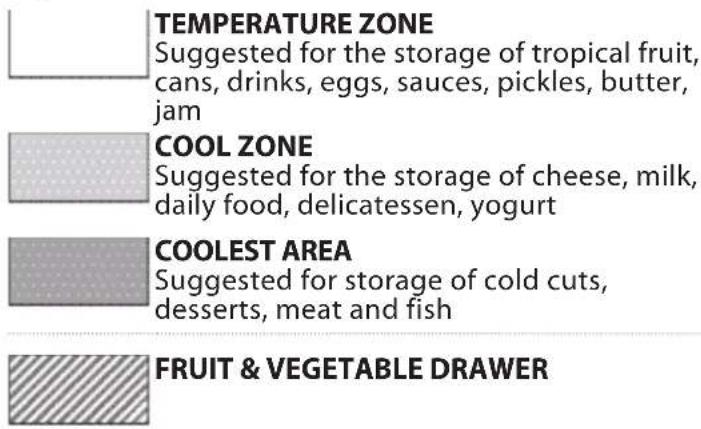
The load limits are determined by the particular construction (baskets, containers, flaps, drawers, shelves, etc.), or the load limits are determined by natural load limits.
FREEZER COMPARTMENT FOOD STORAGE
The freezer compartment → all allows long time storage of frozen food and freezing of fresh food. The quantity of fresh food that can be frozen in 24 hours is written on the rating plate. Arrange the fresh food in the freezing area inside the freezer compartment, leaving enough space around the food packages to allow air to circulate freely. It is advisable that you do not re-freeze food that has partially defrosted. It is important to wrap the food in a way that prevents the ingress of water, humidity or condensation.
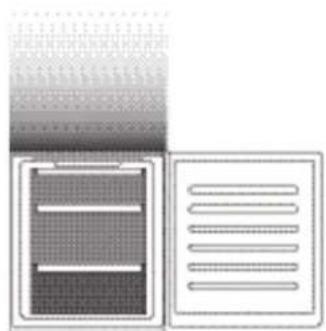
Legend FREEZER DRAWERS
FREEZING ZONE DRAWER (Max cool zone) Suggested to freeze fresh/cooked food
REMOVING THE DRAWERS
Pull the drawers outwards as far as they will go, lift them up and remove them. To get more volume, the freezer compartment can be used without the drawers. Make sure that the door is closed properly after putting the food back on the grilles/shelves.
STORAGE TIMES FOR HOME FROZEN FOODS
Store Zone
Months


Food


FREEZER COMPARTMENT
Ice cubes
Fill 2/3 of the ice tray with water and put it back in the freezer compartment. Do not use sharp or pointed objects to remove the ice under any circumstances.
The quantity of fresh food that can be frozen in a specific time period is indicated on the rating plate.
Load limits are determined by baskets, flaps, drawers, shelves etc. Make sure that these components can still close easily after loading.
Easy Take Freezer Tray
Easy access zone in the freezer: easy to find and grab your favorite items.
Total No Frost system
The Total No Frost system effectively prevents ice formation, avoiding the hassle of manual defrosting both in freezer and fridge cavity.
Its ventilation system provides perfect circulation of cold air in both cavities thus avoiding ice builds up.
FUNCTIONAL SOUNDS
- A buzz generated by the compressor is normal while the product is working.

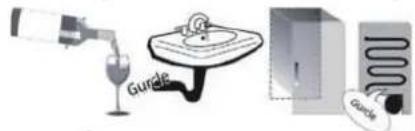
- Gurgling and crackles are generated by the passage of the refrigerant gas inside the cooling circuit, therefore these are normal noises.
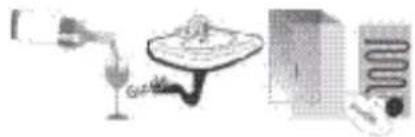
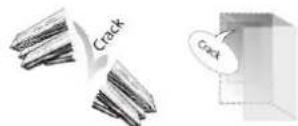
- It's possible to "hear" creaks when the compressor is active and inactive: it is a normal sound of the product's structure.
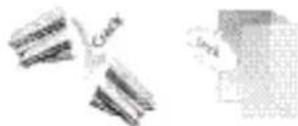
- Check that the balconies on the inside of the refrigerator door, the shelves and the drawers in the refrigerator compartment are attached and positioned properly, to avoid possible vibrations.
- Don't place glass containers (bottles, jars, etc.) in direct contact with each other, to avoid vibrations.
- This device is equipped with a compressor that operates at an optimum speed to minimize energy consumption. So it may happen that in certain situations (in summer or if large quantities of food are introduced) that the compressor increases the speed and therefore it is more noisy than usual.
RECOMMENDATION IN CASE OF NO USE OF THE APPLIANCE
In the event of non-use of the appliance
Disconnect the appliance from the power supply, empty it, defrost it (if necessary) and clean it. Keep the doors slightly ajar to let air circulate inside the compartments. By doing this, you avoid the development of mould and bad odours.
In the event of an interruption to the power supply
Keep the doors closed so the food stays cold for as long as possible. Do not re-freeze food that has partially defrosted. If there is a prolonged power cut, the black out alarm may also activate (in products with electronics).
CLEANING AND MAINTENANCE
Before any cleaning or maintenance operation, unplug the appliance from the mains or disconnect the electrical power supply.
Never use abrasives. Never clean refrigerator parts with flammable fluids.
Do not use steam cleaners.
The buttons and control panel display must not be cleaned with alcohol or alcohol-derived substances, but with a dry cloth.
Clean the appliance occasionally with a cloth and a solution of warm water and neutral cleaning agents specifically for cleaning the inside of the refrigerator.
REFRIGERATOR LIGHT
The light system inside the refrigerator compartment uses LEDs light, allowing a better lighting than traditional light bulbs as well as a very low energy consumption. Contact the Technical Assistance Service if you need a replacement.
Important: The refrigerator compartment light switches on when the refrigerator door is opened.
SHELVES
All of the drawers, door shelves and shelves can be removed.
DOOR
DOOR REVERSIBILITY
Note: The direction of door opening can be changed. If this operation is not performed by After-sales Service it is not covered by the warranty. Follow instruction in Installation chapter.
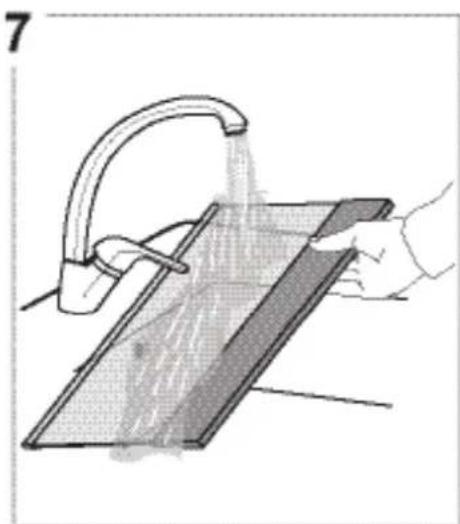
REMOVING THE FRIDGE DRAWER
i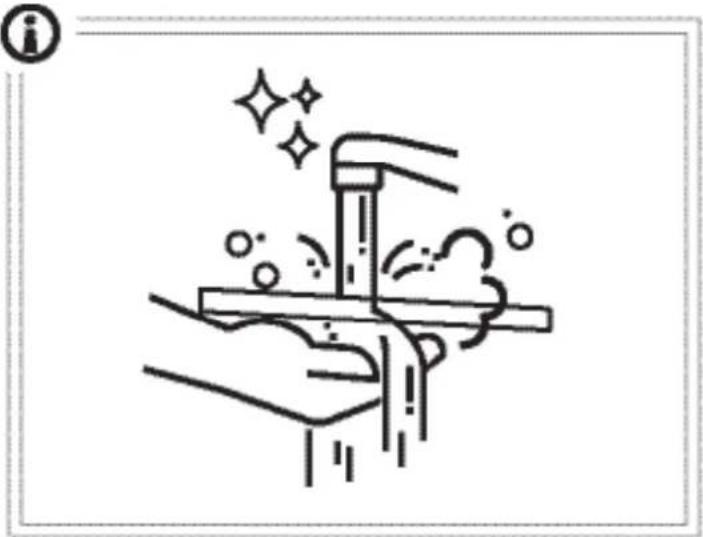
1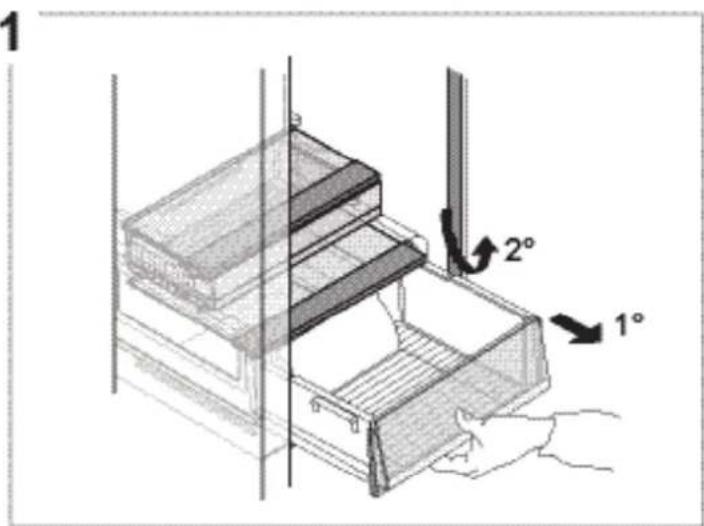
2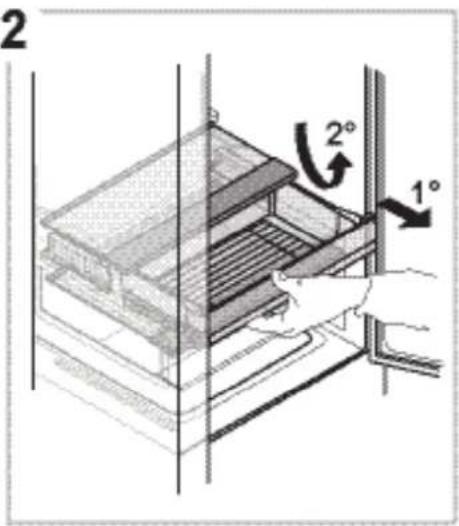
3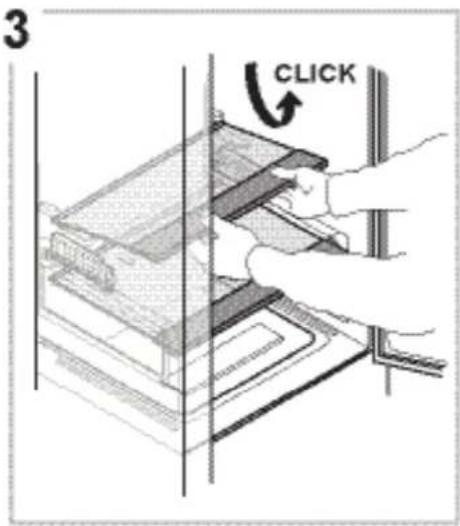

5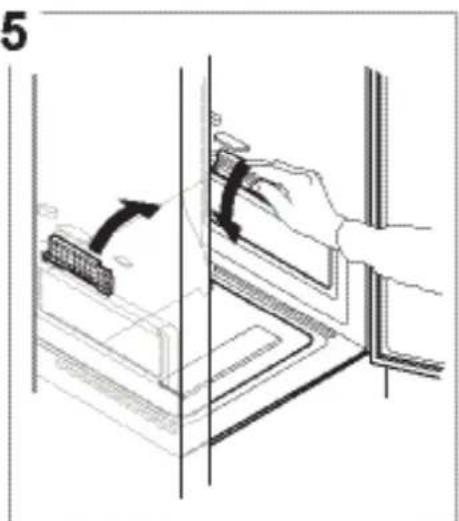
6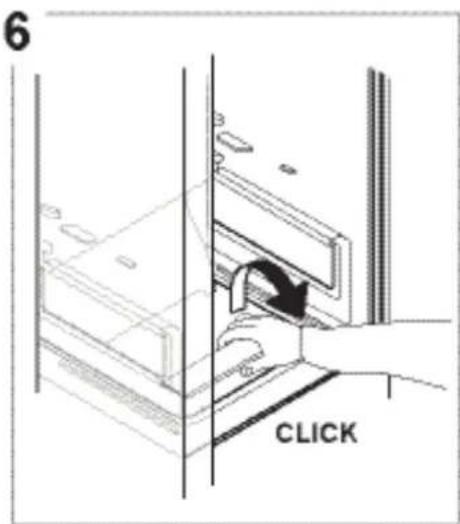
8
9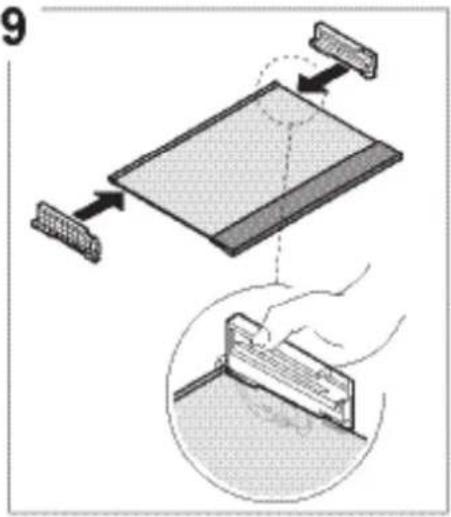
10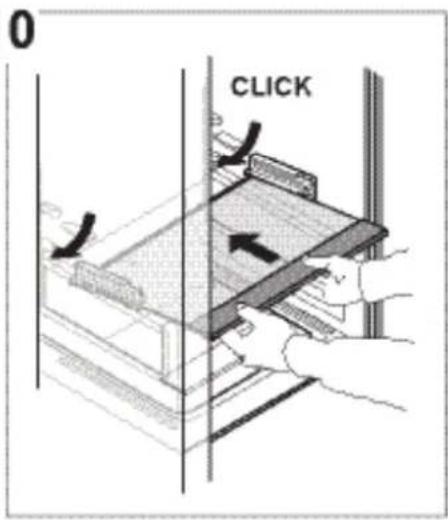
11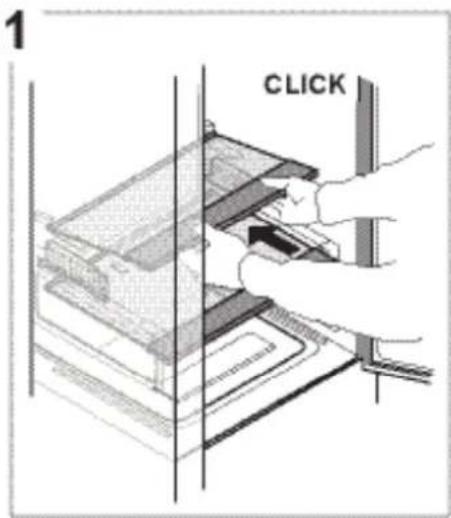
12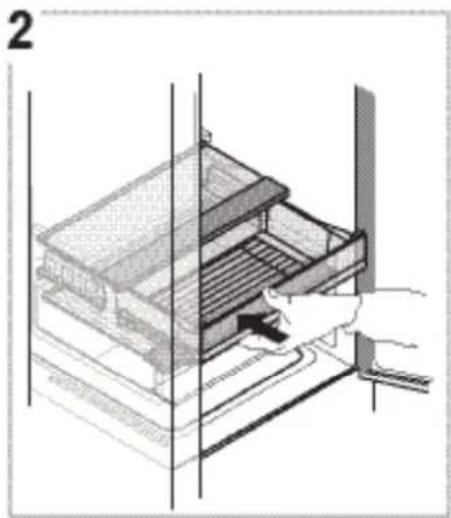
13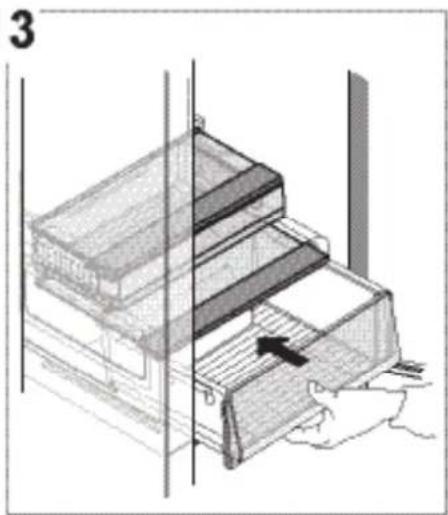
TROUBLESHOOTING
What to do if... Possible reasons Solutions
| The control panel is switched off, the appliance does not work. | The appliance could be in On/Standby mode.There may be an appliance power supply problem. | Activate the appliance with the button 1.Make sure:there is not a power outagethe plug is properly inserted in the power socket and the mains double-pole switch (if present) is in the correct position (i.e. allows the appliance to be powered)the household electrical system protection devices are efficientthe power cable is not broken. |
| The inside light does not work. | The light may need replacing. Contact the | Authorized service center. |
| The appliance could be in On/Standby mode. | Activate the appliance with the button 1. | |
| The temperature inside the compartments is not low enough. | There could be various causes (see "Cures"). | Make sure:the doors close properlythe appliance is not installed near a heat sourcethe set temperature is adequatethe circulation of air through the vents at the bottom of the appliance is not obstructed. |
| The front edge of the appliance, at the door striker seal, is hot. | This is not a defect. It prevents condensation from forming. | No cure is necessary. |
| Acoustic signal sounds. Door open alarmIt is activated when a door remains open for a long period of time. | Close the doors of the product to deactivate the acoustic signal. | |
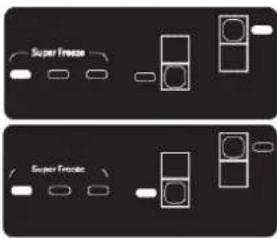 | Black Out alarmIt is activated in case of a prolonged power outage causing an increase in the freezer compartment temperature.Note: A different product temperature cannot be set until the Black Out alarm is deactivated. | Before deactivating the acoustic signal, it is advisable to pay attention to the Freezer temperature leds, corresponding to the highest temperature reached in the freezer compartment during the black out. Press the "Stop Alarm" button briefly to deactivate the acoustic signal. After pressing the button, the temperature led shows the set temperatures again. If the freezer compartment has not yet reached the optimum food preservation temperature, the freezer compartment temperature alarm could be activated (see freezer compartment temperature alarm). Check the food before consuming it. |
 | Freezer compartment temperature alarmThe freezer compartment temperature alarm indicates that the compartment temperature is not optimum. This may happen: with first use, after defrosting and/or cleaning, if large amounts of food are placed inside the freezer or when the freezer door has not been closed properly. | Pressing button (1) or button (6) button the acoustic alarm is snoozed |
WWW.FRANKE.COM
© Franke Technology and Trademark Ltd, Switzerland
SUPPORT
In the event of any operation problems, contact a Franke Technical Service Centre.
Never use the services of unauthorized technicians.
Specify:
- the type of fault
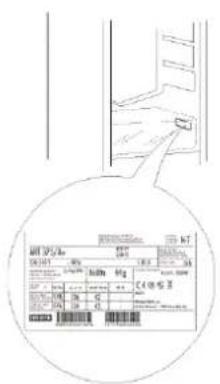
- the appliance model (art./Code)
- the serial number (S.N.).
When contacting our Service Centre, please state the codes provided on your product's identification plate.
CONTENTS
Overview....18
General information....18
Control panel....18
OPERATION....19
Key to symbols

TEMPERATURE RANGE
Key to symbols
FREEZER COMPARTMENT DRAWERS
FREEZER COMPARTMENT
(Max cooling area)
1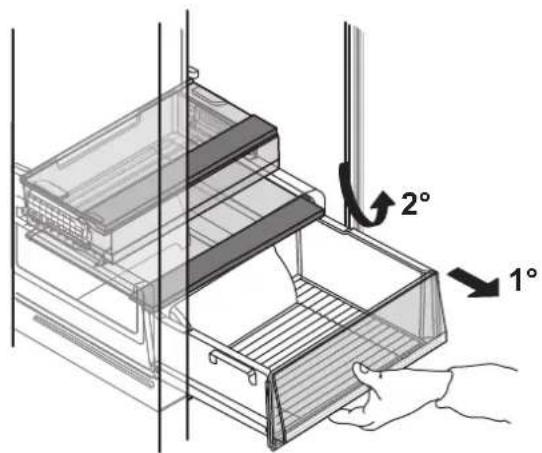
2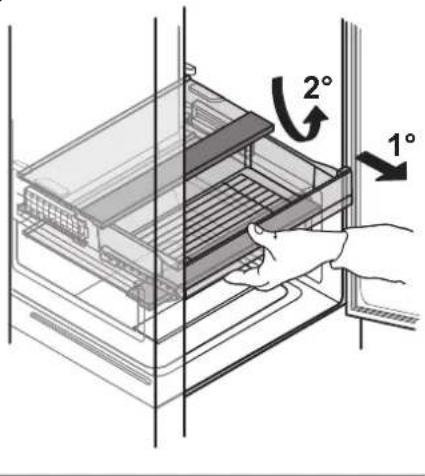
3
4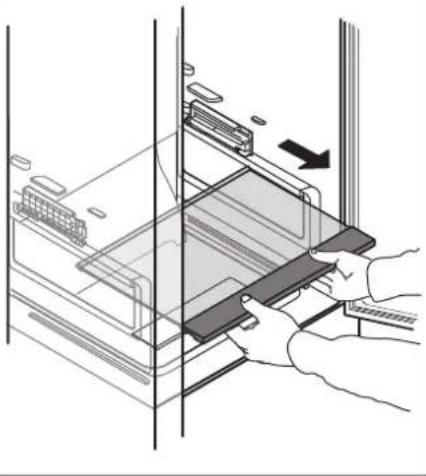
5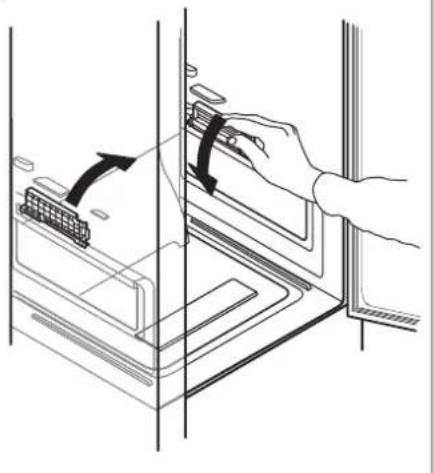
6
7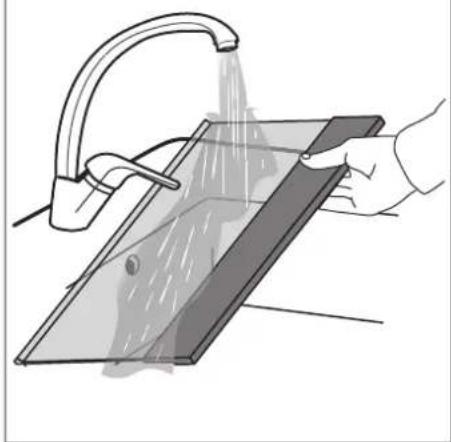
8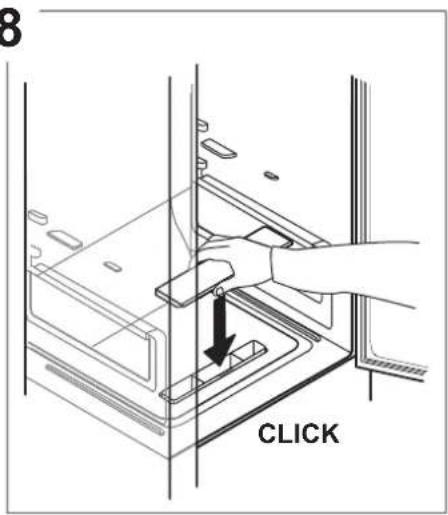
9
10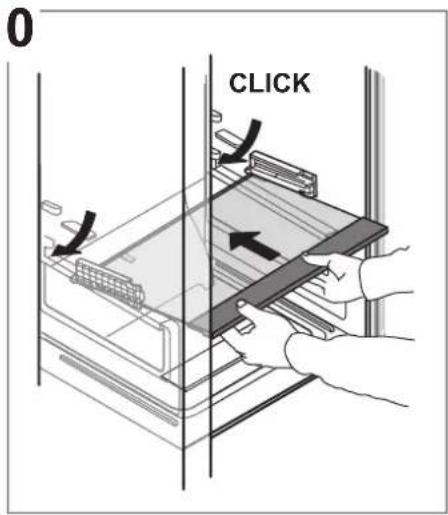
11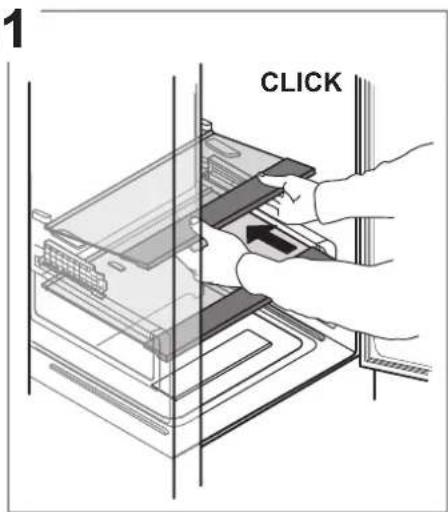
12
13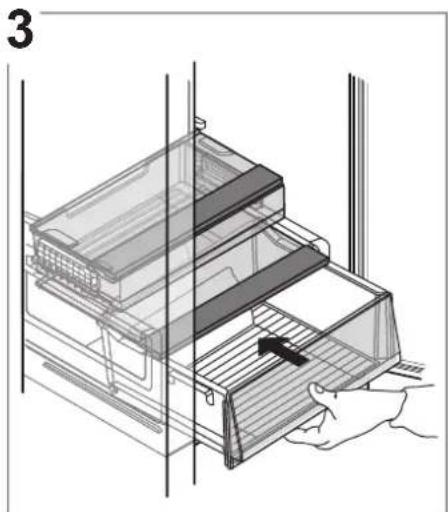
© Franke Technology and Trademark Ltd, Switzerland
SUPPORT
Legend
TEMPERATURE ZONE
Legend
FREEZER DRAWERS
FREEZER COMPARTMENT
Ice cubes
1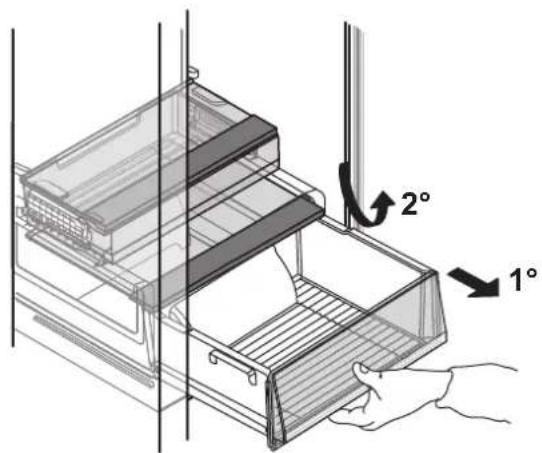
2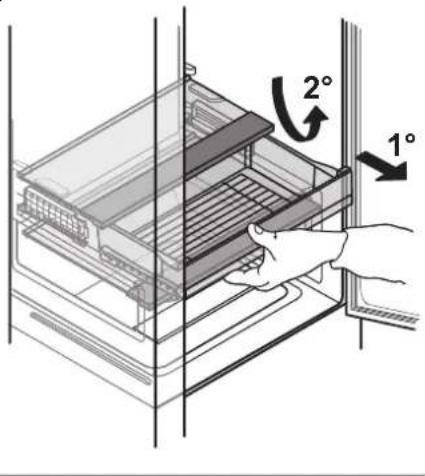
3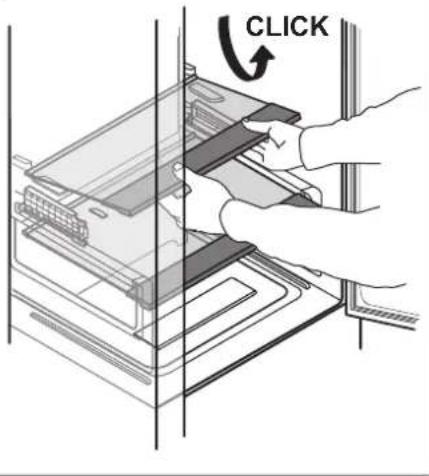
4
5
6
7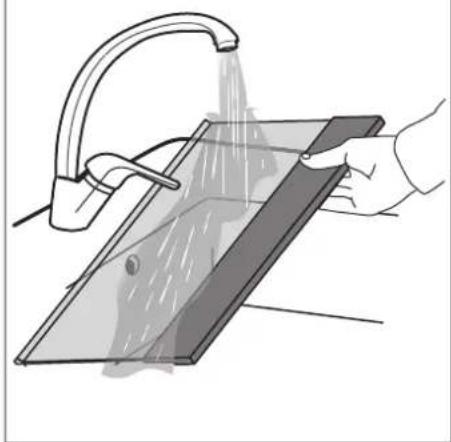
8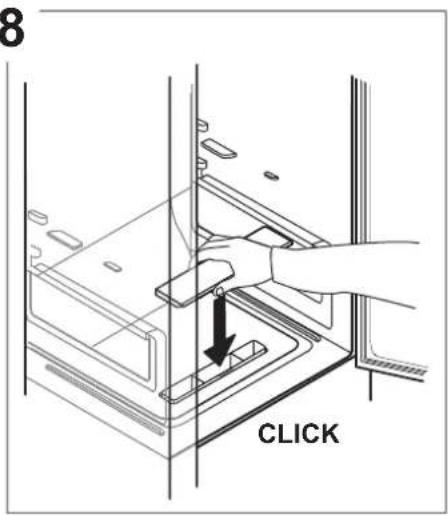
9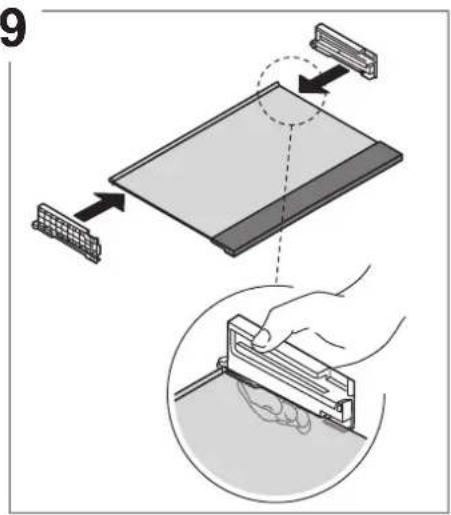
10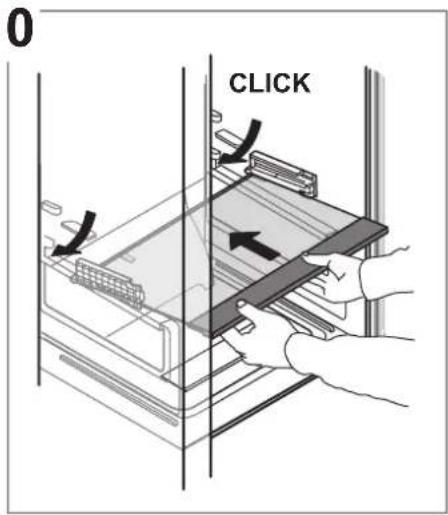
11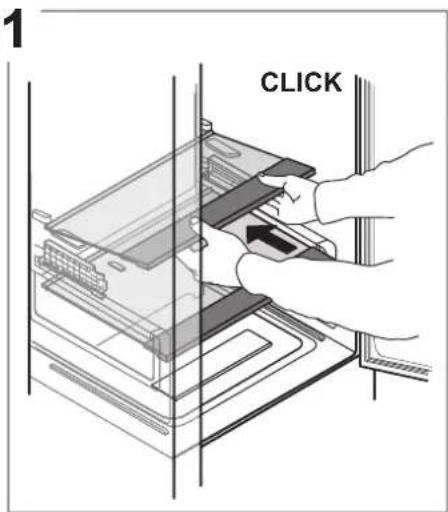
12
13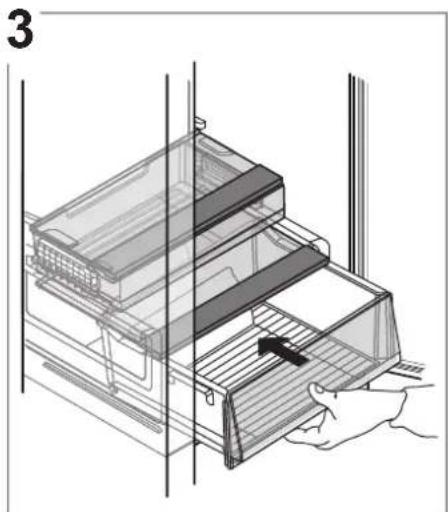
© Franke Technology and Trademark Ltd, Switzerland
ASSISTANCE
Legend
TEMPERATE ZONE
Legend
FREEZER DRAWERS
FREEZING ZONE DRAWER

1
2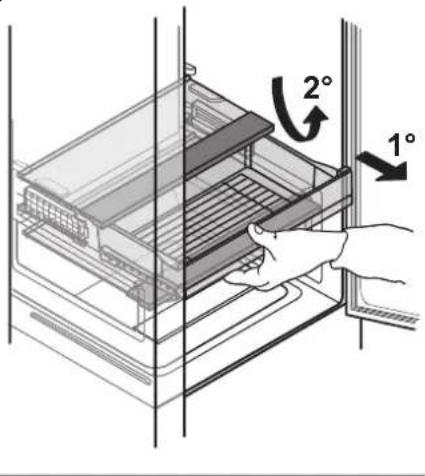
3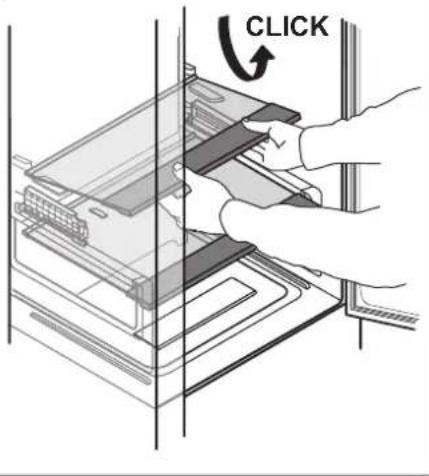
4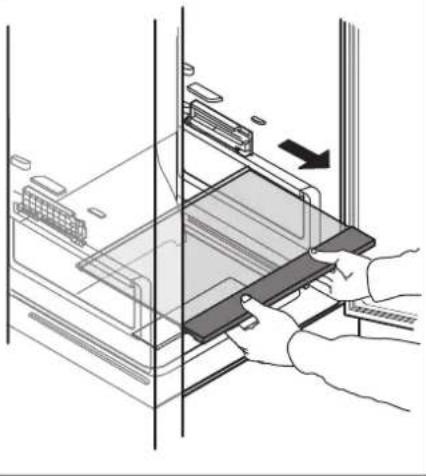
5
6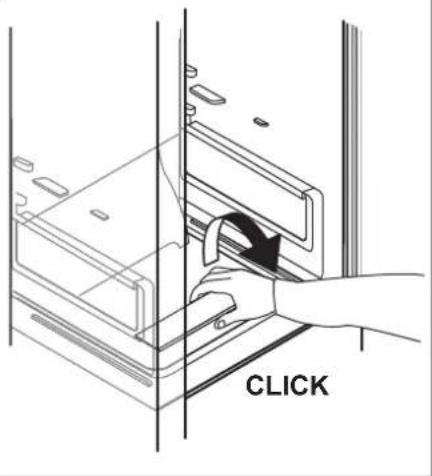
7
8
9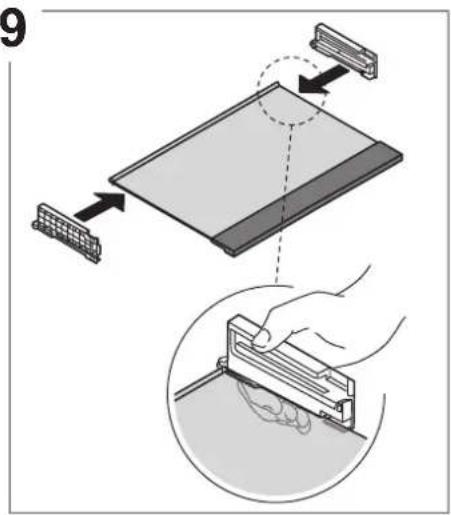
10
11
12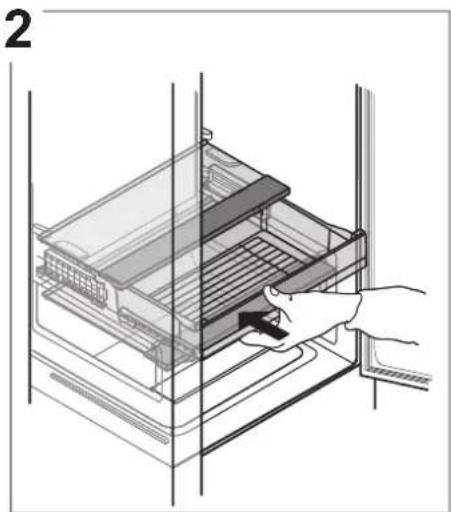
13
ANOMALIES AND REMEDIES
© Franke Technology and Trademark Ltd, Switzerland
ASSISTANCE
INDEX
Legend
TEMPERATURE ZONE
Legend
CLEANING AND MAINTENANCE
1
2
3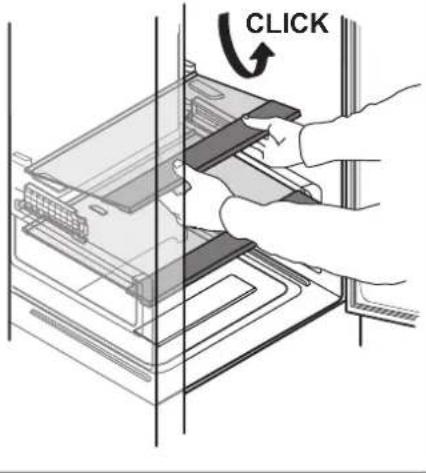
4
5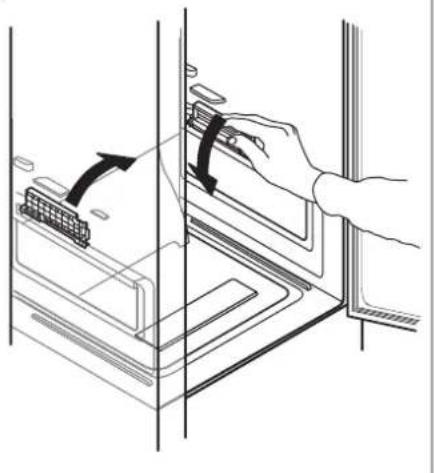
6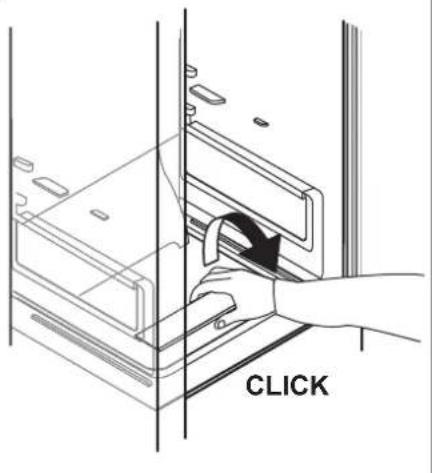
7
8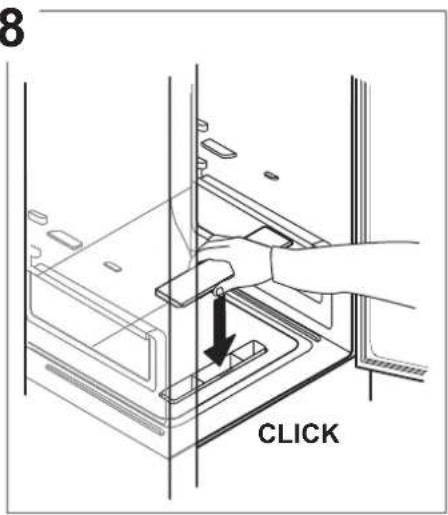
9
10
11
12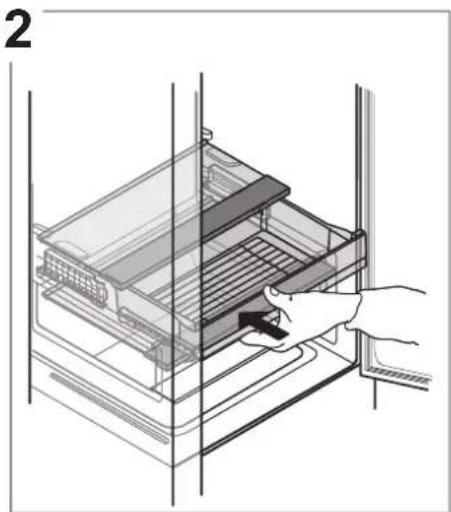
13
© Franke Technology and Trademark Ltd, Switzerland
ASSISTANCE
INDEX
OVERVIEW 58
General information 58
Control panel....58
OPERATION....59
Legend
TEMPERATURE ZONE
Recommended for storing tropical fruits, cans, beverages, eggs, sauces, pickles, butter, and jams

FRESH ZONE
Legend
1
2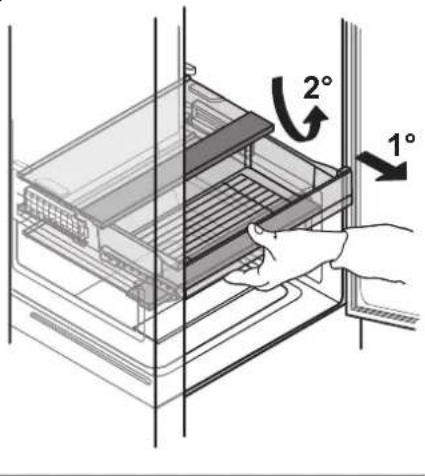
3
4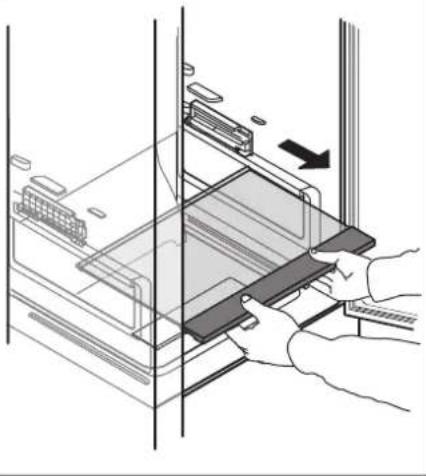
5
6
7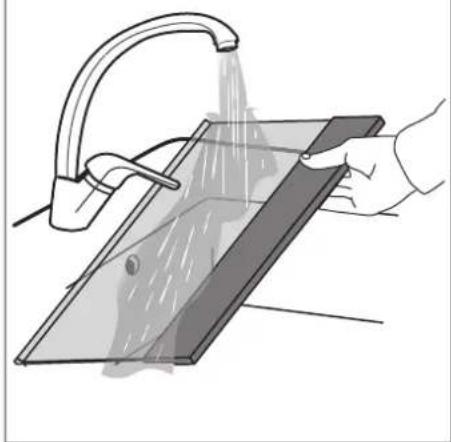
8
9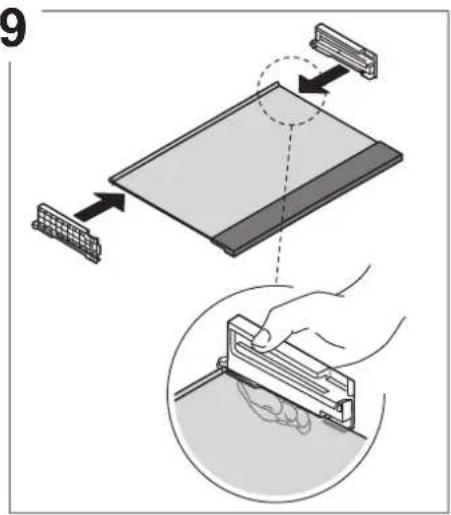
10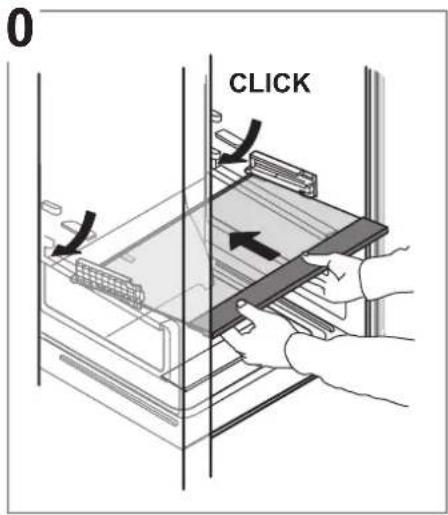
11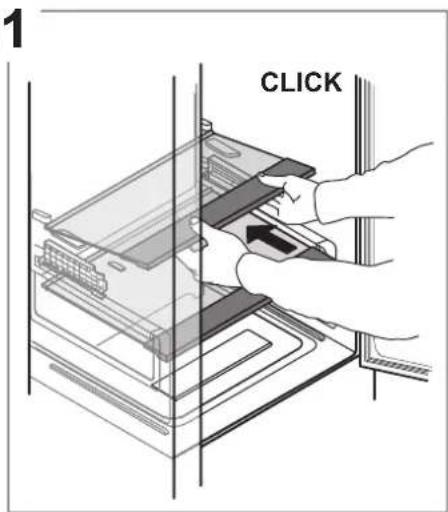
12
13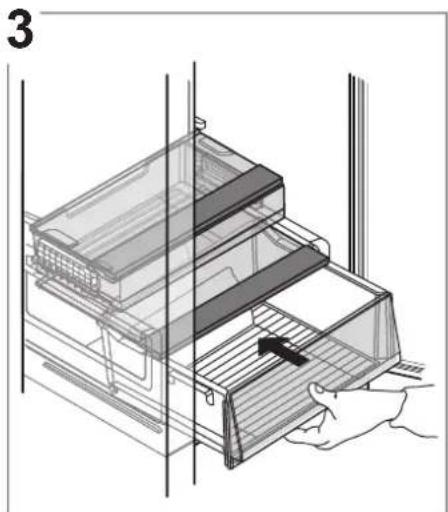
© Franke Technology and Trademark Ltd, Switzerland
SUPPORT
TABLE OF CONTENTS
TABLE OF CONTENTS....68
Legend
TEMPERATURE ZONE
Legend

FREEZER DRAWERS
FREEZING ZONE DRAWER
1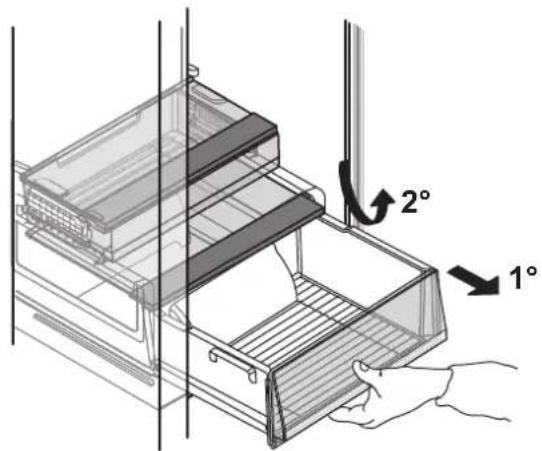
2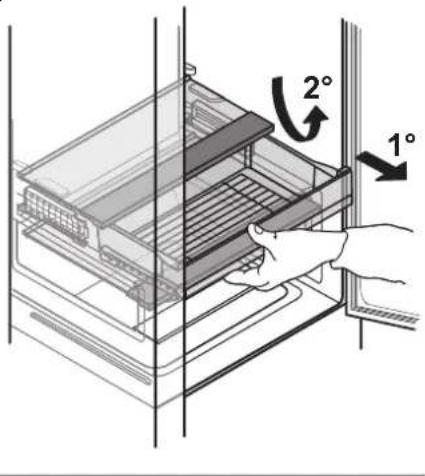
3
4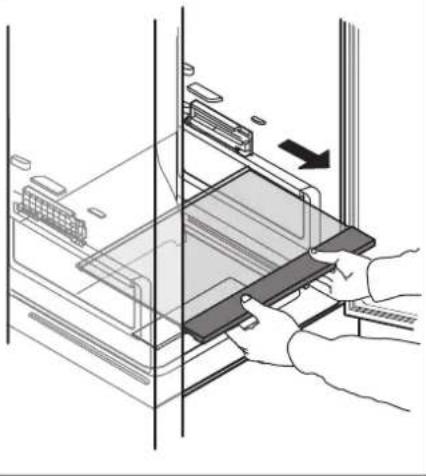
5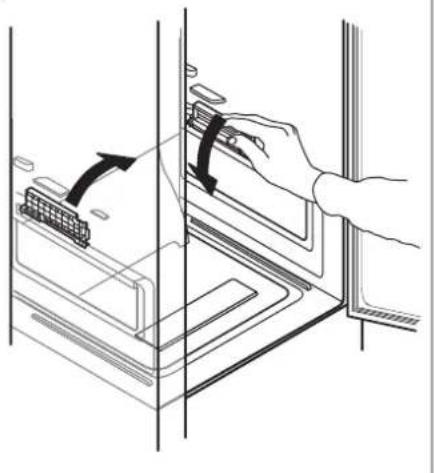
6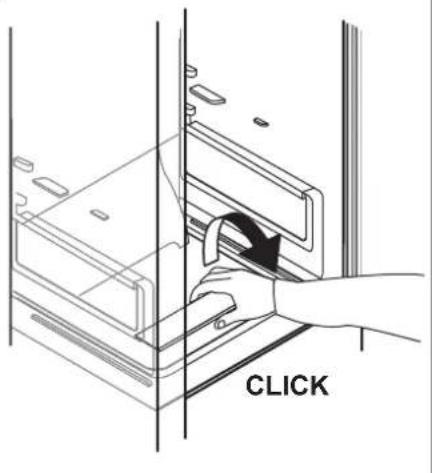
7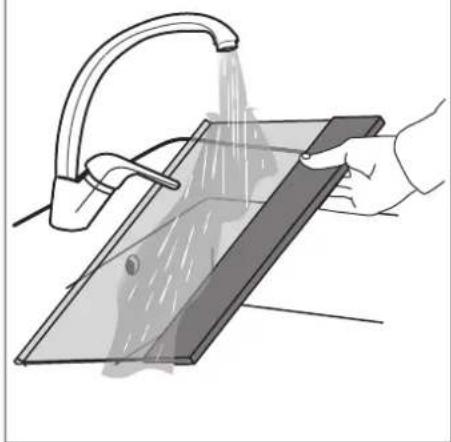
8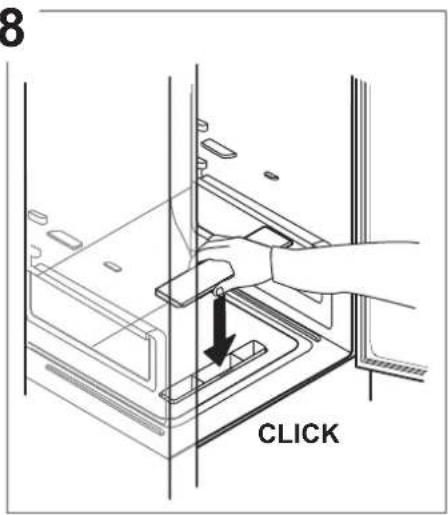
9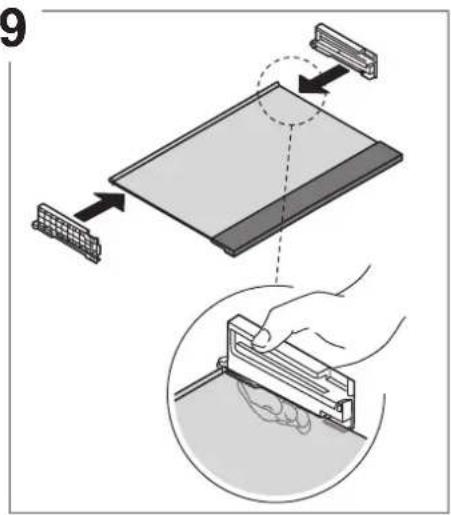
10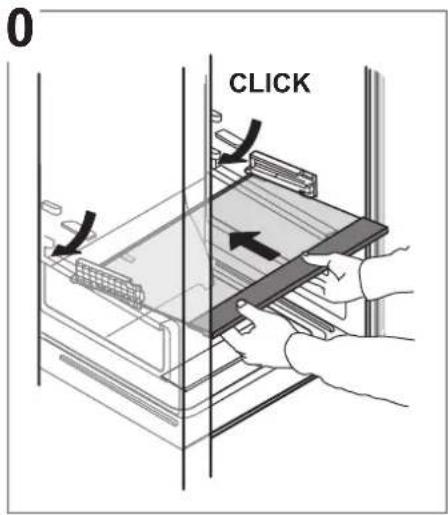
11
12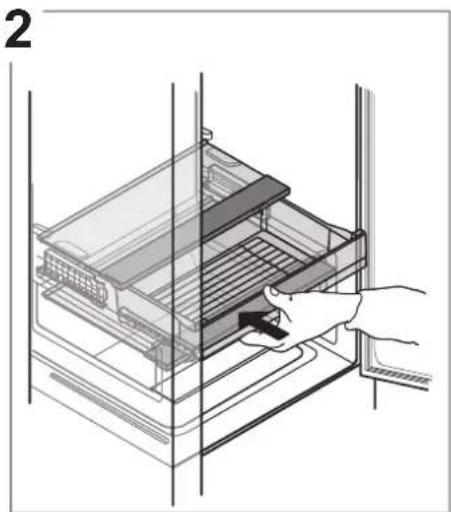
13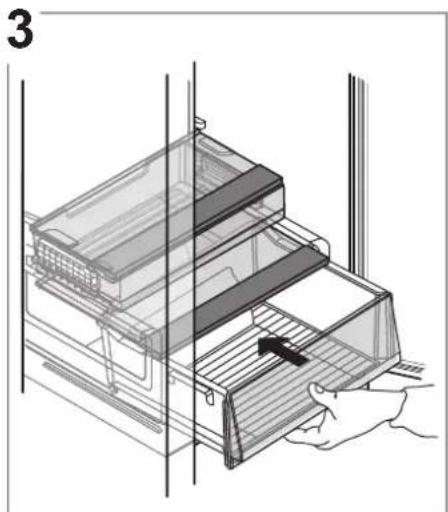
TROUBLESHOOTING
© Franke Technology and Trademark Ltd, Switzerland
TECHNICAL SUPPORT
www.franke.com



- FCB 360 TNF NE E
- TABLE OF CONTENTS
- OVERVIEW
- OPERATION
- CLEANING AND MAINTENANCE
- TROUBLESHOOTING
- SUPPORT
- USER GUIDE
- GENERAL INFORMATION
- CONTROL PANEL
- SETTING THE TEMPERATURES
- DISPOSAL
- ON/STAND-BY
- FAST FREEZE FUNCTION
- FIRST TIME USE
- REFRIGERATOR COMPARTMENT AND FOOD STORAGE
- MULTIFLOW AIR DISTRIBUTION
- HOW TO STORE FRESH FOOD AND BEVERAGES
- FREEZER COMPARTMENT FOOD STORAGE
- REMOVING THE DRAWERS
- STORAGE TIMES FOR HOME FROZEN FOODS
- STORE ZONE
- FREEZER COMPARTMENT
- ICE CUBES
- EASY TAKE FREEZER TRAY
- TOTAL NO FROST SYSTEM
- FUNCTIONAL SOUNDS
- RECOMMENDATION IN CASE OF NO USE OF THE APPLIANCE
- IN THE EVENT OF NON-USE OF THE APPLIANCE
- IN THE EVENT OF AN INTERRUPTION TO THE POWER SUPPLY
- REFRIGERATOR LIGHT
- SHELVES
- DOOR
- DOOR REVERSIBILITY
- REMOVING THE FRIDGE DRAWER
- WWW.FRANKE.COM
- SPECIFY
- CONTENTS
- KEY TO SYMBOLS
- TEMPERATURE RANGE
- FREEZER COMPARTMENT DRAWERS
- LEGEND
- TEMPERATURE ZONE
- FREEZER DRAWERS
- ASSISTANCE
- TEMPERATE ZONE
- FREEZING ZONE DRAWER
- ANOMALIES AND REMEDIES
- INDEX
- FRESH ZONE
- TECHNICAL SUPPORT
Brand : FRANKE
Model : FCB 360 TNF NE E
Category : Refrigerator