
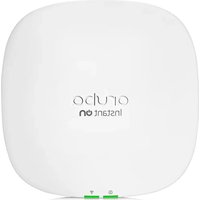
Aruba Unified AP-635 - Access Point HP - Free user manual and instructions
Find the device manual for free Aruba Unified AP-635 HP in PDF.


| Product Type | Wireless Access Point |
| Model | Aruba Unified AP-635 |
| Wi-Fi Standard | 802.11ax (Wi-Fi 6) |
| Frequency Bands | 2.4 GHz and 5 GHz |
| Maximum Data Rate | 2.4 GHz: 1.147 Gbps, 5 GHz: 4.8 Gbps |
| MIMO Configuration | 4x4:4 MU-MIMO |
| Antenna Type | Integrated omnidirectional antennas |
| Bluetooth | Bluetooth 5.0 |
| Interfaces | 1x 5 GbE RJ-45, 1x 10/100/1000 RJ-45, USB-C console |
| Power Source | Power over Ethernet (PoE+) 802.3at |
| Power Consumption | 18.5 W (typical) |
| Security | WPA3, WPA2, 802.1X, Enhanced Open, OWE |
| Management | Aruba Central, Aruba Mobility Controller, Web UI, CLI |
| Operating Temperature | 0°C to 40°C |
| Weight | 0.5 kg (1.1 lbs) |
| Dimensions (W x D x H) | 195 x 195 x 38 mm |
| Mounting | Ceiling (flush mount, T-rail), wall mountable |
| Included Accessories | Mounting bracket, screws, safety cable |
| Certification | FCC, CE, Wi-Fi Alliance |
| Warranty | Limited lifetime (with Aruba support contract) |
Frequently Asked Questions - Aruba Unified AP-635 HP
User questions about Aruba Unified AP-635 HP
0 question about this device. Answer the ones you know or ask your own.
Ask a new question about this device
Download the instructions for your Access Point in PDF format for free! Find your manual Aruba Unified AP-635 - HP and take your electronic device back in hand. On this page are published all the documents necessary for the use of your device. Aruba Unified AP-635 by HP.
USER MANUAL Aruba Unified AP-635 HP
Aruba 630 Series Campus Access Points
Installation Guide
The tri-radio Aruba 630 Series access points support the IEEE 802.11ax WLAN standard in the 6GHz band (Wi-Fi 6E) as well as the 5GHz and 2.4GHz bands, delivering high performance and capacity with MIMO (Multiple-Input, Multiple-Output) and OFDMA (Orthogonal Frequency Division Multiple Access) technologies, while also supporting IEEE 802.11a/b/g/n/ac wireless services.
Package Contents
• Aruba 630 Series Campus Access Point (with a pre-installed mount bracket)

The AP mount bracket attaches to a variety of mount kits (sold separately).

Inform your supplier if there are any incorrect, missing, or damaged parts. If possible, retain the carton, including the original packing materials. Use these materials to repack and return the unit to the supplier if needed.
Hardware Overview
The following sections outline the hardware components of the 630 Series access points.
Figure 1 AP-635 Front View
LEDs
The LED displays located on the front panel of the access point indicate the following functions:
System Status LED
The System Status LED indicates the operating condition of the access point, See Table 1.
Table 1 System Status LED
| Color/State Meaning | |
| Off Device Powered off | |
| Green- solid Device ready, fully functional, no network restrictions | |
| Green- blinking1 | Device booting, not ready |
| Green- flashing off2 | Device ready, fully functional, either uplink negotiated in sub-optimal speed (<1Gbps) |
| Green- flashing on3 | Device in deep-sleep mode |
| Amber- solid Device ready, restricted power mode (limited PoE power available, or IPM restrictions applied), no network restrictions | |
| Amber- flashing off | Device ready, restricted power mode (limited PoE power available, or IPM restrictions applied), uplink negotiated in sub-optimal speed |
| Red System error condition - Immediate attention required | |
- Blinking: one second on, one second off, 2 seconds cycle.
- Flashing off: mostly on, fraction of a second off, 2 seconds cycle.
- Flashing on: mostly off, fraction of a second on, 2 seconds cycle.
2GHz/5GHz/6GHz Radio Status LEDs
The 2GHz/5GHz/6GHz Radio Status LEDs indicate the operating mode of the access point's 2GHz/5GHz/6GHz radios. See Table 2.
Table 2 2GHz/5GHz/6GHz Radio Status LEDs
| Color/State Meaning | |
| Off Device powered off, or radio disabled | |
| Green- solid Radio enabled in access mode | |
| Green- flashing off Radio enabled in uplink or mesh mode | |
| Amber- solid Radio enabled in monitor or spectrum analysis mode | |
LED Display Settings
The LEDs have three operating modes that can be selected in the system management software:
- Default mode: refer to Table 1 and Table 2 • Off mode: all LEDs are off
- Blink mode: all LEDs blink green (synchronized)
To force the LEDs into off mode or back to software defined mode, press the reset button for a short duration (less than 10 seconds).

Pressing the reset button for longer than 10 seconds may cause the AP to reset and return to factory default state.
Figure 2 AP-635 Rear View
Bluetooth 5.0 Low Energy and 802.15.4 Radio
The 630 Series is equipped with an integrated BLE 5.0 and 802.15.4 radio that provides the following capabilities:
• location beacon applications • wireless console access • IOT gateway applications
Console Port
The console port is a Micro-B connector located on the back of the 630 Series. Use the proprietary AP-CBL-SERU cable or AP-MOD-SERU module (sold separately) for direct local management of the 630 Series when connected to a serial terminal or laptop. For pin-out details, refer to Figure 3.
Figure 3 Micro-B Port Pin-out
Ethernet Ports
The 630 Series is equipped with two 100/1000/2500Base-T auto-sensing MDI/MDX wired RJ45 Ethernet ports (E0 and E1). The 2.5bps speed complies with NBase-T and 802.3bz specifications. Both ports are compliant with 802.3ab 1000Base-T Gigabit Ethernet and 802.3az (Energy Efficient Ethernet) standards. Both ports support 802.3af, 802.3at and 802.3bt Power over Ethernet compliance to accept power from a POE source, such as a PoE midspan injector, or a network switch.
Kensington Lock Slot
The 630 Series is equipped with a Kensington lock slot for additional physical security.
USB 2.0 Interface
The USB 2.0 interface located on the top of the 630 Series is compatible with selected cellular modems and other peripherals. When active, this interface can supply up to 5W/1A to a connected device.
Reset Button
The reset button can be used to reset the access point to factory default settings or turn off/on the LED display.
- Use one of the following methods to reset the access point to factory default settings:
■ To reset during normal operation:
- Hold the reset button for more than 10 seconds while the access point is running.
- Release the reset button.
■ To reset during power up, hold the reset button while the access point is powering up.
The system status LED will flash again within 15 seconds indicating that the reset is completed. The access point will now continue to boot with the factory default settings.
• To toggle the LED display between Off and Blinking:
During the normal operation of the access point, shortly press and release the reset button for less than 10 seconds using a small, narrow object, such as a paperclip.
Power
Both E0 and E1 ports support PoE-in (AP is a PoE-PD device), allowing the device to draw power from compliant PoE power sources. If PoE is not available, a proprietary AP-AC2-12B power adapter (sold separately) can be used to power the access point. When both PoE and DC power sources are available, the DC power source takes precedence. In that case, the access point simultaneously draws a minimal current from the PoE source. In the event that the DC source fails, the access point switches to the PoE sources.
The Intelligent Power Monitoring (IPM) feature may also be used to manage the power consumption preferences for this device. When enabled, the user may enable/disable power restrictions for the access point using Aruba's AP management software.
Table 3 lists operational restrictions when the access point is powered by different power options.
Table 3 Power Options and Operational Restrictions
| Power Source IPM Restrictions | ||
| DC power n/a No restrictions, all capabilities available | ||
| PoE 802.3bt n/a No restrictions, all capabilities available | ||
| PoE 802.3at disabled USB disabled (can be overruled in software) | ||
| PoE 802.3af disabled USB disabled (can be overruled in software), AP in dual radio mode, E1 or E0 disabled (one without PoE or E1), remaining wired port limited to 1Gbps. | ||
| PoE 802.3at enabled All capabilities available (features may be disabled per IPM configuration) | ||
| PoE 802.3af enabled All capabilities available (features may be disabled per IPM configuration) | ||
Before You Begin
Refer to the sections below before beginning the installation process.

FCC Statement: Improper termination of access points installed in the United States configured to non-US model controllers will be in violation of the FCC grant of equipment authorization. Any such willful or intentional violation may result in a requirement by the FCC for immediate termination of operation and may be subject to forfeiture (47 CFR 1.80).
Pre-Installation Checklist
Before installing the 630 Series, be sure that you have the following (not included with the AP):
- A mount kit compatible with the AP and mount surface
- Cat5E or better UTP cable with network access
- (Optional) a compatible 12V AC-to-DC power adapter with power cord
- (Optional) a compatible PoE midspan injector with power cord
- (Optional) a compatible snap-on front cover (for easy aesthetic customization) • (Optional) an AP-CBL-SERU console cable or an AP-MOD-SERU RS232 serial interface module Also make sure that (at least) one of the following network services is supported: • Aruba Discovery Protocol (ADP) • DNS server with an "A" record • DHCP Server with vendor-specific options

The Aruba 630 Series access point is designed in compliance with governmental requirements so that only authorized network administrators can change the settings. For more information about access point configuration, refer to the AP Software Quick Start Guide.
Identifying Specific Installation Locations
Use the access point placement map generated by Aruba RF Plan software application to determine the proper installation location(s). Each location should be as close as possible to the center of the intended coverage area and should be free from obstructions or obvious sources of interference. These RF absorbers/reflectors/interference sources will impact RF propagation and should be accounted for during the planning phase and adjusted for in RF plan.

Use of this equipment adjacent to or stacked with other equipment should be avoided because it could result in improper operation. If such use is necessary, this equipment and the other equipment should be observed to verify that they are operating normally.
Identifying Known RF Absorbers/Reflectors/Interference Sources
Identifying known RF absorbers, reflectors, and interference sources while in the field during the installation phase is critical. Make sure that these sources are taken into consideration when you attach an access point to its fixed location.
RF absorbers include:
- Cement/concrete—Old concrete has high levels of water dissipation, which dries out the concrete, allowing for potential RF propagation. New concrete has high levels of water concentration in the concrete, blocking RF signals. • Natural Items—Fish tanks, water fountains, ponds, and trees
- Brick
RF reflectors include:
- Metal Objects—Metal pans between floors, rebar, fire doors, air conditioning/heating ducts, mesh windows, blinds, chain link fences (depending on aperture size), refrigerators, racks, shelves, and filing cabinets.
- Do not place an access point between two air conditioning/heating ducts. Make sure that access points are placed below ducts to avoid RF disturbances.
RF interference sources include:
- Microwave ovens and other 2.4 or 5 GHz objects (such as cordless phones)
- Cordless headset such as those used in call centers or lunch rooms

Portable RF communications equipment (including peripherals such as antenna cables and external antennas) should be used no closer than 30 cm (12 inches) to any part of the access point. Otherwise, degradation of the performance of this equipment could result.
Access Point Installation
The Aruba 630 Series access points are designed for ceiling or wall mounted deployments. Several optional mount kits are available to attach the 630 Series to a variety of surfaces. These mount kits are available as
accessories and must be ordered separately. Refer to the online ordering guide at
https://www.arubanetworks.com

All Aruba access points should be professionally installed by an Aruba-Certified Mobility Professional (ACMP). The installer is responsible for ensuring that grounding is available and meets applicable national and electrical codes. Failure to properly install this product may result in physical injury and/or damage to property.
The installer is responsible for securing the access point onto the ceiling tile rail. Failure to properly install this product may result in physical injury and/or damage to property.

Use of accessories, transducers and cables other than those specified or provided by the manufacturer of this equipment could result in increased electromagnetic emissions or decreased electromagnetic immunity of this equipment and result in improper operation.
Software
For instructions on choosing operating modes and initial software configuration, refer to the AP Software Quick Start Guide.

Aruba access points are classified as radio transmission devices, and are subject to government regulations of the host country. The network administrator(s) is/are responsible for ensuring that configuration and operation of this equipment is in compliance with their country's regulations. For a complete list of approved channels in your country, refer to the Aruba Downloadable Regulatory Table at https://asp.arubanetworks.com.
Verifying Post-Installation Connectivity
The integrated LED on the access point can be used to verify that the access point is receiving power and initializing successfully (see Table 1-Table 2). Refer to the AP Software Quick Start Guide for further details on verifying post-installation network connectivity.
Electrical and Environmental Specifications
For additional specifications on this product, please refer to the product data sheet at www.arubanetworks.com
Electrical
- Ethernet: E0 port: 100/1000/2500Base-T auto-sensing MDI/MDX wired RJ45 network connectivity port E1 port: 100/1000/2500Base-T auto-sensing MDI/MDX wired RJ45 network connectivity port Power: ■ 12V DC power interface, support powering through AC-to-DC power adapter (AP-AC2-12B) ■ Power over Ethernet (PoE): 802.3af, 802.3at or 802.3bt compliant source

If a power adapter other than the Aruba-approved adapter is used in the US or Canada, it should be NRTL listed, with an output rated 12V DC, minimum 0.75A, marked "LPS" and "Class 2," and suitable for plugging into a standard power receptacle in the US and Canada.
Environmental
- Operating:
■ Temperature: 0°C to +50°C (+32°F to +122°F) ■ Humidity: 5% to 93% non-condensing
• Storage and transport:
■ Temperature: -40°C to +70°C (-40°F to +158°F) ■ Humidity: 5% to 93% non-condensing

The Aruba 630 Series access points are for indoor use only. The access point, AC adapter, and all connected cables are not designed for outdoor use.

This device is intended for stationary use in partly temperature controlled weather-protected environments.
Regulatory Model Name
The following regulatory model numbers (RMN) apply to the 630 Series:
• AP-635 RMN: APIN0635
Safety and Regulatory Compliance

RF Radiation Exposure Statement: This equipment complies with RF radiation exposure limits. This equipment should be installed and operated with a minimum distance of 13.78 inches (35cm) between the radiator and your body. This transmitter must not be co-located or operating in conjunction with any other antenna or transmitter.

Changes or modifications to this unit not expressly approved by the party responsible for compliance could void the user's authority to operate this equipment.

Federal Communication Commission
This device complies with Part 15 of the FCC Rules. Operation is subject to the following two conditions: (1) this device may not cause harmful interference, and (2) this device must accept any interference received, including interference that may cause undesired operation.
This equipment has been tested and found to comply with the limits for a Class B digital device, pursuant to Part 15 of the FCC Rules. These limits are designed to provide reasonable protection against harmful interference in a residential installation. This equipment generates, uses and can radiate radio frequency energy and, if not installed and used in accordance with the manufacturer's instructions, may cause harmful interference to radio communications. However, there is no guarantee that interference will not occur in a particular installation. If this equipment does cause harmful interference to radio or television reception, which can be determined by turning the equipment off and on, the user is encouraged to try to correct the interference by one or more of the following measures:
• Reorient or relocate the receiving antenna. - Increase the separation between the equipment and receiver. - Connect the equipment to an outlet on a circuit different from that to which the receiver is connected.
Consult the dealer or an experienced radio or TV technician for help.

FCC regulations restrict the operation of this device to indoor use only.

The operation of this device is prohibited on oil platforms, cars, trains, boats, and aircraft, except that operation of this device is permitted in large aircraft while flying above 10,000 feet.

Operation in the 5.9725-7.125GHz band is prohibited for control of or communication with unmanned aircraft systems.
Innovation, Science and Economic Development Canada
This Class B digital apparatus meets all of the requirements of the Canadian Interference-Causing Equipment Regulations.
In accordance with Industry Canada regulations, this radio transmitter and receiver may only be used with an antenna, the maximum type and gain of which must be approved by Industry Canada. To reduce potential radio interference, the type of antenna and its gain shall be chosen so that the equivalent isotropic radiated power (EIRP) does not exceed the values necessary for effective communication.
This device complies with Industry Canada's license-exempt RSS regulations. Operation of this device is subject to the following two conditions: (1) this device may not cause interference, and (2) this device must accept any interference, including interference that may cause undesired operation.
When operated in the 5.15 to 5.25 GHz frequency range, this device is restricted to indoor use to reduce the potential for harmful interference with co-channel Mobile Satellite Systems.
European Union Regulatory Conformance
The Declaration of Conformity made under Radio Equipment Directive 2014/53/EU is available for viewing at: www.hpe.com/eu/certificates. Select the document that corresponds to your device's model number as it is indicated on the product label.
Wireless Channel Restrictions
5150-5350MHz band is limited to indoor only in the following countries: Austria (AT), Belgium (BE), Bulgaria (BG), Croatia (HR), Cyprus (CY), Czech Republic (CZ), Denmark (DK), Estonia (EE), Finland (FI), France (FR), Germany (DE), Greece (GR), Hungary (HU), Iceland (IS), Ireland (IE), Italy (IT), Latvia (LV), Liechtenstein (LI), Lithuania (LT), Luxembourg (LU), Malta (MT), Netherlands (NL), Norway (NO), Poland (PL), Portugal (PT), Romania (RO), Slovakia (SK), Slovenia (SL), Spain (ES), Sweden (SE), Switzerland (CH), Turkey (TR), United Kingdom (UK(NI)).
| Radio Frequency | Range MHz Max EIRP | |
| BLE/Zigbee 2402-2480 10 dBm | ||
| Wi-Fi | 2412-2472 20 dBm | |
| 5150-5250 23 dBm | ||
| 5250-5350 23 dBm | ||
| 5470-5725 30 dBm | ||
| 5725-5850 14 dBm | ||
| 5945-6425 23 dBm | ||

Lower power radio LAN product operating in 2.4 GHz and 5 GHz bands. Please refer to the ArubaOS User Guide/Instant User Guide for details on restrictions.
European Union and United Kingdom
This device is limited for indoor use. Use in trains with metal-coated windows (or similar structures made of materials with comparable attenuation characteristics) and aircraft is permitted. Operations in the 6GHz band are blocked by firmware for some countries pending adoption of spectrum. Refer to Aruba DRT release notes for details.
Medical
- Equipment not suitable for use in the presence of flammable mixtures.
- Connect to only IEC 60950-1 or IEC 60601-1 certified products and power sources. The end user is responsible for the resulting medical system complies with the requirements of IEC 60601-1.
- Wipe with a dry cloth, no additional maintenance required.
- No serviceable parts, the unit must be sent back to the manufacturer for repair.
- No modifications are allowed without Aruba approval.

This device is intended for indoor use in professional healthcare facilities.

This device has no IEC/EN60601-1-2 essential performance.

Use of this equipment adjacent to or stacked with other equipment should be avoided because it could result in improper operation. If such use is necessary, this equipment and the other equipment should be observed to verify that they are operating normally.

Compliance is based on the use of Aruba approved accessories. Refer to the ordering guide for this access point at https://www.arubanetworks.com

Use of accessories, transducers and cables other than those specified or provided by the manufacturer of this equipment could result in increased electromagnetic emissions or decreased electromagnetic immunity of this equipment and result in improper operation.

Portable RF communications equipment (including peripherals such as antenna cables and external antennas) should be used no closer than 30 cm (12 inches) to any part of the access point. Otherwise, degradation of the performance of this equipment could result.
Brazil
Hereby, Hewlett Packard Enterprise Company declares that the radio equipment type [The Regulatory Model Number [RMN] for this device can be found in the Regulatory Model Name section of this document] is in
compliance with Ukrainian Technical Regulation on Radio Equipment, approved by resolution of the CABINET OF MINISTERS OF UKRAINE dated May 24, 2017, No. 355. The full text of the UA declaration of conformity is available at the following internet address: https://certificates.ext.hpe.com/public/certificates.html
| Main Site https://www.arubanetworks.com | |
| Support Site https://asp.arubanetworks.com | |
| Airheads Social Forums and Knowledge Base | https://community.arubanetworks.com/ |
| North America Telephone 1-800-943-4526 | 1-408-754-1200 |
| International Telephone | https://www.arubanetworks.com/support-services/contact-support/ |
| Software Licensing Site | https://www.hpe.com/networking/support |
| End-of-Life Information | https://www.arubanetworks.com/support-services/end-of-life/ |
| Security Incident Response Team (SIRT) | https://www.arubanetworks.com/support-service/security-bulletins/Email: aruba-sirt@hpe.com |
Copyright
© Copyright 2021 Hewlett Packard Enterprise Development LP
Open Source Code
This product includes code licensed under the GNU General Public License, the GNU Lesser General Public License, and/or certain other open source licenses.
A complete machine-readable copy of the source code corresponding to such code is available upon request. This offer is valid to anyone in receipt of this information and shall expire three years following the date of the final distribution of this product version by Hewlett Packard Enterprise Company.
To obtain such source code, send a check or money order in the amount of US $10.00 to:
Hewlett Packard Enterprise Company
Attn: General Counsel
6280 America Center Drive
San Jose, CA 94089
USA
Warranty
This hardware product is protected by an Aruba warranty. For more details, visit www.hpe.com/us/en/support.html


- ARUBA 630 SERIES CAMPUS ACCESS POINTS
- INSTALLATION GUIDE
- PACKAGE CONTENTS
- HARDWARE OVERVIEW
- LEDS
- SYSTEM STATUS LED
- GHZ/5GHZ/6GHZ RADIO STATUS LEDS
- LED DISPLAY SETTINGS
- BLUETOOTH 5.0 LOW ENERGY AND 802.15.4 RADIO
- CONSOLE PORT
- ETHERNET PORTS
- KENSINGTON LOCK SLOT
- USB 2.0 INTERFACE
- RESET BUTTON
- POWER
- BEFORE YOU BEGIN
- PRE-INSTALLATION CHECKLIST
- IDENTIFYING SPECIFIC INSTALLATION LOCATIONS
- IDENTIFYING KNOWN RF ABSORBERS/REFLECTORS/INTERFERENCE SOURCES
- ACCESS POINT INSTALLATION
- SOFTWARE
- VERIFYING POST-INSTALLATION CONNECTIVITY
- ELECTRICAL AND ENVIRONMENTAL SPECIFICATIONS
- ELECTRICAL
- ENVIRONMENTAL
- REGULATORY MODEL NAME
- SAFETY AND REGULATORY COMPLIANCE
- FEDERAL COMMUNICATION COMMISSION
- INNOVATION, SCIENCE AND ECONOMIC DEVELOPMENT CANADA
- EUROPEAN UNION REGULATORY CONFORMANCE
- WIRELESS CHANNEL RESTRICTIONS
- EUROPEAN UNION AND UNITED KINGDOM
- MEDICAL
- BRAZIL
- COPYRIGHT
- OPEN SOURCE CODE
- WARRANTY
Brand : HP
Model : Aruba Unified AP-635
Category : Access Point