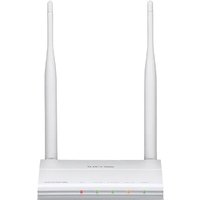
AirStation WZR-600DHP2 - Router BUFFALO - Free user manual and instructions
Find the device manual for free AirStation WZR-600DHP2 BUFFALO in PDF.


Pick your language and provide your email: we'll send you a specifically translated version.
| Product Type | Wireless Router |
| Brand | Buffalo |
| Model | AirStation WZR-600DHP2 |
| Wireless Standard | IEEE 802.11n/g/b |
| Frequency Band | 2.4 GHz and 5 GHz |
| Maximum Data Rate | Up to 600 Mbps (300+300 Mbps) |
| Ports | 4 x Gigabit LAN, 1 x Gigabit WAN, 1 x USB 2.0 |
| Antenna | 2 detachable external antennas (RP-SMA) |
| Security | WPA/WPA2, WEP, AOSS |
| Dimensions (W x D x H) | 30 x 159 x 200 mm |
| Weight | Approx. 400 g |
| Power Supply | AC 100-240 V, 50/60 Hz, Output: 12 V / 1.5 A |
| Power Consumption | Approx. 10 W |
| Operating Temperature | 0 to 40°C |
| Operating Humidity | 20% to 80% (non-condensing) |
| LED Indicators | Power, Wireless, LAN, WAN, USB, Security |
| Buttons | Power, AOSS/WPS, Reset |
| VPN Pass-through | PPTP, L2TP, IPSec |
| QoS | Yes (traffic prioritization) |
| USB Features | File sharing, printer sharing, storage |
| Compliance | FCC, CE, RoHS |
Frequently Asked Questions - AirStation WZR-600DHP2 BUFFALO
How do I reset the Buffalo AirStation WZR-600DHP2 to factory defaults?
Press and hold the Reset button on the back of the router for about 10 seconds until the power LED blinks. Release the button; the router will restart with factory settings.
What is the default IP address and login credentials?
The default IP address is 192.168.11.1, username is admin, and password is password (or blank). Check the sticker on the router for exact info.
Can I use this router as a wireless repeater?
Yes, the WZR-600DHP2 supports WDS and can be configured as a wireless repeater or access point via the web interface under 'Wireless Configuration'.
How do I set up the USB printer sharing?
Connect a USB printer to the router's USB port. Install the Buffalo Print Utility on your computer. The printer will be available over the network.
What should I do if the router is not connecting to the internet?
First, check the WAN cable connection and power cycle the router. Then log in to the web interface and verify the Internet connection type (e.g., PPPoE, DHCP). Reset the modem if necessary.
How do I change the wireless password?
Access the router's web interface (192.168.11.1), go to Wireless Settings, and update the 'Pre-Shared Key' or passphrase. Save and reboot.
Is the Buffalo AirStation WZR-600DHP2 compatible with third-party firmware like DD-WRT?
Yes, the WZR-600DHP2 is known to be compatible with DD-WRT and OpenWrt. Follow community guides to flash the firmware carefully.
What is the difference between AOSS and WPS?
AOSS (AirStation One-Touch Secure System) is Buffalo's proprietary wireless setup, while WPS (Wi-Fi Protected Setup) is a standard. Both allow easy secure connections with a button press.
How do I update the firmware?
Download the latest firmware from Buffalo's support website. Log in to the router's web interface, go to Administration > Firmware Update, select the file, and start the update. Do not power off during the process.
How many wired devices can I connect?
The router has 4 Gigabit LAN ports. You can connect up to 4 devices directly. For more, use a switch connected to any LAN port.
User questions about AirStation WZR-600DHP2 BUFFALO
0 question about this device. Answer the ones you know or ask your own.
Ask a new question about this device
No questions yet. Be the first to ask one.
Download the instructions for your Router in PDF format for free! Find your manual AirStation WZR-600DHP2 - BUFFALO and take your electronic device back in hand. On this page are published all the documents necessary for the use of your device. AirStation WZR-600DHP2 by BUFFALO.
USER MANUAL AirStation WZR-600DHP2 BUFFALO

Manual assistant
Powered by Anthropic
Waiting for your message
Product information
Brand : BUFFALO
Model : AirStation WZR-600DHP2
Category : Router