THASN2856TM4-S - Washing machine HAIER - Free user manual and instructions

Find the device manual for free THASN2856TM4-S HAIER in PDF.

HAIER THASN2856TM4-S - Washing machine
📄 180 pages English EN Download 💬 AI Question 21 questions ⚙️ Specs
Notice HAIER THASN2856TM4-S - page 19
Pick your language and provide your email: we'll send you a specifically translated version.
Product type Front-load washing machine
Brand Haier
Model THASN2856TM4-S
Washing capacity 8 kg
Dimensions (W x H x D) 600 x 850 x 550 mm
Net weight 72 kg
Power supply 230 V, 50 Hz
Rated power 2200 W
Energy class A+++
Annual energy consumption 180 kWh
Annual water consumption 10000 L
Noise level (washing/spinning) 56 / 78 dB(A)
Maximum spin speed 1400 rpm
Motor type Direct drive motor
Main functions Delayed start, delayed end, steam, self-cleaning
Wash programs Cotton, synthetic, delicate, wool, quick 15 min, sport
Safety Child lock, anti-overflow, imbalance detection
Maintenance Filter cleaning, emergency drain, drum cleaning
Common spare parts Filter, belt, drain pump, heating element
Repairability index 8.5 / 10

Frequently Asked Questions - THASN2856TM4-S HAIER

What to do if the machine does not start?
Check that the door is properly closed, the power supply is plugged in, and the water tap is open. Consult the user manual for error codes.
How to clean the drain pump filter?
Unplug the appliance, open the lower cover, unscrew the filter, drain residual water and clean it under running water. Put it back and screw it on.
Why does the machine vibrate during spinning?
Make sure the machine feet are properly adjusted and the floor is stable. Check that the transport bolts have been removed and that the laundry is evenly distributed.
How to use the steam program?
Select the appropriate steam program (e.g., anti-crease) via the selector. The machine injects steam to reduce wrinkles and freshen laundry. Follow the on-screen instructions.
What does error code E12 mean?
Error code E12 indicates a drainage problem. Check that the drain hose is not kinked or blocked, and clean the pump filter.
How to activate child lock?
Press the corresponding buttons simultaneously (usually temperature and spin buttons) for 3 seconds. A lock icon appears on the screen. To deactivate, repeat the operation.
Can I open the door during a cycle?
The door remains locked during the cycle for safety reasons. If the water temperature is below 40°C and the water level is low, the door unlocks automatically after a few minutes. Use the pause function if necessary.
How to maintain the door seal?
Clean the rubber seal regularly with a damp cloth to prevent mold. Leave the door slightly open after each wash to allow air to circulate.
What is the maximum recommended capacity for the cotton program?
For the standard cotton program, the maximum load is 8 kg. Do not exceed this capacity to ensure efficient washing and avoid damaging the machine.
How to descale the machine?
Use a special washing machine descaler or white vinegar. Run a 90°C program without laundry with the product. Repeat twice a year depending on water hardness.

User questions about THASN2856TM4-S HAIER

11 questions about this device. Answer the ones you know or ask your own.

Ask a new question about this device

Your email remains private: it is only used to notify you if someone answers your question.

The door seal of my HAIER THASN2856TM4-S is bulging after the second wash, what should I do?
Frequently Asked Questions - 7 d
Response Notice-Facile

A bulge in the seal after the second wash on a new machine is abnormal and suggests a manufacturing defect or a sealing issue.

Preliminary Checks

  • Check that the door closes completely and that nothing is blocking the seal
  • Clean the seal with a damp cloth - according to the THASN2856TM4-S manual, regular maintenance of the seal is recommended to avoid build-up
  • Make sure to leave the door ajar after each wash to promote air circulation and evaporation (this prevents deformation of the seal)

If the seal remains bulged

Contact Haier customer service immediately. You are covered by the legal warranty on your new machine, and the seal should be replaced free of charge. Keep your purchase receipt and take a photo of the defective seal to justify the defect with the manufacturer.

Haier technical support: check the hOn app (downloadable via QR code or go.haier-europe.com/download-app) or visit go.he.services/haier-um for support.

Respond (be the first)
How does the drum speed adjust according to the laundry load on the HAIER THASN2856TM4-S?
Frequently Asked Questions - 7 d
Response Notice-Facile

On the HAIER THASN2856TM4-S, the drum speed automatically decreases with a light load and increases with a heavier load.

Operation of the adaptation system

The washing machine has an automatic detection that recognizes the weight of the laundry at the beginning of the cycle and proportionally adjusts the drum rotation speed. This means:

  • Light load = reduced drum speed
  • Normal or heavy load = drum speed increased up to a maximum of 1400 rpm

Benefits of this adaptation

This automatic slowdown with a light load better preserves the fibers: less laundry requiring less mechanical action, the machine slows down proportionally to avoid unnecessary wear of the clothes.

Manual control possible

You can also manually reduce the spin speed via button C, independently of the automatically detected load. Available speeds include 1400 rpm, 800 rpm, 400 rpm (Night program), or no full spin.

Respond (be the first)
What drum speed will the HAIER THASN2856TM4-S have with a small load?
Frequently Asked Questions - 7 d
Response Notice-Facile

The HAIER THASN2856TM4-S features an integrated automatic detection that adjusts the drum speed based on the detected load. With a small load, here’s what happens:

  • Reduced speed: the machine slows down the drum rotation speed proportionally to the recognized weight of the laundry
  • Water consumption adjustment: the amount of water automatically decreases according to the detected weight, preserving delicate fibers
  • Adjusted cycle: the cycle duration and rinsing phases adapt to the small load to optimize washing
  • Foam management: the anti-foam system also automatically adjusts to the reduced load

The machine performs this recognition automatically at the beginning of the washing cycle by detecting both the weight and the type of fabric. You do not need to make any manual adjustments. The maximum drum speed is 1400 rpm, but this will be reduced based on the load and the selected program. If you wish to further decrease the rotation speed, you can use the C button to select 800 rpm or 400 rpm according to your needs.

Respond (be the first)
How does the Mixtes & Couleurs program use the load in kg on the HAIER THASN2856TM4-S?
Frequently Asked Questions - 7 d
Response Notice-Facile

The Mixtes & Couleurs program of the HAIER THASN2856TM4-S uses the load in kg thanks to an integrated automatic detection system. This technology recognizes the weight and type of fabric loaded in the drum and automatically adjusts:

  • The amount of water needed
  • The duration of the washing cycle
  • The rinsing control
  • The drum rotation speed
  • The foam management

You can load up to the maximum capacity of 8 kg for this program, which offers a predefined temperature of 20°C (modifiable) and guarantees excellent results in approximately 59 minutes. Therefore, there is no need to manually calculate the amount of water - the machine takes care of it automatically based on your actual load.

Respond (be the first)
Can I use a spin speed of 800 rpm on the HAIER THASN2856TM4-S?
Frequently Asked Questions - 7 d
Response Notice-Facile

Yes, you can use 800 rpm on the HAIER THASN2856TM4-S. This intermediate spin speed is perfectly possible on this machine, which has a maximum speed of 1400 rpm.

To reduce the spin speed from the maximum, you need to press the C button (spin reduction button). The manual states: "By pressing this button, it is possible to reduce the maximum speed and, if desired, to eliminate the spin cycle."

The device has a selective spin speed control and offers you several levels:

  • Maximum spin: 1400 rpm
  • Reduced speeds (including 800 rpm): activatable via the C button
  • Complete elimination of spin: possible if necessary
  • Night program with reduced spin: 400 rpm

800 rpm is an excellent compromise to preserve delicate fibers (stretch, elastane, synthetics) while ensuring good water extraction. This speed is about 2.8 times less intense than the maximum of the machine.

Respond (be the first)
What spin speed should be used for elastane garments, as 1200 RPM damages the fibers?
Frequently Asked Questions - 7 d
Response Notice-Facile

You identify a crucial point: elastane is extremely sensitive to high spin speeds, even 1200 RPM (which is close to the maximum of 1400 RPM of the HAIER THASN2856TM4-S) damages the fibers.

To protect your stretch garments:

  • Recommended program: Use the Wool/Hand Wash program at 30°C, which includes a gentle spin phase suitable for sensitive textiles.
  • Reduce spin: Press the Spin Speed (C) button on the control panel to reduce the speed well below 1200 RPM, or eliminate the spin cycle entirely.
  • Alternative drying: Prefer air drying or low temperature drying instead of applying aggressive spinning.

Following this approach significantly extends the lifespan of your elastic garments.

Respond (be the first)
Why does the amount of water affect the protection of clothes during washing?
Frequently Asked Questions - 7 d
Response Notice-Facile

You have raised a fundamental physical point: water acts as a hydraulic cushion that protects your textiles during the washing cycle.

How it works:

  • With more water, the fibers are immersed in an environment that absorbs and dampens the mechanical frictions of the drum and agitation.
  • With less water, the fibers are more concentrated, which increases direct friction between them and with the drum - leading to accelerated wear.

On the HAIER THASN2856TM4-S, this effect is observed between the two programs:

  • Mixed & Colors: accepts up to 8 kg of laundry and uses more water proportionally, providing better hydraulic protection (ideal for delicate colored garments).
  • Synthetic: limited to a maximum of 4 kg with less water, which explains why this program requires a smaller load - the limited space in the drum and the lesser amount of water require less textile volume.

To maximize protection:

  • Use the Wool/Hand Wash program for elastane and stretch fabrics (30°C, very gentle spin).
  • Reduce the spin manually with button C if you are washing delicate fabrics.
  • Activate the Rinse+ option to slightly increase the overall water volume.
Respond (be the first)
Which program consumes more water between Synthetic and Mixed & Colors?
Frequently Asked Questions - 7 d
Response Notice-Facile

The manual for the HAIER THASN2856TM4-S does not specify the exact water consumption for each program. However, here is what we can deduce:

The Mixed & Colors program generally injects more water, for two main reasons:

  • Higher capacity: it accepts up to 8 kg of laundry compared to a maximum of 4 kg for the Synthetic
  • Automatic load detection: this machine has a weight detection feature that automatically adjusts the amount of water based on the load. A more filled drum (Mixed & Colors) will therefore receive proportionally more water

In summary, it is the Mixed & Colors program that generally consumes more water, as it has to handle a larger load and the machine adjusts the water injection to this detectable load.

Respond (be the first)
What are the differences between the Synthetic and Mixed & Colors programs on the HAIER THASN2856TM4-S?
Frequently Asked Questions - 7 d
Response Notice-Facile

The Synthetic program and the Mixed & Colors program are designed for different uses:

Synthetic Program (60°C)

  • Temperature: 60°C by default
  • Capacity: up to 4 kg
  • Cycle: Drum movements and rinses optimized for synthetic fabrics
  • Spin: Gentle phase to reduce creasing
  • Ideal use: Polyester, viscose, slightly dirty mixed cotton

Mixed & Colors Program (20°C)

  • Temperature: 20°C by default (modifiable if needed)
  • Capacity: up to 8 kg (double that of synthetic)
  • Duration: 59 minutes - shorter cycle
  • Cycle: Suitable for lightly soiled laundry, allows washing all types of fabrics together
  • Ideal use: Lightly soiled laundry, colored garments, mixed fabrics, energy savings

Summary

Choose Synthetic if you have synthetic or slightly dirty mixed cotton laundry and can accept a maximum load of 4 kg. Choose Mixed & Colors if you have lightly soiled laundry, varied colors, or if you want a larger capacity (8 kg) with a gentle temperature and reduced energy consumption.

Respond (be the first)
Which program should I use to wash stretch clothing without damaging the elastane fibers?
Frequently Asked Questions - 7 d
Response Notice-Facile

To protect your stretch and elastane clothing, use the "Wool/Hand Wash" program on your THASN2856TM4-S. This program operates at 30°C with a very gentle drum action, specially designed for delicate and stretchy fabrics.

Here’s how to proceed:

  • Recommended program: Wool/Hand Wash (30°C) - designed for hand-washable items and sensitive fabrics
  • Temperature: Keep a maximum of 30°C (hot water weakens elastane)
  • Spin speed: Use reduced spin or select a low speed (less than 800 rpm) to limit tension on the fibers
  • Load: Do not exceed 4-5 kg per cycle - an overloaded drum increases friction

Alternative: The Synthetic program (60°C) may be suitable if your clothing is made of pure synthetic material, but the Wool/Hand Wash program remains safer for elastane.

Additional tips: Wash your stretch clothing inside out, avoid temperatures above 40°C, and use a gentle detergent. Your THASN2856TM4-S also offers a Quick 44' program that may be suitable for a quick and light wash at 30-40°C.

Respond (be the first)
How to increase the amount of water during washing on the HAIER THASN2856TM4-S washing machine?
Frequently Asked Questions - 7 d
Response Notice-Facile

The HAIER THASN2856TM4-S washing machine does not manually adjust the amount of water, but the system automatically manages the water volume based on your load of laundry in kg.

Increasing the amount of water

To increase the amount of water during washing, you need to increase the load of laundry (put in more clothes). The machine automatically detects the weight and adjusts the water accordingly.

Options to control the wash

  • Soil level (button G): allows you to adjust the program duration and washing intensity according to the estimated soil level of the laundry
  • Rinse + (button F): adds an extra rinse cycle at the end of the wash, also increasing the total water consumption

Water consumption is automatically optimized by the machine according to the detected weight of the laundry.

Respond (be the first)

Download the instructions for your Washing machine in PDF format for free! Find your manual THASN2856TM4-S - HAIER and take your electronic device back in hand. On this page are published all the documents necessary for the use of your device. THASN2856TM4-S by HAIER.

USER MANUAL THASN2856TM4-S HAIER

Washing machine Top Loader

Exterior view of a white disposable washing machine (no visible text or symbols).

IT 3

DE 11

EN 19

ES 27

FR 35

NL 43

PT 51

BG 59

HR 67

HU 75

SL 83

SR 91

CS 99

PL 107

RO 115

SK 123

UA 131

EL 139

DA 147

SV 155

FI 163

NO 171

ITHAIER THASN2856TM4-S - Washing machine Top Loader - 2

Haier

Technical line drawing of a front view of a computer tower case with a labeled component (no text or symbols beyond the label).

graph TD A["Open Bin"] --> B["Recycle Icon"] B --> C["Recycle Bin"] C --> D["Recycle Icon"] style A fill:#f9f,stroke:#333 style B fill:#ccf,stroke:#333 style C fill:#cfc,stroke:#333 style D fill:#fcc,stroke:#333

Diagram illustrating a mechanical or electrical operation with labeled steps and directional arrows indicating motion.

⑦ 1

Technical diagram showing two labeled mechanical assembly steps (A, B, C, D) with numbered components and structural details.

Buttons

A Play/pause

PROGRAMMA(XSTK) (MAX)(vedere pannello di controllo)HAIER THASN2856TM4-S - Buttons - 1DETERGENTELAVAGGIO NOTTURNOEXTRARISCIACQUOIGIENE +STIRATURA FACILELIVELLO MACCHIEPARTENZA RITARDATA
5kg5,5kg6kg6,5kg7kg7,5kg8kg8,5kg(MAX)1 o 2[2y8z]
HAIER THASN2856TM4-S - Buttons - 2RAPIDO 44'33333,553,53,53,53,540°///
HAIER THASN2856TM4-S - Buttons - 3RAPIDO 14'1111111,51,530°///
HAIER THASN2856TM4-S - Buttons - 4MISTI & COLORATI 59'55,566,577,588,540°///
HAIER THASN2856TM4-S - Buttons - 5LANA / LAVAGGIO A MANO1111112230°//
HAIER THASN2856TM4-S - Buttons - 6STIRATURA FACILE PLUS1,51,51,51,51,51,51,51,51,51,51,51,51,51,51,51,51,51,51,51,51,51,51,51,51,51,51,51,51,51,51,51,51,51,52,52,52,52,52,52,52,52,52,52,52,52,52,52,52,52,52,52,52,52,52,52,52,52,52,52,52,52,52,52,52,52,52,52
HAIER THASN2856TM4-S - Buttons - 7SCARICO & CENTRIFUGA---------
HAIER THASN2856TM4-S - Buttons - 8RISCIACQUO---------///
HAIER THASN2856TM4-S - Buttons - 9STEAM HYGIENE PLUS2,52,5333,53,54460°///
HAIER THASN2856TM4-S - Buttons - 10BABY CARE22222,52,52,52,52,540°/
HAIER THASN2856TM4-S - Buttons - 11FRESH CARE22222,52,52,52,52,540°///
HAIER THASN2856TM4-S - Buttons - 12ECO 40-6055,566,577,588,560°///
[DS86]20 °C55,566,577,588,560°/
HAIER THASN2856TM4-S - Buttons - 13SINTETICI2,52,5333,53,54460°(●)
HAIER THASN2856TM4-S - Buttons - 14COTONE55,566,577,588,590°(●)/
HAIER THASN2856TM4-S - Buttons - 15CONTROLLO REMOTO (Wi-Fi)Posizione da selezionare quando si desidera abilitare il controllo remoto tramite l'app (via Wi-Fi).

Technical diagram showing four steps of a device installation or assembly process with labeled components A, B, C, and D.

HAIER THASN2856TM4-S - Buttons - 17

HAIER THASN2856TM4-S - Buttons - 18

Haier

DEHAIER THASN2856TM4-S - Buttons - 19

Haier

Technical diagram of a front-mounted computer tower with labeled component C and numbered part (②).

PROGRAMMHAIER THASN2856TM4-S - Haier - 2 (MAX.) (siehe Bedienfeld)HAIER THASN2856TM4-S - Haier - 3WASCHMITTELNACHTPROGRAMMEXTRA SPÜLENHYGIENE+BÜGELLEICHTVERSCHMUTZUNGSGRADSTARTZEITVERZÖGERUNG
5kg5,5kg6kg6,5kg7kg7,5kg8kg8,5kg(MAX.)1oder2[TZG]
[CD70]KURZ 44'33333,553,5353,540°///
[642X]KURZ 14'1111111,51530°///
[923X]MISCH- & BUNTWÄSCHE 59'55,566,577,588,540°///
[62HZ]WOLLE/HANDWÄSCHE1111112230°//
[2KSH]BÜGELLEICHT PLUS1,5151,5151,5151,51,51,51,51,51,51,51,51,51,51,51,51,51,51,51,51,51,51,51,51,51,51,51,51,51,51,51,51,51,51,51,51,51,1,51,51,51,51,51,51,51,51,51,51,51,51,51,51,51,51,51,51,51,51,51,51,51,51,51,51,51,51,51,51,51,51,52,52,52,52,52,52,52,52,52,52,52,52,52,52,52,52,52,52,52,52,52,52,52,52,52,52,52,52,52,52,52,52,52,52.--------///
HAIER THASN2856TM4-S - Haier - 4ABPUMPEN & SCHLEUDERN-----------///
[W5KB]SPÜLEN-----------////
[HT26]DAMPF HYGIENE PLUS2,52,5333,53,53,53,53,53,53,53,53,53,53,53,53,53,53,53,53,53,53,53,53,53,53,53,53,53,53,53,53,53,53,53,53,53,54,54,54,54,54,54,54,54,54,54,54,54,54,54,54,54,54,54,54,54,54,54,54,54,54,54,54,54,54,54,54,54,54,542,52,5333,53,53,53,53,53,53,53,53,53,53,53,53,53,53,53,53,53,53,53,53,53,53,53,53,53,53,53,53,53,2,52,5333,53,53,53,53,53,53,53,53,53,53,53,53,53,53,53,53,53,53,53,53,53,53,53,53,53,53,53,53,53, 53,53,53,53,53,53,53,53,53,53,53,53,53,53,53,53,53,53,53,53,53,53,53,53,53,53,53,53,53,53,53,53,53,2,52,53352,52,52,52,52,52,52,52,52,52,52,52,52,52,52,52,52,52,52,52,52,52,52,52,52,52,52,52,52,52,52,52,52,22222,52,52,52,52,52,52,52,52,52,52,52,52,52,52,52,52,52,52,52,52,52,52,52,52,52,52,52,52,52,52,52,52,53,52,52,52,52,52,52,52,52,52,52,52,52,52,52,52,52,52,52,52,52,52,52,52,52,52,52,52,52,52,52,52,52,52 ,22222,52,52,52,52,52,52,52,52,52,52,52,52,52,52,52,52,52,52,52,52,52,52,52,52,52,52,52,52,52,52,52 ,22212,52,52,52,52,52,52,52,52,52,52,52,52,52,52,52,52,52,52,52,52,52,52,52,52,52,52,52,52,52,52,52,52,51 ,22222,52,52,52,52,52,52,52,52,52,52,52,52,52,52,52,52,52,52,52,52,52,52,52,52,52,52,52,52,52,52,51 ,22212,52,52,52,52,52,52,52,52,52,52,52,52,52,52,52,52,52,52,52,52,52,52,52,52,52,52,52,52,52,52,51 ,22206,52,52,52,52,52,52,52,52,52,52,52,52,52,52,52,52,52,52,52,52,52,52,52,52,52,52,52,52,52,51 ,22206,51,52,52,52,52,52,52,52,52,52,52,52,52,52,52,52,52,52,52,52,52,52,52,52,52,52,52,51 ,22206,51,52,52,51,52,52,52,52,52,52,52,52,52,52,52,52,52,52,52,52,52,52,52,51 ,22206,51,52,52,52,52,52,52,52,52,52,51 ,22206,51,52,52,52,52,52,52,52,52,52,52,52,52,52,52,52,52,51 ,22206,51,52,52,52,52,52,52,52,52,52,52,52,52,51 ,22206,51,52,52,52,52,52,52,52,52,52,52,52,51 ,22206,51,52,52,52,52,52,52,52,52,52,51 ,22206,51,52,52,52,52,49,49,49,49,49,49,49,49,49,49,49,49,49,49,49,49,49,49,49,49,49,49,49,49,49,49,49,49,49,49,49,49,49,49 ,22206,51,52,52,52,52,52,52,52,52,52,52,51 ,22206,51,52,52,52,52,52,52,52,52,52,51 ,22206,51,52,52,52,52,52,49(●) ,22206,51(●) ,22206(●) ,22206(●) ,22206(●) ,22206(●) ,22206(●) ,22206(●) ,
[XXHK]20°C20°C20°C20°C20°C20°C20°C20°C20°C20°C20°C20°C20°C20°C20°C20°C20°C20°C20°C
HAIER THASN2856TM4-S - Haier - 5SYNTHETIK2,52,5333,53,53,53,53,53,53,53,53,53,53,53,53,53,53,53,53,53,53,53,53,53,53,53,53,53,53,53,53,53,
HAIER THASN2856TM4-S - Haier - 6BAUMWOLLE20°C20°C20°C20°C20°C20°C20°C20°C20°C20°C20°C20°C20°C20°C20°C20°C20°C20°C
HAIER THASN2856TM4-S - Haier - 7FERNBEDIENUNG (Wi-Fi)Muss eingestellt werden,wenn Sie den Trockner dezentral über die App (über Wi-Fi) bedienen möchten.

HAIER THASN2856TM4-S - Haier - 8

Technical diagram showing four steps of a device or assembly with labeled components A, B, C, and D.

HAIER THASN2856TM4-S - Haier - 10

HAIER THASN2856TM4-S - Haier - 11

Download the hOn App

HAIER THASN2856TM4-S - Haier - 12

HAIER THASN2856TM4-S - Haier - 13

HAIER THASN2856TM4-S - Haier - 14

Before using the device, carefully read the safety instructions.

Before using the washing machine, it is absolutely necessary to remove the screws and transport lock spacers.

For detailed instructions on the removal procedure, see the Installation Instructions.

1. Installation

1.1 - Transportation bolts removal

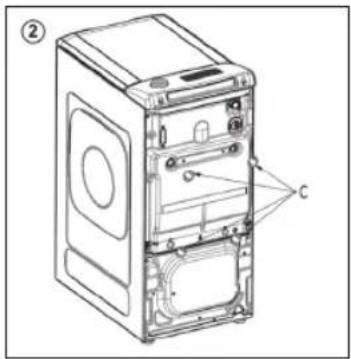
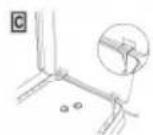
  • Remove the 2 or 4 transportation screws (A) on the back and remove the 2 or 4 flat washers, rubber bungs and plastic spacer tubes (B) as illustrated in figure 1. Fit the trims provided "C" (fig. 2).

1.2 - Carefully remove and dispose of the protective profile located under the washing machine door (as shown in Figure 3).

1.3 - Aligning the appliance

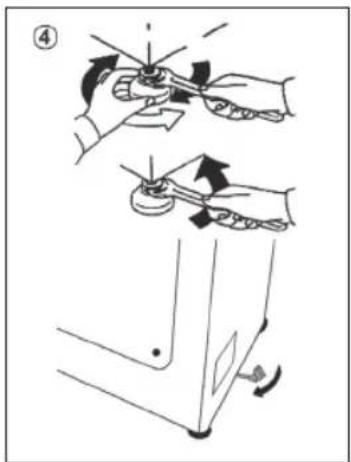
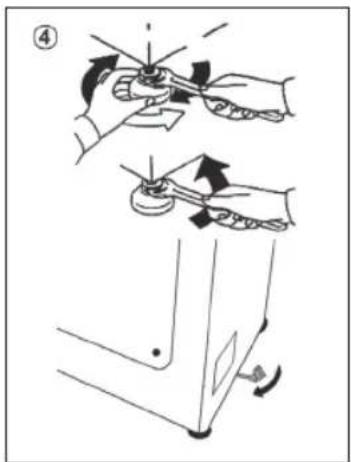
- Level the machine by adjusting the front feet (fig. 4).

a) Turn the nut clockwise to release the screw on the foot. b) Raise or lower the foot by rotating it until it stands firmly on the floor. c) Lock the foot in position by turning the nut anticlockwise until it comes up against the bottom of the washing machine.

  • Check that the appliance is properly levelled.
  • Check that the washing machine does not rock by trying to move two diagonally opposite top corners at the same time.
  • If you move the washing machine from one place to another, you must level the feet again afterwards.

Technical diagram of a refrigerator internal structure with labeled components A and B.

Technical line drawing of a front view of a washing machine casing with a labeled component (no text or symbols beyond the label).

graph TD A["Open Bin"] --> B["Recycle Bin"] B --> C["Recycle Icon"]

Diagram illustrating a mechanical or electrical operation with labeled steps and directional arrows indicating motion.

1.4 - Hydraulic connections

  • The washing machine should be connected to the water mains via the new tube supplied with the appliance (inside the drum). Do not use the old tube for this purpose.
  • Connect one end of the water inlet pipe with the elbow bend to the electrovalve (top rear part of the machine) and the other end to a tap or a plumbed-in 3/4" gas threaded connection.
  • Place the washing machine close to the wall, ensuring that there are no bends or kinks anywhere in the tube.
  • Hook the outlet pipe to the edge of the sink or preferably to a fixed drainage outlet of a diameter greater than that of the outlet pipe and at a height of min. 50 cm and a maximum of 75 cm from the floor (fig. 5).
  • If necessary, use the curved* accessory to attach and support the outlet pipe more securely.
  • Connect the water hose to the water supply tap (fig. 6) only using the hose supplied with the appliance (do not reuse old hose-sets).
  • Some models may include one or more of the following features:
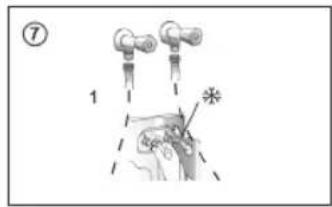
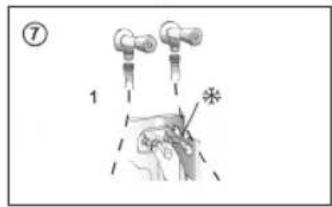
  • HOT&COLD (fig. 7): water mains connection settings with hot and cold water for higher energy savings. Connect the grey tube to the cold water faucet, and the red one to the hot water faucet. The machine can be connected to the cold water faucet only: in this case, some programs may start a few minutes later.
  • AQUASTOP (fig. 8): a device located on the supply tube that stops water flow if the tube deteriorates; in this case, a red mark will appear in the window "A" and the tube must be replaced. To unscrew the nut, press the one-way lock device "B".
  • AQUAPROTECT - SUPPLY TUBE WITH GUARD (fig. 9): should water leak from the primary internal tube "C", the transparent containment sheath "D" will contain water to permit the washing cycle to complete. At the end of the cycle, contact the Customer Service Centre to replace the supply tube.
  • Control panelHAIER THASN2856TM4-S - - Hydraulic connections - 1

Buttons

A Play/Pause, B Temperature selection, C Spin speed, D Easy iron, E Delay start, F Options, G Stain level/Steam level*, H Special programmes (only available on certain models), B+C Child lock. *Steam level (only available on certain models)

Icons

1 Door locked indicator, 2 Easy iron indicator, 3 Kg Load indicator light (active only on certain programmes)

4 Wi-Fi indicator, 5 Child lock indicator, 6 Wash temperature indicator, 7 Spin speed indicator

8 Options indicator, 9 Stain level indicators, 10 Special programmes indicator

2.1 - Buttons

HAIER THASN2856TM4-S - - Buttons - 1

Play/Pause (A)

Close the door BEFORE selecting the button PLAY/PAUSE. To start the selected cycle with the preset parameters, press PLAY/PAUSE. When the programme is running, the display will show the time to elapse.

HAIER THASN2856TM4-S - Play/Pause (A) - 1

Temperature button (B)

This button allows you to change the temperature of the wash cycles. It is not possible to raise the temperature over the maximum allowed for the programme, in order to protect the fabrics. If you want to carry out a cold wash, all the indicators must be off.

HAIER THASN2856TM4-S - Temperature button (B) - 1

Spin speed button (C)

By pressing this button, it is possible to reduce the maximum speed, and if you wish, the spin cycle can be cancelled.

HAIER THASN2856TM4-S - Spin speed button (C) - 1

Easy iron button (D) (Available on some programmes only)

This function allows you to minimize creases as much as possible, eliminating the intermediate spins or reducing the intensity of the last one.

HAIER THASN2856TM4-S - Easy iron button (D) (Available on some programmes only) - 1

Delay start button (E)

This button allows you to pre-programme the wash cycle to delay the start of the cycle for up to 24 hours.

HAIER THASN2856TM4-S - Delay start button (E) - 1

Options button (F)

This button allows you to choose between different options (depending on the selected programme):

HAIER THASN2856TM4-S - Options button (F) - 1

Prewash (F) - This option allows you to make a prewash and it is particularly useful for heavily soiled loads (can be used only on some programmes). When activated, the indicator icon (E) lights up

HAIER THASN2856TM4-S - Options button (F) - 2

Extra rinse (F) - This option allows you to add one rinse at the end of the washing cycle and is useful for people with delicate and sensitive skin. When activated, the indicator icon (F) lights up

HAIER THASN2856TM4-S - Options button (F) - 3

Hygiene + (F) - Activated when you set 60°C of temperature. This option allows deep cleaning of your clothes by maintaining the same temperature for the whole wash.

HAIER THASN2856TM4-S - Options button (F) - 4

Stain level (G)

This option allows you to choose between 3 levels of wash intensity modifying the length of the programme, depending on how much the fabrics are soiled (can only be used on some programmes as shown in the table of programmes).

Steam level (G) (only available on certain models)

After selecting the EASY IRON PLUS programme, you can use this button to choose between three steam treatments of different intensities, designed for dry or wet garments and depending on the type of fabric:

- COTTON (default selection)

This programme is used for cotton garments. On wet fabrics (e.g., after washing), it is suitable for relaxing creases after spinning; on dry fabrics it is instead designed to achieve the ideal humidity level for easier ironing.

- SYNTHETIC (press button once)

This programme is used for synthetic garments. On wet fabrics (e.g., after washing), it is suitable for relaxing creases after spinning; on dry fabrics it is instead designed to achieve the ideal humidity level for easier ironing.

- DELICATES (press button twice)

With the help of steam, the cycle refreshes and relaxes creases in garments after use. The programme consists of an initial phase in which the steam acts and a final phase in which the excess humidity is removed for immediate use. The cycle is suitable for dry fabrics.

HAIER THASN2856TM4-S - - DELICATES (press button twice) - 1

Special programmes (H)

This button allows you to choose between different options (depending on the selected programme):

HAIER THASN2856TM4-S - Special programmes (H) - 1

Single item (H) - This option (which can be set in several programs) optimizes the water and energy consumption of the selected program, maintaining the washing performance unchanged.

HAIER THASN2856TM4-S - Special programmes (H) - 2

Night wash (H) - This option reduces the intermediate spin speed to 400 rpm, where applicable, increase the water level during rinsing and keep the laundry immersed in water after the final rinse, in order to spread the fiber perfectly.

HAIER THASN2856TM4-S - Special programmes (H) - 3

Drum clean (H) - Developed to clean the washing machine drum. Use only powder detergent. Do not start the programme with laundry in the washing machine. It is suggested that this is carried out after every 50 washing cycles. The option can only be selected for the DRAIN & SPIN programme.

HAIER THASN2856TM4-S - Special programmes (H) - 4

Child lock (B+C)

  • Pressing simultaneously the buttons "TEMPERATURE SELECTION" and "SPIN SPEED" for about 3 seconds, the machine allows you to lock the keys. In this way, you can avoid making accidental or unwanted changes if a button on the display is pressed accidentally during a cycle.
  • The key lock can be simply cancelled by pressing the two buttons simultaneously again or turning off the appliance.

HAIER THASN2856TM4-S - Child lock (B+C) - 1

APPLIANCE PAIRING (ON APP)

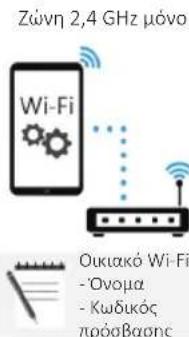
NOTE: The frequency of the home Wi-Fi network has to be set on the 2.4 GHz band. (5 GHz band not allowed).

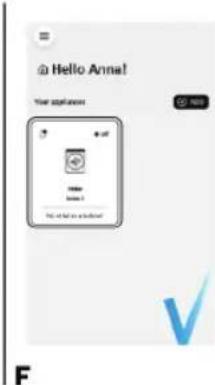
  • Download the hOn App on your device by framing the following QR code or by the link: go.haier-europe.com/download-app • Create the user profile (or log-in) and pairing the appliance following the instructions on the device display.

Download theHAIER THASN2856TM4-S - APPLIANCE PAIRING (ON APP) - 1

App

HAIER THASN2856TM4-S - APPLIANCE PAIRING (ON APP) - 2

HAIER THASN2856TM4-S - APPLIANCE PAIRING (ON APP) - 3

HAIER THASN2856TM4-S - APPLIANCE PAIRING (ON APP) - 4

AHAIER THASN2856TM4-S - APPLIANCE PAIRING (ON APP) - 5

Parental profile you ang you yong you yong you@yong.com you yong you you you you

B

2.4 GHz band onlyHAIER THASN2856TM4-S - APPLIANCE PAIRING (ON APP) - 7

CHAIER THASN2856TM4-S - APPLIANCE PAIRING (ON APP) - 8

Follow pairing instructionsHAIER THASN2856TM4-S - APPLIANCE PAIRING (ON APP) - 9

DHAIER THASN2856TM4-S - APPLIANCE PAIRING (ON APP) - 10

Welcome Anna! Pre-appliance has been polished and How to be replaced by your own or the appliance.

E

Hello Anne! Your application Hello Anne 1 My first to switch!

F

TO ENABLE REMOTE CONTROL

- Close the door and turn the knob to the REMOTE CONTROL (Wi-Fi) position. You can now manage your product from the app.

TO DISABLE REMOTE CONTROL

- Turn the knob to any position other than REMOTE CONTROL (Wi-Fi), without going through the OFF. If there is a cycle underway, it will continue. From the app it is possible to view the status of the product but not to control it.

2.2 - Icons

HAIER THASN2856TM4-S - - Icons - 1

Door lock indicator (1)

For safety reasons the door is locked partially during the washing cycle. It is only possible to open the door at the end of the program or after the program was cancelled correctly. In case of high water level, high water temperature and during spinning it is not possible to open the door.

HAIER THASN2856TM4-S - Door lock indicator (1) - 1

Easy iron indicator light (2):

The indicator light shows the selection of the relevant option.

HAIER THASN2856TM4-S - Easy iron indicator light (2): - 1

Kg Load indicator light (3): (active only on certain programmes).

Through every wash phase "Kg Load" allows to monitor information on the wash load in the drum and in the first minutes of the wash it:

  • adjusts the amount of water required; • determines the length of the wash cycle;
  • controls rinsing according to the type of fabric selected to be washed it;
  • adjusts the rhythm of drum rotation for the type of fabric being washed;
  • recognises the presence of too much soap suds, and if necessary, adjust the amount of rinse water.
  • adjusts the spin speed according to the load, thus avoiding any imbalance.

HAIER THASN2856TM4-S - Easy iron indicator light (2): - 2

Wi-Fi indicator light (4): On models equipped with Wi-Fi, it indicates the status of the connection. It could be.

HAIER THASN2856TM4-S - Easy iron indicator light (2): - 3

Key lock indicator light (5): The indicator light show that the keys are locked.

HAIER THASN2856TM4-S - Easy iron indicator light (2): - 4

Wash temperature indicator light (6)

This show the washing temperature of the selected programme that can be changed (where allowed) by the relevant button. If you want carry out a cold wash all the indicators must be off.

HAIER THASN2856TM4-S - Easy iron indicator light (2): - 5

Spin speed indicator light (7)

This show the spin speed of the selected programme, you can reduce or omit by the relevant button.

HAIER THASN2856TM4-S - Easy iron indicator light (2): - 6

HAIER THASN2856TM4-S - Easy iron indicator light (2): - 7

HAIER THASN2856TM4-S - Easy iron indicator light (2): - 8

Options indicator light (8)

The indicator lights show the options that can be selected by the relevant button.

HAIER THASN2856TM4-S - Easy iron indicator light (2): - 9

HAIER THASN2856TM4-S - Easy iron indicator light (2): - 10

HAIER THASN2856TM4-S - Easy iron indicator light (2): - 11

Stain level indicator light (9)

  • Once the programme has been selected, the indicator light will automatically show the stain level set for that programme.
  • Selecting a different stain level the relevant indicator will light up.

HAIER THASN2856TM4-S - Easy iron indicator light (2): - 12

HAIER THASN2856TM4-S - Easy iron indicator light (2): - 13

HAIER THASN2856TM4-S - Easy iron indicator light (2): - 14

Special programmes indicator light (10) *Only available on certain models

The indicator lights show the options that can be selected by the relevant button.

3. Programmes

HAIER THASN2856TM4-S - Programmes - 1

Yes

HAIER THASN2856TM4-S - Programmes - 2

Yes by pressing the button

HAIER THASN2856TM4-S - Programmes - 3

Optionals

HAIER THASN2856TM4-S - Programmes - 4

No

HAIER THASN2856TM4-S - Programmes - 5

HAIER THASN2856TM4-S - Programmes - 6

HAIER THASN2856TM4-S - Programmes - 7

Detergent compartment for:

HAIER THASN2856TM4-S - Programmes - 8

② Detergent

HAIER THASN2856TM4-S - Programmes - 9

Softener or care product

HAIER THASN2856TM4-S - Programmes - 10

Prewash

PROGRAMMEHAIER THASN2856TM4-S - Programmes - 11 (MAX.) (see control panel)HAIER THASN2856TM4-S - Programmes - 12DETERGENTNIGHT WASHEXTRARINSEHYGIENE+EASY IRONSTAIN LEVELDELAY START
5kg5.5kg6kg6.5kg7kg7.5kg8kg8.5kg(MAX.)1 or 2[CACC]HAIER THASN2856TM4-S - Programmes - 13
HAIER THASN2856TM4-S - Programmes - 14RAPID 44'33333.53.53.53.540°/ ○/ / /
[ASDW]RAPID 14'1111111.51.530°/ ○/ / /
[AT22]MIXED & COLOURED 59'55566577.588.540°/ ○/ / /
HAIER THASN2856TM4-S - Programmes - 15WOOL/HAND WASH1111112230°/ ○/ ○
HAIER THASN2856TM4-S - Programmes - 16EASY IRON PLUS1.51.51.51.51.51.51-/ / /
[DIYX]DRAIN & SPIN---------/ / /
HAIER THASN2856TM4-S - Programmes - 17RINSE---------/ / /
[85XB]STEAM HYGIENE PLUS2.52.5333.53.544.60°/ ○/ / /
HAIER THASN2856TM4-S - Programmes - 18BABY CARE22222.52.52.52.540°/ ○
HAIER THASN2856TM4-S - Programmes - 19FRESH CARE22222.52.52.52.540°/ ○/ / /
[2HC0]ECO 40-6055566577.588.560°/ / /
[4773]20°C55566577.588.560°/ / ○
[95YW]SYNTHETICS2.52.5333.53.544.60°(●)
HAIER THASN2856TM4-S - Programmes - 20COTTON55566577.588.590°(●)/ ○
[ASKS]REMOTE CONTROL (Wi-Fi) Position that you have to select when you want to enable remote control through the App (via Wi-Fi).

3.1 - Program descriptions

HAIER THASN2856TM4-S - - Program descriptions - 1RAPID 44'A complete washing cycle (wash, rinse and spin). This programme is particularly suited to slightly dirty cottons and mixed fabrics. With this programme it is recommended to use only 20% of the detergent normally used to avoid waste.
HAIER THASN2856TM4-S - - Program descriptions - 2RAPID 14'A complete washing cycle (wash, rinse and spin). This programme is suited to slightly dirty cottons and mixed fabrics. With this programme it is recommended to use only 20% of the detergent normally used to avoid waste.
HAIER THASN2856TM4-S - - Program descriptions - 3MIXED & COLOURED 59'*This programme offers you the freedom to wash all kinds of fabrics and non-fading colours together, with a full load, obtaining excellent results in only 59 minutes. With washing at medium temperature, this programme is recommended for laundry that is not particularly dirty.* Preset temperature of 20°C (modifiable by the relevant button). The washing cycle is also suitable for washing cotton fabrics.
[24AW]WOOL/HAND WASHThis programme performs a wash cycle dedicated to the wool fabrics that can be washed in a washing machine, the articles to be washed by hand or laundry items made from silk or specified as "Wash as Silk" on the fabric label.
[AXDO]EASY IRON PLUSThis programme uses a steam treatment to relax creases and achieve the ideal degree of humidity for easier ironing. Three different intensity levels can be selected via the button, designed for dry or wet garments and depending on the type of fabric.
HAIER THASN2856TM4-S - - Program descriptions - 4DRAIN & SPINThe program completes the drain and a maximum spin. It is possible to delete or reduce the spin through the SPIN SELECTION button.
HAIER THASN2856TM4-S - - Program descriptions - 5RINSEThis program performs 3 rinses with an intermediate spin (which can be reduced or excluded by using the appropriate button). It is used for rinsing any type of fabric, for example after a wash carried out by hand.
[93ZH]STEAM HYGIENE PLUSThis washing programme is capable of reaching a temperature of 60°C for an extended period of time, combining the steam action with a powerful rinsing action for thoroughly clean and hygienic clothing. Recommended for cotton fabrics.
[XODG]BABY CAREThis program allows you to wash all baby clothes getting a perfect clean and sanitizing effect, setting the temperature at 60°C minimum. To optimize the result of the sanitizing effect we recommend the use of powder detergent.
[HWOC]FRESH CAREThis programme is designed to remove everyday stains with a refreshing action to guarantee outstanding laundry. Low temperature wash recommended for small loads.
[8H4S]ECO 40-60The ECO 40-60 programme is able to clean normally soiled cotton laundry declared to be washable at 40°C or 60°C, together in the same cycle. This programme is used to assess the compliance with the EU Ecodesign legislation (environmentally friendly products design).
HAIER THASN2856TM4-S - - Program descriptions - 620°CThis innovative programme, allows you to wash different fabrics and colours together, such as cottons, synthetics and mixed fabrics at only 20°C and provides an excellent cleaning performance. Consumption on this program is about 40% of a conventional 40°C cottons wash.
[7TW2]SYNTHETICSThis program is studied for synthetics fabrics (as Polyester, Viscos) or mixed cotton lightly dirty. The drum movements and rinses are set in order to optimize the washing phases. The delicate spin phase can decrease the creases on the clothes.
HAIER THASN2856TM4-S - - Program descriptions - 7COTTONThis programme is suitable for washing coloured cotton garments at 40°C or for ensuring the highest degree of cleanliness for cotton resistant laundry washing at 60°C or 90°C. The final spin is at maximum speed that ensures excellent water removal.

4. Daily use

  • Connect the washing machine to a power supply and water connection (see installation chapter in the user manual).
  • Prepare the laundry: Sort out clothes according to fabric (cotton, synthetics, wool or silk, etc.) and how dirty they are. Check the labels on your garments. Separate white clothes from colored ones. Empty pockets of objects like keys, coins, etc., and remove harder decorative objects.
  • Put in the laundry piece by piece, avoiding overloads (check the different maximum load capacity according to the program). Close the door carefully. Make sure that no pieces of laundry are pinched.
  • Select the detergent and softener (when needed) and pour it into the correct compartments of the dispenser.

Open the dispenser drawer; the following components can be seen (Fig. 4.1):

  1. Compartment 1 is for powder detergent.
  2. Compartment 2 is for liquid detergent.
  3. The compartment ✉ is for fabric conditioners, scenting agents, and special additives such as starch, blueing, etc. The recommendation on the type of detergents suitable for the various washing temperatures; please refer to the detergent manual (see ).
  4. Select a program by turning the knob, choosing the one that fits the most according to the loaded garments. The display will show the program name, the main options, and the duration estimation.
  5. Add or remove options and change the parameters according to your specific needs.
  6. Press Start/Pause button to start the program.
  7. When the cycle is finished, "END" is shown on the display. Switch off the washing machine by turning the selector to OFF. Remove your laundry as soon as possible in order to prevent wrinkles, bad odors and bacteria to proliferate.

Technical diagram showing a device with labeled buttons and a close-up view of a component (no readable text or symbols).

5. Care and maintenance

5.1 - General machine cleaning

  • Unplug the machine during cleaning and maintenance.
  • Use a soft cloth with soap liquid to clean the machine case and rubber components.
  • Do not use organic chemicals or corrosive solvents.

5.2 - Pump filter cleaning

It is recommended to clean the pump filter once a month.

Turn off and unplug the machine and open the cover on the bottom of the appliance. Prepare a flat container to catch leach water.

  • Pull the drain hose out and hold its end above the container and open it. After complete drainage, close the drain hose and push it back into the machine.
  • Unscrew and remove counter-clockwise the pump filter and clean it carefully.
  • Put the filter back in the machine and close it carefully.

5.3 - Cleaning the detergent dispenser and its compartments

Take always care there are no detergent residues. Clean the drawer regularly.

  • Press button (A).
  • Hold down the button and turn the detergent dispenser outwards.
  • Remove the dispenser and clean it.
  • It is recommended to remove any remaining detergent in the compartments to avoid any build up that could cause blockages and restrict the water flow from the dispenser to drum.
  • Pulling out and extract the trap/traps (B) that are located in the back part of the dispenser and clean them carefully.
  • Remove any solid residue which could block the holes in the compartments.

Technical diagram showing four steps of installing or adjusting a device panel, labeled A, B, C, and D.

5.4 - Cleaning the drum

  • Remove accidentally washed items, especially metal parts such as pins, coins, etc. from the drum and the groove of the door gasket (rubber ring) because they cause rust stains and damage.
  • Use a non-chloride cleaner for removing rust stains. Observe the warning hints of the cleaning agent manufacturer.
  • Do not use any hard objects or steel wool for cleaning.
  • After the procedure, open the door, use a towel to clean the stains and foam around the gasket, and keep the inside and outside of the gasket clean.

HAIER THASN2856TM4-S - - Cleaning the drum - 1

Technical diagram of a refrigerator internal structure with labeled components A and B.

Technical diagram of a front-mounted computer tower with labeled component C.

graph TD A["Open Bin"] --> B["Recycle Bin"] B --> C["Recycle Icon"]

Diagram illustrating a mechanical or electrical operation with labeled steps and directional arrows indicating motion.

Technical diagram of a front-mounted computer tower with labeled component C and numbered part (②).

graph TD A["Open Bin"] --> B["Recycle Bin"] B --> C["Recycle Icon"]

Diagram illustrating a mechanical or electrical operation with labeled steps and directional arrows indicating motion.

graph TD A["Open Bin"] --> B["Recycle Symbol"] B --> C["Recycle Bin"] style A fill:#f9f,stroke:#333 style C fill:#bbf,stroke:#333

Technical line drawing of a front view of a washing machine with a labeled component.

Diagram illustrating a mechanical or electrical operation with labeled steps and directional arrows indicating motion.

APPARATUS COUPLING (IN THE APP)

Technical diagram of a computer tower case with labeled component C and internal panel layout.

graph TD A["Open Bin"] --> B["Recycle Bin"] B --> C["Recycle symbol"] style A fill:#f9f,stroke:#333 style B fill:#ccf,stroke:#333 style C fill:#cfc,stroke:#333

Diagram illustrating a mechanical or electrical operation with labeled steps and directional arrows indicating motion.

⑦ 1 *

⑧ A B ⑨ C D

Buttons

APPLIANCE PAIRING (IN THE APP)

E

Hello Anna! Your application Help Home Yes 10 Do not help us to access!

F

ACTIVATE THE REMOTE CONTROL

Technical diagram showing four steps of a device mounting or repair operation, labeled A, B, C, and D.

HAIER THASN2856TM4-S - ACTIVATE THE REMOTE CONTROL - 2

HAIER THASN2856TM4-S - ACTIVATE THE REMOTE CONTROL - 3

Haier

BGHAIER THASN2856TM4-S - ACTIVATE THE REMOTE CONTROL - 4

Haier

Technical diagram of a front-mounted computer tower with labeled component C and numbered part (②).

graph TD A["Open Bin"] --> B["Recycle Symbol"] B --> C["Recycle Bin"] style A fill:#f9f,stroke:#333 style C fill:#bbf,stroke:#333

Diagram illustrating a mechanical or electrical operation with labeled steps and directional arrows indicating motion.

B

@ Welcome Anna! No appliance has been paired yet your appliance is your own or your app? OK AMPLIANCE

E

@ Hello Annal! Your options at 1 2 3

F

graph TD A["Open Bin"] --> B["Recycle Bin"] B --> C["Recycle Icon"]

Technical diagram of a front-mounted washing machine with labeled component C

Diagram illustrating a mechanical or electrical operation with labeled steps and directional arrows indicating motion.

⑦ 1

Technical diagram showing two labeled mechanical components with parts A, B, C, D and numbered annotations 8 and 9.

Gumbi

A Start/Pause B Temperature selection button C Spin speed D Easy iron E Delay start F Options G Soil level / Steam level* H Special programs (available only on certain models) B + C Safety lock

* Steam level (available only on certain models)

Icons

1 Door locked indicator 2 Easy iron indicator 3 Load indicator in kg (active only in some programs)

4 Wi-Fiveze indicator 5 Safety lock indicator 6 Wash temperature indicator 7 Spin speed indicator

8 Options indicator 9 Soil level indicators 10 Special programs indicator

2.1 - Buttons

HAIER THASN2856TM4-S - - Buttons - 1

Start/Pause (A)

Close the door BEFORE pressing the START/PAUSE button. To start the selected cycle with previously set parameters, press the START/PAUSE button. When the program is running, the time remaining will be displayed on the screen.

HAIER THASN2856TM4-S - Start/Pause (A) - 1

Temperature button (B)

Delay Start button (E)

With this button you can pre-program wash cycles and delay the start of the cycle by up to 24 hours.

HAIER THASN2856TM4-S - Delay Start button (E) - 1

Options button (F)

With this button you can choose between different options (depending on the selected program):

HAIER THASN2856TM4-S - Options button (F) - 1

Pre-wash (F) - this option enables pre-washing and is especially useful for heavily soiled laundry (can only be used with some programs). When activated, the indicator icon (E) lights up.

HAIER THASN2856TM4-S - Options button (F) - 2

Extra rinse (F) - this option allows adding an extra rinse at the end of the wash cycle and is useful for people with sensitive skin. When activated, the indicator icon (F) lights up.

Diagram showing a device control panel with two labeled buttons and a close-up of its internal structure (no text or symbols present)

Technical diagram showing four steps of a device mounting or repair operation, labeled A to D with Chinese annotations.

HAIER THASN2856TM4-S - Options button (F) - 5

Technical diagram of a device casing with labeled components A and B, showing internal structure and wiring.

Technical diagram of a computer tower case with labeled component C and internal panel layout

graph TD A["Open Bin"] --> B["Recycle Bin"] B --> C["Recycle Icon"]

Diagram illustrating a mechanical or electrical operation with labeled steps and directional arrows indicating motion.

Welcome Anna! No appliance has been paired yet. Not being replaced by the other appliance.

Hello Anne! Your appliances. Hello Anne. No. 1.

REMOTE CONTROL ENABLE

HAIER THASN2856TM4-S - REMOTE CONTROL ENABLE - 1

HAIER THASN2856TM4-S - REMOTE CONTROL ENABLE - 2

HAIER THASN2856TM4-S - REMOTE CONTROL ENABLE - 3

HAIER THASN2856TM4-S - REMOTE CONTROL ENABLE - 4

HAIER THASN2856TM4-S - REMOTE CONTROL ENABLE - 5

HAIER THASN2856TM4-S - REMOTE CONTROL ENABLE - 6

Technical diagram of a device casing with labeled components A and B, showing internal structure and wiring.

Technical diagram of a front-mounted computer tower with labeled component C.

graph TD A["Open Bin"] --> B["Recycle Bin"] B --> C["Recycle Icon"]

Diagram illustrating a mechanical or electrical operation with labeled steps and directional arrows indicating motion.

Technical line drawing of a front view of a computer tower case with labeled component (no text or symbols beyond label).

graph TD A["Open Bin"] --> B["Recycle Icon"] B --> C["Recycle Bin"] C --> D["Recycle Icon"] style A fill:#f9f,stroke:#333 style B fill:#ccf,stroke:#333 style C fill:#cfc,stroke:#333 style D fill:#fcc,stroke:#333

Diagram illustrating a mechanical or electrical operation with labeled steps and directional arrows indicating motion.

To learn more, download and read the complete user manual online at the website:

go.he.services/haier-um

1.4 - Water connections

  • The washing machine must be connected to the water supply using a new hose supplied with the appliance (inside the drum). Do not reuse an old hose for this purpose.
  • Connect one end of the water supply hose with the bent elbow to the solenoid valve (upper rear part of the machine), and the other end to the tap or a 3/4" threaded water supply connection.
  • Position the washing machine close to the wall, making sure there are no kinks or folds in the hose at any point.
  • Attach the drain hose to the edge of the sink or, preferably, to a fixed drain pipe with a diameter larger than that of the drain hose, at a height of at least 50 cm and no more than 75 cm from the floor (fig. 5).
  • If necessary, use the curved* accessory to secure and support the drain hose more safely.
  • Connect the water hose to the water supply tap (fig. 6) only using the hose supplied with the appliance (do not reuse old hose kits).
  • Some models may have one or more of the following features:
  • HOT&COLD (fig. 7): settings for connection to the water supply with hot and cold water for greater energy savings. Connect the grey hose to the cold water tap, and the red one to the hot water tap. The appliance can be connected only to the cold water tap: in that case, some programs may start a few minutes later.
  • AQUASTOP (fig. 8): a device located on the inlet hose that stops the water flow if there is a problem with the hose; in that case, a red mark appears in the "A" slot and the hose must be replaced. To unscrew the nut, press the safety catch "B".
  • AQUAPROTECT – INLET HOSE WITH PROTECTOR (fig. 9): if water leaks from the primary inner hose "C", water will be present in the transparent protective sheath "D" to allow the wash cycle to complete. At the end of the cycle, contact the Customer Service Centre to have the inlet hose replaced.
  • Control panelHAIER THASN2856TM4-S - - Water connections - 1

50 cm. maks. 100 cm +2,6 m maks. min. 4 cm. maks. 50 cm maks. 85 cm. * Dodatna oprema se prodaje odvojeno.

Diagram showing a mechanical component with a dashed outline and a magnified view of a device (no text or symbols present).

⑦ 1

Technical diagram showing two labeled mechanical components (A, B, C, D) with numbered parts and assembly details.

Buttons

A Start/pause B Temperature selection C Spin speed D Easy ironing E Delayed start F Options G Soil level/steam level* H Special programs (available only on certain models) B+C Key lock * Steam level (available only on certain models)

Icons

B

Only 2.4 GHz bandWi-Fi: Home Wi-Fi: - Name - Password

C

Follow the pairing instructions for the hOn app.

D

Welcome Anna! No appliance has been paired yet. The following is your own of the appliance. NEW APPERENCE

E

Hello Anna! Your application all Name Phone 1 Be what is your app? V

F

ACTIVATING WIRELESS CONTROL

- Close the door and turn the round knob to the WIRELESS CONTROL (Wi-Fi) position. You can now control the product from the app.

DEACTIVATING WIRELESS CONTROL

- Turn the round knob to any position other than WIRELESS CONTROL (Wi-Fi), without passing through OFF. If a cycle was in progress, it will continue. From the app, you can view the product status, but not control it.

2.2 - Icon

HAIER THASN2856TM4-S - - Icon - 1

Door lock indicator (1)

Technical line drawing of a front view of a computer tower case with labeled component.

graph TD A["Recycle Bin"] --> B["Recycle Bin"] B --> C["Recycle Bin"] style A fill:#f9f,stroke:#333 style C fill:#bbf,stroke:#333

Diagram illustrating a mechanical or electrical operation with labeled steps and directional arrows indicating motion.

E

Hello Annal! Your application Name: Item 1. We do not want to check? OK

F

ACTIVATION OF REMOTE CONTROL

Technical diagram showing four steps of installing or adjusting a device panel, labeled A, B, C, and D.

Haier

graph TD A["Open Bin"] --> B["Recycle Bin"] B --> C["Recycle Icon"]

Technical diagram of a front-mounted washing machine with labeled component C.

Diagram illustrating a mechanical or electrical operation with labeled steps and directional arrows indicating motion.

⑦ 1

Technical diagram showing two mechanical assembly steps labeled A, B, C, D with numbered components and directional arrows.

Buttons

Welcome Anna! No appliance has been painted yet The appliance has been painted yet is not applied to the NEW IMPLAINED

@ Hello Anna! Your application Name: Name 1 No. of Name is displayed!

ENABLING REMOTE CONTROL

Technical diagram of a front-mounted computer tower with labeled component C and numbered part (②).

graph TD A["Open Bin"] --> B["Recycle Symbol"] B --> C["Recycle Bin"] style A fill:#f9f,stroke:#333 style C fill:#bbf,stroke:#333

Diagram illustrating a mechanical or electrical operation with labeled steps and directional arrows indicating motion.

B

Welcome Anna! No appliance has been joined yet NEW APPLICATIONS

E

@ Hello Anna! Your app? + - Home 1 No. of the app? OK

F

FOR ACTIVATING REMOTE CONTROL

Technical diagram of a front-mounted computer tower with labeled component C.

graph TD A["Open Bin"] --> B["Recycle Bin"] B --> C["Recycle Icon"]

Diagram illustrating a mechanical or electrical operation with labeled steps and directional arrows indicating motion.

B

Only 2.4 GHz bandWelcome Anna! Pre-appliance has become part of yet NEW APPLIANCE

E

Hello Anne! Your application No. of new # new of # new

F

REMOTE CONTROL

graph TD A["Open Bin"] --> B["Recycle Symbol"] B --> C["Recycle Bin"] style A fill:#f9f,stroke:#333 style C fill:#bbf,stroke:#333

Technical diagram of a front-mounted computer tower with labeled component C and numbered part (②)

Diagram illustrating a mechanical or electrical operation with labeled steps and directional arrows indicating motion.

B

Welcome Anna! An appliance has been joined yet Add APPLIANCE

E

Hello Annal! Your application Make Make New

F

Technical line drawing of a front view of a computer tower case with labeled component (no text or symbols beyond label)

graph TD A["Open Bin"] --> B["Recycle Symbol"] B --> C["Recycle Bin"] style A fill:#f9f,stroke:#333 style C fill:#bbf,stroke:#333

Diagram illustrating a mechanical or electrical operation with labeled steps and directional arrows indicating motion.

Welcome Anna! No appliance has been paired yet Add the app to you for your own app ADD APPLIANCE

Hello Anne! Your application OK Save Save As... Do not use any options!

A

B

C

D

E

Technical diagram of a computer tower case with labeled component C and internal panel layout.

graph TD A["Open Bin"] --> B["Recycle Icon"] B --> C["Recycle Bin"] C --> D["Recycle Icon"] style A fill:#f9f,stroke:#333 style B fill:#ccf,stroke:#333 style C fill:#cfc,stroke:#333 style D fill:#fcc,stroke:#333

Diagram illustrating a mechanical or electrical operation with labeled steps and directional arrows indicating motion.

MACHINE PAIRING (ON APP)

HAIER THASN2856TM4-S - MACHINE PAIRING (ON APP) - 1

HAIER THASN2856TM4-S - MACHINE PAIRING (ON APP) - 2

HAIER THASN2856TM4-S - MACHINE PAIRING (ON APP) - 3

HAIER THASN2856TM4-S - MACHINE PAIRING (ON APP) - 4

HAIER THASN2856TM4-S - MACHINE PAIRING (ON APP) - 5

HAIER THASN2856TM4-S - MACHINE PAIRING (ON APP) - 6

HAIER THASN2856TM4-S - MACHINE PAIRING (ON APP) - 7

Haier

Download the hOn app

HAIER THASN2856TM4-S - MACHINE PAIRING (ON APP) - 8

HAIER THASN2856TM4-S - MACHINE PAIRING (ON APP) - 9

Technical diagram of a refrigerator internal structure with labeled components A and B.

graph TD A["Recycle Bin"] --> B["Recycle Bin"] B --> C["Recycle Bin"] style A fill:#f9f,stroke:#333 style B fill:#ccf,stroke:#333 style C fill:#cfc,stroke:#333

Technical diagram of a front-mounted washing machine with labeled component C.

Diagram illustrating a mechanical or electrical operation with labeled steps and directional arrows indicating motion.

⑦ 1 *

Technical diagram showing two labeled mechanical components (A, B, C, D) with numbered parts and assembly details.

Buttons

E

Hello Anne! Your application NOS File Path View None 1 No. of NOS is displayed!

F

ACTIVATE REMOTE CONTROL

HAIER THASN2856TM4-S - ACTIVATE REMOTE CONTROL - 1

HAIER THASN2856TM4-S - ACTIVATE REMOTE CONTROL - 2

HAIER THASN2856TM4-S - ACTIVATE REMOTE CONTROL - 3

HAIER THASN2856TM4-S - ACTIVATE REMOTE CONTROL - 4

HAIER THASN2856TM4-S - ACTIVATE REMOTE CONTROL - 5

HAIER THASN2856TM4-S - ACTIVATE REMOTE CONTROL - 6

HAIER THASN2856TM4-S - ACTIVATE REMOTE CONTROL - 7

Haier

FIHAIER THASN2856TM4-S - ACTIVATE REMOTE CONTROL - 8

Haier

Technical diagram of a front-mounted computer case with labeled component C.

E

Hello Anna! Your app? Hello Anna 2. My own app is solved!

F

HAIER THASN2856TM4-S - Haier - 3

HAIER THASN2856TM4-S - Haier - 4

Haier

Download the hOn app

HAIER THASN2856TM4-S - Haier - 5

HAIER THASN2856TM4-S - Haier - 6

Technical diagram of a refrigerator internal structure with labeled components A and B.

Technical line drawing of a front view of a computer tower case with labeled component (no text or symbols beyond label).

graph TD A["Open Bin"] --> B["Recycle Icon"] B --> C["Recycle Bin"] C --> D["Recycle Icon"] style A fill:#f9f,stroke:#333 style B fill:#ccf,stroke:#333 style C fill:#cfc,stroke:#333 style D fill:#fcc,stroke:#333

Diagram illustrating a mechanical or electrical operation with labeled steps and directional arrows indicating motion.

1.4 - Hydraulic connections

⑦ 1

Technical diagram showing two labeled mechanical components (A, B, C, D) with numbered parts and assembly details.

Buttons

A Start / Pause

B Temperature selection

C Spin speed

D Easy iron

E Delayed start

F Options

Delayed start button (E)

APP PAIRING (ON APP)

TO ACTIVATE REMOTE CONTROL

Manual assistant
Powered by Anthropic
Waiting for your message
Product information

Brand : HAIER

Model : THASN2856TM4-S

Category : Washing machine