Zense CM10AB-M125 - Coffee machine WILFA - Free user manual and instructions
Find the device manual for free Zense CM10AB-M125 WILFA in PDF.


Pick your language and provide your email: we'll send you a specifically translated version.
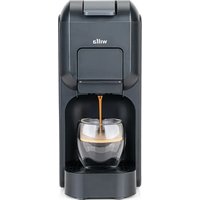
| Product type | Filter coffee machine with integrated grinder |
| Brand | Wilfa |
| Model | Zense CM10AB-M125 |
| Color | Black and stainless steel |
| Dimensions (W x H x D) | 25 x 35 x 30 cm |
| Weight | 5.2 kg |
| Power supply | 220-240 V, 50/60 Hz, 1450 W |
| Water tank capacity | 1.25 L |
| Bean hopper capacity | 250 g |
| Pump pressure | 15 bars |
| Coffee type | Whole coffee beans |
| Main functions | Adjustable integrated grinder, espresso extraction, steam for cappuccino, auto shut-off, programmable |
| Grind setting | 15 levels |
| Temperature setting | Yes, adjustable |
| Display screen | Touch LED |
| Cleaning and descaling | Automatic descaling program, removable parts dishwasher safe |
| Safety | Auto shut-off, overheat protection, grinder lock |
| Spare parts available | Water tank, grinder, portafilter, seal |
| Repairability | Repairability index of 8.5/10, parts available online |
| Warranty | 2 years |
| Included accessories | Measuring spoon, cleaning brush, user manual |
| Country of manufacture | Norway |
Frequently Asked Questions - Zense CM10AB-M125 WILFA
How to start my Wilfa Zense CM10AB-M125?
Fill the water tank (max 1.25 L), add coffee beans to the grinder, then press the ON/OFF button. The touch screen lights up and you can select your drink.
How to adjust the coffee grind?
Turn the grind adjustment knob located on top of the grinder. The 15 levels allow you to get a fine to coarse grind. Adjust to your taste.
What to do if the machine does not turn on?
Check that the power cord is plugged in and that the outlet works. If the problem persists, contact Wilfa customer service.
How to clean the grinder?
Use the cleaning brush provided to remove coffee residues. Removable parts (grinder, portafilter) are dishwasher safe or can be washed under warm water. Avoid abrasive products.
How to descale the machine?
Activate the automatic descaling program via the touch screen menu. Use a compatible descaling solution and follow the on-screen instructions. Then rinse twice with clean water.
What does the message 'Water tank empty' mean?
The water level is insufficient. Fill the tank with fresh water. If the message persists, the sensor may be blocked; clean the tank and the seal.
How to prepare a cappuccino with this machine?
Prepare an espresso in a cup, then use the steam wand to froth the milk. Immerse the wand in cold milk, open the steam, and make circular movements.
Can I use ground coffee instead of beans?
Yes, use the ground coffee hopper (located near the grinder). Do not put ground coffee in the bean hopper to avoid damaging the grinder.
How to program a delayed start?
From the touch screen, go to Menu > Programming. Set the desired time and confirm. The machine will turn on automatically at the programmed time.
Where to buy spare parts for the Zense CM10AB-M125 model?
Spare parts are available on the Wilfa official website or from authorized dealers. You can also contact customer service to order a water tank, grinder, or seals.
User questions about Zense CM10AB-M125 WILFA
0 question about this device. Answer the ones you know or ask your own.
Ask a new question about this device
No questions yet. Be the first to ask one.
Download the instructions for your Coffee machine in PDF format for free! Find your manual Zense CM10AB-M125 - WILFA and take your electronic device back in hand. On this page are published all the documents necessary for the use of your device. Zense CM10AB-M125 by WILFA.
USER MANUAL Zense CM10AB-M125 WILFA

Manual assistant
Powered by Anthropic
Waiting for your message
Product information
Brand : WILFA
Model : Zense CM10AB-M125
Category : Coffee machine