FESTINA IFMOS20 - Wristwatch

IFMOS20 - Wristwatch FESTINA - Free user manual and instructions

Find the device manual for free IFMOS20 FESTINA in PDF.

📄 18 pages English EN Download 💬 AI Question 11 questions ⚙️ Specs
Notice FESTINA IFMOS20 - page 7
View the manual : Français FR Deutsch DE English EN Español ES Italiano IT
Pick your language and provide your email: we'll send you a specifically translated version.
Product type Quartz wristwatch
Brand FESTINA
Model IFMOS20
Display Analog (hours, minutes, seconds)
Date function Yes, adjustable via crown
Chronograph Measures up to 59 minutes 59 seconds
Movement Quartz
Power Button cell battery (type SR626SW or equivalent)
Case material Stainless steel
Glass material Mineral
Strap Stainless steel or leather (depending on version)
Case diameter Approximately 40 mm
Case thickness Approximately 10 mm
Weight Approximately 100 g
Water resistance Not specified, avoid contact with water
Time setting Crown in pulled position
Date setting Crown in first position, counterclockwise rotation
Chronograph reset Crown in second position, button A
Care Clean with a soft dry cloth
Recycling Selective collection according to WEEE regulations

Frequently Asked Questions - IFMOS20 FESTINA

How to set the time on the FESTINA IFMOS20 watch?
Pull the crown to the setting position (second notch). Turn it to position the hour and minute hands. Push the crown in to start the seconds hand.
How to set the date on the IFMOS20 watch?
Pull the crown to the first notch. Turn it counterclockwise to advance the date. Push the crown in after setting. Avoid setting the date between 9 PM and 1 AM to ensure the change the next day.
How to use the chronograph on the FESTINA IFMOS20 watch?
Press button A to start the chronograph. Press button A again to stop it. Press button B to reset the hands to zero.
How to reset the chronograph if the hands do not return to zero?
Pull the crown to the second position. Press and hold button A to advance the seconds hand to the zero position. Then push the crown in to confirm the new zero position.
What to do if the watch stops working?
Check the battery status. If necessary, have the battery replaced by a watchmaker. Refer to the manual for chronograph reset after battery replacement.
What type of battery does the FESTINA IFMOS20 watch use?
The watch uses a button cell battery type SR626SW (or equivalent). It is recommended to have the battery replaced by a professional.
Is the FESTINA IFMOS20 watch waterproof?
The manual does not specify the water resistance level. Avoid prolonged contact with water (shower, swimming). For safe use, remove the watch before any contact with water.
How to clean the FESTINA IFMOS20 watch?
Use a soft dry cloth to clean the case and strap. Do not use chemical or abrasive products.
Where can I find the complete manual for the IFMOS20 watch?
The complete manual is available for free download in PDF format on notice-facile.com. You can also request a translation in your language.
How to recycle my FESTINA watch at the end of its life?
In accordance with WEEE regulations, dispose of your watch at an approved collection point or at a FESTINA retailer for selective treatment and recycling.

User questions about IFMOS20 FESTINA

1 question about this device. Answer the ones you know or ask your own.

Ask a new question about this device

Your email remains private: it is only used to notify you if someone answers your question.

What type of battery is compatible with the FESTINA IFMOS20 watch?
Frequently Asked Questions - 12/14/2025
Response Notice-Facile

The FESTINA IFMOS20 watch generally uses a SR626SW type battery or an equivalent. This type of battery is a silver oxide button cell, commonly used in analog watches.

To replace the battery:

  • Make sure to choose a battery of the same type (SR626SW or equivalent) to ensure the proper functioning of the watch.
  • It is recommended to have the battery replaced by a professional to avoid damaging the mechanism or compromising the watch's water resistance.
  • After replacement, check that the watch is functioning correctly and that the cover is securely closed.

If you cannot find the SR626SW battery, you can consult a watchmaker who can recommend a compatible alternative.

Respond (be the first)

Download the instructions for your Wristwatch in PDF format for free! Find your manual IFMOS20 - FESTINA and take your electronic device back in hand. On this page are published all the documents necessary for the use of your device. IFMOS20 by FESTINA.

USER MANUAL IFMOS20 FESTINA

Displays and Buttons 10

Setting the time 11

Setting the Date 11

Using the Chronograph 12

Chronograph reset (incl. after replacing battery) 13
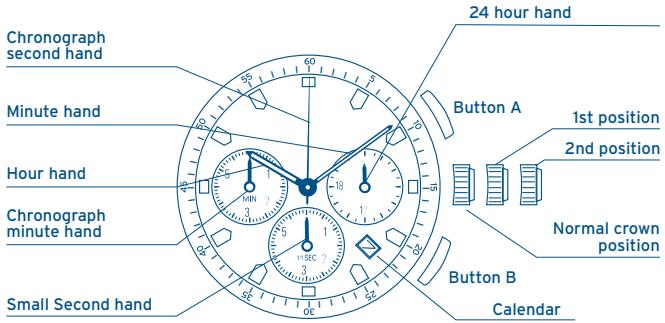
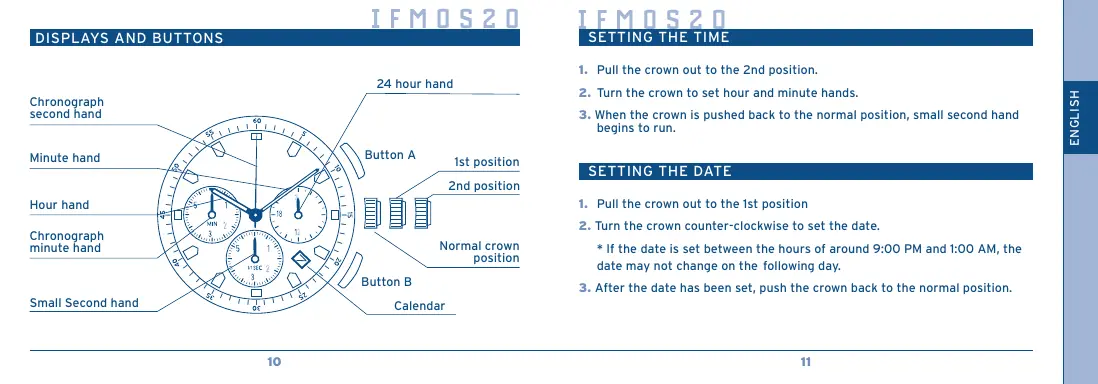
DISPLAYS AND BUTTONS

FESTINA IFMOS20 - DISPLAYS AND BUTTONS - 1

SETTING THE TIME

  1. Pull the crown out to the 2nd position.
  2. Turn the crown to set hour and minute hands.
  3. When the crown is pushed back to the normal position, small second hand begins to run.

SETTING THE DATE

  1. Pull the crown out to the 1st position
  2. Turn the crown counter-clockwise to set the date.

  3. If the date is set between the hours of around 9:00 PM and 1:00 AM, the date may not change on the following day.

  4. After the date has been set, push the crown back to the normal position.

USING THE CHRONOGRAPH

This chronograph is able to measure and display time in 1/1 second united up to maximum of 59 minutes 59 seconds.

The chronograph second hand keeps continuously for 59 minutes 59 seconds after starting.

[Measuring time with the chronograph]

  1. The chronograph can be started and stopped each time button "A" is pressed.
  2. Pressing button "B" resets the chronograph and the chronograph second hand and chronograph minute hand return to zero position.

FESTINA IFMOS20 - [Measuring time with the chronograph] - 1

CHRONOGRAPH RESET (incl. after replacing battery)

This procedure should be performed when the chronograph second hand does not return to zero position after the chronograph has been reset, and including after the battery has been replaced.

  1. Pull the crown out to the 2nd position.
  2. Press button "A" to set the chronograph second hand to the zero position. The chronograph hand can be advanced rapidly by continuously pressing button "A".
  3. Once the hand have been zeroed, return the crown to the normal position.

  4. Do not push crown to normal position while the chronograph second hand returns to zero position. It stops on the way when crown are returned to normal position and its position is recognized as zero position.

IFMOS2O

MANUEL D'INSTRUCTION

CHRONOMETRE

FESTINA IFMOS20 - CHRONOMETRE - 1

By virtue of the regulations pursuant to the handling of waste products deriving from electronic and electrical equipment, end of lifecycle watching products must be selectively collected for processing. You may therefore use one of your quartz watch making products at any of our retail outlets or any authorized collection point. The selective collection, processing, rating and marketing of these products helps contribute to safeguarding the environment and protecting our health.

INDICATIONS ET BOUTONS
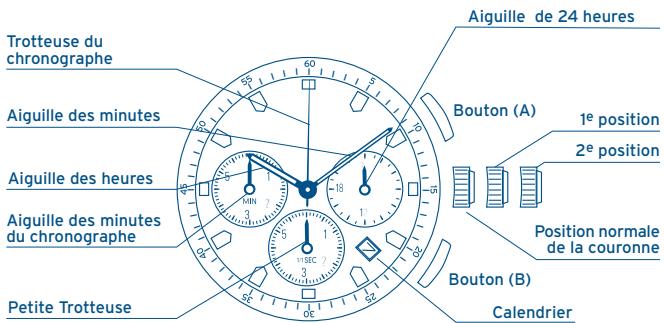
FESTINA IFMOS20 - INDICATIONS ET BOUTONS - 1

RéGLAGE DE L'HEURE

Manual assistant
Powered by Anthropic
Waiting for your message
Product information

Brand : FESTINA

Model : IFMOS20

Category : Wristwatch