DarkFX IP Wash 2000 - Lighting Antari - Free user manual and instructions
Find the device manual for free DarkFX IP Wash 2000 Antari in PDF.


Pick your language and provide your email: we'll send you a specifically translated version.
| Product Type | LED Wash Light |
| Brand | Antari |
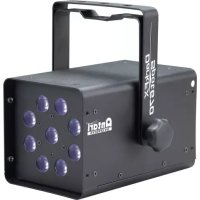
| Model | DarkFX IP Wash 2000 |
| Category | Lighting |
| IP Rating | IP65 (weatherproof) |
| Light Source | 2000W LED (COB or multi-chip) |
| Power Consumption | 2200W max |
| Voltage | AC 100-240V, 50/60Hz |
| Weight | 18.5 kg |
| Dimensions (LxWxH) | 500 x 300 x 400 mm |
| Control Protocol | DMX512 (3-pin XLR) |
| DMX Channels | 4/6/8 channel modes |
| Beam Angle | 60° (adjustable zoom optional) |
| Color Range | RGBW or RGBWA+UV |
| Strobe | 0-20 Hz |
| Dimming | 0-100% linear (16-bit smooth) |
| Housing Material | Die-cast aluminum with tempered glass lens |
| Cooling | Passive cooling (no fan) |
| Operating Temperature | -20°C to 45°C |
| Maintenance | Wipe lens with dry cloth; check seals annually |
| Safety Certifications | CE, ETL, IP65 compliant |
Frequently Asked Questions - DarkFX IP Wash 2000 Antari
How do I connect the DarkFX IP Wash 2000 to a DMX controller?
Use a 3-pin XLR cable. Connect the male end to the fixture's DMX In and the female end to your controller. Set the DMX address via the menu on the back panel. Refer to the manual for channel assignments.
What is the IP rating and can it be used outdoors?
The fixture has an IP65 rating, meaning it is dust-tight and protected against water jets. It can be used outdoors in rain and snow, but ensure all connectors are properly sealed.
How do I clean the lens?
Use a soft, lint-free cloth slightly dampened with water or a mild glass cleaner. Do not use abrasive cleaners. Clean the lens when the fixture is cool and disconnected from power.
Can I replace the LED source?
The LED engine is not user-replaceable. If it fails, contact Antari service or an authorized technician for repair. The fixture is designed for long LED life (up to 50,000 hours).
What DMX channel modes are available?
The fixture supports 4-channel (basic RGBW), 6-channel (with dimmer and strobe), and 8-channel (with additional effects) modes. Select via the menu.
How do I set the DMX address?
Press the Menu button to enter settings. Use Up/Down to find 'DMX Address'. Set the desired address between 001 and 512. Press Enter to confirm.
What happens if the fixture gets wet?
Due to its IP65 rating, it can withstand rain and hose-downs. However, if water enters through damaged seals, power off immediately, dry the fixture, and check seals before reuse.
Can I use this fixture on a stand without a safety cable?
No. Always use a secondary safety cable (e.g., steel wire) attached to the mounting bracket to prevent injury in case of clamp failure.
How do I update the firmware?
Firmware updates require a special Antari USB-to-DMX interface. Download the latest firmware from Antari's website, connect the interface to the fixture's DMX port, and follow the instructions in the manual.
What is the recommended distance for optimal light spread?
With a 60° beam angle, the fixture provides a broad wash. For even coverage, mount at a distance of 2-5 meters from the target, depending on desired intensity.
User questions about DarkFX IP Wash 2000 Antari
0 question about this device. Answer the ones you know or ask your own.
Ask a new question about this device
No questions yet. Be the first to ask one.
Download the instructions for your Lighting in PDF format for free! Find your manual DarkFX IP Wash 2000 - Antari and take your electronic device back in hand. On this page are published all the documents necessary for the use of your device. DarkFX IP Wash 2000 by Antari.
USER MANUAL DarkFX IP Wash 2000 Antari

Manual assistant
Powered by Anthropic
Waiting for your message
Product information
Brand : Antari
Model : DarkFX IP Wash 2000
Category : Lighting