
AR8D01 - Dehumidifier ARDES - Free user manual and instructions
Find the device manual for free AR8D01 ARDES in PDF.


| Product Type | Dehumidifier |
| Brand | Ardes |
| Model | AR8D01 |
| Dimensions (W x H x D) | 38 cm x 55 cm x 25 cm |
| Weight | 11.5 kg |
| Power Supply | 220-240 V, 50 Hz |
| Power Consumption | 250 W |
| Water Tank Capacity | 3.5 L |
| Dehumidification Capacity | 25 L/day (at 30°C, 80% RH) |
| Refrigerant | R-290 (Propane) |
| Noise Level | 45 dB(A) |
| Humidity Control | Adjustable hygrostat (30% - 80% RH) |
| Timer | 1-24 hours timer |
| Auto Defrost | Yes, at low ambient temperature |
| Continuous Drain | Yes, with hose (not included) |
| Air Filter | Washable pre-filter |
| Ionizer | Yes, built-in |
| Safety Features | Auto restarts after power failure, overflow protection |
| Maintenance | Clean filter every 2 weeks; clean coils annually |
| Replacement Filter | Filter not separately replaceable |
Frequently Asked Questions - AR8D01 ARDES
User questions about AR8D01 ARDES
0 question about this device. Answer the ones you know or ask your own.
Ask a new question about this device
Download the instructions for your Dehumidifier in PDF format for free! Find your manual AR8D01 - ARDES and take your electronic device back in hand. On this page are published all the documents necessary for the use of your device. AR8D01 by ARDES.
USER MANUAL AR8D01 ARDES
MINI THERMOELECTRIC DEHUMIDIFIER
AR8D01
This appliance may be used by children aged 8 years and above and by persons with reduced physical, sensory, or mental capabilities, or lack of experience and knowledge, if they have been given supervision or instruction concerning use of the appliance in a safe way and understand the hazards involved.
Children must not play with the appliance.
Cleaning and user maintenance shall not be made by children without supervision.
If the supply cord is damaged, it must be replaced by the manufacturer, its service agent, or similarly qualified persons in order to avoid a hazard.
The appliance is only to be used with the power supply unit provided with the appliance.
Ensure that the appliance is switched off from the supply mains during cleaning and emptying.
Warnings
ATTENTION: read this booklet carefully; it contains important instructions for safe installation, use, and maintenance. Keep these instructions for future reference.
Keep the guarantee, proof of purchase, and these instructions for future use and reference.
After removing the packaging, check the appliance for any signs of damage.
In case of visible damage, do not use it and contact a qualified technician.
Do not leave packaging parts within the reach of children. This appliance is not a toy: it is an electrical device and must be handled with the necessary caution.
Before connecting the appliance, make sure that the power supply voltage matches the indication on the rating plate.
If the plug and socket are not compatible, the socket has to be replaced with a suitable type by skilled persons.
Do not use adapters or extension cables which do not meet current safety standards or that exceed the current carrying capacity limits.
When you don't use the appliance, disconnect it from the power supply and assure that the switch is off.
Do not tug on the power cable or on the appliance itself to remove the plug from the socket.
The use of any electrical appliance requires that a number of basic rules are observed, namely:
- Never touch the appliance with wet or humid hands.
- Do not leave the appliance exposed to weathering (rain, sunlight).
- Do not subject it to rough handling.
In case of a breakdown or malfunctioning of the appliance, disconnect it at once.
Do not attempt to repair it, but take it to a service centre approved by the manufacturer.
The power cable should be extended to its full length to avoid overheating.
For safety reasons, the appliance should never be opened.
The appliance has been designed and manufactured to operate in the home.
Any other use is considered inappropriate and dangerous.
Do not insert objects through the safety grill or the air inlets.
Do not use the heater close to sinks, bathtubs, showers and swimming-pools.
Do not place the cord near sources of heat.
WARNING: DO NOT COVER THE APPLIANCE OR OBSTRUCT THE AIR INLETS TO AVOID OVERHEATING.
Technical information
1 - Air outlet 2 - On/Off pushbutton 3 - Indicator light 4 - Water tank

Instructions for use
The appliance can dehumidify the ambient air, collecting approximately 220 ml/day (30°C, 80% humidity). To turn on the product, plug the adapter into the appliance and then plug the adapter into the socket. Push the On/Off pushbutton to turn the appliance on or off; the indicator light will turn on (blue color) to indicate that the appliance is working. If the water level reaches the maximum level, the indicator light turns red to indicate that the water tank must be emptied. Note: when the indicator light is red, the appliance is not working. To empty the water tank, turn off the product, take out the water tank, open the drain cover, and pull out the water. Use a soft and clean cloth to wipe the water tank and the dehumidifier. Put the water tank back into the dehumidifier.
Make sure that the appliance is completely dry before storing it in the box.
Maintenance
This appliance does not require any special maintenance.
Disconnect the plug from the socket and let the appliance cool down well before cleaning it.
To clean the appliance, use a soft or slightly damp cloth.
Never use abrasives or chemical solvents.
Do not use very wet substances, liquids, or cloths to prevent water from entering the apparatus and irreparably damaging it.
NEVER IMMERSE THE APPLIANCE IN WATER.
WARRANTY
Conditions
Terms and Conditions
The guarantee is valid for 24 months.
This guarantee applies only if it has been duly filled in and is submitted with the receipt showing the date of purchase.
The guarantee covers the replacement or repair of parts making up the appliance which were faulty at source due to manufacturing faults.
After the guarantee has expired, the appliance will be repaired against payment.
The manufacturer declines any responsibility for damage to persons, animals or property due to misuse of the appliance and failure to observe the directions contained in the instructions.
Limits
All rights under this guarantee and any responsibility on our part will be voided if the appliance has been:
- mishandled by unauthorized persons
- improperly used, stored or transported.
The guarantee does not cover damage to the outward appearance or any other that does not prevent regular operation.
If any faults should be found despite the care taken in selecting the materials and in creating the product, or if any information or advice are required, please contact your local dealer.

DISPOSAL
USER INFORMATION
"Implementation of Directive 2012/19/EU on Waste Electrical and Electronic Equipment (WEEE)", pertaining to reduced use of hazardous substances in electrical and electronic equipment, as well as to waste disposal".
The symbol of the crossed-out wheelie bin on the equipment or on its packaging indicates that the product must be disposed of separately from other waste at the end of its service life.
The user must therefore take the dismissed equipment to suitable separate collection centres for electrical and electronic waste.
For more details, please contact the appropriate local authority.
Suitable segregated collection of the equipment for subsequent recycling, treatment or environmentally-friendly disposal helps prevent damage to the environment and to human health, and encourages the re-use and/or recycling of the materials that make up the equipment.
Abusive disposal of the product by the user shall result in the application of administrative fines in accordance with the laws in force.
Ardes
Poly Pool S.p.A. Via Sottocorna, 21/B
24020 Parre (Bergamo) - Italy
Tel. +39 035 4104000 r.a. - Fax +39 035 702716
http://www.ardes.it - e-mail: polypool@polypool.it
MADE IN CHINA
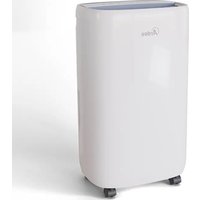
Brand : ARDES
Model : AR8D01
Category : Dehumidifier