
Kraken BT Kitty Edition - Earphones RAZER - Free user manual and instructions
Find the device manual for free Kraken BT Kitty Edition RAZER in PDF.


| Product Type | Wireless Bluetooth Headset |
| Brand | Razer |
| Model | Kraken BT Kitty Edition |
| Form Factor | Over-Ear |
| Driver Diameter | 40 mm |
| Driver Type | Neodymium Magnet |
| Frequency Response | 20 Hz - 20 kHz |
| Impedance | 32 Ω |
| Microphone | Retractable Unidirectional |
| Wireless Connectivity | Bluetooth 5.0 |
| Audio Codec Support | aptX, AAC, SBC |
| Battery Life (Lighting Off) | Up to 50 hours |
| Battery Life (Lighting On) | Up to 40 hours |
| Charging Port | USB Type-C |
| Charge Time | Approx. 3 hours |
| Lighting | Razer Chroma RGB (Kitty Ear Zones) |
| Weight | Approx. 298 g (0.66 lbs) |
| Dimensions (W x D x H) | 190 x 80 x 195 mm |
| Ear Cushions | Memory Foam with Leatherette |
| Cleaning Instructions | Wipe with a soft, dry cloth; avoid liquids |
| Safety Warnings | Do not expose to moisture; avoid prolonged high volume |
| Replaceable Parts | Ear cushions, USB-C cable |
| Warranty | 1 Year Limited Manufacturer Warranty |
Frequently Asked Questions - Kraken BT Kitty Edition RAZER
User questions about Kraken BT Kitty Edition RAZER
0 question about this device. Answer the ones you know or ask your own.
Ask a new question about this device
Download the instructions for your Earphones in PDF format for free! Find your manual Kraken BT Kitty Edition - RAZER and take your electronic device back in hand. On this page are published all the documents necessary for the use of your device. Kraken BT Kitty Edition by RAZER.
USER MANUAL Kraken BT Kitty Edition RAZER
natural_image
Abstract black line drawing of a stylized creature or serpent on a solid green background (no text or symbols)RAZER KRAKEN BT KITTY EDITION
MASTER GUIDE
Be free to express your own killer kitty style with the Razer Kraken BT Kitty Edition—a wireless Bluetooth headset with custom kitty ear and headset lighting along with clear sounding 40mm drivers.
CONTENTS
- WHAT'S INSIDE / WHAT'S NEEDED ....3
- LET'S GET YOU COVERED ....5
- TECHNICAL SPECIFICATIONS ....6
- GETTING STARTED....7
- USING YOUR RAZER KRAKEN BT KITTY EDITION....9
- CONFIGURING YOUR HEADSET VIA RAZER SYNAPSE....15
- SAFETY AND MAINTENANCE....28
- LEGALESE....29
A. Kitty ears and earcups powered by Razer Chroma™ RGB
B. Adjustable padded headband
C. Circumaural ear cup design
D. Plush leatherette foam ear cushions
E. Mic diaphragm
F. Charging port
G. Volume dial
H. Power button
I. Status indicator
- Charging cable

flowchart
graph LR
    A["Input"] --> B["R AZ ≡ R"]
    B --> C["Output"]
    D["Input"] --> E["R AZ ≡ R"]
    E --> F["Output"]
■ Important Product Information Guide
WHAT'S NEEDED
PRODUCT REQUIREMENTS
■ Devices with Bluetooth audio capability
RAZER AUDIO APP REQUIREMENTS
■ iOS 12 / Android 8.1 Oreo (or higher) device with Bluetooth connectivity
■ Internet connection for app installation
2. LET'S GET YOU COVERED
You've got a great device in your hands, complete with a 2-year limited warranty coverage. Now maximize its potential and score exclusive Razer benefits by registering at razerid.razer.com
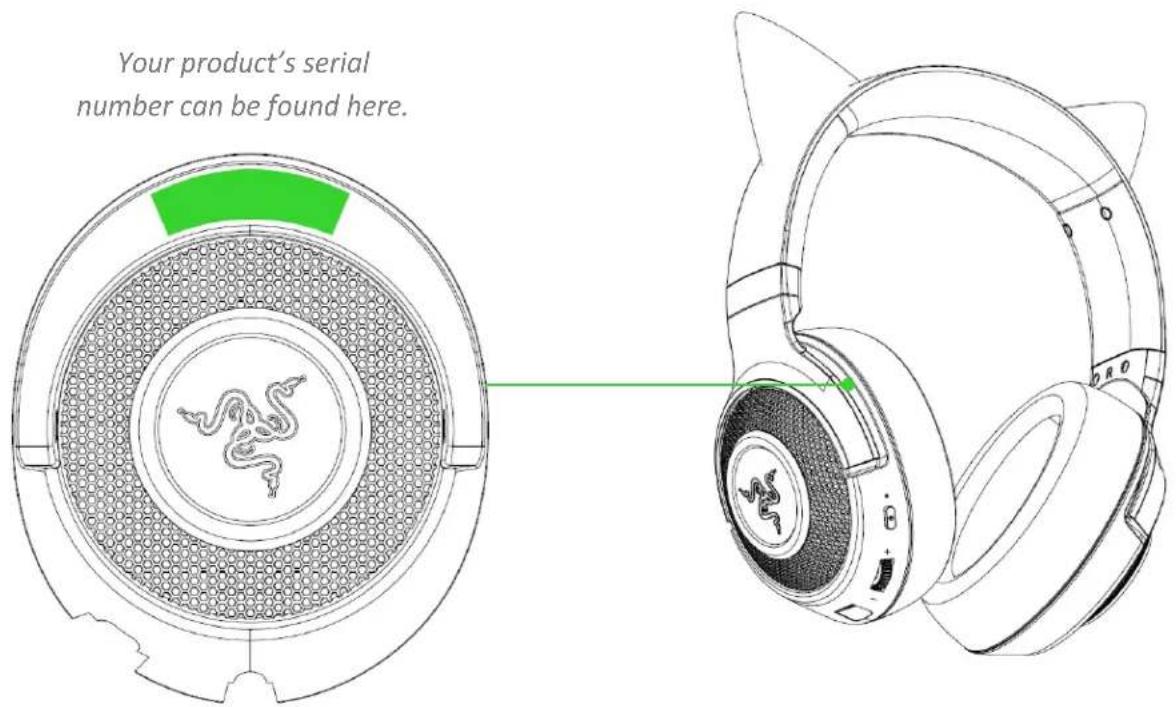
Got a question? Ask the Razer Support Team at support.razer.com
3. TECHNICAL SPECIFICATIONS
HEADPHONES
■ Frequency Response: 20 Hz – 20 kHz (44.1kHz Sampling)
■ Impedance: 32 Ohm
■ Sensitivity: 96 dB / mW at 1KHz
■ Driver Size (Diameters): 40 mm
■ Driver Type : Dynamic Driver
■ Earcups: Over-Ear (Circumaural)
- Earpads Material: Plush leatherette with foam
■ Noise Cancelling: Dual mic noise cancelation
■ Connection Type: Bluetooth 5.0 connection
MICROPHONE
■ Microphone Style: ECM
■ Pick Up Pattern: Omni-directional
■ Microphone Frequency Response: 100 Hz – 10 kHz
■ Microphone Sensitivity (@1kHz): -38 dBV/Pa (1kHz)
■ Virtual Surround Encoding: Nil
CONTROLS
■ Volume Control: Volume dial on earcup
■ Other Controls: Power On / Pairing / Multi-Function Button
■ Battery Life:
- Up to 20 hours with lighting on
○ Up to 50 hours with lighting off
■ Lighting: RGB LED for indicating power, pairing and charging status
■ BT Connection: Mobile/System
4. GETTING STARTED
CHARGING YOUR HEADSET
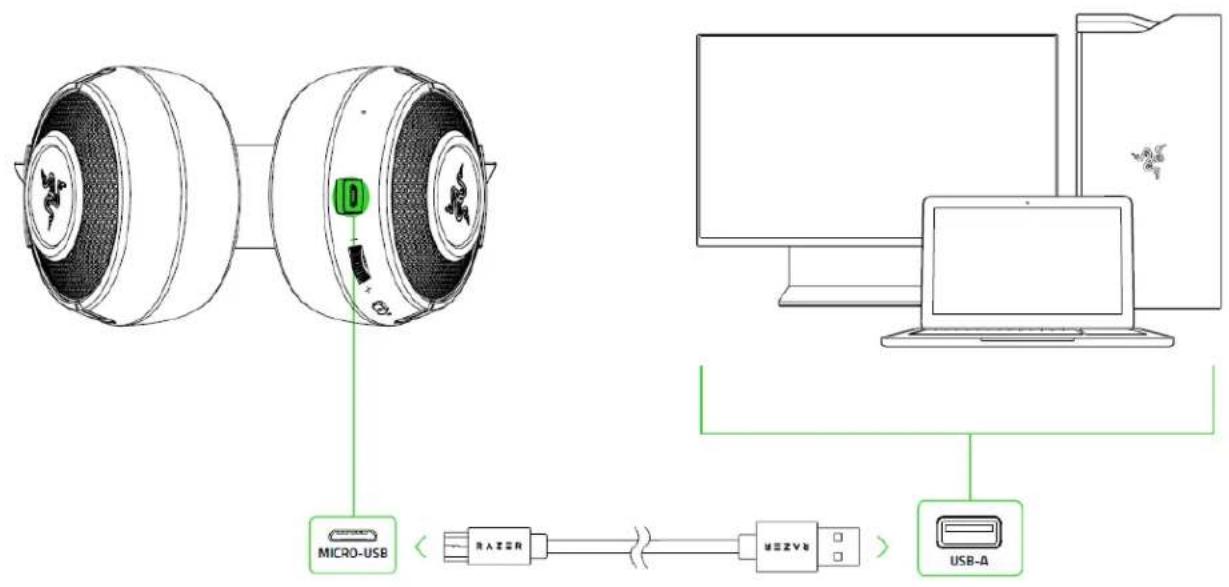
Connect your Razer Kraken BT Kitty Edition directly to the USB port of your computer using the charging cable. For best results, please fully charge your headset before using it for the first time. A depleted battery will fully charge in about 3 hours.
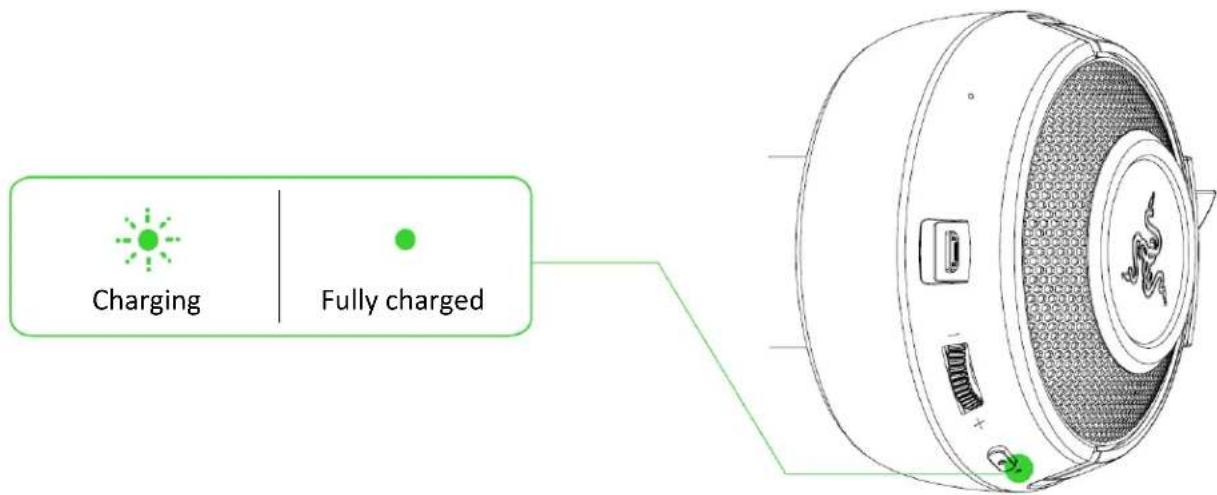
While charging, your Razer Kraken BT Kitty Edition will continuously show its battery level on the status indicator, as shown here:
CONNECTING YOUR HEADSET
While powered off, press and hold the power button until the status indicator starts blinking blue. An audio prompt will notify you that your Razer Kraken BT Kitty Edition is searching for compatible Bluetooth devices. Follow your device's instructions to pair it with your Razer Kraken BT Kitty Edition. Once the headset is paired, the status indicator will briefly change to static blue.

5. USING YOUR RAZER KRAKEN BT KITTY EDITION
BATTERY LEVEL
While unplugged, your Razer Kraken BT Kitty Edition will briefly show its battery level on the status indicator when you power on the headset. While in use, an audio prompt will be heard when the battery needs recharging.

GAMING MODE
With Gaming Mode enabled, your headset will function at a lower latency; giving you real-time audio feedback while gaming. While connected via Bluetooth, triple press the power button then hold the last press for 2 seconds to activate or deactivate this function. The status indicator will briefly display solid blue and an audio prompt will notify you that this function has been enabled.

For best performance, it is recommended to keep your VOLUME DIAL headset within a very close distance of the audio source.
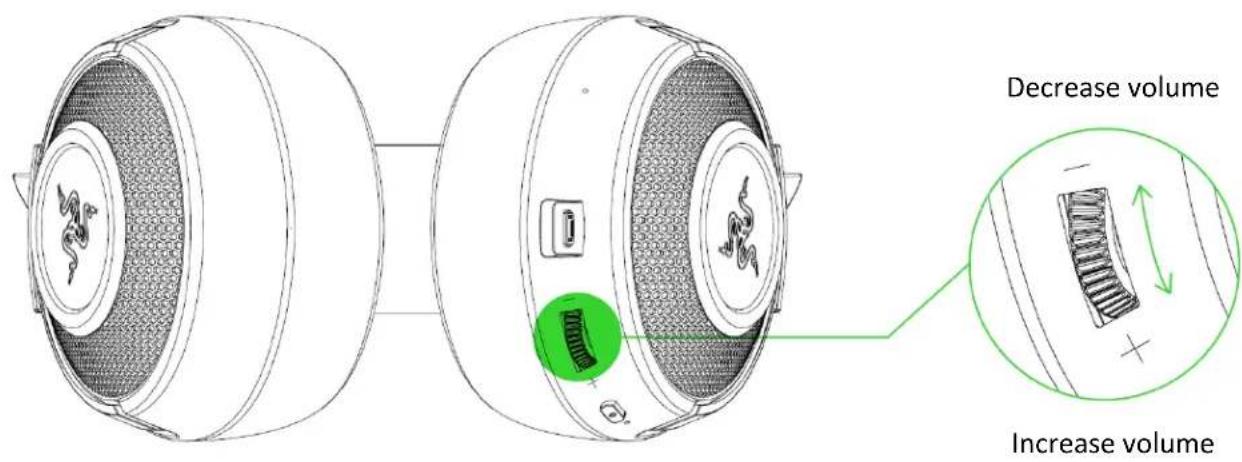
Rotate the volume dial to increase or decrease the volume.
POWER BUTTON
POWER ON/OFF
Press and hold the power button until the status indicator turns green to power on. Press and hold the power button for 4 seconds to power off. An audio prompt will help notify you that your Razer Kraken BT Kitty Edition is powered on or off.

PAIRING MODE
Activate your headset's pairing mode if you want to pair it to a different device. While powered off, press and hold the power button for 4 seconds to power on and activate pairing mode.

An audio prompt will help notify you that your Razer Kraken BT Kitty Edition has been powered on and is now in pairing mode. Follow your device's instructions to pair it with your headset. Once the headset is paired, the status indicator will briefly change to static blue.
OTHER FUNCTIONS
Other power button functions are available when the headset is powered on and connected to your device. These functions operate based on your device's current activity.

Some features listed here may not be applicable to certain devices.
| Single press | Play/pause |
| Accept incoming call or end current call | |
| Put call on-hold and accept incoming call | |
| End call and swap to on-hold call | |
| Press and hold for 2 seconds | Launch voice command |
| Reject incoming call | |
| Swap calls | |
| While powered off, press and hold for 4 seconds | Activate pairing mode |
| Double press | Skip track |
| Triple press | Previous track |
| Triple press then hold the last press for 2 seconds | Enable / disable Gaming Mode |
COMFORT
We recommend stretching the headset gently apart before placing them over your head to minimize headband stress. However, please avoid overstretching the headset beyond its technical limits.

natural_image
Line drawing of a stylized head with cat ears and two green arrows pointing inward (no text or symbols)RAZER AUDIO APP (FOR MOBILE DEVICES)
Making advanced customization just got a whole lot easier for your Razer Kraken BT Kitty Edition. With its own mobile app, you can select or create your own equalizer preset, customize the headset's lighting and much more—anytime, anywhere.

flowchart
graph LR
    A["Signal"] --> B["Download on the App Store"]
    A --> C["GET IT ON Google Play"]
RAZER AUDIO
- Download the mobile app on your mobile device.
- Launch the app and follow the onscreen instructions
RAZER SYNAPSE (PC)
Use the Razer Synapse* app to select or customize audio and mic presets, adjust its power saving feature, and even personalize its lighting for an immersive gaming experience that's truly yours.
*Make sure that your Razer Kraken BT Kitty Edition is connected to your PC via Bluetooth. Install Razer Synapse when prompted or download the installer from razer.com/synapse.
6. CONFIGURING YOUR HEADSET VIA RAZER SYNAPSE
i Internet connection is required for installation, updates and cloud -based features. Registering for a Razer ID account is recommended, but optional. All listed features are subject to change based on the current software version, connected device(s), and supported apps and software.
SYNAPSE TAB
The Synapse tab is your default tab when you first launch Razer Synapse. This tab allows you to navigate the Dashboard subtab.
Dashboard
The Dashboard subtab is an overview of your Razer Synapse where you can access all your Razer devices, modules, and online services.

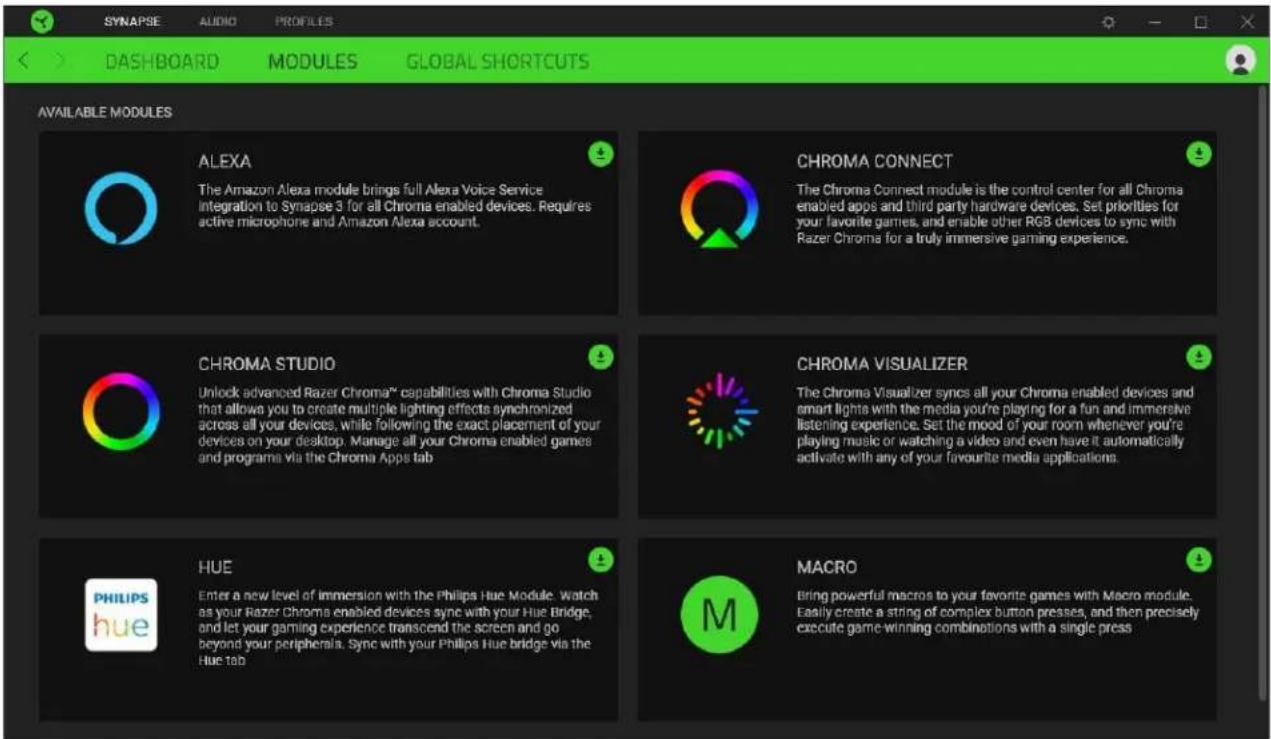
Modules
The Modules subtab displays all installed and available modules for installation.
Global Shortcuts
Bind operations or Razer Synapse functions to custom key-combinations from any Razer Synapse-enabled device inputs which apply across all device profiles. Learn more about Profiles

Only Razer Synapse-enabled device inputs will be recognized.

AUDIO TAB
The Audio tab is the main tab for your Razer Kraken BT Kitty Edition. From here, you can customize your device's settings to unleash its full potential. Changes made under this tab are automatically saved to your system and cloud storage.
Sound
The Sound subtab is for adjusting your device's volume, selecting or customizing your preferred audio equalizer preset and accessing Windows Sound properties.

Profile
Profile is a data storage for keeping all your Razer peripheral's settings. By default, the profile name is based on your system's name. To add, rename, duplicate, or delete a profile, simply press the Miscellaneous button (●).
Volume
Adjust the audio volume of the device. You may also access the Windows Volume mixer of the current playback device where you can proportionally adjust the overall volume of the system or individually adjust the volume of each active application.
Sound Properties
Launch the Windows sound properties window to manage the sound settings of your system such as modifying the playback and recording device settings, sound scheme and default communications activity.
Audio Equalizer
Select any of the available equalizer presets created for the best audio experience, giving you easy access to commonly used audio tones. Manually adjusting any equalizer preset will automatically set it to Custom.
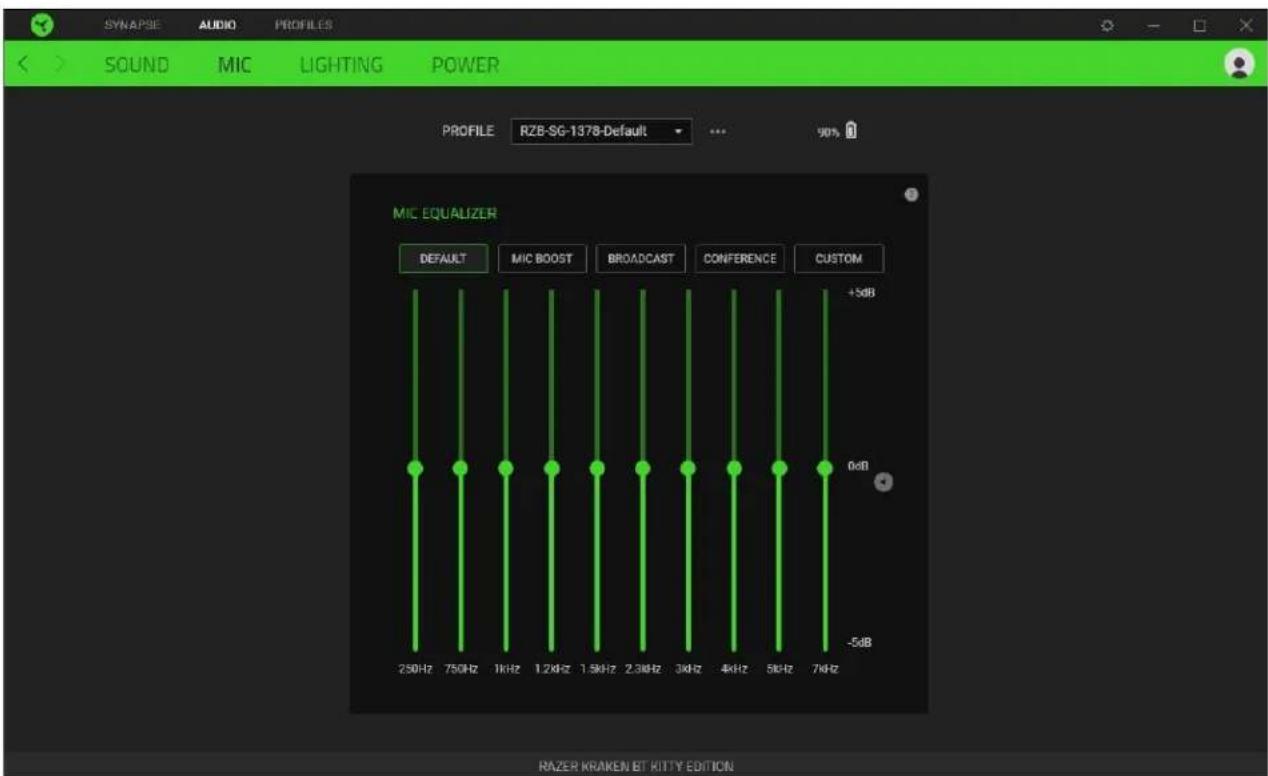
Mic
The Mic subtab enables you to change the settings for all outgoing mic audio. Select any of the available mic equalizer presets which best fits your mic needs. Manually adjusting any equalizer preset will automatically set it as a Custom preset.
Lighting
The Lighting subtab enables you to modify your Razer device's light settings.
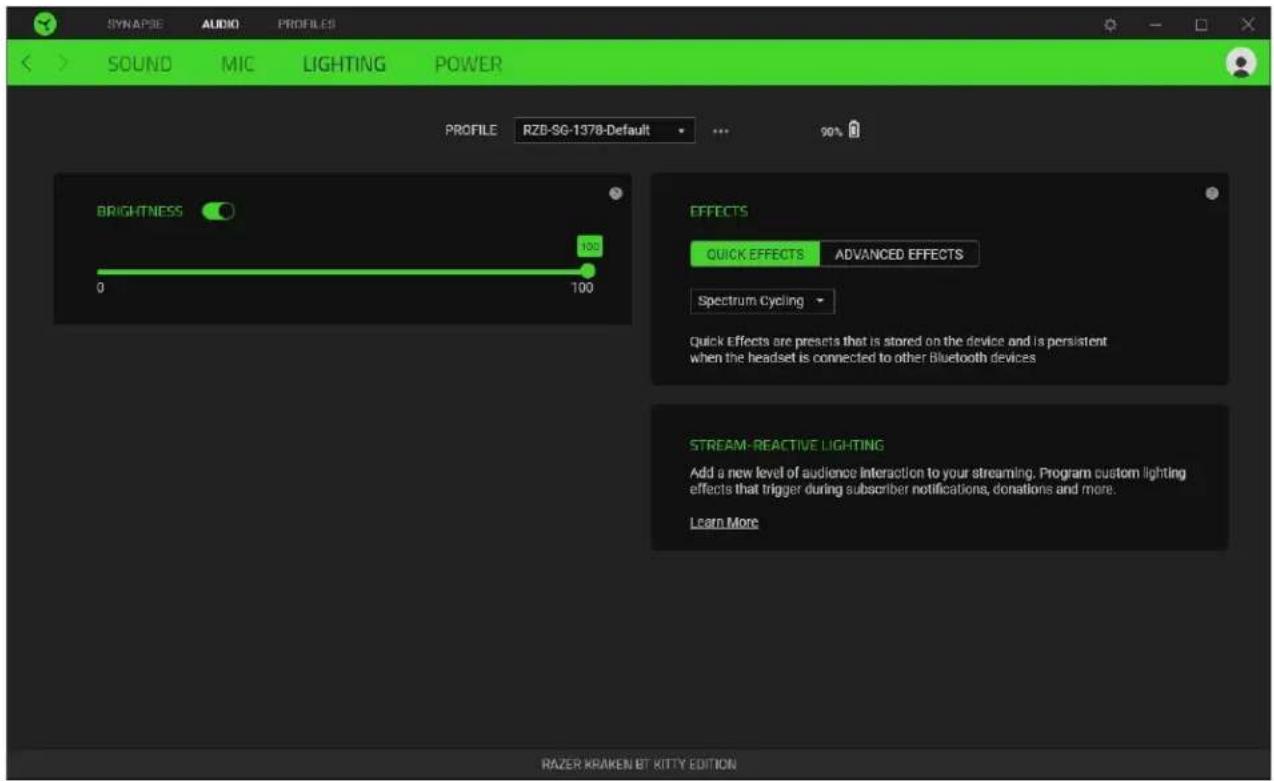
Brightness
You can turn off your Razer device's lighting by toggling the Brightness option or increase/decrease the luminance using the slider.
Effects
A number of effects can be selected and applied to your headset's lighting, as listed here:
| Name | Description | How to set up | |
 | Audio meter | The earcups will light up according to the audio level with a default spectrum of colors | Select a Color Boost level |
 | Breathing | The lighting will fade in and out of the selected color(s) | Select up to 2 colors or randomize colors |
 | Spectrum cycling | The lighting will cycle between 16.8 million colors indefinitely | No further customization required |
 | Static | The earcups will remain lit in the selected color | Select a color |
If you have other supported Razer Chroma-enabled devices, you can synchronize their quick effects with your Razer device by clicking the Chroma Sync button ( )
i Only devices that support the selected lighting effect will synchronize.
Advanced Effects
The Advanced Effects option allows you to choose a Chroma Effect you want to use on your Razer Chroma-enabled peripheral. To start making your own Chroma Effect, simply press the Chroma Studio button ( CHROMA STUDIO
The Chroma Studio module is required to use this function.
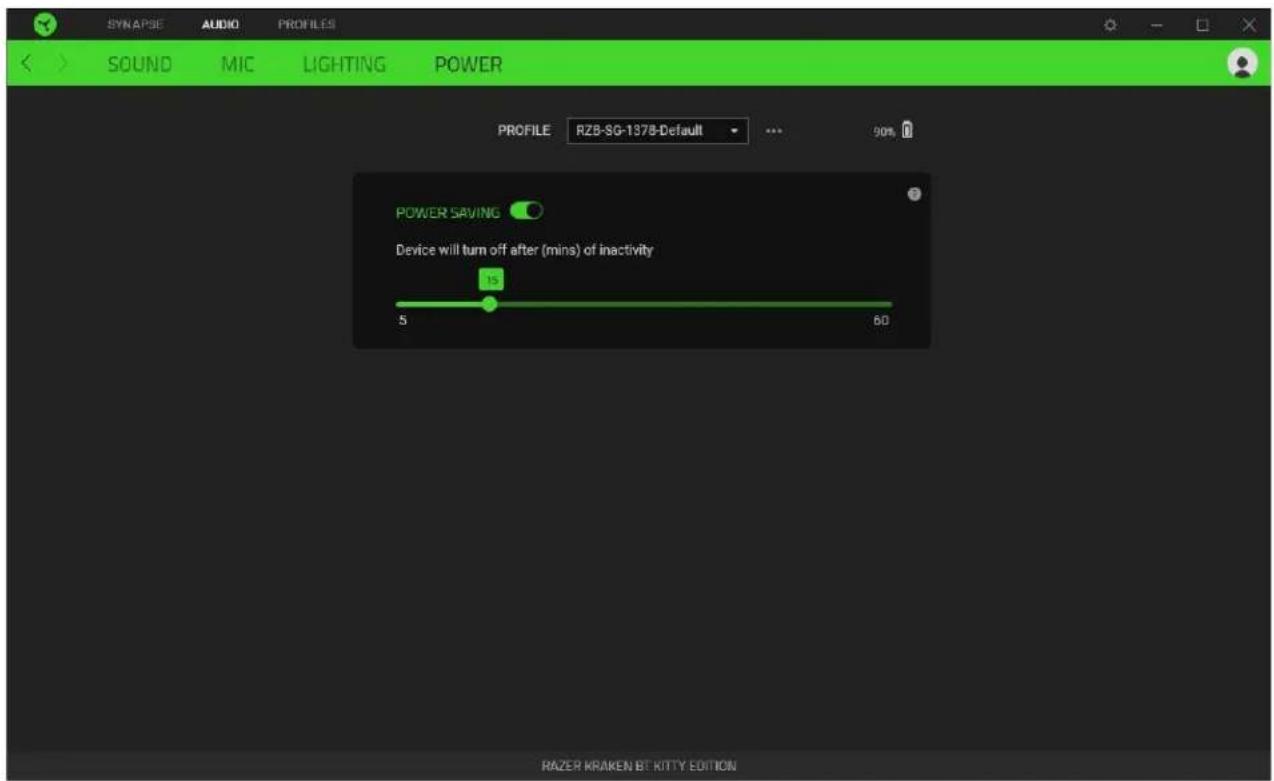
Power
The Power subtab allows you to manage your device's energy consumption by setting it to power off when it has been idle for a certain amount of time.
PROFILES TAB
The Profiles tab is a convenient way of managing all your profiles and linking them to your games and applications.
Devices
View which games are linked to each device's profiles or which Chroma Effect is linked to specific games using the Devices subtab.
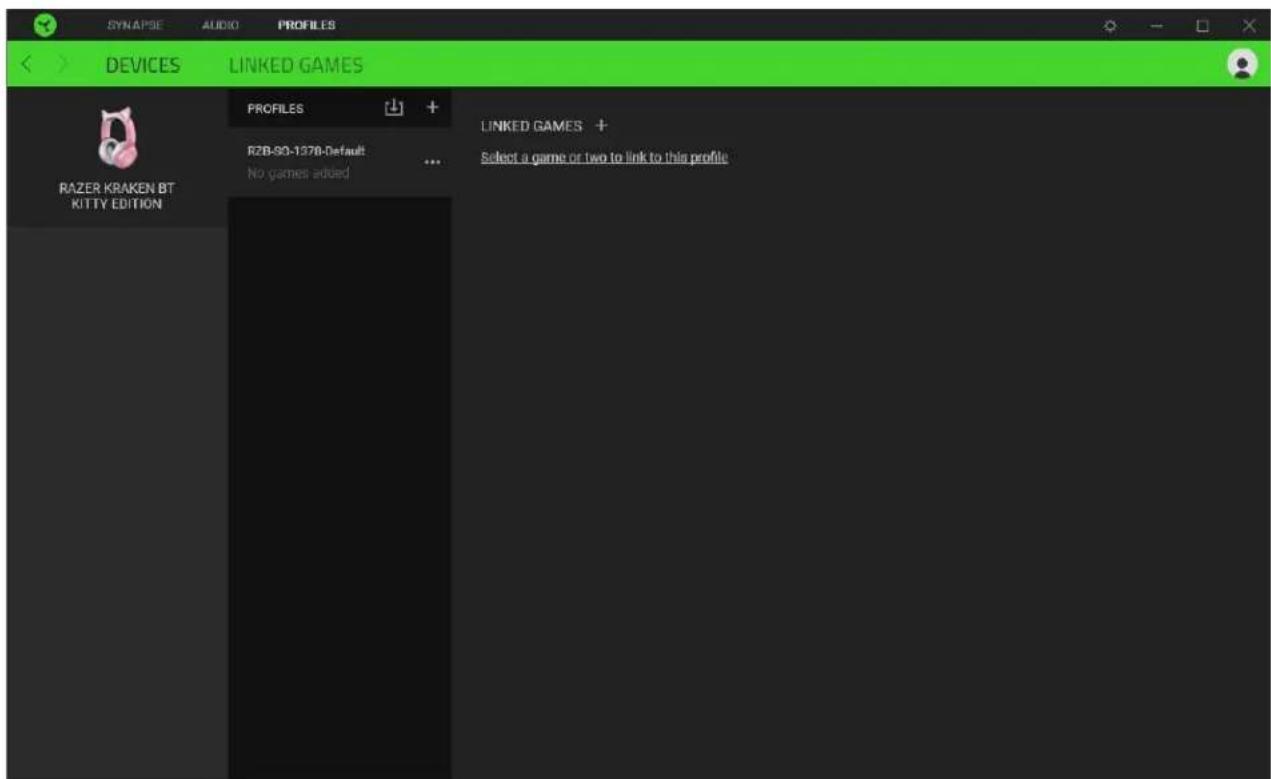
You can import Profiles from your computer or from the cloud through the import button ( ) or create new profiles within the selected device using the add button ( ). To rename, duplicate, export, or delete a profile, simply press the Miscellaneous button ( ●). Each profile can be set to automatically activate when you run an application using the Linked Games option.
Linked Games
The Linked Games subtab gives you the flexibility to add games, view devices that are linked to games, or search for added games. You can also sort games based on alphabetical order, last played, or most played. Added games will still be listed here even if it is not linked to a Razer device.
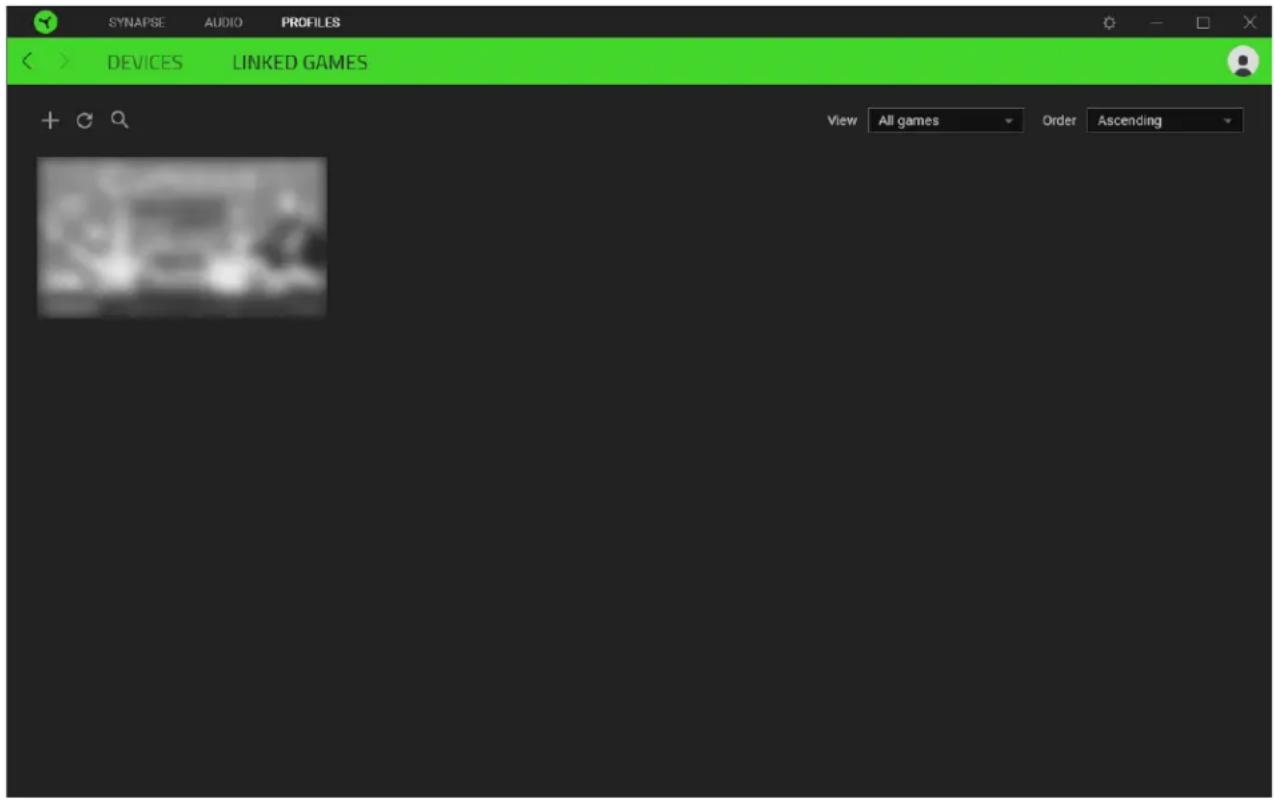
To link games to connected Razer devices or Chroma Effects, simply click on any game from the list, and then click Select a device and its profile to launch automatically during gameplay to select the Razer device or Chroma Effect it will link with. Once linked, you may click on the Miscellaneous button (●●●) of the corresponding Chroma Effect or device to select a specific Chroma Effect or profile.
SETTINGS WINDOW
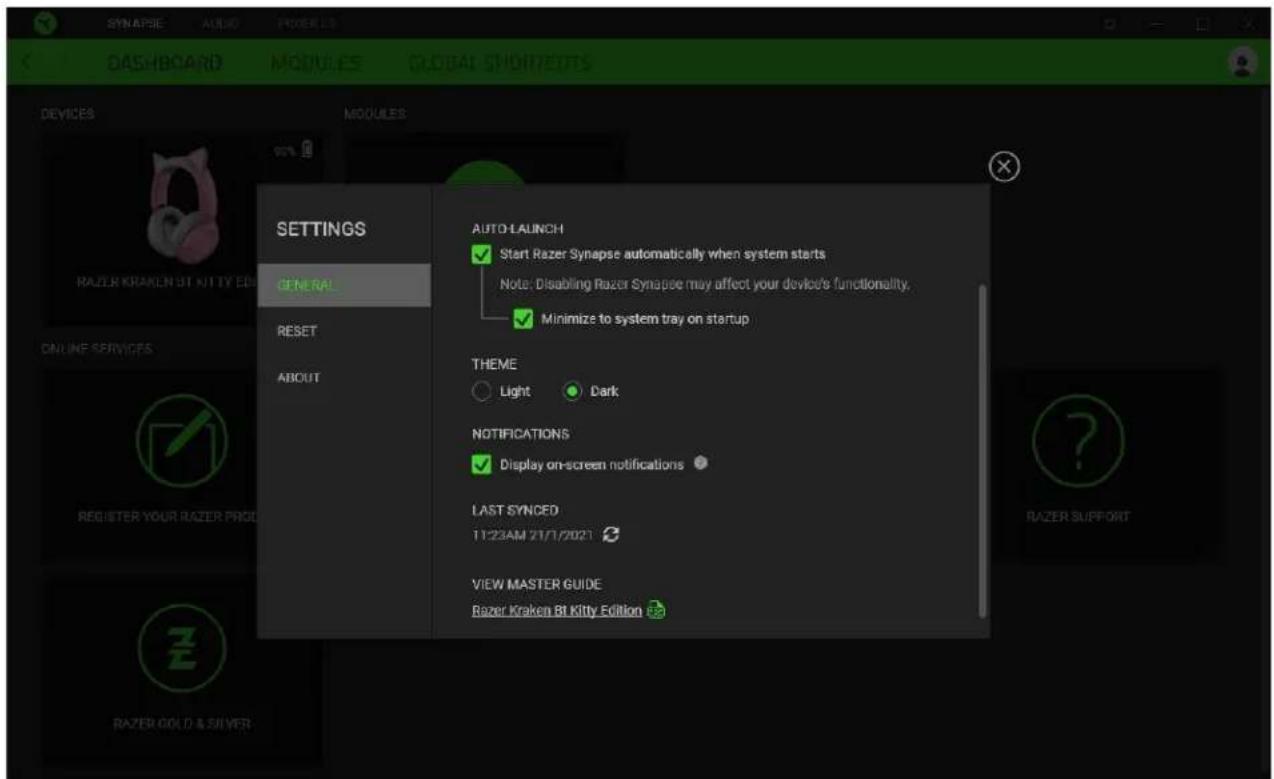
The Settings window, accessible by clicking the ( ) button on Razer Synapse, enables you to configure the startup behavior and display language of Razer Synapse, view the master guides of each connected Razer device, or perform factory reset on any connected Razer device.
General tab
The default tab of the Settings window. The General tab enables you to change the software's display language, start-up behavior, display theme, and on-screen notifications display. You may also manually sync your profiles to the cloud ( 🔒 or view the master guide of all connected Razer devices and installed modules.
Reset tab
The Reset tab allows you to perform a factory reset on all connected Razer devices with on-board memory and/or reset Razer Synapse tutorials to acquaint yourself again with Razer Synapse's new features on its next launch.
By resetting a Razer device, all profiles stored on the selected device's on-board memory will be erased.
About tab
The About tab displays brief software information, copyright statement and provides relevant links for its terms of use. You may also use this tab to check for software updates, or as a quick access to Razer's social communities.
7. SAFETY AND MAINTENANCE
SAFETY GUIDELINES
In order to achieve maximum safety while using your Razer Kraken BT Kitty Edition, we suggest that you adopt the following guidelines:
Should you have trouble operating the device properly and troubleshooting does not work, unplug the device and contact the Razer hotline or go to support.razer.com for assistance.
Do not take apart the device (doing so will void your warranty) and do not attempt to operate it under abnormal current loads.
Keep the device away from liquid, humidity or moisture. Operate the device only within the specific temperature range of 0^ C ( 32^ F) to 40^ C ( 104^ F). Should the temperature exceed this range, unplug and/or switch off the device in order to let the temperature stabilize to an optimal level.
The device isolates external ambient sounds even at low volumes, resulting in lowered awareness of your external surroundings. Please remove the device when engaging in any activities that requires active awareness of your surroundings.
Listening to excessively loud volumes over extended periods of time can damage your hearing. Furthermore, legislation of certain countries permits a maximum sound level of 86db to affect your hearing for 8 hours a day. We therefore recommend that you reduce the volume to a comfortable level when listening for prolonged periods of time. Please, take good care of your hearing.
MAINTENANCE AND USE
The Razer Kraken BT Kitty Edition requires minimum maintenance to keep it in optimum condition. Once a month we recommend you clean it using a soft cloth or cotton swab to prevent dirt buildup. Do not use soap or harsh cleaning agents.
BATTERY WARNING
The Razer Kraken BT Kitty Edition contains a Li-ion rechargeable battery. In general, the life expectancy of such batteries is dependent upon usage. If you suspect that the Li-ion rechargeable battery inside the Razer Kraken BT Kitty Edition may be drained (has a low charge), try charging it.
Caution: Do not open, mutilate, or expose to conducting materials (metal), moisture, liquid, fire, or heat. Doing so may cause batteries to leak or explode, resulting in personal injury. Battery life varies with usage.
8. LEGALESE
COPYRIGHT AND INTELLECTUAL PROPERTY INFORMATION
©2020 Razer Inc. All rights reserved. Razer, the triple-headed snake logo, Razer logo, and “For Gamers. By Gamers.” are trademarks or registered trademarks of Razer Inc. and/or affiliated companies in the United States or other countries. All other trademarks are the property of their respective owners.
©2018 Google LLC All rights reserved. Android, Google, Google Logo, Google Play, and the Google Play logo are registered trademarks of Google LLC.
Apple, the Apple logo, and iPhone are trademarks of Apple Inc., registered in the U.S. and other countries. App Store is a service mark of Apple Inc. iOS is a trademark or registered trademark of Cisco in the U.S. and other countries and is used under license.
The Bluetooth ^® word mark and logos are registered trademarks owned by Bluetooth SIG, Inc., and any use of such marks by Razer is under license.
Razer Inc. (“Razer”) may have copyright, trademarks, trade secrets, patents, patent applications, or other intellectual property rights (whether registered or unregistered) concerning the product in this guide. Furnishing of this guide does not give you a license to any such copyright, trademark, patent or other intellectual property right. The Razer Kraken BT Kitty Edition (the “Product”) may differ from pictures whether on packaging or otherwise. Razer assumes no responsibility for such differences or for any errors that may appear. Information contained herein is subject to change without notice.
LIMITED PRODUCT WARRANTY
For the latest and current terms of the Limited Product Warranty, please visit razer.com/warranty.
LIMITATION OF LIABILITY
Razer shall in no event be liable for any lost profits, loss of information or data, special, incidental, indirect, punitive or consequential or incidental damages, arising in any way out of distribution of, sale of, resale of, use of, or inability to use the Product. In no event shall Razer's liability exceed the retail purchase price of the Product.
GENERAL
These terms shall be governed by and construed under the laws of the jurisdiction in which the Product was purchased. If any term herein is held to be invalid or unenforceable, then such term (in so far as it is invalid or unenforceable) shall be given no effect and deemed to be excluded without invalidating any of the remaining terms. Razer reserves the right to amend any term at any time without notice.
- CONTENTS
- WHAT'S NEEDED
- PRODUCT REQUIREMENTS
- RAZER AUDIO APP REQUIREMENTS
- LET'S GET YOU COVERED
- TECHNICAL SPECIFICATIONS
- HEADPHONES
- MICROPHONE
- CONTROLS
- GETTING STARTED
- CHARGING YOUR HEADSET
- CONNECTING YOUR HEADSET
- USING YOUR RAZER KRAKEN BT KITTY EDITION
- BATTERY LEVEL
- GAMING MODE
- POWER BUTTON
- POWER ON/OFF
- PAIRING MODE
- OTHER FUNCTIONS
- COMFORT
- RAZER AUDIO APP (FOR MOBILE DEVICES)
- RAZER SYNAPSE (PC)
- CONFIGURING YOUR HEADSET VIA RAZER SYNAPSE
- SYNAPSE TAB
- Dashboard
- Modules
- Global Shortcuts
- AUDIO TAB
- Sound
- Profile
- Volume
- Sound Properties
- Audio Equalizer
- Mic
- Lighting
- Brightness
- Effects
- Advanced Effects
- Power
- PROFILES TAB
- Devices
- Linked Games
- SETTINGS WINDOW
- General tab
- Reset tab
- About tab
- SAFETY AND MAINTENANCE
- SAFETY GUIDELINES
- MAINTENANCE AND USE
- BATTERY WARNING
- LEGALESE
- COPYRIGHT AND INTELLECTUAL PROPERTY INFORMATION
- LIMITED PRODUCT WARRANTY
- LIMITATION OF LIABILITY
- GENERAL
Brand : RAZER
Model : Kraken BT Kitty Edition
Category : Earphones