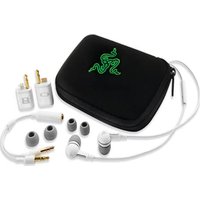
Moray - Earplug RAZER - Free user manual and instructions
Find the device manual for free Moray RAZER in PDF.


| Product Type | In-Ear Monitors / Earplugs |
| Brand | Razer |
| Model | Moray |
| Driver Type | Dual dynamic drivers with custom-tuned bass |
| Frequency Response | 20 Hz - 20 kHz |
| Impedance | 32 Ω |
| Sensitivity | 106 dB |
| Cable Length | 1.3 meters |
| Connectivity | 3.5 mm audio jack |
| Weight | Approx. 15 g (per pair) |
| Dimensions (earpiece) | 26 mm x 18 mm x 14 mm |
| Noise Isolation | Up to 32 dB |
| Ear Tips | Silicone and foam tips (3 sizes each) |
| Wearing Style | Over-ear with memory wire |
| Microphone | None (pure audio earplugs) |
| Certification | THX certified |
| Cleaning | Wipe with a dry, lint-free cloth; use alcohol wipes for ear tips |
| Storage | Use the included carrying case |
| Warranty | 2 years limited |
Frequently Asked Questions - Moray RAZER
User questions about Moray RAZER
0 question about this device. Answer the ones you know or ask your own.
Ask a new question about this device
Download the instructions for your Earplug in PDF format for free! Find your manual Moray - RAZER and take your electronic device back in hand. On this page are published all the documents necessary for the use of your device. Moray by RAZER.
USER MANUAL Moray RAZER
Designed for gamers, the Razer Moray delivers immersive gaming audio or music on the go in a sleek, compact package. Take your gaming on the road with the Razer Moray's powerful bass-driven stereo sound and mid/high range clarity. With a standard 3.5mm mini-jack, the Razer Moray is the perfect complement to any mobile gaming device such as the PSP ^ , Nintendo DS ^TM or any MP3 player.
TABLE OF CONTENTS
-
PACKAGE CONTENTS / HARDWARE REQUIREMENTS / REGISTRATION...... 2
-
KEY FEATURES .... 3
-
TECHNICAL SPECIFICATIONS....4
-
USING YOUR RAZER MORAY....5
-
SAFETY AND MAINTENANCE 6
6.LEGALESE....7
1. PACKAGE CONTENTS / HARDWARE REQUIREMENTS / REGISTRATION
PACKAGE CONTENTS
- Razer Moray In-Ear Noise Isolang Gaming Earphones
• 3 Interchangeable Ear-buds - Airline Adapter
- Carrying Pouch
- Quick Start Guide
HARDWARE REQUIREMENTS
- Any audio device with 3.5mm minijack
- Any audio device with 2x 3.5mm stereo output jack*
*Using The Airline Adapter
REGISTRATION
Please visit www.razerzone.com/registraon/ for online product registraon.
What you'll get:
- 6 months limited manufacturer's warranty
• Free online technical support at www.razersupport.com
2. KEY FEATURES
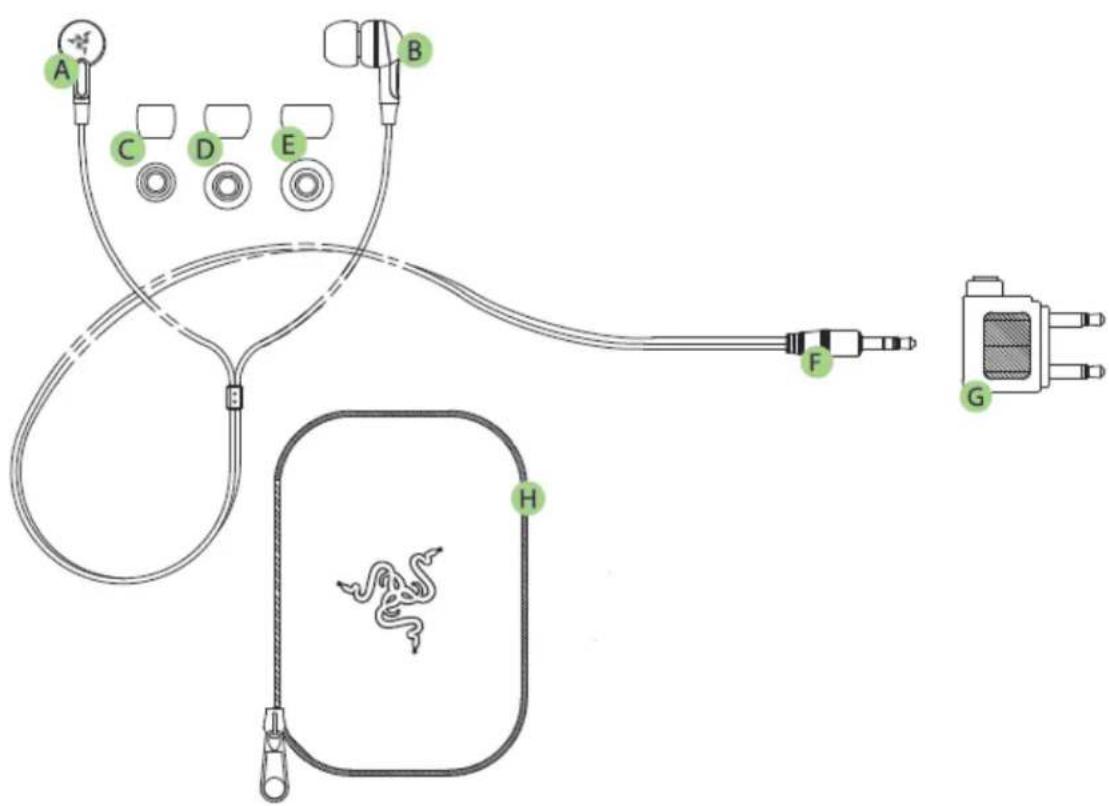
A. Le Earphone
B. Right Earphone
C. Small Ear-Buds
D. Medium Ear-Buds
E. Large Ear-Buds
F. 3.5mm Miniplug
G. Airline Adapter
H. Carrying Pouch
3. TECHNICAL SPECIFICATIONS
EARPHONES
• Frequency response: 20 to 22,000Hz
• Sound pressure level: 110dB
- Impedance: 17ohms
• Max rated input: 20mW
- Cable length: 1.3m
- Connector: 3.5mm miniplug
• Weight (including cable): 10.7g
To enjoy the full-bodied bass of the Razer Moray as it is intended, please ensure that the earphones are properly ed into your ears and that a proper seal is achieved to block out ambient noise.
REMOVING YOUR RAZER MORAY
CAUTION: Do not yank out earphones from your ears as the sudden release of air pressure might cause potenal discomfort.
EAR-BUD SIZES
Due to the dierent ear canal sizes of individuals, the default ear-buds may not achieve a proper seal. Interchanging the ear-buds to a larger/smaller size will improve performance.
REMOVING THE EAR-BUDS
-
Firmly hold the neck of the earphone.
-
Grip the opening of the ear-bud rmly with the other hand.
-
Pull ear-bud downwards gently unl it is released from p of the earphones.
REPLACING THE EAR-BUDS
-
Firmly hold the neck of the earphone.
-
Push mouth of the ear-bud onto p of the earphone.
-
As you apply pressure, use a gentle twisng moon unl ear-bud is secured and in place.

natural_image
Line drawing of a hand holding a small object with an arrow indicating motion (no text or symbols)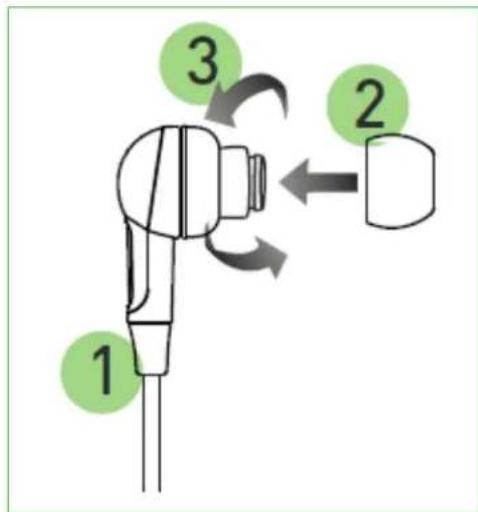
5. SAFETY AND MAINTENANCE
SAFETY GUIDELINES
In order to achieve maximum safety while using your Razer Moray, we suggest that you adopt the following guidelines:
- Should you have trouble operang the device properly and troublesomeong does not work, unplug the device and contact the Razer hotline or go to www.razersupport.com for support. Do not aempt to service or x the device yourself at any me.
- Do not take apart the device (doing so will void your warranty) and do not aempt to operate it under abnormal current loads.
- Keep the device away from liquid, humidity or moisture. Operate the device only within the specific temperature range of 0^ C ( 32^ F) to 40^ C ( 104^ F). Should the temperature exceed this range, unplug and switch o the device in order to let the temperature stabilize within the opmal temperature range.
- The Razer Moray isolates external ambient sounds even at low volumes, resulting in lowered awareness of your external surroundings. Please remove the Razer Moray when engaging in any acvity that requires acve awareness of your surroundings.
- Listening to excessively loud volumes over extended periods of me can damage your hearing. Furthermore, legislaon of certain countries permits a maximum sound level of 86db to aect your hearing for 8 hours a day. We therefore recommend that you reduce the volume to a comfortable level when listening for prolonged periods of me. Please, take good care of your hearing.
MAINTENANCE AND USE
The Razer Moray requires minimum maintenance to keep it in opmum condion. Once a month we recommend you unplug the device from the USB port and clean it using a so cloth or coon swab with a bit of warm water to prevent dirt buildup. Do not use soap or harsh cleaning agents.
6. LEGALESE
COPYRIGHT AND INTELLECTUAL PROPERTY INFORMATION
©2011 Razer USA Ltd. Patent Pending. All Rights Reserved. Razer™, the Razer Triple-Headed Snake logo, the Razer distressed word logo and other trademarks contained herein are trademarks or registered trademarks of Razer USA Ltd and/or its aliated or associated companies, registered in the United States and/or other countries.
Razer USA Ltd (“Razer”) may have copyright, trademarks, trade secrets, patents, patent applicaons, or other intellectual property rights (whether registered or unregistered) concerning the product in this Master Guide. Furnishing of this Master Guide does not give you a license to any such copyright, trademark, patent or other intellectual property right. The Razer Moray (the “Product”) may dier from pictures whether on packaging or otherwise. Razer assumes no responsibility for such dierences or for any errors that may appear. Informaon contained herein is subject to change without noce.
LIMITED PRODUCT WARRANTY
For the latest and current terms of the Limited Product Warranty, please visit http://warranty.razerzone.com.
LIMITATION OF LIABILITY
Razer shall in no event be liable for any lost prots, loss of informaon or data, special, incidental, indirect, punive or consequential or incidental damages, arising in any way out of distribuon of, sale of, resale of, use of, or inability to use the Product. In no event shall Razer's liability exceed the retail purchase price of the Product.
COSTS OF PROCUREMENT
For the avoidance of doubt, in no event will Razer be liable for any costs of procurement unless it has been advised of the possibility of such damages, and in no case shall Razer be liable for any costs of procurement liability exceeding the retail purchase price of the Product.
GENERAL
These terms shall be governed by and construed under the laws of the jurisdicon in which the Product was purchased. If any term herein is held to be invalid or unenforceable, then such term (in so far as it is invalid or unenforceable) shall be given no eect and deemed to be excluded without invalidang any of the remaining terms. Razer reserves the right to amend any term at any me without noce.
- TABLE OF CONTENTS
- PACKAGE CONTENTS / HARDWARE REQUIREMENTS / REGISTRATION
- PACKAGE CONTENTS
- HARDWARE REQUIREMENTS
- REGISTRATION
- KEY FEATURES
- TECHNICAL SPECIFICATIONS
- EARPHONES
- REMOVING YOUR RAZER MORAY
- EAR-BUD SIZES
- REMOVING THE EAR-BUDS
- REPLACING THE EAR-BUDS
- SAFETY AND MAINTENANCE
- SAFETY GUIDELINES
- MAINTENANCE AND USE
- LEGALESE
- COPYRIGHT AND INTELLECTUAL PROPERTY INFORMATION
- LIMITED PRODUCT WARRANTY
- LIMITATION OF LIABILITY
- COSTS OF PROCUREMENT
- GENERAL
Brand : RAZER
Model : Moray
Category : Earplug