
HD-3110 - Webcam HP - Free user manual and instructions
Find the device manual for free HD-3110 HP in PDF.


| Product Type | Webcam |
| Model | HD-3110 |
| Brand | HP |
| Resolution | 1280 x 720 (HD) |
| Frame Rate | 30 fps |
| Interface | USB 2.0 |
| Built-in Microphone | Yes, mono |
| Field of View | 60 degrees |
| Focus Type | Fixed focus |
| Dimensions (W x H x D) | 3.5 x 2.0 x 1.5 inches |
| Weight | 3.5 oz (100 g) |
| Power Supply | USB powered (5V, 500 mA) |
| Mounting Type | Clip or tripod mount |
| Compatible Operating Systems | Windows, macOS, Chrome OS |
| Main Functions | Video calling, streaming, recording, photo capture |
| Cleaning Instructions | Wipe lens gently with a dry microfiber cloth |
| Safety Precautions | Do not disassemble; avoid exposure to liquids |
| Spare Parts Availability | USB cable only; contact HP support |
| Warranty | 1 year limited |
| Package Contents | Webcam, quick start guide |
Frequently Asked Questions - HD-3110 HP
User questions about HD-3110 HP
0 question about this device. Answer the ones you know or ask your own.
Ask a new question about this device
Download the instructions for your Webcam in PDF format for free! Find your manual HD-3110 - HP and take your electronic device back in hand. On this page are published all the documents necessary for the use of your device. HD-3110 by HP.
USER MANUAL HD-3110 HP
HP WEBCAM 3100
HP WEBCAM 3110
USER'S GUIDE
Version 1.0.EN
Part number: 603528-001
© Copyright 2010 Hewlett-Packard Development Company, L.P.
The information contained herein is subject to change without notice.
The only warranties for HP products and services are set forth in the express warranty statements accompanying such products and services. Nothing herein should be construed as constituting an additional warranty. HP shall not be liable for technical or editorial errors or omissions contained herein.
Product Registration
Registration is quick, easy and offers: e-mail updates containing notifications about product enhancements, the most recent support alerts, and driver updates specific to the product(s) you own.
For faster help, be sure to register your recently purchased product at https://register.hp.com
Table of Contents
Webcam Overview ....1
Software Overview 2
System Requirements....3
Quality and Performance....3
Using the Launch Utility to Start a Video Chat....4
Recording a Video....6
Taking a Picture....7
Managing Pictures and Videos....8
Posting a Video on YouTube 8
Applying Effects to a Video or Picture 9
Using Masques 10
Using Fun Frame 11
Editing a Video 12
Advanced Editing....12
Using Your Webcam as a Video Monitor 13
Adjusting Webcam Settings....14
Adjusting Additional Webcam Settings 15
Troubleshooting....16
Webcam Overview
Congratulations on purchasing the HP Webcam 3100/3110. Your webcam includes the following features:

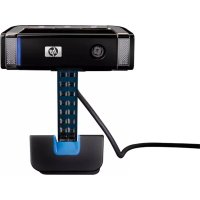
1 Snapshot button 2 HP Instant Chat button 3 Video Record button 4 Product label
5 USB connector
6 Adjustable clip/stand
7 Integrated microphone
Please refer to the product label for the HP product number and serial number. This is useful information if you ever need to contact technical support.
Software Overview
The CD that comes with your webcam includes the following software:
■ Webcam drivers. Enables your webcam to operate with optimum performance. ■ Launch Utility. Helps you set up your chat application to communicate with your webcam. ■ ArcSoft Magic-i™ Visual Effects 2. Enables you to apply special effects to your video chats when used in conjunction with your instant messaging (IM) application.
■ ArcSoft WebCam Companion® 3. Enables you to record and edit videos, take snapshots, use your webcam as a video monitor, and apply a variety of special effects including masks and frames.
- ArcSoft TotalMedia™ ShowBiz. Enables you to edit your videos and combine them with other video clips, transitions, and effects.
The software on this CD is not available via web download. In North America and Europe, a replacement CD can be ordered on the web at www.hp.com/support.
System Requirements
To use your webcam with the included software, your PC must meet the following minimum system requirements:
■ For 1280x720 (720p) preview, capture, edit, and playback in WCC3/MIVE2/TMShowBiz3.5: Windows® XP (SP2 or SP3), Windows Vista® (32-bit or 64-bit), or Windows 7 (32-bit or 64-bit); Intel Dual-Core 1.6GHz or faster, Intel Pentium IV Hyper-Threading 3.4GHz or faster, or AMD Athlon 64 4000+ or faster; 230 MB free hard drive space required for program installation; 1GB DDR RAM or above; VGA card with 64 MB or more; 16-bit color display at 1024x768 with DirectX 3D support; DirectX 9.0c or above.
■ For 640x480 (VGA) preview, capture, edit, and playback in WCC3/MIVE2/TMShowBiz3.5.
■ Windows XP (SP2 or SP3), Windows Vista (32-bit or 64-bit), or Windows 7 (32-bit or 64-bit).
■ Pentium IV 2.4 GHz or equivalent AMD Athlon.
■ 230 MB free hard drive space required for program installation.
■ 1GB DDR RAM or above.
■ 16-bit color display at 1024x768 with DirectX 3D support.
■ DirectX 9.0c or above.
Quality and Performance
Image quality and video performance are impacted by the following factors:
■ The amount of light on the subject ■ The webcam resolution setting ■ The power of the PC ■ The bandwidth of the internet connection, especially for chat.
If you are experiencing slow or choppy video or washed out color, try adding a small lamp to the area that will not be visible in the frame. This will light the viewing area of the webcam and help provide more lifelike video and more accurate color.
Using the Launch Utility to Start a Video Chat
You can add live video to the most popular instant messaging (IM) applications (ISP connection required):
■ AOL® Instant Messenger™ (AIM®) ■ Windows Live™ Messenger ■ Yahoo!® Messenger ■ Skype®
1 Press the HP Instant Chat button on your webcam.

2 Select the instant messaging (IM) application you want to use. 3 If prompted, follow the on-screen instructions to install and set up the IM application. 4 Follow the video chat steps in the IM application's documentation.

NOTE: The Launch Utility appears only during initial setup. The next time you press the HP Instant Chat button, the selected IM application will open automatically.
To select a different IM application after initial setup, open the Start menu and then click All Programs > ArcSoft WebCam Companion 3 > Launch Utility.
5 (Optional) Select the effects you want to apply:

Turn face tracking on and off.
• To track one face, click Single. - To track more than one face, click Single to select the first face, and then click Next to select the next face.
● To find the best angle for a group image, click Multiple.

Zoom in and out, or pan around the image.

Add fun house effects to your video.

Add a picture frame to the face on the screen.

Decorate your video with a theme.

Adopt a different persona by selecting an avatar.

Make your video brighter and sharper.

Combine your face with a masque template.

TIP: You can also open ArcSoft Magic-i Visual Effects by double-clicking ArcSoft Magic-i Visual Effects in the Windows System Tray.
To learn more about using effects in your chats, click Help ? in the upper-right corner of the ArcSoft Magic-i Visual Effects window.
Recording a Video
1 Do either of the following to open ArcSoft WebCam Companion and enter capture mode:
■ Press the Video Record button on your webcam.
- Double-click the WebCam Companion 3 icon on the Windows desktop, and then click Capture.
2 (Optional) Click Full Screen to record in full-screen mode.
3 (Optional) Click the resolution list below the icons in the upper-right corner, and select the resolution setting you want to use for the recording. The default setting is 1280x720 (HD 720p), which provides optimum performance in most environments.
NOTE: Higher resolutions and/or poor lighting may slow down the frame rate and make the video jerky. For more information on resolution issues, see "Troubleshooting."
4 Press the Video Record button or click Record Video to begin recording.
5 Press the Video Record button again or click Stop Recording to stop recording and save the video to your PC.
6 If you're recording in full-screen mode, click the X in the upper-right corner to return to partial-screen mode.

To learn more about using ArcSoft WebCam Companion, click Extras and select Application Help.
Taking a Picture
1 Press the Snapshot button on your webcam to open ArcSoft WebCam Companion.
2 Do either of the following:
To take a single picture, press the Snapshot button again or click Take Picture.
■ To take a series of pictures, click Burst
To learn more about taking pictures with ArcSoft WebCam Companion, click Extras and select Application Help.

TIP: You can edit, print, and share your pictures with the free Windows Live Photo Gallery software. Double-click the Download Windows Live Photo Gallery icon on the Windows desktop, and then follow the instructions on the screen to download and install the software. For information on how to use the software, click the Help icon in the upper-right corner of the Windows Live Photo Gallery window.
Managing Pictures and Videos
After you capture a video or take a picture, you can use the icons in the lower-left corner of the Capture screen to manage your pictures and videos. Click any of the following icons:
Preview a picture or video. Locate a picture or video on your PC hard drive. Send a picture or video as an e-mail attachment. Print the pictures you selected. Delete the selected picture or video.
To learn more about using ArcSoft WebCam Companion, click Extras and select Application Help.

Posting a Video on YouTube
After you record a video, follow these steps to post it on YouTube.
1 Double-click the WebCam Companion 3 icon on the Windows desktop.
2 Click Edit
3 Click the video you want to post.
4 Click YouTube in the upper-right corner.
5 Log into your YouTube account.
6 Follow the on-screen instructions to post the video.

Applying Effects to a Video or Picture
Many of the ArcSoft Magic-i Visual Effects features are integrated into ArcSoft WebCam Companion, so that you can continue to enjoy the effects you use in your video chats while you capture videos and take pictures.
1 Double-click the WebCam Companion 3 icon on the Windows desktop.
2 Click Capture
3 Click the Effects tab.
4 Click any of the icons in the lower-left corner to apply an effect.
5 To turn off all effects, click No Effect
To learn more about using effects in your chats, see "Using the Launch Utility to Start a Video Chat."

Using Masques
1 Double-click the WebCam Companion 3 icon on the Windows desktop.
2 Click Masque

3 Select the masque you want to use.
4 (Optional) Click the icons above the preview image to adjust the image.
5 Press the Snapshot button again or click Take Picture to take the picture. To learn more about using masks, click Extras and select Application Help.

Using Fun Frame
1 Double-click the WebCam Companion 3 icon on the Windows desktop. 2 Click Fun Frame. 3 (Optional) Click Customize, click Select Layout and select a layout, select the frames you want to use, and then click OK. 4 Do either of the following:
■ Press the Snapshot button or click Take Picture to take the picture.
- Click Start auto-snapshot with pose detection to let the software detect a pose and take the picture. To adjust the pose sensitivity, drag the slider above the picture frame.

Editing a Video
1 Double-click the WebCam Companion 3 icon on the Windows desktop.
2 Click Edit.
3 Click the video you want to edit. To learn about specific editing functions, click Extras and select Application Help.

Advanced Editing
1 Do either of the following to open ArcSoft ShowBiz and enter editing mode:
■ Double-click the ArcSoft ShowBiz icon on the Windows desktop. If ArcSoft WebCam Companion is already open, click the Advanced Editing icon.
2 Click the video you want to edit, and then drag and drop it into the Storyboard. To learn about specific editing functions in ArcSoft ShowBiz, click Option and select Help.
Using Your Webcam as a Video Monitor
With the Monitor feature, you can use your webcam as a security camera. If the webcam detects motion or a face, it records the activity on your PC hard drive. Additionally, you can set the Monitor feature to send a snapshot by e-mail or post a snapshot on an FTP site if it detects activity.
1 Double-click the WebCam Companion 3 icon on the Windows desktop. 2 Click Monitor. 3 Click Start Monitor to begin monitoring. 4 Click Stop Monitor to finish monitoring and save the video to your PC.
To learn more about using ArcSoft WebCam Companion, click Extras and select Application Help.

TIP: You can disable either the motion detection or face detection feature, but you cannot turn them both off.
Adjusting Webcam Settings
You can adjust most of your webcam's settings in ArcSoft WebCam Companion.
1 Double-click the WebCam Companion 3 icon on the Windows desktop.
2 Click Capture. 3 Click the WebCam Settings Icon.
4 On the Video Proc Amp tab, do either of the following: - To manually adjust a setting, drag the slider for that setting. - To let the webcam auto-detect a setting, place a check in the Auto check box to the right of that setting.
5 Click the Camera Control tab and do any of the following: - To manually adjust the focus (HP Webcam 3110 only), remove the check from the Auto Focus check box, and then drag the Focus slider. - To manually adjust the exposure, remove the check from the Auto Exposure check box and then drag the Exposure slider.
6 Click OK.


NOTE: To restore the factory settings, click Default.
To learn about customizing the Capture, Monitor, Fun Frame, and Masque settings in ArcSoft WebCam Companion, click Extras and select Application Help.
Adjusting Additional Webcam Settings
You can change additional webcam settings in ArcSoft Magic-i Visual Effects.
1 If it is open, close the ArcSoft WebCam Companion window. 2 Double-click the Magic-i Visual Effects icon on the Windows desktop. 3 Double-click ArcSoft Magic-i Visual Effects in the Windows System Tray.
4 On the Webcam Settings tab, do any of the following:
- Click System Setting, click the Private tab, click Load Image, and then select an image to replace the webcam video when you want privacy during a chat.
- Click Private to replace the webcam video with the image you selected in System Settings. When you're done with the chat, click Private again to reveal the video so that your webcam is ready to use the next time you want to use it.
- Click Mute Microphone to turn off the webcam microphone during a chat. When you're done with the chat, click Mute Microphone again to turn the microphone back on so that your webcam is ready to use the next time you want to use it. Remove the check from the LED On check box to turn off the status LED on the front of your webcam. Place a check in the Video Off check box to disable the webcam video during a chat. A blank screen replaces the video. When you're done with the chat, remove the check to enable the video feature, so that your webcam is ready to use the next time you want to use it. Drag the slider for the individual settings. To see additional settings, drag the scroll bar on the right side of the ArcSoft Magic-i Visual Effects window.
- Click Current Profile, enter a name, and then click Save to store the current settings in a user profile.
To learn more about customizing webcam settings in ArcSoft Magic-i Visual Effects, click Help in the upper-right corner.

Troubleshooting
| Problem Solution | |
| The video is jerky | Many factors affect video quality, including lighting, PC processor speed and memory, and Internet connection speed. If the video is jerky, you need to choose a lower resolution setting. |
| 1 Double-click theWebCam Companion 3icon on the Windows desktop. | |
| 2 Click Capture3 Click the resolution list below the icons in the upper-right corner, and select a lower resolution setting. | |
| There are lines interfering with the image | Right-click theButton Managericon in the Windows System Tray and select the appropriate setting for your location:60Hz or 50Hz. The interfering lines should disappear. |
| I don’t want to use ArcSoftMagic-i Visual Effectswith my IM application | Open your IM application and use the preference settings to select a different video device. See the documentation for your IM application for details. |
| My webcam isn’t connected to my IM application | Open the Start menu and then clickAll Programs >ArcSoft WebCam Companion 3 >Launch Utility. If you have multiple IM applications and you already set up all of your IM applications, select a different video device in your IM application. See your IM documentation for details. |
| I want to turn off the autofocus feature (HP Webcam 3110 only) | 1 Double-click theWebCam Companion 3 icon on the Windows desktop, and then clickCapture. |
| 2 Click theWebCam Settings icon. | |
| 3 Click theCamera Control tab. | |
| 4 Remove the check from theAuto Focuscheck box. | |
| 5 Drag theFocusslider to manually adjust the focus. | |
| 6 Click OK or Apply. | |
Problem Solution
The webcam buttons are not working properly
- Look in the Windows System Tray for the HP Button Manager icon. If you don't see the HP Button Manager icon, then open My Computer (Windows XP) or Computer (Windows Vista or Windows 7), navigate to the Program Files\HP\Button Manager folder (32-bit systems), or Program Files (x86)\HP Button Manager (64-bit systems), and double-click the BM.EXE file to restart it.
On Windows XP computers, check to see if the USB Video Device application and ArcSoft WebCam Companion are both running. If so, close both of these applications, and then press the Snapshot button. To avoid this problem in the future, do not click the USB Video Device icon in My Computer. Instead, use the ArcSoft applications that came with your webcam.
I hear an echo or feedback in the speakers
On Windows XP computers (Classic view):
1 Click Start > Control Panel > Sounds and Audio Devices. 2 Click the Audio tab. 3 Under Sound playback, click Volume, and drag the Master Volume slider to adjust the speaker volume. 4 Under Sound recording, click Volume, and drag the Microphone slider to adjust the microphone volume.
On Windows Vista computers (Classic view) or Windows 7 computers (Large icons or Small icons view):
1 Open the Start menu and then click Control Panel > Sound. 2 Click the Playback tab. 3 Select the Speaker you are using and then click Properties. 4 Click the Levels tab and drag the sliders to adjust the output level. 5 Click the Recording tab. 6 Select the Microphone you are using and then click Properties. 7 Click the Levels tab and drag the sliders to adjust the input level.
The webcam audio is not synchronized with the webcam video
From the Video Capture screen, select the resolution list in the upper-right corner, and set the video resolution to 640x480 to synchronize the video and audio. After synchronizing the audio and video, try increasing the resolution to the next level. If the problem recurs, go back to the previous resolution setting.
| Problem Solution | |
| I am having trouble using the webcam with SKYPE | 1 Check for updates to make sure you installed the latest version of SKYPE.2 Check the audio microphone and video settings. They should be set to USB Video Device (Windows XP) or HP Webcam 3100 (BK356AA)/3110 (BK357AA) (Windows Vista or Windows 7). |
| I see a blank screen with static when I run SKYPE | After you place the call, make sure the video device is set to USB Video Device (Windows XP) or HP Webcam 3100 (BK356AA)/3110 (BK357AA) (Windows Vista or Windows 7). |
| The webcam microphone does not work with SKYPE | 1 On the menu bar, select Call > Audio settings.2 Make sure the microphone device is set to USB Video Device (Windows XP) or HP Webcam 3100 (BK356AA)/3110 (BK357AA) (Windows Vista or Windows 7).3 Drag the Microphone Volume slider towards High to increase the volume level.4 Click Save. Retry your call. |
| I have more than one USB Video Device option. Which one should I use? | You have more than one video device connected to your PC. Try selecting each option and then attempt to use your webcam. If the webcam works, you found the right option. If the webcam doesn’t work, try another option until you find the one associated with your webcam. |
Still need help? Please refer to the warranty that came with your webcam for support phone numbers and Web site information.


- HP WEBCAM
- USER'S GUIDE
- PRODUCT REGISTRATION
- TABLE OF CONTENTS
- WEBCAM OVERVIEW
- SOFTWARE OVERVIEW
- SYSTEM REQUIREMENTS
- QUALITY AND PERFORMANCE
- USING THE LAUNCH UTILITY TO START A VIDEO CHAT
- RECORDING A VIDEO
- TAKING A PICTURE
- MANAGING PICTURES AND VIDEOS
- POSTING A VIDEO ON YOUTUBE
- APPLYING EFFECTS TO A VIDEO OR PICTURE
- USING MASQUES
- USING FUN FRAME
- EDITING A VIDEO
- ADVANCED EDITING
- USING YOUR WEBCAM AS A VIDEO MONITOR
- ADJUSTING WEBCAM SETTINGS
- ADJUSTING ADDITIONAL WEBCAM SETTINGS
- TROUBLESHOOTING
- PROBLEM SOLUTION
- ON WINDOWS XP COMPUTERS (CLASSIC VIEW)
- ON WINDOWS VISTA COMPUTERS (CLASSIC VIEW) OR WINDOWS 7 COMPUTERS (LARGE ICONS OR SMALL ICONS VIEW)
Brand : HP
Model : HD-3110
Category : Webcam