
BT42C - Food thermometer Comark - Free user manual and instructions
Find the device manual for free BT42C Comark in PDF.


| Product Type | Digital Food Thermometer |
| Brand | Comark |
| Model | BT42C |
| Dimensions (approx.) | 20 cm x 3 cm x 1.5 cm (probe included) |
| Weight (approx.) | About 50 g (with battery) |
| Power | 1 CR2032 battery (included) |
| Temperature range | -50 °C to +300 °C |
| Accuracy | ±1 °C (-20 °C to +100 °C), ±2 °C beyond |
| Probe type | Stainless steel needle probe (approx. 12 cm) |
| Response time | About 3 to 5 seconds |
| Main functions | Digital display, instant measurement, hold function (HOLD), auto power off, low battery indicator |
| Measurement units | °C / °F (selectable) |
| Display | LCD screen, about 2.5 cm diagonal |
| Housing material | ABS plastic |
| Maintenance and cleaning | Clean the probe with a damp cloth and mild soap. Do not immerse the housing. Dry completely before storage. |
| Safety | Do not expose to temperatures above 300 °C. Keep out of reach of children. Do not use in microwave. |
| Spare parts and repairability | The battery is replaceable. No other spare parts available. Device not user-serviceable. |
| Warranty | 2 years (parts and labor) |
| General information | Thermometer compliant with CE and RoHS standards. Ideal for cooking meat, fish, and confectionery. |
Frequently Asked Questions - BT42C Comark
User questions about BT42C Comark
0 question about this device. Answer the ones you know or ask your own.
Ask a new question about this device
Download the instructions for your Food thermometer in PDF format for free! Find your manual BT42C - Comark and take your electronic device back in hand. On this page are published all the documents necessary for the use of your device. BT42C by Comark.
USER MANUAL BT42C Comark
BLUETOOTH THERMOMETER
BT42
BT42C
BT48
BT48C
For BT42C Model only:
Meets the requirements of DIN EN 13485:2002
"Thermometers for measuring the air and product temperature for the transport, storage and distribution of chilled, frozen, deep-frozen/quick frozen food and ice-cream"

Introduction

Comark BT40 series Bluetooth thermometers have either a Lumberg or sub-miniature connector and are designed for use with interchangeable probes. They have a high strength, polycarbonate case with rubber over moulding. This offers a high level of strength and durability. All models incorporate a clock, countdown timer, MAX/MIN and data hold feature.
Comark's Bluetooth thermometers are designed for use with the Comark Kitchen Checks App to automate your HACCP records and reporting. Download the Comark Kitchen Checks App from Google Play or Apple Store. For larger organizations the Comark API can be used to integrate Bluetooth thermometers into existing HACCP programs.
When connected via Bluetooth, temperature updates are sent to the tablet or phone and displayed by the App.
For more information visit: www.comarkinstruments.com/kitchen-checks-pro.
Safety Information

Prevent Electric Shock
- To avoid electric shock do not allow the probe to come into contact with live electrical parts.

Maintaining Product Safety & Preserving Comark Warranty
- Only use the instrument for its intended purpose.
- Do not use in a microwave oven.
- Do not use the instrument beyond its operating temperature range.

Waste Electrical & Electronic Equipment Directive (WEEE)
- This instrument must not be disposed of in general waste. Instead take it to your local authority's recycling centre for small electrical goods. Within the European Union, Comark operates a Take Back scheme for our end-of-life products. Contact us for details.
- Dispose of waste batteries in local recycling facilities.

FCC Safety Warning
This device complies with Part 15 of the FCC Rules. Operation is subject to the following two conditions:
(1) This device may not cause harmful interference, and
(2) This device must accept any interference received, including interference that may cause undesired operation.
Overview of display symbols
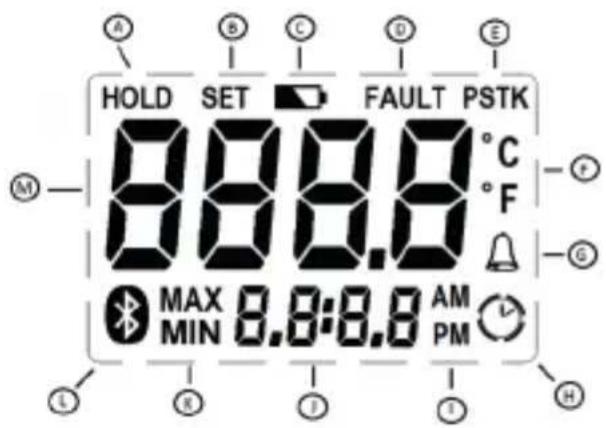
A Indicates the HOLD has been selected
B Setting menu item to ON/OFF
C Indicates low battery
D Indicates a fault with the Bluetooth - Contact Comark for support if fault indicated
E Indicates probe type
F Indicates the temperature scale in use
G Alarm indication
H Indicates countdown active
I Indicates AM or PM for clock
J Clock, countdown and timer display
K Indicates MAX or MIN has been selected
L Indicates Bluetooth connection status
M Main display for temperature
Operation
Connecting Probes to the Thermometers
BT40 series thermometers have either sub-miniature or Lumberg sockets for probe connection and offer a class leading choice between Comark thermistor, type T thermocouple or type K thermocouple probes.
The polarity of the connector must always be checked before connecting thermocouple probes to BT40 series thermometers. A probe of the correct thermocouple type must also be selected to match the specific thermometer. BT40 series thermometers with Lumberg sockets will automatically detect the sensor type of the probe connected. The LCD will then indicate thermistor probes as "PST", and type T thermocouple probes as "T". Models with Sub-Min connector are of fixed thermocouple type, see specifications for details
Switching On and Off


Press and hold the “HOLD” button on the keypad to switch the thermometer on. After a short pause, the display will show the current model of the instrument and will then revert to normal temperature display. The current time is also permanently displayed on the LCD. To switch off is a long press on the “HOLD” button.
Data Hold

All BT40 series thermometers have a data hold facility. If the "HOLD" button is pressed at any time during normal temperature mode, the current temperature will be held on the display. To release press "HOLD".
MAX/MIN

All BT40 series thermometers have a MAX/MIN function. Press "MAX/MIN" for MAX temperature reading and again for MIN temperature reading. Press "MAX/MIN" to resume normal temperature readings. To clear MAX/MIN, press and hold "MAX/MIN" until the display returns to normal measurement.
Countdown Timer

All BT40 series thermometers have a countdown timer. This function is activated from the Set-Up Menu – see section below, and can be calibrated in seconds or minutes. Pressing the countdown timer button will start this function. Pressing the button again during the countdown period will stop the count. The instrument will beep for 30 seconds at the end of a countdown period to indicate to the user that it has been completed.
Auto Switch Off/Power Saving Mode
BT40 series thermometers have a selectable auto-switch off feature. This is set to 3 minutes from the factory. Auto-switch off timer starts on the last button press. Please refer to Set-Up Menu for instructions on changing this setting.
Set-Up Menu
BT40 series thermometers have a hidden menu structure that is used to set up a number of parameters within the instrument.
To enter the set-up menu first ensure the instrument is off, then press the Count Down button and keep this held down while pressing the "HOLD" (ON/OFF) button to switch the instrument on. After the thermometer has completed its self-
checks, it will enter the menu.
N.B. After each menu item use the Bluetooth button to save and move to the next menu item.
Clock selection is the first item in the menu:
Clock – the display will show 'CLOC'
Use the UP and DOWN buttons to adjust the clock time up or down.
Countdown Timer – the display will show 'Cd'
Use the UP and DOWN button to select timer on or off. Use the UP and DOWN buttons to scroll up and down in seconds up to 5 minutes then in 1 minute intervals up to 60 Minutes.
Auto Power OFF – the display will show 'AOFF'
Use the UP and DOWN Buttons to scroll between the available options of None, 3, 10, and 30 minutes.
Scale – the display will show 'SCAL'
After entering the SCALE menu, use the UP and DOWN Buttons to scroll between the available scales.
High Alarm – the display will show 'HIAL'
Use the UP and DOWN Buttons to select or de-select high alarms, then select the required high alarm value.
Low Alarm – the display will show 'LOAL'
Use the UP and DOWN Buttons to select or de-select low alarm, then select the required low alarm value.
On Alarm the speaker will bleep, press any key to stop.
Bluetooth MAC Address
The Bluetooth MAC address will be indicated next, in blocks of 4 numbers on alternate seconds. Simply press the Bluetooth button to exit setup and return to normal operation.
Bluetooth Operation
To switch on the Bluetooth, press the Bluetooth button. Bluetooth radio will advertise for 60 seconds (Bluetooth Symbol will flash during this time). If after this time a successful connection is not made, the Bluetooth radio will shut down, leaving only the thermometer active. To re-attempt making a Bluetooth connection, simply press the Bluetooth button again.
Note: The advertising text for searching is BTXX 12345678, where XX is the model number, e.g. 42 or 48 and 12345678 is the serial number.
Taking Measurements
Having successfully connected the Bluetooth Thermometer to Comark Kitchen Checks app, check that the Bluetooth symbol in the LCD is solid. To record the displayed reading press the Bluetooth button on the keypad. The temperature display will flash. The app will guide you through storing the temperature record.
Note: The app will display the reading as indicated on the LCD, e.g. including MAX/MIN or Data Hold values.
Maintenance
Cleaning
BT40 series thermometers are dust and splash proof and will withstand harsh environments. Use a damp cloth or warm soapy water to remove deposits and prevent them from hardening or becoming sticky.
Use only domestic kitchen cleaners or mild detergents to clean this instrument. Do not use aggressive cleaning chemicals or solvents, these will attack plastics and cause damage.
Caution: Do not place any BT40 series thermometers in a dishwasher.
Battery Replacement

The low battery symbol appears on the display when the battery voltage has reduced. Battery replacement is recommended at this time.
To replace the battery, remove the battery cover retaining screw on the rear of the instrument, using the correct size *screwdriver. Remove the two cells, wait for a minimum of 30 seconds and replace with Alkaline or Lithium (L91) cells. Be careful to observe the correct polarity. Take care not to over-tighten the screw when refitting the cover.
Note: The BT40 series thermometers will not work if the battery compartment is incorrectly fitted or missing. In this instance, the display will show 'OPEn'. Please note the small pip on the inside of the battery cover, which must fit into the hole provided in the back of the case.
Technical Support
Please see: www.comarkinstruments.com or www.comarkUSA.com for details.
Warranty
Each Comark product is warranted to be free from defects in material and workmanship under normal use and service. The warranty period is one (1) year, unless otherwise stated, and the warranty period begins on the date of shipment. Temperature probes are warranted for six (6) months.
The warranty extends only to the original buyer or end-user of a Comark authorized reseller. This warranty does not cover damage resulting from normal wear and tear, abuse, misuse, accidental breakage, negligence, defects caused by modifications, repair and servicing not made or authorised by Comark Instruments, damage caused by handling, operating, storing, or using the product outside the intended uses described by our product literature. Disposable batteries are also exempt from warranty.
Warranties on dishwasher safe models apply only where the product has been used in a commercial dishwasher. Comark Instruments products are not suitable for use or cleaning in domestic dishwashers.
Comark's warranty obligation is limited, at Comark's option, to refund of the purchase price, free of charge repair, or replacement of a defective product returned within the warranty period. Products must be returned to Comark
or one of Comark's authorized service agents.
This warranty is the buyer's sole and exclusive remedy and is in lieu of all other warranties, express or implied, including but not limited to any implied warranty of fitness for a particular purpose. Comark shall not be liable for any special, indirect, incidental or consequential damages or losses, including loss of data, whether arising from breach of warranty or based on contract, tort, reliance or any other theory. Since some countries or states do not allow limitation of the term of an implied warranty, or exclusion or limitation of incidental or consequential damages, the limitations and exclusions of this warrant may not apply to every buyer.
To obtain service during the warranty period, visit the Service and Repair page on our website - www.comarkinstruments.com or www.comarkUSA.com for instructions on obtaining a Return Material Authorization (RMA) then send the product to our Service Centre with a description of the problem.
Specification
General Specification
| Measurement |
| Measurement RangeThermistorType T ThermocoupleType K Thermocouple |
| Scales |
| Displayed Resolution0.1°1° |
| Instrument AccuracyThermocouple |
| System AccuracyThermistorType T Thermocouple* |
| Temperature CoefficientThermistorThermocouple |
| Ambient Temperature Range |
| Display |
| Power |
| Battery Life (continuous) |
| Enclosure Ingress Protection |
| Thermistor 10 K Ohms unicurveThermocouple type T and K6-pin Lumberg and Sub-Min Connectors | |
| -40°C to +125°C / -40°F to +257°F-200°C to +400°C / -328°F to +752°F-200°C to 1372°C / -328°F to +2502°F | |
| °C / °F | |
| >-100°<1000°≤ -100°≥ 1000° | |
| 0.1% ±0.2°C / ±0.4°F full range @ +23°C /+73°F Ambient | |
| ±0.3°C 0°C to +70°C / ±0.6°F +32°F to +158°F±0.5°C -20°C to +100°C / ±0.9°F -4°F to+212°F±0.5°C 0°C to +70°C / ±0.9°F +32°F to +158°F*Typical accuracy with a Comark probe | |
| < 0.005 degree/degree< ± 0.01 % of reading ±0.02 °C/°C change from+23°C / ±0.02°F/°F change from +73°F | |
| -20°C (-4°F) to +50°C (122°F) operating | |
| 4 digit, 12.5 mm LCD | |
| Two Type I.E.C. LR6 Size AA – Alkaline or*Lithium recommended.*Lithium is recommended for Low Temperatureenvironments, constantly below 10°C/50°F andwill give approximately 50% increased batterylife when used in lieu of Alkaline. | |
| Up to 1000 hours with Bluetooth enabledUp to 5000 hours with Bluetooth disabled | |
| IP65 |
Weight & Measures
Dimensions
Case Size
Weight
Case Materials
Case
152 x 58 x 22/27 mm / 6" x 2.3" x 1.1" 178g / 6.3 ozs
Mixed: ABS & PC with BioCote® anti-microbial protection moulded in.
Compliance
EMC Directive
EMC Standard
Radiated RF emissions 30MHz-6GHz
Electrostatic discharge
Radiated RF immunity *
Power frequency magnetic field immunity
Broadband Data Transmission Systems -
Essential Requirements
Radio Equipment-Common Requirements
Broadband Data Transmission Systems
Product Safety
RoHS Directive
* Readings may be temporarily affected in the presel
| EC Directive 2014/30/EUEN 61326-1:2013, EN 61326-2-1:2013 (Portable Equipment Environment)EN 55011:2009+A1:2010EN 55022:2010 CFR 47 Part 15.109EN 61000-4-2:2009EN 61000-4-3:2006+A1:2008+A2:2010EN 61000-4-8:2010EN 300 328 1.8.1 (2012-06)EN 301 489-1 1.9.2 (2011-09)EN 301 489-17 2.2.1 (2012-09) | |
| EN 61010-1:2010 Safety requirements for electrical equipment for measurement, control and laboratory use. Part-1: General requirementsEN 60950-1:2006+A11:2009+A1:2010+A12:2011 ITE Safety | |
| EC Directive 2011/65/EU RoHS |
nce of radio frequency interference.
Appendix 1
BT40 Series Model Range Options
| Models BT42 BT42 | T Type | BT48 K Type | |
| Part No. BT42C | BT42 BT48 | BT48C | |
| Options | |||
| Bluetooth | ✓ ✓ ✓ | ||
| Countdown Timer | ✓ ✓ ✓ | ||
| Data Hold | ✓ ✓ ✓ | ||
| Real Time Clock | ✓ ✓ ✓ | ||
| MAX/MIN | ✓ ✓ ✓ | ||
| Scale Selection | ✓ ✓ ✓ | ||
| High Alarm | ✓ ✓ ✓ | ||
| Low Alarm | ✓ ✓ ✓ | ||
| Type T | ✓ | ✓ | - |
| Type K - - | ✓ | ||
| Thermistor | ✓ | ✓ | - |
| Connector* L L S | |||
| Auto Off | ✓ ✓ ✓ | ||
| Splashproof | ✓ ✓ ✓ | ||
* L – Lumberg
S - Sub-Miniature
Introduction

Assistance technique
152 × 58 × 22/27 mm/6" × 2,3" × 1,1"
178 g/6,3 oz
* L – Lumberg
S - Sub-Mini
Introducción

Emissioni RF irradiate 30 MHz-6 GHz
52 Hurricane Way, Norwich,
Norfolk NG6 6JB United Kingdom
Tel: +44 (0) 207 942 0712
Email: sales@comarkinstruments.com
Website: www.comarkinstruments.com
Comark Instruments
PO Box 500
Beaverton, OR 97077 USA
Tel: 503 643 5204
Email: sales@comarkusa.com
Website: www.comarkusa.com
Part No 20580-1 (02-19)
© 2019 Comark Instruments



- BLUETOOTH THERMOMETER
- FOR BT42C MODEL ONLY
- INTRODUCTION
- SAFETY INFORMATION
- PREVENT ELECTRIC SHOCK
- MAINTAINING PRODUCT SAFETY & PRESERVING COMARK WARRANTY
- WASTE ELECTRICAL & ELECTRONIC EQUIPMENT DIRECTIVE (WEEE)
- FCC SAFETY WARNING
- OVERVIEW OF DISPLAY SYMBOLS
- OPERATION
- CONNECTING PROBES TO THE THERMOMETERS
- SWITCHING ON AND OFF
- DATA HOLD
- MAX/MIN
- COUNTDOWN TIMER
- AUTO SWITCH OFF/POWER SAVING MODE
- SET-UP MENU
- CLOCK – THE DISPLAY WILL SHOW 'CLOC
- COUNTDOWN TIMER – THE DISPLAY WILL SHOW 'CD
- AUTO POWER OFF – THE DISPLAY WILL SHOW 'AOFF
- SCALE – THE DISPLAY WILL SHOW 'SCAL
- HIGH ALARM – THE DISPLAY WILL SHOW 'HIAL
- LOW ALARM – THE DISPLAY WILL SHOW 'LOAL
- BLUETOOTH MAC ADDRESS
- BLUETOOTH OPERATION
- TAKING MEASUREMENTS
- MAINTENANCE
- CLEANING
- BATTERY REPLACEMENT
- TECHNICAL SUPPORT
- WARRANTY
- SPECIFICATION
- GENERAL SPECIFICATION
- WEIGHT & MEASURES
- DIMENSIONS
- CASE MATERIALS
- COMPLIANCE
- PRODUCT SAFETY
- ROHS DIRECTIVE
- APPENDIX 1
- BT40 SERIES MODEL RANGE OPTIONS
- ASSISTANCE TECHNIQUE
- INTRODUCCIÓN
- COMARK INSTRUMENTS
Brand : Comark
Model : BT42C
Category : Food thermometer