
M-Touch - DMX Controller MARTIN - Free user manual and instructions
Find the device manual for free M-Touch MARTIN in PDF.


| Product Type | Lighting Control Console |
| Brand | Martin |
| Model | M-Touch |
| Display | Touchscreen, 7-inch TFT LCD |
| Connectivity | Ethernet, USB, DMX |
| DMX Channels | Up to 4096 |
| Control Protocol | DMX512, Art-Net, sACN |
| Software | Martin Companion or similar |
| Memory | Internal flash storage for shows |
| Power Supply | External 12V DC adapter |
| Weight | Approximately 2.5 kg (5.5 lbs) |
| Dimensions (W x D x H) | 360 x 250 x 60 mm (14.2 x 9.8 x 2.4 in) |
| Operating Temperature | 0°C to 40°C (32°F to 104°F) |
| Supported User Types | Live events, theaters, clubs |
| Maintenance | Keep screen clean, update firmware regularly |
| Accessories Included | Power supply, USB cable, quick start guide |
Frequently Asked Questions - M-Touch MARTIN
User questions about M-Touch MARTIN
0 question about this device. Answer the ones you know or ask your own.
Ask a new question about this device
Download the instructions for your DMX Controller in PDF format for free! Find your manual M-Touch - MARTIN and take your electronic device back in hand. On this page are published all the documents necessary for the use of your device. M-Touch by MARTIN.
USER MANUAL M-Touch MARTIN
Safety and Installation Guide
Table of Contents
Dimensions 3
Introduction 4
Technical Support....5
Safety Information....6
Electromagnetic Compatibility....6
Included Items....7
Software....7
Setup and Powering Up 8
USB 8
DMX....8
Connection without a USB hub 9
Connection with a USB hub....9
Connections....10
Side....10
Maintenance 11
Specifications....12
Control and Programming....12
Playback 12
Physical ....Error! Bookmark not defined.
Connections....12
Electrical 12
Included Items....12
Ordering Information....12
Dimensions
All dimensions are in millimeters

© 2014-2016 Martin Professional™ ApS. Information subject to change without notice. Martin Professional and all affiliated companies disclaim liability for any injury, damage, direct or indirect loss, consequential or economic loss or any other loss occasioned by the use of, inability to use or reliance on the information contained in this document. Martin™, Harman™ and all other trademarks in this document pertaining to services or products by Martin Professional™ or its affiliates and subsidiaries are registered as the property of Harman International Industries.
Martin Professional • Olof Palmes Allé 18 • 8200 Aarhus N • Denmark • www.martin.com
P/N 35000383 Rev. C
Introduction
Thank you for purchasing the Martin™ M-Touch Lighting Control System.
The system offers a powerful control surface when it is connected to a computer running Martin ^™ M-PC software.
Please read this document carefully. Visit the Martin™ website at www.martin.com for further documentation including the software user manual and access to our online community.
Technical Support
Martin ^™ operate a complete network of support services around the world.
Experts in programming and operating Martin ^™ control systems can be found in every time zone and on every continent.
Contact by email
The best way to get questions answered or to report a problem is to email us at controllersupport@martin.dk
Contact by phone
In an emergency, call the dedicated 24-hour controller support hotline on: +45 8740 0015
Fixture Type Requests
The Martin ^™ M-Series contains an extensive fixture library. However, new fixtures are constantly appearing on the market and a specific fixture may not be available in the fixture library yet.
You can make a fixture request at http://www.martin.com/en-US/Fixtures-Request We may have already created a fixture profile and included it in the library update package. You can find a list of all available fixture profiles on the support page for your Martin™ product and we recommend that you check the page before you fill out a request form.
The support pages offer help in installing fixture updates on your system.
Controller Support website
Up-to-date software, manuals and training documentation is available at controllersupport.martin.com
User Forums
The Martin™ controller user forums are a helpful resource to communicate with other users around the world. Many questions may already be answered in the forums and it is a great way to interact with other programmers and users. forum.martin.com
Safety Information
This product is for professional use only. It is not for household use. It presents risks of lethal or severe injury due to electric shock. Read this document before powering or installing the console, follow the safety precautions listed below and observe all warnings in this document and printed on the product.
If you have questions about how to operate the product safely, please contact your Martin™ supplier or call the Martin™ 24-hour service hotline on +45 8740 0000.
This product is for indoor use only.
- Do not expose the product to rain or moisture.
- Operate the product only on a stable and solid surface.
- Do not use the product if the ambient temperature exceeds 40^ (104°F)
- Refer any service operation not described in this manual to a qualified technician.
- Do not modify the product or install other than genuine Martin™ parts.
- Transportation damage is not covered under warranty.
- Risk of fire and electrical shock. Use only in dry locations.
- Do not operate the product in any manner not specified in its user documentation. Product misuse can result in a hazard. You can compromise the safety protection built into the product if the product is damaged in any way. If the product is damaged, stop using it immediately and return it to Martin Professional™ for repair.
Electromagnetic Compatibility
This product has been tested and complies with the regulatory requirements and limits for electromagnetic compatibility (EMC) stated in the product specifications. These requirements and limits provide reasonable protection against harmful interference when the product is operated in the intended operational electromagnetic environment.
This equipment has been tested and found to comply with the limits for a Class A digital device, pursuant to part 15 of the FCC Rules. These limits are designed to provide reasonable protection against harmful interference when the equipment is operated in a commercial environment. This equipment generates, uses, and can radiate radio frequency energy and, if not installed and used in accordance with the instruction manual, may cause harmful interference to radio communications.
Operation of this equipment in a residential area is likely to cause harmful interference in which case the user will be required to correct the interference at his own expense.
Included Items
Each Martin ^TM M-Touch controller contains the following items:
• Martin™ M-Touch Controller
- USB cable
• Safety and Installation Manual
Software
The Martin™ M-Touch requires a Windows PC running Martin™ M-PC software. The software is available from the support website controllersupport.martin.com
Please check periodically for new releases that may add new functionality or improvements.
We recommend that you update to the latest software release before using the Martin™ M-Touch for the first time.
Setup and Powering Up
USB
The Martin ^™ M-Touch does not have a separate power connector. It draws power from the connected computer via USB.
If you use a USB hub to connect the Martin™ M-Touch to a PC, it must be powered type. If you use an unpowered USB hub, the Martin™ M-Touch will fail to connect to the PC.
When the Martin ^™ M-Touch is connected to a PC running M-PC software for the first time, a driver will be installed on the PC. As soon as the driver is loaded and initialized, the M-Touch ^™ is ready to be used.
DMX
Connect fixtures to the DMX port of the Martin™ M-Touch controller.
Use only cable that is certified for DMX. Do not use microphone cable or other cable types, as unsuitable cable impedance may cause signal disruption.
Use a 5-pin male DMX plug on the M-Touch side.
Always use a DMX termination plug on the last fixture on the DMX link.
Damage to the controller due to faulty DMX wiring is not covered under warranty.
Connection without a USB hub
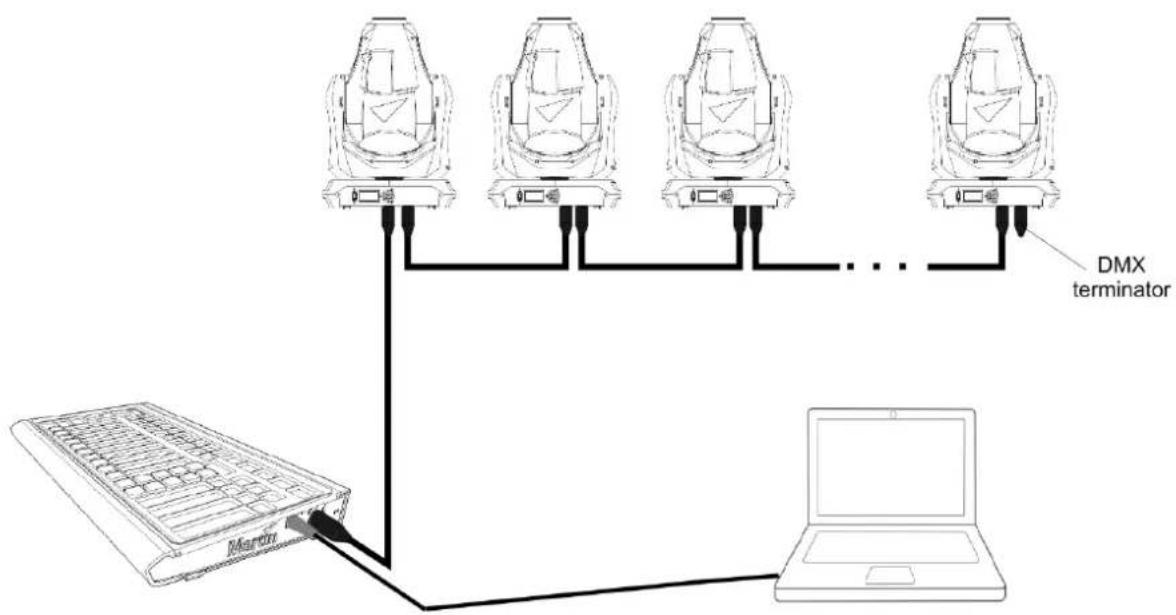
flowchart
graph TD
    A["MC Martin"] -->|Data Link| B["Cam 1"]
    A -->|Data Link| C["Cam 2"]
    A -->|Data Link| D["Cam 3"]
    A -->|Data Link| E["Cam 4"]
    B --> F["DMX terminator"]
    C --> F
    D --> F
    E --> F
Connection with a USB hub
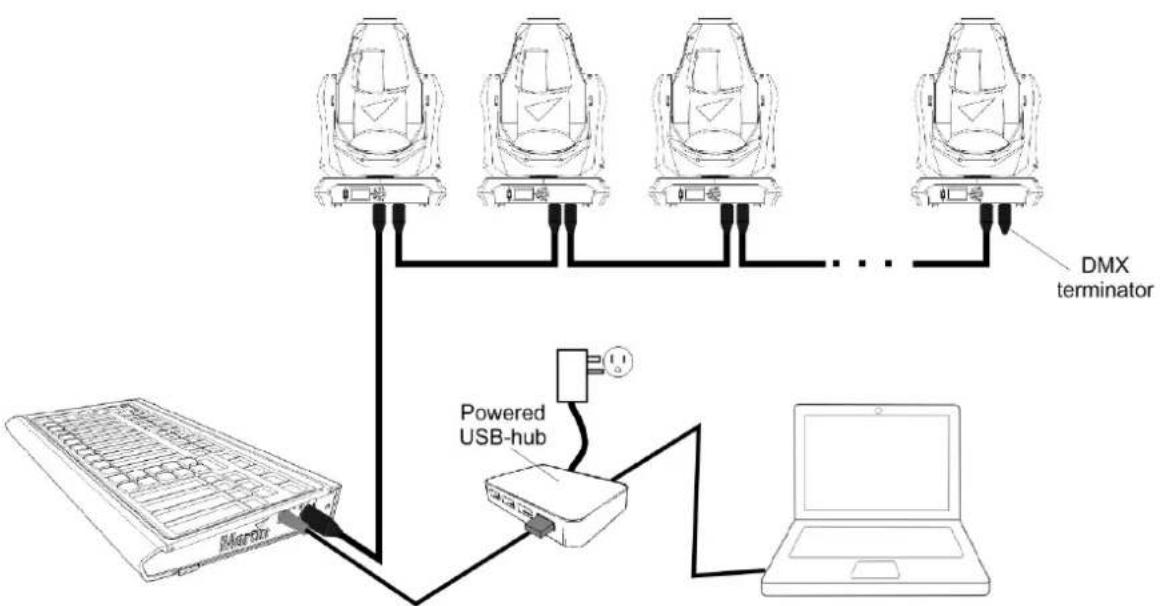
flowchart
graph TD
    A["MCU"] -->|DC| B["DMX terminator"]
    C["Laptop"] -->|USB-hub| D["Powered USB-hub"]
    D -->|DC| A
    style A fill:#f9f,stroke:#333
    style B fill:#ccf,stroke:#333
    style C fill:#cfc,stroke:#333
    style D fill:#fcc,stroke:#333
Connections
Side

A USB-B 2.0 connector is placed on the right-hand side of the Martin™ M-Touch for connection to a host PC. The M-Touch can draw a maximum of 500mA . If you use a USB hub, make sure that it is powered.
DMX
5-pin female XLR DMX Output pinout:
- Pin 1 Signal ground
- Pin 2 Cold
- Pin 3 Hot
- Pin 4-5 Not in use
Maintenance
The Martin™ M-Touch is a rugged, roadworthy device. Occasional cleaning is the only service required of the user. For any other service-related concerns, please contact your Martin™ dealer or visit www.martin.com.
Any service not described in this document must be carried out by a qualified Martin ^™ technician.
The M-Touch requires periodic cleaning. The schedule depends heavily on the operating environment; please consult a Martin ^™ service technician for recommendations if needed.
As with any electronic device, never spray cleaner directly onto the product, always spray onto a lint-free cloth and wipe clean. Cleaning products designed for cellphone and tablet devices tend to work very well for cleaning lighting consoles.

Important! Excessive dust, dirt smoke fluid build-up etc. can degrade nance and cause damage to the controller that is not covered by the ty.
Specifications
Physical
Length: 394 mm (15.5 in.)
Width: 219 mm (8.6 in.)
Height: 47 mm (1.83 in.)
Weight: 1.5 kg (3.3 lbs.)
Minimum ambient temperature (°Ta min.): 0°C (32°F)
Maximum ambient temperature (Ta Max.): 40°C (104°F)
IP Rating: IP20
Control and Programming
• Bank navigation Up/Down with numerical display
- Main Go section: Snap, Release, Pause and Go button
- Command Buttons: Record, Edit, Update, Load, Clear
- Multifunction Mode select button
• 4 Parameter Select buttons
• 4 Parameter Adjust Touch faders
- Fixture Selection buttons: Last, Next, Highlight
• 10 Function Velocity pads
Playback
- 10 Playback Touch faders with 3 buttons (2 Touch Pad, 1 Velocity Pad)
Connections
1x DMX universe output: 5-pin locking XLR
1x USB 2.0 input
Electrical
Mains Power: 5 VDC over USB
Maximum current: 500 mA
Included Items
USB Cable 1.5 m
Ordering Information
Martin™ M-Touch: P/N 90737040
- Table of Contents
- Dimensions
- Introduction
- Technical Support
- Contact by email
- Contact by phone
- Fixture Type Requests
- Controller Support website
- User Forums
- Safety Information
- This product is for indoor use only.
- Electromagnetic Compatibility
- Included Items
- Software
- Setup and Powering Up
- USB
- DMX
- Connection without a USB hub
- Connection with a USB hub
- Connections
- Maintenance
- Specifications
- Physical
- Control and Programming
- Playback
- Electrical
- Ordering Information
Brand : MARTIN
Model : M-Touch
Category : DMX Controller