DTR-25 - Electronic timer ENTES - Free user manual and instructions
Find the device manual for free DTR-25 ENTES in PDF.


| Product Type | Power Quality Analyzer |
| Brand | ENTES |
| Model | DTR-25 |
| Dimensions (approx.) | 120 x 80 x 30 mm |
| Weight (approx.) | 200 g |
| Power Supply | 100-240 V AC, 50/60 Hz |
| Main Functions | Data logging, waveform capture, harmonic analysis |
| Display | LCD graphical display |
| Connectivity | USB, LAN |
| Memory | Internal memory for data storage |
| Sampling Rate | 256 samples/cycle |
| Accuracy Class | Class 0.5S (IEC) |
| Operating Temperature | -10°C to 50°C |
| Humidity Range | 0-95% non-condensing |
| Safety Standards | IEC 61010-1 |
| Cleaning | Wipe with a dry, soft cloth |
| Spare Parts Availability | Contact manufacturer for spare parts |
| Repairability | Refer to qualified service personnel |
Frequently Asked Questions - DTR-25 ENTES
User questions about DTR-25 ENTES
0 question about this device. Answer the ones you know or ask your own.
Ask a new question about this device
Download the instructions for your Electronic timer in PDF format for free! Find your manual DTR-25 - ENTES and take your electronic device back in hand. On this page are published all the documents necessary for the use of your device. DTR-25 by ENTES.
USER MANUAL DTR-25 ENTES
DTR-25, which has a real time clock, is an electronic timer that calculates the Fajr, Dhuhr, Asr, Maghrib and Isha'a Salah times additional to the sunset and sunrise periods automatically. It is designed for controlling the devices which are connected to its contacts according to Salah times, sunset, sunrise and the time periods which are programmed by the user.

ESC Button :It is used to switch between monitoring menus. In the programming mode, it is used to cancel a parameter change or to return to the previous menu.
SET Button :It is used to switch between monitoring menus. When it is pressed for 3 seconds, programming mode is entered. In the programming mode, it is used to apply a parameter UP change or to enter to a menu.
DOWN Buttons: In the monitoring menu, it is used to switch between programs to show their activity in a day. When the DOWN button is pressed for 3 seconds, C1 relay goes into manual mode and when the UP button is pressed for 3 seconds, C2 relay goes into manual mode. In the programming menu; it is used to browse between menus, to select parameters and to adjust values with digits.
①
Precautions for Installation and Safe Use
If below precautions are not properly observed and carried out, it may result in cases with injury or death. - Disconnect power before working on the device.
-When device is connected to the network, do not remove the front panel.
-Do not clean the device with solvent or similar items. Only clean with dry cloth.
-Verify correct terminal connections before energizing the device.
-Install the device on the electrical panel.
-Contact your authorized reseller in case problems occur with your device.
No responsibility is assured by the manufacturer or any of its subsidiaries for any consequences rising out of the use of this material.
- The output loads connected to the relays do not function if auxiliary supply is absent. Even if the relay status is monitored as "on"(☐ and/or☐), auxiliary supply is a must for the operation.
Salah Times are based on the calendars which are prepared by the Turkish Presidency of Religious Affairs and the calculation settings are controlled in reference with the Calendars of the Turkish Presidency of Religious Affairs.
The device shouldn't be used for anything other than controlling relays before or after the Salah Times. The Salah Times may differ +/- 2 minutes from the times which are listed in the calendar. For a more precise time calculation, the coordinates of the device should be entered manually from the REGIONAL SETTING menu.
- There are two reserves in the device. Programmed data is protected by these reserves against power outages.
- Battery shelf life is 5 years.
- Reserve battery should only be changed by the authorized service.
②
MANUAL MODE :
In order to use the relay outputs manually, DTR-25 has to be in the monitoring mode. The DOWN button is used to switch the C1 relay to manual mode and the UP button is used to switch the C2 relay to manual mode. When the UP or DOWN button is pressed for 3 seconds, "MANUAL" indication appears on the screen. If this is done while the relay C1 or C2 is activated, that relay will be deactivated. If it is done while the relay C1 or C2 is deactivated, no switching will occur. After the relay C1 or C2 is in the manual mode; when the DOWN button is pressed again for 3 seconds, C1 relay will exit the manual mode and when the UP button is pressed again for 3 seconds, C2 relay will exit the manual mode. The relay will stay activated or deactivated according to the program flow. When both of the relays are in manual mode, "AUTO" indication will disappear from the screen.
MONITORING MENU
SET and ESC buttons are used to switch between menus in the monitoring mode. If the device is left unattended for 60 seconds in any menu other than the real time and date, it returns to the real time and date screen.

flowchart
graph LR
    A["Real Time and Date Menu"] --> B["Salah Time for Fajr"]
    B --> C["Salah Time for Dhuhr"]
    C --> D["Salah Time for Asr"]
    D --> E["Salah Time for Maghrib"]
③
Program activity time menu shows the programs, which are stored on the device, in order according to program activity time. The active or finished programs can be shown with UP or DOWN buttons. The programs with a # sign next to them are the programs which are still active.

flowchart
graph LR
    A["I SHA 18:12:00"] --> B["SUNRI SE 07:22:00"]
    B --> C["SUNSET 16:36:00"]
    C --> D["PQ1-C1 05:44:00"]
    D --> E["Program Activity Time ▲▼ Menu"]
    F["C2-SHOT 000000"] --> G["C2-TIME 000000"]
    G --> H["C1-SHOT 000000"]
    H --> I["C1-TIME 000000"]
    J["Operation Count for C2 Relay"] --> K["Activation Time for C2 Relay(Hours)"]
    K --> L["Operation Count for C1 Relay"]
    L --> M["Activation Time for C1 Relay(Hours)"]
④
DTR-25 Menu Settings
If the "SAVE" option doesn't get accepted when returning to the monitoring menu, the changes which are made in the DTR-25 menus will be discarded. This isn't the case for "TIME SETTING" menu. The changes which are done in "TIME SETTING" menu are applied immediately. When none of the keys are pressed in the programming menu, the device returns to monitoring menu and any changes which were made will be discarded. Refer to the menu map when configuring the DTR-25 menus.
- Program Menu:
There are 32 programs available to program between P01 and P32. The available settings for programs are relay selection, activation time, activation day, deactivation time, time conflict query and save. In addition to these, an appointed program has two additional settings as "EDI T" and "DELETE". If "EDI T" is selected for an appointed program, the existing settings of that program is shown and can be reconfigured. If "DELETE" is selected for an appointed program, that program will be deleted permanently.
Output Selection ( PXX-OUT ):
DTR-25 has 2 relay outputs as C1 and C2. The user must choose between C1 and C2 as the relay output to control.
Activation Time Setting (PXX-ON):
There are 3 parameters: Time, sunrise and sunset. The user can select and set any of the 3 parameters which suits the application best.
Time Parameter (TIME):
This parameter is the adjustment of the relay according to the real time clock. If this parameter is selected, the user can enter an activation time between 00:00:00 (HH:mm:ss) and 23:59:59.
Fajr Salah Time Parameter (FAJR) :
This parameter is calculated according to the Fajr Time of the adjusted local coordinates and date. If this parameter is selected, the user can adjust a new Fajr Salah Time with a difference of ±9:59:59 (HH:mm:ss). If the adjusted time corresponds to the day before, it becomes (00:00:00) for the current day.
⑤
Dhuhr Salah Time Parameter (DHUHR):
This parameter is calculated according to the Dhuhr Time of the adjusted local coordinates and date. If this parameter is selected, the user can adjust a new Dhuhr Salah Time with a difference of ± 9:59:59 (HH:mm:ss). If the adjusted time corresponds to the day before, it becomes (00:00:00) for the current day.
Asr Salah Time Parameter (ASR)
This parameter is calculated according to the Asr Time of the adjusted local coordinates and date. If this parameter is selected, the user can adjust a new Asr Salah Time with a difference of ± 9:59:59 (HH:mm:ss). If the adjusted time corresponds to the day before, it becomes (00:00:00) for the current day.
Maghrib Salah Time Parameter ( MAGHRI B ) :
This parameter is calculated according to the Maghrib Time of the adjusted local coordinates and date. If this parameter is selected, the user can adjust a new Maghrib Salah Time with a difference of ± 9:59:59 (HH:mm:ss). If the adjusted time corresponds to the day before, it becomes (00:00:00) for the current day.
Isha'a Salah Time Parameter (ISHA T):
This parameter is calculated according to the Isha'a Time of the adjusted local coordinates and date. If this parameter is selected, the user can adjust a new Isha'a Salah Time with a difference of ± 9:59:59 (HH:mm:ss). If the adjusted time corresponds to the day before, it becomes (00:00:00) for the current day.
Sunrise Parameter ( SUNRI SE ):
This parameter is the adjustment of the relay according to sunrise time which is calculated in reference to the local coordinates and date. If this parameter is selected, the user can enter an activation time adding or subtracting 9:59:59(HH:mm:ss) to the local sunrise time. If the time after the subtraction corresponds to the day before, this parameter is adjusted as 00:00:00 for the current day.
⑥
Sunset Parameter ( SUNSET ):
This parameter is the adjustment of the relay according to sunset time which is calculated in reference to the local coordinates and date. If this parameter is selected, the user can enter an activation time adding or subtracting 9:59:59(HH:mm:ss) to the local sunset time. If the time after the addition corresponds to the day after, this parameter is adjusted as 23:59:59 for the current day.
Selection of Activation Days:
The day/days in which the program will be activated is adjusted in this menu. If "ALL DAYS" "YES" is selected, the program will be activated for all days of the week. If "NO" is selected, the user will be asked to select "YES" or "NO" for the all of the days starting from Doshanbeh in which the program will be active. There are numbers 1 to 7 on the top section of the screen. These numbers stand for the days of the week. "1" indicates shanbeh. These numbers also help to indicate the days in which a program will be active without entering that appointed programs menu.
Deactivation Time Setting ( PXX-OFF ):
There are 3 parameters: Time, sunrise and sunset. The user can select and set any of the 3 parameters which suits the application best. These parameters are the same as in the relay activation setting. In this menu, the user can select a different option than in the relay activation setting but the activation and deactivation times must be set differently. If the activation setting is selected as sunrise/sunset and the deactivation setting is selected as time, the deactivation time shouldn't be earlier than the activation setting. For the cases other than this one in which the deactivation time is set earlier than the activation time, the deactivation time is set for the next day.
Time Conflict Query:
The device checks for any time conflicts between the existing programs and the newly entered program. If there is a time conflict, it warns the user with the "CROSS PXX" warning. If there isn't a time conflict, "PROGRAM VALID" is shown on the screen. These warnings will be shown for 3 seconds. If a button is pressed before 3 seconds run out while a warning is displayed, the save menu is entered.
⑦
Save: In this menu, the user is asked to approve the changed program or not. If the program is not confirmed by the user, it stays unchanged. If the program is confirmed by the user, the changes are kept on the memory but are not in effect. When the "SAVE" query is confirmed by the user while returning to the monitoring menu, the changes are saved to the memory. See application example 1 and 2
- Merge Function:
The merge function does a logical AND operation. In the common timeframe of the merged programs, the corresponding relay becomes active. This function can be used if at least two programs are assigned for the same relay output. There are 2 sub-menus as "AND-1" and "AND-2". There is a "DI SABL" parameter in these menus. When the user selects at least 2 programs, "FI NI SH" parameter becomes accessible in this menu instead of this parameter. The user browses between the parameters with UP or DOWN buttons and selects the programs which he wants to merge with SET button. According to the selection of the output of the first selected program, the programs for the other output are excluded from the selectable programs for the users convenience to easily select the programs with the same output. To finish the selection, "FI NI SH" parameter has to be selected. After this process, "AND-X" sub-menu will be set and shown as occupied. To disable the merge function, the user must select the "DI SABL" parameter. After this process, "AND-X" sub-menu will be set and shown as unoccupied. When the "SAVE" query is confirmed by the user while returning to the monitoring menu, the changes are saved to the memory.
● Relay Time Menu:
The operation counts and activation times of the C1 and C2 relays are reset in this menu. The user can reset any of the parameter/parameters of the C1 relay. There are 4 sub-menus as "C1-TIME", "C1-SHOT", "C2-TIME" and "C2-TIME". When the "SAVE" query is confirmed by the user while returning to the monitoring menu, the changes are saved to the memory.
● Settings Observation Menu:
The user can observe the sub-menu settings with 3 second intervals in this menu. The activation/deactivation time settings, merge function settings, holiday lock settings, time zone, summer/winter time setting, geographical coordinates and the parameter to which the exit from the manual mode is set can be displayed. UP, DOWN and ESC buttons enables the interval between screens to extend. The SET button provides a faster browsing between the sub-menus.
8

flowchart
graph LR
    A["DEMO MODE"] --> B["P01-C1"]
    B --> C["P31-C1 AND 1 AND-2"]
    C --> D["XXXXX XXXXX XXXXX"]
    A --> E["RECOVERY POSITION DAY HIGH TIME ZON"]
    E --> F["HOLDY-X"]
    F --> G["XXXXX XXXX XXXX XXXX"]
xxxx is a symbolic representation. The set parameters are shown here.
● Regional Settings Menu:
Geographical settings are done in this menu. The changes which are made in this menu are saved to the memory when the "SAVE" query is confirmed by the user while returning to the monitoring menu.
Language Menu:
There are English and Turkish parameters. The user enters the language menu with SET button, chooses a language with UP or DOWN buttons and confirms this language with the SET button. If Turkish is selected, the change is applied immediately. But if the "SAVE" query isn't confirmed by the user while returning to the monitoring menu, the language doesn't change.
Location Menu: The sunrise and sunset times are automatically calculated according to the set coordinates. The user can choose to select the MANUAL parameter and enter latitude and longitude of the coordinate which he is in manually or to use the coordinates which are already saved on the devices memory. If the language is set as Turkish, the selectable options are 81 Turkish cities and the districts of Alanya and Bodrum. If the language is set as English, the selectable options are 68 world clocks. When any parameter other than MANUAL is selected, the time zone is adjusted automatically.

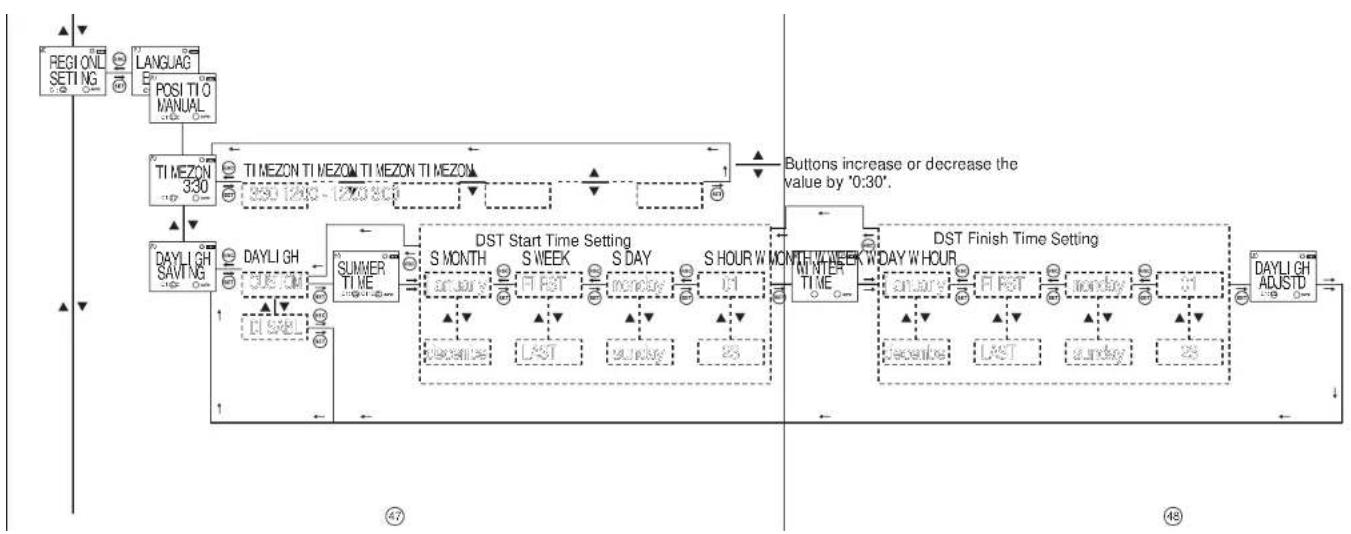
Time Zone Menu: The time zone for the geographical location in which the user resides is set in this menu. This parameter affects only the sunrise and sunset times according to the set location. Daylight Savings Time(DST) Menu: DST usage is set in this menu. There are 4 parameters.
Disable Parameter(DI SABL): This parameter turns the DST off. The snow icon(DST activate) or the sun icon(DST inactivate) disappears from the screen. If this process is done while the DST is activated, the sunrise and sunset times are turned 1 hour backward.
Europe Parameter:
According to the European DST settings; the DST starts when the local time is about to reach 03:00:00 and the clocks are turned 1 hour forward to 04:00:00 on the last Sunday of March. The DST ends when the local time is about to reach 02:00:00 and the clocks are turned 1 hour backward to 01:00:00 on the last Sunday of October.
USA Parameter:
According to the European DST settings; the DST starts when the local time is about to reach 02:00:00 and the clocks are turned 1 hour forward to 03:00:00 on the second Sunday of March. The DST ends when the local time is about to reach 02:00:00 and the clocks are turned 1 hour backward to 01:00:00 on the first Sunday of October.
Custom Parameter(CUSTOM):
By choosing this parameter, the user first selects the month, the place of the day in that selected month(Ex.: The selection of the "second" parameter in the "second Shanbeh of the Favardin month". It is selected as the week of the month.), the day, the time on which it will be turned forward for DST start. The user then selects the month, the place of the day in that selected month(Ex.: The selection of the "second" parameter in the "second Shanbeh of the Mehr month". It is selected as the week of the month.), the day, the time on which it will be turned backward for DST finish.

Salah Time Calculation Method Selection Menu
For the calculation of the Salah Times, the latitude and longitude information of the location is needed. For In addition, angle information is needed for the calculation of Fajr and Isha'a Salah times. There are 6 globally approved references for the angle information.
1) University of Islamic Science (UIS)
2) Islamic Society of North America (ISNA)
3) World Islamic League (WIL)
4) Um Ul-Qura, Makkah(UMQ)
5) Egyptian General Organisation of Surveying (EGOS)
6) Shia Ithna Ashari (SIA)
In Turkey, WIL method is used for the angles. For the other countries, the device finds the calculation method automatically. A different calculation method can be set on this screen if wanted.
The user also has the option to set the Fajr and Isha'a time angles manually between 14 and 20 degrees.
• Time Settings Menu:
The time settings are done in this menu. There are 3 sub-menus. The changes which are made in this menu are immediately applied.
Date Menu(DATE): It is displayed as dd.mm.yy.
Clock Menu(CLOCK): It is displayed as HH.mm.ss.
Century Menu(CENTURY): The first two digits of the year which you're in is set in this menu. It is displayed as yyyy. The last two digits come from the date setting. When the user wishes to set this value it changes to yy--. It can be set between 19 and 25.
11

flowchart
graph LR
    A["DATE 16.08.10"] -->|SET| B["DATE 16.08.10"]
    B -->|SET| C["DATE 23.08.10"]
    C -->|SET| D["CHANGED DATE"]
    D --> E["DATE 23.08.10"]


flowchart
graph LR
    A["CENTURY 1910"] -->|ESC SET| B["19--"]
    B --> C["ESG SET"]
    C --> D["Can be set between 19~25"]
    D --> E["CHANGED CENTRY"]
    E --> F["CENTURY 2010"]
12
● Display Settings Menu:
The contrast is adjusted between 00 an 15 in this menu.

flowchart
graph LR
    A["CONTRAS 08"] -->|ESC SET| B["CONTRAS 06"]
    B --> C{Can be set between 00~15}
    C --> D["CONTRAS 05"]
    D --> E["CONTRAS 05"]
    style A fill:#f9f,stroke:#333
    style B fill:#ccf,stroke:#333
    style C fill:#cfc,stroke:#333
    style D fill:#fcc,stroke:#333
    style E fill:#cff,stroke:#333
● Holiday Lock Menu:
In this menu, the set programs are deactivated for a time period which is entered by the user. 4 different holiday times can be entered by the user. The user must enter and approve the start date(as dd:mm), the start time(as HH:mm), the finish date(as dd:mm) and the finish time(as HH:mm) of a holiday. After the approval, "HOLDAY X-FULL" will appear on the screen. For an occupied holiday setting, "EDI T" ve "DELETE" options are available. If "EDI T" is selected for a holiday lock, the existing settings for that holiday lock can be observed and edited. If "DELETE" is selected for a holiday lock, the settings for that holiday lock is deleted.
The changes are saved to the memory when the "SAVE" query is confirmed by the user while returning to the monitoring menu. See Program Example 3.
- Manual Mode Menu: The setting for leaving the manual mode after the device is set in manual mode is done in this menu. There are 3 parameters. The user can leave the manual mode with the DOWN button regardless of what parameter he chooses in this menu.
Disabled Parameter(DI SABL):
When this parameter is selected; after the manual mode is enabled with the UP/DOWN buttons for any of the outputs, it must be disabled again with the UP/DOWN buttons.
Program Parameter(NEXT-P):
When this parameter is selected: after the relay/relays is/are activated or deactivated by a program in the program flow, the manual mode for the relay/relays will be disabled.
Timer Parameter(TI MER):
When this parameter is selected; the user will be prompted to enter the time as HH:mm. The device will start to count back from the entered time when the manual mode is enabled for the relay/relays. If the time is entered as 23:59, the manual mode will be disabled after 23 hours and 59 minutes. If the time is entered as 00:01, the manual mode will be disabled after 1 minute. There is a special case if the time is entered as 00:00. With this entered time, the manual mode will be disabled after 1 minute too.
- Password Settings Menu:
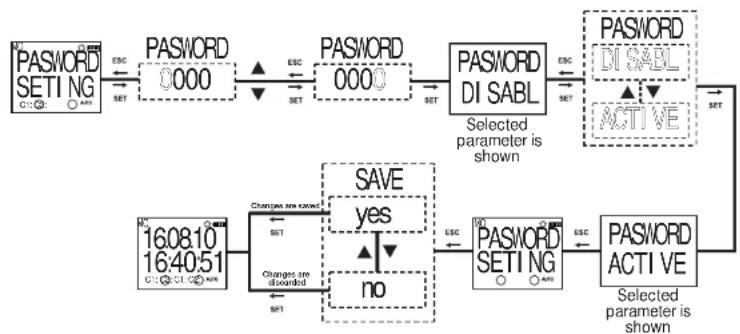
The activation and changing of a password is done in this menu. The factory default value for the password is "0000". The 4 digit password is prompted before entering this menu. If the password is activated, it isn't prompted again before entering this menu since the password was entered before entering the main programming menu.
Password Activation Menu: The password is activated or deactivated in this menu. It is activated as following:
flowchart
graph TD
    A["PASSWORD SETI NG"] -->|ESC SET| B["PASSWORD 0000"]
    B -->|ESC SET| C["PASSWORD 0000"]
    C --> D["PASSWORD DI SABL"]
    D -->|ESC SET| E["PASSWORD DI SABL"]
    E --> F["ACTIVE"]
    F --> G["Password ACTI VE"]
    G -->|ESC SET| H["Password SETI NG"]
    H -->|ESC SET| I["Password SETI NG"]
    I --> J["SAVE yes no"]
    J --> K["16:08:10 16:40:51"]
    K --> L["Changes are saved SET"]
    L --> M["Password SETI NG"]
    M --> N["Password SETI NG"]
    N --> O["Password SETI NG"]
    O --> P["Password SETI NG"]
    P --> Q["Password SETI NG"]
    Q --> R["Password SETI NG"]
    R --> S["Password SETI NG"]
    S --> T["Password SETI NG"]
    T --> U["Password SETI NG"]
    U --> V["Password SETI NG"]
    V --> W["Password SETI NG"]
    W --> X["Password SETI NG"]
    X --> Y["Password SETI NG"]
    Y --> Z["Password SETI NG"]
    Z --> AA["Password SETI NG"]
    AA --> AB["Password SETI NG"]
    AB --> AC["Password SETI NG"]
    AC --> AD["Password SETI NG"]
    AD --> AE["Password SETI NG"]
    AE --> AF["Password SETI NG"]
    AF --> AG["Password SETI NG"]
    AG --> AH["Password SETI NG"]
    AH --> AI["Password SETI NG"]
    AI --> AJ["Password SETI NG"]
    AJ --> AK["Password SETI NG"]
    AK --> AL["Password SETI NG"]
    AL --> AM["Password SETI NG"]
    AM --> AN["Password SETI NG"]
    AN --> AO["Password SETI NG"]
    AO --> AP["Password SETI NG"]
    AP --> AQ["Password SETI NG"]
    AQ --> AR["Password SETI NG"]
    AR --> AS["Password SETI NG"]
    AS --> AT["Password SETI NG"]
    AT --> AU["Password SETI NG"]
    AU --> AV["Password SETI NG"]
    AV --> AW["Password SETI NG"]
    AW --> AX["Password SETI NG"]
    AX --> AY["Password SETI NG"]
    AY --> AZ["Password SETI NG"]
    AZ --> BA["Password SETI NG"]
    BA --> BB["Password SETI NG"]
    BB --> BC["Password SETI NG"]
    BC --> BD["Password SETI NG"]
    BD --> BE["Password SETI NG"]
    BE --> BF["Password SETI NG"]
    BF --> BG["Password SETI NG"]
    BG --> BH["Password SETI NG"]
    BH --> BI["Password SETI NG"]
    BI --> BJ["Password SETI NG"]
    BJ --> BK["Password SETI NG"]
    BK --> BL["Password SETI NG"]
    BL --> BM["Password SETI NG"]
    BM --> BN["Password SETI NG"]
    BN --> BO["Password SETI NG"]
    BO --> BP["Password SETI NG"]
    BP --> BQ["Password SETI NG"]
    BQ --> BR["Password SETI NG"]
    BR --> BS["Password SETI NG"]
    BS --> BT["Password SETI NG"]
    BT --> BU["Password SETI NG"]
    BU --> BV["Password SETI NG"]
    BV --> BW["Password SETI NG"]
    BW --> BX["Password SETI NG"]
    BX --> BY["Password SETI NG"]
    BY --> BZ["Password SETI NG"]
    BZ --> CA["Password SETI NG"]
    CA --> CB["Password SETI NG"]
    CB --> CC["Password SETI NG"]
    CC --> CD["Password SETI NG"]
    CD --> CE["Password SETI NG"]
    CE --> CF["Password SETI NG"]
    CF --> CG["Password SETI NG"]
    CG --> CH["Password SETI NG"]
    CH --> CI["Password SETI NG"]
    CI --> CJ["Password SETI NG"]
    CJ --> CK["Password SETI NG"]
    CK --> CL["Password SETI NG"]
    CL --> CM["Password SETI NG"]
    CM --> CN["Password SETI NG"]
    CN --> CO["Password SETI NG"]
    CO --> CP["Password SETI NG"]
    CP --> CQ["Password SETI NG"]
    CQ --> CR["Password SETI NG"]
    CR --> CS["Password SETI NG"]
    CS --> CT["Password SETI NG"]
    CT --> CU["Password SETI NG"]
    CU --> CV["Password SETI NG"]
    CV --> CW["Password SETI NG"]
    CW --> CX["Password SETI NG"]
    CX --> CY["Password SETI NG"]
    CY --> CZ["Password SETI NG"]
⑮16
Password Change Menu: The password is changed in this menu. It is done as following:

flowchart
graph TD
    A["10 PASSWORD SETING C1: ○ →"] -->|ESC SET| B["10 PASSWORD ACTIVE"]
    B -->|▲| C["10 PASSWORD CHANGE"]
    C -->|ESC SET| D["NEWPASS NEWPASS 0000 00"]
    D -->|SET| E["REENTER REENTER 0001"]
    E -->|SET| F["0000"]
    F --> G["16:40:51 16:08:10"]
    G --> H["CHANGE are saved"]
    H --> I["SAVE yes ▲"]
    I --> J["no"]
    J --> K["CHANGE are discounted"]
    K --> L["START SET"]
O
● Factory Setting Menu:
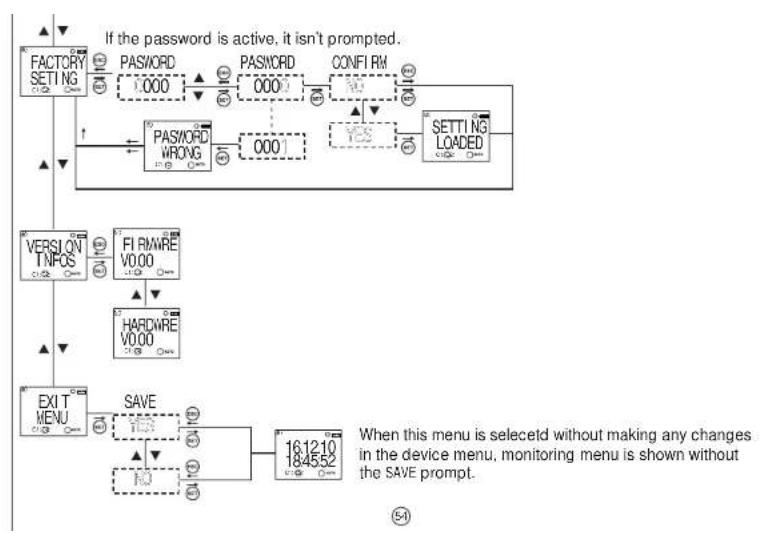
The device is returned to its factory settings in this menu. The 4 digit password is prompted before entering this menu. If the password is activated, it isn't prompted again before entering this menu since the password was entered before entering the main programming menu. The device returns to its factory settings when the "SAVE" query is confirmed by the user while returning to the monitoring menu. Time settings, relay operation count and relay operation time doesn't change.
- Version Information Menu:
The software and hardware versions of the device is shown in this menu.
- Exit from Main Programming Menu
This menu is used to exit from the main programming menu. The ESC button can be used for this, too. If any changes are committed in the menus while in the main programming menu, an approval prompt is shown. If there aren't any changes, the monitoring menu is shown directly.
Factory Settings:
Program
P01: C1 relay will be activated everyday 50 minutes before Fajr Salah Time and be deactivated 10 minutes before the sunrise time.
P02: C1 relay will be activated 20 minutes before every Dhuhr Salah Time except Yaumul Jumuah and be deactivated 30 minutes after.
P03: C1 relay will be activated 60 minutes before every Yaumul Jumuah Salah Time and be deactivated 50 minutes after.
P04: C1 relay will be activated everyday 20 minutes after Asr Salah Time and be deactivated 20 minutes before the sunrise.
P05: C1 relay will be activated everyday 20 minutes after Maghrib Salah Time and be deactivated 20 minutes before the sunrise time.
17
P06: C1 relay will be activated everyday 20 minutes before Isha'a Salah Time and be deactivated 30 minutes after Isha'a Salah Time.
P07: C2 relay will be activated everyday 50 minutes before Fajr Salah Time and be deactivated 10 minutes before the sunrise time.
P08: C2 relay will be activated 20 minutes before every Dhuhr Salah Time except Yaumul Jumuah and be deactivated 30 minutes after.
P09: C2 relay will be activated 60 minutes before every Yaumul Jumuah Salah Time and be deactivated 50 minutes after.
P10: C2 relay will be activated everyday 20 minutes after Asr Salah Time and be deactivated 20 minutes before the sunrise.
P11: C2 relay will be activated everyday 20 minutes after Maghrib Salah Time and be deactivated 20 minutes before the sunrise time.
P12: C2 relay will be activated 20 minutes before Isha'a Salah Time and be deactivated 30 minutes after Isha'a Salah Time.
P13...P32: Empty
Merge Function
AND-1: FREE
AND-2: FREE
Regional Settings
LANGUAGE: ENGLISH
POSITION: MECCA
TIME ZONE: 3.00
DAYLIGHT SAVING: -
H METHOD: UQM
Display Settings
CONTRAST:08
Manual Mode
RECOVRY : DISABLE
Holiday Lock
HOLIDAY-1: FREE
HOLIDAY-2: FREE
HOLIDAY-3: FREE
HOLIDAY-4: FREE
Activation Time
C1 TIME: 0
C1 SHOT:0
C2 TIME : 0
C2 SHOT:0
Password
PASSWORD:0000
PASSWORD STATUS:INACTIVE
DIMENSIONS
CONNECTION DIAGRAM


Note: The contact resistance at ohmic load (eg: Incandescent bulb, Resistance devices) is 16A. It is recommended to use a contactor if the inductive load (eg: AC motor, fluorescent, etc.) or capacitive load (eg: Led Drivers, UPS, Fluorescent (Electronic Ballast), etc.) switch. Otherwise adhesion may occur in relay contacts.
18
TECHNICAL FEATURES
| Operating Voltage (Un) | Please look at the side label |
| Output Contact | 2 C/O, 16 A / 4000 VA |
| Refresh Time | 1 sec. |
| Power Consumption | < 5 VA |
| Accuracy | 1 sec./day |
| Screen Size | 1,3" LCD |
| Program Number | 32 |
| Battery Shelf Life | 5 Years |
| Equipment Protection Class | Class II( ) |
| Ambient Temperature | -10°C, +55°C |
| Protection Class | IP20 |
| Installation | Rail Mount |
| Dimensions | PK25 |
| Package Weight | 0,2 kg |
| Quantity in 1 Package | 5 pcs. |
Due to the structure of LCD screens, the liquid inside them starts to freeze below its operating temperature. This causes the screen to respond slower or not respond at all. Device's other functions are not affected from this and it opens/closes its relays as programmed. After the device temperature rises back to the operating range, LCD screen starts to work normally.
City Names and Their Screen Displays for
the Language set in the Regional Settings
Parameters for the Turkish Language Selection
| Cities | Displayed Name | Time Zone |
| Adana | ADANA | +2:00 |
| Adıyaman | ADIYAM | +2:00 |
| Afyon | AFYONK | +2:00 |
| Ahirý | AGRI | +2:00 |
| Aksaray | AKSARA | +2:00 |
| Amasya | AMASYA | +2:00 |
| Ankara | ANKARA | +2:00 |
| Antalya | ANTALY | +2:00 |
| Ardahan | ARDAIJA | +2:00 |
| Artvin | ARTVIN | +2:00 |
| Aydýn | AYDIN | +2:00 |
| Balykesir | BALIKS | +2:00 |
| Bartýn | BARTIN | +2:00 |
| Batman | BATMAN | +2:00 |
| Bayburt | BAYBUR | +2:00 |
| Bilcicik | BILECI | +2:00 |
| Bingól | BINGOL | +2:00 |
| Bitlis | BITLIS | +2:00 |
| Bolu 1:2:00 | BOLU | |
| Burdur +2:00 | BURDUR | |
| Bursa +2:00 | BURSA | |
| Çanakkale | CANAKK | +2:00 |
| Cities | Displayed Name | Time Zone |
| Çankfıry | CANKIR | +2:00 |
| Çorum | CORUM | +2:00 |
| Denizli | DFNIZL | +2:00 |
| Diyarbakıy | DIYRBK | +2:00 |
| Düzce | DUZCE | +2:00 |
| Edirne | EDIRNE | +2:00 |
| Elazyö | ELAZIG | +2:00 |
| Erzincan | ERZINC | +2:00 |
| Erzurum | ERZURU | +2:00 |
| Eskişehir | ESKISE | +2:00 |
| Gazkantep | GANTEP | +2:00 |
| Giresun | GIRESU | +2:00 |
| Gümüphane | GUMUSH | +2:00 |
| Hakkari | HAKKAR | +2:00 |
| Hatay | HATAY | +2:00 |
| İdölýr | İGDIR | +2:00 |
| İsparta | ISPART | +2:00 |
| Ystanbul | ISTANB | +2:00 |
| Yzmir +2:00 | İZMIR | |
| Kahramanmarap +2:00 | KMARAS | |
| Karabuk +2:00 | KARABU | |
| Karaman | KARAMA | +2:00 |
| Cities | Displayed Name | Time Zone |
| Kars | KARS | +2:00 |
| Kastamonu | KASTAM | +2:00 |
| Kayseri | KAYSER | +2:00 |
| Kýrýkále | KIRIKK | +2:00 |
| Kýriklareli | KIKLA | +2:00 |
| Kýrþehir | KIRSEH | +2:00 |
| Kilis | KILIS | +2:00 |
| Kocaeli | KOCael | +2:00 |
| Konya | KONYA | +2:00 |
| Kítahya | KUTAHY | +2:00 |
| Malatya | MALATY | +2:00 |
| Manisu | MANISA | +2:00 |
| Mardin | MARDIN | +2:00 |
| Mersin | MERSIN | +2:00 |
| Muðla | MUGLA | +2:00 |
| Muþ | MUS | +2:00 |
| Nevþehir | NEVSEII | +2:00 |
| Niðle | NIGDE | +2:00 |
| Ordu +2:00 | ORDU | |
| Osmaniye +2:00 | OSMANI | |
| Rize +2:00 | RIZE | |
| Sakarya | SAKARY | +2:00 |
Parameters for the Turkish Language Selection
| Cities | Displayed Name | Time Zone |
| Samsun | SAVSUN | +2:00 |
| Siirt | SI I RT | +2:00 |
| Sinop | SI NOP | +2:00 |
| Sivas | SI VAS | +2:00 |
| Panlurla | SURFA | +2:00 |
| Pyrnak | SI RNAK | +2:00 |
| Tekirdao | TEKI RD | +2:00 |
| Tokat | TOKAT | +2:00 |
| Trabzon | TRABZO | +2:00 |
| Tunceli | TUNCEL | +2:00 |
| Upak | USAK | +2:00 |
| Van | VAN | +2:00 |
| Yalova | YALOVA | +2:00 |
| Yozgat | YOZGAT | +2:00 |
| Zonguldak | ZONGUL | +2:00 |
| Alanya | I STANB | +2:00 |
| Bodrum +2:00 | I ZWI R |
Parameters for the English Language Selection
| Cities | Displayed Name | Time Zone |
| Abu Dhabi, U.A.E. | ABUDHA | +3 |
| Ahmedabad, India | AHMEDA | +5:30 |
| Alexandria, Egypt | ALEXAN | +2 |
| Almaty, Kazakhstan | ALMATY | +6 |
| Alorstar, Malesia | ALORST | +8 |
| Amman, Jordan | AMMAN | +2 |
| Ashgabat, Turkmenistan | ASHGAB | +5 |
| Aslana, Kazakhstan | ASTANA | +6 |
| Baghdad, Iraq | BAGHDA | +3 |
| Banda Aceh, Indonesia | BANDA | +7 |
| Basra, Iraq | BASPA | +3 |
| Beirut, Lebanon | BEI RU | +2 |
| Bishkok, Kyrgyzstan | BI SHKE | +6 |
| Cairo, Egypt | CAIRO | +2 |
| Damascus, Syria | DAMASC | +2 |
| Dammam, Saudi Arabia | DAMMAM | +3 |
| Dhaka, Bangladesh | DHAKA | +6 |
| Doha, Quatar | DOHA | +3 |
| Dubai, U.A.E. + 3 | DUBAI | |
| Dushanbe, Tajikistan + 5 | DUSHAN | |
| Faisalabad, Pakistan + 5 | FAI SAL | |
| Georgetown, Malaysia | G_TOMN | +8 |
21
| Cities | Displayed Name | Time Zone |
| Hyderabad, Pakistan | HYDERA | + 5 |
| Ipoh, Malaysia | I PCH | + 8 |
| Islamabad, Pakistan | I SLAMA | + 5 |
| ISTANBUL, TURKEY | I STANB | + 2 |
| Jeddah, Saudi Arabia | JEDDAH | + 3 |
| Kabul, Afghanistan | KABUL | + 4:30 |
| Kandahar, Afghanistan | KANDAH | + 4:30 |
| Karachi, Pakistan | KARACH | + 5 |
| Kashmir, India | KASHMI | + 5:30 |
| Khartoum, Sudan | KHARTO | + 3 |
| Kuwaitcity, Kuwait | KUWAIT | + 3 |
| Lahore, Pakistan | LAHOPE | + 5 |
| Manama, Bahrain | MAXAMA | + 3 |
| Mashdad, Iran | MASHDA | + 3:30 |
| Mecca, Saudi Arabia | MECCA | + 3 |
| Medina, Saudi Arabia | MEDINA | + 3 |
| Namangan, Uzbekistan | NAWANG | + 5 |
| Nukus, Uzbekistan | NUKUS | + 5 |
| Omdurman, Sudan + 3 | OMDURM | |
| Peshawar, Pakistan + 5 | PESHAW | |
| Port Said, Egypt + 2 | PORT S | |
| Pune, India | PUNE | + 5:30 |
22
| Cities | Displayed Name | Time Zone |
| Punjab, Pakistan | PUNJAB | + 5 |
| Rawalpindi, Pakistan | RAWALP | + 5 |
| Riyadh, Saudi Arabia | RI YADH | + 3 |
| Sabha, Libya | SABHA | + 2 |
| Sana'a, Yemen | SANAA | + 3 |
| Tabriz, Iran | TABRI Z | + 3:30 |
| Tashkent, Uzbekistan | TASHKE | + 5 |
| Tehran, Iran | TEHRAN | + 3:30 |
| Tripoli, Libya | TRI POL | + 2 |
APPLICATION EXAMPLE 1: On every weekday, the C1 relay will be activated 1 hour 35 minutes 51 seconds before the sunrise and be deactivated at 9 o'clock.

flowchart
graph TD
    A["16.08.10 16:40:51 C1:○: ○ AUTO"] --> B["PROGRAM"]
    B --> C["P01 FREE"]
    C --> D["P01-OUT C1"]
    D --> E["P01-ON SUNRSE"]
    E --> F["+0:00:00 - 1:35:5 SET"]
    F --> G["ALL DAYS YES C1:○:○ AUTO"]
    G --> H["P01-OFF TIME"]
    H --> I["SET"]
    I --> J["SUNRI SE +0:00:00 C1:○: ○ AUTO"]
    J --> K["SET"]
    K --> L["TIME 00:00:00 C1:○: ○ AUTO"]
    L --> M["SET"]
    M --> N["PROGRAM VALID"]
    N --> O["CONFIRM YES"]
    O --> P["ADJUSTED P01"]
    P --> Q["P01 FULL"]
    Q --> R["PROGRAM"]
    R --> S["SAVE YES"]
    S --> T["SET"]
    T --> U["16.08.10 16:41:21 C1:○:○ AUTO"]
23
Note: The parameter selection in the example program diagrams must be done with the UP or DOWN buttons. This isn't described in the diagrams. The SET button is used for approval and the ESC button is used for returning to the previous selection. The diagrams are for P01 and the programming is done the same way for the other programs.
24

flowchart
graph TD
    A["16.08.10 16:40:51 C1"] --> B["3 sec. SET"]
    B --> C["PROGRAM"]
    C --> D["P01 FREE"]
    D --> E["P01-OUT C2"]
    E --> F["P01-ON FAJR"]
    F --> G["FAJR T - 0:10:00 C1:00"]
    G --> H["ALL DAYS YES"]
    H --> I["P01-OFF FAJR"]
    I --> J["FAJR T +0:20:00 C1:20"]
    J --> K["PROGRAM VALID"]
    K --> L["CONFIRM YES"]
    L --> M["ADJUSTED PO1"]
    M --> N["P01 FULL"]
    N --> O["P02 FREE"]
    O --> P["P02-OUT C2"]
    P --> Q["P02-ON DHUHR"]
    Q --> R["FAJR T +0:20:00 C1:20"]
    R --> S["PROGRAM VALID"]
    S --> T["CONFIRM YES"]
    T --> U["ADJUSTED PO1"]
    U --> V["P01 FULL"]
    V --> W["P02 FREE"]
    W --> X["P02-OUT C2"]
    X --> Y["P02-ON DHUHR"]

flowchart
graph TD
    A["CONTINUED FROM PAGE 26"] --> B["SET"]
    B --> C["MD DHUHR - 0:10:00 C1: AUTO"]
    C --> D["SET"]
    D --> E["MC ALL DAYS YES C1: AUTO"]
    E --> F["SET"]
    F --> G["MD P02-OFF DHUHR"]
    G --> H["SET"]
    H --> I["MD DHUHR T +0:20:00 C1: AUTO"]
    I --> J["SET"]
    J --> K["MC PROGRAM VALID C1: AUTO"]
    K --> L["SET"]
    L --> M["MD CONFIRM YES C1: AUTO"]
    M --> N["SET"]
    N --> O["MD ADJUSTED P02 C1: AUTO"]
    O --> P["↓"]
    P --> Q["SET"]
    Q --> R["P02 FULL C1: AUTO"]
    R --> S["SET"]
    S --> T["MD P03 FREE C1: AUTO"]
    T --> U["SET"]
    U --> V["MD P03-OUT C2 C1: AUTO"]
    V --> W["SET"]
    W --> X["MD P03-ON ASR C1: AUTO"]
    X --> Y["SET"]
    Y --> Z["MD ASR T - 0:10:00 C1: AUTO"]
    Z --> AA["SET"]
    AA --> AB["MD ALL DAYS YES C1: AUTO"]
    AB --> AC["SET"]
    AC --> AD["MD P03-OFF ASR C1: AUTO"]
    AD --> AE["→"]
CONTINUED FROM PAGE 28

flowchart
graph LR
    A["ASR T +0:20:00"] --> B["PROGRAM VALID"]
    B --> C["CONFIRM YES"]
    C --> D["ADJUSTED PO3"]
    D --> E["P03 FULL"]
    E --> F["P04 FREE"]
    F --> G["P04-OUT C2"]
    G --> H["P04-ON MAGHRI"]
    H --> I["Output"]
    style A fill:#f9f,stroke:#333
    style I fill:#ccf,stroke:#333

flowchart
graph LR
    A["MO MAGHRI B - 0:10:00 C1: AUTO"] --> B["SET"]
    B --> C["NC ALL DAYS YES C1: AUTO"]
    C --> D["SET"]
    D --> E["NC P04- OFF MAGHRI C1: AUTO"]
    E --> F["SET"]
    F --> G["NO MAGHRI B +0:20:00 C1: AUTO"]
    G --> H["SET"]
    H --> I["NO PROGRAM VALI D C1: AUTO"]
    I --> J["SET"]
    J --> K["NO CONFI RM YES C1: AUTO"]
    K --> L["SET"]
    L --> M["NO ADJUSTED P04 C1: AUTO"]
    M --> N["SET"]
    N --> O["+0:00:00 +0:10:00 SET"]
29
30

flowchart
graph TD
    A["P04 FULL"] --> B["P05 FREE"]
    B --> C["P05-OUT C2"]
    C --> D["P05-ON I SHA"]
    D --> E["+0:00:00 - 0:10:00 SET"]
    E --> F["ALL DAYS YES"]
    F --> G["P05-OFF I SHA"]
    G --> H["SET"]
    H --> I["I SHA T +0:20:00 SET"]
    I --> J["PROGRAM VALID"]
    J --> K["CONFIRM YES"]
    K --> L["P05 FULL"]
    L --> M["PROGRAM"]
    M --> N["SAVE YES"]
    N --> O["16:12:10 18:45:52 SET"]

flowchart
graph TD
    A["16:12:10 18:45:52 C1:02: AUTO"] --> B["PROGRAM 3 sec. SET"]
    B --> C["HOLI DAY LOCK C1:C2: AUTO"]
    C --> D["HOLI DAY 1-FREE C1:C2: AUTO"]
    D --> E["START DATE C1:C2: AUTO"]
    E --> F["S- DATE 01.01 C1:C2: AUTO"]
    F --> G["01.01 31:03 00:00 18:30 SET"]
    G --> H["S-CLOCK 00:00 C1:C2: AUTO"]
    H --> I["END DATE C1:C2: AUTO"]
    I --> J["16:12:10 18:45:52 C1:C2: AUTO"]

    K["E- DATE 01.01 C1:C2: AUTO"] --> L["SET 01.01 02:09 00:00 00:00"]
    L --> M["E-CLOCK 00:00 C1:C2: AUTO"]
    M --> N["SET"]
    N --> O["HOLI DAY SAVED C1:C2: AUTO"]
    O --> P["HOLI DAY 1-FULL C1:C2: AUTO"]
    P --> Q["ESC"]
    Q --> R["HOLI DAY LOCK C1:C2: AUTO"]
    R --> S["ESC"]
    S --> T["SAVE YES C1:C2: AUTO"]
    T --> U["SET"]
    U --> V["END DATE C1:C2: AUTO"]
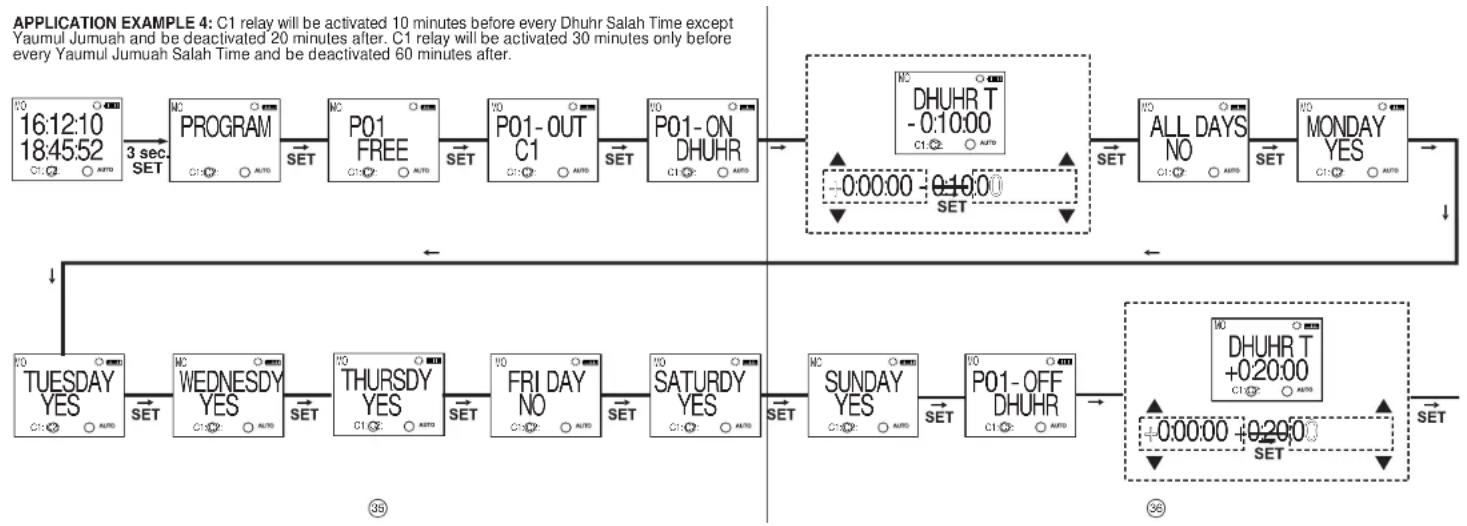
flowchart
graph TD
    A["16:12:10 18:45:52 C1:02 AUTO"] --> B["3 sec SET"]
    B --> C["MC PROGRAM"]
    C --> D["SET"]
    D --> E["P01 FREE"]
    E --> F["SET"]
    F --> G["P01-OUT C1"]
    G --> H["SET"]
    H --> I["P01-ON DHUHR"]
    I --> J["SET"]
    J --> K["MC DHUHR T - 0:10:00 C1:02 AUTO"]
    K --> L["SET"]
    L --> M["ALL DAYS NO"]
    M --> N["SET"]
    N --> O["MONDAY YES"]
    O --> P["SET"]
    P --> Q["MD DHUHR T +0.20:00 C1:02 AUTO"]
    Q --> R["SET"]
    R --> S["TUESDAY YES C1:02 AUTO"]
    S --> T["WEDNESDY YES C1:02 AUTO"]
    T --> U["SET"]
    U --> V["THURSDY YES C1:02 AUTO"]
    V --> W["SET"]
    W --> X["FRI DAY NO C1:02 AUTO"]
    X --> Y["SET"]
    Y --> Z["SATURDY YES C1:02 AUTO"]
    Z --> AA["SET"]
    AA --> AB["MUNDAY YES"]
    AB --> AC["SET"]
    AC --> AD["SUNDAY YES C1:02 AUTO"]
    AD --> AE["SET"]
    AE --> AF["P01-OFF DHUHR C1:02 AUTO"]
    AF --> AG["SET"]
    AG --> AH["MD DHUHR T +0.20:00 C1:02 AUTO"]
    AH --> AI["SET"]
CONTINUED FROM PAGE 36

flowchart
graph TD
    A["PROGRAM VALID"] --> B["CONFIRM YES"]
    B --> C["ADJUSTED P01"]
    C --> D["P01 FULL"]
    D --> E["P02 FREE"]
    E --> F["P02-OUT C1"]
    F --> G["P02-ON DHUHR"]
    G --> H["DHUHR T - 1:00:00"]
    H --> I["SET"]
    I --> J["SET"]
    J --> K["SET"]
    K --> L["SET"]
    L --> M["SET"]
    M --> N["SET"]
    N --> O["SET"]
    O --> P["SET"]
    P --> Q["SET"]
    Q --> R["SET"]
    R --> S["SET"]
    S --> T["SET"]
    T --> U["SET"]
    U --> V["SET"]
    V --> W["SET"]
    W --> X["SET"]
    X --> Y["SET"]
    Y --> Z["SET"]
    Z --> AA["SET"]
    AA --> AB["SET"]
    AB --> AC["SET"]
    AC --> AD["SET"]
    AD --> AE["SET"]
    AE --> AF["SET"]
    AF --> AG["SET"]
    AG --> AH["SET"]
    AH --> AI["SET"]
    AI --> AJ["SET"]
    AJ --> AK["SET"]
    AK --> AL["SET"]
    AL --> AM["SET"]
    AM --> AN["SET"]
    AN --> AO["SET"]
    AO --> AP["SET"]
    AP --> AQ["SET"]
    AQ --> AR["SET"]
    AR --> AS["SET"]
    AS --> AT["SET"]
    AT --> AU["SET"]
    AU --> AV["SET"]
    AV --> AW["SET"]
    AW --> AX["SET"]
    AX --> AY["SET"]
    AY --> AZ["SET"]
    AZ --> BA["SET"]
    BA --> BB["SET"]
    BB --> BC["SET"]
    BC --> BD["SET"]
    BD --> BE["SET"]
    BE --> BF["SET"]
    BF --> BG["SET"]
    BG --> BH["SET"]
    BH --> BI["SET"]
    BI --> BJ["SET"]
    BJ --> BK["SET"]
    BK --> BL["SET"]
    BL --> BM["SET"]
    BM --> BN["SET"]
    BN --> BO["SET"]
    BO --> BP["SET"]
    BP --> BQ["SET"]
    BQ --> BR["SET"]
    BR --> BS["SET"]
    BS --> BT["SET"]
    BT --> BU["SET"]
    BU --> BV["SET"]
    BV --> BW["SET"]
    BW --> BX["SET"]
    BX --> BY["SET"]
    BY --> BZ["SET"]
③7
38
CONTINUED FROM PAGE 38

flowchart
graph LR
    A["+0:00:00 +0:30:00"] --> B["SET"]
    B --> C["NC PROGRAM VALID"]
    C --> D["SET"]
    D --> E["VD CONFIRM YES"]
    E --> F["SET"]
    F --> G["NC ADJUSTED PO2"]
    G --> H["ESC"]
    H --> I["NC PROGRAM"]
    I --> J["ESC"]
    J --> K["NC SAVE YES"]
    K --> L["SET"]
    L --> M["VD 16:12:10 18:45:52"]


MENU MAP

flowchart
graph TD
    A["16:12:10 18:45:52"] --> B["FAJR 05:42:00"]
    B --> C["DHUHR 12:06:00"]
    C --> D["ASR 14:22:00"]
    D --> E["MAGHRI B 16:47:00"]
    E --> F["I SHA 18:12:00"]
    F --> G["SUNRI SE 07:22:00"]
    G --> H["SUNSET 16:36:00"]
    H --> I["P01-C1 # 05:44:00"]
    I --> J["C1-TIME 00:00:00"]
    J --> K["C1-SHOT 00:00:00"]
    K --> L["C2-TIME 00:00:00"]
    L --> M["C2-SHOT 00:00:00"]

    A --> N["Press for 3 seconds"]
    N --> O["PROGRAM"]
    O --> P["COMBINE FUNC"]
    P --> Q["HOUR COUNTR"]
    Q --> R["DEMO MODE"]
    R --> S["REGI ONL SETTING"]
    S --> T["TIME SETTING"]
    T --> U["DI SPLAY SETTING"]
    U --> V["HOLI DAY LOCK"]
    V --> W["MANUAL MODE"]
    W --> X["PASSWORD SETTING"]
    X --> Y["FACTORY SETTING"]
    Y --> Z["VERSI ON INFOS"]
    Z --> AA["EXI T MENU"]

    N --> AB["P01 AND-1 AND-2 FREE"]
    AB --> AC["C1-TIME C1-TIME DELETE"]
    AC --> AD["AND-1 AND-2 FREE"]
    AD --> AE["C1-TIME C1-TIME DELETE"]
    AE --> AF["P32 FREE"]

    O --> AG["P HOLI DAY 1 HOLI DAY"]
    AG --> AH["RECOVERY DI SABL"]
    AH --> AI["HOLI DAY 2 HOLI DAY"]
    AI --> AJ["HOLI DAY 4-FREE"]
    AJ --> AK["FI R/WIRE HARDWARE VODOO"]
If the "SAVE" query is not confirmed by the user while returning to the monitoring menu, the changes which are committed in the menus will be discarded (This doesn't apply to the Time Settings Menu).
The Salah Times for the selected region is displayed as Fajr, Dhuhr, Asr, Maghrib, Isha'a in hours and minutes. Sunrise and sunset times are also displayed. * The device shows the entered programs in the order of their program flow in the menu display. The programs can be browsed with the UP or DOWN buttons. The programs with a #symbol next to them are the programs which didn't run yet.
(Monitoring Menu and Main Programming Menu screens are shown).

flowchart
graph TD
    A["PROGRAM"] --> B["P01 FULL"]
    B --> C["P32 FREE"]
    C --> D["DELETE"]
    D --> E["INIT / DELETE won't be shown for empty programs. P01"]
    E --> F["Activation time setting"]
    F --> G["ALL DAYS MONDAY FRI DAY P01 OFF"]
    G --> H["Deactivation time setting"]
    H --> I["Time conflict query VALID CROSS PXX"]
    I --> J["CONFIR RNF PROGRAM ADJUSTED P01"]
    J --> K["The settings stay unchanged."]

    subgraph Program Status
        L["Program is deleted completely. FULL changes to FREE."]
        M["Program stays unchanged."]
    end

    style A fill:#f9f,stroke:#333
    style B fill:#f9f,stroke:#333
    style C fill:#f9f,stroke:#333
    style D fill:#f9f,stroke:#333
    style E fill:#ccf,stroke:#333
    style F fill:#ccf,stroke:#333
    style G fill:#ccf,stroke:#333
    style H fill:#ccf,stroke:#333
    style I fill:#ccf,stroke:#333
    style J fill:#ccf,stroke:#333
    style K fill:#ccf,stroke:#333

flowchart
graph TD
    A["REGIONL SETTING"] --> B["LANGUAGE"]
    B --> C["POST TI/O MANUAL"]
    C --> D["TI MEZON 330"]
    D --> E["TIMEZON TI MEZON TI MEZON TI MEZON"]
    E --> F["DAYLIGHT SAVING"]
    F --> G["DAYLI GH"]
    G --> H["SUMMER TIME"]
    H --> I["S MONTH"]
    I --> J["S WEEK"]
    J --> K["S DAY"]
    K --> L["S HOUR W"]
    L --> M["DAY Light TIME"]
    M --> N["DST Finish Time Setting"]
    N --> O["DAY Light ADJUSTD"]
    O --> P["TIME"]
    P --> Q["LAST"]
    Q --> R["Sunday"]
    R --> S["23"]
    S --> T["TIME"]
    T --> U["Day W HOUR"]
    U --> V["day W HOUR"]
    V --> W["day W HOUR"]
    W --> X["day W HOUR"]
    X --> Y["day W HOUR"]
    Y --> Z["day W HOUR"]
    Z --> AA["day W HOUR"]
    AA --> AB["day W HOUR"]
    AB --> AC["day W HOUR"]
    AC --> AD["day W HOUR"]
    AD --> AE["day W HOUR"]
    AE --> AF["day W HOUR"]
    AF --> AG["day W HOUR"]
    AG --> AH["day W HOUR"]
    AH --> AI["day W HOUR"]
    AI --> AJ["day W HOUR"]
    AJ --> AK["day W HOUR"]
    AK --> AL["day W HOUR"]
    AL --> AM["day W HOUR"]
    AM --> AN["day W HOUR"]
    AN --> AO["day W HOUR"]
    AO --> AP["day W HOUR"]
    AP --> AQ["day W HOUR"]
    AQ --> AR["day W HOUR"]

flowchart
graph TD
    A["REGIONL SETTNG"] --> B["LANGUAGE"]
    B --> C["POSITION"]
    C --> D["TIMEZON"]
    D --> E["DAYLIGHT SAVING"]
    E --> F["C.METHOD WIL"]
    F --> G["40"]
    H["Namaz vakit hesaplama method seçim menüsü"] --> I["H YONTM WIL"]
    I --> J["UOM"]
    J --> K["EGOS"]
    K --> L["SI A"]
    L --> M["MANUAL"]
    M --> N["UIS"]
    N --> O["TSA"]
    O --> P["50"]
    Q["In the MANUAL option, the Fajr and Isha’a Time angles are entered between 14 and 20."] --> R["FAJRANG 14"]
    R --> S["FAJRANG 15"]
    S --> T["FAJRANG 20"]
    T --> U["ISHAANG 14"]
    U --> V["ISHAANG 15"]
    V --> W["ISHAANG 20"]

flowchart
graph TD
    A["TIME SETTING"] --> B["DATE 13.09.11"]
    B --> C["CLOCK 205340"]
    C --> D["CENTURY 2011"]
    D --> E["DISPLAY SETTING"]
    E --> F["CONTRAS 08"]
    F --> G["The last entered DATE is shown."]
    G --> H["DATE 13.09.11"]
    H --> I["CLOCK 205340"]
    I --> J["CENTURY 2011"]
    J --> K["CONTRAS"]
    K --> L["The last entered CENTURY is shown."]
    L --> M["DATE 20.09.1"]
    M --> N["CLOCK 20435"]
    N --> O["CENTURY 2011"]
    O --> P["CONTRAS"]
    P --> Q["The last entered value is shown."]
    Q --> R["DATE 19~25"]
    R --> S["CLOCK 20435"]
    S --> T["CENTURY 2011"]
    T --> U["CONTRAS"]
    U --> V["The last entered CLOCK is shown."]
    V --> W["DATE 20.09.1"]
    W --> X["CLOCK 20435"]
    X --> Y["CENTURY 2011"]
    Y --> Z["CONTRAS"]
    Z --> AA["The last entered value is shown."]
    AA --> AB["DATE 19~25"]
    AB --> AC["CLOCK 20435"]
    AC --> AD["CENTURY 2011"]
    AD --> AE["CONTRAS"]
    AE --> AF["The last entered DATE is shown."]
    AF --> AG["DATE 20.09.1"]
    AG --> AH["CLOCK 20435"]
    AH --> AI["CENTURY 2011"]
    AI --> AJ["CONTRAS"]
    AJ --> AK["The last entered CENTURY is shown."]
    AK --> AL["DATE 19~25"]
    AL --> AM["CLOCK 20435"]
    AM --> AN["CENTURY 2011"]
    AN --> AO["CONTRAS"]
    AO --> AP["The last entered value is shown."]

flowchart
graph TD
    A["HOLIDAY LOCK"] --> B["HOLIDAY 1-FREE"]
    B --> C["START DATE"]
    C --> D["S- DATE 1.01"]
    D --> E["S-CLOCK 0.00"]
    E --> F["END DATE"]
    F --> G["E- DATE 1.01"]
    G --> H["HOLIDAY SAVED"]
    H --> I["E-CLOCK 0.00"]
    I --> J["HOLIDAY 4-FREE"]
    J --> K["MANUAL MODE"]
    K --> L["RECOVERY DI SABL"]
    L --> M["Selected parameter is shown."]
    M --> N["R-TI MER 0.00"]
    N --> O["R-TI MER 0.00"]

flowchart
graph TD
    A["If the password is active, it isn't prompted."] --> B["PASSWORD SETTING"]
    B --> C["1"]
    C --> D["PASSWORD 000"]
    D --> E["000"]
    E --> F["PASSWORD DI SABL"]
    F --> G["000"]
    G --> H["Password WRONG"]
    H --> I["000"]
    I --> J["Password CHANGE"]
    J --> K["NEWPASS 000"]
    K --> L["NEWPASS 000"]
    L --> M["REENTER 000"]
    M --> N["REENTER 000"]
    N --> O["PASSWORD CHANGED"]
    O --> P["000"]
    P --> Q["ENTRY WRONG"]
    Q --> R["Selected parameter is known."]
flowchart
graph TD
    A["FACTORY SETTING"] --> B["PASWORD 1000"]
    B --> C["PASWORD 000"]
    C --> D["CONFIRM"]
    D --> E["SETTING LOADED"]
    E --> F["VALID INPUT"]
    F --> G["FI RM/RE V0.00"]
    G --> H["HARDWARE V0.00"]
    H --> I["EXIT MENU"]
    I --> J["SAVE 164552"]
    J --> K["16:12:10 18:4552"]
    K --> L["When this menu is selected without making any changes in the device menu, monitoring menu is shown without the SAVE prompt."]
- Precautions for Installation and Safe Use
- MANUAL MODE :
- MONITORING MENU
- DTR-25 Menu Settings
- - Program Menu:
- Selection of Activation Days:
- Deactivation Time Setting ( PXX-OFF ):
- Time Conflict Query:
- - Merge Function:
- ● Relay Time Menu:
- ● Settings Observation Menu:
- ● Regional Settings Menu:
- Language Menu:
- Europe Parameter:
- USA Parameter:
- Custom Parameter(CUSTOM):
- Salah Time Calculation Method Selection Menu
- • Time Settings Menu:
- ● Display Settings Menu:
- ● Holiday Lock Menu:
- Disabled Parameter(DI SABL):
- Program Parameter(NEXT-P):
- Timer Parameter(TI MER):
- - Password Settings Menu:
- ● Factory Setting Menu:
- - Version Information Menu:
- - Exit from Main Programming Menu
- Factory Settings:
- Program
- P13...P32: Empty
- Merge Function
- Regional Settings
- Display Settings
- Manual Mode
- Holiday Lock
- Activation Time
- Password
Brand : ENTES
Model : DTR-25
Category : Electronic timer