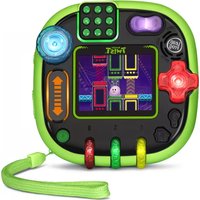
Rockit Twist - Toys Leap Frog - Free user manual and instructions
Find the device manual for free Rockit Twist Leap Frog in PDF.


| Product Type | Toy - Electronic Learning Game |
| Brand | Leap Frog |
| Model | Rockit Twist |
| Category | Educational Toys |
| Age Range | 4 to 8 years |
| Dimensions | Approx. 4.5 x 4.5 x 2.5 inches |
| Weight | Approx. 0.5 lbs |
| Power Source | 3 AA batteries (not included) |
| Main Functions | Educational games with twist, press, and rock actions; lights and sounds; multiple learning modes for letters, numbers, music, and logic |
| Interactive Features | Rotating dial, pressable buttons, motion sensor, light-up screen |
| Audio | Built-in speaker with volume control |
| Material | Durable plastic |
| Safety Warnings | Contains small parts; not for children under 3 years. Adult supervision recommended. |
| Battery Safety | Do not mix old and new batteries; remove if not in use for extended periods |
| Cleaning Instructions | Wipe with a damp cloth; do not submerge in water |
| Repairability | Battery compartment replaceable; no user-serviceable parts inside. Contact Leap Frog for repairs. |
| Included Items | Rockit Twist unit, instructional manual |
Frequently Asked Questions - Rockit Twist Leap Frog
User questions about Rockit Twist Leap Frog
0 question about this device. Answer the ones you know or ask your own.
Ask a new question about this device
Download the instructions for your Toys in PDF format for free! Find your manual Rockit Twist - Leap Frog and take your electronic device back in hand. On this page are published all the documents necessary for the use of your device. Rockit Twist by Leap Frog.
USER MANUAL Rockit Twist Leap Frog
ROCKIT TW!ST™
ROTATABLE LEARNING GAME SYSTEM

Parent's Guide
This guide contains important information. Please keep it for future reference.
INTRODUCTION
Thank you for purchasing the RockIt Twist™ rotatable learning game system! Four sides of controls including a spinner, slider, switch, D-pad, buttons and dials provide a unique gameplay experience. The system includes 12 games that help build core skills such as reading, math and creativity. Plus, grow, nurture and play with virtual RockIt Pets™. Expand the fun and learning with additional game packs (sold separately).
PRODUCT LAYOUT AND BUTTONS
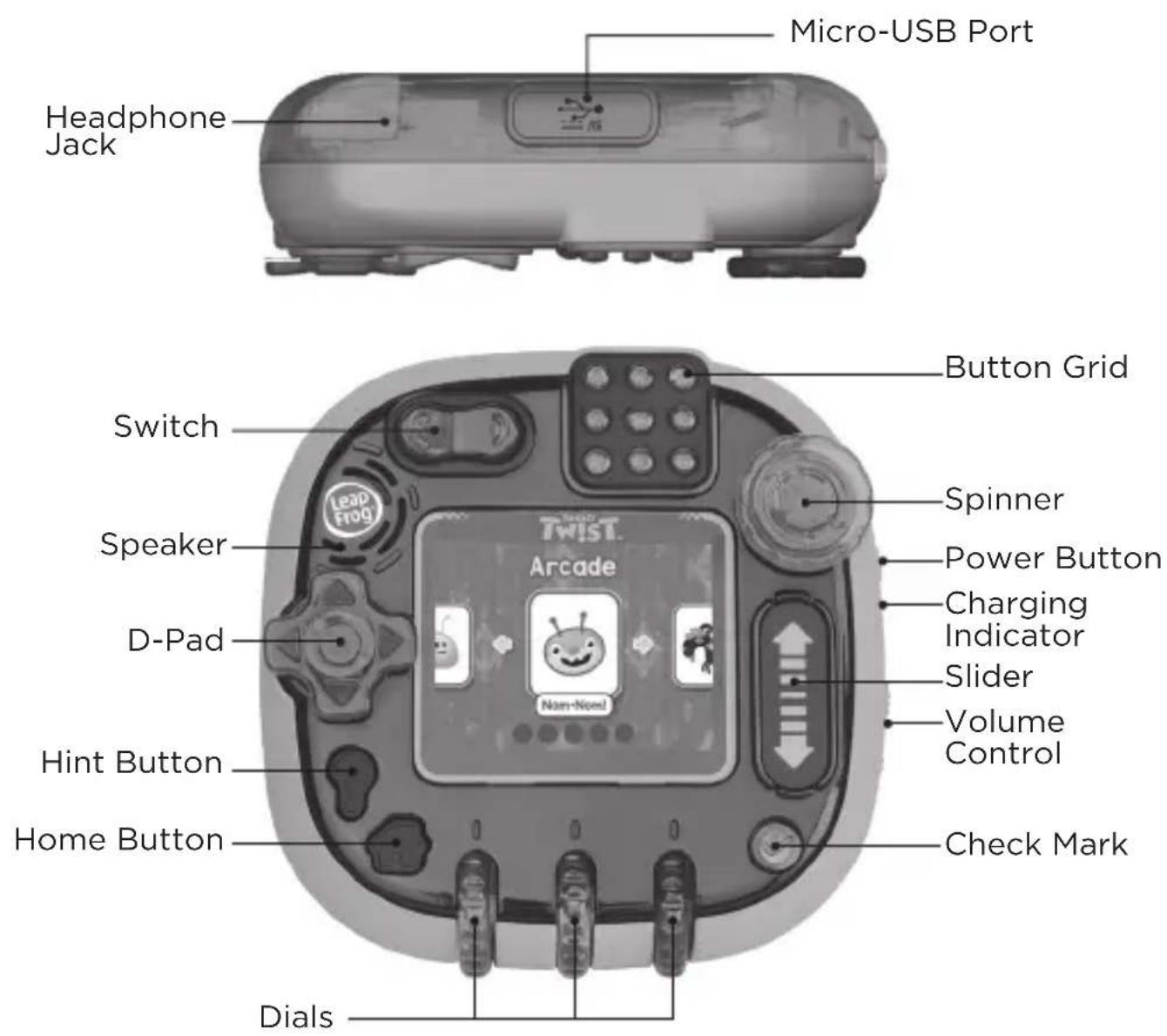
PRODUCT FEATURES
1. D-Pad
Press the D-Pad left, right, up, or down in game play as needed. Use this control to scroll through menus or select games to play.
2. Switch
Rock the Switch back and forth during game play as needed.
3. Button Grid
Press any of the nine buttons on the Button Grid in game play as needed.
4. Spinner
Turn the Spinner in game play as needed. The Spinner turns in both directions.
5. Slider
Swipe your finger up and down the Slider in game play as needed.
6. Dials
Turn the Dials upward or downward in game play as needed. The three Dials turn independently.
7. Check Mark √
Press the Check Mark to confirm on-screen selections or in game play as needed.
8. Power Button
Press and hold the Power Button to turn the system on or off.
9. Volume Control
Press the Volume Control up or down to adjust the system volume.
10. Home Button
Press the Home Button to return to the game or system menu.
11. Hint Button
Press the Hint Button when you need help in a game.
12. Micro-USB Port
Connect the RockIt Twist™ system to your computer using the included micro-USB cable to transfer MP3s, install game pack content (sold separately), and charge the system.
INCLUDED IN THIS PACKAGE
RockIt Twist™ system

Wrist strap Micro-USB cable
WARNING:
All packing materials such as tape, plastic sheets, packaging locks, removable tags, cable ties and packaging screws are not part of this toy, and should be discarded for your child's safety.
The LCD label covering the LCD screen of the product is packing material, please remove this label before use.
NOTE:
Please keep this parent's guide as it contains important information.
ATTENTION :
Note: Adult operation required.
A low battery alert will appear in the bottom right portion of the screen when the battery level is low.
To charge the RockIt Twist™ system, connect it to a computer or AC adapter (not included) with rating of 5V, ≥1A using the included micro-USB cable. To do so correctly, please follow these steps:
• Make sure the RockIt Twist™ system is turned OFF.
- Pull up the rubber cover of the Micro-USB Port on the side of the system.
- Insert the micro-USB cable (small end) into the Micro-USB Port on the RockIt Twist™ system.
- Insert the large end of the cable into a USB port on your computer or compatible AC adapter. A USB port is usually marked with this symbol:
- The Charging Indicator light will flash while the system is charging. After the battery is fully charged, the Charging Indicator will turn off.
Note: The actual charging time depends on the charging current, the remaining charge in the battery prior to recharging, and the ambient temperature. The optimum ambient temperature is 32° F - 104° F ( 0° C to 40° C). If powered off, using a computer to charge the system will take up to 3.5 hours. If powered on, using a computer to charge the system will take up to 6.5 hours. If powered on or off, using an AC adapter to charge the system will take up to 3.5 hours.
Battery Life
The time the battery lasts between charges depends on the amount and frequency of use. When the battery level is low as indicated by the low battery alert, it is recommended to recharge the battery before further use. When the battery level is too low, the system will not turn on until it is sufficiently recharged.
Battery Maintenance
Charge the battery regularly for optimal performance, even when the system is not regularly in use. For example, charge the system at least once every six months.
BATTERY NOTICE
Misuse of batteries can lead to them bursting, causing a fire or chemical burns. Please follow these precautions:
- Do not disassemble.
- Do not crush and do not expose the battery to any shock or force such as hammering, dropping or stepping on it.
- Do not short circuit.
- Do not expose to high temperatures or place near a heat source.
- Do not leave in direct sunlight for any length of time.
- Do not dispose of in a fire.
- If you find the time between charges is considerably shortened with no change in usage, the battery could be nearing the end of its life. The battery life varies from battery to battery depending on storage, operating conditions and environment.
- Examine the charging cord periodically for conditions that may result in the risk of fire, electric shock, or injury to persons such as damage to the cord, housing, or other parts. In the event of such conditions, the cord should not be used until properly repaired or replaced.
QUICK START
-
Press and hold the Power Button until the LCD screen turns On.
-
You can create up to two profiles that will store your game play progress, or play as a guest. The guest profile does not store any game play progress.
-
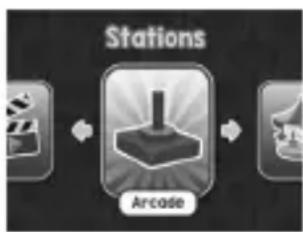
After creating or selecting a profile, use the red D-Pad and the green Check Mark to select a Station, and then find a game to play.
-
Press and hold the Power Button to turn Off the RockIt Twist™ system.
![graph TD A["User"] --> B["Player 1"] B --> C["Play"]](/content/2026/06/1365459/images/ccbc0a30fa991b65452dbb95f892130d1eb0d6ab9753b011ad45eae305393114.jpg)
INSTALL GAME PACKS AND TRANSFER
MP3 FILES (sold separately)
1. Power Up and Connect
Connect the RockIt Twist™ system to your computer with the included micro-USB cable.
2. Set Up
Install the Leapfrog ® Connect application from
leapfrog.com/connect onto your computer.
3. Register
Follow the instructions on screen to create or sign in to a LeapFrog ® Parent Account and register your RockIt Twist ™ system.
4. Activate and Install
To activate and install game packs, follow the instructions that come with the activation card and go to the Activate Game Packs screen. To transfer your personal MP3s, follow the on-screen instructions.
5. Play and Learn!
Eject the system and your child is ready to play!
GAME PACKS
Expand the fun with game packs that include additional learning games, virtual RockIt Pets ™ and collectible figures (sold separately).
System Requirements for Computer Connection
Internet connection, parent account registration, and LeapFrog® Connect application are required to install game packs and transfer MP3s. The LeapFrog® Connect application is available at leapfrog.com/connect. Must be 18 years or older to register.
Monitor resolution of 1024 x 768; available USB port; 1 GB of RAM; 500 MB free disk space.
PC Requirements: Pentium ® 4 or equivalent (2 GHz processor or faster recommended); Windows ® 7, Windows ® 8, or Windows ® 10 operating system with latest service pack.
Mac Requirements: Intel ® -based Apple computer (1 GHz processor or faster recommended); Mac OS X 10.11+ operating system software. MAC, APPLE, and MAC OS are trademarks of Apple Inc., registered in the U.S. and other countries.
CARE & MAINTENANCE
- Keep the rubber cover over the Micro-USB Port closed tightly when not in use in order to prevent dust or water from getting in.
- Keep the RockIt Twist™ system and accessories clean by wiping them with a slightly damp cloth. Never use solvents or abrasives.
- Keep the RockIt Twist™ system out of direct sunlight and away from direct sources of heat.
- Avoid dropping the RockIt Twist™ system. NEVER try to dismantle it.
- Always keep the RockIt Twist™ system away from water.
- Examine the micro-USB cable regularly, checking for damage to the cable, plug and other parts. Do not use the micro-USB cable if there is any damage.
- As with all electrical products, precautions should be observed during handling to prevent electric shock.
- Connecting an AC adapter to a wall outlet should only be performed by an adult or a supervised child 8+ years of age.
- Do not leave the toy plugged in for extended periods of time.
- Never clean a plugged-in toy with liquid.
- Never use more than one adapter.
WARNING:
A very small percentage of the public, due to an existing condition, may experience epileptic seizures or momentary loss of consciousness when viewing certain types of flashing colors or patterns. While the RockIt Twist™ system does not contribute to any additional risks, we do recommend that parents supervise their children while they play games. If your child experiences dizziness, altered vision, disorientation, or convulsions, discontinue use immediately and consult your doctor. Please note that playing screen devices at close range for a prolonged period of time may cause fatigue or discomfort. We recommend that children take a 15-minute break for every hour of play.
TROUBLESHOOTING
Check this section if you experience difficulty operating your RockIt Twist™ system. If the system stops working for any reason, please follow these steps:
| Problem Correction | |
| The Rocklt TwistTM system has stopped working | 1. Press and hold the Power Button for 30 seconds.2. Release, then press the Power Button again to turn the system back on. It should now work properly.3. If the Rocklt TwistTM system doesn't work, recharge the battery and repeat steps 1 and 2.(Refer to the Getting Started section for details) |
| Screen is not working correctly | 1. Press and hold the Power Button for 30 seconds.2. Release, then press the Power Button again to turn the system back on. It should now work properly. |
| Cannot connect the Rocklt TwistTM system to a computer | 1. Check the connections on the cable between the Rocklt TwistTM system and the computer and review the Connecting to a Computer section of this guide.2. Press and hold the Power Button for 30 seconds. Then, release and press again to turn it back on. Once the Rocklt TwistTM system turns back on, reconnect to computer. |
| Charging Indicator flashes rapidly while charging | 1. Disconnect from power by unplugging the USB cable.2. Inspect the charging cable for damage.3. Reconnect the charging cable.4. If steps 1-3 do not work, try again with a different cable or power source. |
IMPORTANT NOTE:
If the problem persists, please call our Consumer Services Department at 1-800-701-5327 in the U.S. or email support@ leapfrog.com.
Creating and developing LeapFrog ® products is accompanied by a responsibility that we take very seriously. We make every effort to ensure the accuracy of the information, which forms the value of our products. However, errors sometimes can occur. It is important for you to know that we stand behind our products and encourage you to contact us with any problems and/or suggestions you might have.
A service representative will be happy to help you.
Supplier's Declaration of Conformity
Trade Name: LeapFrog ®
Model: 6060
Product Name: RockIt Twist™
Responsible Party: LeapFrog Enterprises, Inc.
Address: 6401 Hollis Street, Suite 100, Emeryville, CA 94608
Website: leapfrog.com
Note: This equipment has been tested and found to comply with the limits for a Class B digital device, pursuant to Part 15 of the FCC Rules. These limits are designed to provide reasonable protection against harmful interference in a residential installation. This equipment generates, uses and can radiate radio frequency energy and, if not installed and used in accordance with the instructions, may cause harmful interference to radio communications.
However, there is no guarantee that interference will not occur in a particular installation. If this equipment does cause harmful interference to radio or television reception, which can be determined by turning the equipment off and on, the user is encouraged to try to correct the interference by one or more of the following measures:
- Reorient or relocate the receiving antenna.
- Increase the separation between the equipment and receiver.
- Connect the equipment into an outlet on a circuit different from that to which the receiver is connected.
- Consult the dealer or an experienced radio/TV technician for help.
OTHER NOTES:
Static electricity may cause the RockIt Twist™ to malfunction. In cases where RockIt Twist™ is malfunctioning due to static electricity, reset the system by pressing and holding the Power button for 10 seconds until the unit switches off. Next, press and hold the Power button for 3 seconds to turn the unit on again. Or, if the static electricity malfunction occurred during the downloading process, disconnect the USB cable, delete the corrupted file, then reset the globe as described above. Then reconnect the USB cable and restart the download process.
DISCLAIMER AND LIMITATION OF LIABILITY
LeapFrog and its suppliers assume no responsibility for any damage or loss resulting from the use of this handbook. LeapFrog and its suppliers assume no responsibility for any loss or claims by third parties that may arise through the use of this software. LeapFrog and its suppliers assume no responsibility for any damage or loss caused by deletion of data as a result of malfunction, dead battery, or repairs. Be sure to make backup copies of important data on other media to protect against data loss.
THIS DEVICE COMPLIES WITH PART 15 OF THE FCC RULES. OPERATION IS SUBJECT TO THE FOLLOWING TWO CONDITIONS: (1) THIS DEVICE MAY NOT CAUSE HARMFUL INTERFERENCE, AND (2) THIS DEVICE MUST ACCEPT ANY INTERFERENCE RECEIVED, INCLUDING INTERFERENCE THAT MAY CAUSE UNDESIRED OPERATION.
CAN ICES-3 (B)/NMB-3(B)
Caution: Changes or modifications not expressly approved by the party responsible for compliance could void the user's authority to operate the equipment.
USB Cable: The USB cable provided with this product complies with FCC and other regulatory emission limits. If using a USB cable other than the one provided, please note that in order not to exceed FCC and other regulatory emissions limits, a shielded cable must be used.


Visit our website for more information about our products, downloads, resources and more.
leapfrog.com
leapfrog.ca
Read our complete warranty and policies online at:
leapfrog.com/legal
- ROCKIT TW!ST™
- PARENT'S GUIDE
- INTRODUCTION
- PRODUCT FEATURES
- D-PAD
- SWITCH
- BUTTON GRID
- SPINNER
- SLIDER
- DIALS
- CHECK MARK √
- POWER BUTTON
- VOLUME CONTROL
- HOME BUTTON
- HINT BUTTON
- MICRO-USB PORT
- INCLUDED IN THIS PACKAGE
- WARNING
- NOTE
- ATTENTION
- BATTERY LIFE
- BATTERY MAINTENANCE
- BATTERY NOTICE
- QUICK START
- INSTALL GAME PACKS AND TRANSFER
- MP3 FILES (SOLD SEPARATELY)
- POWER UP AND CONNECT
- SET UP
- REGISTER
- ACTIVATE AND INSTALL
- PLAY AND LEARN
- GAME PACKS
- SYSTEM REQUIREMENTS FOR COMPUTER CONNECTION
- CARE & MAINTENANCE
- TROUBLESHOOTING
- IMPORTANT NOTE
- SUPPLIER'S DECLARATION OF CONFORMITY
- OTHER NOTES
- DISCLAIMER AND LIMITATION OF LIABILITY
- VISIT OUR WEBSITE FOR MORE INFORMATION ABOUT OUR PRODUCTS, DOWNLOADS, RESOURCES AND MORE
Brand : Leap Frog
Model : Rockit Twist
Category : Toys