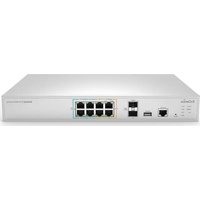
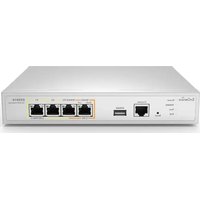
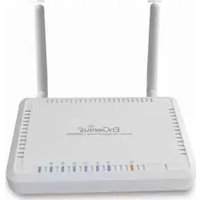
ESG510 - Router ENGENIUS - Free user manual and instructions
Find the device manual for free ESG510 ENGENIUS in PDF.


| Product Type | Router/Switch |
| Brand | EnGenius |
| Model | ESG510 |
| Dimensions | 440 x 205 x 44 mm |
| Weight | 2.5 kg |
| Power Supply | AC 100-240V, 50/60Hz |
| Power Consumption | 15W (max) |
| Ethernet Ports | 5 x Gigabit (10/100/1000) |
| Switching Capacity | 10 Gbps |
| Routing Capability | Static routes, RIP, OSPF |
| VLAN Support | 802.1Q VLAN, up to 256 groups |
| Firewall | SPI firewall, ACL |
| VPN | IPSec/PPTP/L2TP |
| Quality of Service (QoS) | Bandwidth management |
| Management | Web GUI, CLI, SNMP |
| Operating Temperature | 0°C to 40°C |
| Storage Temperature | -20°C to 70°C |
| Humidity | 10% to 90% non-condensing |
| Safety | CE, FCC |
| Spare Parts | Power adapter available |
| Repairability | Authorized service centers |
| Maintenance | Clean with dry cloth; do not use liquid |
Frequently Asked Questions - ESG510 ENGENIUS
User questions about ESG510 ENGENIUS
0 question about this device. Answer the ones you know or ask your own.
Ask a new question about this device
Download the instructions for your Router in PDF format for free! Find your manual ESG510 - ENGENIUS and take your electronic device back in hand. On this page are published all the documents necessary for the use of your device. ESG510 by ENGENIUS.
USER MANUAL ESG510 ENGENIUS
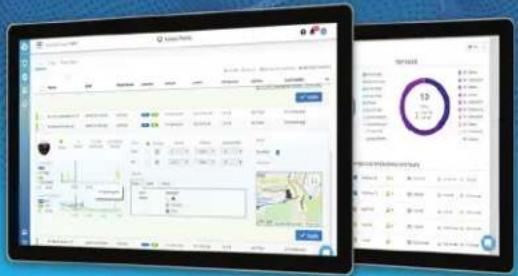
Visualize Your Networks with AI-driven Cloud
EnGenius Cloud is built on top of the most advanced cloud computing technology. Scalable and AI-ready, the robust and dynamic cloud computing infrastructure helps you work smarter on your network with important analytics and visualization tools.
Why EnGenius Cloud
Resolve the pain points of traditional networks

natural_image
Icon showing three white buildings connected by blue lines on a dark blue circular background (no text or symbols)Easily manage multiple sites

natural_image
Icon showing a wrench and gear with a blue chain link, set against a dark blue circular background (no text or symbols)Precisely debug the networks

natural_image
Icon showing a computer connected to a server with dashed lines, set against a solid blue background (no text or symbols)Remotely manage device firmware

natural_image
Abstract icon with a cloud and network lines inside a dark circle (no text or symbols)Cloud-based Unified Management
The Smart Cloud Helps You Achieve More
Artificial intelligence (AI) enables EnGenius Cloud to predict issues before they occur and provide accurate recommendations to proactively improve performance. EnGenius Cloud's Advisory Board uses AI to continuously analyze networks and report potential problems, often before issues occur.

Quick Deployment

Easy Administration

Smart Networking

Visualized Insights

natural_image
Blue square logo with a white stylized 'G' (no text or symbols)Next-Generation True Cloud Infrastructure for High Stability and Scalability

Serverless FaaS Reliability
The Cloud is built on the server-less infrastructure without server boundaries
Each function is scalable and works seamlessly with dynamic allocation
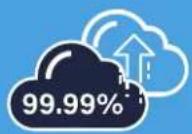
The service-level agreement guarantees 99.99% availability for your network
Quick Deployment
Plug & Play Auto-Provisioning
EnGenius Cloud lets you deploy multiple sites with quick registration and configuration, available on your cloud network.

natural_image
White wireless router with two antennas and network ports, displayed against a blue background (no visible text or symbols)[Non-Text]
PLANNING SITE
1 Register devices with web or mobile app
Scan a QR code with your device to register it to company inventory on the EnGenius Cloud.
2 Assign devices to network groups
Create networks with predefined configuration profiles for Cloud managed devices under the same network group, and then apply this configuration automatically to new devices


flowchart
graph TD
    A["Configuration Group"] --> B["NETWORK 1"]
    A --> C["NETWORK 2"]
    A --> D["NETWORK 3"]
    B --> E["Organization Inventory"]
    C --> E
    D --> E
    E --> F["AP1"]
    E --> G["AP2"]
    E --> H["AP3"]
    E --> I["AP4"]
    E --> J["AP5"]
    E --> K["Switch1"]
    E --> L["Switch2"]
    E --> M["AP7"]
#
DEPLOYMENT SITE
3 Unbox devices and connect to your network
Once plugged in, EnGenius Cloud will push the proper configuration to the device and work as intended.
Multiple site deployment made easy
With EnGenius Cloud, deploying and managing multiple sites in different timezones and with various network policies is easy.

natural_image
Blue circular icon with three white rounded squares, no text or symbols present.NETWORK 1
Name
□ AP1
AP2
AP3
NETWORK 3
Name
AP6
AP7
□ Switch2

natural_image
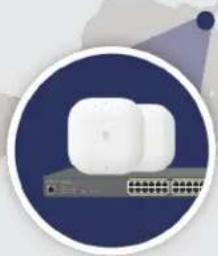
Illustration of a white connected device with ports and cables, enclosed in a circular frame (no text or symbols)NETWORK 2
Name
AP4
AP5
□ Switch2
Easy Administration
Get ready for EnGenius Cloud with the easy-to-use features for rapid deployment, initial configuration, and quick registration for one or multiple sites.

Manage your network with hierarchy view
EnGenius Cloud defines the hierarchy view level as a multilayered group of networks. You can manage and monitor company networks with hierarchy view based on different locations or business setups.
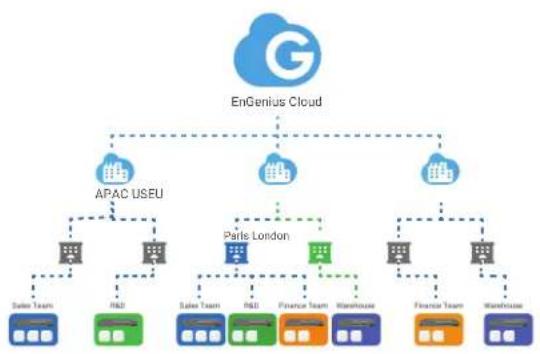
flowchart
graph TD
    A["EnGenius Cloud"] --> B["APAC USEU"]
    A --> C["Paris London"]
    A --> D["Finance Team"]
    B --> E["Sales Team"]
    B --> F["R&D"]
    B --> G["Sales Team"]
    C --> H["R&D"]
    C --> I["Finance Team"]
    C --> J["Warehouse"]
    C --> K["Finance Team"]
    C --> L["Warehouse"]
    D --> M["Finance Team"]
Two factor authentication to secure your account
Add an extra layer of security with the two-step verification to protect users' accounts from attack when signing in.

Multi-tenant design with different roles and privileges
Assign different users with roles and privileges to manage your organization's network sites to best fit your business management policy.

flowchart
graph TD
    A["EU Manager\nLucy"] --> B["HQ Manager\nBrain"]
    C["Finance Head & US Manager\nMary"] --> D["US"]
    B --> E["EU"]
    B --> F["US"]
    E --> G["Paris"]
    E --> H["London"]
    G --> I["Sales Team"]
    G --> J["R&D"]
    G --> K["Finance Team"]
    G --> L["Washingdoner"]
    H --> M["Finance Team"]
    H --> N["Washingdoner"]
Scheduled firmware upgrade for multiple sites and networks
It is easy to deploy and manage multiple sites by creating firmware upgrade tasks for different groups of devices based on region, local timezone, and other configurations.

Smart Networking
Work Smarter with EnGenius Cloud
EnGenius Cloud makes it simple to manage and monitor multiple sites with hierarchy view, gather real-time device information, and utilize many other benefits to fit your business.

natural_image
Abstract digital network diagram with interconnected devices and nodes on a blue gradient background (no text or symbols)AP
Quick access to Access Point status
EnGenius Cloud manages all Access Points in a single place. The Access Points list summarizes the most critical current traffic usage data for the network administrator to access quickly.
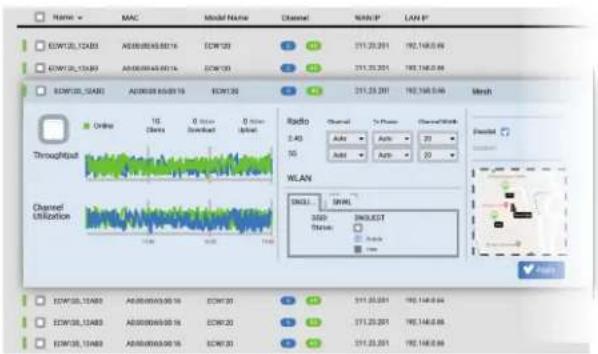
AP
Master the detailed status of Access Points
Get in-depth information of the SSID, radio, and IP addressing settings for specific Access Point to optimize the network performance according to its policy and have a clear picture of real-time usage, related logs, and connected clients.

AP
User authentication for Wi-Fi access per SSID
EnGenius Cloud offers various authentication methods for different business requirements. You can configure the AAA authentication all on the Cloud or by Customer's RADIUS server, create a guest Wi-Fi with voucher service, or let users log in by linking to their social media account.
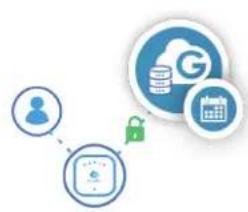
flowchart
graph TD
    A["User"] --> B["Data Storage"]
    B --> C["Cloud Storage"]
    C --> D["Calendar"]
Cloud Authentication
Authentication and authorization on EnGenius Cloud

flowchart
graph TD
    A["User"] --> B["Database"]
    B --> C["Lock"]
    style A fill:#f9f,stroke:#333
    style B fill:#bbf,stroke:#333
    style C fill:#dfd,stroke:#333
Custom Radius
Use local radius server for authentication
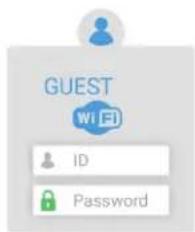
Voucher Service
Pre-defined access templates and specific portal for front-desk

Social Login
Login with a Google account

AP
Customize a splash page for your captive portal
Use the WYSIWYG editor to create a pleasing entrance for your captive portal. You can select one of the available templates and place a logo in your preferred position. The customized captive portal properly guides visitor traffic while delivering important messages to your guests.
AP
Block suspicious clients from your networks
Rogue client monitoring tools allow you to deny access to your SSID for selected clients.

AP
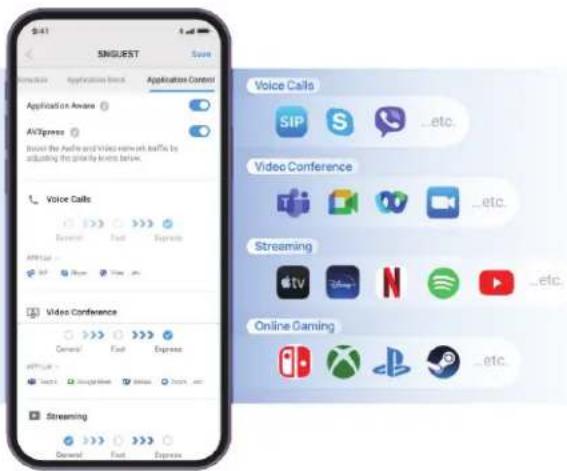
Application priority setting with one-click
By simply selecting the 'AVXpress' mode, users can effortlessly prioritize services such as video conferencing, streaming, and gaming, with the same ease as prioritizing voice calls.
AP
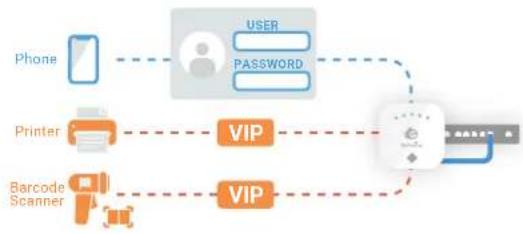
Give devices VIP permission to join networks and bypass captive portal
You can skip authentication for specific clients such as barcode scanners or printers with no web-based interface to proceed.
flowchart
graph LR
    A["Phone"] --> B["User"]
    B --> C["Password"]
    D["Printer"] --> E["VIP"]
    F["Barcode Scanner"] --> G["VIP"]
    G --> H["User"]
    H --> I["Password"]
AP
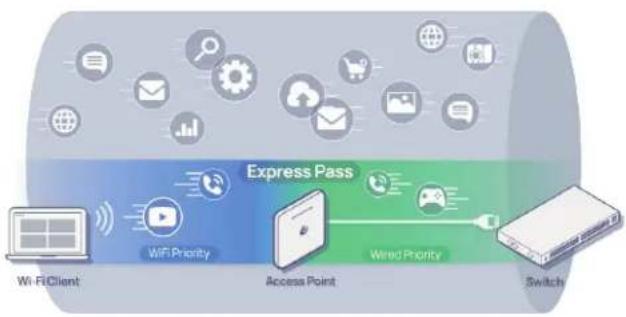
Consistent quality through Wi-Fi and wired networks
The AVXpress feature ensures that application traffic from wireless clients receives "Express" priority throughout the entire network, providing seamless prioritization from Access Points to Switches.
flowchart
graph LR
    A["Wi-Fi Client"] --> B["WiFi Priority"]
    B --> C["Access Point"]
    C --> D["Wired Priority"]
    D --> E["Switch"]
    style A fill:#f9f,stroke:#333
    style B fill:#bbf,stroke:#333
    style C fill:#dfd,stroke:#333
    style D fill:#ffd,stroke:#333
    style E fill:#fdd,stroke:#333
Switch
Quick view of network Switches
Conveniently monitor and troubleshoot all of your network switches in one location with the switch list by checking overall configurations and real-time meters.
Switch
Detailed view of Switch port and PoE status
Check real-time information of port connection state and PoE utilization and make configurations for each port of individual switches.
Switch
Comprehensive and flexible Switch configuration
Get full control and flexibility in configuring network switches. Setup network ports, VLAN tags, and other details for one or a group of devices to optimize overall network performance.

other
| Port View | Serial Number | MAC | Model Name | WAN/IP | LAN/IP | |---|---|---|---|---|---| | 7F_01_ECS1502FP | 3029G********** | 88 ** ** ** ** ** | ECS1528FP | 211.23.68.199 | 10.0.93.245 | | 7F_02_ECS1550FP | 7936G********** | 88 ** ** ** ** ** | ECS1552FP | 211.23.68.199 | 10.0.93.245 |

flowchart
graph TD
    A["VLAN Tagging"] --> B["Port Setting"]
    B --> C["Switch Mirroring"]
    C --> D["Link Aggregation"]
Switch Extender
Built-in Switch features for network efficiency
The built-in switch features optimize network performance by assigning VoIP traffic to specific VLANs for enhanced call quality and supporting IGMP Snooping to suppress IPTV traffic for optimized bandwidth usage.

flowchart
graph LR
    A["VLAN 1"] --> B["Tagging"]
    C["VLAN 2"] --> B
    D["IGMP Snooping"] --> E["Snooping"]
    F["RSTP Setting"] --> G["Setting"]
Switch Extender
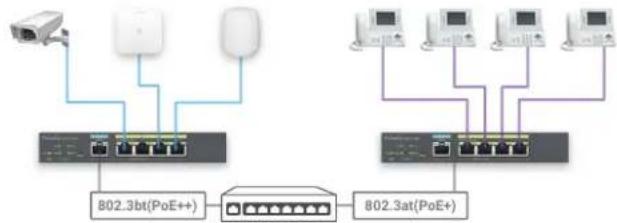
Easy powering multiple devices
EnGenius Switch Extender powers devices efficiently in power-constrained spaces with PSE-out capability, reducing individual power wires while delivering optimized wattage for peak performance.
Switch Extender
Simplified network extension
Connect devices to the extender and run one cable to your main switch, streamlining setup, minimizing cabling, and slashing deployment costs for effortless long-distance network expansion.

flowchart
graph TD
    A["Server Rack"] --> B["Switch Extender"]
    B --> C["Client Devices"]
    B --> D["Client Devices"]
    B --> E["Client Devices"]
    B --> F["Client Devices"]
    B --> G["Client Devices"]
    B --> H["Client Devices"]
802.3at802.3af
IP Camera Access Point Speaker
flowchart
graph TD
    A["Device"] --> B["Router"]
    C["Router"] --> B
    D["Router"] --> B
    B --> E["802.3 bt(PoE+)"]
    B --> F["802.3 at(PoE+)"]
    E --> G["Port"]
    F --> H["Port"]
VPN Router
Easy setup and secure SD-WAN connections
Streamline your remote work and communication with site-to-site and client VPN. Forget the complexity of traditional VPN configurations and embrace effortless, secure, and private connections for your business.

flowchart
graph LR
    A["Remote Client"] -->|VPN Tunnel| B["Cloud-managed VPN Router"]
    C["Internet"] -->|VPN Tunnel| B
    D["Branch Office"] -->|VPN Tunnel| B
    B --> E["Headquarter Office"]
VPN Router
The VPN router has multiple 2.5G ports for dual WAN and dual LAN connection for high-speed WAN environment and in-line architecture design.

flowchart
graph TD
    A["Internet"] --> B["Router"]
    B --> C["2.5G WAN"]
    C --> D["EnGenius VPN Router"]
    D --> E["2.5G LAN"]
    E --> F["Intranet"]
    D --> G["DMZ"]
    H["FTP"] --> D
    I["WEB"] --> D
VPN Router
Protect networks with high-throughput stateful firewall
EnGenius Security VPN Routers protect business networks from threats and attacks. The stateful firewall of VPN Router integrates corporate security policies and real-time filtering of malicious internet traffic while delivering a high throughput.

flowchart
graph TD
    A["Private Network"] --> B{Allow}
    B --> C["Fire"]
    B --> D{Check}
    C --> E["Deny"]
    D --> F["Allow"]
    E --> G["Network"]
    F --> H["Network"]
Stay connected with WAN failover and cellular failover
The dual WAN ports are ready for load balance to increase the WAN bandwidth or redundancy links. If all WAN ports go down, the 3G/4G network connection with the USB wireless dongle can provide a backup for the corporate network from disruption.

flowchart
graph TD
    A["Cellular WAN"] --> B["ISP1"]
    A --> C["ISP2"]
    B --> D["Follower"]
    C --> D
    D --> E["WAN 1"]
    D --> F["WAN 2"]
    E --> G["Load Balance"]
    F --> G
    G --> H["ISP3"]
    style A fill:#f9f,stroke:#333
    style B fill:#ccf,stroke:#333
    style C fill:#ccf,stroke:#333
    style D fill:#cfc,stroke:#333
    style E fill:#fcc,stroke:#333
    style F fill:#fcc,stroke:#333
    style G fill:#ffc,stroke:#333
Self-healing Auto-VPN for easy networkingOptimal perf
EnGenius VPN Routers will automatically update related VPN information to all peers for continuous VPN connection in the case of WAN IP address reassignment or forwarding port change.

flowchart
graph TD
    A["Configuration Update"] -->|VPN Tunnel| B["Server"]
    B -->|VPN Tunnel| C["Auto-VPN"]
    C -->|VPN Tunnel| B
    B -->|Auto-VPN| D["Server"]
    D -->|VPN Tunnel| C
    style A fill:#f9f,stroke:#333
    style C fill:#bbf,stroke:#333
Seamless and secure VPN client for remote working
SecuPoint SSL VPN Client helps businesses with remote workforces to easily establish secure connections to the VPN servers through automated setup and agile certificate authentication.

PDU P
Quick Access to PDU status
EnGenius Cloud unifies all PDUs in a single platform. The PDU list displays essential power usage data and outlet status for network administrators to access efficiently.

pie
| Category | Power (W) | |---|---| | Outlets View | 123,168.75 | | Outlets | 142,168.75 | | Outlets | 142,168.75 | | Outlets | 142,168.75 | | Outlets | 142,168.75 | | Outlets | 142,168.75 | | Outlets | 142,168.75 | | Outlets | 142,160.0 | | Outlets | 142,168.75 | | Outlets | 142,168.75 | | Outlets | 142,168.75 | | Outlets | 142,168.75 | | Outlets | 142,168.75 | | Outlets | 142,168.75 | | Outlet Status | 900 W | | Overall Status | 123,168 W | | Overall Status | 123,168 W | | Overall Status | 123,168 W | | Overall Status | 123,168 W | | Overall Status | 123,168 W | | Overall Status | 123,168 W | | Overall Status | 123,168 W | | Overall Status | 123,168 W |PDU
The PDU enables individual outlet scheduling, improving energy management. Users can customize outlet operations, optimizing power use and efficiency.

PDU
AI-driven Hyperview dashboard
EnGenius Hyperview dashboard with AI-driven analytics and visualization offers a user-friendly interface for monitoring real-time power metrics while displaying electricity costs to enhance budget management.
Detailed PDU status & power data statistics
Obtain comprehensive real-time data and power usage statistics for each PDU outlet's current, voltage, and kWh usage, empowering you to optimize power consumption effectively.

line
| Quarter | ECS100BP (kWh) | | ------- | -------------- | | Q1 | 3.5 | | Q2 | 3.6 | | Q3 | 3.7 | | Q4 | 3.8 | | Q1'1 | 3.9 | | Q2'1 | 4.0 | | Q3'1 | 4.1 | | Q4'1 | 4.2 | | Q1'2 | 4.3 | | Q2'2 | 4.4 | | Q3'2 | 4.5 | | Q4'2 | 4.6 | | Q1'3 | 4.7 | | Q2'3 | 4.8 | | Q3'3 | 4.9 | | Q4'3 | 5.0 | | Q1'4 | 5.1 | | Q2'4 | 5.2 | | Q3'4 | 5.3 | | Q4'4 | 5.4 | | Q1'5 | 5.5 | | Q2'5 | 5.6 | | Q3'5 | 5.7 | | Q4'5 | 5.8 | | Q1'6 | 5.9 | | Q2'6 | 6.0 | | Q3'6 | 6.1 | | Q4'6 | 6.2 | | Q1'7 | 6.3 | | Q2'7 | 6.4 | | Q3'7 | 6.5 | | Q4'7 | 6.6 | | Q1'8 | 6.7 | | Q2'8 | 6.8 | | Q3'8 | 6.9 | | Q4'8 | 7.0 | | Q1'9 | 7.1 | | Q2'9 | 7.2 | | Q3'9 | 7.3 | | Q4'9 | 7.4 | | Q1'10 | 7.5 | | Q2'10 | 7.6 | | Q3'10 | 7.7 | | Q4'10 | 7.8 | | Q1'11 | 7.9 | | Q2'11 | 8.0 | | Q3'11 | 8.1 | | Q4'11 | 8.2 | | Q1'12 | 8.3 | | Q2'12 | 8.4 | | Q3'12 | 8.5 | | Q4'12 | 8.6 | | Q1'13 | 8.7 | | Q2'13 | 8.8 | | Q3'13 | 8.9 | | Q4'13 | 9.0 | | Q1'14 | 9.1 | | Q2'14 | 9.2 | | Q3'14 | 9.3 | | Q4'14 | 9.4 | | Q1'15 | 9.5 | | Q2'15 | 9.6 | | Q3'15 | 9.7 | | Q4'15 | 9.8 | | Q1'16 | 9.9 | | Q2'16 | 10.0 | | Q3'16 | 10.1 | | Q4'16 | 10.2 | | Q1'17 | 10.3 | | Q2'17 | 10.4 | | Q3'17 | 10.5 | | Q4'17 | 10.6 | | Q1'18 | 10.7 | | Q2'18 | 10.8 | | Q3'18 | 10.9 | | Q4'18 | 11.0 | | Q1'19 | 11.1 | | Q2'19 | 11.2 | | Q3'19 | 11.3 | | Q4'19 | 11.4 | | Q1'20 | 11.5 | | Q2'20 | 11.6 | | Q3'20 | 11.7 | | Q4'20 | 11.8 | | Q1'21 | 11.9 | | Q2'21 | 12.0 | | Q3'21 | 12.1 | | Q4'21 | 12.2 | | Q1'22 | 12.3 | | Q2'22 | 12.4 | | Q3'22 | 12.5 | | Q4'22 | 12.6 | | Q1'23 | 12.7 | | Q2'23 | 12.8 | | Q3'23 | 12.9 | | Q4'23 | 13.0 | | Q1'24 | 13.1 | | Q2'24 | 13.2 | | Q3'24 | 13.3 | | Q4'24 | 13.4 | | Q1'25 | 13.5 | | Q2'25 | 13.6 | | Q3'25 | 13.7 | | Q4'25 | 13.8 | | Q1'26 | 13.9 | | Q2'26 | 14.0 | | Q3'26 | 14.1 | | Q4'26 | 14.2 | | Q1'27 | 14.3 | | Q2'27 | 14.4 | | Q3'27 | 14.5 | | Q4'27 | 14.6 | | Q1'28 | 14.7 | | Q2'28 | 14.8 | | Q3'28 | 14.9 | | Q4'28 | 15.0 | | Q1'29 | 15.1 | | Q2'29 | 15.2 | | Q3'29 | 15.3 | | Q4'29 | 15.4 | | Q1'30 | 15.5 | | Q2'30 | 15.6 | | Q3'30 | 15.7 | | Q4'30 | 15.8 | | Q1'31 | 15.9 | | Q2'31 | 16.0 | | Q3'31 | 16.1 | | Q4'31 | 16.2 | | Q1'32 | 16.3 | | Q2'32 | 16.4 | | Q3'32 | 16.5 | | Q4'32 | 16.6 | | Q1'33 | 16.7 | | Q2'33 | 16.8 | | Q3'33 | 16.9 | | Q4'33 | 17.0 | | Q1'34 | 17.1 | | Q2'34 | 17.2 | | Q3'34 | 17.3 | | Q4'34 | 17.4 | | Q1'35 | 17.5 | | Q2'35 | 17.6 | | Q3'35 | 17.7 | | Q4'35 | 17.8 | | Q1'36 | 17.9 | | Q2'36 | 18.0 | | Q3'36 | 18.1 | | Q4'36 | 18.2 | | Q1'37 | 18.3 | | Q2'37 | 18.4 | | Q3'37 | 18.5 | | Q4'37 | 18.6 | | Q1'38 | 18.7 | | Q2'38 | 18.8 | | Q3'38 | 18.9 | | Q4'38 | 19.0 | | Q1'39 | 19.1 | | Q2'39 | 19.2 | | Q3'39 | 19.3 | | Q4'39 | 19.4 | | Q1'40 | 19.5 | | Q2'40 | 19.6 | | Q3'40 | 19.7 | | Q4'40 | 19.8 | | Q1'41 | 19.9 | | Q2'41 | 20.0 | | Q3'41 | 20.1 | | Q4'41 | 20.2 | | Q1'42 | 20.3 | | Q2'42 | 20.4 | | Q3'42 | 20.5 | | Q4'42 | 20.6 | | Q1'43 | 20.7 | | Q2'43 | 20.8 | | Q3'43 | 20.9 | | Q4'43 | 21.0 | | Q1'44 | 21.1 | | Q2'44 | 21.2 | | Q3'44 | 21.3 | | Q4'44 | 21.4 | | Q1'45 | 21.5 | | Q2'45 | 21.6 | | Q3'45 | 21.7 | | Q4'45 | 21.8 | | Q1'46 | 21.9 | | Q2'46 | 22.0 | | Q3'46 | 22.1 | | Q4'46 | 22.2 | | Q1'47 | 22.3 | | Q2'47 | 22.4 | | Q3'47 | 22.5 | | Q4'47 | 22.6 | | Q1'48 | 22.7 | | Q2'48 | 22.8 | | Q3'48 | 22.9 | | Q4'48 | 23.0 | | Q1'49 | 23.1 | | Q2'49 | 23.2 | | Q3'49 | 23.3 | | Q4'49 | 23.4 | | Q1'50 | 23.5 | | Q2'50 | 23.6 | | Q3'50 | 23.7 | | Q4'50 |PDU
Self-healing reboot Individual outlet scheduling
The PDU consistently monitors internet connectivity by pinging a reliable hostname. If disconnected, it reboots the gateway outlet, helping in internet restoration.
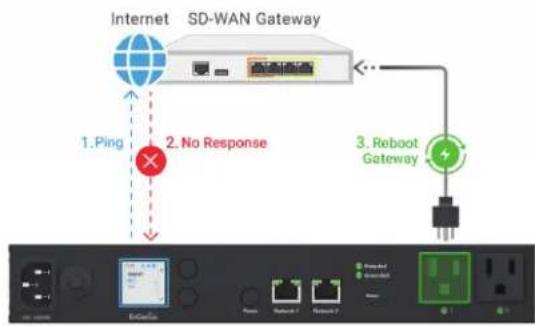
flowchart
graph TD
    A["Internet"] -->|1. Ping| B["SD-WAN Gateway"]
    B --> C["Reboot Gateway"]
    C --> D["Output"]
    style A fill:#f9f,stroke:#333
    style B fill:#ccf,stroke:#333
    style C fill:#cfc,stroke:#333
    style D fill:#fcc,stroke:#333
    note right of B: No Response
    note left of B: 2. No Response

line
| Metric | Value | | --- | --- | | Total Credit | 12 | | Working Avg. (Days) | 48 | | Concessions | 280 | | Accretion | 2703 | | Avg. Concessions per Share | 350 | | Week Ended | 14 |Camera
EnGenius Hybrid VSaaS for intelligent surveillance
EnGenius presents an advanced Hybrid VSaaS solution with AI cameras directly connecting to the Cloud for seamless management. Our edge AI cameras feature in-camera memory for local storage, ensuring enhanced privacy and efficient data handling. This solution leverages AI smart search capabilities in the Cloud, utilizing metadata for superior surveillance insights and efficient data management.
EnGenius Cloud



Build Your Own Big Data and Insights

Upload Meta-data (<50Kbps)
Time Stamp/ Object Type/ Object Attributes
EnGenius AI Camera
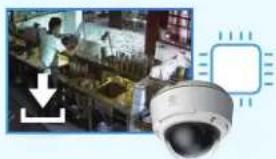
natural_image
Composite image showing surveillance camera and interior scene with a downward arrow (no text or symbols)


natural_image
Security camera with surveillance camera overlay showing security personnel and equipment (no readable text or symbols)Store Audio & Videos on Cameras
Camera
Why EnGenius AI Cloud surveillance
Cloud + AI Edge
Combines AI edge computing and cloud services to optimize surveillance capabilities.


Big Data Utilization
Builds a big data repository and uses AI for deep insights, efficient data management, and search capabilities.

Cost Efficiency Scalability Privacy & Security
Transmits only metadata to the cloud, reducing bandwidth and costs.

Easily scalable for seamless management across multiple tenants.

Stores video locally, ensuring sensitive information remains secure and private.

Cloud Camera Specifications
| Model Name | Cam5MP Dome | Cam5MP Bullet | Cam8MP Dome |
| Model Number | ECC100 | ECC120 | ECC500 |
| Resolution | 5MP | 5MP | 4K |
| Field of View | H: 102° | H: 77° | H: 97° ~ 35.3° |
| Optical Zoom | - | - | 3x |
| IR Night Vision | >20m / 66ft | 30m / 98ft | 30m / 98ft |
| Audio | Microphone | - | Microphone |
| Object Detection and Tracking | V | V | V |
| Facial Recognition | - | - | V |
| License Plate Recognition | - | - | V |
| Storage | 256GB | 256GB | 512GB |
| Deployment | PoE | PoE | PoE |
| Weatherproofing | IP67 | IP66 | IP67 |
| Resistance | IK10 | IK04 | IK10 |
Camera
Seamless live video surveillance
Provide live video monitoring with multi-view layouts, a video wall carousel, and shareable video wall URLs. It ensures seamless access and collaboration while maintaining privacy by not saving footage to the cloud by default.

Camera
AI-Powered metadata search
Leverage AI-powered metadata search to enhance surveillance. With Region of Interest (ROI) filtering and cross-camera search capabilities, users can quickly locate and analyze events across multiple cameras, ensuring comprehensive monitoring and swift response.

Camera
Comprehensive AI-driven metadata insights
Leverage AI-driven metadata to gain detailed insights into people and vehicle activities. Track and analyze counting statistics over time and visualize usage patterns with heatmaps to highlight activity hotspots for better security management.

line
| Time | Green Line | Blue Line | |------|------------|-----------| | 1 | 28 | 12 | | 2 | 25 | 8 | | 3 | 32 | 15 | | 4 | 20 | 10 |Advanced video playback
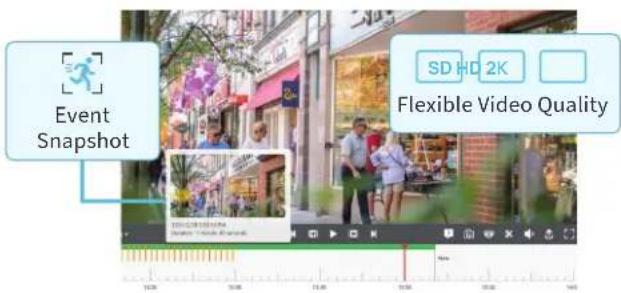
Offer advanced video playback with immediate access through local storage, event snapshots for quick and easy timeline navigation, and flexible video quality settings. Share video URLs or export videos effortlessly when suspicious activity is detected.
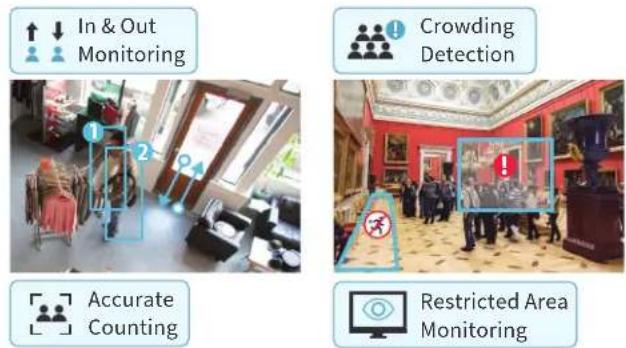
Intelligent monitoring, detection, and alerts
Advanced Region/Area and Cross-line Object Detection features crowding detection, restricted area monitoring, accurate counting, and proactive alerts. Efficiently monitor and manage multiple entrances and areas with real-time notifications and customizable settings.
Efficient management with floor plan mapping
Utilize floor plan mapping to display exact camera locations and coverage areas, identify blind spots, and receive real-time alert notifications. Directly access live or recorded footage by clicking on camera icons for efficient surveillance management.

Explore the Visualized Interface and Features of EnGenius Cloud
EnGenius Cloud provides reliable performance, predictive analysis, and real-time insights to allow companies to focus on growing their business. The enterprise-class features help IT quickly build reliable and efficiently managed networks.
Learn more of EnGenius Cloud: www.engenius.ai/cloud
Visualize Your Networks with AI-driven Cloud

flowchart
graph LR
    A["Server Icon"] --> B["Green Checkmark"]
    B --> C["Global Symbol"]


flowchart
graph TD
    A[" "] --> B{?}
    B -->|✓| C[" "]
    B -->|✓| D[" "]


flowchart
graph TD
    A["Node 1"] --> B["Node 2"]
    A --> C["Node 3"]
    A --> D["Node 4"]
    B --> E["Node 5"]
    C --> E
    D --> E
    E --> F["Node 6"]
    F --> G["Node 7"]
    G --> H["Node 8"]
    H --> I["Node 9"]
    I --> J["Node 10"]
    J --> K["Node 11"]
    K --> L["Node 12"]
    L --> M["Node 13"]
    M --> N["Node 14"]
    N --> O["Node 15"]
    O --> P["Node 16"]
    P --> Q["Node 17"]
    Q --> R["Node 18"]
    R --> S["Node 19"]
    S --> T["Node 20"]
    T --> U["Node 21"]
    U --> V["Node 22"]
    V --> W["Node 23"]
    W --> X["Node 24"]
    X --> Y["Node 25"]

Visualized Insights
Insights from the Big Picture Down to the Smallest Detail
EnGenius Cloud always keeps you updated on your networks status. It performs troubleshooting accurately and effectively, backed by the latest in AI-driven computing insights.
Network health at a glance
EnGenius AI is a web-based management platform on EnGenius Cloud that lets you manage your networks from an intuitive central interface. This feature-rich, easy-to-use management tool helps you work more efficiently. Its holistic assessments of real-time network health assist you in pinpointing potential issues and organizing a rapid response.

other
| Metric | Value | |---|---| | Network traffic (CPU) | 18 | | Client count | 82 | | Throughput | 10 | | Total throughput | 10 | | Top access points | 10 | | Top clients | 10 | | Top SSIDS | 10 | | TOP APPLICATIONS | 9.710 | | TOP DEVICE OPERATING SYSTEMS | 9.67 MW | | NET POWER (Watts) | 15.00 MW | | NET POWER (MWh) | 15.00 MW | | NET POWER (GWh) | 15.00 MW | | NET POWER (LWh) | 15.00 MW | | NET POWER (kW) | 15.00 MW | | NET POWER (kW) + Net Power | 15.00 MW | | NET POWER (kW) + Net Power + Net Power | 15.00 MW | | NET POWER (kW) + Net Power + Net Power + Net Power | 15.00 MW | | NET POWER (kW) + Net Power + Net Power + Net Power | 15.00 MW | | NET POWER (kW) + Net Power + Net Power + Net Power | 15.00 MW | | NET POWER (kW) + Net Power + Net Power + Net Power | 15.00 MW | | NET POWER (kW) + NetPower | 15.00 MW | | NET POWER (kW) + NetPower | 15.00 MW | | NET POWER (kW) + NetPower | 15.00 MW | | NET POWER (kW) + NetPower | 15.00 MW | | NET POWER (kW) + NetPower | 15.00 MW | | NET POWER (kW) + NetPower | 15,00 MW | | NET POWER (kW) + NetPower | 15,00 MW | | NET POWER (kW) + NetPower | 15,00 MW | | NET POWER (kW) + NetPower | 15,00 MW | | NET POWER (kW) + NetPower | 15,00 MW | | NET POWER (kW) + NetPower | 15,00 MW | | | NET POWER (kW) + NetPower | 15,00 MW | | NET POWER (kW) + NetPower | 15,00 MW | | NET POWER (kW) + NetPower | 15,00 MW | | NET POWER (kW) + NetPower | 15,00 MW | | NET POWER (kW) + NetPower | 15,00 MW | | NET POWER (mW) | 15,00 MW | | NET POWER (mW) + NetPower | 15,00 MW | | NET POWER (mW) + NetPower | 15,00 MW | | NET POWER (mW) + NetPower | 15,00 MW | | NET POWER (mW) + NetPower | 15,00 MW | | NET POWER (mW) + NetPower | 15,00 MW | | NET POWER (mW) + NetPower | 15.00 MW | | NET POWER (mW) + NetPower | 15,00 MW | | NET POWER (mW) + NetPower | 15,00 MW | | NET POWER (mW) + NetPower | 15,00 MW | | NET POWER (mW) + NetPower | 15,00 MW | | NET POWER (mW) + NetPower | 15,00 MW | | | NET POWER (mW) + NetPower | 15,00 MW | | NET POWER (mW) + NetPower | 15,00 MW | | NET POWER (mW) + NetPower | 15,00 MW | | NET POWER (mW) + NetPower | 15,00 MW | | NET POWER (mW) + NetPower | 15,00 MW | | NET POWER (kW) | 15,00 MW | | NET POWER (kW) + NetPower | 15,00 MW | | NET POWER (kW) + NetPower | 15,00 MW | | NET POWER (kW) + NetPower | 15,00 MW | | NET POWER (kW) + NetPower | 15,00 MW | | NET POWER (kW) + NetPower | 15.00 MW | | NET POWER (kW) + NetPower | 15,00 MW | | NET POWER (kW) + NetPower | 15,00 MW | | NET POWER (kW) + NetPower | 15,00 MW | | NET POWER (kW) + NetPower | 15,00 MW | | | NET POWER (kW) + NetPower | 15,00 MW |Pinpoint issues with the AI-Driven advisory board
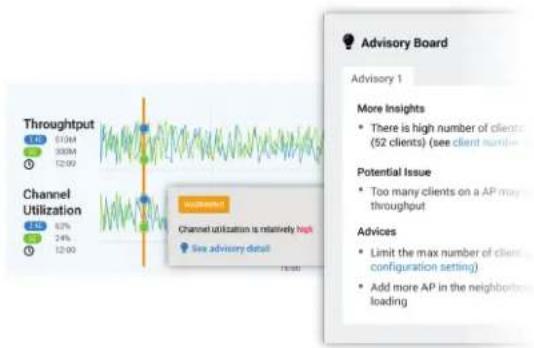
AI-powered alerts and recommendations guide you to the appropriate solution whenever any problems occur in your network.
line
| Metric | Value | | --- | --- | | Throughput | 610M | | Channel Utilization | 82% | | Target | 24% | | Target | 1200 | | Channel Utilization is relatively high. See advisory detail. | Yes | | Target is not specified. | No visible text. |Wi-Fi planner calculates optimal AP placement and signal strength on your floor plan
Upload a floor plan and preview your Wi-Fi coverage in simulated conditions with heatmaps that factor in real-world obstacles such as walls.

* Real environmental effects is available in professional plan.
line
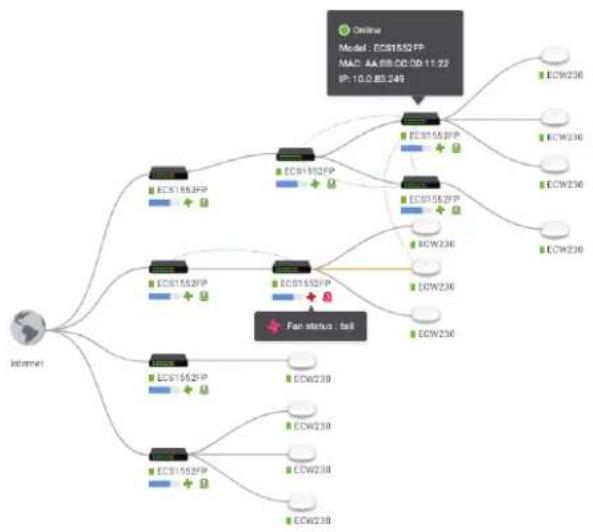
| Metric | Value | | ------------------ | ----- | | CPU | 2.45 | | Memory | 0.35 | | Throughput | 0.25 | | Channel Utilization| 0.15 |View the real connections of devices with topology view
The topology view displays all the devices managed by EnGenius Cloud and the relationships between network devices. You can see the real-time status of Access Points and switches and check the detailed information of PoE status, IP and MAC address, and throughput.
- Third-party devices are visible in professional mode.
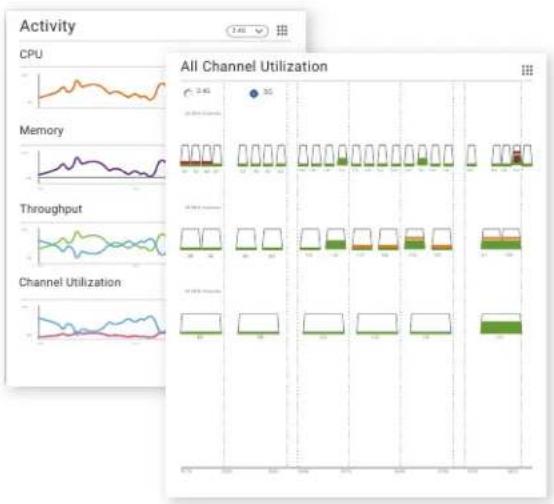
Supervise devices with real-time metrics
EnGenius Cloud provides the capability to display device performance in real-time. It breaks down key performance diagnostics such as CPU, memory, and throughput to determine the root cause of any current network problem.
flowchart
graph TD
    A["Internet"] --> B["EC81852FP"]
    A --> C["EC81852FP +"]
    A --> D["EC81852FP +"]
    A --> E["EC81852FP +"]
    A --> F["EC81852FP +"]
    A --> G["EC81852FP +"]
    A --> H["EC81852FP +"]
    A --> I["EC81852FP +"]
    A --> J["EC81852FP +"]
    A --> K["EC81852FP +"]
    A --> L["EC81852FP +"]
    A --> M["EC81852FP +"]
    A --> N["EC81852FP +"]
    A --> O["EC81852FP +"]
    A --> P["EC81852FP +"]
    A --> Q["EC81852FP +"]
    A --> R["EC81852FP +"]
    A --> S["EC81852FP +"]
    A --> T["EC81852FP +"]
    A --> U["EC81852FP +"]
    A --> V["EC81852FP +"]
    A --> W["EC81852FP +"]
    A --> X["EC81852FP +"]
    A --> Y["EC81852FP +"]
    A --> Z["EC81852FP +"]
    A --> AA["EC81852FP +"]
    A --> AB["EC81852FP +"]
    A --> AC["EC81852FP +"]
    A --> AD["EC81852FP +"]
    A --> AE["EC81852FP +"]
    A --> AF["EC81852FP +"]
    A --> AG["EC81852FP +"]
    A --> AH["EC81852FP +"]
    A --> AI["EC81852FP +"]
    A --> AJ["EC81852FP +"]
    A --> AK["EC81852FP +"]
    A --> AL["EC81852FP +"]
    A --> AM["EC81852FP +"]
    A --> AN["EC81852FP +"]
    A --> AO["EC81852FP +"]
    A --> AP["EC81852FP +"]
    A --> AQ["EC81852FP +"]
    A --> AR["EC81852FP +"]
    A --> AS["EC81852FP +"]
    A --> AT["EC81852FP +"]
    A --> AU["EC81852FP +"]
    A --> AV["EC81852FP +"]
    A --> AW["EC81852FP +"]
    A --> AX["EC81852FP +"]
    A --> AY["EC81852FP +"]
    A --> AZ["EC81852FP +"]
    A --> BA["EC81852FP +"]
    A --> BB["EC81852FP +"]
    A --> BC["EC81852FP +"]
    A --> BD["EC81852FP +"]
    A --> BE["EC81852FP +"]
    A --> BF["EC81852FP +"]
    A --> BG["EC81852FP +"]
    A --> BH["EC81852FP +"]
    A --> BI["EC81852FP +"]
    A --> BJ["EC81852FP +"]
    A --> BK["EC81852FP +"]
    A --> BL["EC81852FP +"]
    A --> BM["EC81852FP +"]
    A --> BN["EC81852FP +"]
    A --> BO["EC81852FP +"]
    A --> BP["EC81852FP +"]
    A --> BQ["EC81852FP +"]
    A --> BR["EC81852FP +"]
    A --> BS["EC81852FP +"]
    A --> BT["EC81852FP +"]
    A --> BU["EC81852FP +"]
    A --> BV["EC81852FP +"]
    A --> BW["EC81852FP +"]
    A --> BX["EC81852FP +"]
    A --> BY["EC81852FP +"]
    A --> BZ["EC81852FP +"]
    A --> CA["EC81852FP +"]
    A --> CB["EC81852FP +"]
    A --> CC["EC81852FP +"]
    A --> CD["EC81852FP +"]
    A --> CE["EC81852FP +"]
    A --> CF["EC81852FP +"]
    A --> CG["EC81852FP +"]
    A --> CH["EC81852FP +"]
    A --> CI["EC81852FP +"]
    A --> CJ["EC81852FP +"]
    A --> CK["EC81852FP +"]
    A --> CR["EC81852FP +"]
    A --> CS["EC81852FP +"]
    A --> CT["EC81852FP +"]
    A --> CU["EC81852FP +"]
    A --> CV["EC81852FP +"]
    A --> CW["EC81852FP +"]
    A --> CX["EC81852FP +"]
    A --> CY["EC81852FP +"]
    A --> CZ["EC81852FP +"]
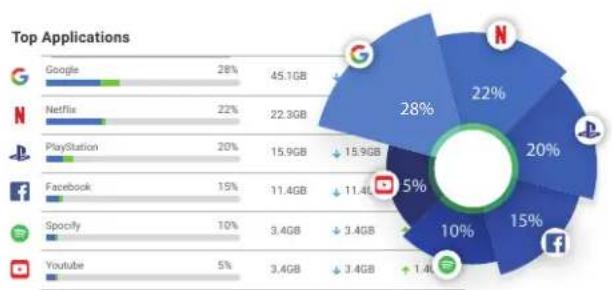
Get information about layer 7 applications
Take full control of the applications in service with layer 7 dashboards for ranking and usage information.
pie
Top Applications | Application | Percentage (%) | Usage (GB) | | :--- | :--- | :--- | | Google | 28 | 45.1 | | Netflix | 22 | 22.3 | | PlayStation | 20 | 15.9 | | Facebook | 15 | 11.4 | | Spotify | 10 | 3.4 | | Youtube | 5 | 3.4 | The chart also shows a separate pie chart with percentage shares and absolute usage values for each application. The 'N' category represents the largest segment at 28%, followed by 'G' at 22%, 'N' at 20%, 'L' at 15%, 'f' at 10%, and 's' at 1.4%. The data is presented as a single column of text with corresponding horizontal bars indicating usage volume.Monitor your networks on the go
With the EnGenius Cloud To-Go mobile app, you can always have full control of cloud-managed Switches, Access Points, and devices no matter where you go.


Empower Your Networking with Professional Features
Scheduling Report
Customize and schedule network reports in minutes
For MSPs to provide regular reports to customers and MIS to continuously track network status, Scheduling Report allows users to generate reports regularly and email to designated persons with customized content, including logo, sender, and selected dashboards.
Per-user VLAN
User-based VLAN to keep your access privilege within network
Each client can be assigned to a VLAN to access different network resources even under the same SSID and remain the same VLAN across the network, regardless of the SSID with which they are associated. For example, faculty and students accessing the same SSID will be assigned to different VLANs.
myPSK
Each user has a unique PSK to access the same Wi-Fi Network
When accessing the same SSID, each tenant will have a unique PSK and be associated with different VLAN tags based on the privilege. In the case of dormitory Wi-Fi management, when a user's unique myPSK expires along with his stay, he or she will no longer be able to access the Wi-Fi network.

flowchart
graph TD
    A["Page Contents ScheduleCover Letter"] --> B["MARCH"]
    B --> C["1"]
    B --> D["2"]
    B --> E["3"]
    B --> F["4"]
    B --> G["5"]
    B --> H["6"]
    B --> I["7"]
    B --> J["8"]
    B --> K["9"]
    B --> L["10"]
    B --> M["11"]
    B --> N["12"]
    B --> O["13"]
    B --> P["14"]
    B --> Q["15"]
    B --> R["16"]
    B --> S["17"]
    B --> T["18"]
    B --> U["19"]
    B --> V["20"]
    B --> W["21"]
    B --> X["22"]
    B --> Y["23"]
    B --> Z["24"]
    B --> AA["25"]
    B --> AB["26"]
    B --> AC["27"]
    B --> AD["28"]

flowchart
graph TD
    A["SSID-A"] --> B["VLAN 30"]
    C["Student"] --> D["VLAN 20"]
    B --> E["Faculty"]
    D --> E
    style A fill:#f9f,stroke:#333
    style C fill:#f9f,stroke:#333
    style D fill:#f9f,stroke:#333

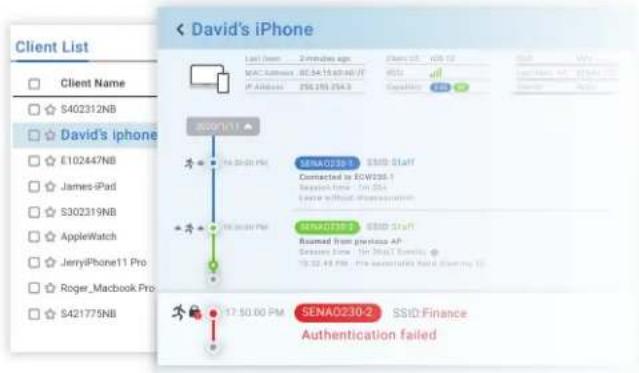
Client Timeline
Discover potential connection problems with Client Timeline
Pull up the entire history of a client device to trace back the time and behavior when a network problem may have originated.

flowchart
graph LR
    A["ID Password"] --> B["Mobile Device"]
    B --> C["Cloud Authentication"]
Cloud Authentication
Easy Cloud authentication and voucher services
Use EnGenius Cloud to authenticate client access to the network without the time and cost of deploying an on-premise server. The voucher service is also available to provide users with pre-defined access profiles that help you manage the guest Wi-Fi conveniently.
VLAN Pooling
Automatic partitioning of a broadcast domain to avoid broadcast flooding
To prevent broadcast traffic from flooding the network, Access Point will randomly assign a VLAN from a pool of user-defined VLANs to each client associated with it, thereby automatically separating the broadcast traffic of clients into multiple VLANs.

flowchart
graph TD
    A["Server"] --> B["Central Server"]
    A --> C["External Server"]
    B --> D["VLAN 001"]
    B --> E["VLAN 002"]
    B --> F["VLAN 003"]
    C --> G["VLAN 001"]
    C --> H["VLAN 002"]
    C --> I["VLAN 003"]
flowchart
graph TD
    A[" broadcast"] --> B[" with BCMC Suppression "]
    A --> C[" without BCMC Suppression "]
    B --> D[" devices: desktops, mobile phones"]
    C --> E[" devices: mobile phones"]
    D --> F[" Wi-Fi icon "]
    D --> G[" Wi-Fi icon "]
    E --> H[" Wi-Fi icon "]
    E --> I[" Wi-Fi icon "]
    F --> J[" devices: mobile phones "]
    G --> K[" devices: mobile phones "]
    H --> L[" devices: mobile phones "]
    I --> M[" devices: mobile phones "]
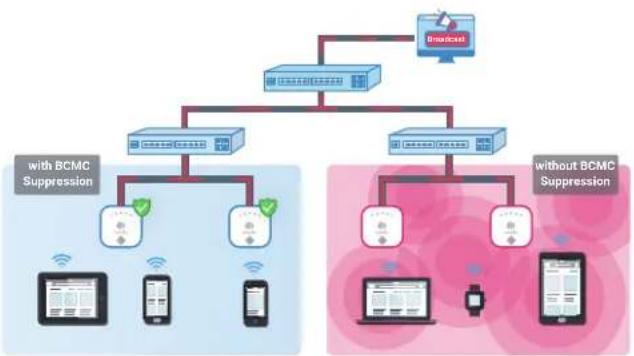
Broadcast and Multicast Suppression
Optimize broadcast and multicast traffic for Wi-Fi networks
When a broadcast or multicast packet floods the subnet, a broadcast storm will reduce network performance. Broadcast and multicast suppression can reduce the number of traffic sending from wired networks to wireless networks.
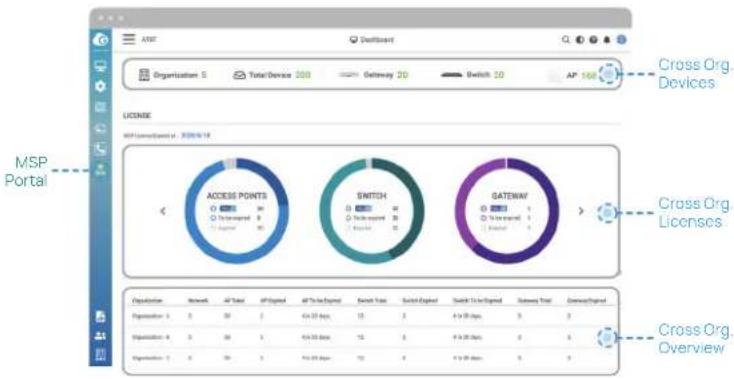
Single Dashboard to see everything and miss nothing
Gain a centralized, holistic view for comprehensive oversight and control across multiple tenants (organizations). The MSP Portal efficiently scale and manage customer networks from a single dashboard.
pie
| Category | Total Devices | Gateway 2D | Switch 2D | |---|---|---|---| | Access Points | 0 | 0 | 0 | | Switch | 0 | 0 | 0 | | Gateway | 0 | 0 | 0 |
flowchart
graph TD
    A["Organizational A"] -->|Dashed arrow| B["Device Licenses"]
    C["Organization B"] -->|Dashed arrow| B
    D["Central Organization"] -->|Dashed arrow| B
    B --> E["Device Licenses"]
    style A fill:#f9f,stroke:#333
    style C fill:#f9f,stroke:#333
    style D fill:#f9f,stroke:#333
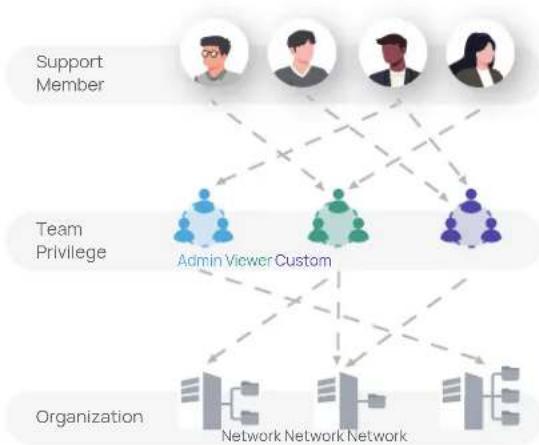
Simplified team management across multiple organizations
With simplified team privileges, MSP administrators can assign access rights to entire teams instead of individual users. Effortless team modifications ensure that when changes occur within a team, updating the team list automatically adjusts access rights across all associated organizations or networks, maintaining consistent permissions throughout.
flowchart
graph TD
    A["Organization A"] --> B["Network Settings"]
    B --> C["Clone"]
    D["Organization B"] --> E["Network Settings Network Settings"]
    E --> F["Clone"]
Unified inventory & licensing for efficient management
Our platform provides a one-stop management solution for MSP administrators, offering centralized control over device and license registration. This facilitates seamless device relocation and ensures proactive inventory control, including comprehensive tracking of upcoming license expirations for optimal visibility.
flowchart
graph TD
    A["Support Member"] --> B["Admin Viewer Custom"]
    C["Team Privilege"] --> B
    D["Organization"] --> E["Network Network Network"]
    B --> E
    B --> F["Network Network Network"]
    B --> G["Network Network Network"]
    B --> H["Network Network Network"]
    B --> I["Network Network Network"]
    B --> J["Network Network Network"]
    B --> K["Network Network Network"]
    B --> L["Network Network Network"]
    B --> M["Network Network Network"]
    B --> N["Network Network Network"]
    B --> O["Network Network Network"]
    B --> P["Network Network Network"]
    B --> Q["Network Network Network"]
    B --> R["Network Network Network"]
    B --> S["Network Network Network"]
    B --> T["Network Network Network"]
    B --> U["Network Network Network"]
    B --> V["Network Network Network"]
    B --> W["Network Network Network"]
    B --> X["Network Network Network"]
    B --> Y["Network Network Network"]
    B --> Z["Network Network Network"]
    B --> AA["Network Network Network"]
    B --> AB["Network Network Network"]
    B --> AC["Network Network Network"]
    B --> AD["Network Network Network"]
    B --> AE["Network Network Network"]
    B --> AF["Network Network Network"]
    B --> AG["Network Network Network"]
    B --> AH["Network Network Network"]
    B --> AI["Network Network Network"]
    B --> AJ["Network Network Network"]
    B --> AK["Network Network Network"]
    B --> AL["Network Network Network"]
    B --> AM["Network Network Network"]
    B --> AN["Network Network Network"]
    B --> AO["Network Network Network"]
    B --> AP["Network Network Network"]
    B --> AQ["Network Network Network"]
    B --> AR["Network Network Network"]
    B --> AS["Network Network Network"]
    B --> AT["Network Network Network"]
    B --> AU["Network Network Network"]
    B --> AV["Network Network Network"]
    B --> AW["Network Network Network"]
    B --> AX["Network Network Network"]
    B --> AY["Network Network Network"]
    B --> AZ["Network Network Network"]
    B --> BA["Network Network Network"]
    B --> BB["Network Network Network"]
    B --> BC["Network Network Network"]
    B --> BD["Network Network Network"]
    B --> BE["Network Network Network"]
    B --> BF["Network Network Network"]
    B --> BG["Network Network Network"]
    B --> BH["Network Network Network"]
    B --> BI["Network Network Network"]
    B --> BJ["Network Network Network"]
    B --> BK["Network Network Network"]
    B --> BL["Network Network Network"]
    B --> BM["Network Network Network"]
    B --> BN["Network Network Network"]
    B --> BO["Network Network Network"]
    B --> BP["Network Network Network"]
    B --> BQ["Network Network Network"]
    B --> BR["Network Network Network"]
    B --> BS["Network Network Network"]
    B --> BT["Network Network Network"]
    B --> BU["Network Network Network"]
    B --> BV["Network Network Network"]
    B --> BW["Network Network Network"]
    B --> BX["Network Network Network"]
    B --> BY["Network Network Network"]
    B --> BZ["Network Network Network"]
    B --> CA["Network Network Network"]
    B --> CB["Network Network Network"]
    B --> CC["Network Network Network"]
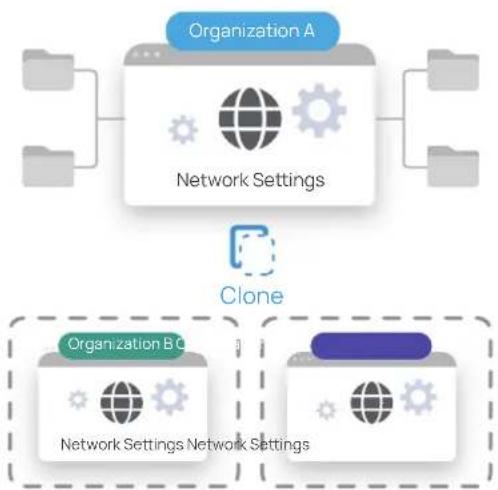
Clone to deploy for easy setup in minutes
The 'Clone' feature enables the smart copy of configurations from specific Organizations and Networks, significantly reducing setup times and eliminating repetitive configurations. This streamlines the launch of new Organizations and Networks by minimizing redundant settings for similar tenants, unleashing efficiency in deployment processes.




AirGuard WIPS/WIDS Spectrum Analysis BLE Capability Zero-wait DFS
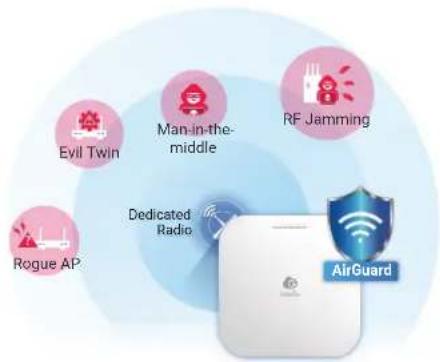
AirGuard™ is an intelligent wireless security system built into the EnGenius Cloud security AP to protect the airspace from rogue devices and wireless threats 24/7. Using dedicated scanning radios, AirGuard security APs continuously scan the environment for rogue APs and other threats without degrading network speed at all.
AirGuard™
AirGuard™ WIPS/WIDS to secure your WLAN
AirGuard™ is an intelligent wireless security system built in to the EnGenius Cloud security AP to protect the airspace from rogue devices and wireless threats with dedicated scanning radios.

Zero-Wait DFS
Zero-Wait DFS to avoid disrupting client connection
The dedicated radio continuously scan all DFS channels in the background and maintain a list of available DFS channels—preventing client devices from being temporarily disconnected.
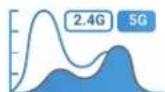
RF Spectrum Analysis
Spectrum analysis while maintaining performance
The security AP can perform real-time spectrum analysis of its environment with dedicated radio scanning without decreasing performance.

Wi-Fi 7
Next-Generation Wi-Fi With Blazing-Fast Speed, Greater Capacity, and Ultra-Low Latency.
The Ultimate Wireless Solution - Wi-Fi 7 Access Points
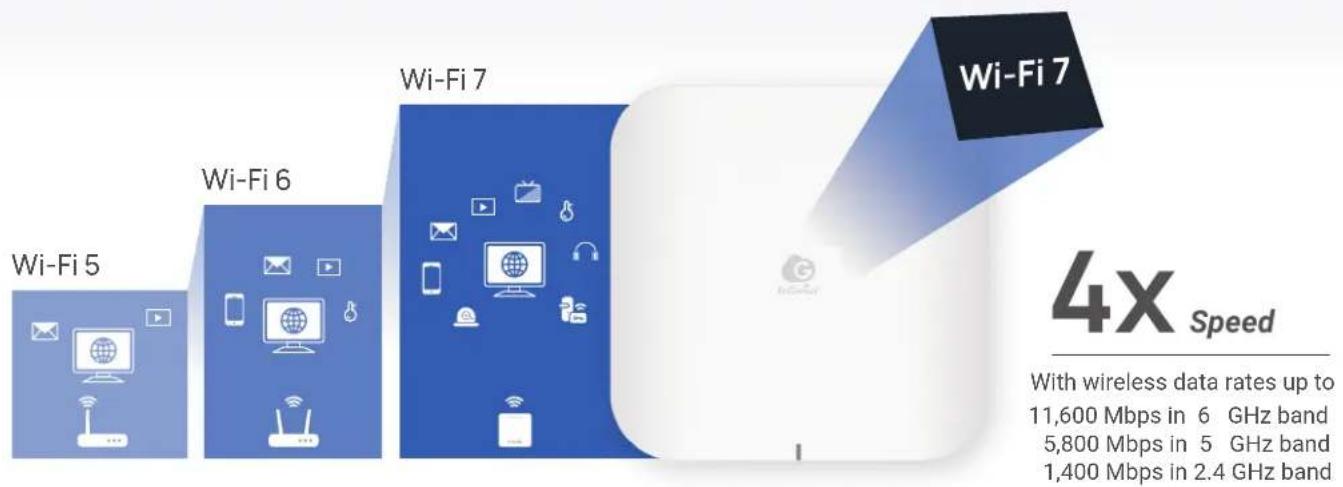
Wi-Fi 7 is the latest Wi-Fi standard that fully utilizes the resources of the three frequency bands (2.4 GHz, 5 GHz, and 6 GHz), emphasizing the 6 GHz band to provide an extensive bandwidth, offering extremely high speed and low latency.
bar
| Wi-Fi Type | Speed (Mbps) | | ---------- | ------------ | | Wi-Fi 5 | 11,600 | | Wi-Fi 6 | 5,800 | | Wi-Fi 7 | 1,400 |Wi-Fi 7 Solution Advantages

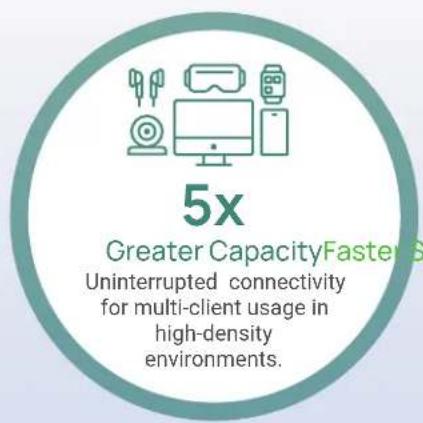
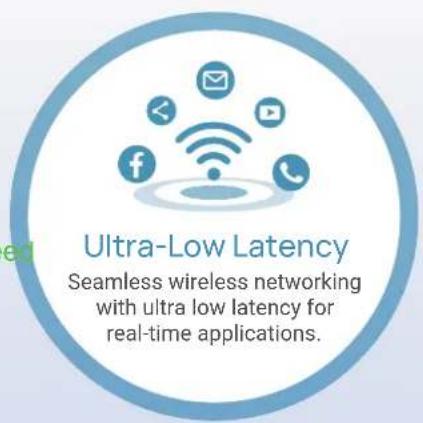
Innovative Features of Wi-Fi 7
2x Wider Bandwidth
320 MHz in 6 GHz band
The three 320 MHz channels Unlock the full potential of the 6 GHz bands with Wi-Fi 7, eliminating bottlenecks and boosting productivity. Get more transmission done in less time for faster speed.

120% Faster Scheme
4K-QAM
The 4096-QAM utilizes a higher modulation scheme to encode data, enhancing throughput and greater capacity by increasing the number of data symbols transmitted per second, enabling more devices a seamless experience.

Better Efficiency
Multi-RU & Puncturing
Wi-Fi 7 access point allows multiple devices to transmit and receive data simultaneously. Multi-RU enhances capacity from multiple client devices, while Preamble Puncturing reduces overhead and improves efficiency by using shorter preambles.
Minimal Latency
Multi-Links Operation
With MLO, Wi-Fi 7 access point empowers devices to seamlessly transmit and receive data across multiple bands and channels simultaneously to increase throughput, reduce latency, and improve reliability.
Scenarios Where Wi-Fi 7 Can Boost Business Performance

natural_image
Office interior with three people working at desks, one holding a cup and notebook, no visible text or symbolsBusiness
WORKPLACES
Fast speed, Low latency
Elevate collaboration and boost productivity in your workspace with Wi-Fi 7. Enjoy blazing-fast speeds and minimal latency, enabling smooth video conferencing, seamless file sharing, and effortless usage of cloud-based applications. Stay connected and maximize your productivity in the most demanding work environments.
Business
INDUSTRIAL IOT
High capacity, Low latency
Realize the revolution of industrial IoT with Wi-Fi 7, delivering unparalleled bandwidth, increased capacity, and ultra-low latency. Seamlessly connect multiple IoT devices, enabling smooth communication, real-time interactions, and automation for manufacturing, logistics, and energy management.

natural_image
Industrial robotic arms in operation inside a factory setting (no visible text or symbols)
natural_image
Crowd at a stadium during a nighttime event, with silhouetted fans and stadium seating in the background (no visible text or signage)Smart Life
PUBLIC SPACES
High Capacity, Low Latency
Experience enhanced capacity in high client-density public spaces such as convention centers, transit hubs, and shopping malls with Wi-Fi 7 to meet the ever-growing demand for wireless connectivity. Empower users with reliable, ultra-fast Wi-Fi for seamless browsing, streaming, and real-time information.
Smart Life
ENTERTAINMENT
High Speed, Low latency
Unleash the full potential of entertainment with Wi-Fi 7. Superior speeds and minimal latency allow Wi-Fi 7 to deliver seamless enjoyment for high-definition 8K streaming, online multiplayer gaming, and immersive virtual reality (VR) experiences.

natural_image
Person wearing headset at computer in dimly lit room (no visible text or symbols)

EnGenius Cloud To-Go
Smart Networking at Your Fingertips
With the EnGenius Cloud To-Go mobile app, you can always have full control of cloud-managed switches, access points, and other devices. Get real-time alerts no matter where you are. Easy device deployment, visualized monitoring, and alerts for abnormal network activity available within an intuitive mobile app.


Easy deployment and configuration
Scan, register, and quickly configure Cloud network devices
Simple monitoring and management
Smartly manage Access Points, Switches and clients and stay informed to troubleshoot
Highly secured and flexible
Rich features your business needs in one place


radar
| Metric | Value | | -------------------- | ----- | | Channel Availability | 19 | | Switch Online | 11 | | Switch CPU Availability | 19 | | STA Ratio | 19 | | AP Online | 77 | | AP CPU Availability | 19 | | AP | 11 |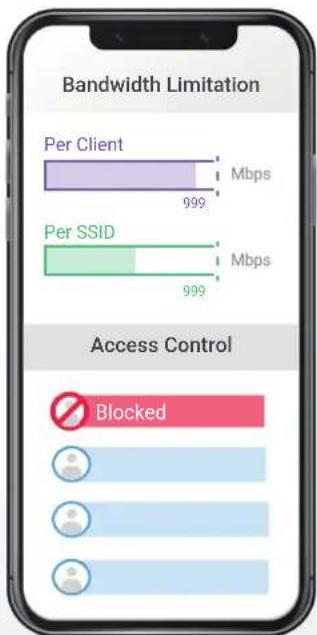
Keep Your Network Growing with Your Business
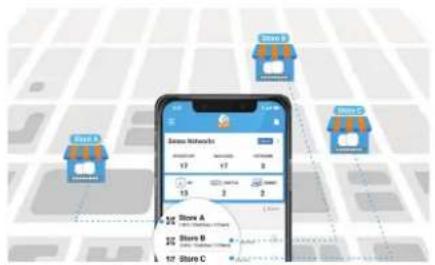
Manage all branch networks remotely
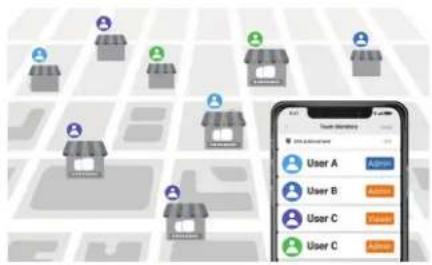
Leverage expertise for local site network management

Expand networks in no time
How EnGenius Cloud To-Go Cares for Your Business
Retail Store

natural_image
Woman browsing clothing in a store, wearing a yellow dress and holding a tablet (no visible text or signage)Flexible network deployment
Cloud To-Go managed devices can be mounted to ceilings, walls, or poles. They can easily fit into any environment.
Always-on networks for business
Cloud networks let you smoothly run all in-store services that need to be online, such as streaming music and realtime surveillance.
Multi-site management
You can easily assign new members to manage and remotely control the networks for all branch businesses.
Hospitality

natural_image
Woman in apron preparing food at a counter with checkered pattern (no visible text or symbols)Setup-and-go in minutes
Follow the easy step-by-step guidelines of the app to quickly set-up your cloud-managed devices.
Ideal Wi-Fi access for all guests
Set up traffic shaping and bandwidth for your guests to ensure everyone has fast and steady Wi-Fi.
In-store messages for branding
Customize the captive portal with your brand to welcome your guests to access the Wi-Fi and share their positive experiences in your store.
Small & Home Office

natural_image
Two professionals in a modern office setting engaged in conversation, with a laptop and potted plant in the background (no visible text or symbols)Improve the working efficiency
A fast connection for employees to focus and accelerate their work without any latency despite the type of office.
Monitor networks remotely
No matter when or where you are, you can check the real-time status and manage settings for your networks with your mobile device.
Secure connection and data
The Cloud-managed networks are well-protected for the connection and data of your company, staff, customers, and visitors.
Start with essential features and upgrade with Pro licenses.
EnGenius Cloud provides two types of feature plans, Basic and PRO. Set up the feature plan to either Basic or PRO for product categories so that you can use the Basic/Pro feature set in the AP, Switch, VPN Router, PDU and Extender.
Basic
Basic Plan
For SOHO, SMB, and fast-growing retail and hospitality to manage networks in a simple way
PRO
Professional Plan
For SMEs, managed service providers and networks required more advanced features
Cloud License Price FREE (no license needed) Require Cloud PRO License

Platform-wide
| Cloud Network Management | Easy Administration | Smart Networking | Visualized Insights |
| Quick deployment with QR-code scan | Quick access to device live view | Network dashboard | |
| Hierarchy view & multi-tenant design | Variety of user authentications | AI-driven advisory board | |
| Two factor authentication | Custom splash page | Device real-time metrics | |
| Schedule firmware upgrade | Block/ VIPed client | Usage of Layer 7 applications | |
| Team Members | 10 users | Unlimited | |
| Max Network no. in an Org | 50 | 5000 (Recommend 500) | |
| Cloud Radius and Voucher Service | 100 entries | 10000 entries | |
| Clone Network | - | V | |
| Client List Export | - | V | |
| Topology | EnGenius devices only | EnGenius and 3rd-party devices | |
| Scheduling Report System | 1 report | V | |
| Customer Support | Limited support | Priority support with on-line tool | |
PRO AP Access Point
| Statistic Data Stored | 1 day | 30 days |
| Client Timeline | - | V |
| Wi-Fi Floor Plan Heatmap | V | V |
| Wi-Fi Floor (Obstacle & Virtual AP) | - | V |
| WiFi Floor Plan Counsel * | - | V |
| myPSK (dynamic/ private PSK) | - | V |
| VLAN Pooling | - | V |
| Broadcast Suppression | V | V |
| Application QoS (AVXpress) | V | V |
| AD/ LDAP/ Google Authentication / Azure AD | - | V |
| Live Diagnostic Tools | Limited | V |
| Live Client List | - | V |
| RF Spectrum Analysis * | - | V |
| AirGuard * | - | V |
| Zero-Wait DFS * | V | V |
| BLE Client List * | V | V |
| Smartcasting | - | V |
| Radius Load Balance | - | V |
| SSID on LAN | V | V |
| Packet Capture | - | V |
| Block/VIP Client/ Whitelist | 100 | 1000 |
| Change Log | V | V (More Details) |
| Alert Notification | On-line/ Off-line | V |
| Backup & Restore | - | V |
| API Integration (3rd party) | - | V |
Start with essential features and upgrade with Pro licenses.
EnGenius Cloud provides two types of feature plans, Basic and PRO. Set up the feature plan to either Basic or PRO for product categories so that you can use the Basic/Pro feature set in the AP, Switch, VPN Router, PDU and Extender.
| Basic Basic PlanFor SOHO, SMB, and fast-growing retail and hospitality to manage networks in a simple way | PRO Professional PlanFor SMEs, managed service providers and networks required more advanced features | ||
| Cloud License Price FREE (no license needed) Require Cloud PRO License | $ | ||
| Platform-wide | |||
| Cloud Network Management | Easy Administration | Smart Networking | Visualized Insights |
| Quick deployment with QR-code scanHierarchy view & multi-tenant designTwo factor authenticationSchedule firmware upgrade | Quick access to device live viewVariety of user authenticationsCustom splash pageBlock/ VIPed client | Network dashboardAI-driven advisory boardDevice real-time metricsUsage of Layer 7 applications | |
| PRO SW Switch | |||
| Statistic Data Stored | 1 day | 30 days | |
| Switch Template (Port Configuration) | - | V | |
| Real-time Wired Client List | - | V | |
| PD Lifeguard | V | V | |
| Auto Cam Lifeguard | - | V | |
| Packet Capture (.pcap) | - | V | |
| Diag Tools | Limited | Full / real-time client | |
| Change Log | V | V (More Details) | |
| Alert Notification | On-line/ Off-line | V | |
| Backup & Restore | - | V | |
| API Integration (3rd party) | - | V | |
Start with essential features and upgrade with Pro licenses.
EnGenius Cloud provides two types of feature plans, Basic and PRO. Set up the feature plan to either Basic or PRO for product categories so that you can use the Basic/Pro feature set in the AP, Switch, VPN Router, PDU and Extender.
Basic Basic Plan
For SOHO, SMB, and fast-growing retail and hospitality to manage networks in a simple way
PRO Professional Plan
For SMEs, managed service providers and networks required more advanced features
Cloud License Price FREE (no license needed) Require Cloud PRO License

Platform-wide
| Cloud Network Management | Easy Administration | Smart Networking | Visualized Insights |
| Quick deployment with QR-code scan | Quick access to device live view | Network dashboard | |
| Hierarchy view & multi-tenant design | Variety of user authentications | AI-driven advisory board | |
| Two factor authentication | Custom splash page | Device real-time metrics | |
| Schedule firmware upgrade | Block/ VIPed client | Usage of Layer 7 applications |
PRO GW VPN Router
| Statistic Data Stored | 1 day | 30 days |
| Auto VPN | V | V |
| Auto VPN NAT Traversal | - | V |
| Auto VPN Fail-over | - | V |
| VPN Topology | - | V |
| VPN Traffic Usage | - | V |
| VPN Client (IPsec) | V | V |
| Network Clone | - | V |
| Firewall State/ Session Log for Diag | - | V |
| Remote CLI | - | V |
| Diag Tools | V | V |
| Packet Capture | - | V |
| Policy Route | V | V |
| Change Log | V | V (More Details) |
| Alert Notification | On-line/ Off-line | V |
| Backup & Restore | - | V |
| API Integration (3rd party) | - | V |
PRO PDU PDU
| Statistic Data Stored | 1 day | 30 days |
| Change Log | V | V (More Details) |
| Alert Notification | On-Off only | Advanced |
| Backup & Restore | — | V |
| API Integration (3rd Party) | — | V |
PRO EXT Switch Extender
| Statistic Data Stored | 1 day | 30 days |
| Change Log | V | V (More Details) |
| Alert Notification | — | V |
| Backup & Restore | — | V |
Indoor


Wi-Fi 6

Wi-Fi 6

Wi-Fi 6

Wi-Fi 6

| Model Name | Cloud5 2x2 | Cloud5 4x4 | Cloud6 2x2 Wallplate | Cloud6 2x2 | Cloud6 2x2 S | Cloud6 4x4 |
| Model Number | ECW120 | ECW130 | ECW215 | ECW220 | ECW220S | ECW230 |
| Wi-Fi Standard | 11ac Wave 2 | 11ac Wave 2 | Wi-Fi 6 (11ax) | Wi-Fi 6 (11ax) | Wi-Fi 6 (11ax) | Wi-Fi 6 (11ax) |
| Frequency | 2.4 GHz & 5 GHz | 2.4 GHz & 5 GHz | 2.4 GHz & 5 GHz | 2.4 GHz & 5 GHz | 2.4 GHz & 5 GHz | 2.4 GHz & 5 GHz |
| Data Rate (2.4 GHz) | 400 Mbps | 800 Mbps | 600 Mbps | 600 Mbps | 600 Mbps | 1200 Mbps |
| Data Rate (5 GHz) | 867 Mbps | 1800 Mbps | 1200 Mbps | 1200 Mbps | 1200 Mbps | 2400 Mbps |
| Data Rate (6 GHz) | - | - | - | - | - | - |
| Radio Chains | 2 x 2:2 | 4 x 4:4 | 2 x 2:2 | 2 x 2:2 | 2 x 2:2 | 4 x 4:4 |
| Tx Power (2.4 GHz) | 23 dBm | 25 dBm | 20 dBm | 22 dBm | 22 dBm | 23 dBm |
| Tx Power (5 GHz) | 23 dBm | 24 dBm | 20 dBm | 22 dBm | 22 dBm | 23 dBm |
| Tx Power (6 GHz) | - | - | - | - | - | - |
| Antennas (2.4 GHz) | 2 x 5 dBi Omni | 4 x 4 dBi Omni | 2 x 4 dBi Omni | 2 x 4 dBi Omni | 2 x 4 dBi Omni | 4 x 5 dBi Omni |
| Antennas (5 GHz) | 2 x 5 dBi Omni | 4 x 6 dBi Omni | 2 x 5 dBi Omni | 2 x 5 dBi Omni | 2 x 5 dBi Omni | 4 x 6 dBi Omni |
| Antennas (6 GHz) | - | - | - | - | - | - |
| PoE Standard | 802.3af | 802.3at | 802.3af/at | 802.3af/at | 802.3af/at | 802.3at |
| Scanning Radio | - | - | - | - | ● | - |
| BLE | - | - | - | - | ● | - |
| Power Consumption (Peak) | 12W | 19.1W | 14.2W | 12.8W | 12.8W | 19.5W |
| Ethernet Port | 1x GE PoE port | 1x GE PoE+port1x GE port | 2x GE PoE+ ports1x GE PSE Out port | 1x GE PoE port | 1x GE PoE+ port | 1x 2.5GE PoE+ port |
| Mounting | Wall/ Ceiling | Wall/Ceiling | Wall | Wall/ Ceiling | Wall/ Ceiling | Wall/ Ceiling |
| IP Rating | N/A | N/A | N/A | N/A | N/A | N/A |
| Dimensions | 161 x 161 x 41 mm | 215 x 215 x 56mm | 140 x 90 x 40 mm | 160 x 160 x 33 mm | 160 x 160 x 33 mm | 205 x 205 x 33 mm |
| Mesh Technology | ● | ● | ● | ● | ● | ● |
| Mobile app (Cloud To-Go) | ● | ● | ● | ● | ● | ● |
Indoor Outdoor
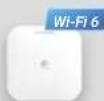

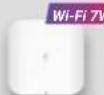


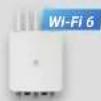
| Model Name | Cloud6 4x4 S | Cloud6E 4x4x4 | Cloud7 2x2x2 | Cloud7 4x4x4 | Cloud5 2x2 Outdoor | Cloud6 2x2 Out door | Cloud6 4x4 Outdoor |
| Model Number | ECW230S | ECW336 | ECW526 | ECW536 | ECW160 | ECW260 | ECW270 |
| Wi-Fi Standard | Wi-Fi 6 (11ax) | Wi-Fi 6E (11ax) | Wi-Fi 7(11be) | Wi-Fi 7 (11be) | 11ac Wave 2 | Wi-Fi 6 (11ax) | Wi-Fi 6 (11ax) |
| Frequency | 2.4 GHz & 5 GHz | 2.4 GHz & 5 GHz & 6 GHz | 2.4 GHz & 5 GHz & 6 GHz | 2.4 GHz & 5 GHz & 6 GHz | 2.4 GHz & 5 GHz | 2.4 GHz & 5GHz | 2.4 GHz & 5GHz |
| Data Rate (2.4 GHz) | 1200 Mbps | 1,200 Mbps | 700 Mbps | 1,400 Mbps | 400 Mbps | 600 Mbps | 1200 Mbps |
| Data Rate (5 GHz) | 2400 Mbps | 2,400 Mbps | 2,900 Mbps | 5,800 Mbps | 867 Mbps | 1200 Mbps | 2400 Mbps |
| Data Rate (6 GHz) | - | 4,800 Mbps | 5,800 Mbps | 11,600 Mbps | - | - | - |
| Radio Chains | 4 x 4:4 | 4 x 4:4 | 2 x 2:2 | 4 x 4:4 | 2 x 2:2 | 2 x 2:2 | 4 x 4:4 |
| Tx Power (2.4 GHz) | 23 dBm | 23 dBm | 23 dBm | 25 dBm | 23 dBm | 23 dBm | 24 dBm |
| Tx Power (5 GHz) | 23 dBm | 23 dBm | 22 dBm | 24 dBm | 23 dBm | 25 dBm | 24 dBm |
| Tx Power (6 GHz) | - | 23 dBm | 22 dBm | 24 dBm | - | - | - |
| Antennas (2.4 GHz) | 4 x 5 dBi Omni | 4 x 5 dBi Omni | 2 x 5 dBi Omni | 4 x 5 dBi Omni | 2 x 5 dBi External Omni | 2 x 5 dBi External Omni | 4 x 5 dBi External Omni |
| Antennas (5 GHz) | 4 x 6 dBi Omni | 4 x 6 dBi Omni | 2 x 6 dBi Omni | 4 x 6 dBi Omni | 2 x 5 dBi External Omni | 2 x 5 dBi External Omni | 4 x 7 dBi External Omni |
| Antennas (6 GHz) | - | 4 x 5 dBi Omni | 2 x 6 dBi Omni | 4 x 5 dBi Omni | - | - | - |
| PoE Standard | 802.3at | 802.3at | 802.3at | 802.3bt | 802.3af/at | 802.3af/at | 802.3at/bt |
| Scanning Radio | ● | - | - | - | - | - | - |
| BLE | ● | - | - | - | - | - | - |
| Power Consumption (Peak) | 19.5W | 22.5W | 21W | 38W | 12.6W | 15.9W | 46W |
| Ethernet Port | 1x 2.5GE PoE+ port | 1x 5GE PoE+ port | 1x 10GE PoE+port | 1x 10GE PoE++port1x 10GE port | 1x GE PoE+ port | 1x 2.5GE PoE+ port | 1x 2.5GE PoE++ port1x GE PSE Out port |
| Mounting | Wall/ Ceiling | Wall/ Ceiling | Wall/ Ceiling | Wall/ Ceiling | Wall/ Pole | Wall/ Pole | Wall/Pole |
| IP Rating | N/A | N/A | N/A | N/A | IP67 | IP67 | IP6B |
| Dimensions | 205 x 205 x 33 mm | 205 x 205 x 33 mm | 190 x 190 x 39.5 mm | 230 x 230 x 39.5mm | 112 x 173 x 30 mm | 124 x 190 x 52.5 mm | 218 x 285 x 53 mm |
| Mesh Technology | ● | ● | ● | ● | ● | ● | ● |
| Mobile app (Cloud To-Go) | ● | ● | ● | ● | ● | ● | ● |
Gigabit Switch
| Model Name | L2Plus 8 PoE | L2Plus 8 Full PoE | L2Plus 24 | L2Plus 24 PoE | L2Plus 24 Full PoE | L2Plus 48 | L2Plus 48 PoE | L2Plus 48 Full PoE |
| Model Number | ECS1008P | ECS1112FP | ECS1528T | ECS1528P | ECS1528FP | ECS1552 | ECS1552P | ECS1552FP |
| Switch Class | Layer 2+ | Layer 2+ | Layer 2+ | Layer 2+ | Layer 2+ | Layer 2+ | Layer 2+ | Layer 2+ |
| Gigabit Ethernet Ports | 8 | 10 | 24 | 24 | 24 | 48 | 48 | 48 |
| Multi-Gigabit Ethernet Ports | - | - | - | - | - | - | - | - |
| SFP Ports | - | 2 | - | - | - | - | - | - |
| SFP+ Ports | - | - | 4 | 4 | 4 | 4 | 4 | 4 |
| RJ45 Console Port | - | ● | ● | ● | ● | ● | ● | ● |
| Form Factor | 9.45" (desktop) | 13" 1U | 13" 1U | 19" 1U | 19" 1U | 19" 1U | 19" 1U | 19" 1U |
| Power-over-Ethernet | 802.3af/at | 802.3af/at | - | 802.3af/at | 802.3af/at | - | 802.3af/at | 802.3af/at |
| Total PoE Budget | 55W | 130W | - | 240w | 410w | - | 410w | 740w |
| PoE Capable Ports | Ports 1-8 | Ports 1-8 | - | Ports 1-24 | Ports 1-24 | - | Ports 1-48 | Ports 1-48 |
| Switching Capacity | 16Gbps | 24Gbps | 128Gbps | 128Gbps | 128Gbps | 176Gbps | 176Gbps | 176Gbps |
| Packet Forwarding Rate (Mpps) | 11.904Mpps | 17.856Mpps | 95.23Mpps | 95.23Mpps | 95.23Mpps | 130.95Mpps | 130.95Mpps | 130.95Mpps |
| MAC Address Table | 8K | 8K | 16K | 16K | 16K | 32K | 32K | 32K |
| Packet Buffer Memory | 512KB | 512KB | 1.5MB | 1.5MB | 1.5MB | 2MB | 2MB | 2MB |
| Full load Power consumption | 62.05 Watts | 152.8 Watts | 24.41 Watts | 297.6 Watts | 500.46 Watts | 43.92 Watts | 476.3 Watts | 885 Watts |
| *PoE Extended Mode | ● | ● | - | ● | ● | - | ● | ● |
| PD Lifeguard | ● | ● | - | ● | ● | - | ● | ● |
| Continuous PoE Power | ● | ● | - | ● | ● | - | ● | ● |
| Dimension | 240mm x 105mm x 27mm | 330mm x 230mm x 44mm | 330mm x 230mm x 44mm | 440mm x 260mm x 44mm | 440mm x 260mm x 44mm | 440mm x 260mm x 44mm | 440mm x 310mm x 44mm | 440mm x 310mm x 44mm |
Multi-G Switch
| Model Name | MGPlus 8 Full PoE | MGPlus 8 | MGPlus 8 Full PoE | MGPlus 24 Full PoE | MGPlus 48 Full PoE | Aggregate 8XG | Aggregate 8XG Full PoE | Aggregate 12 |
| Model Number | ECS2510FP | ECS2512 | ECS2512FP | ECS2528FP | ECS2552FP | ECS5512 | ECS5512FP | ECS5512F |
| Switch Class | Layer 2+ | Layer 2+ | Layer 2+ | Layer 2+ | Layer 2+ | Layer 2+ | Layer 2+ | Layer 2+ |
| Gigabit Ethernet Ports | - | - | - | 16 | 32 | - | - | - |
| Multi-Gigabit Ethernet Ports | 8x2.5G | 8x2.5G | 8x2.5G | 8x2.5G | 16x2.5G | 8 x 10G | 8 x 10G | - |
| SFP Ports | - | - | - | - | - | - | - | - |
| SFP+ Ports | 2 | 4 | 4 | 4 | 4 | 4 | 4 | 12 |
| RJ45 Console Port | ● | ● | ● | ● | ● | ● | ● | ● |
| Form Factor | 13" 1U | 13" 1U | 13" 1U | 19" 1U | 19" 1U | 13" 1U | 13" 1U | Half Rack |
| Power-over-Ethernet | 802.3af/at | - | 802.3af/at/bt | 802.3af/at | 802.3af/at | - | 802.3af/at/bt (up to 90W) | - |
| Total PoE Budget | 240w | - | 240w | 410w | 740w | - | 410w | - |
| PoE Capable Ports | Ports 1-8 | - | Ports 1-8 | Ports 1-24 | Ports 1-48 | - | Ports 1-8 | - |
| Switching Capacity | 80Gbps | 120Gbps | 120Gbps | 152Gbps | 224Gbps | 240Gbps | 240Gbps | 240Gbps |
| Packet Forwarding Rate (Mpps) | 59.52 Mpps | 89.29 Mpps | 89.29 Mpps | 113.10 Mpps | 166.67 Mpps | 178.57 Mpps | 178.57 Mpps | 178.57 Mpps |
| MAC Address Table | 16k | 16k | 16k | 16k | 32k | 32k | 32k | 32k |
| Packet Buffer Memory | 512KB | 512KB | 512KB | 1.5MB | 2MB | 2MB | 2MB | 2MB |
| Full load Power consumption | 270.47 Watts | 23.52 Watts | 299 Watts | 499.85 Watts | 913 Watts | 29.22 Watts | 410.35 Watts | 43.4 Watts |
| *PoE Extended Mode | - | - | - | ● | ● | - | - | - |
| PD Lifeguard | - | - | - | ● | ● | - | - | - |
| Continuous PoE Power | - | - | - | ● | ● | - | - | - |
| Dimension | 330mm x 230mm x 44mm | 330mm x 230mm x 44mm | 330mm x 230mm x 44mm | 440mm x 260mm x 44mm | 330mm x 310mm x 44mm | 330mm x 230mm x 44mm | 330mm x 230mm x 44mm | 210mm x 230mm x 44mm |
| VPN Router | |||
 |  |  | |
| Model Name | Gateway5 4mG | Gateway6 4mG | Gateway6 8mG 2SFP+ |
| Model Number ESG510 | ESG610 | ESG620 | |
| Processor Quad Core Quad Core Quad Core | |||
| Operating Frequency 1.6GHz 2.2GHz 2.2GHz | |||
| Memory 4GB 8GB 8GB | |||
| Flash Storage 8GB 8GB 16GB | |||
| RJ-45 Interface 4 x 2.5G 4 x 2.5G | 8 x 2.5G | ||
| SFP interface | - | - | 2 x SFP+ |
| PoE ports | 1 | 1 | 4 |
| PoE Standard | 802.3 af/at | 802.3 af/at | 802.3 af/at |
| I/O Interfaces | 1 x RJ-45 console/1 x USB 3.0 | 1 x RJ-45 console/1 x USB 3.0 | 1 x RJ-45 console/1 x USB 3.0 |
| Mounting Method | Wall mount Wall mount | Rack mount | |
| Firewall (SPI throughput) | 4G | 6.8G(**) | 7.7G(**) |
| VPN throughput | 970M | 1.5G(**) | 1.5G(**) |
| Max. Concurrent VPN Tunnels | 200 300(**) | 300(**) | |
| Max. Concurrent VPN Users* | 250 380(**) | 380(**) | |
| Max. TCP Concurrent Sessions | 1,000,000 1,250,000 (**) | 1,250,000 (**) | |
| Max VLAN | 96 160(**) | 160(**) | |
| Power | 54V/1.2A | 54V/1.2A | internal 300w power |
| Operation Temperature | 0°C to 40°C | 0°C to 40°C | 0°C to 40°C |
| Humidity (non-condensing) | 5 to 95% non-condensing | 5 to 95% non-condensing | 5 to 95% non-condensing |
| Dimensions | 210 x 179.5 x 35 mm | 210 x 179.5 x 35 mm | 330 x 230 x 44 mm |
| Package Contents | - Power Adapter- Power Cord- RJ-45 Console Cable- Wall Mount Kit- Product Card | - Power Adapter- Power Cord- RJ-45 Console Cable- Wall Mount Kit- Product Card | - Power Cord- RJ-45 Console Cable- Rack Mount Kit- Product Card |
| Regulatory Compliance | - FCC Part 15 (Class B)- IC- CE EMC- CB- UL | - FCC Part 15 (Class B)- IC- CE EMC- CB- UL | - FCC Part 15 (Class B)- IC- CE EMC- CB- UL |
*The test methodology is based on RFC2544 to have maximum throughput. Actual performance may be different under different testing condition and services enabled
**The performance no are estimated number for reference only. Specifications are subject to change with final test results
PDU
 |  |  |  | |
| Model Name | PDU 6P 12A 100-120V | PDU 14P 12A 100-120V | PDU 6P 10A 200-240V | PDU 12P 10A 200-240V |
| Model Number | ECP106 | ECP214 | ECP106-INT | ECP212-INT |
| Dimensions | 440 x 44 x 70 mm | 440 x 88 x 88 mm | 440 x 44 x 85 mm | 440 x 88 x 101.9 mm |
| Weight | 1035 g | 2430 g | 1124 g | 2460 g |
| Enclosure Material | AL6063 | SECC | AL6063 | SECC |
| Networking Interfaces | (2) 10/100/1000 BASE-T | (2) 10/100/1000 BASE-T | (2) 10/100/1000 BASE-T | (2) 10/100/1000 BASE-T |
| Management Interface | Ethernet | Ethernet | Ethernet | Ethernet |
| Power Output | (6)NEMA-5-15R, 120V AC, 15A max.,60Hz | (14)NEMA-5-15R, 120V AC, 15A max.,60Hz | (6)IEC-C13, 200-240V AC, 10A max.,50/60Hz | (12)IEC-C13, 200-240V AC, 10A max.,50/60Hz |
| Power Method | 100-120VAC, 12A max.,50/60Hz | 100-120VAC, 12A max.,50/60Hz | 200-240VAC, 10A max.,50/60Hz | 200-240VAC, 10A max.,50/60Hz |
| Max. Power Consumption | 1440W for 120V AC | 1440W for 120V AC | 2400W for 240VAC | 2400W for 240VA |
| Buttons | (1) Factory Reset(1) Circuit Breaker(1)Outlet Power Button(2)LCD Control Buttons | (1) Factory Reset(1) Circuit Breaker(1)Outlet Power Button(2)LCD Control Buttons | (1) Factory Reset(1) Circuit Breaker(1)Outlet Power Button(2)LCD Control Buttons | (1) Factory Reset(1) Circuit Breaker(1)Outlet Power Button(2)LCD Control Buttons |
| Protection | Surge Protection Gounded Protection | Surge Protection Gounded Protection | Surge Protection Gounded Protection | Surge Protection Gounded Protection |
| LCM Display | 1.3 RGB display, Non-touch Firmware Upgradable | 1.3 RGB display, Non-touch Firmware Upgradable | 1.3 RGB display, Non-touch Firmware Upgradable | 1.3 RGB display, Non-touch Firmware Upgradable |
| Operating Temperature | Operating: 0°C ~ +50°C | Operating: 0°C ~ +50°C | Operating: 0°C ~ +45°C | Operating: 0°C ~ +45°C |
| Operating Humidity | Humidity 5% ~ 95% RH Non-condensing | Humidity 5% ~ 95% RH Non-condensing | Humidity 5% ~ 95% RH Non-condensing | Humidity 5% ~ 95% RH Non-condensing |
| Certifications | FCC, IC, UL1449 type5, UL62368-1,CSA22.2 | FCC, IC, UL1449 type5, UL62368-1,CSA22.2 | CE,RCM,UL 62368-1 | CE,RCM,UL 62368-1 |
Cloud - Switch Extenders
Switch Extender
 |  |  | |
| Model Name | Switch Extender 4 PoE | Switch Extender 4GE 1 SFP | Switch Extender 3GE 4 PoE 1SFP |
| Model Number | EXT1105P | EXT1106 | EXT1109P |
| SW Type | Gigabit Switch | Gigabit Switch | Gigabit Switch |
| Feature labels (product image) | PD Switch | PD Switch | PD Switch |
| Switch Class | Websmart | Websmart | Websmart |
| Gigabit Ethernet Ports | 5 | 5 | 8 |
| SFP Ports | - | 1 | 1 |
| Form Factor | 6.7" (desktop) | 4.92" (desktop) | 4.92" (desktop) |
| Power-over-Ethernet | 802.3 af/at | - | 802.3 af/at |
| Total PoE Budget | Up to 60w | - | Up to 60w |
| PoE Capable Ports | Ports 2-5 | - | Ports 2-5 |
| Switching Capacity | 10Gbps | 12Gbps | 18Gbps |
| Packet Forwarding Rate | 7.44 Mpps | 8.93 Mpps | 13.39 Mpps |
| MAC Address Table | 8k | 8k | 8k |
| Packet Buffer Memory | 512KB | 512KB | 512KB |
| Full load Power consumption | 69.36 Watts | 4.57 Watts | 64.27 Watts |
| Continuous PoE Power | ● | ● | ● |
| Dimensions | 170mm x 105mm x 27mm | 125mm x 73.9mm x 28mm | 240 mm x 105 mm x 27 mm |
| Cloud Managed Mode | ● | ● | ● |
| FitXpress Managed Mode | ● | ● | ● |
| Fitcon Mode | Future | Future | Future |
Japan
EnGenius Networks Japan株式会社 japan.sales@engenius.ai www.engeniustech.com/jp/
U.S.A
EnGenius Technologies, Inc. sales@engeniustech.com www.engeniustech.com
Canada
EnGenius Technologies Canada sales.canada@engeniustech.com www.engeniustech.com
India
EnGenius Networks Private Limited indiasales@engeniustech.com www.engeniustech.com/in/
Europe
EnGenius Networks Europe B.V. sales@engeniusnetworks.eu www.engeniustech.com/eu/
Asia Pacific
EnGenius Networks Singapore Pte Ltd. techsupport@engeniustech.com.sg www.engeniustech.com/apac/
Dubai, UAE
EnGenius International Dubai techsupport@engeniustech.com.sg www.engeniustech.com/apac/
Taiwan
EnGenius Networks, Inc. sales@engeniustech.com.tw www.engeniustech.com/tw/
- Visualize Your Networks with AI-driven Cloud
- Why EnGenius Cloud
- The Smart Cloud Helps You Achieve More
- Quick Deployment
- Plug & Play Auto-Provisioning
- [Non-Text]
- PLANNING SITE
- #
- DEPLOYMENT SITE
- Easy Administration
- Manage your network with hierarchy view
- Two factor authentication to secure your account
- Multi-tenant design with different roles and privileges
- Scheduled firmware upgrade for multiple sites and networks
- Smart Networking
- Work Smarter with EnGenius Cloud
- AP
- Quick access to Access Point status
- Master the detailed status of Access Points
- User authentication for Wi-Fi access per SSID
- Customize a splash page for your captive portal
- Switch
- Quick view of network Switches
- Detailed view of Switch port and PoE status
- Comprehensive and flexible Switch configuration
- Switch Extender
- Built-in Switch features for network efficiency
- Easy powering multiple devices
- Simplified network extension
- VPN Router
- Easy setup and secure SD-WAN connections
- Protect networks with high-throughput stateful firewall
- Stay connected with WAN failover and cellular failover
- Self-healing Auto-VPN for easy networkingOptimal perf
- Seamless and secure VPN client for remote working
- PDU P
- Quick Access to PDU status
- PDU
- AI-driven Hyperview dashboard
- Detailed PDU status & power data statistics
- Self-healing reboot Individual outlet scheduling
- Camera
- EnGenius Hybrid VSaaS for intelligent surveillance
- Why EnGenius AI Cloud surveillance
- Cloud + AI Edge
- Big Data Utilization
- Cost Efficiency Scalability Privacy & Security
- Seamless live video surveillance
- AI-Powered metadata search
- Comprehensive AI-driven metadata insights
- Advanced video playback
- Intelligent monitoring, detection, and alerts
- Efficient management with floor plan mapping
- Explore the Visualized Interface and Features of EnGenius Cloud
- Visualized Insights
- Insights from the Big Picture Down to the Smallest Detail
- Network health at a glance
- Pinpoint issues with the AI-Driven advisory board
- Wi-Fi planner calculates optimal AP placement and signal strength on your floor plan
- View the real connections of devices with topology view
- Supervise devices with real-time metrics
- Get information about layer 7 applications
- Monitor your networks on the go
- Empower Your Networking with Professional Features
- Scheduling Report
- Per-user VLAN
- myPSK
- Client Timeline
- Discover potential connection problems with Client Timeline
- Cloud Authentication
- Easy Cloud authentication and voucher services
- VLAN Pooling
- Automatic partitioning of a broadcast domain to avoid broadcast flooding
- Broadcast and Multicast Suppression
- Optimize broadcast and multicast traffic for Wi-Fi networks
- AirGuard™
- Zero-Wait DFS
- RF Spectrum Analysis
- Wi-Fi 7
- Next-Generation Wi-Fi With Blazing-Fast Speed, Greater Capacity, and Ultra-Low Latency.
- The Ultimate Wireless Solution - Wi-Fi 7 Access Points
- Innovative Features of Wi-Fi 7
- 2x Wider Bandwidth
- 120% Faster Scheme
- Better Efficiency
- Minimal Latency
- Scenarios Where Wi-Fi 7 Can Boost Business Performance
- Business
- WORKPLACES
- INDUSTRIAL IOT
- Smart Life
- PUBLIC SPACES
- ENTERTAINMENT
- EnGenius Cloud To-Go
- Easy deployment and configuration
- Simple monitoring and management
- Highly secured and flexible
- Keep Your Network Growing with Your Business
- How EnGenius Cloud To-Go Cares for Your Business
- Flexible network deployment
- Always-on networks for business
- Multi-site management
- Setup-and-go in minutes
- Ideal Wi-Fi access for all guests
- In-store messages for branding
- Improve the working efficiency
- Monitor networks remotely
- Secure connection and data
- Start with essential features and upgrade with Pro licenses.
- Basic
- Basic Plan
- PRO
- Professional Plan
- Basic Basic Plan
- PRO Professional Plan
- Cloud - Switch Extenders
- Japan
- U.S.A
- Canada
- India
- Europe
- Asia Pacific
- Dubai, UAE
- Taiwan
Brand : ENGENIUS
Model : ESG510
Category : Router