
AC5350 - Air purifier GermGuardian - Free user manual and instructions
Find the device manual for free AC5350 GermGuardian in PDF.


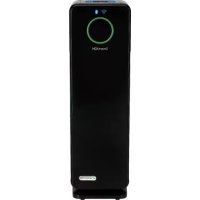
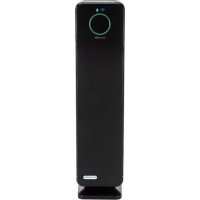
| Product Type | Air Purifier |
| Brand | GermGuardian |
| Model | AC5350 |
| Color | White/Black |
| Coverage Area | Up to 167 sq. ft. |
| Filtration System | Pre-filter, Activated Carbon, True HEPA, UV-C |
| CADR (Smoke) | 121 CFM |
| CADR (Dust) | 124 CFM |
| CADR (Pollen) | 140 CFM |
| Fan Speeds | 3 (Low, Medium, High) |
| Dimensions (W x D x H) | 10.5 x 10.5 x 22.5 inches |
| Weight | 12.6 lbs |
| Power Supply | 120V / 60Hz |
| Power Consumption | 55 W |
| Noise Level | 35 – 50 dB (depending on speed) |
| Filter Replacement Indicator | Yes |
| Timer Settings | 2, 4, or 8 hours |
| UV-C Light | Yes (bulb lasts approx. 1 year) |
| Certifications | Energy Star, CARB, AHAM |
| Warranty | 3 years (limited) |
Frequently Asked Questions - AC5350 GermGuardian
User questions about AC5350 GermGuardian
0 question about this device. Answer the ones you know or ask your own.
Ask a new question about this device
Download the instructions for your Air purifier in PDF format for free! Find your manual AC5350 - GermGuardian and take your electronic device back in hand. On this page are published all the documents necessary for the use of your device. AC5350 by GermGuardian.
USER MANUAL AC5350 GermGuardian
To the consumer, Guardian Technologies LLC warrants this product to be free of defects in materials or workmanship commencing upon the date of the original purchase. In order to be eligible for this Limited Warranty, an original sales receipt or comparable substitute proof of purchase bearing the date of original purchase is required. Refer to the original product carton or specific product/model page on the Guardian Technologies website for warranty length for your particular model. This warranty applies only to the original purchaser of this product from the original date of purchase. This warranty covers product purchased from authorized distributors only.
This warranty applies to repair or replacement of product found to be defective in materials or workmanship. This warranty does not apply to damage resulting from unusual wear, commercial, abusive, unreasonable use or supplemental damage. This warranty does not cover damage from unauthorized repairs or from any use not in accordance with the instruction manual. Defects that are the result of normal wear and tear will not be considered manufacturing defects under this warranty.
If this product should become defective within the warranty period, we will repair or replace any defective parts free of charge. All warranty repairs must be completed by Guardian Technologies LLC. This warranty gives you specific legal rights and you may also have other rights (other rights may vary from state to state in the U.S.A.)
To submit product under warranty the complete machine must be delivered pre-paid to Guardian Technologies LLC. Please include complete information including: the problem, the model number of the product, the day of purchase, and a copy of the original sales receipt along with your name, address, and telephone (email optional). Address returns to the attention of: Customer Service, at the address below. Additional questions or comments can be made toll free to the number listed below.
USA and Canada
Guardian Technologies LLC
26251 Bluestone Blvd.
Euclid, Ohio 44132
1.866.603.5900
www.guardiantechnologies.com
Please go to www.guardiantechnologies.com to register your product. We consider the registration process important to ensuring superior service to our customers, however submitting the warranty registration is optional and does not affect your rights to utilize this warranty according to the conditions stated above.
Additional copies of the instruction manual can be obtained by accessing and printing directly from our website or calling customer service.

guardian technologies™
USE & CARE INSTRUCTIONS

natural_image
Line drawing of a rectangular electronic device with a circular button and base (no text or symbols)Air Cleaning System
Model No. RAC5300, RAC5350 Series
90-Day Limited Warranty
Customer Service
1.866.603.5900
www.guardiantechnologies.com
Date Purchased month ____ year ____
English E - 1 French F - 1 Spanish S - 1
Note: Use GENUINE Guardian Technologies replacement parts only.
REV0818
READ AND SAVE THESE INSTRUCTIONS WARNINGS
Failure to comply with the warnings listed below may result in electric shock or serious injury.

This product should be used only in accordance with the specifications outlined in this manual. Usage other than what has been specified here may result in serious injury.
When using electrical appliances, basic precautions should always be followed to reduce the risk of fire, electric shock and injury to persons, including the following: - Read all instructions before using appliance.
- IMPORTANT - This appliance has a polarized plug (one blade is wider than the other). Toreduce the risk of electric shock, this plug is intended to fit in a polarized outlet only one way. If the plug does not fit fully in the outlet, reverse the plug. If it still does not fit, contact a qualified electrician. Do not attempt to defeat this safety feature.
• To avoid fire or shock hazard, plug the appliance directly into a 120V AC electrical outlet. - Keep the cord out of heavy traffic areas. To avoid fire hazard, NEVER put the cord under rugs, near heat registers, radiator, stoves or heaters.
- To protect against electrical hazards, DO NOT immerse in water or other liquids. Do not use near water.
• Children cannot recognize the hazards associated with the usage of electrical appliances. For this reason, always supervise children when they are near the unit. - Always unplug the air purifier before moving it, opening the grill, changing filters, cleaning or whenever the air purifier is not in use. Be sure to pull by the plug and not the cord.
- NEVER drop or insert any object into any openings.
• DO NOT run cord under carpeting.
- DO NOT cover cord with throw rugs, runners, or similar coverings.
- DO NOT route cord under furniture or appliances. Arrange cord away from traffic area and where it will not be tripped over.
- DO NOT operate any appliance with a damaged cord or plug, if motor fan fails to rotate, after the appliance malfunctions, or if it has been dropped or damaged in any manner. Call Customer Service at 1.866.603.5900 for assistance.
- Use appliance only for intended household use as described in this manual. Any other use not recommended by the manufacturer may cause fire, electric shock or injury to persons.
• DO NOT use outdoors.
• DO NOT place anything on top of unit.
- NEVER block the air openings, grills/outlets or place on a soft surface such as a bed or sofa, as this could cause the unit to tip over, blocking the air intake or outtake opening.
- DO NOT attempt to repair or adjust any electrical or mechanical functions on this unit. Doing so will void your warranty. The inside of the unit contains no user serviceable parts. All servicing should be performed by qualified personnel only.
- WARNING: To reduce the risk of fire or electric shock, do not use this fan with any solid-state speed control device.
- WARNING: Skin or eye damage may result from directly viewing the light produced by the lamp in this apparatus. Always disconnect power before replacing lamp or servicing. Replace Lamp With Lamp Model No. LB4000, Manufactured by Guardian Technologies.
• Always unplug the unit before before cleaning or servicing in any way. - CAUTION: Do NOT use gasoline, benzene, thinner, harsh cleaners, etc. on and/or in the unit while cleaning as they will damage the product. NEVER use alcohol or other solvents.
The 8 hour TWA Ozone for this product is 0.001 ppmv when tested in a 30m3 chamber. The product complies with the maximum allowable concentration of ozone of 0.050 parts per million by volume (ppmv) in a 24-hour period. The Health Canada Guideline 2010 recommends that the maximum exposure limit, based on averaging time of 8 hours, is 0.020 ppmv or less when tested in a sealed, controlled room approximately 30m3 .

WARNING: Cancer or Reproductive Harm. For more information go to www.P65Warnings.ca.gov.

LAMP CONTAINS MERCURY

Manage in accordance with Spills, Disposal and Site Cleanup Requirements. In case of breakage, follow clean-up procedures provided by contacts below.
www.epa.gov/cflcleanup 1-866-284-4010

ENERGY STAR
This product earned the ENERGY STAR by meeting strict energy efficiency guidelines set by the US EPA. US EPA does not endorse any manufacturer claims of healthier indoor air from the use of this product. The energy efficiency of this ENERGY STAR qualified model is measured based on a ratio between the model's CADR for Dust and the electrical energy it consumes, or CADR/Watt.
PRODUCT SPECIFICATIONS AND PARTS

CONTROLS
AC5300 Series Control Panel

flowchart
graph LR
    A["POWER ON/OFF Button"] --> B["SPEED"]
    B --> C["FAN SPEED SELECTION Light"]
    C --> D["UV MODE"]
    D --> E["UV-C ON/OFF Button"]
    D --> F["REPLACE Filter Light"]
    F --> G["REPLACE SWITCH"]
    G --> H["REPLACE SWITCH"]
    H --> I["REPLACE SWITCH"]
    I --> J["REPLACE SWITCH"]
AC5350 Series Control Panel

REPLACEMENT PARTS

AIR CLEANING SYSTEM
Improve your indoor air quality with your new gemguardian® Air Cleaning System. Multiple levels of cleaning include a combination filter that captures allergens, and Charcoal filter to remove odors. UV-C light technology enhances germ-killing.
Pre-Filter - Captures initial dust and allergen particles.
Activated Carbon Filter - Charcoal/Activated Carbon contributes to the control and prevention of the growth of bacteria, germs and mold.
UV-C Light - UV-C light technology works with Titanium Dioxide (TiO 2 ) to enhance the elimination of airborne germs. TiO 2 is activated by the UV-C light to decompose remaining odor molecules caused by smoking, cooking and pets.
*Pre-Filter and Carbon Filter are combined into one layer that attaches to the Filter.
AIR CLEANING LAYERS

OPERATING INSTRUCTIONS
- Select a firm, level and flat location for the air purifier.
* For proper air flow, locate the unit at least 1 foot from any wall or furniture.
* Make sure none of the grills are blocked.
- Plug the power cord into a 120V AC outlet.
IMPORTANT: When moving the air purifier, always lift unit by the carrying handle located on back.
OPERATING THE AIR PURIFIER (AC5300 SERIES):

- Turn unit power ON. To turn OFF, press and hold button for 3 seconds.

- Select fan speed MODE 1 - 3
1 = low, ultra quiet sleep mode
3 = high

- Select UV-C ON or OFF using UV-C Mode Button.

Filter Replacement Indicator: The Replace HEPA light on the control panel will illuminate and flicker indicating that it is time to replace your filter. Replace the filter according to directions (E-7) then press and hold the UV Mode button for 3 seconds to reset the system.
UV Bulb Replacement Indicator: The circular blue light on the front panel of the purifier will flicker when it's time to replace the bulb. Replace the bulb according to directions (E-8), then press and hold UV Mode button for 3 seconds to reset the system.
OPERATING THE AIR PURIFIER (AC5350 SERIES):

- Turn unit power ON.

- Select fan speed MODE 1 - 5
1 = low, ultra quiet sleep mode
5 = high speed allergen control - Default setting is 5

- Select UV-C ON or OFF using UV-C Mode Button.

- TIMER: If you prefer to run the purifier for a specific number of hours, you can select between 1 and 8 hours on the display.
Filter Replacement Indicator: The Replace HEPA light on the control panel will illuminate and flicker indicating that it is time to replace your filter. Replace the filter according to directions (E-7) then press and hold the Timer Set button for 3 seconds to reset the system.
UV Bulb Replacement Indicator: The circular blue light on the front panel of the purifier will flicker when it's time to replace the bulb. Replace the bulb according to directions (E-8), then press and hold UV Mode button for 3 seconds to reset the system.
Control Panel Beep/Sound: The sound emitted from pressing the buttons on the control panel can be turned off/on by holding the Speed button for 3 seconds.
E-6
FILTER REPLACEMENT

The Air Cleaner will beep for 30 seconds and the Replace HEPA light will flash continuously indicating that it is time to replace your filter. Replace the filter according to directions then restart the system. Depending on usage, filter will last approximately 6 months.
- Tum off and unplug the unit.

natural_image
Diagram of a portable air conditioner unit with cooling fins and ventilation slots (no text or symbols)- Press the lock and release button and remove the rear cover from the unit.
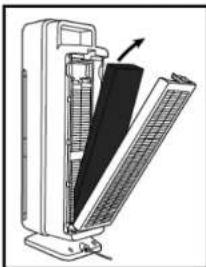
natural_image
Diagram of a device with a black panel and directional arrow indicating movement (no text or symbols)- Remove the used Combination Filter (Filter C) and dispose of it in the garbage.

natural_image
Diagram of a vertical cylindrical device with internal components, showing a black panel and a grid-like structure (no text or symbols)-
Insert filter system into the unit. Consult the arrow on the filter for correct installation direction.
-
Reattach the rear cover of the unit and securely latch into place.
CHECKING AND MAINTAINING FILTER
Maintain the filter by checking it frequently.
Depending on air quality conditions, you may need to replace it more frequently.
Vacuum the carbon filter layer as needed to remove loose debris and dust and to help prolong the life of your filter.
To check the status of the filter, peel back the carbon layer to expose the pleated filter. If the filter is no longer white and is covered in grey dust/dirt it should be replaced.
I IMPORTANT: Do NOT try to wash and re-use the Combination Filter.
IMPORTANT: To maintain the performance of the air cleaner, use Guardian Technologies GENUINE Replacement Parts only.
INSTALLING & REMOVING UV-C BULB
UV Bulb Replacement Indicator: The UV light on the display will flash when its time to replace the UV bulb.

natural_image
Diagram of a portable air conditioner unit with cooling fins and ventilation slots (no text or symbols)- Turn off and unplug unit. Press the lock and release button and remove the rear cover from the unit.
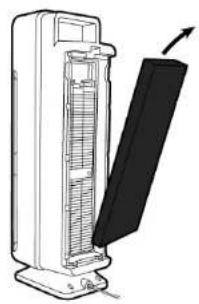
natural_image
Diagram of a vertical electric heater with a black panel and arrow indicating direction (no text or symbols)- Remove the combination filter.

natural_image
Line drawing of a portable air conditioner unit with cooling fins and a handle (no text or symbols)-
Use a Philips head screwdriver to remove 2 screws and detach the UV-C Metal Shield.
-
The UV-C Bulb is removed by carefully grasping the bulb with a clean cloth or tissue and pulling the bulb straight out of the unit.

- The UV-C Bulb is reinstalled by sliding it, horizontally, back into the slots at the top of the unit.
NOTE: Do NOT stick any foreign objects or your fingers inside of the unit.
CAUTION: Do NOT use gasoline, benzine, thinner, harsh cleaners, etc. on and/or in the unit while cleaning as they will damage the product.
NEVER use alcohol or other solvents.
TROUBLESHOOTING GUIDE
| PROBLEM SOLUTION | |
| Unit does not operate. Check that the unit is plugged in.Check that filter is in place.Confirm that filter is Genuine Replacement FilterCall Customer Service. | |
| Unit shuts off unexpectedly. | Check that unit is plugged into a working electrical outlet.Check that filter is firmly in place.Check that the Rear Cover is latched firmly in place.Call Customer Service. |
| No air circulating from unit. Unplug unit. Check Pre-/Carbon and filters.Clean Pre-/Carbon Filter if necessary.Replace filter if necessary. | |
| Increase in noise level. Make sure the filters are clean. Replace if necessary. | |
| Control buttons "beep"when pushed. 1. Press and hold the TIMER and UV buttons for 3 seconds.(AC5350 Series) 2. Select ON/OFF.'Beeping' will automatically be reset to ON when the unit is unplugged. | To shut off the "beeping" sound when buttons are pushed. |
| Red light is flashing. Replace filter and reset system. | |
| Blue ring on product Replace bulb and reset system.is flashing. | |
What is CADR?
CADR stands for "Clean Air Delivery Rate," which indicates the volume of filtered air delivered by an air purifier. CADR ratings show the effectiveness of how efficient the air purifier is at capturing fine particles from things like tobacco smoke and plant pollens from the room.
Clean Air Delivery Rate
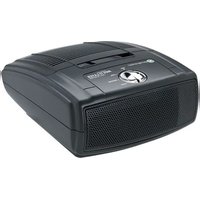
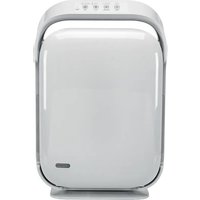
From air cleaner to air cleaner, compare the CADR numbers. First look at suggested room size. Then refer to the Clean Air Delivery Rate (CADR) numbers. The higher the number, the faster the unit filters the air.
Refer to website for individual model CADR numbers.
- USE & CARE INSTRUCTIONS
- Air Cleaning System
- READ AND SAVE THESE INSTRUCTIONS WARNINGS
- LAMP CONTAINS MERCURY
- OPERATING INSTRUCTIONS
- OPERATING THE AIR PURIFIER (AC5300 SERIES):
- OPERATING THE AIR PURIFIER (AC5350 SERIES):
- FILTER REPLACEMENT
- CHECKING AND MAINTAINING FILTER
- INSTALLING & REMOVING UV-C BULB
- What is CADR?
- Clean Air Delivery Rate
Brand : GermGuardian
Model : AC5350
Category : Air purifier