
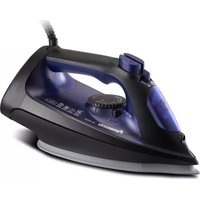
NI-S530 - Iron PANASONIC - Free user manual and instructions
Find the device manual for free NI-S530 PANASONIC in PDF.
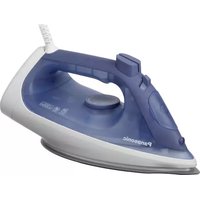


| Product Type | Steam Iron |
| Brand | Panasonic |
| Model | NI-S530 |
| Power | 1800 W |
| Voltage | 220-240 V, 50-60 Hz |
| Soleplate Material | Stainless Steel |
| Water Tank Capacity | 300 ml |
| Cord Length | 2 m |
| Dimensions (L x W x H) | 28 x 13 x 15 cm |
| Weight | 1.2 kg |
| Steam Function | Adjustable steam output, vertical steam |
| Spray Function | Yes |
| Anti-Drip System | Yes |
| Auto Shut-Off | Yes, after 30 seconds horizontal / 8 minutes vertical |
| Temperature Settings | Adjustable thermostat |
| Self-Cleaning | Yes |
| Anti-Calc System | Yes |
| Safety Features | Thermal fuse, auto shut-off |
| Maintenance | Descale regularly; clean soleplate with damp cloth |
| Spare Parts Availability | Soleplate, water tank cap, steam button, temperature dial |
| Country of Origin | China (typical) |
| Warranty | 2 years |
Frequently Asked Questions - NI-S530 PANASONIC
User questions about NI-S530 PANASONIC
0 question about this device. Answer the ones you know or ask your own.
Ask a new question about this device
Download the instructions for your Iron in PDF format for free! Find your manual NI-S530 - PANASONIC and take your electronic device back in hand. On this page are published all the documents necessary for the use of your device. NI-S530 by PANASONIC.
USER MANUAL NI-S530 PANASONIC
NI-S630
Panasonic
Operating Instructions
User Guide
(Household Use Only) Steam Iron
Warranty registration
The warranty can be registered online. Please visit the website by scanning the QR code.
Only Vietnam
Website: https://www.panasonic.com
Printed in China
Printed in China
Panasonic
Operating Instructions
(Household Use Only) Steam Iron
Model No. NI-S630
NI-S530
NI-S430
Contents
Safety precautions 04-09
Parts identification 10
Helpful ironing tips 11
How to use as an iron 11-12
Guide for Steam/Dry selector 13
Using the "power shot" 13
Using the "vertical shot" 14
Using the "spray" 14
Electronic 3-way auto shut-off function (NI-S630 only) 14
How to care for and store your iron 15-16
Q&A 17
Trouble shooting 17
Specifications 18
Thank you for purchasing this Panasonic product.
Before operating this unit, please read these instructions completely and save them for future use.
Safety precautions
To reduce the risk of electric shock, injury, fire, loss of life, and damage to equipment or property, always observe the following safety precautions.
Explanation of symbols
The following symbols are used to classify and describe the level of hazard, injury, and property damage caused when the denotation is disregarded and improper use is performed.

WARNING
Denotes a potential hazard that could result in serious injury or death.

CAUTION
Denotes a hazard that could result in minor injury or damage your belongings.
The following symbols are used to classify and describe the type of instructions to be observed.

This symbol is used to alert users to a specific operating procedure that must not be performed.

This symbol is used to alert users to a specific operating procedure that must be followed in order to operate the unit safely.

WARNING

Do not use when the power plug or power cord is damaged or hot.
Never use the product if the power plug fits loosely in the socket-outlet.
- Doing so may cause electric shock or fire due to a short circuit.

Do not leave the iron unattended while it is connected to the socket-outlet.
- Doing so may cause fire.

Do not connect or disconnect the power plug to the socket-outlet with wet hands.
- Doing so may cause electric shock or injury.

Do not damage, modify, forcibly bend, pull, or twist the power cord.
Do not place anything heavy on or pinch the power cord.
- Doing so may cause electric shock or fire due to a short circuit.

Do not allow the power cord to touch hot surfaces of the iron.
- Doing so may cause electric shock or injury.
! WARNING

Do not use with the power cord bundled.
- Doing so may cause electric shock or fire due to a short circuit.

Do not use the product with wet hands.
- Doing so may cause electric shock or fire due to a short circuit.

Never modify, disassemble, or repair the product by yourself.
- Doing so may cause ignition or injury due to abnormal operation. Contact an authorized service agent for repair.

Do not use in proximity of flammable materials (such as benzine or the like).
- Doing so may cause an explosion or fire.

Do not wrap the power cord around the product for storage.
- Doing so may cause breakage to the wire of the power cord, and may cause electric shock or fire due to a short circuit.

Do not immerse the product in water or other liquids.
- Doing so may cause burns, electric shock or fire due to a short circuit.

The iron is not to be used if it has been dropped, if there are visible signs of damage or if it is leaking.
- Refer servicing to authorized service personnel.

Do not use in a way exceeding the rating of the socket-outlet or the wiring.
- Exceeding the rating by connecting too many plugs to one socket-outlet may cause fire due to overheating.

Always ensure the product is operated on an electric power source matched to the rated voltage indicated on the product.
Fully insert the power plug.
- Failure to do so may cause injury, electric shock or fire.

Regularly clean the power plug to prevent dust from accumulating.
- Disconnect the power plug and wipe with a dry cloth.

Use a dedicated socket-outlet, and do not use an extension cord.
- Failure to do so may cause electric shock or fire.

This product must use a socket-outlet with earth connection.
- Failure to do so may cause fire or electric shock.
WARNING

This appliance is not intended for use by persons (including children) with reduced physical, sensory or mental capabilities, or lack of experience and knowledge, unless they have been given supervision or instruction concerning use of the appliance by a person responsible for their safety. Children should be supervised to ensure that they do not play with the appliance.
- Failure to do so may cause an accident or injury.

Immediately stop using and remove the power plug if there is an abnormality or malfunction.
- Using it in such conditions may cause fire, electric shock, or injury.
- The power cord is damaged (like it cracks, or the core wire is exposed).
- The main body, power cord or power plug is abnormally hot, deformed or discolored.
- The product may occasionally fail to power on after the power cord is moved.
- The power plug or power cord smells of burning.
- Immediately request inspection or repair at an authorized service center.

If the power cord is damaged, it must be replaced by the manufacturer, its service center, or similarly qualified persons in order to avoid a hazard.
- Failure to do so may cause an accident or injury.

The iron must be used and rested on a flat, stable surface. When placing the iron on its heel rest, ensure that the surface on which the heel rest is placed is stable.
- If placed on a shaggy rug or other unstable location, the iron may fall over and cause damage to the rug, injury, or burns.

CAUTION

Do not insert pins or needles into the iron or use the product on clothes with sewing needles or the like inserted.
- Doing so may cause electric shock or injury.

Do not put the soleplate too close to you or others since steam may unexpectedly erupt from it.
- Doing so may cause scalds or injury.

Do not use the product on anything other than fabric.
- Failure to do so may cause damage.

Do not store the product until it has fully cooled down.
Doing so may cause scalds.

Do not store the product while the power cord is twisted.
- Doing so may cause breakage to the wire of the power cord, and may result in scalds, electric shock or fire due to a short circuit.

Do not add perfume, vinegar, starch, descaling agents, ironing aids or other chemicals in the water reservoir. Please only use room-temperature pure water or distilled water in this product.
- Otherwise the clothes may be stained or discolored.

Do not use any ironing accessories available on the market.
- Doing so may cause burns or damage to cloth due to incorrect operation.

Do not use the product near walls or furniture that cannot withstand high temperature or humidity.
- Doing so may damage the wall or furniture.

Do not use steam when wearing gloves through which steam can penetrate.
Doing so may cause scalds.

Do not add hot water in the water reservoir.
- Doing so may cause burns due to hot water splashes.

If the shot intensity is low, do not operate the power shot button.
- Doing so may cause burns due to hot water leaks.

CAUTION

Do not store the power cord coiled with sharp angles.
- This may damage the cord.

Do not repeatedly and quickly press the power shot button.
- If repeating operation over an interval of less than 2 seconds, burns due to hot water leaks may result.

Do not touch the steam or "power shot" during use.
- When using an ironing board through which steam can penetrate, do not put your hand, leg, etc., under the ironing board.
- Do not aim the steam towards your hand, knee, or any other part of the body.
- Do not use steam or "power shot" when the iron is partially sticking out from the ironing board.
- Do not iron the clothes that you are wearing.

Do not tilt or violently move the iron back and forth.
- Doing so may cause burns due to hot water leaks.

Do not touch the steam during use.
- Do not aim the steam towards your hand, knee, or any other part of the body.
- Do not iron clothes that you are wearing.
- Doing so may cause scalds.

Do not touch the hot surface (such as the surface of the soleplate, any side of the iron and the hot area around it) during use.
- Doing so may cause scalds.
- Do not place your hands, feet, etc. under the ironing board.
- Do not place the iron on your hand, knee or any other part of the body.
- Do not use steam when the iron is partially sticking out from the ironing board.

Do not put the iron on a carpet or the floor.
- Doing so may damage the product, carpet or floor.

Do not set the steam control to the steam positions if the temperature setting is , or when the iron is still heating up.
- Otherwise hot water may leak from the iron and it may cause scalds.
Steam Zone
| Fabric type | Temperature setting | Steam setting * |
| Cotton / Linen | ●●● ~ MAX | |
| Wool | ●● | (Dry Only) |
| Silk / Acrylic | ● |
* These marks are one of examples. They might be different

CAUTION

Disconnect the power plug by holding the power plug instead of pulling the power cord.
- Failure to do so may break the power cord, and may cause burns, electric shock, or fire due to a short circuit.

Care should be taken when using the product.
Steam emission may cause burns.

Use the product only for its intended purpose, for ironing fabrics.
Failure to do so may cause injury.

When using with the following fabrics, test on an inconspicuous area, or place a cloth over the fabric to prevent the fabric from marking.
Expensive or specially processed fabrics (velvet, acrylic, nylon, cashmere, etc.)
Fabrics that are labeled as "low heat" or "medium heat", or dark colored fabrics.
Failure to do so may cause damage to the fabric.

The plug must be removed from the socket-outlet before the water reservoir is filled with water.
Also, disconnect the power plug during emptying, cleaning, and when not in use.
Failure to do so may cause electric shock or fire due to electrical leakage resulting from insulation deterioration.

When ironing wet clothes, please use dry ironing.
Failure to do so may cause scalds due to hot water splashes from the main body.
English Parts identification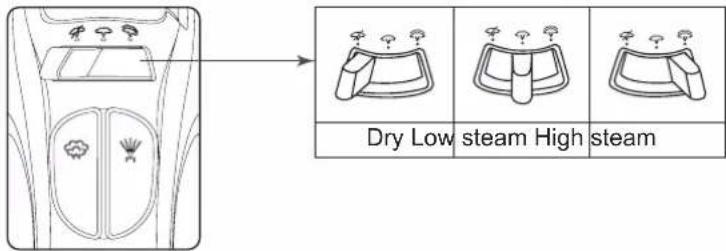
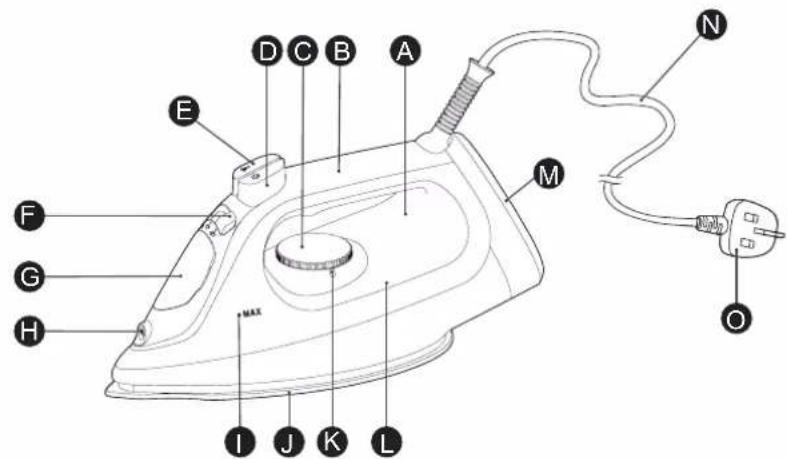
A Thermostat operating indicator light B Handle
© Temperature selector
D Power shot button
E Spray mist button
F Steam/Dry selector
G Water fill cover
H Spray nozzle
① Maximum water level indicator
J Soleplate
K Temperature select scale position
Water reservoir
※Plug type may vary comply with respective country or region requirement.
Helpful ironing tips
The temperature selector of the iron has words, dots and steam symbols.
The dots are symbols for 3 temperature ranges:
- Low temperature • • Medium temperature ... High temperature

Some fabrics are labeled with these dots as a guide for selecting the proper ironing temperature setting.
Use a press cloth if necessary.
Notes:
- The thermostat operating indicator light goes on and off alternately to indicate the changing temperature of the soleplate. If you turn the temperature selector from a high temperature to a lower temperature, wait until the indicator light goes on before using the iron.
- Do not place the hot iron on cloth for extended time or wrap cloth over the hot iron.
How to use as an iron
- Move the steam/dry selector to the dry position to avoid water leakage.

- Fill water in the water reservoir when using steam, power shot, vertical steam or spray.
① Open the water fill cover. Hold the iron as shown and fill the iron with water up to "MAX" (about 260 mL). Use a clean cup for filling. ② Place iron in vertical position to check water level. ③ Close water fill cover firmly to prevent spillage during ironing.

Note:
Do not overfill the water reservoir. The steam will release through the vents when the iron is positioned vertically.
- Position the iron in the heel rest position and make sure the temperature selector is set to "0".

- Plug the power plug into socket-outlet.

- Set the temperature selector. The thermostat operating indicator light goes on.
Refer to "Guide for Steam/Dry selector" on P13
- Please make sure the temperature select indicator setting is on "MAX" when using "high steam" and "power shot".
Note: If the temperature of soleplate is high, the light does not go on.
- Wait until the thermostat operating indicator light goes off. Hold the iron horizontally and move the steam/dry selector into the dry position when using the "power shot".
- After each use
Set the temperature selector to "0" and unplug.

① Set the steam/dry selector to the dry position. If the steam/dry selector is not in the dry position after using, remaining water will move into the soleplate and can result in burns when the iron is used next time.

② Empty the water reservoir immediately after using. Do not store the iron with water in it. If you empty the water reservoir after it has cooled, heat the iron for about 5 minutes with the temperature selector set to "MAX".

- Do not wind the power cord around the iron. It may be damaged by the hot soleplate.
③ Wait until the iron has cooled before storing it, and always set it on the heel rest to protect the soleplate from scratches, corrosion or stains.

Guide for Steam/Dry selector
| Steam/Dry selector | Temperature zone | Recommendations | |
| Dry |  | Choose according to the type of fabrics. | For polyester and other synthetic fiber material. |
| Low steam |  |  | For thin or delicate fabrics requiring a small amount of steam. |
| High steam | [xGGW] | [cSZX] | For fabrics requiring a lot of steam. (i.e. thick materials, items with stubborn wrinkles). |

Please make sure the temperature select indicator setting is on "MAX" when using "high steam".
CAUTION:
Do not aim the steam at any parts of your body or others.
Notes:
- The anti-drip system will activate when the temperature of the soleplate's surface drops. The thermostat operating indicator light will go on and steam will stop. It is normal to hear clicking sound during this process. Resume usage only after the thermostat operating indicator light has turned off.
- Use an ironing board to support the steam iron.
Using the "power shot"
The "power shot" feature provides extra steam which goes deep into the garment and is helpful for removing stubborn wrinkles. It is necessary to clean the inside of the iron before using the "power shot" feature, if you have not used the "power shot" feature for a prolonged period. Simply test the "power shot" feature several times away from the ironing board and clothes to be ironed. This will prevent brown spotting or water spotting on the clothes.
Set the steam/dry selector to the dry position.
Set the temperature selector to the "MAX" position.
Simply pump the power shot button

- Pump the power shot button several times at the beginning of each ironing session.
- Press the power shot button in intervals of at least 2 seconds during the use to prevent water spotting.
- If the power shot weakens, wait until the thermostat operating indicator light goes on, and then off.
- Use a press cloth if necessary.
Using the "vertical shot"
To get better results when using vertical steam, hang the garment on a hanger. Curtains and drapes may also be steamed once they are hung. Hold the iron away from your body, close to but not touching the fabric. Pull the fabric tightly and pump the power shot button at 2 seconds intervals as you press the iron over the wrinkled fabric.
- If the power shot weakens, wait until the thermostat operating indicator light goes on, and then off.

Using the "spray"
The spray feature is particularly helpful for removing stubborn wrinkles and where extra dampening is needed.
The spray may be used with steam or dry ironing. Simply push the spray mist button whenever spray is desired.
- If the spray does not work immediately, keep triggering until it does.

Electronic 3-way auto shut-off function (NI-S630 only)
The auto shut-off feature is not intended to take the place of unplugging the cord. The auto shut-off system works regardless of the position of the temperature selector.
- When the iron is left idle with its soleplate facing down or on its side for approx. 1 minute, the iron will automatically shut off.
- When the iron is left idle on its heel rest for approx. 10 minutes, the iron will automatically shut off.
- To resume ironing and turn the iron on, simply move the iron in any manner. If the iron has been left in the auto shut off mode for more than 10 minutes, allow the iron to reheat until the indicator light goes off.
1 minute to "0"

10 minutes to "0"
Always unplug the iron when you finish ironing. Even though the iron is unplugged, the soleplate is still hot. Make sure to rest the iron on its heel, away from fabric.
How to care for and store your iron
Cleaning
▶ Using the "power shot" feature
- Fill the water reservoir with tap water as described in the "How to use as an iron" on P11.
- Set the temperature select indicator to "0".
- Plug the power plug into socket-outlet.
- Stand the iron up and set the temperature select indicator to "MAX".
- Hold the iron horizontally over the sink after the thermostat operating indicator light has gone out.
- Pump the power shot button quickly (at least 3 times per second) for approx. 20-30 times continuously. While pumping, shake the iron back and forth.
- Set the temperature select indicator to "0".


- Unplug and dispose of any water remaining in the water reservoir.

- To prevent corrosion of the soleplate vents, plug the power plug into a socket-outlet, stand the iron up, set the temperature select indicator to "MAX" and preheat for about 5 minutes.
- Set the temperature select indicator to "0" and unplug.
- Iron on a used cloth to remove any impurities on the soleplate.
- Repeat the steps if venting of the steam does not improve.
- Use both methods once every two weeks. If the water is very hard (i.e., steam holes on the soleplate are easily blocked by impurities), both methods should be used more frequently.
- Let the iron cool down on its heel rest and follow the instructions in the "After each use" section on page 12.
▶ Anti-calc system (Stay clean vents)
The built-in anti-calc system in the water reservoir continuously reduces scale build-up in the vaporizing chamber of the iron.
This system makes it possible to use the steam function for a long period of time and prevents steam vents from clogging.
Anti-drip system (automatic water seal)
This model has an anti-drip system. When the temperature of the soleplate's surface drops too low, the valve for the vaporizing chamber in the iron automatically closes and stops the water from flowing. This prevents hot unvaporized water from spewing out from the soleplate when the iron has cooled down. With this system, it is unnecessary for you to wait until the inside of the vaporizing chamber dries completely when you store the iron.
Note:
- It is not a sign of malfunction even if a click sound is heard. This sound can be heard whenever this system is activated.
How to care for your iron
▶ Surface of the iron
- After unplugging and cooling the iron, simply wipe off with a damp cloth and, if necessary, use a mild detergent.
- Never use any strong cleaners.
▶ Soleplate
- Starch and other residue may be easily removed from the soleplate with a damp cloth.
- To avoid scratching the surface, never use a metallic pad to clean the soleplate, and never place the iron on a rough surface.
- The best way to remove synthetic residue from the soleplate is to iron over an old cotton cloth rag after heating the iron.
Note:
Never use cleaners in the iron, since they may damage the working parts of the iron. Some odor may be released during initial use of the iron, however, this is normal and the odor will not attach to your clothes. Never use steam iron detergent in the iron, since they may damage the working parts of the iron.
Q&A
Question Answer
Why click sound or metallic sound be heard while using or shaking the iron?
Why do the clothes sometimes become brown after being ironed?
Why are there white powder/particles coming out of the steam vents while using the steam function (especially when using "power shot")?
▶
These sounds are made by the internal parts of the iron, spray mechanism, leakage prevention, etc., moving slightly. This is normal.
▶
If there is laundry detergent remaining on the fabric, the clothes may become brown after being ironed.
▶
The powder/particles are hydrophilic treatment or impurities and minerals found in hard water etc. These are not harmful and can be brushed off clothing.
Troubleshooting
| Problem Causes, Solution | |
| No heating | Make sure the power plug is plugged into socket-outlet. |
| No steam | Fill the water reservoir with tap water up to " MAX " dot. |
| If there is no steam, set the steam/dry selector to the steam position, or set the temperature selector to " MAX ". | |
| Poor steaming power | For poor steam, move the steam/dry selector several times, then reset to the steam position. |
| Press the power shot button several times when the " power shot " appears insufficient. | |
| Wait until the thermostat operating indicator light goes off before using the iron. | |
| Set the temperature selector to " MAX ". | |
| No spray | Push the spray mist trigger several times. |
| Fill the water reservoir with tap water up to " MAX " dot. | |
| Water leaks from steam vents | Press the power shot button in intervals of at least 2 seconds when using the " power shot ". |
| Wait until the thermostat operating indicator light goes off before using the iron. | |
| Clothes are marked | Empty the water reservoir and fill it with clean water. There may be contaminants in the iron/cup. |


- PANASONIC
- WARRANTY REGISTRATION
- CONTENTS
- SAFETY PRECAUTIONS
- EXPLANATION OF SYMBOLS
- WARNING
- CAUTION
- HELPFUL IRONING TIPS
- NOTES
- HOW TO USE AS AN IRON
- NOTE
- REFER TO "GUIDE FOR STEAM/DRY SELECTOR" ON P
- USING THE "POWER SHOT
- USING THE "VERTICAL SHOT
- USING THE "SPRAY
- ELECTRONIC 3-WAY AUTO SHUT-OFF FUNCTION (NI-S630 ONLY)
- HOW TO CARE FOR AND STORE YOUR IRON
- CLEANING
- USING THE "POWER SHOT" FEATURE
- ANTI-CALC SYSTEM (STAY CLEAN VENTS)
- ANTI-DRIP SYSTEM (AUTOMATIC WATER SEAL)
- HOW TO CARE FOR YOUR IRON
- SURFACE OF THE IRON
- SOLEPLATE
- Q&A
- QUESTION ANSWER
- TROUBLESHOOTING
Brand : PANASONIC
Model : NI-S530
Category : Iron