Groove - Headphone amplifier Apogee - Free user manual and instructions
Find the device manual for free Groove Apogee in PDF.


| Product Type | Portable USB Headphone Amplifier / DAC |
| Brand | Apogee |
| Model | Groove |
| Dimensions (W x H x D) | 3.5 x 1.2 x 0.6 inches (89 x 30 x 15 mm) |
| Weight | 2.6 oz (74 g) |
| Power Source | Bus-powered via USB; no external battery required |
| Input Connector | USB-C (compatible with USB-A via adapter) |
| Output Connector | 3.5 mm (1/8") stereo headphone jack |
| Output Power | 2.5 Vrms into 300 ohms; 1.5 Vrms into 32 ohms |
| Frequency Response | 20 Hz - 20 kHz ±0.5 dB |
| DAC Resolution | Up to 24-bit / 96 kHz |
| SNR (Signal-to-Noise Ratio) | > 115 dB (A-weighted) |
| THD+N (Total Harmonic Distortion + Noise) | < 0.001% |
| Compatibility | Mac, Windows, iOS, Android (with appropriate adapter) |
| Driver Requirement | Plug-and-play on most systems; drivers available for Windows |
| Construction Material | Aluminum chassis with rubber grip |
| Indicators | LED power/status indicator |
| Accessories Included | USB-C to USB-A cable, adapter cable (USB-C to Lightning) |
| Maintenance & Cleaning | Wipe with dry cloth; avoid liquids; keep connectors clean |
| Safety Warnings | Do not use at excessive volume; avoid exposure to moisture |
| Spare Parts & Repairability | Not user-serviceable; contact Apogee support for repairs |
Frequently Asked Questions - Groove Apogee
User questions about Groove Apogee
0 question about this device. Answer the ones you know or ask your own.
Ask a new question about this device
Download the instructions for your Headphone amplifier in PDF format for free! Find your manual Groove - Apogee and take your electronic device back in hand. On this page are published all the documents necessary for the use of your device. Groove by Apogee.
USER MANUAL Groove Apogee
Thank you for Choosing Groove
Since 1985, Apogee has produced award-winning technology that powers many of the world's most respected studios. Apogee products have been instrumental in capturing countless GRAMMY® and OSCAR® winning performances by the most successful artists.
Now you can experience the same legendary quality with Apogee Groove™. Not only does Groove deliver the sound of the studio to your laptop, it's also the first headphone amp/DAC designed to make all headphones sound their best using Apogee's unique Constant Current Drive™ technology.
Learn more about Constant Current Drive: www.apogeedigital.com/groove/
Register your Apogee Product
When you register your new Apogee product it helps us provide you with the best possible customer experience.
Benefits of registration:
- Get help from our technical support experts
- Be notified immediately when updates are available for your product
- Communicate your thoughts and feedback in our customer survey
• Find out first about new Apogee products
Go here to register Groove: www.apogeedigital.com/register
Connecting to Mac
Apogee Groove is fully class-compliant with OS X. No special software is required. See your Groove box for system requirements.
To select Groove as your Output device on OS X:
- Connect Groove to your computer using the supplied USB cable
- Open Mac System Preferences and select the Sound icon



Sound
- In the Sound Output tab, select Groove from the list

Audio played from iTunes, Safari, and other general Mac applications will output through Groove.
Connecting to Windows
Install the Driver
Driver software is required for Groove to work on computers running the Windows operating system. See your Groove box for system requirements.
To download the Windows driver, register Groove on the Apogee website: www.apogeedigital.com/register/
- Log into your Support Account
- Register Groove. In the "My Registered Products" page, click the Download Driver link and save the file
- Unzip the download and run the Apogee_DriverSetup file inside Follow the prompts to complete installation
- NOTE: If a prompt appears asking for permission to make changes to the computer, click "Yes".
Select Groove as the Output Device
To select Groove as your output device in Windows:
- Click Start
- In the Search bar, type "Manage audio devices"
- Select "Manage audio devices" from the search results
- In the Sound screen, select the "Playback" tab
- Select Apogee Groove from the list
- Click the "Set Default" button
- Click OK to close the Sound screen
Audio played from iTunes, Windows Media Player, and other general programs will output through Groove.

Using Groove
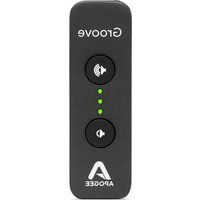
Groove has 3 multi-color LEDs and 2 up/down volume control buttons.
What do the LED colors mean?
A single blue LED indicates Groove is connected and ready but not streaming audio from an application.
Purple LEDs display the listening level you've set with the up/down volume controls.
Green LEDs display the level of the audio file you're playing back, regardless of the listening level.
NOTE: If the green LED playback level seems low, check the volume control of your playback application and increase output as necessary in the application.
The two buttons adjust the analog volume up or down.
Blue LED
Ready but not streaming audio

Purple LEDs
Listening level set using volume up/down buttons

Volume up

natural_image
Circular icon with a speaker symbol emitting sound waves (no text or numbers)
natural_image
Circular button with a white speaker symbol on black background (no text or numbers)Volume down
Green LEDs
Audio playback level Red: Turn application volume down


Warranty Information

APOGEE ELECTRONICS CORPORATION warrants this product to be free of defects in material and manufacture under normal use for a period of 12 months. The term of this warranty begins on the date of sale to the purchaser from an authorized Apogee dealer (proof of purchase in the form of a receipt may be required). Units returned for warranty repair to Apogee or an authorized Apogee warranty repair facility will be repaired or replaced with a functional equivalent product that is new or refurbished at the manufacturer's option, free of charge. Please note this guarantee may be subject to other conditions as dictated by the customer's legal warranty rights under the applicable national legislation governing the sale of consumer goods.
Apogee reserves the right to change or improve design at any time without prior notification. Design changes are not implemented retroactively, and the incorporation of design changes into future units does not imply the availability of an upgrade to existing units. This warranty is void if Apogee determines, in its sole business judgment, the defect to be the result of abuse, neglect, alteration or attempted repair by unauthorized personnel. The buyer acknowledges and agrees that in no event shall the company be held liable for any special, indirect, incidental or consequential damages, or for injury, loss or damage sustained by any person or property, that may result from this product failing to operate correctly at any time.
Warranty details are subject to change. For the latest warranty information please visit www.apogeedigital.com.

Declarations of Conformity
This device complies with Part 15 of the FCC Rules. Operation is subject to the following two conditions:
(1) This device may not cause harmful interference and (2) This device must accept any interference received, including interference that may cause undesired operation. This equipment has been tested and found to comply with the limits of a Class B digital device, pursuant to Part 15 of the FCC Rules.
CAUTION: Changes or modifications not expressly approved by Apogee Electronics Corporation compliance could void the user's authority to operate the equipment.
Rating: 3.3-5V 100mA USB 2.0
Declaration of Conformity – CE
Apogee Electronics Corporation hereby declares that the product, Groove, to which this declaration relates, is in material conformity with the following standards or other normative documents:
(EN50081-1/EN55022; 1995) and (EN50082-1/IEC 801-2, 3, 4; 1992)
following the provisions of: (73/23/EEC – Low Voltage Directive) and (89/336/EEC – EMC Directive)
Declaration of Conformity – CE
Apogee Electronics Corporation hereby declares that the product, Groove, to which this declaration relates, is in material conformity with the following standards or other normative documents:
(EN50081-1/EN55022; 1995) and (EN50082-1/IEC 801-2, 3, 4; 1992)
following the provisions of: (73/23/EEC - Low Voltage Directive) and (89/336/EEC - EMC Directive)
Declaration of Conformity – Japan
Apogee Electronics Corporation hereby declares that Groove, to which this declaration relates, is in material conformity with the VCCI Class A standard.
Declaration of Conformity – Australia
Apogee Electronics Corporation hereby declares that the Groove is in material conformity with AN/NZS standard requirements.
Contact Information
Apogee Technical Support:
www.apogeedigital.com/support
Apogee Electronics Corporation:
1715 Berkeley St. Santa Monica, CA 90404, USA
TEL: +1 310 584-9394, FAX: +1 310 584-9385
www.apogeedigital.com
© 2015, Apogee Electronics Corp. All rights reserved. Apogee Groove is a registered trademark of Apogee Electronics Corp. Mac, the Mac logo and Mac OS are registered trademarks of Apple Inc.
Windows is a registered trademark of Microsoft Corporation. Intel is a registered trademark of Intel Corporation.
OSCAR is a registered trademark and service mark of the Academy of Motion Picture Arts and Sciences.
GRAMMY is a registered trademark of the Grammy Foundation.
Groove

APOGEE
www.apogeedigital.com
Product Booklet, Apogee Groove. Part Number: 7070-0033-2014. Rev 3.0
- Thank you for Choosing Groove
- Register your Apogee Product
- Benefits of registration:
- Connecting to Mac
- Connecting to Windows
- Install the Driver
- Select Groove as the Output Device
- Using Groove
- What do the LED colors mean?
- Blue LED
- Purple LEDs
- Green LEDs
- Warranty Information
- Declarations of Conformity
- Contact Information
- Groove
Brand : Apogee
Model : Groove
Category : Headphone amplifier