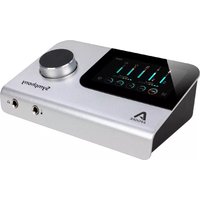
Clearmountain 8068 - Professional audio equipment Apogee - Free user manual and instructions
Find the device manual for free Clearmountain 8068 Apogee in PDF.


Pick your language and provide your email: we'll send you a specifically translated version.
| Product Type | Analog Summing Mixer |
| Brand | Apogee |
| Model | Clearmountain 8068 |
| Number of Input Channels | 8 |
| Number of Output Channels | 2 (Stereo) |
| Analog Inputs | 8 x 1/4" TRS |
| Analog Outputs | 2 x XLR (Main), 2 x 1/4" TRS (Monitor) |
| Frequency Response | 20 Hz - 20 kHz ±0.1 dB |
| THD+N | <0.0005% |
| Signal-to-Noise Ratio | >120 dB |
| Power Supply | Internal, 100-240 VAC, 50/60 Hz |
| Power Consumption | 30 W |
| Dimensions (W x H x D) | 19" x 3.5" x 10" (48.3 x 8.9 x 25.4 cm) |
| Weight | 12 lbs (5.4 kg) |
| Rack Mountable | Yes, 2U |
| Construction Material | Steel chassis, aluminum front panel |
| Key Features | Analog summing, stereo bus, discrete circuitry, headroom |
| Cleaning Instructions | Use dry soft cloth; avoid solvents |
| Safety Certifications | CE, FCC, RoHS |
| Warranty | 1 year limited |
Frequently Asked Questions - Clearmountain 8068 Apogee
How do I connect the Clearmountain 8068 to my audio interface?
Connect the balanced outputs of your interface to the line inputs on the rear panel of the Clearmountain 8068 using TRS cables. The main stereo output should be connected to your monitoring system via XLR cables.
Can I use the Clearmountain 8068 with unbalanced gear?
Yes, but for optimal performance use balanced connections. If using unbalanced cables, keep cable lengths short and avoid running them near power sources to minimize noise.
What is the recommended gain staging for the 8068?
Set your source levels so that the average signal hits around 0 dBVU on the meters. The Clearmountain 8068 offers ample headroom, so you can push levels higher for analog coloration without distortion.
Does the Clearmountain 8068 require any special drivers?
No, it is a purely analog device and does not require any drivers. It connects directly to your audio interface's line outputs.
How should I clean the front panel and controls?
Use a soft, dry cloth to wipe the surface. For stubborn dirt, slightly dampen the cloth with water. Avoid using any chemical cleaners or abrasives that could damage the finish.
What type of rack screws should I use?
Use standard 10-32 rack screws with a rack rail depth of approximately 12 inches. Do not overtighten to avoid damaging the chassis.
Can I use the 8068 for mixing more than 8 channels?
Yes, you can cascade multiple units using the link feature (if available) or sum multiple buses. Each unit provides stereo output, so for larger setups you can combine them.
What is the headroom of the Clearmountain 8068?
The unit operates on a +24 dBu headroom, allowing you to drive signals hot without clipping. This is ideal for achieving analog saturation effects.
Is there a mute or solo function?
The Clearmountain 8068 is a summing mixer and does not include per-channel mute or solo. Those functions should be handled in your DAW before routing audio to the unit.
What is the warranty period and how do I get service?
Apogee offers a 1-year limited warranty. For service, contact Apogee support or an authorized service center. Keep your proof of purchase for warranty claims.
User questions about Clearmountain 8068 Apogee
0 question about this device. Answer the ones you know or ask your own.
Ask a new question about this device
No questions yet. Be the first to ask one.
Download the instructions for your Professional audio equipment in PDF format for free! Find your manual Clearmountain 8068 - Apogee and take your electronic device back in hand. On this page are published all the documents necessary for the use of your device. Clearmountain 8068 by Apogee.
USER MANUAL Clearmountain 8068 Apogee

Manual assistant
Powered by Anthropic
Waiting for your message
Product information
Brand : Apogee
Model : Clearmountain 8068
Category : Professional audio equipment