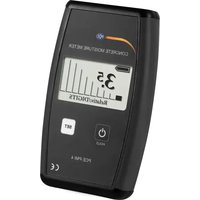
MPC 10 - Measuring equipment PCE Instruments - Free user manual and instructions
Find the device manual for free MPC 10 PCE Instruments in PDF.


Pick your language and provide your email: we'll send you a specifically translated version.
| Brand | PCE Instruments |
| Model | MPC 10 |
| Product Type | Measuring Equipment |
| Dimensions (approx.) | 150 x 80 x 30 mm |
| Weight (approx.) | 200 g |
| Power Supply | 2 x AA batteries (1.5 V) |
| Battery Life | Approximately 50 hours continuous use |
| Display | LCD with backlight |
| Measurement Functions | Pressure measurement, data hold, min/max recording |
| Measuring Range | 0 to 10 bar (or equivalent unit) |
| Accuracy | ±0.5% of full scale |
| Resolution | 0.01 bar |
| Auto Power Off | Yes, after 10 minutes of inactivity |
| Operating Temperature | 0°C to 50°C |
| Storage Temperature | -10°C to 60°C |
| Interface | USB for data transfer (optional) |
| Cleaning | Wipe with a dry, soft cloth |
| Safety Precautions | Do not exceed rated pressure; avoid dropping |
| Spare Parts | Batteries, seals, and carrying case available |
| Repair | Contact authorized service center |
| Manual | 11 pages in English (PDF) |
Frequently Asked Questions - MPC 10 PCE Instruments
How do I turn on the MPC 10?
Press the ON/OFF button located on the front panel. The device will perform a self-test and then display the current pressure reading.
What type of batteries does the MPC 10 use?
It uses two AA 1.5V batteries. Replace them when the battery indicator shows low.
What is the measurement range of the MPC 10?
The measurement range is typically 0 to 10 bar. Refer to the manual for exact specifications.
How can I calibrate the MPC 10?
Calibration should be performed by a certified technician. The device may have a zero adjustment screw; consult the manual for details.
Does the MPC 10 have a data hold function?
Yes, press the HOLD button to freeze the current reading on the display. Press again to release.
How do I clean the MPC 10?
Wipe the exterior with a dry, soft cloth. Do not use solvents or immerse the device in water.
What does the auto power off feature do?
The device turns off automatically after 10 minutes of inactivity to save battery. Press any button to wake it.
Is the MPC 10 water-resistant?
No, it is not water-resistant. Avoid exposure to moisture or liquids. Store in a dry place.
How can I download the manual for the MPC 10?
You can download the manual in PDF format from the notice-facile.com website by selecting your language and providing your email.
What should I do if the display shows an error?
Check if the batteries are fresh and properly inserted. If the error persists, contact PCE Instruments support.
User questions about MPC 10 PCE Instruments
0 question about this device. Answer the ones you know or ask your own.
Ask a new question about this device
No questions yet. Be the first to ask one.
Download the instructions for your Measuring equipment in PDF format for free! Find your manual MPC 10 - PCE Instruments and take your electronic device back in hand. On this page are published all the documents necessary for the use of your device. MPC 10 by PCE Instruments.