
RCD-M37 - CD player and integrated amplifier DENON - Free user manual and instructions
Find the device manual for free RCD-M37 DENON in PDF.


| Product type | CD player and integrated amplifier |
| Brand | DENON |
| Model | RCD-M37 |
| Dimensions (W x H x D) | 210 x 115 x 330 mm |
| Weight | 4.5 kg |
| Power supply | 220-240 V AC, 50/60 Hz |
| Output power | 30 W per channel (into 4 Ω, RMS) |
| Supported audio formats | CD, CD-R/RW, MP3 (on CD) |
| Tuner | FM/AM with 40 presets |
| Auxiliary inputs | 1 x analog audio input (RCA) |
| Headphone output | 1 x 3.5 mm jack |
| Remote control | Yes, included |
| Display | Fluorescent tube display |
| Maintenance and cleaning | Clean with a dry, soft cloth. Do not use solvents. |
| Safety | Do not expose to moisture or open flames. Ensure adequate ventilation. |
| Spare parts and repairability | Contact an authorized DENON service center for repairs. |
| General information | Compliant with European directives (CE). Repairability index not provided. |
Frequently Asked Questions - RCD-M37 DENON
User questions about RCD-M37 DENON
0 question about this device. Answer the ones you know or ask your own.
Ask a new question about this device
Download the instructions for your CD player and integrated amplifier in PDF format for free! Find your manual RCD-M37 - DENON and take your electronic device back in hand. On this page are published all the documents necessary for the use of your device. RCD-M37 by DENON.
USER MANUAL RCD-M37 DENON
The lightning flash with arrowhead symbol, within an equilateral triangle, is intended to alert the user to the presence of uninsulated "dangerous voltage" within the product's enclosure that may be of sufficient magnitude to constitute a risk of electric shock to persons.

The exclamation point within an equilateral triangle is intended to alert the user to the presence of important operating and maintenance (servicing) instructions in the literature accompanying the appliance.
WARNING:
TO REDUCE THE RISK OF FIRE OR ELECTRIC SHOCK, DO NOT EXPOSE THIS APPLIANCE TO RAIN OR MOISTURE.
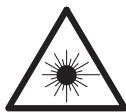
Laser Class
(IEC 60825-1:2001)
CLASS 1 LASER PRODUCT
LUOKAN 1 LASERLAITE KCLASS 1 LASERAPPARA
"CLASS 1 LASER PRODUCT"
ADVARSEL: USYNLIG LASERSTRÄLING VED ÅBNING, När SIKKERHEDSAFBRYDERE ER UDE AF FUNKTION UNDGÅ UDSAETTELSE FOR STRÄLING.
VAROITUS! LAITTEEN KÄYTTÄMINEN MUULLA KUIN TÄSSÄ KÄYTTÖOHJEESSA MAINITULLA TAVALLA SAATTAA ALTISTAA KÄYTTÄJÄNTURVALLISUUSLUOKAN 1 YLITTÄVÄLLE NAKYMÄMTTÖMÄLLE LASERSÄTEILLYLLE.
VARNING: OM APPARATEN ANVÄNDS PÅ ANNAT SÄTT ÅN I DENNA BRUKSANVISNING SPECIFICERATS, KAN ANVÄNDAREN UTSÄTTAS FÖR OSYNLIG LASERSTRÄLNING SOM ÖVERSKRIDER GRÄNSEN FÖR LASERKLASS 1.
- DECLARATION OF CONFORMITY
We declare under our sole responsibility that this product, to which this declaration relates, is in conformity with the following standards: EN60065, EN55013, EN55020, EN61000-3-2 and EN61000-3-3. Following the provisions of 2006/95/EC and 2004/108/EC Directive.
Division of D&M Germany GmbH
An der Landwehr 19, Nettetal, D-41334 Germany
CAUTION:
To completely disconnect this product from the mains, disconnect the plug from the wall socket outlet.
The mains plug is used to completely interrupt the power supply to the unit and must be within easy access by the user.
VORSICHT:
USE OF CONTROLS OR ADJUSTMENTS OR PERFORMANCE OF PROCEDURES OTHER THAN THOSE SPECIFIED HEREIN MAY RESULT IN HAZARDOUS RADIATION EXPOSURE.
THIS PRODUCT SHOULD NOT BE ADJUSTED OR REPAIRED BY ANYONE EXCEPT PROPERLY QUALIFIED SERVICE PERSONNEL.
NOTE ON USE / HINWEISE ZUM GEBRAUCH / OBSERVATIONS RELATIVES A L'UTILISATION / NOTE SULL'USO / NOTAS SOBRE EL USO / ALVORENSTE GEBRUIKEN / OBSERVERA ANGÄENDE ANVÄNDNINGEN
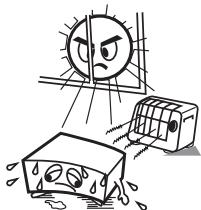
- Avoid high temperatures.
Allow for sufficient heat dispersion when installed in a rack.
- Handle the power cord carefully.
Hold the plug when unplugging the cord.
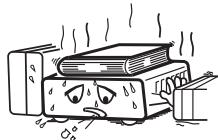
* (For apparatuses with ventilation holes)
- Do not obstruct the ventilation holes.
- Decken Sie den Luftungsbereich nicht ab.
- Ne pas obstruer les trouès d'airation.
Non coprite i fori di ventilazione. - No obtruya los orificios de ventilación.
- De ventilatieopengingen mogen nicht wordenbeblokkeerd.
Tapp inte till ventilationsöppningarna.
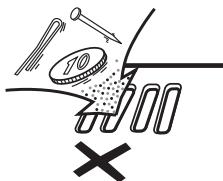
- Do not let foreign objects into the unit.
- Lassen Sie keine fremden Gegenstände in das Gerätkommen
- Ne pas laisser des objets étrangers dans l'appareil.
- Non inserte corpi estranei all'interno dell'unità.
- No deje objetos extranos dentro del equipo.
- Laat geen vreemde voorwerpen in dit apparaat vallen.
- Se till att främande foremål inte tränger in i apparaten.
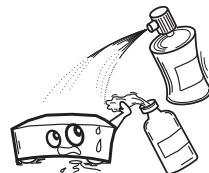
- Do not let insecticides, benzene, and thinner come in contact with the unit.
- Lassen Sie das Gerat nicht mit Insektiziden, Benzin oder Verdunnungsmitteln in Berührung kommt.
- Ne pasmettre en contact des insecticides,du benzene et un diluant avec l'appraié.
- Assicuratevi che I'unità non entri in contatto con insettici di, benzolo o solventi.
- No permitted contacto de insecticidas, gasolina y diluyentes con el equipo.
- Voorkom dat insecticiden, benzeen de ververdunner met dit toestel in contactkommen.
- Se till ante inte insektsmedel på spraybrukt, bensen och thinnerkommen i kontakt med apparatels höje.

- Never disassemble or modify the unit in any way.
- Versuchen Sie niemals das Gerät auseinander zu behnem oder zu verändern.
- Ne jamais démonter ou modifier l'appareil d'une manière ou d'une autre.
- Non smontate né modificlate l'unità in alcun modo.
- Nunca desarme o modifie el equipo de tinguna manera.
- Dit toestel mag nicht gedemonteerd of aangepast worden.
- Ta inte isär apparaten och försök inte byygga om den.
CAUTION:
- The ventilation should not be impeded by covering the ventilation openings with items, such as newspapers, tablecloths, curtains, etc.
- No naked flame sources, such as lighted candles, should be placed on the unit.
- Observe and follow local regulations regarding battery disposal
- Do not expose the unit to dripping or splashing fluids.
- Do not place objects filled with liquids, such as vases, on the unit.
ACHTUNG:
A NOTE ABOUT RECYCLING:
This product's packaging materials are recyclable and can be reused. Please dispose of any materials in accordance with the local recycling regulations.
When discarding the unit, comply with local rules or regulations.
Batteries should never be thrown away or incinerated but disposed of in accordance with the local regulations concerning battery disposal.
This product and the supplied accessories, excluding the batteries, constitute the applicable product according to the WEEE directive.
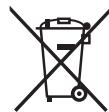
HINWEIS ZUM RECYCLING:
Cautions on Handling 2
Cautions on Installation 2
Main Features 2
Discs 2
Discs usable on the RCD-M37 2, 3
Holding Discs 3
Loading Discs 3
Cautions on Loading Discs 3
Cautions on Handling 3
Cautions on Storing Discs 3
Cleaning Discs 3
About the Remote Control Unit 3
Inserting the Batteries 3,4
Operating Range of the Remote Control Unit 4
Part Names and Functions 4
Front Panel 4
Display 5
Rear Panel 5
Remote Control Unit 6,7
Connections
Preparations 8
Cables Used for Connections 8
Using the AM Loop Antenna 8
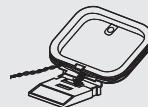
Assembling the AM Loop Antenna 8
Speaker Connections 9
Connecting the Speaker Cables 9
Connecting thePlayback Components 10
Control Dock for iPod 10
Connecting the Recording Components 10
Recorder / MD Recorder / Tape deck 10
Connections to Other Devices 10
Antenna Terminals 10, 11
USB Port 11
Connecting the Power Cord 11
Once Connections are Completed 11
Connections
Setting the Current Time (24-Hour Display) 12
Playback
Preparations 13
Turning the Power On 13
Loading Discs 13
Operations Possible DuringPlayback 13
Adjusting the Master Volume 13
Input Source Switching 13
Adjusting the Tone 13
Turning the Sound Off Temporarily (Muting) 13
Switching the Display's Brightness 13
Listening With Headphones 13
CDPlayback 14
Playing CDs 14
Playing Repeatedly
Playing Random Order
Playing Tracks in the Desired Order 15
Switching the Display 15
Playback of MP3 and WMA Files 15
About the MP3 and WMA Formats That Can be Played 15
Playing MP3 and WMA Files 16
TUNERPlayback 17
Tuning in Broadcast Stations 17
Automatically Presetting FM Stations (Auto Preset) 17
Presetting FM/AM Stations Manually 17
Listening to Preset Stations 18
Naming the Currently Tuned In Broadcast Station 18
RDS (Radio Data System) 18, 19
RDS Search 19
PTY Search 19
TP Search 19
Listening to DAB (For UK Model Only) 20
Setting DAB Band 21
Tuning in DAB Stations 21
Auto Scannig Broadcast Stations 21
Switching the Reception Information for the Currently Tuned in
DAB Station 21
Making the DAB Settings 21
DAB Initialize 21
iPod®Playback 22
Preparations 22
Listening to Audio 22, 23
Disconnecting the iPod 23
Playing a Portable Audio 23
Connecting a Portable Player 23
Playing the Portable Player 23
USBPlayback 24
Playable USB Memory Formats 24
Basic Operation 24, 25
Setting the Timer
TimerPlayback 26
Setting the Timer 26, 27
Sleep Timer Playback 27
Other Functions
Convenient Functions 28
Auto Power On 28
Auto Function Selector Function 28
Last Function Memory 28
Resetting the Microprocessor 28
Using an Optimizing Filter 28
Troubleshooting 29,30
Specifications 30
Getting Started
Thank you for purchasing this DENON product. To ensure proper operation, please read this owner's manual carefully before using the product.
After reading them, be sure to keep them for future reference.
Accessories
Check that the following parts are supplied with the product.
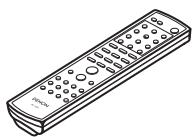
① Remote control (RC-1097) 1
② R03/AAA batteries 2
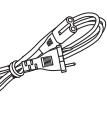
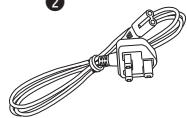
③ 1 Power cord: for continental model only (Cord length: Approx. 2 m)
Power cord: for UK model only (Cord length: Approx. 2 m)
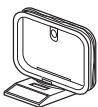
④ AM loop antenna 1
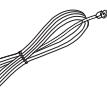
⑤ FM indoor antenna 1
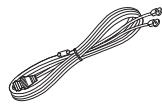
⑥ DAB indoor antenna (for UK model only). 1
⑦ Owner's manual 1
⑧ Service station list. 1
①
③
2
(5)
④
6
Cautions on Handling
- Before turning the power switch on
Check once again that all connections are correct and that there are no problems with the connection cables.
- Power is supplied to some of the circuitry even when the unit is set to the standby mode. When traveling or leaving home for long periods of time, be sure to unplug the power cord from the power outlet.
- Sufficiently ventilate the place of installation
If the unit is left in a room full of the smoke from cigarettes, etc., for long periods of time, the surface of the optical pickup could get dirty, in which case it will not be able to read the signals properly.
- About condensation
If there is a major difference in temperature between the inside of the unit and the surroundings, condensation (dew) may form on the operating parts inside the unit, causing the unit not to operate properly.
If this happens, let the unit sit for an hour or two with the power turned off and wait until there is little difference in temperature before using the unit.
- Cautions on using mobile phones
Using a mobile phone near this unit may result in noise. If so, move the mobile phone away from this unit when it is in use.
- Moving the unit
Turn off the power and unplug the power cord from the power outlet.
Next, disconnect the connection cables to other system units before moving the unit.
- Note that the illustrations in these instructions may differ from the actual unit for explanation purposes.
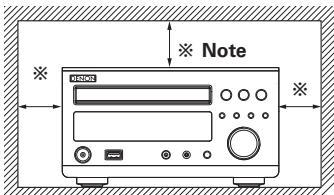
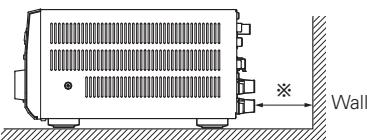
Cautions on Installation
Note:
For proper heat dispersal, do not install this unit in a confined space, such as a bookcase or similar enclosure.
Main Features
1. High quality amplifier stressing sound quality
Equipd with 30 W + 30 W (6 Ω/ohms) high quality amplifier circuits.
2. Tone control and SDB control
Separate bass and treble tone controls for adjusting the tone to your tastes and Super Dynamic Bass (SDB) circuit for producing powerful bass sound even when the volume is low.
Source direct position provided for turning off the SDB and tone control circuitry to make the response flat.
3. CD player for digital sound
Compact body integrating a CD section in addition to the FM/AM tuner and amplifier, allowing playback of CD-R/RW discs.
4. Playback of MP3 and WMA files
Supports playback of discs and USB memory devices on which MP3 and WMA files are recorded. The track name and artist name of the currently playing track can be displayed on the set's display.
The characters that can be displayed "Switching the Display" (10 page 16)
5. Low standby power consumption
Designed with considerations on the environment, with the power consumption when the power is in standby kept down to about 0.3W .
Discs
Discs Usable on the RCD-M37
Music CDs
Discs marked with the logotype below can be played in this unit.
CD-R/CD-RW

NOTE
- Discs with special shapes (heart-shaped discs, octagonal discs, etc.) cannot be played. Do not attempt to play them, as doing so can damage the product.
- Some discs and some recording formats may not be playable.
Non-finalized discs cannot be played.
※ What is finalization?
Finalization is the process that
makes recorded CD-R/CD-RW discs playable on compatible players.
Holding Discs
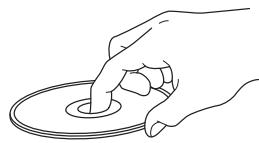
Do not touch the signal surface.
Loading Discs
- Set the disc with the labeled side facing up.
- Make sure the disc tray is fully open when inserting the disc.
- Place the discs flatly, 12cm discs in the outer tray guide (Figure 1), 8 cm discs in the inner tray guide (Figure 2).
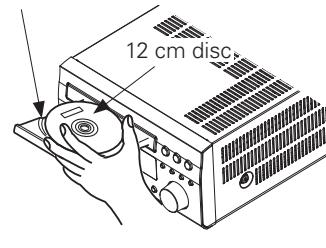
Figure 1
Outer tray guide
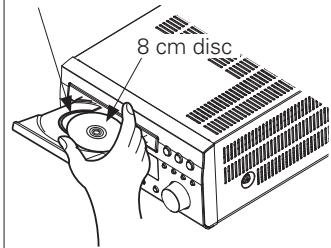
Figure 2
Inner tray guide
- Place 8 cm discs in the inner tray guide without using an adapter.

- "00 Tr 00 : 00" is displayed if a disc that cannot be played is loaded.
- "00Tr 00:00" is displayed if the disc is loaded upside-down or if no disc is loaded.
NOTE
Do not push the disc tray in by hand when the power is turned off. Doing so could damage the set.
Cautions on Loading Discs
- Only load one disc at a time. Loading two or more discs can damage the unit or scratch the discs.
- Do not use cracked or warped discs or discs that have been repaired with adhesive, etc.
- Do not use discs on which the sticky part of cellophane tape or labels is exposed or on which there are traces of where labels have been removed. Such discs can get caught inside the player and damage it.
Cautions on Handling
- Do not get fingerprints, oil or dirt on discs.
- Take special care not to scratch discs when removing them from their cases.
- Do not bend or heat discs.
- Do not enlarge the hole at the center.
- Do not write on the labeled (printed) surface with ball-point pens, pencils, etc., or stick new labels on discs.
- Water droplets may form on discs if they are moved suddenly from a cold place (outdoors for example) to a warm place, but do not try to dry them off using a hairdryer, etc.
Cautions on Storing Discs
- Be sure to remove discs after using them.
- Be sure to store discs in their cases to protect them from dust, scratches, warping, etc.
-
Do not store discs in the following places:
-
Places exposed to direct sunlight for long periods of time
- Dusty or humid places
- Places exposed to heat from heating appliances, etc.
Cleaning Discs
- If there are fingerprints or dirt on discs, wipe them off before using the disc. Fingerprints and dirt can impair sound quality and cause interruptions in playback.
- Use a commercially available disc cleaning set or a soft cloth to clean discs.
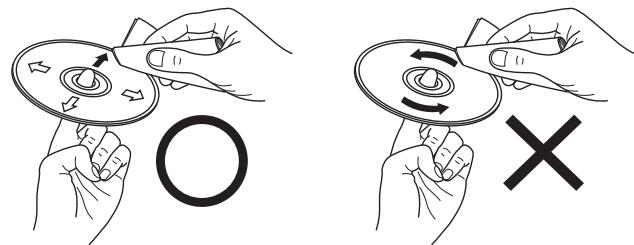
Gently wipe the disc from the inside towards the outside.
Do not wipe with a circular motion.
NOTE
Do not use record spray, antistatic agents, or benzene, thinner or other solvents.
About the Remote Control Unit
Inserting the Batteries
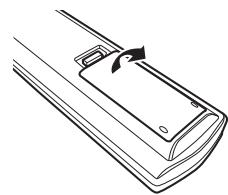
① Slide the rear lid in the direction of the arrow and remove it.
② Load the two batteries properly as indicated by the marks in the battery compartment.
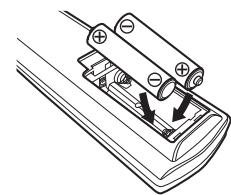
③ Put the rear cover back on.
NOTE
- Replace the batteries with new ones if the set does not operate even when the remote control unit is operated close to the unit.
- The supplied batteries are only for verifying operation.
- When inserting the batteries, be sure to do so in the proper direction, following the “ ” and “ ” marks in the battery compartment.
- To prevent damage or leakage of battery fluid:
- Do not use a new battery together with an old one.
- Do not use two different types of batteries.
- Do not attempt to charge dry batteries.
- Do not short-circuit, disassemble, heat or dispose of batteries in flames.
- If the battery fluid should leak, carefully wipe the fluid off the inside of the battery compartment and insert new batteries.
- Remove the batteries from the remote control unit if it will not be in use for long periods.
Operating Range of the Remote Control Unit
Point the remote control unit at the remote sensor when operating it.
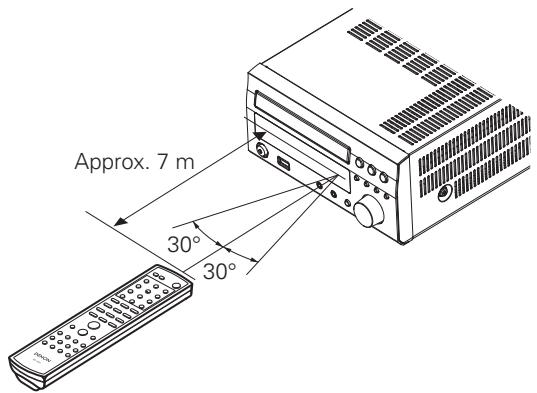
NOTE
The set may function improperly or the remote control unit may not operate if the remote control sensor is exposed to direct sunlight, strong artificial light from an inverter type fluorescent lamp or infrared light.
Part Names and Functions
For buttons not explained here, see the page indicated in parentheses ( ).
Front Panel
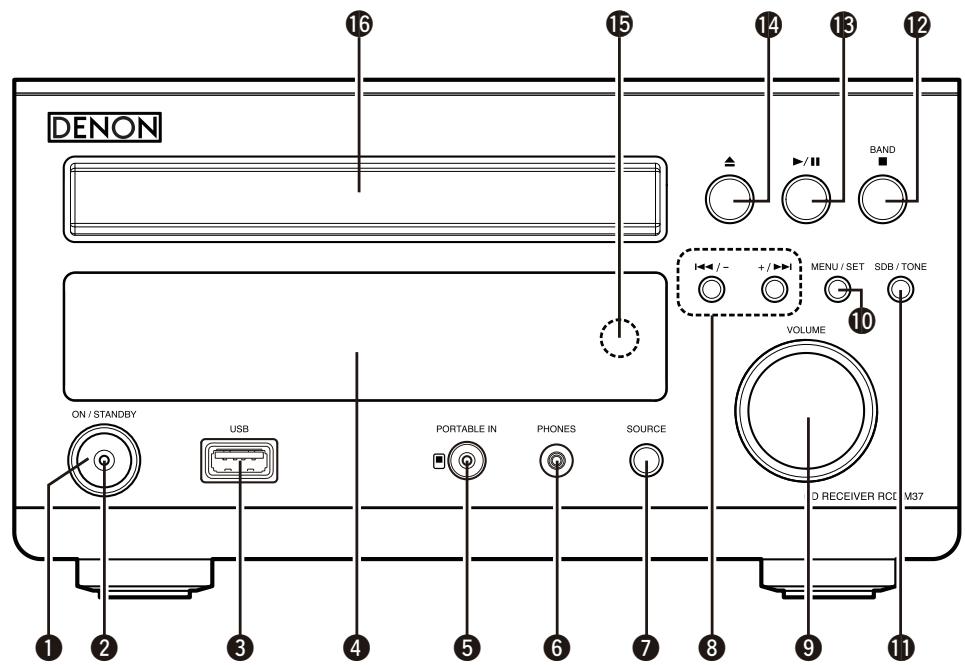
Power operation button (ON/STANDBY) (13)
2 Power indicator (13)
3 USB port (USB) (11)
4 Display
5 Portable jack (PORTABLE IN) (23)
6 Headphones jack (PHONES) (13)
SOURCE button (13)
Revers-skip/Forward-skip buttons (14, 17)
9 Master volume control knob (VOLUME) (13)
10 MENU/SET button (12, 26)
11 SDB/TONE button (13)
12 BAND/Stop button (BAND/) (14, 17)
13 Play/Pause button (▶II) (14)
14 Disc tray open/close button (△) ………………………………………… (13)
Remote control sensor (4)
16 Disc tray (3)
Display
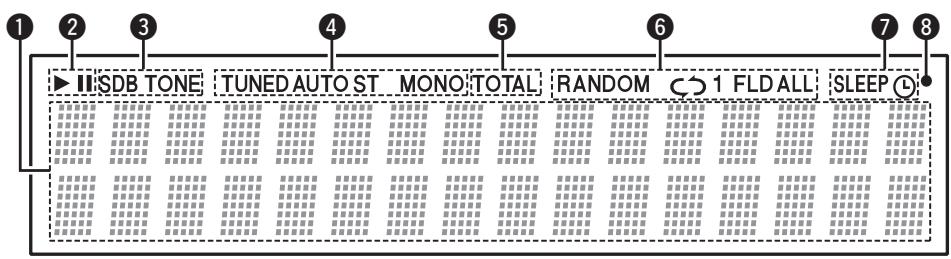
Information display
Various information is displayed here, depending on the operation mode.
(2) : (the play indicator) lights when a disc is playing.
(1) (the pause indicator) lights when a disc is pausing.
SDB,TONE indicator (13)
4 Reception mode indicator (17)
TOTAL indicator
Lights when the total number of tracks and total time of the CD are displayed.
6 Play mode indicator (14)
Timer indicator (26)
8 :Flashes when remote control signals are received.
Rear Panel
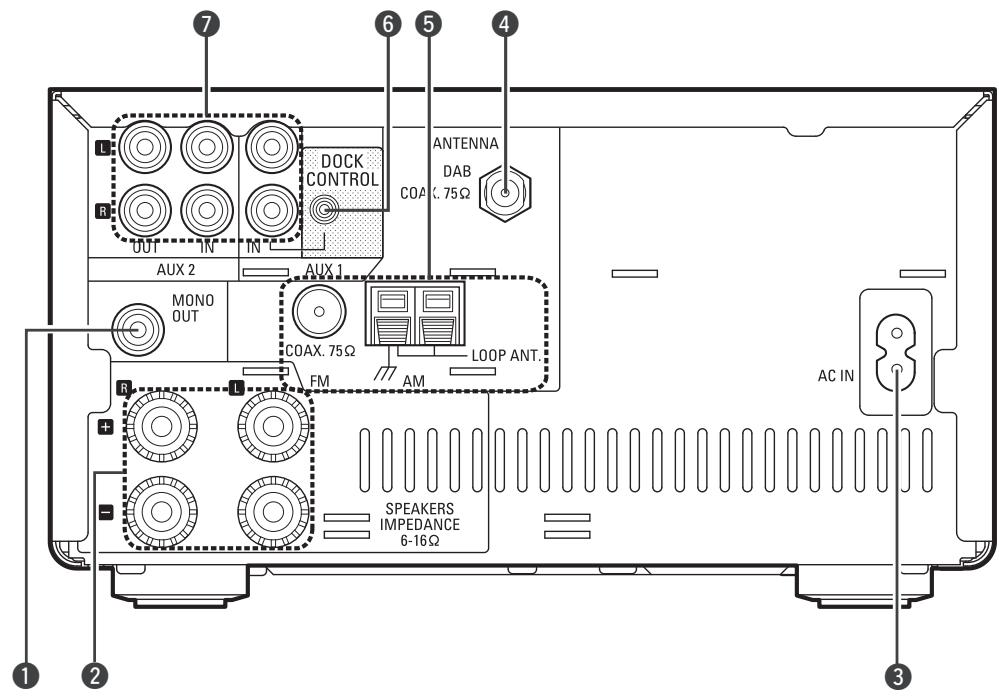
1 Monaural audio connector
(MONO OUT) (9)
2 Speakers terminals (9)
3 AC inlet (AC IN) (11)
DAB ANTENNA terminal
(UK model only) (11)
5 FM/AM antenna terminals (10)
DOCK CONTROL jack (10)
AUX1/AUX2
Analog audio connectors (10)
Remote Control Unit
Buttons Operable for All Functions (CD, TUNER, iPod and USB)
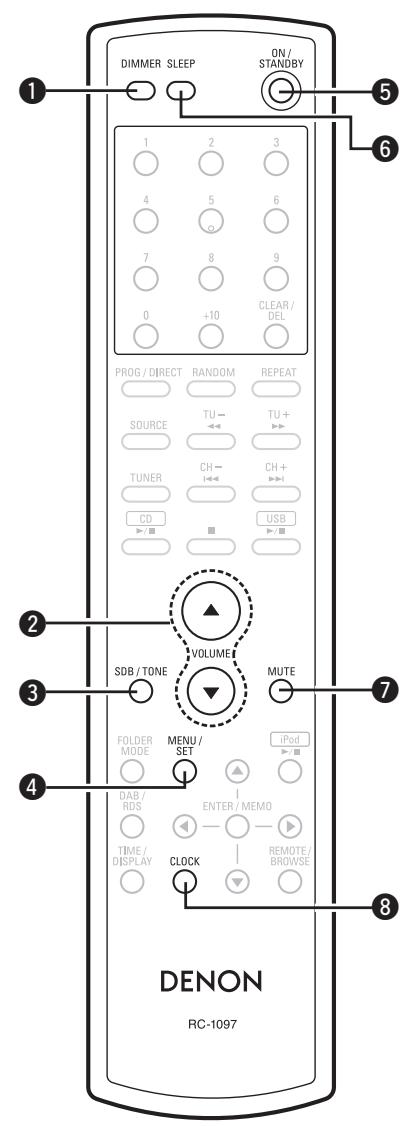
DIMMER button (13)
2 Master volume control buttons (VOLUME) (13)
SDB/TONE button (13)
4 MENU/SET button (12)
5 ON/STANDBY button (13)
6 SLEEP button (27)
MUTE button (13)
8 CLOCK button (12)
Buttons Operable When the Function is Set to "CD"
The buttons listed at "Buttons Operable for All Functions" can also be used.
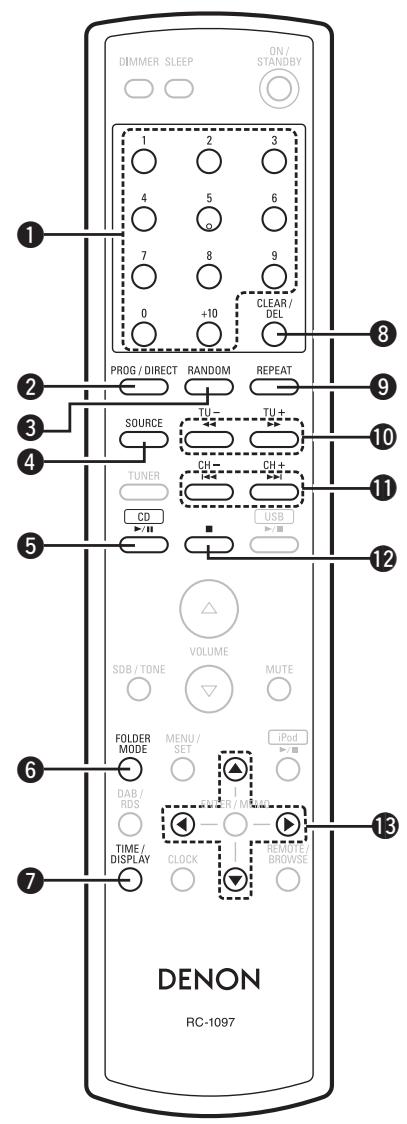
1 Number buttons (14)
PROG/DIRECT button (15)
3 RANDOM button (14)
4 SOURCE button (14)
CD button (14)
6 FOLDER MODE button (16)
7 TIME/DISPLAY button (16)
CLEAR/DEL button (15)
9 REPEAT button (14)
10 Fast-reversing/Fast-forwarding buttons (▲▲, ▲▶) ………………………………………… (14)
1 Reverse-skip/Forward-skip buttons (I<, I) (14)
12 Stop button (■) (14)
13 Cursor buttons ( ) (16)
Buttons Operable When the Function is Set to "TUNER"
The buttons listed at "Buttons Operable for All Functions" can also be used.
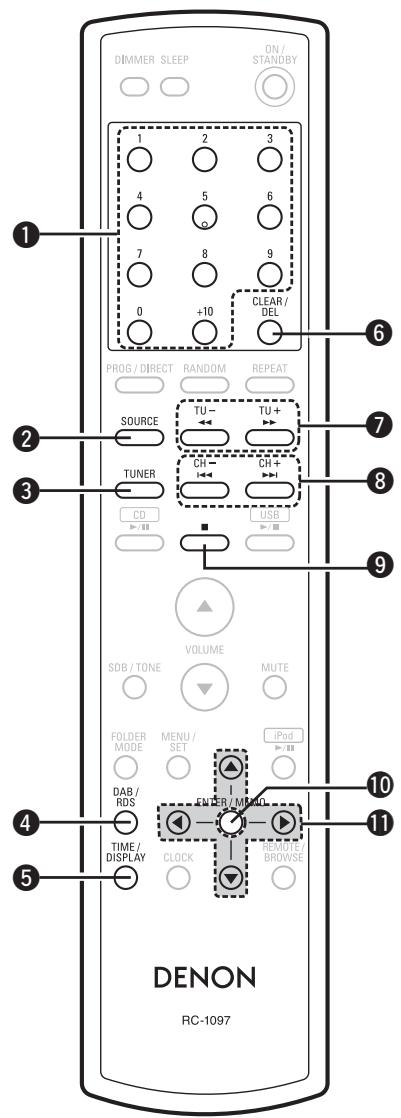
Number buttons (18)
2 SOURCE button (17)
3 TUNER button (17)
4 DAB/RDS button (19)
5 TIME/DISPLAY button (21)
6 CLEAR/DEL button (18)
7 Tuning + -buttons (TU + ,TU - ) (17)
3 Channel +, - buttons (CH+, CH-) (17)
9 Stop button (■) (17)
10 ENTER/MEMO button (17)
1 Cursor buttons ( ) (17)
Buttons Operable When the Function is Set to "iPod", "USB"
The buttons listed at "Buttons Operable for All Functions" can also be used.
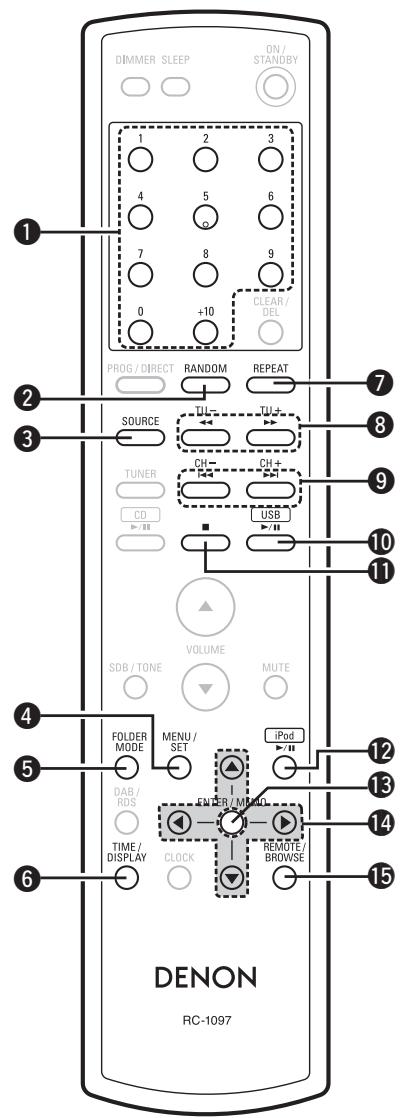
1 Number buttons (24)
2 RANDOM button (25)
3 SOURCE button (24)
4 MENU/SET button (22)
FOLDER MODE button (22)
6 TIME/DISPLAY button (23)
7 REPEAT button (25)
Fast-reversing/Fast-forwarding buttons (▲▲, ▲▶) ………………………………………… (22)
9 Reverse-skip/Forward-skip buttons (I<1,▶▶I) (22)
10 USB▶/II button (24)
11 Stop button (■) (25)
12 iPod /II button (22)
ENTER/MEMO button (22)
14 Cursor buttons ( ) (22)
15 REMOTE/BROWSE button (22)
Connections
Connections for all compatible audio signal formats are described in this owner's manual. Please select the types of connections suited for the equipment you are connecting.
With some types of connections, certain settings must be made on the RCD-M37. For details, refer to the instructions for the respective connection items below.
NOTE
- Do not plug in the power cord until all connections have been completed.
- When making connections, also refer to the owner's manual of the other components.
- Be sure to connect the left and right channels properly (left with left, right with right).
- Do not bundle power supply cords together with connection cables. Doing so can result in humming or noise.
Preparations
Cables Used for Connections
Select the cables according to the equipment being connected.
Audio cables
Analog connections (stereo)
(White) (Red)
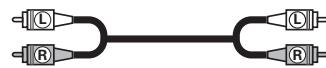

Stereo pin-plug cable
Using the AM Loop Antenna
To use suspended on a wall
Suspend directly on the wall without assembling.
Nail, tack, etc.
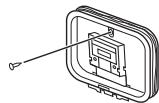
To use standing alone
Use the procedure below to assemble.
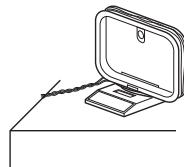
Assembling the AM Loop Antenna
1 Bend in the direction of the arrow.
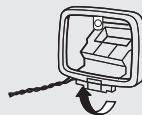
2 Insert into the hole.
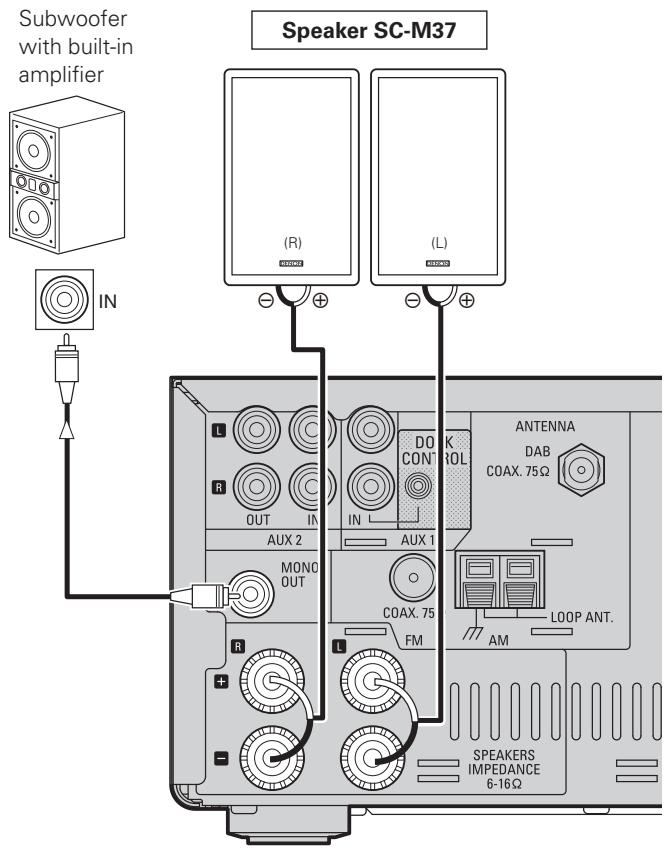
Speaker Connections
Connecting the Speaker Cables
Check the left (L) and right (R) channels and the + (red) and - (black) terminals on the set and the speakers to be used and interconnect the cables to the same polarities.
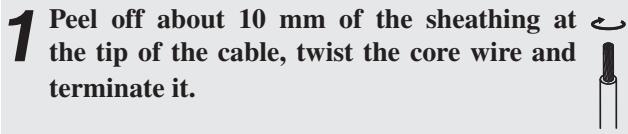
2 Turn the speaker terminal counterclockwise to loosen it.
3 Insert the speaker cable's core wire into the base of the speaker terminal.
4 Turn the speaker terminal counterclockwise to tighten it.
NOTE
- Use speakers with an impedance of 6 to 16 Ω/ohms. The protection circuit may be activated if speakers with an impedance other than specified are used.
- Connect the speaker cables in a way that they do not stick out of the speaker terminals. The protection circuit may be activated if the core wires touch the rear panel or screws or if the + and - sides touch.
- Never touch the speaker terminals while the power is on. Doing so could cause electric shock.
Protector circuit
The protection circuit will be activated in the following cases:
- When the speaker cable's core wires are touching the rear panel or screws or when the speaker cable's + and - sides are touching
- When the surrounding temperature is extremely high
- When the internal temperature rises due to extended use with a high output
If this happens, unplug the power cord, then check the connections of the speaker cables and input cables. If the set's temperature is extremely high, wait for it to cool off and improve surrounding ventilation. After doing this, plug the power cord back in.
If the protection circuit is activated though there are no problems in ventilation around the set or in connections, the set could be damaged. Turn off the power, then contact a DENON servicing and inquiry outlet.
Connecting the Playback Components
Control Dock for iPod
Use a DENON Control Dock for iPod (ASD-1R or ASD-3N/3W, sold separately) to connect the set with an iPod.
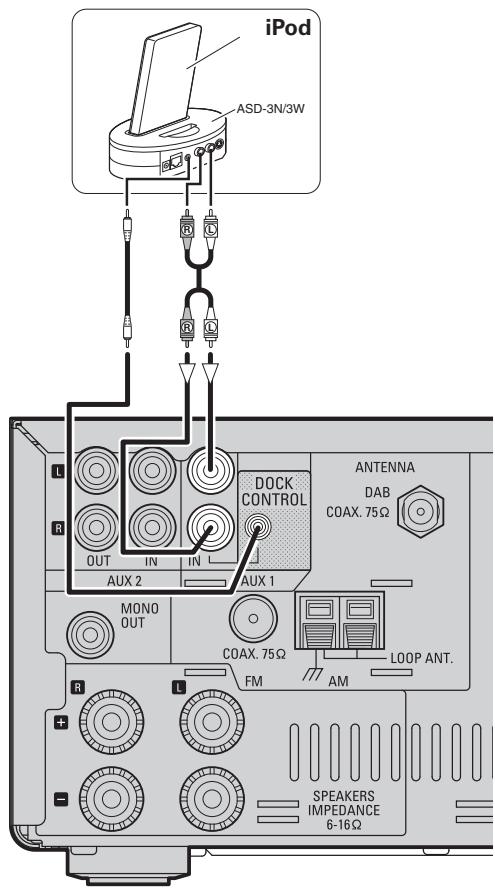

- When using a Control Dock for iPod, the Control Dock for iPod must be set. For details, refer to the operating instructions of the Control Dock for iPod.
To use an iPod, see "iPod® Playback" (page 22).
Connecting the Recording Components
CD Recorder / MD Recorder / Tape deck
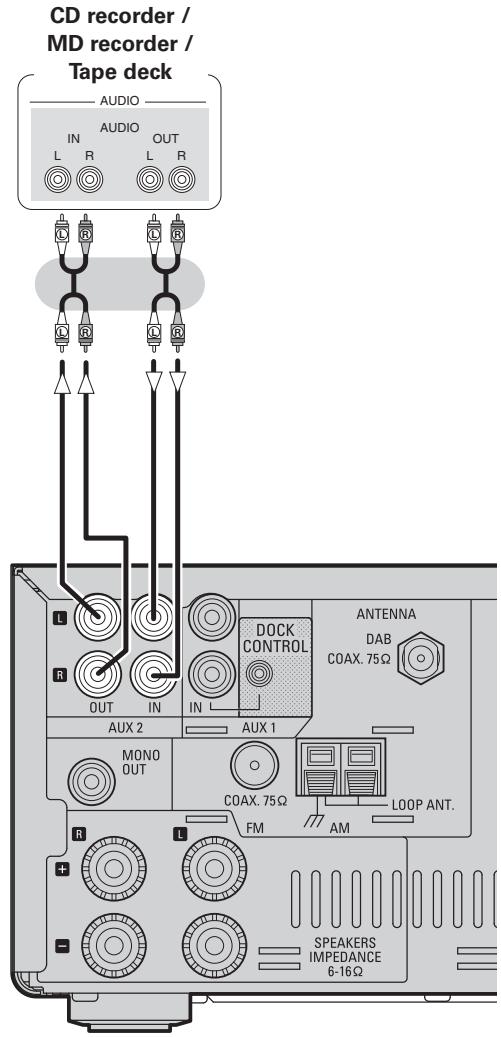
Connections to Other Devices
Antenna Terminals
AM/FM
The AM and FM reception sensitivity depends on the place the antenna is set and the direction in which it is set. Set it so that reception is best.
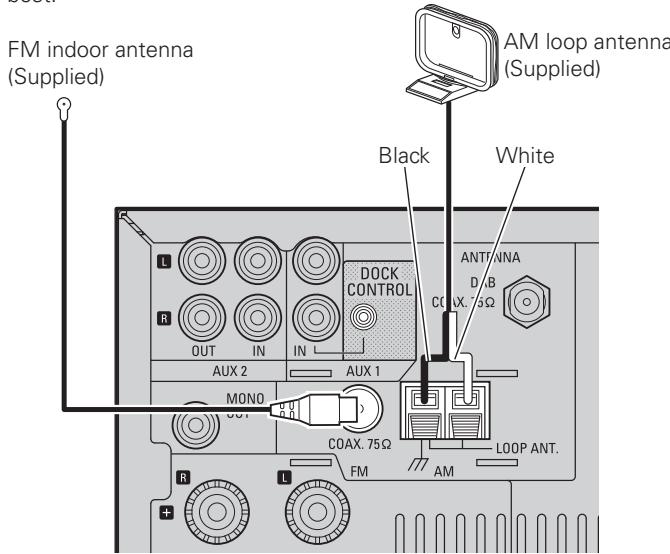
- Connecting the AM loop antenna
1 Push the lever.

2 Insert the conductor.
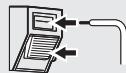
3 Return the lever.

NOTE
- Make sure the AM loop antenna lead terminals do not touch metal parts of the panel.
- Do not connect two FM antennas simultaneously.
□ Installing the DAB indoor antenna
DAB station reception ( page 20).
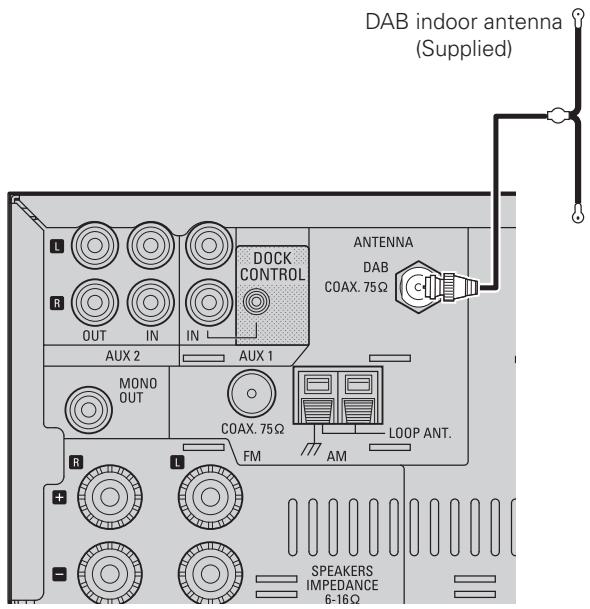
USB Port
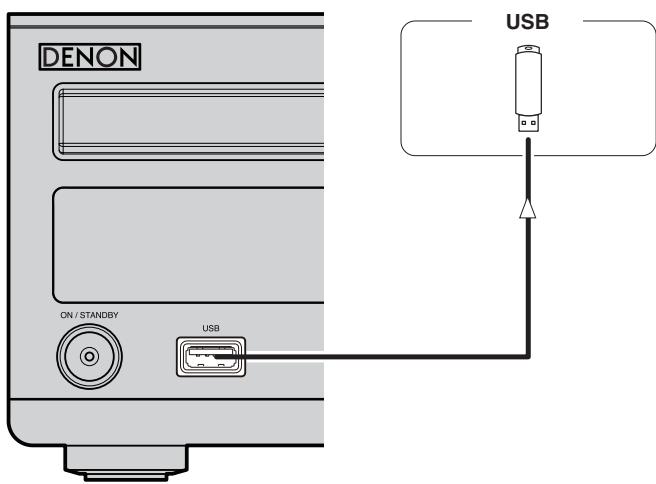
NOTE
- It is not possible to connect and use a computer via the RCD-M37's USB port using a USB cable.
- For details about USB memory devices, see "Playable USB Memory Formats" (12 page 24).
Connecting the Power Cord
For Continental model only
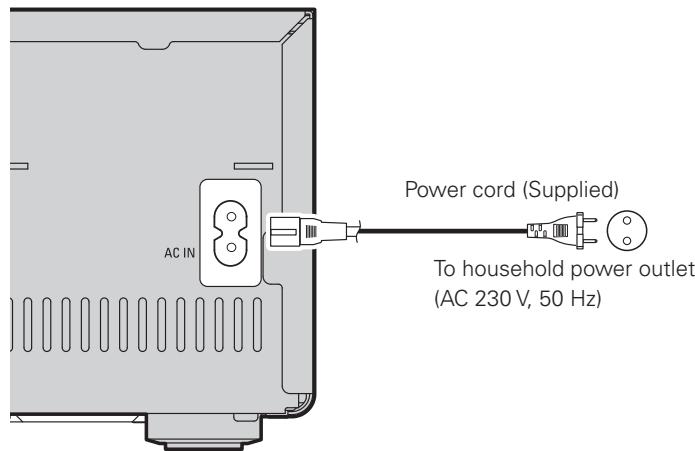
For UK model only
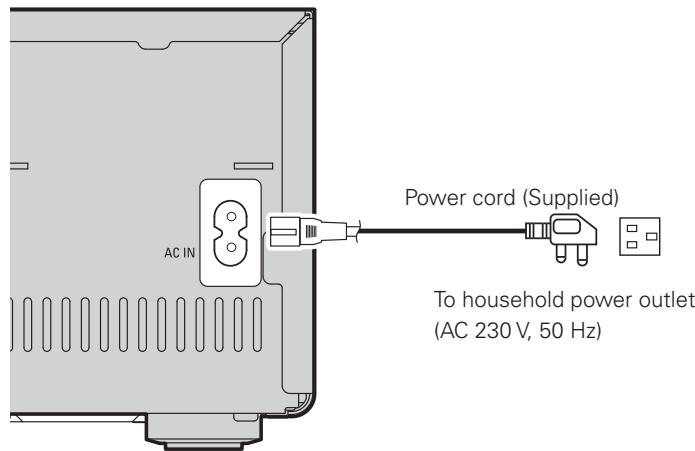
NOTE
- Only use the supplied power cord.
- Be sure the power cord is unplugged from the power outlet before connecting or disconnecting it to the AC IN.
Once Connections are Completed
Turning the Power On (page 13)
Setup

Symbols used to indicate buttons in this manual
Button located on both the main unit and the remote control unit BUTTON
Button only on the main unit
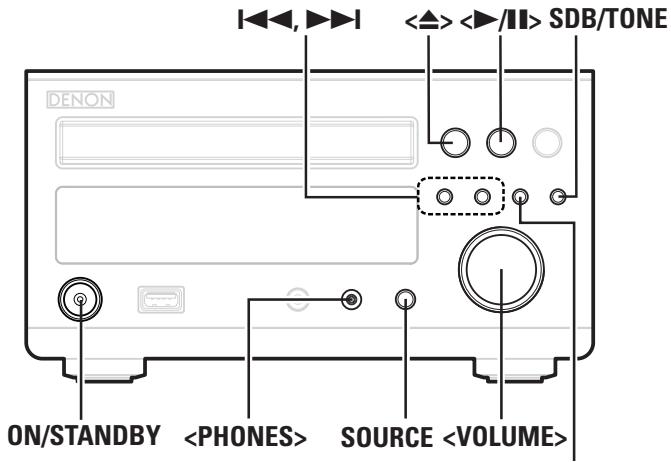
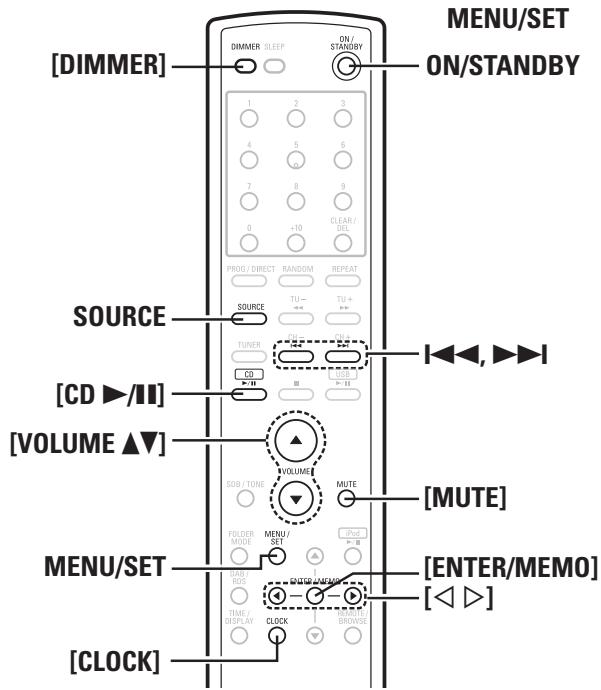
Setting the Current Time (24-Hour Display)
【Example】Setting the current time to 10:15 am
1 Press ON/STANDBY to turn the power on.
Press [CLOCK]. The current time is displayed.
Press MENU/SET for over 1 second to set the manual time setting mode. The "hours" display flashes. TIME Adj :0100
Use 1 1, or [ ] to set the “hours”. TIME Adj 10:00
Press MENU/SET or [ENTER/MEMO]. The "minutes" display flashes. TIME Adj 10:00
Use 1 1, or [ ] to set the “minutes”.
7 Press MENU/SET or [ENTER/MEMO]. The current time is set, and the normal display reappears.
- Checking the current time when the power is on Press [CLOCK]. When pressed again or if a different operation is performed, the normal display reappears.
- Checking the current time when the power is set to standby
- Press MENU/SET or [CLOCK].
- Press again to turn off display.

- Displaying the time when the power is set to standby consumes electricity. To reduce electric consumption, turn the time display off.
- When the function is set to iPod, the current time cannot be set.
Playback
Preparations
Turning the Power On
Press ON/STANDBY.
- The power turns on. Press again to set the power to standby.
- Power indicator Standby...Red Power on...Green When the timer is set...Orange
NOTE
- Power continues to be supplied to some of the circuitry even when the power is in the standby mode. When leaving home for long periods of time or when traveling, either press ON/STANDBY to turn off the power, or unplug the power cord from the power outlet.
- Be sure to stop playback before turning the power off.
Completely turning off the power
Unplug the power cord from the wall outlet.
※ Note that the time setting is cleared when the power cord is unplugged from the outlet.
※ The settings made for the various functions may be cleared if the power cord is left unplugged from a power outlet for an extended period of time.
Loading Discs
In the stop mode, press <> to open the disc tray.
※“Loading discs" (page 3).
To close the disc tray
Press < > again.
The disc tray also closes when </> , [CD /II] or SOURCE is pressed.
NOTE
Do not place any foreign objects in the disc tray. Doing so could damage it.
Operations Possible DuringPlayback
Adjusting the Master Volume
Either turn <VOLUME> or press [VOLUME ].
The volume level is displayed.
[Variable range]
VOLUME 00 ~ 45, VOLUME MAX
Input Source Switching
Press SOURCE to select the input source.

※ "AUX1/Dock" is displayed when a Control Dock for iPod is connected to "AUX1".
※“PORTABLE IN” is only displayed when connected.
Adjusting the Tone
1 Select the item to be adjusted with SDB/TONE.
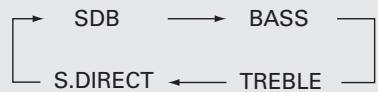
【About the display】
When the SDB is on "SDB" is displayed.
When BASS or TREBLE is set to something other than 0 dB "TONE" is displayed.
2 Display the mode you want to adjust, then use , and [ ] to turn on or off and to adjust the tone.
※ If no operation is performed for 5 seconds, the adjustment is retained and the normal display reappears.
[Selectable modes]
SDB
Switches Super Dynamic Bass on and off.
BASS
Adjusts the bass sound.
[Variable range] -10dB ~ +10dB
TREBLE
Adjusts the treble sound.
[Variable range] -10dB ~ +10dB
S.DIRECT
Turns SDB, bass and treble off.
Settings made upon purchase :
-
SDB............OFF
-
TREBLE 0 dB
BASS. 0 dB
S.DIRECT OFF
Turning the Sound Off Temporarily (Muting)
Press [MUTE].
The "MUTE ON" is displayed.
![DENON RCD-M37 - Press [MUTE]. - 1](/content/2025/01/135701/images/9b982d5e2b165cfcb6cc91acaf4a4ba348ce228cc2d5be66c9a0ccc1da8564b6.jpg)
To cancel, press [MUTE] again.
(The mute mode is also canceled when the
Switching the Display's Brightness
Press [DIMMER].

※ The display's brightness switches each time the button is pressed.
Listening With Headphones
Plug the headphones (sold separately) into the
※ The sound from the speakers is automatically cut off.
NOTE
Be careful not to set the volume too high when using headphones.
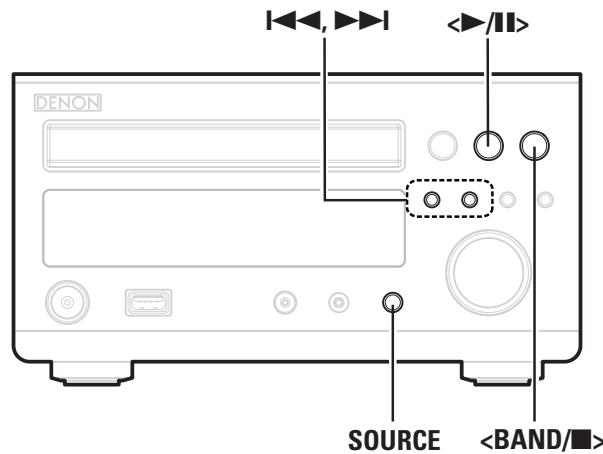
Symbols used to indicate buttons in this manual
Button located on both the main unit and the remote control unit BUTTON
Button only on the main unit [BUTTON]
Button only on the remote control unit [BUTTON]
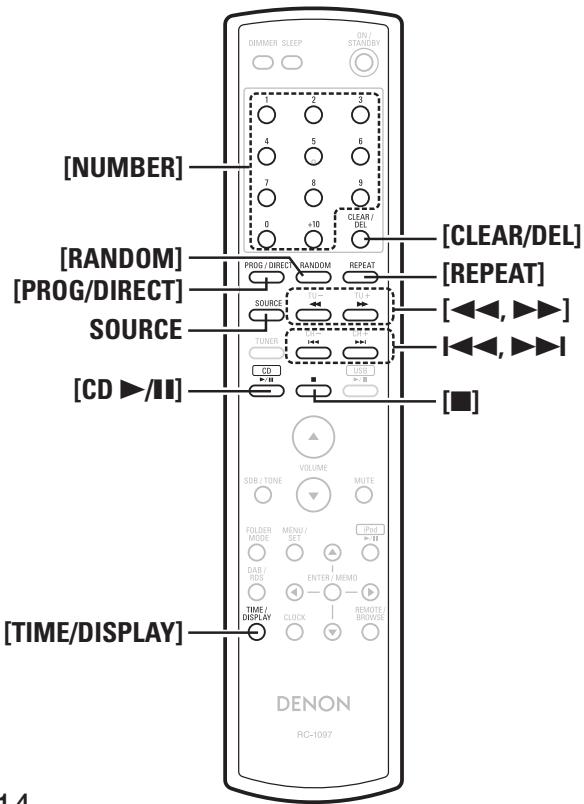
CDPlayback
Playing CDs
Press </> or [CD /] .
The "▶" indicator lights and playback begins.

- If the function is set to something other than "CD", press [CD▶/III] to switch the function to "CD" and start playback (10 page 28 "Auto Function Selector Function").
- The function can also be switched to "CD" using SOURCE
□ Stopping Playback
Press <BAND/> or [] .
□ Stopping Playback Temporarily
Press < / > or [CD / ]
The "I" is displayed.
※ To resume playback, press < > or [CD > /II]
Fast-Forwarding and Fast-Reversing (searching)
During playback, press and hold in [▲▲, ▲▶].
□ Moving to the Beginning of Tracks (skipping)
During playback, press 1
※ The disc is skipped the number of tracks equal to the number of times the button is pressed.
※ When pressed once in the return direction, playback returns to the beginning of the currently playing track.
To Play the Desired Track
(Remote Control Unit Only)
Press [NUMBER] (0 9, + 10) to select the track.
[Example]: Track 4 : [4]
[Example]: Track 12: [+10], [2]
[Example]: Track 20: [+10], [+10], [0]
Playing Repeatedly
Press [REPEAT].
Playback in the respective repeat mode starts.
![DENON RCD-M37 - Press [REPEAT]. - 1](/content/2025/01/135701/images/9f96863f4b4d0345ed734ea05fe61242b10638378f90765bd5cb258fd9bca675.jpg)
[Selectable items]
![DENON RCD-M37 - [Selectable items] - 1](/content/2025/01/135701/images/49f699dd0a603b2756b9025f4cd9001388f5b8835723db4d5279fe1306edd943.jpg)
(Single-track repeat)
:Only 1 track is played repeatedly.
![DENON RCD-M37 - [Selectable items] - 2](/content/2025/01/135701/images/d6b03e9364a9e757a5317bf4d2b0eee2ee97fc8d22dc712e5ff147ce02ca4b64.jpg)
LL (All-track repeat)
: All tracks are played repeatedly.
Repeat off (indicator turns off)
: Normal playback resumes.
Playing Random Order
1 In the stop mode, press [RANDOM]. The "RANDOM" indicator lights.
Press or [CD ] The tracks start playing in random
NOTE
Random play cannot be set or canceled during playback.
Canceling Random Playback
In the stop mode, press [RANDOM].
The "RANDOM" indicator turns off.
NOTE
When [REPEAT] pressed during random playback, the tracks are played in a different random order after this turn.
Playing Tracks in the Desired Order
Up to 25 tracks can be programmed.
1 In the stop mode, press [PROG/DIRECT]. The "PGM" indicator lights.
2 Use [NUMBER] (0 9, + 10) to select the traks.
※【Example】To program tracks 3, 12, 7 to play in that order: Press [PROG/DIRECT], [3], [+10], [2], [7].
3 Press or [CD /II]. Playback starts in the programmed order.
□ Checking the order of the programmed tracks
In the stop mode, press or
The track numbers are displayed in the programmed order each time the button is pressed.
To clear the last track programmed
In the stop mode, press [CLEAR/DEL].
The last track programmed is cleared each time the button is pressed.
To clear one programmed track at a time
In the stop mode, use or to select the track to be cleared, then press [CLEAR/DEL].
Clearing the all programmed track
In the stop mode, press [PROG/DIRECT].
The "PGM" indicator turns off.

When [REPEAT] is pressed, the tracks are played repeatedly in the programmed order.
Switching the Display
Press [TIME/DISPLAY].
Elapsed time of
currently playing track
Remaining time for all remaining tracks
※ The display switches each time the button is pressed.
Playback of MP3 and WMA Files
There are many music distribution sites on the Internet allowing you to download music files in MP3 or WMA (Windows Media® Audio) format. The music (files) downloaded from such sites can be stored on CD-R or CD-RW discs and played on the RCD-M37.
"Windows Media" and "Windows" are registered trademarks or trademarks in the United States and other countries of Microsoft Corporation of the United States.
About the MP3 and WMA Formats That Can be Played
CD-R and CD-RW discs created in the format described below can be played.
Writing software format
ISO9660 level 1
※ When written in other formats, it may not be possible to play the disc properly.
Maximum number of playable files and folders
Total number of folders + files: 512
Maximum number of files in a folder: 255
File format
MPEG-1 Audio Layer-3
WMA (Windows Media Audio)
Tag data
ID3-Tag (Ver.1x)
META-Tag (Compatible with title, artist and album names)
| Playable MP3/WMA file | |||
| File format | Sampling frequency | Bit rate | Extension |
| MP3 | 32, 44.1, 48 kHz | 32 ~ 320 kbps | .MP3 |
| WMA | 32, 44.1, 48 kHz | 64 ~ 160 kbps | .WMA |

- Be sure to give files the extension "MP3" or "WMA". Files with any other extensions or with no extensions cannot be played.
- Recordings you have made should only be used for your personal enjoyment, and as per copyright laws may not be used in other ways without permission of the copyright holder.

Symbols used to indicate buttons in this manual
Button located on both the main unit and the remote control unit BUTTON
Button only on the main unit
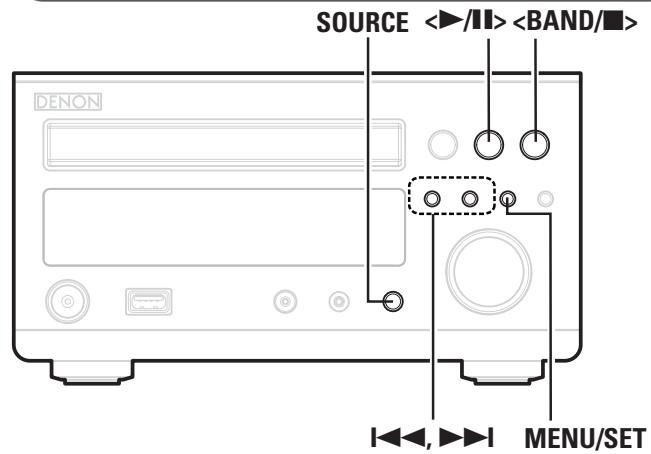
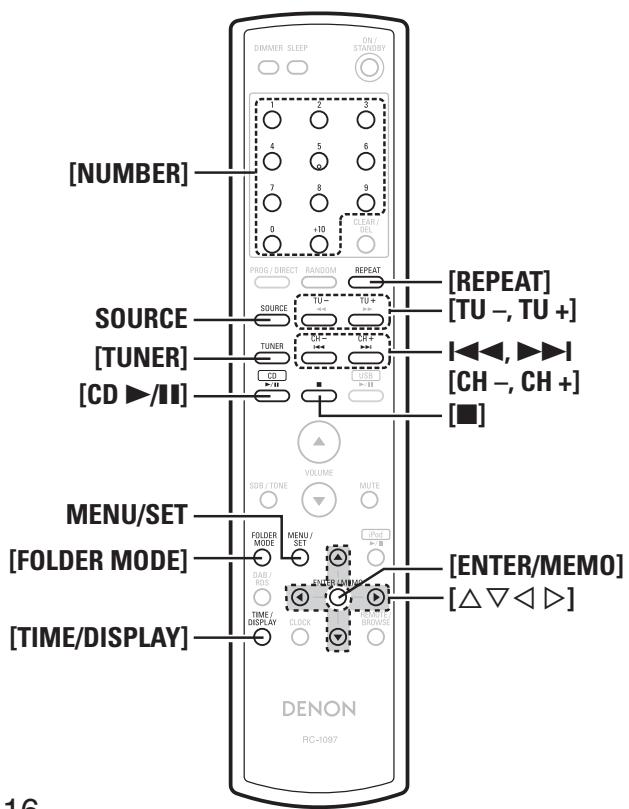
Playing MP3 and WMA Files
1 Load a CD-R or CD-RW disc containing music files in the MP3 or WMA format into the disc tray ( page 3).
Press [FOLDER MODE] and select "Folder Mode" or "Disc Mode".
【About the display】
When "Folder Mode" is selected ... "FLD" is displayed.
When "Disc Mode" is selected……“FLD” is not displayed.
Folder Mode :
All the files in the selected folder are played.
Disc Mode :
After the selected folder and files are played, all the files in all the folders are played.
3 Use [ ] to select the folder to be played.
Use 1 1, 1 or [ ] to select the file to be played.
Press 一 / or [CD ▶/II].
To switch the Folder or File During Playback
- Folder
Use [ ] to select the folder.
- File
Use I to select the file, or use [NUMBER] (0 9, + 10) to select the file number.
※ The file numbers are set automatically when the disc is loaded.

Copyright-protected files cannot be played.
(The "Not Support" is displayed.)
Note that depending on the software used for burning and other conditions, some files may not play or display correctly.
Switching the Display
During playback, press [TIME/DISPLAY].

※ The characters that can be displayed are as follows:
A to Z a to z 0 to 9 ^ {\prime} ( ) * +, -, / = (space)
To Play Repeatedly
Press [REPEAT].
Playback starts in the respective repeat mode.
※ The selectable repeat modes differ in the "Folder Mode" and the "Disc Mode".
When "Folder Mode" is selected:

When "Disc Mode" is selected:

[Selectable items]
When "Folder Mode" is selected:
: Only the selected track is played repeatedly.
FLD
: All the files in the selected folder are played repeatedly.
FLD
: Folder mode playback resumes.
When "Disc Mode" is selected:
"Playing Repeatedly
□ Setting random playback
"Playing Random Order

Programmed playback is not possible with MP3/WMA discs.
TUNERPlayback
Tuning in Broadcast Stations
Connect the antenna beforehand (page 10).
Press [TUNER] or

【About the display】
When FM AUTO is selected... "AUTO" is displayed.
When FM MONO is selected "MONO" is displayed.
When AM is selected The reception mode is not displayed.
2 Use < / -, +/ > or [TU -, TU +] to select the reception band.
When a station is received, the "TUNED" indication will light.

- If the function is set to something other than "TUNER", press [TUNER] to switch the function to "TUNER" (12) page 28 "Auto Function Selector Function").
- The function can also be switched to "TUNER" using SOURCE.
To Tune Automatically
Press and hold in < / -, +/ > or [TU - ,TU + ] to automatically search and tune in broadcast stations.
* Stations whose signal is weak cannot be tuned in.
To Stop Auto Tuning
Press / - , + / or [TU-, TU+.
To Tune Manually
The reception frequency switches each time < / -, +/ > or [TU - ,TU + ] is pressed.

A humming sound may be heard when using a TV nearby while receiving AM programs. If this happens, move the system as far from the TV as possible.
About the FM Broadcast Reception Status Display
The "ST" indicator lights when receiving stereo broadcasts.

If the signal is weak and stable stereo reception is not possible, select "FM MONO" to receive in monaural.
About Switching the Tuning Mode and Preset Mode
Use < / -, +/ > to perform the tuning and preset channel operations. Switch to the mode to be operated before operating.
To switch to the preset mode
Press + / while pressing <BAND> .
The "PRESET" indicator flashes for about 5 seconds.
To switch to the tuning mode
Press while pressing BAND /
The "TUNING" indicator flashes for about 5 seconds.
Automatically Presetting FM Stations (Auto Preset)
Up to 40 stations can be preset.
Auto preset is not possible with AM broadcast stations.
Press [TUNER] to select "FM AUTO" or "FM MONO".
Press and hold in MENU/SET.
The "AUTO PRESET" is displayed
Press MENU/SET again.
"Search" flashes and auto presetting starts.

Broadcast stations whose antenna signal are weak cannot be preset automatically. If you wish to preset such stations, tune them in manually.
To Cancel Auto Presetting
Press
The "Search" indicator turns off.
Presetting FM/AM Stations Manually
Up to 40 stations (total for AM and FM) can be preset.
1 Tune in the station.
Press [ENTER/MEMO].
The smallest non-registered preset number flashes.
3 Use < />, +/ > , [CH-, CH+] or [◇◇] to select the number, then press [ENTER/MEMO].
The preset number, reception band and reception frequency are displayed.

Symbols used to indicate buttons in this manual
Button located on both the main unit and the remote control unit BUTTON
Button only on the main unit
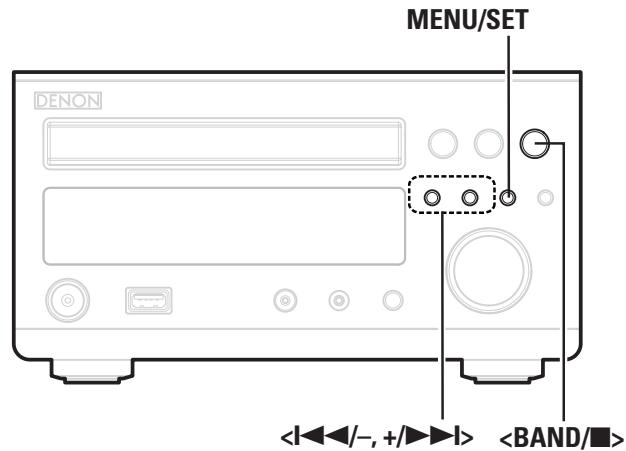
Listening to Preset Stations
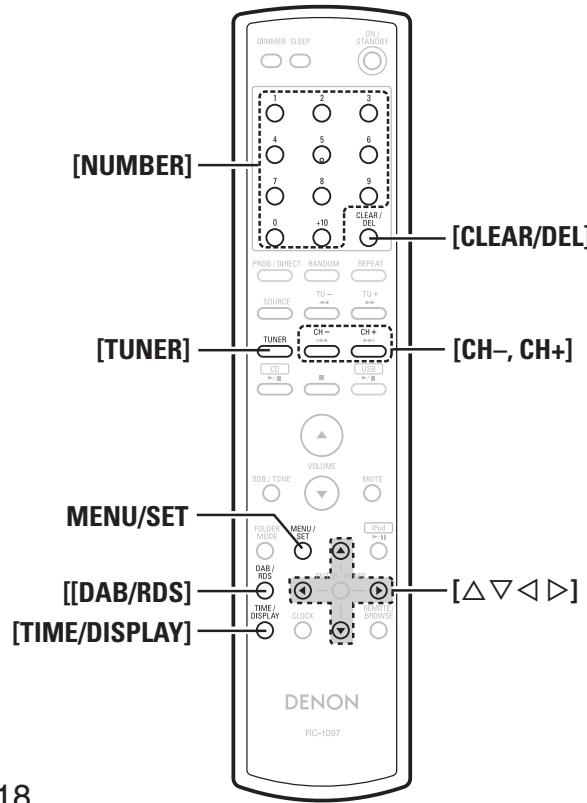
Use < / -, +/ > , [CH -, CH +] or [NUMBER] (0 ~ 9, +10) to select the preset number.
※ Operate < / -, +/ > after switching to the preset mode (page 17).
Naming the Currently Tuned In Broadcast Station
Names of up to 8 characters can be input.
1 Press [NUMBER] (0 9, + 10) for the preset number to be named.
Press MENU/SET three times. The "STATION NAME" is displayed.
※ Operatewithin 5 seconds.
Press [△]. The name input
Use [ ] to select the character, then press [] to set.
※ Characters that can be input.
$$ A \text {t o} Z \text {a t o} Z 0 \text {t o} 9 ^ {\wedge^ {\prime}} () ^ {*} +, \dots / = (\text {s p a c e}) $$
Press [ ] to move the cursor. Use this to correct input characters.
Press ENTER/MEMO. Naming mode is finished.
Changing the Broadcast Station Name
① Call out the preset name to be changed, then press MENU/SET three times.
② Perform steps 3, 4 and 5 at "Naming the Currently Tuned In Broadcast Station".
※ Press [CLEAR/DEL] to delete the characters.
RDS (Radio Data System)
RDS (works only on the FM band) is a broadcasting service which allows a station to send additional information along with the regular radio program signal.
The following four types of RDS information can be received with this unit:
Program Type (PTY)
PTY identifies the type of RDS program.
The program types and their displays are as follows:
| NEWS | News | WEATHER | Weather |
| AFFAIRS | Current Affairs | FINANCE | Finance |
| INFO | Information | CHILDREN | Children's programmes |
| SPORT | Sports | ||
| EDUCATE | Education | SOCIAL | Social Affairs |
| DRAMA | Drama | RELIGION | Religion |
| CULTURE | Culture | PHONE IN | Phone In |
| SCIENCE | Science | TRAVEL | Travel |
| VARIED | Varied | LEISURE | Leisure |
| POP M | Pop Music | JAZZ | Jazz Music |
| ROCK M | Rock Music | COUNTRY | Country Music |
| EASY M | Easy Listening | NATION M | National Music |
| Music | OLDIES | Oldies Music | |
| LIGHT M | Light Classical | FOLK M | Folk Music |
| CLASSICS | Serious Classical | DOCUMENT | Documentary |
| OTHER M | Other Music |
Traffic Program (TP)
TP identifies programs that carry traffic announcements.
This allows you to easily find out the latest traffic conditions in your area before leaving home.
Radio Text (RT)
RT allows RDS stations to send text messages that appear on the display.

- When the RT mode is turned on while an RDS radio station not offering an RT service is tuned in, "NO TEXT" is displayed on the display, then the mode automatically switches to the PS mode.
- In the same way, the mode automatically switches to the PS mode when the RT service is finished. In this case, the mode automatically switches from the PS mode back to the RT mode when an RT broadcast is resumed.
- The RT mode cannot be set in the AM band or for FM stations not offering RDS broadcasts.
NOTE
The operations described below selecting "RDS Search" will not function in areas in which there are no RDS broadcasts.
Clock Time (CT)
Use this to correct the time of the clock on the RCD-M37.
① During CT reception, press MENU/SET for over 1 second. The "AUTO Adj mm:ss" is displayed.
② Press MENU/SET to set. The "RDS mm:ss" is displayed.
The time on the set's internal clock is updated to the currently displayed "CT" time.

Do not operate any buttons while the time is being updated. If buttons are operated, CT reception is not possible and the time is not updated.
Viewing Track Information During Reception
Press [TIME/DISPLAY] while receiving a RDS to display the information of the track currently being broadcast.
RDS Search
Use this function to automatically tune to FM stations that provide the RDS service.
Press < BAND/ |口 or [TUNER] to select "FM".
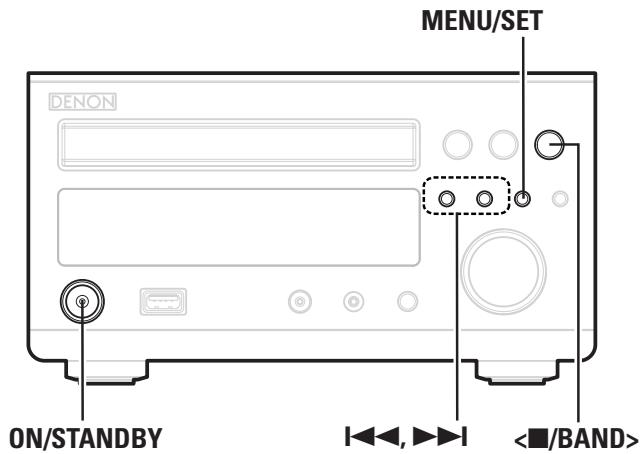
Press [DAB/RDS] to select "RDS Search". RDS Search PTY Search TP Search
3 Press [< ▷ ]. Automatically begin the RDS search operation.
※ If no RDS station is found, "NO PROGRAM" is displayed.
PTY Search
Use this function to find RDS stations broadcasting a designated program type (PTY). For a description of each program type, refer to "Program Type (PTY)".
Press
2 Press [DAB/RDS] to select "PTY Search".
3 Use [ ] to call out the desired program type.
4 Press [A D]. Automatically begin the PTY search operation.
※ If no program of the specified type is found, "NO PROGRAM" is displayed.
TP Search
Use this function to find RDS stations broadcasting traffic programs (TP stations).
Press < BAND/ |口 or [TUNER] to select "FM".
2 Press [DAB/RDS] to select "TP Search".
Press [△]. Automatically be
※ “NO PROGRAM” is displayed when there is no traffic information broadcast station.

Symbols used to indicate buttons in this manual
Button located on both the main unit and the remote control unit BUTTON
Button only on the main unit
Listening to DAB (For UK Model Only)
About DAB (Digital Audio Broadcasting)
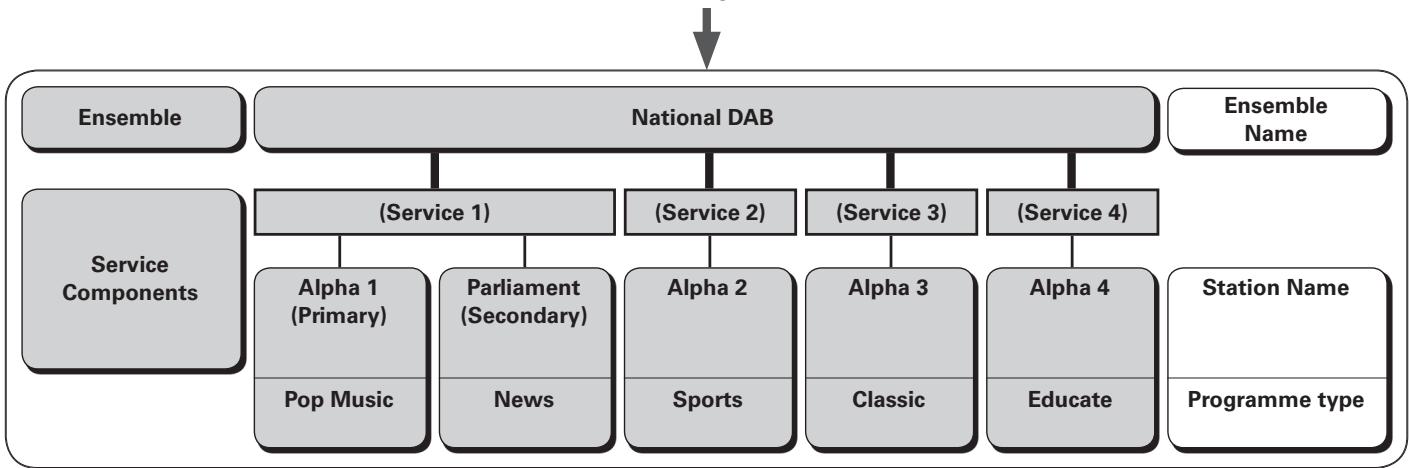
- Since the DAB system is broadcasted in digital format, DAB system can supply crystal-clear audio and stable reception even in mobile objects.
DAB is a new generation radio which can provide data service and supplementary multi-media services. - DAB broadcasts multiple services under one Ensemble that are called service components.
Each component contains inherent programmes; news, music, sports, and many more.
Each Ensemble and service component has its label, and users can recognize a current broadcasting station and service contents by using the label. - The main service component is broadcast as Primary while the others are broadcast as Secondary.
- Also rich character information is serviced through Dynamic Labels; song title, artist composer etc.
DAB Signal
DAB Service Diagram
Setting DAB Band
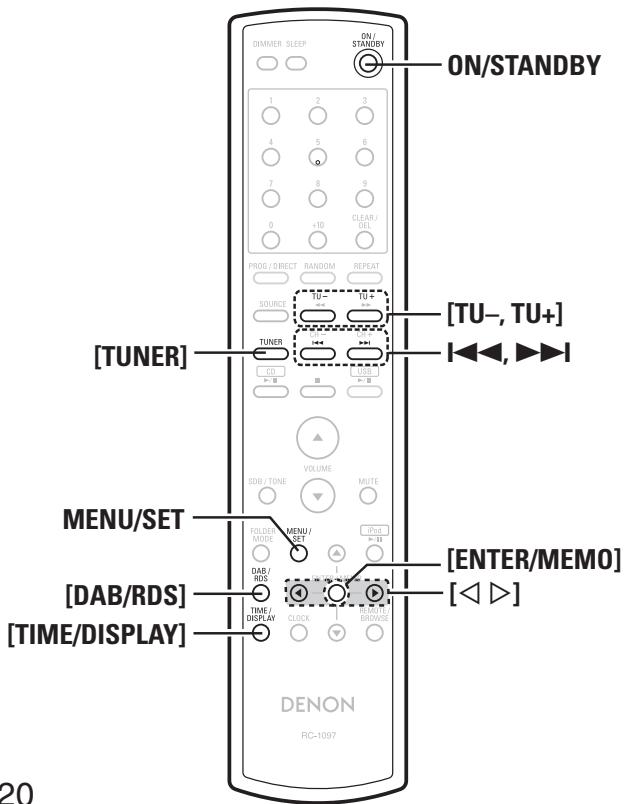
1 Press ON/STANDBY to set the standby mode.
2 Press MENU/SET for over 1 second. "DAB SCAN AREA" is displayed for 2 seconds.
3 Use | |, or [ ] to select the auto preset range. ALL BAND III ←→ UK ONLY
ALL BAND III : 5A to 13F
UK ONLY: 11B to 12D
Press MENU/SET. The standby mode is set.
Tuning in DAB Stations
1 Press < BAND/or [TUNER] to select "DAB". Automatically begin the DAB search operation.
Press I▶, ▷▶ or [TU+, TU-] to select the desired broadcast station.
※ The broadcast stations are displayed in the order in which they were scanned.

DAB stations can be stored in the preset memory and played in the same way as FM/AM stations.
- "Automatically Presetting FM Stations (Auto Preset)"
-Presetting FM/AM Stations Manually - "Listening to Preset Stations"
Auto Scannig Broadcast Stations
Connect the antenna beforehand
1 Set the band to "DAB", then press MENU/SET for at least 1 second.
Press ▷or[<D]to select“AUTO SCAN".
3 Press MENU/SET.
Switching the Reception Information for the Currently Tuned in DAB Station
1 Perform steps 1 to 2 under "Tuning in DAB stations" to tune in a DAB station.
2 Press [TIME/DISPLAY].
※ The display switches as shown below each time the button is pressed.
① Data Label Segment :
Text data included in the broadcast is scrolled.
② Station Name :
The service station name is displayed.
③ Program Type :
The category of the tuned in station is displayed.
④ Ensemble Name :
The ensemble name is displayed.
⑤ Frequency:
The frequency is displayed.
⑥ Signal Quality :
The reception signal sensitivity is displayed (0 to 100).
※ If the reception signal sensitivity is 80 or greater, the program can be received without noise.
⑦ Audio Information :
The mode of the currently tuned in station and its bit rate are displayed.
⑧ Data and Time :
The current date and time are displayed.
※When MENU/SET is pressed, the set's internal clock is updated to the currently displayed time.
Making the DAB Settings
1 Press [DAB/RDS].
The display switches as shown below each time the button is pressed.
Press , ▷or [△D] to select the menu to be set.
3 Press [ENTER/MEMO].
[Selectable items]
Tuning Aid

The reception sensitivity of the currently tuned in frequency is displayed.
※ The program can be received without noise when the cursor moves to the right of the sensitivity display. ----I
Station Order

The service list is created with the auto scan function.
MULTIPLEX ALPHANUMERIC
(In order of frequency) (In alphabetical order)
DRC (Dynamic Range Control) :

DAB Versio

The DAB module's version is displayed.
DAB Initialize
When the "DAB Initialize" procedure is performed, all the preset memory settings for the stations and DABs are reset.
1 Set the band to "DAB", then press MENU/SET for at least 1 second.
Press ▷or[△D]to select“DAB INITIALIZE”.
3 Press MENU/SET.
Symbols used to indicate buttons in this manual
Button located on both the main unit and the remote control unit BUTTON
Button only on the main unit
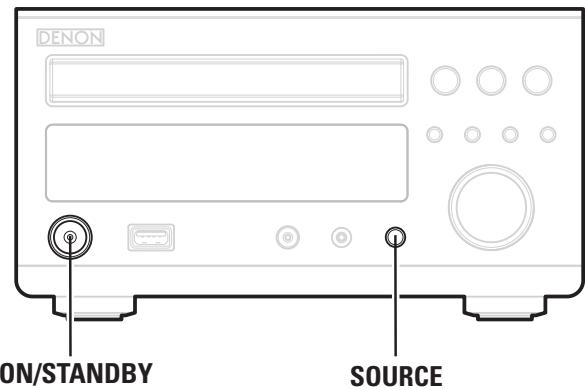
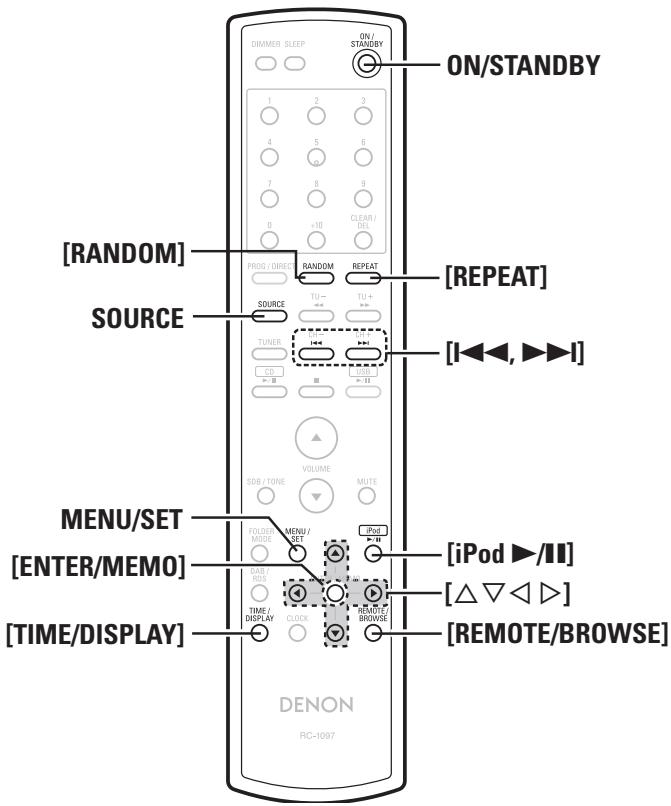
iPod® Playback
With the RCD-M37, you can listen to music on an iPod. It is also possible to operate the iPod from the main unit or remote control unit.

iPod is a trademark of Apple Inc., registered in the U.S. and other countries.
※ The iPod may only be used to copy or play contents that are not copyrighted or contents for which copying or playback is legally permitted for your private use as an individual. Be sure to comply with applicable copyright legislation.
Preparations
1 Set the iPod on the DENON Control Dock for iPod. (See the Control Dock for iPod's operating instructions.)
2 Press SOURCE to select "AUX1/Dock".
Press [REMOTE/BROWSE] to select the display mode. The mode switches each time the button is pressed.
| [Selectable mode] | Browse mode | Remote mode | |
| Display location | Main unit display | iPod display | |
| Playable files | Audio file | ○ | ○ |
| Video file | × | ○ | |
| Active buttons | Remote control unit (RCD-M37) | ○ | ○ |
| iPod | × | ○ | |
Listening to Audio
1 Use [ ] to select the item, then press [ENTER/ MEMO] or [D] to select the music file to be played.
2 Press [iPod /II]. Playback starts.

- If the function is set to something other than "AUX1/Dock", press [iPod▶/II] to switch the function to "AUX1/Dock" and start playback. (page 28 "Auto Function Selector Function")
- The function can also be switched to "AUX1/Dock" using SOURCE
Remote control and iPod button relations
| Remote control unit but-tons | iPod buttons | Operation on the RCD-M37 |
| iPod▶/II | ▶II | Play the track.※ Play/Pause in remote mode |
| I<,▶I | I<,▶I | Play the track from the beginning/Play the next track. |
| <,▶> | Fast-reverse the track/Fast-for-ward the track. | |
| <,▶,△,▽ | Click Wheel | Select an item. |
| ENTER/MEMO | Select | Enter the selection or plays the track. |
| REMOTE/BROWSE | - | Switch between the browse mode and the remote mode. |
| REPEAT | - | Switch the repeat function |
| RANDOM | - | Switch the shuffle function |
| MENU/SET | MENU | Display the menu or return to the previous menu. |
NOTE
- DENON will accept no responsibility whatsoever for any loss of iPod data.
- Depending on the type of iPod and the software version, some functions may not operate.
To Switch the Display
During playback, press [TIME/DISPLAY].
The display switches each time the button is pressed.

Disconnecting the iPod
1 Press ON/STANDBY to set the standby mode.
2 Remove the iPod from the Control Dock for iPod.
Playing a Portable Audio
Your portable audio player can be connected to the RCD-M37's portable jack to play tracks on the portable audio player.
Connecting a Portable Player
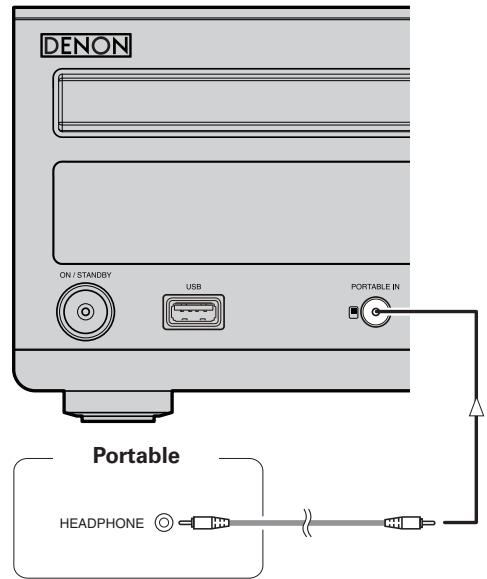
Connect the RCD-M37 and portable audio player using a separately sold mini-stereo audio cable.
Playing the Portable Player
1 Press SOURCE to select "PORTABLE IN".
2 Play the portable audio player. The Portable Audio are output.
※ Also read the portable audio player's operating instructions.
NOTE
When using the portable player's headphones jack, set the volume on the portable player to an appropriate level.

Symbols used to indicate buttons in this manual
Button located on both the main unit and the remote control unit BUTTON
Button only on the main unit [BUTTON]
Button only on the remote control unit [BUTTON]
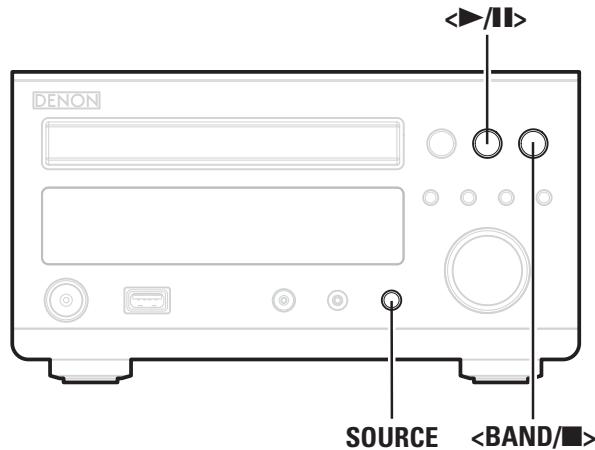
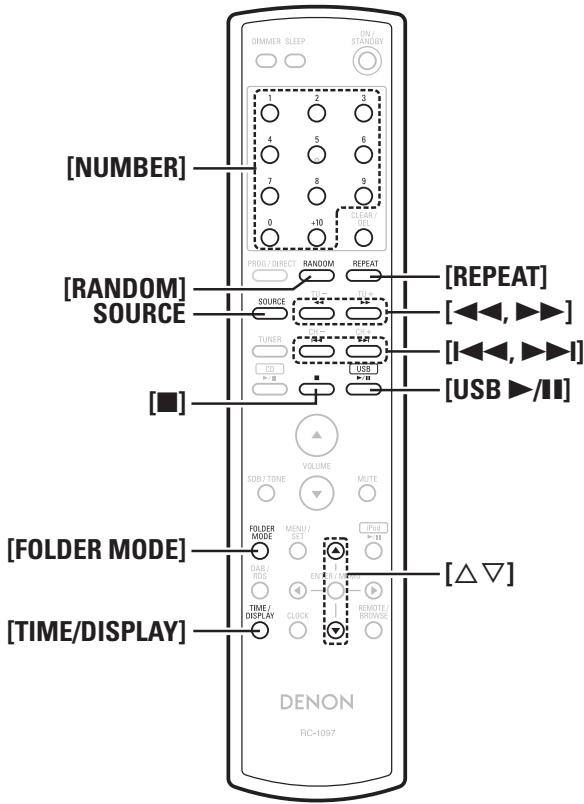
USBPlayback
Playable USB Memory Formats
Files stored on USB memory devices created in the formats below can be played.
USB-Compatible File Systems
"FAT16" or "FAT32"
※ If the USB memory device is divided into multiple partitions, only the top drive can be selected.
Maximum number of playable files and folders
Maximum number of files in a folder: 255
Maximum number of folders: 255
File Format
MPEG-1 Audio Layer-3
WMA (Windows Media Audio)
Tag Data
ID3-Tag (Ver.1x)
META-Tag (Compatible with title, artist and album names)
| Playable MP3/WMA file | |||
| File format | Sampling frequency | Bit rate | Extension |
| MP3 | 32, 44.1, 48 kHz | 32 ~ 320 kbps | .mp3 |
| WMA | 32, 44.1, 48 kHz | 64 ~ 192 kbps | .wma |

Only music files that are not copyright-protected can be played on this set.
※ Contents downloaded from pay sites on the Internet are copyright protected. Also, files encoded in WMA format when ripped from a CD, etc., on a computer may be copyright protected, depending on the computer's settings.
Basic Operation
Set the USB port to be used.
Playback starts automatically.
※ When a USB memory device is connected, playback starts automatically when the operation below is performed.
- Switch the function to "USB" using SOURCE.
Press [USB /II]

- If the function is set to something other than "USB", press [USB /II] to switch the function to "USB" and start playback. (page 28 "Auto Function Selector Function")
- The function can also be switched to "USB" using SOURCE
To Switch the "Folder Mode" or "Memory Mode"
Press [FOLDER MODE]
【About the display】
When "Folder Mode" is selected……"FLD" is displayed.
When "Memory Mode" is selected ... "FLD" is not displayed.
Folder Mode :
All the files in the selected folder are played.
Memory Mode :
After the selected folder and files are played, all the files in all the folders are played.
To Switch the Folder or File DuringPlayback
- Folder
Use [ ] to select the folder.
- File
Use I I, to select the file, or use [NUMBER] (0 9, + 10)
to select the file number.
□ Stopping Playback
Press < BANDor [ ]
Stopping Playback Temporarily
Press </> or [USB > /II]
The "I" is displayed.
※ To resume playback, press </> or [USB / ].
Fast-Forwarding and Fast-Reversing (searching)
During playback, press and hold in [▲▲, ▲▶].
Playing Repeatedly (Memory mode only)
Press [REPEAT].
Playing Random Order (Memory mode only)
In the stop mode, press [RANDOM].
Switching the Display
During playback, press [TIME/DISPLAY].

※ The characters that can be displayed are as follows:
A to Z a to z 0 to 9 '()^* +, -· / = (space)
NOTE
- DENON will take no responsibility whatsoever for any loss or damage to data on USB memory devices when using the USB memory device connected to the RCD-M37.
- USB memory devices will not work via a USB hub.
- DENON does not guarantee that all USB memory devices will operate or be supplied power. When using a USB connection type portable hard disk of the type for which power can be supplied by connecting an AC adapter, we recommend using the AC adapter.
Setting the Timer

Symbols used to indicate buttons in this manual
Button located on both the main unit and the remote control unit BUTTON
Button only on the main unit
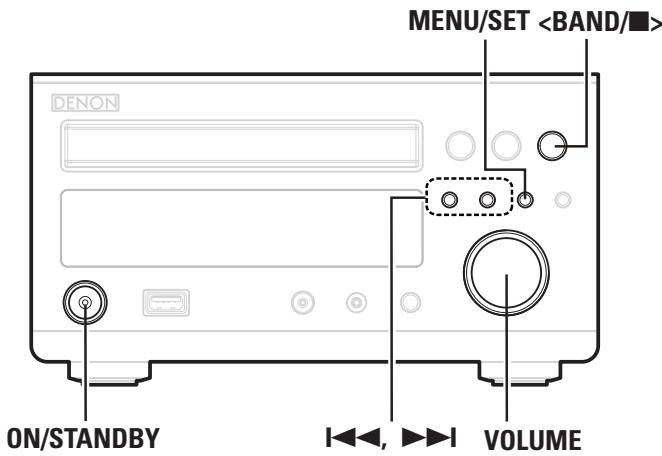
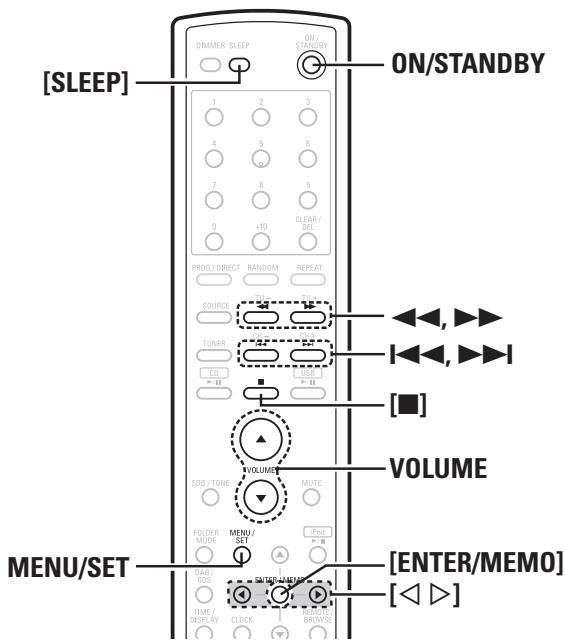
TimerPlayback
The everyday timer, once timer and sleep timer can be set.
Timer order of priority
The order of priority when the times set for the different timers overlap is as follows:
- Sleep timer
- Once timer
- Everyday timer
Setting the Timer
Everyday timer playback
Playback starts (the power turns on) and stops (the power turns off) at the set times each day.
- Once timer playback
Playback starts (the power turns on) and stops (the power turns off) once only at the set times.
1 Press MENU/SET. The "TIMER" is displayed
※ Operatethewithin5seconds.
Use 1 1 or [ ] to select the timer play mode.
- "1": Once timer, "E": Everyday timer
Press MENU/SET or [ENTER/MEMO]. The timer play mode is set.
Use 1 1, or [ ] to select the function to be played.
![DENON RCD-M37 - Use 1 1, or [ ] to select the function to be played. - 1](/content/2025/01/135701/images/4f9aef8531168fcbc256a8d4cd4d8d4eafd2cf600bec3d16955443309d961bc4.jpg)
Press MENU/SET or [ENTER/MEMO]. The function to be played is set.
※ If the function is set to anything other than the tuner, the setting display shown in step 7 is displayed.
【Only when the "TUNER" function is selected】
6 -① Use I<, ▷or [< ▷] to select the preset number.
E
-② Press MENU/SET or [ENTER/MEMO]. The broadcast station for the selected preset number is set.
7 Use 1 1, or [ ] to set the “hours” for the timer start time.
Press MENU/SET or [ENTER/MEMO]. The "hours" for the timer start time are set.
9 Use 1 1, or [ ] to set the “minutes” for the timer start time.
10 Press Menu/SET or [ENTER/MEMO]. The "minutes" for the timer start time are set.
11 Use , or to set the “hours” for the timer stop time.
12 Press MENU/SET or [ENTER/MEMO]. The "hours" for the timer stop time are set.
12Use , or [ ] to set the "minutes" for the
timer stop time.
E OFF 10+00
14Press MENU/SET or [ENTER/MEMO]. The "minutes" for the timer stop time are se
15 Use , or [ ] to turn timer playback on.
1_off/E_on
| Display | Once timer | Everyday timer |
| 1_off/E_off | OFF | OFF |
| 1_on/E_on | ON | ON |
| 1_off/E_on | OFF | ON |
| 1_on/E_off | ON | OFF |
When turned on, " lights.
16 Press MENU/SET or [ENTER/MEMO]. The timer setting is set.
17Adjust the volume for when the timer starts using VOLUME.
18 Set the power to standby. The timer playback standby mode is set.
Canceling the timer
Press MENU/SET twice.
At step 15 under "Setting the Timer", use ||, | or [ ] to turn off the timer on/off indicator and turn off " ".
To check the timer settings
① Press MENU/SET.
The "TIMER" is displayed.
② Press , or []
The "EVERYDAY" or "ONCE" is displayed.
③ Press MENU/SET.
The display switches each time the button is pressed.
To change the timer settings
Repeat the procedure under "Setting the Timer" ( page 26).
To change the setting while setting the timer
Press < BAND/or [ ]
Return to step 2 under "Setting the Timer" (12 page 26). Repeat the procedure.
To clear the timer settings
① Press MENU/SET.
The "TIMER" is displayed.
② Press , or []
The "EVERYDAY" or "ONCE" is displayed.
③ While "EVERYDAY" or "ONCE" is displayed, press
[for at least 2 seconds.
If there is a power failure
The time setting and the timer settings are cleared. Reset the current time, then reset the timer.
NOTE
When performing timer playback using DENON Control Dock for iPod ASD-3N or ASD-3W, leave the ASD-3N or ASD-3W power on.

When the function is set to iPod, the timer cannot be set. To set the timer, first switch to a function other than iPod.
Sleep Timer Playback
Use this function to automatically switch the power to the standby mode after a specific amount of time (minutes). The sleep timer can be set to up to 90 minutes, in steps of 10 minutes.
1 Select and play the desired function.
Press [SLEEP] and select the setting time.

The "SLEEP" indicator flashes.
Press [SLEEP] while the "SLEEP" indicator is flashing. The set time is displayed.
※ After about 5 seconds, the set returns to as it was before the sleep timer was set, and the "SLEEP" indicator lights.
Canceling the sleep timer
Either press [SLEEP] at step 2 under "Sleep Timer Playback" until "OFF" is displayed, or press ON/STANDBY.
To change the setting while the sleep timer is set Press [SLEEP].
□ Checking the time remaining until the sleep timer starts
Press [SLEEP].
Return to step 2 under "Sleep Timer Playback".
Other Functions

Symbols used to indicate buttons in this manual
Button located on both the main unit and the remote control unit BUTTON
Button only on the main unit
Convenient Functions
Auto Power On
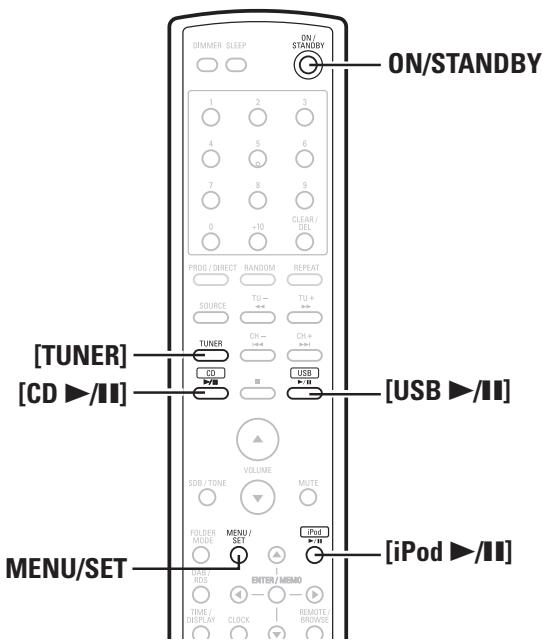
When the power is in standby, the power turns on when any of the buttons below other than ON/STANDBY is operated, and the respective operation is performed.
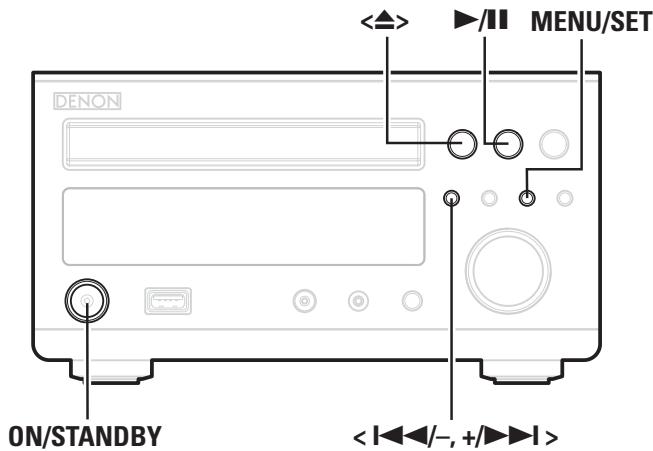
- <△> The disc tray opens.
- ▷/III for the different functions Playback of that source starts.
- [TUNER]...Playback of the tuner starts.
NOTE
The Auto Power On function cannot be used with iPods.
Auto Function Selector Function
When one of the buttons below is pressed, the function switches to the respective function and playback of that source starts.
- [CD▶/II] The function switches to "CD" and the CD starts playing.
- [USB▶/II] The function switches to "USB" and the USB starts playing.
- [iPod ▷/■] The function switches to "AUX1/Dock" and the iPod starts playing.
- [TUNER] The functions switch to "TUNER" and the band last set is tuned in.
Last Function Memory
This stores the settings as they were directly before the standby mode was set.
When the power is turned back on, the settings are restored to as they were directly before the standby mode was set.
Resetting the Microprocessor
Perform this procedure if the display is abnormal or if operations cannot be performed.
When the microprocessor is reset, all the settings are reset to their default values.
1 Unplug the power cord.
2 Plug the power cord into a power outlet while pressing </> and MENU/SET simultaneously.
3 Press [CLOCK]. The "00:00" display flashes.
![DENON RCD-M37 - Press [CLOCK]. The "00:00" display flashes. - 1](/content/2025/01/135701/images/72b4df8ba54e1807eb3402cbbfbc1541ad89fb79dc853a9a68ad4ecf15e764ac.jpg)
If "00:00" is not flashed in step 3, start over from step 1.
Using an Optimizing Filter
An optimizing filter suited for the properties of the speakers (SC-M37) can be used.
1 Press MENU/SET to select "SP OPTIMISE".
2 Use < > or [< ] to select "ON" or "OFF".
3 Press MENU/SET to set.
[Selectable items]
ON : The response is optimized for the speakers (SC-M37, sold separately).
OFF :The response is flat.
![DENON RCD-M37 - [Selectable items] - 1](/content/2025/01/135701/images/f2442c7e37137c4353219386f0561a660b82071c520c9d17d3900f11ebc60330.jpg)
When the function is set to iPod, the set cannot be switched between on and off.
Troubleshooting
If a problem should arise, first check the following:
- Are the connections correct?
- Is the set being operated as described in the owner's manual?
- Are the other components operating properly?
If this unit does not operate properly, check the items listed in the table below. Should the problem persist, there may be a malfunction.
In this case, disconnect the power immediately and contact your store of purchase.
[General]
| Symptom | Cause | Countermeasure | Page |
| Set does not operate properly. | • External noise or interference is causing the set to malfunction. | • Reset the microprocessor. | 28 |
| Display not lit and sound not produced when power switch set to on. | • Power cord not plugged in securely. | • Check the connections on the set's rear panel and the connection of the power plug to the power outlet. | 11 |
| Display lit but sound not produced. | • Device you want to play and set input source do not match. • Volume control set to minimum. • MUTING is on. | • Select an appropriate input source. • Turn volume up to suitable level. • Switch off MUTING. | 13 13 13 |
| Display is off. | • The Dimmer setting is set to "OFF". | • Set to something other than "OFF". | 13 |
| Power turns off suddenly and power indicator flashes red. | • Protection circuit activated due to rise of internal temperature. • Core wires of two speakers are touching each other or a core wire is sticking out of the terminal and touching the set's rear panel, activating the protection circuit. • Set is damaged. | • Turn off the power, wait for the set to fully cool down, then turn the power back on. • Place the set in a well-ventilated place. • First unplug the power cord, then twist the core wires tightly or terminate the speaker cables, then reconnect. • Turn off the power and contact a DENON service center. | 9 9 9 |
[Remote Control Unit]
| Symptom | Cause | Countermeasure | Page |
| Set does not work properly when remote control unit operated. | ·Batteries are worn. ·You are operating outside of the specified range. ·Obstacle between main unit and remote control unit. ·The batteries are not inserted in the proper direction, as indicated by the polarity marks in the battery compartment. ·The set's remote control sensor is exposed to strong light (direct sunlight, inverter type fluorescent bulb light, etc.). | ·Replace with new batteries. ·Operate within the specified range. ·Remove the obstacle. ·Insert the batteries in the proper direction, following the polarity marks in the battery compartment. ·Move the set to a place in which the remote control sensor will not be exposed to strong light. | 3 4 4 3 4 |
[CD]
| Symptom | Cause | Countermeasure | Page |
| "00 Tr 00 : 00" is shown on the display even though a CD is loaded. | The disc is not properly loaded. | Reload the disc. | 3 |
| Disc is not played when CD ➔ button is pressed. | The disc is dirty or scratched. | Wipe the dirt off the disc or replace the disc. | 3 |
| A specific part of a disc is not played. | The disc is dirty or scratched. | Wipe the dirt off the disc or replace the disc. | 3 |
| A CD-R or CD-RW disc cannot be played. | The disc has not been finalized. The recording conditions are bad or the quality of the disc itself it poor. | Finalize the disc then play it. Use a properly recorded disc. | 2- |
| MP3 and WMA files cannot be played. | The file formats, extensions or settings made when disc was created are not compatible with the RCD-M37. | Create discs with file formats, extensions or settings compatible with the RCD-M37. | 15 |
[Tuner]
| Symptom | Cause | Countermeasure | Page |
| Continuous noise is heard when receiving FM programs. | Antenna cable is not properly connected. | Connect the antenna cable properly. Connect an outdoor antenna. | 14 - |
| Hissing or continuous noise is heard when receiving AM programs. | This may be noise from a TV or interference from a radio station. | Turn off the TV. Change the position and direction of the AM loop antenna. | - 10 |
[iPod]
| Symptom | Cause | Countermeasure | Page |
| iPod cannot be played. | Device you want to play and set input source do not match. Cable is not properly connected. Control Dock for iPod's AC adapter is not connected to power outlet. | Select an appropriate input source. Reconnect. Plug the Control Dock for iPod's AC adapter into a power outlet. | 22 10 - |
[USB]
| Symptom | Cause | Countermeasure | Page |
| When a USB memory device is connected, "USB" is not displayed. | ·The set cannot recognize a USB memory device. ·A USB memory device not conforming to mass storage class or MTP standards is connected. ·A USB memory device that the set cannot recognize is connected. ·USB memory device is connected via USB hub. | ·Check the connection. ·Connect a USB memory device conforming to mass storage class or MTP standards. ·This is not a malfunction. DENON does not guarantee that all USB memory devices will operate or receive power. ·Connect the USB memory device directly to the USB port. | 11 - - - - |
| Files on a USB memory device cannot be played. | ·USB memory device is in format other than FAT16 or FAT32. ·USB memory device is divided into multiple partitions. ·Files are stored in a non-compatible format. ·You are attempting to play a file that is copyright protected. | ·Set the format to FAT16 or FAT32. For details, refer to the USB memory device's operating instructions. ·When divided into multiple partitions, only files stored in the top partition can be played. ·Record the files in a compatible format. ·Files that are copyright protected cannot be played on this set. | - - 24 24 |
Specifications

Audio section
Power amplifier
Rated output:
30 W + 30 W (6 Ω/ohms, 1 kHz T.H.D 10 %)

Tuner section
Reception frequency range:
FM: 87.50 MHz ~ 108.00 MHz
AM: 522 kHz ~ 1611 kHz
Receiving sensitivity:
DAB: BAND3 170 MHz ~ 240 MHz
AM: 20~ V
FM stereo separation:
DAB: -93 dBm
35 dB (1 kHz)

CD section
Playback frequency response:
2 Hz ~ 20 kHz
Wow & flutter:
Below measurable limits (± 0.001%)
Sampling frequency:
44.1 kHz

Clock/Timer section
Clock method:
Crystal oscillator (Within 1 ~ 2 minutes per month)
Timer:
Everyday/Once timer: One system each
Sleep timer: 90 minutes, maximum

General
Power supply:
AC 230V,50Hz
Power consumption:
65W
Maximum external dimensions:
Approx. 0.3 W (standby)
Weight:
Remote control unit (RC-1097)
Remote control method:
IR pulse method
Power supply:
R03/AAA Type (two batteries)
Maximum external dimensions:
110 g (including batteries)
※ For purposes of improvement, specifications and design are subject to change without notice.
- WARNING:
- Laser Class
- "CLASS 1 LASER PRODUCT"
- - DECLARATION OF CONFORMITY
- CAUTION:
- VORSICHT:
- NOTE ON USE / HINWEISE ZUM GEBRAUCH / OBSERVATIONS RELATIVES A L'UTILISATION / NOTE SULL'USO / NOTAS SOBRE EL USO / ALVORENSTE GEBRUIKEN / OBSERVERA ANGÄENDE ANVÄNDNINGEN
- ACHTUNG:
- A NOTE ABOUT RECYCLING:
- HINWEIS ZUM RECYCLING:
- Connections
- Playback
- Setting the Timer
- Other Functions
- Troubleshooting 29,30
- Specifications 30
- Getting Started
- Accessories
- Cautions on Handling
- - Before turning the power switch on
- - Sufficiently ventilate the place of installation
- - About condensation
- - Cautions on using mobile phones
- - Moving the unit
- Cautions on Installation
- Note:
- Main Features
- High quality amplifier stressing sound quality
- Tone control and SDB control
- CD player for digital sound
- Playback of MP3 and WMA files
- Low standby power consumption
- Discs
- Discs Usable on the RCD-M37
- Music CDs
- NOTE
- Holding Discs
- Loading Discs
- Cautions on Loading Discs
- Cautions on Storing Discs
- Cleaning Discs
- About the Remote Control Unit
- Inserting the Batteries
- Operating Range of the Remote Control Unit
- Part Names and Functions
- Front Panel
- Display
- Rear Panel
- Remote Control Unit
- Buttons Operable for All Functions (CD, TUNER, iPod and USB)
- Buttons Operable When the Function is Set to "CD"
- Buttons Operable When the Function is Set to "TUNER"
- Buttons Operable When the Function is Set to "iPod", "USB"
- Preparations
- Cables Used for Connections
- Audio cables
- Analog connections (stereo)
- Using the AM Loop Antenna
- To use suspended on a wall
- To use standing alone
- Assembling the AM Loop Antenna
- Speaker Connections
- Connecting the Speaker Cables
- Protector circuit
- Connecting the Playback Components
- Control Dock for iPod
- Connecting the Recording Components
- CD Recorder / MD Recorder / Tape deck
- Connections to Other Devices
- Antenna Terminals
- AM/FM
- - Connecting the AM loop antenna
- □ Installing the DAB indoor antenna
- USB Port
- Connecting the Power Cord
- For Continental model only
- For UK model only
- Once Connections are Completed
- Setup
- Symbols used to indicate buttons in this manual
- Setting the Current Time (24-Hour Display)
- Turning the Power On
- Press ON/STANDBY.
- Completely turning off the power
- To close the disc tray
- Operations Possible DuringPlayback
- Adjusting the Master Volume
- [Variable range]
- Input Source Switching
- Adjusting the Tone
- [Selectable modes]
- Turning the Sound Off Temporarily (Muting)
- Press [MUTE].
- Switching the Display's Brightness
- Listening With Headphones
- CDPlayback
- Playing CDs
- □ Stopping Playback
- □ Stopping Playback Temporarily
- Fast-Forwarding and Fast-Reversing (searching)
- □ Moving to the Beginning of Tracks (skipping)
- To Play the Desired Track
- (Remote Control Unit Only)
- Playing Repeatedly
- Press [REPEAT].
- [Selectable items]
- Playing Random Order
- Canceling Random Playback
- Playing Tracks in the Desired Order
- Switching the Display
- Press [TIME/DISPLAY].
- Playback of MP3 and WMA Files
- About the MP3 and WMA Formats That Can be Played
- Writing software format
- Maximum number of playable files and folders
- File format
- Tag data
- Playing MP3 and WMA Files
- TUNERPlayback
- Tuning in Broadcast Stations
- About the FM Broadcast Reception Status Display
- About Switching the Tuning Mode and Preset Mode
- Automatically Presetting FM Stations (Auto Preset)
- Presetting FM/AM Stations Manually
- Listening to Preset Stations
- Naming the Currently Tuned In Broadcast Station
- RDS (Radio Data System)
- Program Type (PTY)
- Traffic Program (TP)
- Radio Text (RT)
- Clock Time (CT)
- Viewing Track Information During Reception
- RDS Search
- PTY Search
- TP Search
- Listening to DAB (For UK Model Only)
- About DAB (Digital Audio Broadcasting)
- Setting DAB Band
- Tuning in DAB Stations
- Auto Scannig Broadcast Stations
- Switching the Reception Information for the Currently Tuned in DAB Station
- Press [TIME/DISPLAY].
- Making the DAB Settings
- Tuning Aid
- Station Order
- DAB Versio
- DAB Initialize
- iPod® Playback
- Listening to Audio
- To Switch the Display
- Disconnecting the iPod
- Playing a Portable Audio
- Connecting a Portable Player
- Playing the Portable Player
- USBPlayback
- Playable USB Memory Formats
- USB-Compatible File Systems
- Basic Operation
- Set the USB port to be used.
- To Switch the "Folder Mode" or "Memory Mode"
- Press [FOLDER MODE]
- Folder Mode :
- Memory Mode :
- To Switch the Folder or File DuringPlayback
- Stopping Playback Temporarily
- Playing Repeatedly (Memory mode only)
- Playing Random Order (Memory mode only)
- TimerPlayback
- Timer order of priority
- Press MENU/SET. The "TIMER" is displayed
- Use 1 1 or [ ] to select the timer play mode.
- Press MENU/SET or [ENTER/MEMO]. The timer play mode is set.
- Use 1 1, or [ ] to select the function to be played.
- Press MENU/SET or [ENTER/MEMO]. The function to be played is set.
- Press MENU/SET or [ENTER/MEMO]. The "hours" for the timer start time are set.
- Press Menu/SET or [ENTER/MEMO]. The "minutes" for the timer start time are set.
- Press MENU/SET or [ENTER/MEMO]. The "hours" for the timer stop time are set.
- Sleep Timer Playback
- Convenient Functions
- Auto Power On
- Auto Function Selector Function
- Last Function Memory
- Resetting the Microprocessor
- Unplug the power cord.
- Press [CLOCK]. The "00:00" display flashes.
- Using an Optimizing Filter
- Press MENU/SET to select "SP OPTIMISE".
- Press MENU/SET to set.
- Troubleshooting
- Specifications
- Audio section
- Tuner section
- CD section
- Clock/Timer section
- General
- Remote control unit (RC-1097)
Brand : DENON
Model : RCD-M37
Category : CD player and integrated amplifier