
S-32 - Bluetooth speaker DENON - Free user manual and instructions
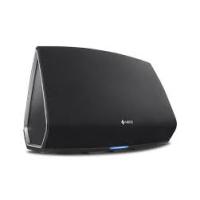
Find the device manual for free S-32 DENON in PDF.


| Product Type | Bluetooth speaker with iPod docking station, internet radio and network |
| Brand | DENON |
| Model | S-32 |
| Dimensions (W x H x D) | 360 x 126 x 226 mm |
| Weight | 6 kg |
| Power Supply | AC 230 V, 50 Hz |
| Power Consumption | 36 W (operation) / 0.4 W (standby) |
| Main Functions | Internet Radio, PC Music (network streaming), iPod, FM/AM RDS, AUX, alarm, sleep timer, favorites, volume control, mute |
| Network Connectivity | Ethernet 100BASE-TX, Wi-Fi IEEE 802.11b/g (WEP, WPA, WPA2) |
| Supported Audio Formats | MP3, WMA, WAV, AAC, FLAC (via network) |
| Remote Control | RC-1089, R03/AAA batteries |
| Inputs and Connectors | AUX IN (3.5 mm jack), headphone (3.5 mm jack), FM/AM antennas, Ethernet, subwoofer output (MONO OUT), iPod docking station |
| Care and Cleaning | Do not expose to water, moisture or high temperatures. Clean with a dry cloth. Do not block ventilation openings. |
| Safety | Unplug the power cord to completely disconnect power. Do not place objects containing liquid on the device. Maintain a distance of at least 20 cm from people for the antenna. |
| Repairability and Spare Parts | Contact a DENON authorized service center for repairs. No spare parts listed in the manual. |
| General Information | Manufactured under license from Audyssey (Dynamic EQ and BassXT). Wi-Fi certified. DLNA CERTIFIED. Complies with WEEE. |
Frequently Asked Questions - S-32 DENON
User questions about S-32 DENON
0 question about this device. Answer the ones you know or ask your own.
Ask a new question about this device
Download the instructions for your Bluetooth speaker in PDF format for free! Find your manual S-32 - DENON and take your electronic device back in hand. On this page are published all the documents necessary for the use of your device. S-32 by DENON.
USER MANUAL S-32 DENON
The lightning flash with arrowhead symbol, within an equilateral triangle, is intended to alert the user to the presence of uninsulated "dangerous voltage" within the product's enclosure that may be of sufficient magnitude to constitute a risk of electric shock to persons.

The exclamation point within an equilateral triangle is intended to alert the user to the presence of important operating and maintenance (servicing) instructions in the literature accompanying the appliance.
WARNING:
TO REDUCE THE RISK OF FIRE OR ELECTRIC SHOCK, DO NOT EXPOSE THIS APPLIANCE TO RAIN OR MOISTURE.

R&TTE Directive 1999/5/EC
This product may be operated in the following countries;
| AT | BE | CZ | DK | FI |
| FR | DE | GR | HU | IE |
| IT | NL | PL | PT | SK |
| ES | SE | GB | NO | CH |
- DECLARATION OF CONFORMITY
Hereby, D&M Holdings Inc., Denon Brand Company declares that this product S-32 is in compliance with the essential requirements and other relevant provisions of Directive 1999/5/EC, in conformity with the following standards;
EN60065, EN55013, EN55020, EN55022, EN55024, EN61000-3-2,
EN61000-3-3, EN300328, EN301489-01, EN301489-17 and EN50385
The declaration of conformity may be consulted to our European representative, DENON EUROPE.
To completely disconnect this product from the mains, disconnect the plug from the wall socket outlet.
The mains plug is used to completely interrupt the power supply to the unit and must be within easy access by the user.
VORSICHT:
Allow for sufficient heat dispersion when installed in a rack.
- Handle the power cord carefully.
Hold the plug when unplugging the cord.
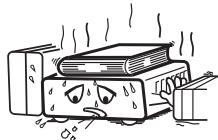
* (For apparatuses with ventilation holes)
- Do not obstruct the ventilation holes.
- Decken Sie den Luftungsbereich nicht ab.
- Ne pas obstruer les troughs d'airation.
Non coprite i fori di ventilazione. - No obstruya los orificios de ventilación.
- De ventilatieopeneringen mogen nicht wordenbeblokkeerd.
Tapp inte till ventilationsöppningarna.
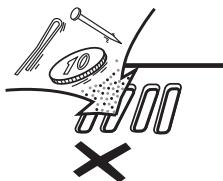
- Do not let foreign objects into the unit.
- Lassen Sie keine fremden Gegenstände in das Gerätkommen
- Ne pas laisser des objets étrangers dans l'appareil.
- Non inserte corpi estranei all'interno dell'unità.
- No deje objetos extraños dentro del equipo.
- Laat geen vreemde voorwerpen in dit apparaat vallen.
- Se till att främande foremål inte tränger in i apparaten.
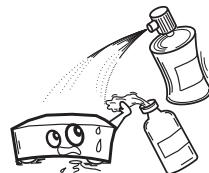
- Do not let insecticides, benzene, and thinner come in contact with the unit.
- Lassen Sie das Gerat nicht mit Insektiziden, Benzin oder Verdunnungsmitteln in Berührung kommt.
- Ne pasmettre en contact des insecticides,du benzene et un diluant avec l'appraiel.
- Assicuratevi che I'unità non entri in contatto con insettici di, benzolo o solventi.
- No permitted contacto de insecticidas, gasolina y diluyentes con el equipo.
- Voorkom dat insecticiden, benzeen de ververdunner met dit toestel in contactkommen.
- Se till ante inte insektsmedel på spraybrukt, bensen och thinnerkommen i kontakt med apparatels höje.
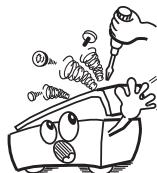
- Never disassemble or modify the unit in any way.
- Versuchen Sie niemals das Gerät auseinander zu behnem oder zu verändern.
- Ne jamais démonter ou modifier l'appareil d'une manière ou d'une autre.
- Non smontate né modificate l'unità in alcun modo.
- Nunca desarme o modifique el equipo de ninguna manera.
- Dit toestel mag nicht gedemonteerd of aangepast worden.
- Ta inte isär apparaten och försök inte byygga om den.
CAUTION:
- The ventilation should not be impeded by covering the ventilation openings with items, such as newspapers, tablecloths, curtains, etc.
- No naked flame sources, such as lighted candles, should be placed on the unit.
- Observe and follow local regulations regarding battery disposal
- Do not expose the unit to dripping or splashing fluids.
- Do not place objects filled with liquids, such as vases, on the unit.
ACHTUNG:
A NOTE ABOUT RECYCLING:
This product's packaging materials are recyclable and can be reused. Please dispose of any materials in accordance with the local recycling regulations.
When discarding the unit, comply with local rules or regulations.
Batteries should never be thrown away or incinerated but disposed of in accordance with the local regulations concerning battery disposal.
This product and the supplied accessories, excluding the batteries, constitute the applicable product according to the WEEE directive.
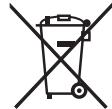

HINWEIS ZUM RECYCLING:
1. IMPORTANT NOTICE: DO NOT MODIFY THIS PRODUCT
This product, when installed as indicated in the instructions contained in this manual, meets R&TTE directive requirements. Modification of the product could result in hazardous Radio and EMC radiation.
2. CAUTION
- Separation distance of at least 20~cm must be maintained between the antenna of this product and all persons.
- This product and its antenna must not be collocated or operating in conjunction with any other antenna or transmitter.
| English | German | French | Italian |
| Spanish | Nederlandish | Swedish | |
Network Information
| Wired or Wireless | SSID | DHCP= On or Off | IP Address |
| MAC Address |
3 Firmware Update
Operation on the Main Unit
1 Appuyez sur
Windows Media Player Network Sharing Service
Windows Media DRM10
Installation de Windows Media Player ver. 11
Communications Ad hoc
WPA (Wi-Fi Protected Access)
WPA2 (Wi-Fi Protected Access 2)
WPA-PSK/WPA2-PSK (Pre-Shared Key)
AES (Advanced Encryption Standard)
105 g (piles incluses)
LAN sans fil
- WARNING:
- R&TTE Directive 1999/5/EC
- - DECLARATION OF CONFORMITY
- VORSICHT:
- CAUTION:
- ACHTUNG:
- A NOTE ABOUT RECYCLING:
- HINWEIS ZUM RECYCLING:
- IMPORTANT NOTICE: DO NOT MODIFY THIS PRODUCT
- CAUTION
- Network Information
- Firmware Update
- Operation on the Main Unit
- Installation de Windows Media Player ver. 11
- Communications Ad hoc
- WPA (Wi-Fi Protected Access)
- WPA2 (Wi-Fi Protected Access 2)
- WPA-PSK/WPA2-PSK (Pre-Shared Key)
- AES (Advanced Encryption Standard)
- LAN sans fil
Brand : DENON
Model : S-32
Category : Bluetooth speaker