
DN-C100 - CD Player DENON - Free user manual and instructions
Find the device manual for free DN-C100 DENON in PDF.


| Product Type | CD Player |
| Brand | Denon |
| Model | DN-C100 |
| Dimensions (W x H x D) | 43 cm x 10 cm x 30 cm |
| Weight | 4.5 kg |
| Power Supply | 230 V AC, 50 Hz |
| Power Consumption | 15 W |
| Compatible Disc Formats | Audio CD, CD-R, CD-RW |
| Main Functions | CD playback, track programming, repeat, random play |
| Audio Outputs | Analog RCA, Optical digital |
| Maintenance and Cleaning | Clean with a soft, dry cloth. Do not use liquid or abrasive products. |
| Safety | Do not expose to moisture, open flames or objects containing liquid. Disconnect before cleaning. |
| Spare Parts and Repairability | Contact an authorized Denon service center for repairs. Parts available upon request. |
| Operating Temperature | 5 °C to 35 °C |
| Operating Humidity | 5 % to 85 % (non-condensing) |
Frequently Asked Questions - DN-C100 DENON
User questions about DN-C100 DENON
0 question about this device. Answer the ones you know or ask your own.
Ask a new question about this device
Download the instructions for your CD Player in PDF format for free! Find your manual DN-C100 - DENON and take your electronic device back in hand. On this page are published all the documents necessary for the use of your device. DN-C100 by DENON.
USER MANUAL DN-C100 DENON
The lightning flash with arrowhead symbol, within an equilateral triangle, is intended to alert the user to the presence of uninsulated "dangerous voltage" within the product's enclosure that may be of sufficient magnitude to constitute a risk of electric shock to persons.

The exclamation point within an equilateral triangle is intended to alert the user to the presence of important operating and maintenance (servicing) instructions in the literature accompanying the appliance.
WARNING:
TO REDUCE THE RISK OF FIRE OR ELECTRIC SHOCK, DO NOT EXPOSE THIS APPLIANCE TO RAIN OR MOISTURE.
CLASS 1 LASER PRODUCT
LUOKAN 1 LASERLAITE
KCLASS 1 LASERAPPARAT
"CLASS 1 LASER PRODUCT"
ADVARSEL: USYNLIG LASERSTRÄLING VED ÅBNING, NÄR SIKKERHEDSAFBRYDERE ER UDE AF FUNKTION. UNDGÅ UDSAETTALSE FOR STRÄLING.
VAROITUS! LAITTEEN KÄYTTÄMINEN MUULLA KUIN TÄSSÄ KÄYTTÖOHJEESSA MAINTULLA TAVALLA SAATTAA ALTISTAA KÄYTTÄJÄN TURVALLISUUSLUOKAN 1 YLITTÄVÄLLE NAKYMÄMTTÖMÄLLE LASERSÄTEILLYLLE.
VARNING: OM APPARATEN ANVÄNDS PÄ ANNAT SÄTT ÄN I DENNA BRUKSANVISING SPECIFICERATS, KAN ANVÄNDAREN UTSÄTTAS FÜR OSYNLIG LASERSTRÄLNING SOM ÖVERSKRIDER GRÄNSEN FÜR LASERKLASS 1.
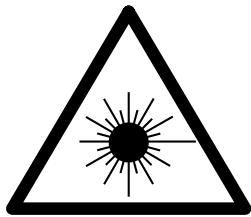
ATTENZIONE: QUESTO APPARECCHIO E' DOTATO DI DISPOSITIVO OTTICO CON Raggio LASER.
USE OF CONTROLS OR ADJUSTMENTS OR PERFORMANCE OF PROCEDURES OTHER THAN THOSE SPECIFIED HEREIN MAY RESULT IN HAZARDOUS RADIATION EXPOSURE.
THIS PRODUCT SHOULD NOT BE ADJUSTED OR REPAIRED BY ANYONE EXCEPT PROPERLY QUALIFIED SERVICE PERSONNEL.
- DECLARATION OF CONFORMITY
We declare under our sole responsibility that this product, to which this declaration relates, is in conformity with the following standards: EN60065, EN55013, EN55020, EN61000-3-2 and EN61000-3-3. Following the provisions of 73/23/EEC, 89/336/EEC and 93/68/EEC Directive.
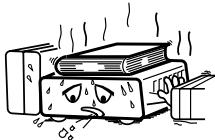
* (For apparatuses with ventilation holes)
- Do not obstruct the ventilation holes.
Die Beluftungsöffnungen)durenichtverdecktwerden. - Ne pas obstruer les trouss d'airation.
Non coprite i fori di ventilazione. - No obstruya los orificios de ventilación.
- De ventilatieopengingen mogen nicht worden beblokkeerd.
Tapp inte till ventilationsoppningarna.
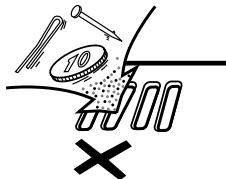
- Do not let foreign objects into the apparatus.
- Keine fremden Gegenstände in das Geratkommen{lassen.
- Ne pas laisser des objets étrangers dans l'appareil.
- E' importante che Nessun oggettö è inserto all'interno dell'unità.
- Nodeojejosteosextraosdentrodelequipo.
- Laat geen vreemde voorwerpen in dit apparaat vallen.
- Se till att främande foremål inte tränger in i apparaten.
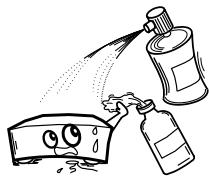
- Do not let insecticides, benzene, and thinner come in contact with the apparatus.
- Lassen Sie das Gört nicht mit Insektiziden, Benzin oder Verdunnungsmitteln in Berührung kommt.
- Ne pasmettre en contact des insecticides,du benzene et un diluant avec l'appareil.
- Assicuratevvi che l'unità non venga in dato con insetticidi, benzolo o solenti.
- No permita el contacto de insecticidas, gasolina y diluyentes con el equipo.
- Laat geen insetkenverdelende middelen, benzine of verf Verdunner met dit aparaat in Kontaktkommen.
- Se till att inte insektsmedel på spraybruken, bensen och thinnerkommen i kontakt med apparatens hölje.
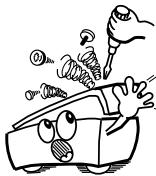
- Never disassemble or modify the apparatus in any way.
- Versuchen Sie nemals das Gerät auseinander zunehmen oder auf jegliche Art zu verändern.
- Ne jamais démonter ou modifier l'apparéil d'une manière ou d'une autre.
Non smontate mai, nè modificate l'unità in Nessun modo - Nunca desarme o modifie el equipo de网通una manera.
- Nooit dit apparaat demonteren of op andere wijze modifiernen.
- Tainte isär apparaten och försök inte byygga om den.
CAUTION:
- The ventilation should not be impeded by covering the ventilation openings with items, such as newspapers, tablecloths, curtains, etc.
- No naked flame sources, such as lighted candles, should be placed on the apparatus.
- Attention should be drawn to the environmental aspects of battery disposal.
- Do not expose the set to dripping or splashing fluids.
- No objects filled with liquids, such as vases, shall be placed on the apparatus.
ACHTUNG:
A NOTE ABOUT RECYCLING:
This product's packaging materials are recyclable and can be reused. Please dispose of any materials in accordance with the local recycling regulations.
When discarding the unit, comply with local rules or regulations.
Batteries should never be thrown away or incinerated but disposed of in accordance with the local regulations concerning chemical waste.
This product and the accessories packed together constitute the applicable product according to the WEEE directive except batteries.
HINWEIS ZUM RECYCLING:
To completely disconnect this product from the mains, disconnect the plug from the wall socket outlet.
The mains plug is used to completely interrupt the power supply to the unit and must be within easy access by the user.
VORSICHT:
Thank you for purchasing this DENON PROFESSIONAL CD Player. Please read the operation instructions thoroughly in order to acquaint yourself with the CD player and achieve maximum satisfaction from it.
Be sure to keep these instructions for future reference, should any questions or problems arise.
Contents
Getting Started
Accessories 2
Before using 2
About discs
Discs usable on this set 2
Holding discs 2
Loading discs 2
Cautions on loading discs 3
Cautions on handling 3
Cautions on storing discs 3
Cleaning discs 3
About the remote control unit
Inserting the batteries 3
Operating range of the remote control unit 3
Part names and functions
Front panel 4
Display 4
Rear panel 5
Remote control unit 5
Connections
Cable indications 6
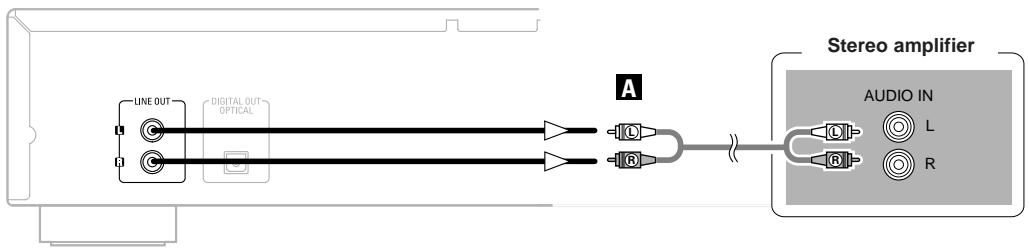
Analog connections 6
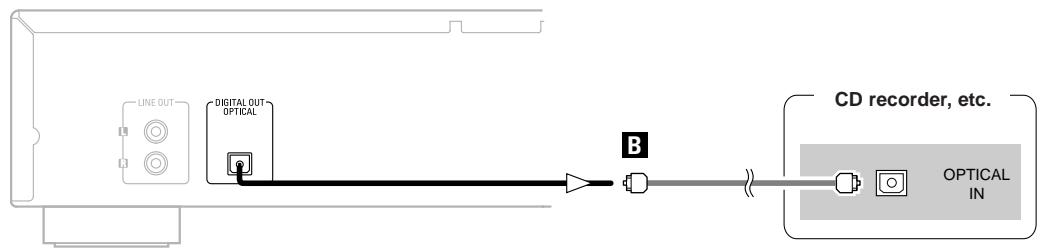
Digital connections 6
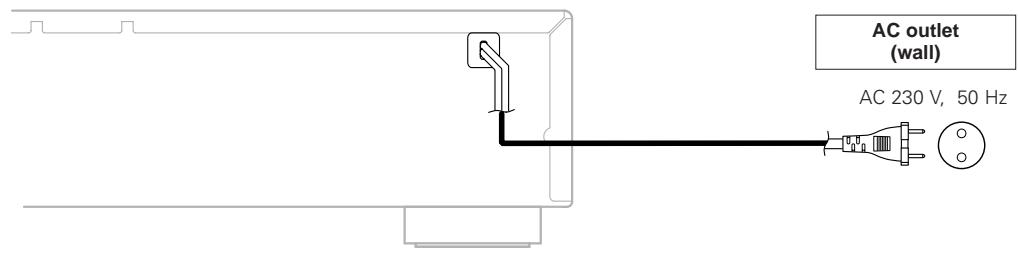
Connecting the power supply cord 6
Operation
Turning the power on 7
Loading discs 7
Starting playback 7
To stop playback 7
To pause playback 7
Fast-forwarding and fast-reversing through tracks (Search)……7
Moving to the beginning of tracks (Skip) 8
Playing the desired track (Direct play) 8
Listening to specific tracks in a specific order
(Programmed play) 8
Listening in random order (Random playback) 8
Listening to tracks repeatedly (Repeat play)
Listening to all the tracks repeatedly (All-track repeat play) 9
Listening to a specific track repeatedly (1-track repeat play)………9
Listening to a specific section between two points repeatedly
(A-B repeat play) 9
Cuing and stopping playback (Pause)
Cuing with direct searching 9
Cuing with programmed searching 9
Using the timer play function 9
Others
Troubleshooting 10
Specifications 10
Accessories
Check that the following parts are attached in addition to the main unit:
① Operating instructions 1
② Service station list. 1
③ Remote control unit (RC-1028)
④ R03/AAA batteries 2
⑤ Pin-plug cable (Cable length: Approx. 1.0 m)
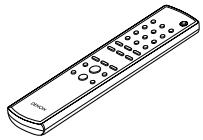
③
4
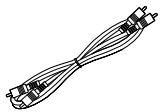
(5)
Before using
- Handle the power supply cord carefully.
Do not damage or deform the power supply cord. If it is damaged or deformed, it may cause electric shock or malfunction when used. When disconnecting the power supply cord from the wall outlet, hold the plug and do not pull on the cable. - Do not open the top cover.
In order to prevent electric shock, do not open the top cover. If problems occur, contact your DENON PROFESSIONAL dealer.
- Do not place anything inside.
Prevent metal objects from entering the CD player and avoid spilling liquids on it.
Electric shock or malfunction may result. - Cautions on moving.
First, if a disc is loaded, eject it, then turn off the power, unplug the power supply cord from the power outlet and disconnect the connection cables with other devices. - Cautions on using mobile phones.
Using a mobile phone near this unit may result in noise. If so, move the mobile phone away from this unit when it is in use. -
Sufficiently ventilate the place of installation.
If the unit is left in a room full of the smoke from cigarettes, etc., for long periods of time, the surface of the optical pickup could get dirty, in which case it will not be able to read the signals properly. -
Store the operating instructions in a safe place.
After reading the operating instructions, store them in a safe place as they could come in handy in the future. - Note that the illustrations in these instructions may differ from the actual unit for explanation purposes.
NOTE:
- This CD player uses a semiconductor laser. To ensure stable operation, it is recommended to use the set indoors at a temperature of 5^ (41^) 35^ (95^)
About discs
Discs usable on this set
1 Music CDs
Discs with the mark at the right can be used on this set.
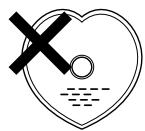
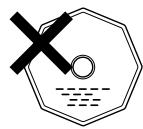
Note however that discs with special shapes (heart-shaped discs, octagonal discs, etc.) cannot be played. Do not attempt to play them, as doing so could damage the set.

CD-R/CD-RW
- Some discs and some recording formats may not be playable.
- Non-finalized discs cannot be played.
※ Finalization:
Finalization is the process that makes recorded CD-R/CD-RW discs playable on compatible players.
Holding discs
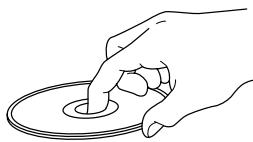
Do not touch the signal surface.
Loading discs
- Set the disc with the labeled side facing up.
- Make sure the disc tray is fully open when inserting the disc.
- Place the discs flatly, 12cm discs in the outer tray guide (Figure 1), 8cm discs in the inner tray guide (Figure 2).
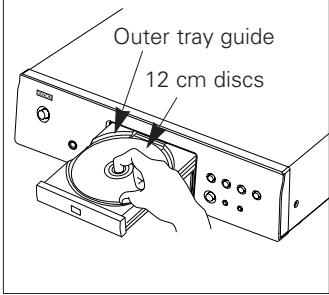
Figure 1
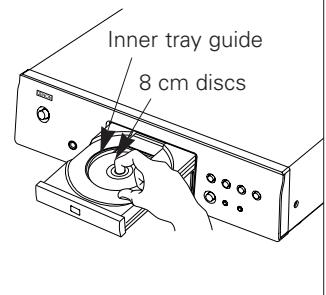
Figure 2
- Place 8 cm discs in the inner tray guide without using an adapter.

- "NO DISC" is displayed if a disc is loaded upside down or if no disc is loaded.
Cautions on loading discs
- Only load one disc at a time. Loading two or more discs can damage the set or scratch the discs.
- Do not use cracked or warped discs or discs that have been repaired with adhesive, etc.
- Do not use discs on which the sticky part of cellophane tape or labels is exposed or on which there are traces of where labels have been removed. Such discs could get caught inside the player and damage it.
Cautions on handling
- Do not get fingerprints, oil or dirt on discs.
-
Take special care not to scratch discs when removing them from their cases.
-
Do not bend or heat discs.
- Do not enlarge the hole at the center.
- Do not write on the labeled (printed) surface with ball-point pens, pencils, etc., or stick new labels on discs.
- Water droplets may form on discs if they are moved suddenly from a cold place (outdoors for example) to a warm place, but do not try to dry them off using a hairdryer, etc.
Cautions on storing discs
- Be sure to remove discs after using them.
- Be sure to store discs in their cases to protect them from dust, scratches, warping, etc.
-
Do not store discs in the following places:
-
Places exposed to direct sunlight for long periods of time
- Dusty or humid places
- Places exposed to heat from heating appliances, etc.
Cleaning discs
- If there are fingerprints or dirt on discs, wipe them off before using the disc. If not the sound quality could be reduced and the sound may be broken.
- Use a commercially available disc cleaning set or a soft cloth to clean discs.
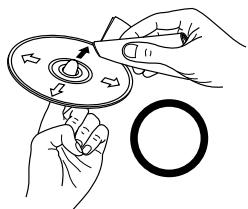
Gently wipe the disc from the inside towards the outside.
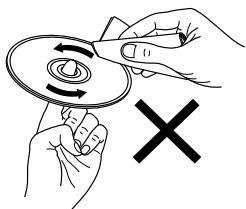
Do not wipe with a circular motion.
NOTE:
- Do not use record spray, antistatic agents, or benzene, thinner or other solvents.
About the remote control unit
Inserting the batteries
① Remove the remote control unit's rear cover.
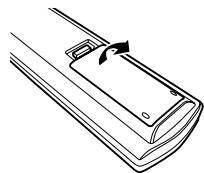
③ Put the rear cover back on.
② Set two R03/AAA batteries in the battery compartment in the indicated direction.
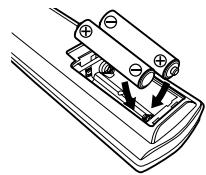
Notes on batteries:
- Replace the batteries with new ones if the set does not operate even when the remote control unit is operated nearby the unit. (The attached batteries are only for verifying operation.)
- When inserting the batteries, be sure to do so in the proper direction, following the “ ” and “ ” marks in the battery compartment.
-
To prevent damage or leakage of battery fluid:
-
Do not use a new battery together with an old one.
- Do not use two different types of batteries.
- Do not short-circuit, disassemble, heat or dispose of batteries in flames.
- If the battery fluid should leak, carefully wipe the fluid off the inside of the battery compartment and insert new batteries.
- Remove the batteries from the remote if it will not be in use for long periods.
Operating range of the remote control unit
- Point the remote control unit at the remote sensor when operating it.
- The remote control unit can be used from a distance of up to about 8 meters, at a horizontal angle of up to 30^ with respect to the sensor.
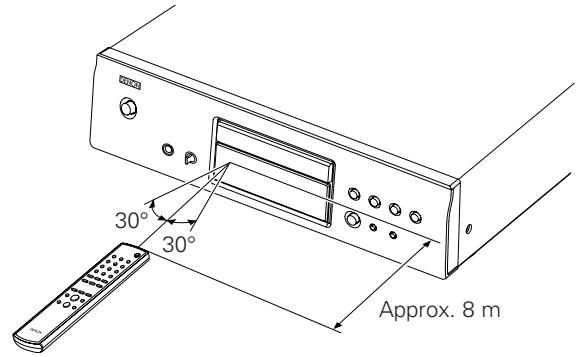
NOTE:
- It may be difficult to operate the remote control unit if the remote sensor is exposed to direct sunlight or strong artificial light.
Part names and functions
For buttons not explained here, see the page indicated in parentheses ( ).
Front panel
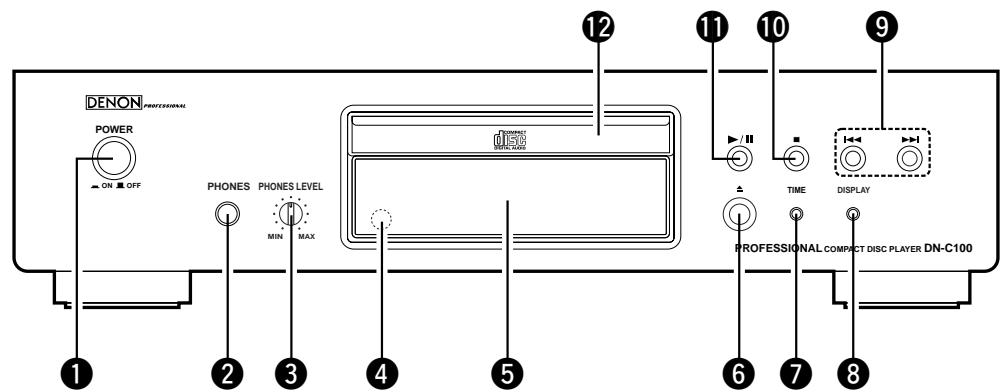
1 POWER switch (7)
2 PHONES jack
Insert the headphones' plug.
3 PHONES LEVEL knob
Adjusts the volume of the headphones.
Remote control sensor (3)
Display (4)
Disc tray open/close button () (7)
TIME button (7)
DISPLAY button
Switching the display brightness
The brightness switches as shown below each time the button is pressed (and released within 1 second).
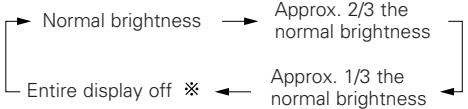
Some of the display remains lit if no disc is playing or loaded.
9 Skip buttons (I<,▶I) ……………………(8)
10 Stop button (■) (7)
11 Play/Pause button (▶/III) ……………………(7)
12 Disc tray (2)
Display
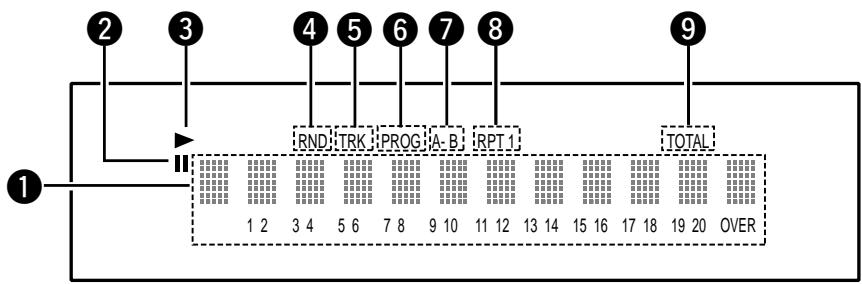
1 Information display
Various information is displayed here, depending on the operation mode. For a music CD:
Total number of tracks
- Total playing time
- Track number
- Elapsed time, etc.
20-track music calendar
- Program number
Lights when the pause mode is set.
3 Lights when a disc is playing.
4 Lights when in the random play mode.
Lights when the track number is displayed.
6 Lights when in the program play mode.
7 Lights when in the A-B repeat play mode.
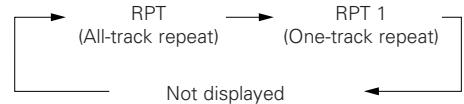
Lights when in the repeat play mode. The display switches as follows each time the REPEAT button on the remote control unit is pressed.
- In modes other than the folder mode:
9 Lights when the total number of tracks and total time are displayed at 1.
Rear panel
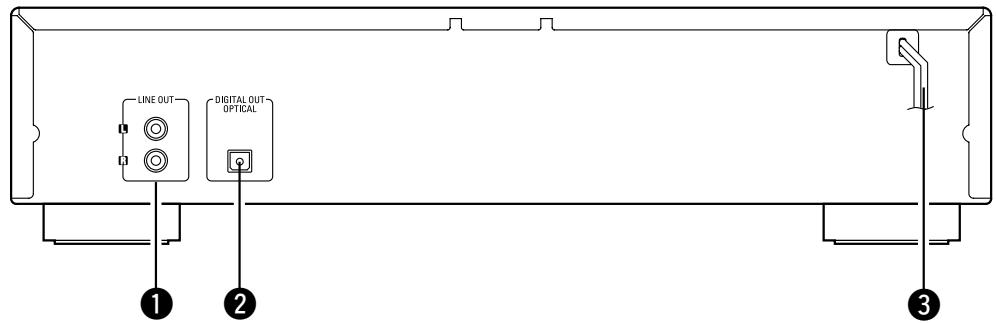
LINE OUT terminals (6)
2 DIGITAL OUT OPTICAL terminal (6)
3 Power supply cord (6)
Remote control unit
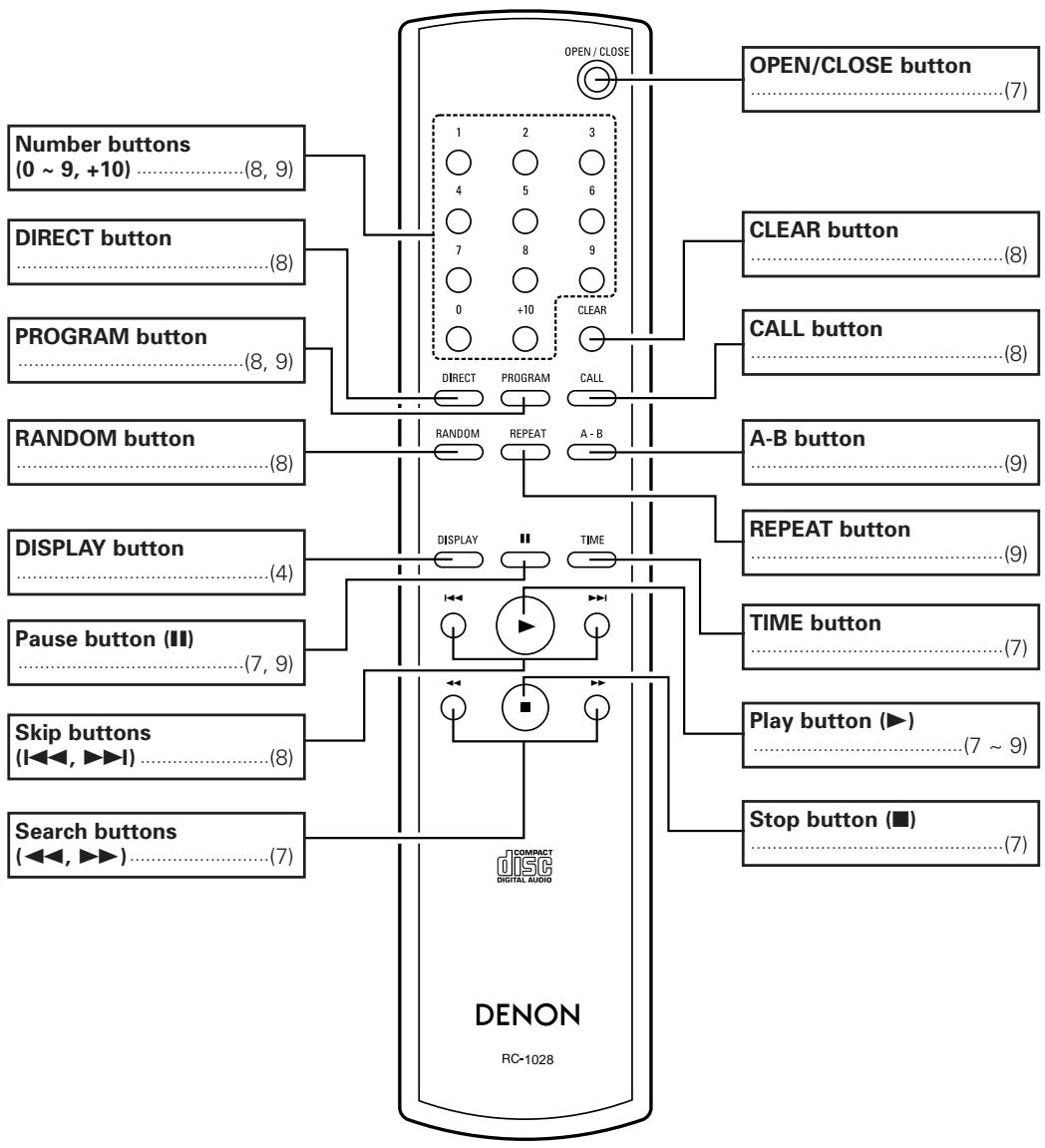

- The skip buttons (I▲ and and +10 button operate continuously when held in.
Connections
NOTE:
- Do not plug in the power supply cord until all connections have been completed.
- When making connections, also refer to the operating instructions of the other components.
- Be sure to connect the left and right channels properly (left with left, right with right).
- Making connections with the power turned on could result in noise or damage the speakers.
- Bunching the power supply cords and connection cables together could result in humming or noise.
Cable indications
Connect using the connection cables shown below.
| Audio cable | Signal direction |
| A Analog connections (Stereo) (White) (Red) Pin-plug cable | Audio signal OUT IN |
| B Digital connections (Optical) Optical fiber cable |
Analog connections
Digital connections
There is a protective cap over the optical digital output terminal. Remove the protective cap and insert the plug firmly until it locks.
□When connecting the optical digital output connector with an optical transmission cable (commercially available)
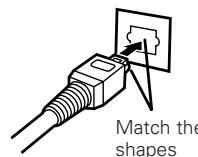
Match the shapes then insert firmly all the way in.
Connecting the power supply cord
NOTE:
- Insert the plugs securely. Incomplete connections will result in the generation of noise.
- Do not unplug the power supply cord while the set is operating.
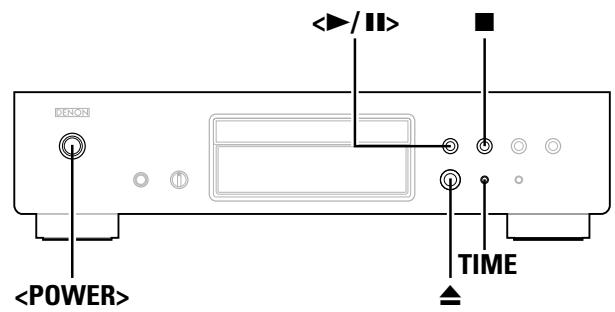
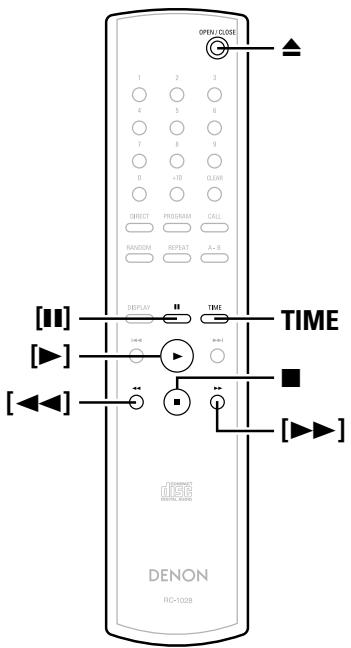
About the button names in this explanation
< > : Buttons on the main unit
[ ] : Buttons on the remote control unit
Button name only :
Buttons on the main unit and remote control unit
Turning the power on
Press.
- When a disc is loaded, playback starts automatically.
- If no disc is loaded "NO DISC" is displayed.
To turn off the power:
Press
NOTE:
- To turn off the power while a disc is playing, be sure to press to stop playback before turning off the power.
Loading discs
page 2
Press to open the disc tray.
To close the disc tray:
Press again.
NOTE:
- Be sure to turn on the power when opening and closing the disc tray.
- Do not push the disc tray in by hand when the power is off. Doing so could damage it.
- Do not insert foreign objects into the disc tray. Doing so will damage it.
Starting playback
Press </> or [] .
- The “▶” indicator lights and playback starts.
※ Once all the tracks remove recorded on the disc have been played, the stop mode is set automatically.
※ TIME can be used to switch the information displayed.
![DENON DN-C100 - Press </> or [] . - 1](/content/2025/01/135526/images/72562c0e8f0e7602f884877991697f93927049c99bdfd1e4bc9d9bdf10a139d4.jpg)
※ During programmed playback, the remaining time of all the programmed tracks is displayed.
To stop playback
Press during playback.
To pause playback
Press </> or [] during playback.
- The "I" indicator lights and the pause mode is set.
To resume playback:
Press </> or [>
Fast-forwarding and fast-reversing through tracks (Search)
Press and hold [ ] or [ ] during playback.
※ Normal playback resumes when you release your finger from the button.
![DENON DN-C100 - Press and hold [ ] or [ ] during playback. - 1](/content/2025/01/135526/images/940ae7cecf16da8284248293e70ae7d2582bc9f93fb39472f2ed5a445c0cfd68.jpg)
- The sound may be interrupted shortly when resuming normal playback after searching.
![DENON DN-C100 - Press and hold [ ] or [ ] during playback. - 2](/content/2025/01/135526/images/47a0415c8799ac888e426d13258a2fd065f9db1419f0af30d1b789b15b915149.jpg)
![DENON DN-C100 - Press and hold [ ] or [ ] during playback. - 3](/content/2025/01/135526/images/1800c8c96da34d0b196b6278d80f89d5faafb1eb91154db5a0dec776cad6c6b0.jpg)
About the button names in this explanation
< > : Buttons on the main unit
[ ] : Buttons on the remote control unit
Button name only :
Buttons on the main unit and remote control unit
Moving to the beginning of tracks (Skip)
Press 1 or 2 during playback.
※ The operation is as follows if the button is held in:
▶▶I: Skip to the beginning of tracks several tracks on
: Skip to the beginning of tracks several tracks before
Playing the desired track (Direct play)
Use [NUMBER] (0 9, + 10) to select the track.
※ For track numbers 1 to 9, press the corresponding button ([1] to [9]).
For track numbers 10 and on, first press [+10] then press buttons [0] to [9].
Example: Track 4 : [4]
Example: Track 12 : [+10] [2]
Example: Track 20 : [+10] [+10] [0]
Listening to specific tracks in a specific order (Programmed play)
Up to 25 tracks can be programmed.
1 In the stop mode, press [PROGRAM].
PROG" is displayed.
2 Use [NUMBER] (0 9, + 10) to select the track.
Example: To program tracks 3, 12, 7 to play in that order: [3] [+10] [2] [7]
3 Press / or [] .
- The tracks are played in the programmed order.
□ Checking the programmed tracks:
In the stop mode, press [CALL].
The tracks are displayed in the programmed order each time the button is pressed.
Clearing tracks from the program:
① Press [CLEAR] while the track you want to clear is displayed during the "Checking the programmed tracks" operation above.
② The last track in the program is deleted each time the button is pressed.
□ Stopping programmed playback:
In the stop mode, press [DIRECT], or press to open the disc tray.

- Direct searching is not possible during programmed playback.
- "--:--" is displayed if the total programmed time exceeds 100 minutes.
- If the end of the track is reached while [ ] is being pressed during programmed playback, the track following the currently playing track is played, regardless of the program.
Listening in random order (Random playback)
1 In the stop mode, press [RANDOM].
- The "RND" indicator lights.
Press or [].
- During normal playback:
Tracks are selected automatically and played in random order. - During programmed playback:
The programmed tracks are played in random order. - In the all-track repeat mode:
The tracks are played once each in random order, then played again in a different order.
□ Stopping random playback:
Press [RANDOM] or [DIRECT].

- Direct searching is not possible during random playback.
Listening to tracks repeatedly (Repeat play)
Listening to all the tracks repeatedly (All-track repeat play)
1 Press [REPEAT] once.
- The "RPT" indicator lights.
Press or [].
- During normal playback: All the tracks are played repeatedly.
- During programmed playback: The tracks are played repeatedly in
- In the random play mode:
The tracks are played once each in random order, then played again in a different order.
□ Stopping all-track repeat playback:
Press [REPEAT] twice in a row, or press to open the disc tray.

- In the programmed play or random play mode during all-track repeat playback, normal playback resumes when [REPEAT] is pressed once.
Listening to a specific track repeatedly (1-track repeat play)
During playback, press [REPEAT] twice in a row.
- The "RPT1" indicator lights and that track is played repeatedly.
- Stopping 1-track repeat playback:
Press [REPEAT] again, or press to open the disc tray.

- 1-track repeat playback is not possible during programmed or random playback.
Listening to a specific section between two points repeatedly (A-B repeat play)
1 During playback, press [A-B] at the point at which you want to start repeating (point A).
The "A-" indicator lights.
2 During playback, press [A-B] at the point at which you want to stop repeating (point B).
- The "A-B" indicator lights and the A-B section is played repeatedly.
□Stopping A-B repeat playback:
Press [A-B] again.

- A-B repeat playback is not possible during programmed playback or random playback.
Cuing and stopping playback (Pause)
Cuing with direct searching
1 Either press / twice or press [II] once.
2 Use [NUMBER] (0 9, + 10) to select the track.
To start playback:
Press </> or [] .
Cuing with programmed searching
1 Press [PROGRAM].
2 Use [NUMBER] (0 9, + 10) to select the track.
3 Either press / twice or press [II] once.
To start playback:
Press or [].
Using the timer play function
Also refer to the operating instructions of the timer device.
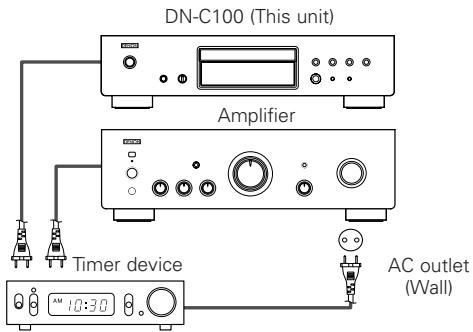
1 Turn on the power of the connected components.
2 Switch the amplifier's input function to the function to which the player is connected.
3 Load a disc in the player.
4 Set the audio timer for the desired times.
5 Turn the timer "ON".
- The power of the components connected to the timer turns off.
※ When the set time is reached, the power of the different components automatically turns on and playback starts from the first track.
Others
Troubleshooting
If a problem should arise, first check the following:
- Are the connections correct?
- Have you operated the player according to the Operating Instructions?
If this unit is not operating properly, check the items listed in the table below. Should the problem persist, there may be a malfunction. Disconnect the power immediately and contact your store of purchase.
| Symptom | Measures | Cause | Page |
| Disc tray does not open. | ·The power is not on. | ·Turn on the power. | 7 |
| “NO DISC” is displayed even though a disc is loaded. | ·The disc is not properly loaded. | ·Reload the disc. | 2, 3 |
| “00 00 : 00” is displayed even though a disc is loaded. | ·The loaded disc is not a CD. | ·Load a CD. | 2 |
| Disc is not played when play button is pressed. | ·The disc is dirty or scratched. | ·Wipe the dirt off the disc or replace the disc. | 3 |
| No sound is produced or sound is distorted. | ·The output cables are not properly connected to the amplifier. ·The amplifier's function setting or adjustments are not right. | ·Check the connections. ·Check the amplifier's function and controls and adjust as necessary. | 6 - |
| No digital signals are output. | ·The connection cables are not properly connected. | ·Check the connections. | 6 |
| Specific section of the disc cannot be played properly. | ·The disc is dirty or scratched. | ·Wipe the dirt off the disc or replace the disc. | 3 |
| Programmed playback is not possible. | ·The tracks have not been programmed properly. | ·Program properly. | 8 |
| A CD-R or CD-RW disc cannot be played. | ·The disc has not been finalized. ·The recording conditions are bad or the quality of the disc itself it poor. | ·Finalize the disc then play it. ·Use a properly recorded disc. | 2 2 |
| Set does not operate properly when remote control unit is operated. | ·The batteries are spent. ·The remote control unit is too far from the set. | ·Replace the batteries with new ones. ·Move the remote control unit closer to the set. | 3 3 |
Specifications
Audio performance
- Analog output
Channels:
Playable frequency range:
S/N:
Dynamic range:
Harmonic distortion:
Wow & flutter:
Output
Signal type:
Sampling frequency:
Usable discs:
- Digital output
Optical:
Emission wavelength:
2 channels
2 Hz ~ 20 kHz
105 dB
98dB
0.003% (1 kHz)
Below measurable limits
2.0 V (10 kΩ/kohms)
16-bit linear PCM
44.1 kHz
Compact Disc
General
Power supply:
Power consumption:
Maximum external dimensions:
Mass:
AC 230V , 50Hz
13W
434 (W) × 107 (H) × 279 (D) mm (including protruding parts)
4.0 kg
Remote control unit (RC-1028)
Remote control type:
Batteries:
External dimensions:
Mass:
Infrared pulse
R03/AAA Type (two batteries)
106 g (included batteries)
- For purposes of improvement, specifications and design are subject to change without notice.
D&M Holdings Inc.
PROFESSIONAL BUSINESS COMPANY
TOKYO, JAPAN
http://www.dm-pro.jp


- WARNING:
- "CLASS 1 LASER PRODUCT"
- - DECLARATION OF CONFORMITY
- CAUTION:
- ACHTUNG:
- A NOTE ABOUT RECYCLING:
- HINWEIS ZUM RECYCLING:
- VORSICHT:
- Contents
- Getting Started
- About discs
- About the remote control unit
- Part names and functions
- Connections
- Operation
- Cuing and stopping playback (Pause)
- Others
- Accessories
- Before using
- NOTE:
- Discs usable on this set
- Music CDs
- CD-R/CD-RW
- ※ Finalization:
- Holding discs
- Loading discs
- Cautions on loading discs
- Cautions on handling
- Cautions on storing discs
- Cleaning discs
- Inserting the batteries
- Notes on batteries:
- Operating range of the remote control unit
- Front panel
- Display
- Rear panel
- Remote control unit
- Cable indications
- Analog connections
- Digital connections
- Connecting the power supply cord
- Turning the power on
- Press.
- To turn off the power:
- Press to open the disc tray.
- To close the disc tray:
- Starting playback
- Press </> or [] .
- To stop playback
- Press during playback.
- To pause playback
- Press </> or [] during playback.
- To resume playback:
- Fast-forwarding and fast-reversing through tracks (Search)
- Press and hold [ ] or [ ] during playback.
- About the button names in this explanation
- Moving to the beginning of tracks (Skip)
- Press 1 or 2 during playback.
- Playing the desired track (Direct play)
- Use [NUMBER] (0 9, + 10) to select the track.
- Listening to specific tracks in a specific order (Programmed play)
- In the stop mode, press [PROGRAM].
- Use [NUMBER] (0 9, + 10) to select the track.
- Press / or [] .
- □ Checking the programmed tracks:
- Clearing tracks from the program:
- □ Stopping programmed playback:
- Listening in random order (Random playback)
- In the stop mode, press [RANDOM].
- Press or [].
- □ Stopping random playback:
- Listening to tracks repeatedly (Repeat play)
- Listening to all the tracks repeatedly (All-track repeat play)
- □ Stopping all-track repeat playback:
- Listening to a specific track repeatedly (1-track repeat play)
- - Stopping 1-track repeat playback:
- Listening to a specific section between two points repeatedly (A-B repeat play)
- □Stopping A-B repeat playback:
- Cuing with direct searching
- To start playback:
- Cuing with programmed searching
- Using the timer play function
- Troubleshooting
- Specifications
Brand : DENON
Model : DN-C100
Category : CD Player