
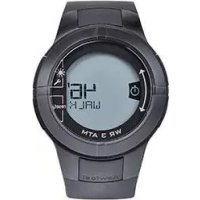
ONwalk 900 - Pedometer DOMYOS - Free user manual and instructions
Find the device manual for free ONwalk 900 DOMYOS in PDF.


| Product Type | Pedometer |
| Brand | Domyos |
| Model | ONwalk 900 |
| Dimensions (approx) | 50 x 35 x 15 mm |
| Weight (including battery) | 40 g |
| Power Supply | 1 CR2032 lithium battery (3V) |
| Display | LCD with step, distance, calorie, and time modes |
| Step Counting Range | 0 to 99,999 steps |
| Distance Range | 0 to 999.9 km |
| Calorie Range | 0 to 9,999 kcal |
| Memory | 7-day daily totals stored |
| Auto On/Off | Yes, starts with motion, auto-off after 2 minutes of inactivity |
| Reset Function | Long press button to clear all data |
| Stride Length Setting | Adjustable from 30 to 150 cm |
| Body Weight Setting | Adjustable from 20 to 200 kg |
| Accuracy | ±5% under normal walking conditions |
| Operating Temperature | 0°C to 40°C |
| Storage Temperature | -10°C to 60°C |
| Material | Plastic housing, silicone strap |
| Cleaning | Wipe with a dry, soft cloth; do not use harsh chemicals |
| Battery Replacement | User-replaceable CR2032; remove battery cover with a coin |
| Water Resistance | IPX4 (splash-proof only; not for immersion) |
| Warranty | 2 years from date of purchase |
Frequently Asked Questions - ONwalk 900 DOMYOS
User questions about ONwalk 900 DOMYOS
0 question about this device. Answer the ones you know or ask your own.
Ask a new question about this device
Download the instructions for your Pedometer in PDF format for free! Find your manual ONwalk 900 - DOMYOS and take your electronic device back in hand. On this page are published all the documents necessary for the use of your device. ONwalk 900 by DOMYOS.
USER MANUAL ONwalk 900 DOMYOS
2 FIRST SET-UP
2.1 Switching on

flowchart
graph LR
    A["1.5 sec"] --> B["2 sec"]
    B --> C["1000 second display"]
2.2 First settings

flowchart
graph LR
    A["Time Minute User's weight"] --> B["Height"]
    B --> C["Stride length"]
    A --> D["1800"]
    B --> E["175"]
    C --> F["1835"]
    D --> G["(-) < > (+)"]
    E --> H["(-) < > (+)"]
    F --> I["(-) < > (+)"]
    G --> J["(-) < > (+)"]
    H --> K["(-) < > (+)"]
    I --> L["(-) < > (+)"]
    J --> M["(-) < > (+)"]
    K --> N["(-) < > (+)"]
    L --> O["(-) < > (+)"]
    M --> P["(-) < > (+)"]
    N --> Q["(-) < > (+)"]
    O --> R["(-) < > (+)"]
    P --> S["(-) < > (+)"]
    Q --> T["(-) < > (+)"]
    R --> U["(-) < > (+)"]
    S --> V["(-) < > (+)"]
    T --> W["(-) < > (+)"]
- User's weight: setting your weight means the amount of calories you have burned when walking can be calculated.

SETTINGS

flowchart
graph TD
    A["Objective Time"] --> B["Weight"]
    B --> C["Height"]
    C --> D["Stride length"]
    D --> E["Automatic reset at midnight"]
    F["Quit settings"] --> G["SET"]
    G --> H["RESET"]
    H --> I["GOAL"]
    H --> J["LENE"]
    H --> K["USER"]
    H --> L["USER"]
    H --> M["AUTO"]
3.1 Activity objective
A. Choice of objective: steps, distance, calories, walking time or disabled

flowchart
graph LR
    A["GOAL<br>10000"] --> B["GOAL<br>500 KM"]
    B --> C["GOAL<br>500 KCAL"]
    C --> D["GOAL<br>100"]
    D --> E["GOAL<br>OFF"]
B. Choice of objective value

3.2 Time

flowchart
graph LR
    A["24h Time"] --> B["18:35"]
    B --> C["18:35"]
    C --> D["18:35"]
    style A fill:#f9f,stroke:#333
    style B fill:#ccf,stroke:#333
    style C fill:#ccf,stroke:#333
    style D fill:#f9f,stroke:#333
3.3 User's weight

flowchart
graph LR
    A["KG"] --> B["Units Kg / Lb"]
    B --> C["Weight of the user"]
    C --> D["Units Kg / Lb"]
    style A fill:#f9f,stroke:#333
    style B fill:#ccf,stroke:#333
    style C fill:#cfc,stroke:#333
    style D fill:#fcc,stroke:#333
3.4 Height

3.5 Stride length
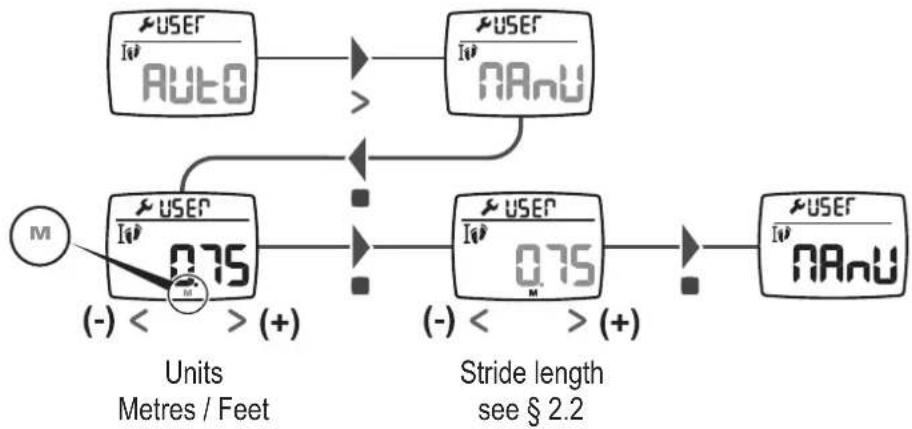
By default, your stride length is calculated according to your height. If you wish to customise your stride length, please go to «Manu» mode.
To find out your stride length, walk 10 metres while counting the number of steps then do this calculation: stride length = 10 metres / number of steps.
flowchart
graph TD
    A["User / Auto"] --> B[">"]
    C["User / NAnu"] --> D[">"]
    E["Motor M"] --> F["+"]
    G["Units / Feet"] --> H["0.75 (-) < + (+)"]
    I["Stride length see § 2.2"] --> J["0.75 (-) < + (+)"]
    K["User / NAnu"] --> L[">"]
    M["User / NAnu"] --> N[">"]
3.6 Automatic reset to zero at midnight
By default, at midnight each day your pedometer automatically resets all of your measurements (number of steps, distance, calories, walking time and progress towards your objective). Using this setting, you can deactivate this reset and continue measurements after midnight.

flowchart
graph LR
    A["RESET"] --> B["ON"]
    B --> C["RESET"]
    style A fill:#f9f,stroke:#333
    style B fill:#ccf,stroke:#333
    style C fill:#cfc,stroke:#333
Automatic reset to zero at midnight ON / OFF
3.7 Quit settings mode
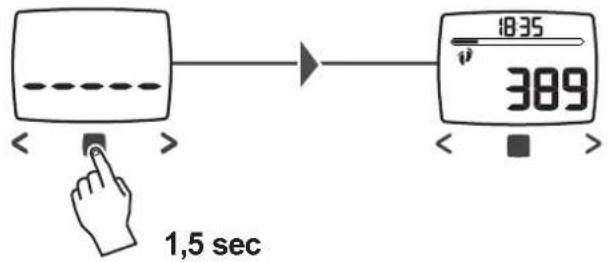
You can leave the settings menu at any time and return to the main menu by pressing the ■ button for 1.5 seconds.

USE
4.1 Positioning the product

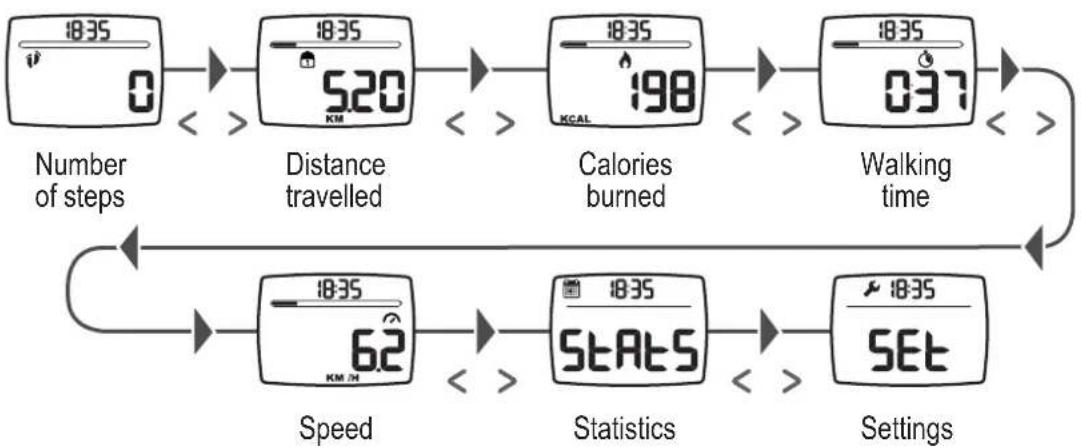
4.2 Viewing the information
flowchart
graph TD
    A["18:35 0"] --> B["Distance travelled"]
    B --> C["Calories burned"]
    C --> D["Walking time"]
    D --> E["Speed"]
    E --> F["Statistics"]
    F --> G["Settings"]
    style A fill:#f9f,stroke:#333
    style B fill:#ccf,stroke:#333
    style C fill:#cfc,stroke:#333
    style D fill:#fcc,stroke:#333
    style E fill:#cff,stroke:#333
    style F fill:#ffc,stroke:#333
    style G fill:#fcc,stroke:#333
4.3 Starting the measurement
Your pedometer starts to measure automatically when you start walking.
4.4 Resetting to zero

4.5 Automatic standby


ACTIVITY OBJECTIVE
To help you achieve your objectives, your pedometer lets you define a customised objective. You have the option of defining an objective in one of these 4 categories:
■ number of steps
calories
Distance
walking time

You can then view your progress using the gauge on the main screen. A notification appears when your objective has been achieved.

STATISTICS
Your pedometer is equipped with a memory that allows you to see the details of your daily activities over the last 7 days.
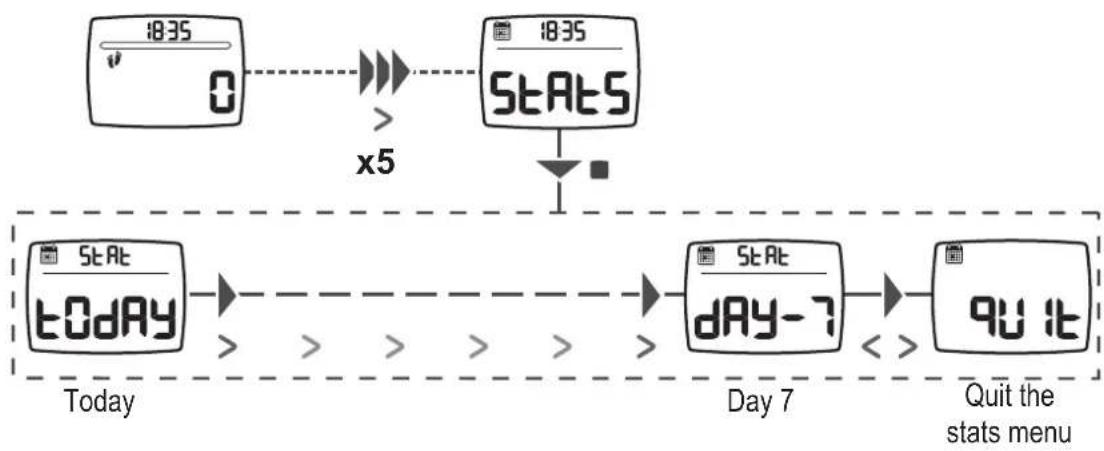
flowchart
graph TD
    A["18:35 timer"] --> B["0"]
    B --> C[">="]
    C --> D["STAT5"]
    D --> E["x5"]
    E --> F["STAT"]
    F --> G["t0dAY"]
    G --> H[">="]
    H --> I[">="]
    I --> J[">="]
    J --> K["STAT"]
    K --> L["dAY-7"]
    L --> M["<<"]
    M --> N["9U it"]
    N --> O["Quit the stats menu"]
To see activity details for one of these days, select it and navigate using the <> buttons

flowchart
graph LR
    A["9389 d-1, KM/h"] --> B["659 d-1"]
    B --> C["546 d-1"]
    C --> D["358 d-1"]
    D --> E["56 KM/h"]
    E --> F["90.16"]
You can leave the statistics menu at any time and return to the main menu by pressing the ☐ button for 1.5 seconds.


REPLACING THE BATTERY


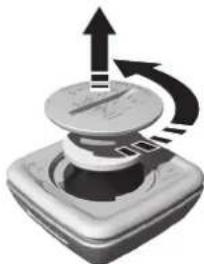
natural_image
Illustration of a mechanical device with upward and downward arrows indicating motion (no text or symbols)
CONTACT US
We would like to hear your feedback on the quality, features and use of our products at: http://support.geonaute.com
We will reply as soon as possible.

PRECAUTIONS FOR USE AND WARRANTY
Warranty
- GEONAUTE guarantees the original buyer that this product is free of material or manufacture defects for two years starting from the date of purchase. Keep the receipt as proof of purchase.
- The warranty does not cover damage resulting from misuse, from a failure to respect the precautions for use, from accidents, from improper maintenance or from commercial use of the product.
- The warranty does not cover damage resulting from repairs carried out by persons not authorised by GEONAUTE.
- The warranties herein expressly supersede all other warranties, including the implicit warranty of fair marketable quality and/or fitness for purpose. Under no circumstances will GEONAUTE be held liable for any damage, whether direct or indirect, general or specific, caused by or related to the use of this instruction manual or the products it describes.
- During the warranty period, the item will either be repaired free of charge by an authorised repair service or replaced free of charge (depending on the distributor).
- The warranty does not cover the battery or cracked or broken screens showing visible signs of impacts.

The algorithms used to calculate the different values displayed by your pedometer have been developed for walking and brisk walking only. The accuracy of these values will be severely reduced if used when running. Therefore, we do not recommend using this product for running.
Batteries and recycling

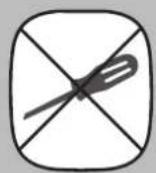
To change the battery, visit the store where you purchased your product. If you change the battery yourself, you may damage the seal, affect the watch's watertightness, and void your warranty. Battery life is affected by how long the product has been at the store and how you use the product.

natural_image
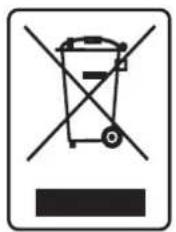
Symbol of a trash bin crossed out by two diagonal lines, representing no waste or discharge (no text or labels)The «crossed out bin» symbol means that this product and its batteries cannot be disposed of with household waste. They must be disposed of via selective waste sorting. The product and batteries must be recycled at a collection point at end of life. Recycling your electronic waste protects the environment and your health. Discard your batteries in a recycling area.




Made in Malaysia


- FIRST SET-UP
- Switching on
- First settings
- SETTINGS
- Activity objective
- Time
- User's weight
- Height
- Stride length
- Automatic reset to zero at midnight
- Quit settings mode
- USE
- Positioning the product
- Viewing the information
- Starting the measurement
- Resetting to zero
- Automatic standby
- ACTIVITY OBJECTIVE
- STATISTICS
- REPLACING THE BATTERY
- CONTACT US
- PRECAUTIONS FOR USE AND WARRANTY
- Warranty
- Batteries and recycling
Brand : DOMYOS
Model : ONwalk 900
Category : Pedometer