
FW-D750 - Hi-Fi System PHILIPS - Free user manual and instructions
Find the device manual for free FW-D750 PHILIPS in PDF.


| Product Type | Hi-Fi System |
| Brand | Philips |
| Model | FW-D750 |
| Dimensions (Main Unit) | 250 x 330 x 150 mm |
| Weight (Main Unit) | 3.5 kg |
| Power Consumption | 60 W |
| Power Output (RMS) | 2 x 30 W |
| Speaker Impedance | 4 ohms |
| Playback Media | CD, CD-R/RW, MP3-CD |
| Tuner Bands | FM, MW |
| Connectivity | AUX In, Headphone Out |
| Radio Presets | 40 stations |
| Display Type | LCD with white backlight |
| Remote Control | Included |
| Clock/Timer | Yes, with sleep timer |
| Equalizer Presets | Rock, Pop, Jazz, Classic, Flat |
| Power Supply | AC 230 V, 50 Hz |
| Maintenance | Clean with soft dry cloth; avoid liquids |
| Safety | Do not expose to water; keep ventilation slots clear |
| Spare Parts / Repairability | Contact Philips service center for genuine parts |
| General Information | User manual available in PDF (48 pages) |
Frequently Asked Questions - FW-D750 PHILIPS
User questions about FW-D750 PHILIPS
0 question about this device. Answer the ones you know or ask your own.
Ask a new question about this device
Download the instructions for your Hi-Fi System in PDF format for free! Find your manual FW-D750 - PHILIPS and take your electronic device back in hand. On this page are published all the documents necessary for the use of your device. FW-D750 by PHILIPS.
USER MANUAL FW-D750 PHILIPS
Manufactured under license from Dolby Laboratories. "Dolby", "Pro-logic" and the double-D symbol are trademarks of dolby Laboratories.
MANUFACTURED UNDER LICENSE FROM DIGITAL THEATER SYSTEMS, INC. US PAT. NO 5,451,942, 5,956,674, 5,974,380, 5,978,762 AND OTHER WORLD-WIDE PATENTS ISSUED AND PENDING. "DTS" AND "DTS DIGITAL SURROUND" ARE RESISTERED TRADEMARKS OF DIGITAL THEATER SYSTEMS, INC. COPYRIGHT 1996, 2000 DIGITAL THEATER SYSTEMS, INC. ALL RIGHTS RESERVED.
This product incorporates copyright protection technology that is protected by method claims of certain U.S. patents and other intellectual property rights owned by Macrovision Corporation and other rights owners. Use of this copyright protection technology must be authorized by Macrovision Corporation, and is intended for home and other limited viewing uses only unless otherwise authorized by Macrovision Corporation. Reserve engineering or disassembly is prohibited.

DEMO MODE
To turn ON
Press & HOLD

for 5 seconds
To turn OFF
Press & HOLD
for 5 seconds
button
PLUG & PLAY -for tuner installation
1

Plug in the unit
2

Follow instructions in the display
3

Press "PLAY"
English 6
Français 49
Español 93
中文 137
CAUTION
Use of controls or adjustment or performance of procedures other than herein may result in hazardous radiation exposure or other unsafe operation.
General Information/Maintenance
Features 8
Discs for playback 8 Region codes
Supplied accessories 8
Environmental information 9
Care and safety information 9
Connections
Step 1: Placing speakers .... 10
Step 2: Connecting speakers 10
Step 3: Connecting TV set 11\~12
Using Video In jack (CVBS)
Using Component Video In jack (Pr Pb Y)
Using S-Video In jack
Using an accessory RF modulator
Step 4: Connecting FM/MW antennas ..... 13
Step 5: Connecting the power cord ..... 13
Step 6: Connecting a VCR or cable/satellite box 14
Step 7: Connecting digital audio equipment. 14
Functional Overview
Controls on the system 15\~16
Remote control 17
Basic Functions
Plug and Play (for tuner installation) 18
Demonstration mode 18
Preparations
Step 1: Inserting batteries into the remote control .... 19
Step 2: Setting the clock 19
Step 3: Setting the TV set 20
Step 4: Setting speakers ...... 21
Step 5: Setting language preference ..... 21
Disc Operations
Playing discs 22
Using the disc menu 22
Basic playback controls 23
Skipping to another title (track)/chapter Fast search
Continuing playback from the last stop point
Selecting various mode functions 23\~24
Repeat play mode Shuffle play mode
Repeating a section within a chapter/track
Programming favorite tracks 24
Using the menu bar to program 24
Changing discs during playback 25
Special DVD/VCD features 25\~27
Changing subtitle language Changing sound track language
Playing in slow motion mode
Searching for a particular passage
Displaying the disc information during playback
Moving to another title (track) / chapter Playing from a selected point
Zooming in
Viewing from another angle
Advancing by frames
Checking the contents of DVD
Special VCD/SVCD features 27
Playback control (PBC)
MP3 / Picture Disc Operations
Playing MP3/picture disc (Kodak, JPEG) ..... 28
DVD Menu Operations
Using the menu bar 29
Using the setup menu 30\~34
Setting the TV shape
Setting the video out
Improving the image for progressive scan video output setting
Setting the screen saver
Setting the digital output
Setting the PCM output
Night mode - turning on/off
Changing the password
Restricting playback by setting parental level
Tuner Operations
Tuning to radio stations 35
Presetting radio stations 35\~36
Automatic preset programming
Manual preset programming
Selecting a preset radio station 36
Deleting a preset radio station
Changing tuning grid 36
Tape Operation/Recording
Tape playback 37
General information on recording 37
Preparation for recording 38
Disc synchro recording 38
Dubbing tapes 38
Clock/Timer Operations
Viewing clock 39
Setting the timer 39
Setting the sleep timer 40
Sound and Volume Controls
Sound control 41
Selecting surround sound
wOOx sound
Selecting sound effect
Volume control 42
Changing the volume level
Switching off the volume temporarily
Listening through headphones
Other Functions
Switching on/off 43
Switching the system on
Switching the system to standby mode
Switching to eco power standby mode
Power saving automatic standby
Dimming the display 43
Vocal 43
Key control 44
Echo 44
Karaoke 44
Listening to external sources 44
Specifications 45
Troubleshooting 46\~47
Glossary 48
Features
Your DVD Mini Hi-Fi System with 2-channel full digital amplifier creates the same dynamic sound qualities that you find in full-fledged cinemas and incorporates some of the best features in home theater technology.
Other features include:
Built-in DTS and Dolby Digital decoder, supporting virtual surround and stereo.
Additional Component Connections
Lets you connect other audio and audio/visual components to the system so you can use the system's surround sound speakers.
Night mode
Lets you compress the dynamic range, reducing the difference in loudness between different sounds in Dolby Digital mode.
Parental control (rating level)
Lets you set a rating level so that your children cannot watch a DVD that has a rating higher than you set.
Sleep timer
Enables the system to switch to standby mode automatically at a preset time.
Progressive scan
Provides a flicker free image with the highest effect on film based sources. It can double the vertical resolution of the picture to 525 lines every time the picture is refreshed.
Note:
- T o enjoy the full quality potential offered by progressive scan feature, a progressive scan TV set is required.
Discs for playback
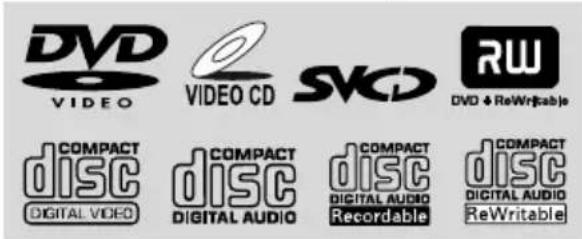
Your DVD Mini Hi-Fi System will play:
- Digital Video Discs (DVDs)
- Video CDs (VCDs)
- S upper Video CDs (SVCDs)
- Digital Video Discs + Rewritable (DVD+RW)
- Compact Discs (CDs)
– Picture (Kodak, JPEG) files on CDR(W)
– Supported MP3-CD format.
• ISO 9660 / UDF format
• Max. title/album name -12 characters
• Max. title number plus album is 255.
• Max. nested directory is 8 levels.
• The max. album number is 32.
• The max. MP3 track number is 999.
• Supported sampling frequencies for MP3 disc: 32 kHz, 44.1 kHz, 48 kHz.
- Supported Bit-rates of MP3 disc are: 32, 64, 96, 128, 192, 256 (kbps).
– Following formats can't be supported
- The files like *.VMA, *.AAC, *.DLF, *.M3U, *.PLS, *.WAV, *.WMA
• Non-English Album/Title name
• The discs recorded under Joliet format
• MP3 Pro and MP3 with ID3 tag
Region codes
DVDs must be labeled for ALL regions or for
Region 3 in order to play on this system. You cannot play discs that are labeled for other
regions.

Notes:
- F or mixed mode discs, only one mode will be selected for playback according to the recording format.
- If you are having trouble playing a certain disc, remove the disc and try a different one. Improperly formatted discs will not play on this system.
Supplied accessories
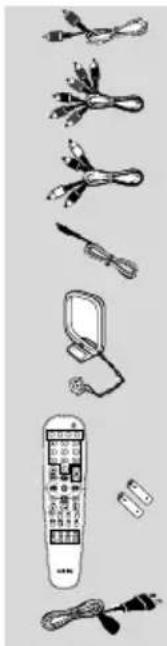
- Composite video cable (yellow)
- Component video cables (red/blue/green)
- Audio cables (white, red)
- FM wire antenna
- MW loop antenna
- Remote Control and two AA batteries
- A C power cable
- This instruction booklet and a Quick Use Guide
Environmental information
Any unnecessary packaging has been omitted. We have tried to make the packaging easy to separate into three materials: cardboard (box), polystyrene foam (buffer) and polyethylene (bags, protective foam sheet).
Your system consists of materials which can be recycled and reused if disassembled by a specialised company. Please observe the local regulations regarding the disposal of packaging materials, exhausted batteries and old equipment.
Care and safety information
Avoid high temperatures, moisture, water and dust
- Do not expose the system, batteries or discs to humidity, rain, sand or excessive heat (caused by heating equipment or direct sunlight). Always keep disc trays closed to avoid dust buildup on the lens.
●No objects filled with liquids, such as vases, shall be placed on the apparatus.
●No naked flame sources, such as lighted candles, should be placed on the apparatus.
Avoid condensation problem
●The lens may cloud over when the player is suddenly moved from cold to warm surroundings, making it impossible to play a disc. Leave the player in the warm environment until the moisture evaporates.
Do not block the vents
- Do not operate the system in an enclosed cabinet and allow about 10 cm (4 inches) of free space all around the player for adequate ventilation.
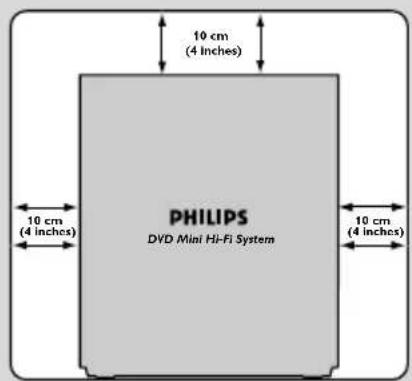
●The ventilation should not be impeded by covering the ventilation openings with items, such as newspapers table-cloths, curtains, etc.
Cleaning the cabinet
●Use soft cloth slightly moistened with a mild detergent solution. Do not use a solution containing alcohol, spirits, ammonia or abrasives.

Cleaning discs
●To clean a CD, wipe it in a straight line from the center towards the edge using soft and lint-free cloth. A cleaning agent may damage the disc.
●Write only on the printed side of a CDR(W) and only with a soft felt-tipped pen.
●Handle the disc by its edge. Do not touch the surface.
Cleaning the disc lens
●After prolonged use, dirt or dust may accumulate at the disc lens. To ensure good playback quality, clean the disc lens with Philips CD Lens Cleaner or any commercially available cleaner. Follow the instructions supplied with cleaner.
Finding a suitable location
●Place the player on a flat, hard, stable surface.
Cleaning the head and the tape paths
● To ensure good recording and playback quality, clean the head Ⓐ, the capstan(s) Ⓑ, and pressure roller(s) Ⓓ after every 50 hours of tape operation.
●Use a cotton swab slightly moistened with cleaning fluid or alcohol.
●You also can clean the head by playing a cleaning tape once.

Demagnetising the head
●Use a demagnetising tape available at your dealer.
Step 1: Placing speakers
![graph TD A["Front speaker (left)"] --> B["Center Speaker"] C["Front speaker (right)"] --> B B --> D["Viewing Area"] style B fill:#f9f,stroke:#333,stroke-width:2px](/content/2026/06/1351210/images/893de9f711196e3ab930fbf51d017d4a881df79adbeb3d9d4a7035091553efef.jpg)
Place the front left and right speakers at equal distances from the TV set and at an angle of approximately 45 degrees from the listening position.
Notes:
- T o avoid magnetic interference, do not position the front speakers too close to your TV set.
- Allow adequate ventilation around the DVD Mini Hi-Fi System.
Step 2: Connecting speakers
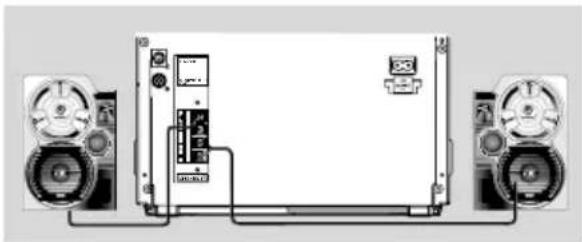
Connect the speaker wires to the SPEAKERS (FRONT) terminals, right speaker to "R" and left speaker to "L", coloured (marked) wire to "+" and black (unmarked) wire to "−". Fully insert the stripped portion of the speaker wire into the terminal as shown.
| Speakers | ||
| Front Left (L) | Black | White |
| Front Right (R) | Black | Red |
Notes:
- F or optimal sound performance, use the supplied speakers.
- Do not connect more than one speaker to any one pair of +/- speaker terminals.
- Do not connect speakers with an impedance lower than the speakers supplied. Please refer to the SPECIFICATIONS section of this manual.
IMPORTANT!
The type plate is located on the rear of the system.
To avoid overheating of the system, a safety circuit has been built in.
Therefore, your system may switch to Standby mode automatically under extreme conditions. If this happens, let the system cool down before reusing it.
Step 3: Connecting TV set

IMPORTANT!
- Y ou only need to make one video connection from the following options, according to the capabilities of your TV system.
- S-Video or Component Video connection provides higher picture quality. These options must be available on your TV set.
- Connect the system directly to the TV set.
Using Video In jack (CVBS)
- Use the composite video cable (yellow) to connect the system's CVBS jack to the video input jack (or labeled as A/V In, Video In, Composite or Baseband) on the TV set.
● To listen to TV channels through this system, use the audio cables (white/red) to connect AUX/TV IN (L/R) jacks to the corresponding AUDIO OUT jacks on the TV set.
●Deactivate Progressive Scan through System Menu. See page 31, Using the Setup Menu – Improving the image for progressive scan video output setting.

IMPORTANT!
- T o set the VIDEO OUT (put) to Pr Pb Y, see page 31, Using the Setup Menu - Setting the video out.
Using component Video In jack (Pr Pb Y)
- Use the component video cables (red/blue/ green) to connect the system's Pr Pb Y jacks to the corresponding Component video input jacks (or labeled as Pr/Cr Pb/Cb Y or YUV) on the TV set.
● To listen to TV channels through this system, use the audio cables (white/red) to connect AUX/TV IN (L/R) jacks to the corresponding AUDIO OUT jacks on the TV set.
- If you are using a Progressive Scan TV set (TV must indicate Progressive Scan or ProScan capability), activate the PROGRESSIVE SCAN function through SYSTEM MENU.
Connections
RF coaxial cable to TV
Television
Back of RF Modulator
(example only)
TO TVINT IN AUDIO IN VIDEO IN R L
CH3 CH4
Antenna or Cable TV signal

LINE OUT
IMPORTANT!
- If the picture is distorted, check the Video Output setting. Make sure it is set to 'S-Video'. See page 31, Using the Setup Menu - Setting the video out.
Using S-Video In jack
- Use the S-Video cable (not supplied) to connect the system's S-VIDEO OUT jack to the S-Video input jack (or labeled as Y/C or S-VHS) on the TV set.
- To listen to TV channels through this system, use the audio cables (white/red) to connect AUX/TV IN (L/R) jacks to the corresponding AUDIO OUT jacks on the TV set.
●Deactivate Progressive Scan through System Menu. See page 31, Using the Setup Menu – Improving the image for progressive scan video output setting.
IMPORTANT!
- If your TV set only has a single Antenna In jack (or labeled as 75 ohm or RF In), you will need a RF modulator in order to view the DVD playback via TV. See your electronics retailer or contact Philips for details on RF modulator availability and operations.
Using an accessory RF modulator
- Use the composite cable (yellow) to connect the system's CVBS jack to the video input jack on the RF modulator.
- Use the RF coaxial cable (not supplied) to connect the RF modulator to your TV's RF jack.
●Deactivate Progressive Scan through System Menu. See page 31, Using the Setup Menu – Improving the image for progressive scan video output setting.
Step 4: Connecting FM/MW antennas
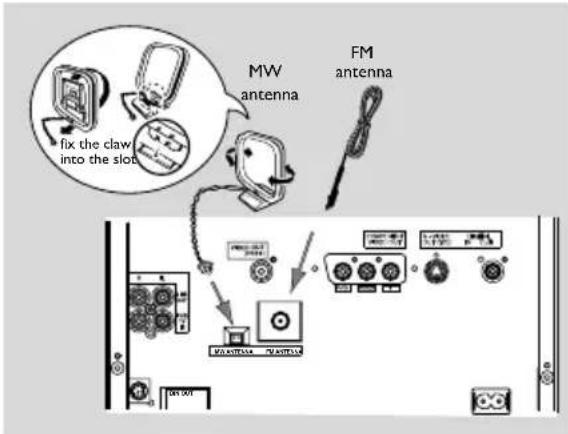
- Connect the supplied MW loop antenna to the MW jack. Place the MW loop antenna on a shelf or attach it to a stand or wall.
●Connect the supplied FM antenna to the FM jack. Extend the FM antenn and fix its end to the wall.
For better FM stereo reception, connect an outdoor FM antenna to the FM ANTENNA terminal.

Notes:
- Adjust the position of the antennas for optimal reception.
- P osition the antennas as far as possible from your TV set, VCR or other radiation sources to prevent unwanted interference.
Step 5: Connecting the power cord

After everything is connected properly, plug in the AC power cord to the power outlet.
Never make or change any connection with the power switched on.
On the DVD Mini Hi-Fi System
"AUTO INSTALL-PRESS PLAY" may appear on the display panel. Press ▶II on the front panel to search and store all available radio stations or press ■ to exit (See page 35, Tuner Operations-Presetting radio stations).
If your system is equipped with a Voltage Selector, set the VOLTAGE SELECTOR to the local power line voltage.

Step 6: Connecting a VCR or cable/satellite box

Viewing and listening to playback
① Connect the VCR or Cable/Satellite Box to the TV system as shown.
② Connect the system's AUX/TV IN (R/L) jacks to the AUDIO OUT jacks on the VCR or Cable/Satellite box.
Before starting operation, press AUX/TV on the remote control to select "AUX" in order to activate the input source.
Using the VCR for recording DVDs
Some DVDs are copy-protected. You cannot record or dub protected discs using a VCR.
③ Connect the system's CVBS jack to the VIDEO IN jack on the VCR.
④ Connect the system's LINE OUT (R/L) jacks to the AUDIO IN jacks on the VCR. This will allow you to make analog stereo (two channel, right and left) recording.
To view DVD playback while recording
You must connect the system to your TV system using the S-VIDEO (as shown above) or the Component (Pr Pb Y) video connection.
Step 7: Connecting digital audio equipment

Recording (digital)
Connect the system's DIGITAL OUT jack to the DIGITAL IN jack on a digital recording device (DTS-Digital Theater System compatible, with a Dolby Digital decoder, for example).
Before operation, set the DIGITAL OUTPUT according to the audio connection. (See page 31, Using the Setup Menu – Setting the digital output).
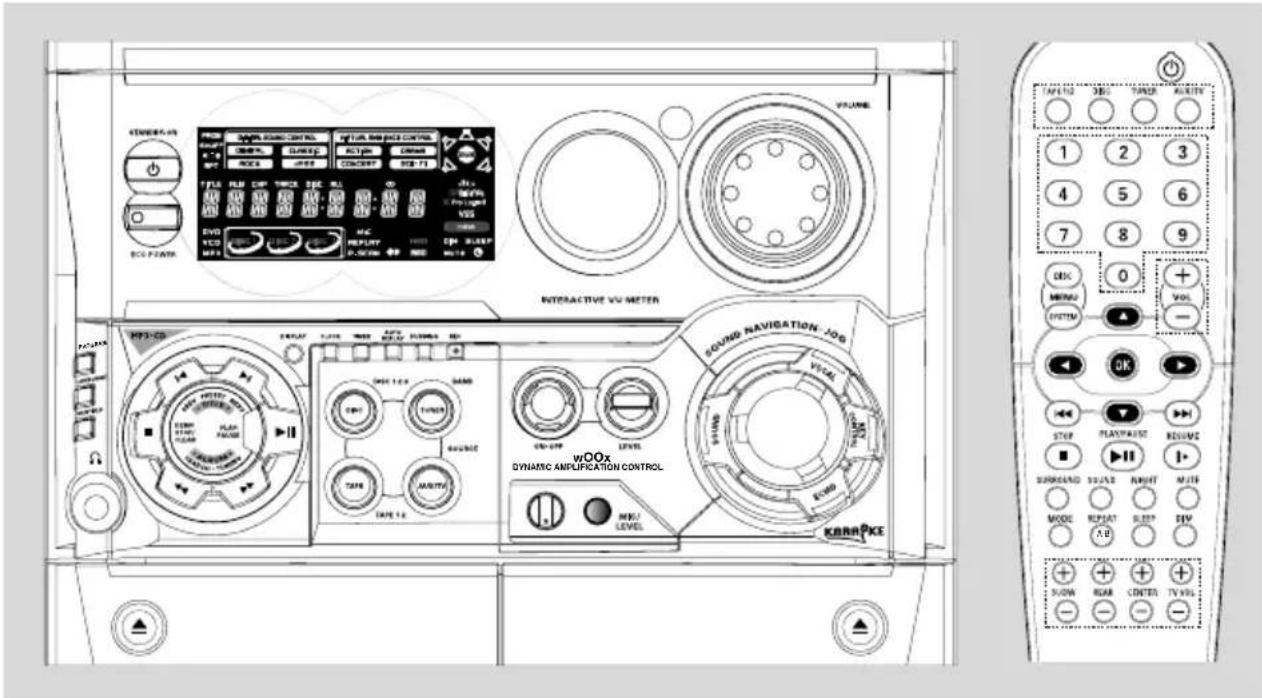
Controls on the system
① ECO POWER
- to switch the system on or to Eco Power Standby mode.
② STANDBY ON
- t o switch the system on or to Standby mode.
③ DISPLAY SCREEN
– to view the current status of the system.
④ DISC TRAYS
⑤ DISC CHANGE
- to change disc(s).
⑥ DISC 1 / DISC 2 / DISC 3
– to select a disc tray for playback.
⑦ OPEN·CLOSE
- to open or close the disc tray.
⑧ INTERACTIVE VU METER
- to show the VU (volume unit) meter in music or volume mode depending on the display mode selected.
⑨ SENSOR
- point the remote control towards this sensor.
⑩ VOLUME
– to increase or decrease the volume.
⑪ Tape Deck Operation AUTO REPLAY
- t o select continuous playback in either AUTO PLAY or ONCE mode only.
DUBBING
- to dub a tape.
REC
– to start recording on tape deck 2.
⑫ VOCAL
- to fade out the original vocal from Karaoke or to switch between mono or stereo mode during audio disc playback.
⑬ JOG CONTROL
- to select the desired sound effect for the selected sound feature.
⑭ KEY CONTROL
– to change the tone level to suit your vocal range.
b ......to decrease the key tone level.
to restore the key tone level to original setting.
# ......to increase the key tone level.
⑮ ECHO
- to adjust the echo level for karaoke after inserting the microphone.
⑯ SOUND
- to activate or deactivate the surround sound effect.
⑰ wOOx ON·OFF
- t o select enhanced or normal wOOx sound effect.
wOOx LEVEL
- to select a desired wOOx level: WOOX 1, WOOX 2 or WOOX 3.
⑱ MIC/LEVEL
- to connect microphone jack.
- to adjust the mixing level for karaoke or microphone recording.
19
- to open the tape deck door.
⑳ TAPE DECK 1
②1 TAPE DECK 2
⑳ SOURCE
- to select the following:
DISC (DISC 1·2·3)
- to select disc tray 1, 2 or 3
TUNER (BAND)
- to select waveband: FM or MW.
TAPE (TAPE 1-2)
- to select tape deck 1 or 2.
AUX/TV
- to select a connected external source: TV/CDR or AUX (auxiliary) mode.
②3 Mode Selection
PLAY/PAUSE ▶ II
for DISC .... to start or interrupt playback. for TAPE .... to start playback.
for PLUG&PLAY ... (on the system only) to initiate plug & play mode.
SEARCH·TUNING ◀◀ ▶▶
(ALBUM - / +)
for DISC ...... to search backward/forward.
for TAPE ...... to rewind or fast forward.
for TUNER ...... to tune to a lower or higher radio frequency.
for CLOCK ...... (in standby mode) to set the minute and hour.
DEMO STOP/CLEAR ■
for DISC .... to stop playback or to clear a programme.
for DEMO .... (in Standby or ECO power mode) to activate/deactivate demonstration.
for PLUG&PLAY ... (on the system only) to exit plug&play mode.
PREV / PRESET / NEXT ◀ ▶
(TITLE - / +)
for DISC .... to select previous/next title, chapter and track during playback.
for TUNER .... to select a preset radio station.
for CLOCK ...... (on the system only) to set the minute.
24
- to connect headphones.
25 SUBTITLE
– to select the preferred language for subtitle.
②6 LANGUAGE
– to select the preferred language for audio recorded.
27PROGRAM
for DISC .... to programme disc tracks. for TUNER .... to programme preset radio stations.
⑳ DISPLAY
– to view the time, title or chapter information.
⑲ CLOCK
– to view the clock, set the clock.
③0 TIMER
- to set the timer.
Remote control

Notes:
- First, select the source you wish to control by pressing one of the source select keys on the remote control (DISC or TUNER, for example). - Then select the desired function (▶, ◀◀◀, ▶▶▶ for example).
① SOURCE
- to select the relevant active mode: TAPE, DISC, TUNER or AUX/TV.
- TUNER: toggles between FM and MW band.
- A UX/TV: toggles between AUX-ANA and AUX-DIG(Digital Input) mode.
② DISC MENU (disc mode only)
- to enter or exit the disc contents menu.
③ SYSTEM MENU (disc mode only)
- to enter or exit the system menu bar.
④ ▲ / ▼ / ◀ / ▶
- in Tuner mode, to select a preset radio station number (◀ or ▶).
- to select movement direction in disc contents menu/system menu bar.
⑤ |◀◀/▶▶|
- in Disc mode, press to skip to the previous/next chapter/track.
– in Disc mode, press and hold to fast reverse/forward the disc. - in Tuner mode, to tune to a lower or higher radio frequency.
⑥ PLAY/PAUSE ▶II
- to start or interrupt disc playback.
⑦ STOP ■
- to stop playing the disc.
⑧ SURROUND
– to select multichannel surround (Dolby Digital, DTS and VSS) or stereo sound effect.
⑨ SOUND
- to select various sound effect: CONCERT, DRAMA, ACTION,SCI-FI, CLASSIC, JAZZ, ROCK, DIGITAL, WOOX 1, WOOX 2, WOOX 3 or WOOX OFF.
⑩ MODE
- to select the REPEAT or SHUFFLE function.
⑪ REPEAT A-B
- to repeat a specific section on a disc.
⑫ POWER ⏻
- to switch to standby mode.
- to enter a track/title number of the disc. - to enter a number of preset radio stations.
⑭ VOL +/-
- adjust the volume level.
⑮ OK
- to exit or confirm the selection.
⑯ RESUME
- to continue disc playback after interruption.
⑰ MUTE
- to interrupt or resume sound reproduction.
⑱ NIGHT (Dolby Digital mode only)
- to optimize the dynamic effect of the sound output.
19 DIM
– to select different brightness for the display.
⑳ SLEEP
- to set the sleep (auto-off) timer function.
②1 SUBW +/- (for subwoofer connection only)
- to adjust the subwoofer's level.
REAR +/- (for 5.1 speaker connection only)
- to adjust the rear speakers' level.
CENTER +/- (for 5.1 speaker connection only)
- to adjust the center speaker's level.
TVVOL+/-
– to adjust Philips' television volume level.
Plug and Play (for tuner installation)
Plug and play allows you to store all available radio stations automatically.
If plug and play has not been installed
1 When you turn on the system, "AUTO INSTALL-PRESS PLAY" will be displayed.
2 Press ▶II on the system to start installation.
→ "INSTALL" will be displayed and followed by "TUNER" and then "AUTO".
→PROG will start to flash.
→The system will search all radio stations on the FM band, and then the MW band.
→All available radio stations with strong signal strength will be stored automatically.
→The system will stop searching when all available radio stations are stored or when the memory for 40 preset radio stations is full.
→The first preset radio station will play when Plug and Play is completed.
Reinstalling plug and play
1 In Standby or Demonstration mode, press and hold ▶ on the system until "AUTO INSTALL-PRESS PLAY" is displayed.
2 Press ▶II again to start installation.
→All previously stored radio stations will be replaced.
To exit without storing the plug and play
●Press ■ on the system.
Notes:
- When the power is turned on, the disc tray may open and close to initialise the system.
- If Plug and Play installation is not completed, it will be reinitiated the next time you power on the system.
- If there is no antenna connected, "CHECK ANTENNA" will scroll on the display.
- If auto-install is not preset, the system will store the radio station automatically.
Demonstration mode
The system has a demonstration mode that shows various features offered by the system.
Activating demonstration
●In Standby or ECO power mode, press and hold DEMO/STOP ■ for more than 5 seconds to activate demo mode.
→ "DEMO ON" is displayed.
→Demonstration will begin.
Deactivating demonstration
- Press and hold DEMO STOP ■ on the system until "DEMO OFF" is displayed.
→The system will switch to Standby mode.
Note:
- Even if you remove the AC power cord and reconnect it to the wall socket, the demonstration will remain off until you activate it again.
IMPORTANT!
- Make sure to complete the preparation procedures before operating the system.
Step 1: Inserting batteries into the remote control
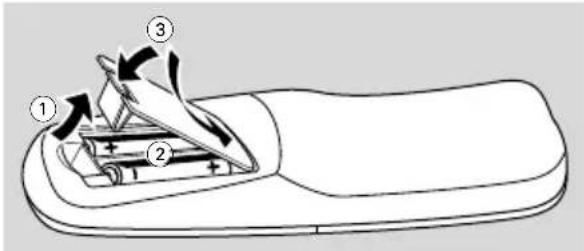
① Open the battery compartment.
② Place two batteries (Type R06 or AA) in the compartment with the correct polarity as indicated by "+" and "-" symbols.
③ Close the cover.
Using the remote control to operate the system
1 Point the remote control directly at the remote sensor (iR) on the front panel.
2 Select the source you wish to control by pressing one of the source select buttons on the remote control (for example TAPE, TUNER).
3 Then select the desired function (for example ▶II, |◀◀, ▶▶I).

CAUTION!
- Remove batteries if they are exhausted or will not be used for a long time.
- Do not use old and new or different types of batteries in combination.
- Batteries contain chemical substances, so they should be disposed of properly.
Step 2: Setting the clock
The clock can be set in either 12-hour or 24-hour mode ("PM 00:00" or "00:00" for example).
1 Go into Standby mode.
→If you have not set the clock, “--:--” will blink until you set the clock.

2 Press CLOCK and "00:00" blinks on the display.
→The current time is flashing on the display.
→If you have not set the clock, "--:" will appear on the display.
3 Press ◀ or ▶ on the system to set the hours.
4 Press ◀◀ or ▶▶ on the system to set the minutes.
5 Press CLOCK to confirm your setting, and then go into standby mode. The system will store the setting automatically.
→The time setting becomes effective.
To exit the setting without storing
●Press ■ on the system to exit.
→ "CANCEL" will appear on the display.
- Press ECO POWER to exit setting mode and go into ECO POWER mode.
- You can also press DISC, DISC1\~3, DISC CHANGE, OPEN/CLOSE to exit setting mode and go into disc mode.
●The system will also exit setting mode and go to tuner, AUX, tape mode wheh you press the corresponding source button.
Viewing the clock
●In Standby mode, Press DISPLAY on the system to toggle between 12-hour and 24-hour modes.
→The time will be displayed.
Notes:
- The clock will be cancelled when the power cord is disconnected or if a power failure occurs.
- During clock setting, if no button is pressed within 30 seconds, the system will exit the setting mode and go into standby mode.
Step 3: Setting the TV set
IMPORTANT!
- Make sure you have completed all the necessary connections. (See page 11-12, Connections - Connecting TV set)
1 Press DISC (DISC 1·2·3) on the front panel (or press DISC on the remote control).
2 Turn on the TV set and set to the correct Video-In channel. You should see the blue Philips DVD background screen on the TV set.
→You may go to channel 1 on your TV set, then press the channel down button repeatedly until you see the Video In channel.
→Or, you can use the TV remote control to select different video modes.
→Or, set TV to channel 3 or 4 if you are using an RF modulator.
Selecting the color system that matches your TV set
This DVD Mini Hi-Fi System is compatible with both NTSC and PAL. For the playback of a DVD disc on this DVD Mini Hi-Fi System, the color systems of the DVD, TV set and DVD Mini Hi-Fi System should match.
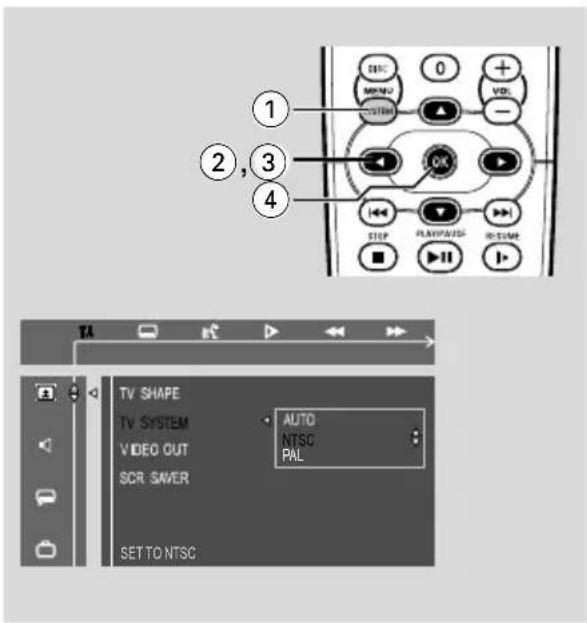
1 In disc mode, stop playback and press SYSTEM MENU.
2 Select icon and press ▼.
3 Press ◀ / ▶ / ▲ / ▼ keys on the remote control to toggle through the functions and select your preferred option.
→ Move to 14 and press ▶.
→Move to "TV System" and press ▶.
AUTO
- Select this if the connected TV set is compatible with both NTSC and PAL (multi system). The output format will be consistent with the video signal of the disc.
NTSC
- Select this if the connected TV set is NTSC system. It will change the video signal of a PAL video disc and output to NTSC system.
PAL
- Select this if the connected TV set is PAL system. It will change the video signal of an NTSC disc and output to PAL format.
4 Select an item and press OK.
To remove the menu
Press SYSTEM MENU.
Step 4: Setting speakers
IMPORTANT!
- This function is only available when you have connected other 3.1-channel speakers.
You can adjust the delay time (center and rear only) for individual speakers to optimize the sound effect according to your surroundings and setup. Speaker settings are only active on effective in the case of Multi-channel audio output.

1 In disc mode, press SYSTEM MENU.
2 Select icon and press ▼.
3 Press ◀ / ▶ / ▲ / ▼ keys on the remote control to select your preferred option.
→Move to and press ▶.
→Move to "CENTER DELAY" or "REAR DELAY" and press ▶.
4 Press ▶ to set CENTER DELAY or REAR DELAY values you want.
→Use longer delay time if the surround speakers are closer to the listener than the front speakers.
5 Press OK to confirm.
To remove the menu
Press SYSTEM MENU.
Step 5: Setting language preference
You can select your preferred language settings so that this DVD Mini Hi-Fi System will automatically switch to the language for you whenever you load a disc. If the language selected is not available on the disc, the language set by default will be used instead. But the menu language of the DVD Mini Hi-Fi System cannot be changed once selected.
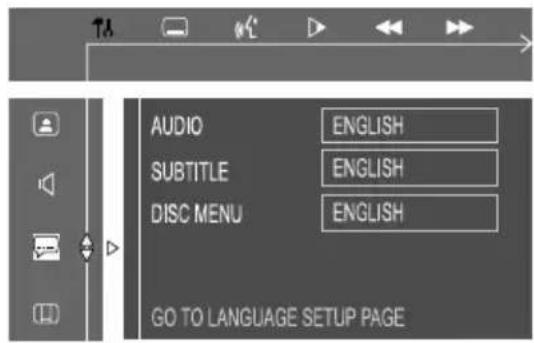
1 In disc mode, stop playback and press SYSTEM MENU.
2 Select icon and press ▼.
3 Press ◀ / ▶ / ▲ / ▼ keys on the remote control to select your preferred option.
→Move to and press ▶.
→ Move to one of the following and press ▶.
– Audio (disc's soundtrack)
- Subtitle (disc's subtitles)
- Menu (on screen menu)
4 Press ▲ / ▼ to select a language and press OK.
5 Repeat steps 3\~4 for other settings.
To remove the menu
Press SYSTEM MENU.
IMPORTANT!
- This system is designed for regular discs. Therefore, do not use any accessories such as disc stabiliser rings or disc treatment sheets, etc., as offered on the market, because they may jam the disc mechanism.
- Do not move the system during playback. Doing so may damage the system.
- Do not push on the disc tray or put any object other than disc on the disc tray. Doing so may cause the system to malfunction.
- D VD discs and players are designed with regional restrictions. Before playing a disc, make sure the disc matches the regional code of your player.
- According to the format requirement of DVD or VCD, some operations may be different or restricted.
Playing discs
1 Press STANDBY ON ⏻ to switch on the system, and then press DISC to select disc mode.
2 Power on the TV system and set to the correct Video In channel (See page 20, Setting the TV set).
→You should see the blue Philips DVD background screen on the TV set.
3 Press OPEN/CLOSE to open the disc tray and load a disc respectively in the first two disc tyays. To load the third disc, press DISC CHANGE.
→The disc tray will rotate until the empty tray is ready for loading.
→Make sure the disc label is facing up. For double-sided discs, load the side you want to play facing up.
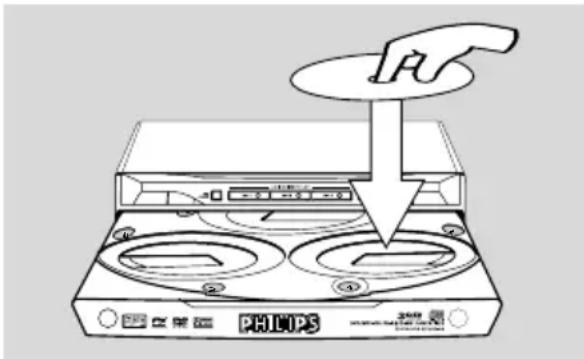
4 Press OPEN•CLOSE to close the disc tray.
→ "READING DISC" will be displayed. The selected disc, total number of tracks and the playing time will appear on the display.
→A lighted button indicates that a disc is loaded in the disc tray.
→In the stop mode, press DISC on the remote control repeatedly to select DISC 1, DISC 2 or DISC 3 cyclically.
●Some discs can play automatically. For discs with Table Of Contents, a menu may appear on the TV screen. When the menu is displayed, press ▲ / ▼ / ◀ / ▶ keys to highlight your selection and press OK to confirm. To select a play option, press numeric keys (0-9).
→If a disc menu shows on the TV screen, see "Using the Disc Menu".
→If the disc is locked by parental control, you must enter your four-digital password (See page 33, – Changing the password).
5 Press ▶II to start playback.
For MP3-CD only
●Load an MP3-CD in the disc tray.
→The number of total tracks will be shown for 3 seconds on the display, and then playback starts from the first track.
→Press DISC MENU to select menu on/off.
Notes:
- Load discs with the label side facing up.
- T o ensure good system performance, wait until disc reading is completed before proceeding.
Using the disc menu
For disc with Table Of Contents, a menu may appear on the TV screen once you load the disc.
To select a playback feature or item
- Press ▲ / ▼ / ◀ / ▶ or numeric keys (0-9) on the remote control, then press ▶II or OK to start playback.
To access or remove the menu
●Press DISC MENU on the remote control.
Basic playback controls
To play discs in all the disc trays
●Press ▶II.
→All the available discs will play once, then stop.
→During playback, the selected disc tray, track number and elapsed playing time of the current track will appear on the display.
To start playback from a selected disc tray
● Press DISC 1, DISC 2 or DISC 3.
To interrupt playback
●Press ▶II.
● To resume playback, press ▶II again.
To stop playback
●Press ■.
Skipping to another title (track) / chapter
- Press I◀ or ▶I on the front panel (or I◀◀ or ▶▶▶I on the remote control) repeatedly during playback to skip backward or forward. Each press will take the disc to the beginning of the previous or next title (track) / chapter.
Note:
- If the player has been set to repeat chapter (track), pressing this button will replay the same chapter (track) from its beginning.
To go directly to any title (track) / chapter
- Use the numeric keys (0-9) to enter the number of the desired title (track) / chapter.
Fast search
1 Press ◀◀ or ▶▶ on the front panel to fast reverse or forward the disc.
2 Press and hold ◀◀◀ or ▶▶▶ on the remote control for more than 1 second, to fast reverse or forward the disc.
3 To resume normal play, press ▶II.
Continuing playback from the last stop point
●In stop mode and before the disc is removed, press RESUME to resume playback from where you have stopped.
To cancel the resume mode
- Press ■ again, or go into STANDBY, POWER OFF, or press OPEN/CLOSE key.
Notes:
- Resume information will be erased if you have changed the disc, opened the disc tray, changed source or disconnected the system from the power supply.
- Resume function is not available in PBC ON mode.
- This function is not available for MP3 discs.
Selecting various mode functions
Repeat play mode
You can only select the Repeat play mode during playback.
For DVD - repeat chapter/title
- Press MODE repeatedly to select the following: REPEAT CHAPTER → REPEAT TITLE → REPEAT OFF
For CVD/SVCD/VCD/CD - repeat chapter/title
●Press MODE repeatedly to select the following: REPEAT TRACK → REPEAT DISC → REPEAT ALL → REPEAT OFF
During program playback
- Press MODE repeatedly to select the following: REPEAT ONE-PROGRAMMED TRACK → REPEAT ALL PROGRAMMED TRACKS → REPEAT OFF
For MP3 repeat - track/album/disc MENU ON:
- Press MODE repeatedly to select the following: REPEAT TRACK → REPEAT ALBUM → REPEAT DISC → REPEAT ALL → REPEAT OFF
MENU OFF:
- Press MODE repeatedly to select the following: REPEAT TRACK → REPEAT DISC → REPEAT ALL → REPEAT OFF
Notes:
- When you open the disc tray, the Repeat function will be cancelled automatically.
- F or CVD, SVCD and VCD 2.0 discs, the Repeat function is not available unless the PBC function is set to OFF.
- If discs of different formats are loaded, the Repeat function is only available for the current disc.
Shuffle play mode
In this mode, all tracks in the current directory will be played once in a random order.
1 In stop mode, press MODE to play in a shuffle order.
→Playback will start from the first disc to the last disc.
2 Press MODE repeatedly to select the following: SHUFFLE DISC → REPEAT SHUFFLE DISC → SHUFFLE ALL → REPEAT SHUFFLE ALL → SHUFFLE OFF
3 Press ▶II to start shuffle play.
In shuffle playback mode:
- Press MODE again to display the current mode.
- Press ▶▶▶1 button to select another track in a shuffle order.
4 Press ■ to stop shuffle playback.
To cancel Shuffle mode:
●In stop mode, press MODE repeatedly to select SHUFFLE OFF.
Notes:
- In Tuner, Tape or AUX mode, this button does not function.
- W hen the disc tray is opened, the Shuffle function will be cancelled automatically.
- In the Shuffle playback mode, the system only supports the same disc format.
Repeating a section within a chapter/track
You can play a specific section in a chapter/track repeatedly.
1 Press REPEAT A-B at your chosen start point.
2 Press REPEAT A-B again at your chosen end point.
→The passage will now repeat continuously.
3 To resume normal play, press REPEAT A-B again.
Note:
- The REPEAT A-B function can only be set within the same chapter or track.
Programming favorite tracks
You can play the contents of the disc in the order you want. At most 99 tracks can be stored.
1 Load the desired discs on the disc trays.
2 Press the DISC button to select the disc tray.
→Programming can only be done on the selected disc.
3 While playback is stopped, press PROGRAM to enter program mode.
→ "P 00 :00" is displayed.
4 Use the numeric keys (0-9) to input the track number in the order you want.
→If you attempt to program more than 99 tracks, "FULL" is displayed.
5 Press OK to store the track.
●Repeat steps 3-4 to store other tracks.
6 Press ▶II to play the program.
7 To stop playback, press ■ once.
8 To exit the program mode, press ■ again.
Notes:
- This function is not available for DVD or MP3 discs.
- If you open the disc tray, the program will be cleared.
Using the menu bar to program
Favorite Track Selection (FTS) lets you play your favorite titles/chapters or tracks/indexes in the order you select. An FTS program can contain 99 items (titles, chapters, etc.).
IMPORTANT!
- Y ou can only program the current disc.
- Y ou have to turn on your TV set and set to the correct Video In channel. See page 20, Setting the TV set.
1 Stop playback, then press SYSTEM MENU.
The menu bar will appear across the top of the TV screen.
2 Press ◀ or ▶ to select 📋, and press ▼ to enter the program menu.
3 Repeat steps 4-8 listed above to program your favorite tracks.
Changing discs during playback
1 Press DISC CHANGE.
→The disc tray will open without interrupting playback.
2 To change the inner disc, press DISC CHANGE again.
→The active disc will stop playing and the disc tray will close to retrieve the inner disc, then reopen with the inner disc accessible.
Special DVD/VCD features
Some operations can be carried out directly via the multiple menu bars on the TV screen without interrupting disc playback.
1 Press SYSTEM MENU.
→The menu bar will be displayed across the top of the TV screen.
2 Press ◀ or ▶ to select:
SETUP MENU → SUBTITLE → AUDIO
LANGUAGE → SLOW → FAST REVERSE →
FAST FORWARD → STATUS → TITLE
SEARCH → CHAPTER SEARCH → TIME
SEARCH → ZOOM → ANGLE → STEP →
PBC ON/OFF → PROGRAM
3 Press ▼ to select the highlighted icon and press ▲ / ▼ to select your preferred option.
4 Press OK to confirm a highlighted selection.
5 To exit, press SYSTEM MENU.
IMPORTANT!
Some operations may be different or restricted according to the disc format.
Refer to the jacket or case of the disc you are playing.
Note:
- When you press a button and appears on the TV screen, this means the function is not available on the current disc or at the current time.
Changing subtitle language
This operation only works on DVDs with multiple subtitle languages.
- Select from the menu bar and press ▼ to select the desired language.
Changing sound track language
This operation only works on DVDs with multiple audio languages.
- Select 📂 from the menu bar and press ▼ to select the desired language.
For CVD/SVCD/VCD:
●Press ▼ to select the desired audio channels for sound. This function is only available for discs recorded with different channels: LEFT VOCAL → RIGHT VOCAL → MONO LEFT → MONO RIGHT → STEREO
Note:
- If your desired language is not set in the disc, you cannot select the language via this function.
Playing in slow motion mode
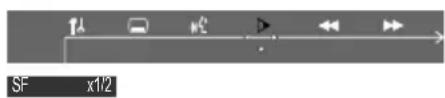
For DVD
1 Select from the menu bar and press ▼ repeatedly to select the required slow motion speed: SF × 1/2 → SF × 1/4 → SF × 1/8 → SR × 1/2 → SR × 1/4 → SR × 1/8 → PLAY SF = slow forward SR = slow reverse
For CVD, SVCD or VCD
1 Press ▼ to select the required slow motion speed: (forward): SF × 1/1 → SF × 1/2 → SF × 1/3 → PLAY
2 Press ▶II to cancel the slow function.
Note:
- This function is not available for MP3 and CD.
Searching for a particular passage
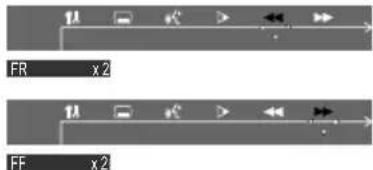
1 Select or from the menu bar to select fast reverse search or fast forward search respectively.
2 Press ▼ to select the required search speed:
For DVD or MP3
(reverse): FR X2 → FR X4 → FR X6 → FR X8
→ PLAY
(forward): FF X2 → FF X4 → FF X6 → FF X8
→ PLAY
For CVD, SVCD, VCD or CD
(reverse): FR X1 → FR X2 → FR X3 → FR X4
→ PLAY
(forward): FF X1 → FF X2 → FF X3 → FF X4
→ PLAY
3 To resume normal play, press ▶II.
Displaying the disc information during playback
- Select D from the menu bar and press ▼ to select the following display informations
![graph TD A["DV D"] --> B["TITLE 01/06 CHAPTER 05/19 00:20:01 00:20:01"] B --> C["TITLE REMAN 00:01:15 00:01:15"] C --> D["CHAPTER ELAPSED 00:20:12"] D --> E["CHAPTER REMAN 00:30:45"] F["VC D (PBC ON)"] --> G["SINGLE ELAPSED"] G --> H["SINGLE REMAN"]](/content/2026/06/1351210/images/a400a33466eaad130e42894aafc02366d775396587e3334c7df05ed93c23c856.jpg)
Moving to another title (track) / chapter
Some discs may contain more than one title or chapter. If the disc has a title or chapter menu recorded on it, you can start playback from the selected item.
1 Select T (title) or C (chapter) from the menu bar.
2 Use numeric keys (0-9) to select a desired title/chapter number.
3 Press OK to start playback.
Note:
- Selecting a title or chapter might not be possible on certain discs.
Playing from a selected point
This function allows you to start playback at any chosen time on the disc.
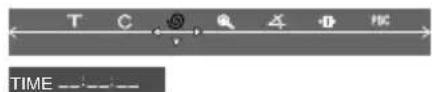
1 Select from the menu bar.
2 Enter hours, minutes and seconds from left to right in the time edit box using the numeric keys (0-9).
→Each time an item has been entered, the next item will be highlighted.
3 Press OK to start playback.
Note:
- In repeat disc or repeat all mode, you can search a desired time point.
Zooming in
This function allows you to enlarge the picture on the TV screen and pan through the enlarged image.
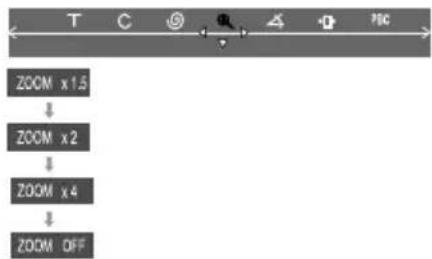
1 Select from the menu bar and press ▼ repeatedly to change the following zooming scale: ZOOM X1.5 → ZOOM X2 → ZOOM X4 → ZOOM OFF
2 To pan through the enlarged image, press SYSTEM MENU to exit and press ◀ / ▶ / ▲ / ▼ buttons to move the zoomed picture left, right, up or down.
3 To exit ZOOM mode, select "ZOOM OFF" from the menu bar.
Viewing from another angle
If the playing DVD disc is recorded with multiple camera angles, the ANGLE mark on the setup page will be set to ON automatically. This allows you to view the picture from different angles. Angle selection is determined by the disc format.
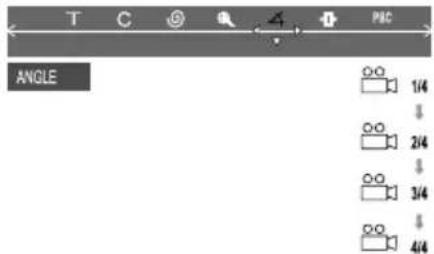
- Select ▲ from the menu bar and press ▲ / ▼ buttons to select the desired angle: 1/4, 2/4, 3/4 or 4/4. →Playback changes to the selected angle.
Advancing by frames

1 Select ▶ from the menu bar and press ▼ to play the disc step by step (one frame each step). 2 To resume normal play, press ▶II.
Note:
- This function is not available for CD or MP3 discs.
Checking the contents of DVD
1 Press DISC MENU on the remote control. →If the current title has a menu, the menu will appear on the screen. Otherwise, the disc menu will be displayed.
2 Press ◀ / ▶ / ▲ / ▼ to select the desired title or chapter; and then press ▶II or OK. →Playback start from the selected title or chapter.
Note:
- If no title menu is recorded in the DVD disc, pressing this button will restart playback from the first track.
Special VCD/SVCD features
Playback control (PBC)
PBC playback allows you to play Video CD interactively, following the menu on the display.

- Select PBC from the menu bar and press ▼ to toggle between PBC ON and PBC OFF.
Playing a disc with PBC function
- If PBC OFF, the system will start playback automatically.
- If PBC ON, the PBC menu (if available) will appear on the TV screen for selection. Use the numeric keys (0-9) to enter your choice.
Note:
- This function is not available for CD or MP3 discs.
Playing MP3 / picture disc (Kodak, JPEG)
IMPORTANT!
- Y ou have to turn on your TV set and set to the correct Video In channel. (See page 20, Setting the TV set.)
MP3 / JPEG picture disc
1 Load an MP3/Picture (JPEG) disc.
→The disc reading time may exceed 30 seconds due to complexity of the directory/file configuration.
2 Playback will start automatically.
→The album/picture menu will appear on the TV screen. If not, press DISC MENU on the remote control.
(example for MP3 disc menu)
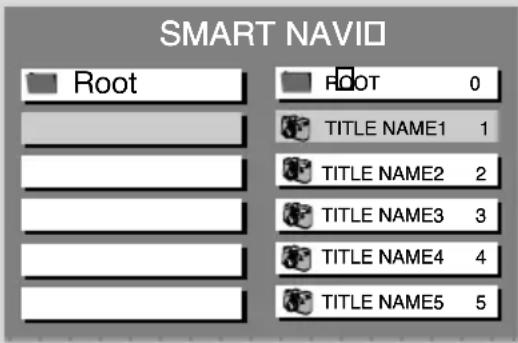
3 Press ◀ / ▶ / ▲ / ▼ to select a desired album, then press OK or ▶II to confirm (for MP3 disc only).
4 Press ◀ / ▶ / ▲ / ▼ to select a desired title, then press OK or ▶II to start playback.
- You can also use the numeric keys (0-9) to enter your choice.
5 To stop playback, press ■.
If the MP3-CD menu is switched off
●You can only play the current title by pressing
▶II. While in playback mode, press ◀◀◀ / ▶▶▶I to select the previous/next title.
→The title number will appear.
Kodak picture disc
1 Load a Kodak Picture disc.
→The disc reading time may exceed 30 seconds due to complexity of the directory/file configuration.
2 Playback will start automatically.
3 Press ■.
→9 thumbnail pictures will appear on the TV screen.
(example for picture disc menu)
| 1 | 2 | 3 |
| 4 | 5 | 6 |
| 7 | 8 | 9 |
4 Press I◀◀ / ▶▶▶I to view the previous/next page (if available).
5 Press ◀ / ▶ / ▲ / ▼ to move within the menu and press OK to select the desired picture to play.
6 Press ▶II to start the slide-show playback.
During playback, you can:
- Press ◀◀◀ / ▶▶▶I to select another title/picture in the current folder.
- Press ◀ / ▶ / ▲ / ▼ on the remote control to rotate or flip the picture files.
- Select "ZOOM ON" and then press ◀◀ / ▶▶ on the system (or select ◀◀ / ▶▶ on the system menu then press ▼) to zoom the picture in and out.
●Press ▶II to pause/resume playback.
Notes:
- Due to the recording nature of Digital Audio MP3 (DAM), only digital audio music will play.
- It is normal to experience an occasional "skip" while you are listening to your MP3 discs.
- F or multi-session discs with different formats, only the first session can be read and played.
- DISC MENU does not function during Kodak Picture disc playback.
Using the menu bar
You can continue some operations directly via the multiple menu bars on the TV screen without interrupting the disc playback. But when you enter ⓁSETUP MENU), the playback will pause.

1 In disc mode, press SYSTEM MENU.
→The menu bar will appear across the top of the TV set screen.
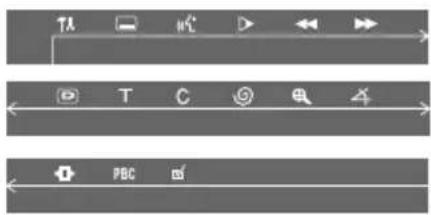
2 Press the ◀ / ▶ / ▲ / ▼ on the remote control to navigate in the menu.
→ Press ◀ / ▶ to move through the menu bar.
→Press ▼ to enter the selection.
3 Press OK to confirm the selection.
→Playback will resume or begin automatically.
To remove the menu
Press SYSTEM MENU or OK.
IMPORTANT!
- Some operations may be different or restricted according to the disc format. Refer to the jacket or care of the disc you are playing.
- Y ou can change the Subtitle Language and Audio Language from the menu bar only on the current disc. But this operation cannot change the default preset.
| Subtitle LanguagePress▼ to select a desired language in DVD mode. | |
| Audio LanguagePress▼ to select a desired audio language on the DVD, CVD, SVCD, VCD:Left Vocal→Right Vocal→Mono Left→Mono Right→Stereo | |
| Slow MotionThe slow motion speed will display. Press▼ repeatedly to select a reverse or forward slow motion speed.To cancel the slow function, press▶II. | |
| Fast ReversePress▼ repeatedly to select a reverse fast speed.To cancel the fast reverse function, press▶II. | |
| Fast ForwardPress▼ repeatedly to select a forward fast speed.To cancel the fast forward function, press▶II. | |
| STATUSIn DISC mode, select this icon and press▼ to view the time, title or chapter information of the playing disc. | |
| T | Title SearchPress▼ to display the message of title, use the number keys to enter a desired title you want, and then pressOKto start playback. |
| C | Time SearchPlayback will pause and a time edit box appears on the display. Use thenumeric keys(0-9)to enter the time (hours : minutes : seconds) at which you want to start playback, then pressOKto start playback. (This function is not available in the PBC ON mode. |
| ZOOMPress▼ repeatedly to select an enlarged picture ratio: 1.5, 2 or 4.You can press◀/▶/▲/▼ to move within the enlarged picture on the TV set.To resume normal playback, repeat the above step to select ZOOM OFF. | |
| ANGLEPress▼ to view the same scene from different angles if the DVD is recorded with multiangles. | |
| STEPPress▼ repeatedly to play forward the disc step by step (one frame every step). To cancel the step function, press▶II. | |
| PBC | PBCPress▼ to select PBC ON or OFF, and then playback will stop automatically. (This function is not available for CD or MP3 discs.) |
| PROGRAMSee page 24, Using the menu bar to program. |
Using the setup menu (user preference settings)
This DVD setup is carried out via your TV set, enabling you to customize the DVD Mini Hi-Fi System to suit your particular requirements.
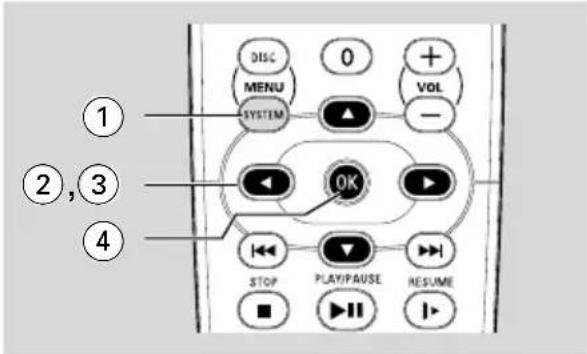
1 In disc mode, press SYSTEM MENU.
→The menu bar will appear across the top of the TV screen.
2 Select ▶ icon and press ▼ to enter the setup menu. Then press ▲ / ▼ to select one of the setup menu options and press ▶ to enter the menu.
→Playback will pause.

3 Press ◀ / ▶ / ▲ / ▼ on the remote control to navigate in the menu.
4 Press OK to confirm your selection.
→Playback will resume or begin automatically.
Removing the menu
Press SYSTEM MENU or OK.
Note:
- Some features of the Setup Menu are described in "Preparations".
Setting the TV shape
Make sure the format you need is available on the disc. If not, your setting will be invalid.

4:3 PS (Pan and Scan mode)
Select this if you have a conventional TV set and your DVD is not formatted for wide screen viewing. A wide picture will display on the whole TV screen with a portion automatically cut off.
4:3 LB (Letterbox mode)
Select this if you have a conventional TV set and your DVD is formatted for wide screen viewing. Black bars appear on the upper and lower portions of the TV screen.
16:9 (Wide-screen TV)
Select this if you have a wide-screen TV set (you must also set your wide screen TV to "full size").

Setting the video out
Video Out selection enables you to choose the type of video output suitable for your DVD system.
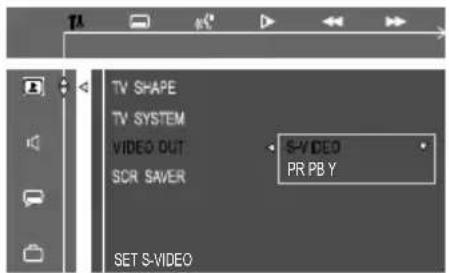
S-VIDEO
- Select S-VIDEO if you have connected the S-VIDEO output to your TV system using S-VIDEO jack.
PR PB Y
- Select PR PB Y if you have connected the video output to your TV system using PR PB Y jack.
Note:
- Y ou do not need to adjust the video output setting if you are using VIDEO jack (yellow) to connect the system to your TV system.
Improving the image for progressive scan video output setting
This feature is only applicable when you have connected this system to a Progressive Scan TV system through the Component Video jacks.

Off
Select this if a conventional TV set is connected to your system.
On
To enjoy the full quality potential offered by progressive scan feature, a progressive scan TV set is required.
You can press and hold DISPLAY for more than 5 seconds to switch progressive scan ON or OFF.
Notes:
- A progressive scan TV set is required. - The progressive scan video quality is only possible through PR PB Y output connection.
Setting the screen saver
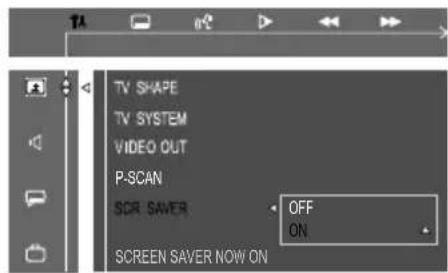
If set to ON, the screen saver will be activated when you leave the system in stop or pause mode for 1 minute. The default setting is ON.
Setting the digital output
Set Digital Output according to your optional audio equipment connections.

Off
Select this to deactivate the digital output.
All
Select this if you have connected the digital output to a piece of optional audio equipment that has a multichannel decoder.
PCM only
Select this if the external component is capable of processing digital signal input. After that, proceed to "Setting the PCM output".
Setting the PCM output
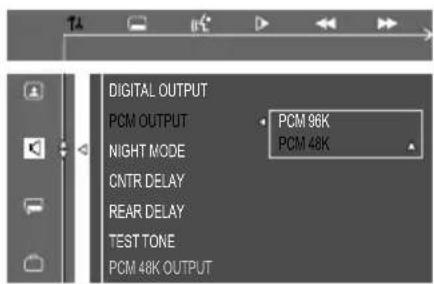
PCM 96K
Select this if the optional audio equipment is capable of processing digital signal input with sampling rate of 96 kHz. However, if the sound output is distorted or there is no sound, select '48 kHz'.
PCM 48K
Select this if the optional audio equipment is incapable of processing 96 kHz digital signal input, then convert to standard signal with sampling rate of 48 kHz.
Note:
- The PCM OUTPUT can be selected only when PCM ONLY is selected.
Night mode - turning on/off
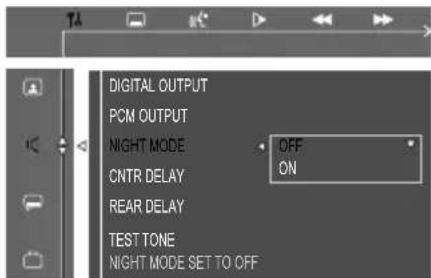
Off
Select this when you want to enjoy the surround sound with its full dynamic range.
On
Select this to level out the volume. High volume output will be softened and low volume output will be brought upward to an audible level. This feature is only available for movies with Dolby Digital mode.
Changing the password
You can change the four-digit code used as Password.
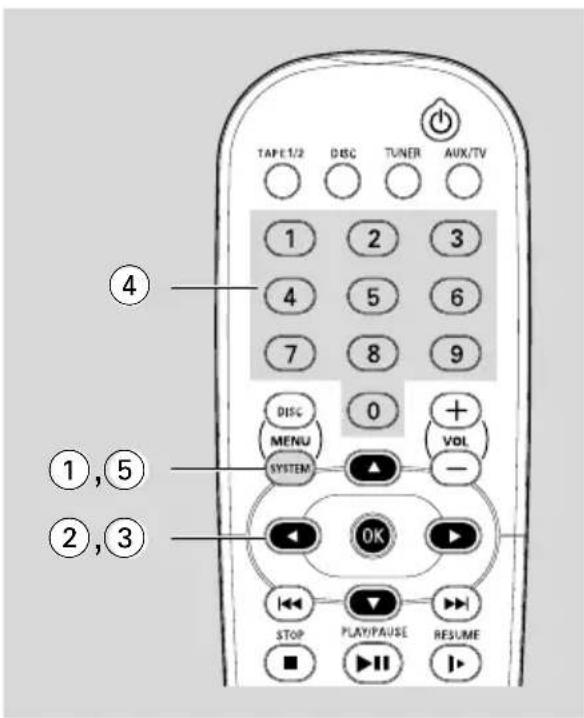
1 In disc mode, press SYSTEM MENU.
2 Select icon and press ▼.
3 Press ◀ / ▶ / ▲ / ▼ on the remote control to navigate in the menu.
→ Move to icon and press ▶.
→Move to "PASSWORD" and press ▶.

4 Use the numeric keys (0-9) to enter your four-digit code.
→The password supplied by default is 1234. →If you forget the four-digit code, press ■ four times, the system will change back to the default password.
- Go to "Password" and enter your new code. Then, enter the same code again to confirm.
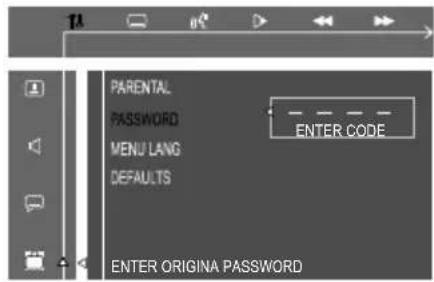
5 Press SYSTEM MENU again to cancel the menu.
Restricting playback by setting parental level
Some DVDs may have a parental level assigned to the complete disc or to certain scenes on the disc. This feature lets you set a playback limitation level. The rating levels are from 1 to 8 and are country specific. You can prohibit the playing of certain discs that are not suitable for your children or have certain discs played with alternative scenes.

1 In disc mode, press SYSTEM MENU.
2 Select icon and press ▼.
3 Use ◀ / ▶ / ▲ / ▼ on the remote control to navigate in the menu.
→ Move to icon and press ▶.
→Move to "PARENTAL" and press ▶.

4 Use the numeric keys (0-9) to enter the four-digit code. You may have to enter the same code twice.
→If not successful, see page 33, Using the Setup Menu - Changing the password.
5 Press ▲ / ▼ to select a rating level between 1-8 and press OK.
→DVDs rated above the level you select will not play unless you enter your four-digit password or choose a higher level rating. Select 'No Parental' to deactivate Parental level and have all discs play.
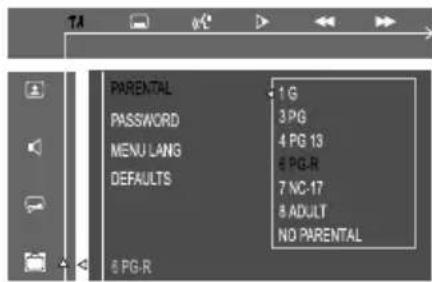
6 Press SYSTEM MENU again to cancel the menu.
Rating explanations
NO PARENTAL – It will play all discs.
8 ADULT – material for adults only; viewed only by adults due to graphic sexual scenes, violence, or language.
7 NC-17 – No children under age 17; not recommended for children under age 17.
6 PG-R – Parental Guidance – Restricted; recommended that parents restrict children under 17 from viewing or allow them to view only when supervised by a parent or adult guardian.
4 PG 13 – Material is unsuitable for children uner age 13.
3 PG – Parental Guidance suggested.
1 G – General Audience; recommended as acceptable for viewers of all ages.
- Menu language
To set the screen display language. The default setting is English.
- Default
If RESET is selected, all the items in the setup menu will be reset to default setting, except Parental Setting.
IMPORTANT!
- Make sure FM and MW antennas are connected.
Tuning to radio stations
1 Press TUNER to select "FM XX" or "MN XX".
2 Press and hold ◀◀◀ / ▶▶▶ on the remote control or ◀◀◀ / ▶▶▶ on the system until the frequency indication starts to change, then release.
→The next radio station will be tuned automatically.
→∞ lights up for FM stereo reception.
3 To tune a weak station, press I◀◀ / ▶▶▶ on the remote control or ◀◀ or ▶▶ on the system to auto search until a radio station with sufficient signal strength is found.
- If you use ◀ / ▶ on the system for frequency tuning, make sure the system is in frequency tuning mode. If not, press TUNER.
Presetting radio stations
You can store up to 40 preset radio stations in the memory, starting from FM and followed by MW bands.
Automatic preset programming
You can start automatic presetting from a selected preset number.
1 Press TUNER (BAND) to select TUNER mode.
→The current radio frequency will appear on the display.
To begin automatic preset from a desired preset number
- Press |◀ / ▶|, ◀ / ▶ or numeric keys (0-9) to select the desired preset number.
2 Press and hold PROGRAM until "AUTO"
appears on the display.
→PROG will start to flash.
→The system will start to search all radio stations on the FM band, then MW band.
→All radio stations with strong signal strength will be stored automatically.
→The system will stop searching when all available radio stations are stored or when the memory of 40 preset radio stations is full.
→The first preset radio station will then be played when completed.
To stop storing the automatic preset
- Press PROGRAM or ■ on the system.
Note:
- If no preset number is selected, automatic preset will begin from “☐” and all your former presets will be overridden.
Manual preset programming
1 Press TUNER (BAND) repeatedly to select the desired tuner band: FM or MW.
2 Press and hold ◀◀ / ▶▶ on the system or ◀◀◀ / ▶▶▶ on the remote control to search a radio frequency.
3 Press PROGRAM.
→ "PROG" and "P 0 I" will display.
4 Press ◀ / ▶ on the system, ◀ / ▶ or numeric keys (0-9) on the remote control to select the desired preset number.
5 After selecting an address number, press PROGRAM again to store the radio station.
- Repeat steps 3-5 to store other preset radio stations.
To stop storing the manual preset
●Press ■ on the system.
Note:
- If you attempt to store more than 40 preset radio stations, "FULL" will be displayed.
Selecting a preset radio station
- In tuner mode, press ◀ or ▶ or use the numeric keys (0-9) to select the desired preset number.
→The preset number, radio frequency, and waveband are displayed.
Deleting a preset radio station
1 Press |◀ or ▶| to select the preset radio station to be erased.
2 Press ■ on the system, "PRESET DELETED" appears on the display.
→The radio frequency remains on the display. →The preset numbers of all other preset radio stations in the band with higher numbers are also decreased by one.
- Repeat steps 1-2 to erase other preset radio stations.
Changing tuning grid
In some countries, the frequency step between adjacent channels in the MW band is 9 kHz (10 kHz in some areas). The preset frequency step in the factory is 9 kHz.
1 Plug the AC power cord.
2 Press TUNER to select MW mode.
3 Press and hold ■ for more than 3 seconds when reconnecting the system to the AC power supply.
→ "STEP XX K" appears.
Note:
- All preset stations will be lost and need to be reprogrammed.
IMPORTANT!
- Before playing a tape, check and tighten slack tape with a pencil. Slack tape may get jammed or may burst in the mechanism.
- Store tapes at room temperature and do not put them too close to a magnetic field (for example, a transformer, TV set or speaker).
Tape playback
1 Press ▲ to open the tape deck door.
2 Insert a recorded tape and close the tape door.
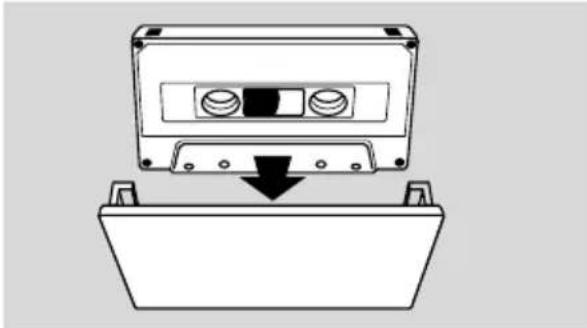
●Load the tape with the open side down and the full spool to the left.
3 Press TAPE (TAPE 1•2) or TAPE1/2 on the remote control repeatedly to select tape deck 1 or tape deck 2.
→The selected tape deck number is displayed.
4 Press ▶II to start playback.
Stopping playback
●Press ■.
Changing the playback mode
- Press AUTO REPLAY repeatedly to select: ONCE, AUTO REPLAY. The default setting is ONCE.
AUTO REPLAY ... the tape will rewind automatically at the end of playback and replay. It will replay up to max. 10 times or until you press ■.
ONCE ...... the selected side will be played once.
Rewinding or forwarding fast when playback is stopped
1 Press ◀◀ or ▶▶ on the front panel (or press ◀ or ▶ on the remote control).
2 Press ■ when you reach the desired passage.
Resetting tape counter number
●In stop mode, press ■.
General information on recording
- If you don't intend to record via the microphone, unplug it to avoid unwanted recording source.
●For recording, only use tape of IEC type I(normal tape).
●The recording level is set automatically, regardless of the position of the Volume, Vocal, Key control and so forth.
●The type is secured at both ends with leader tape. At the beginning and end of the tape, nothing will be recorded for seven seconds.
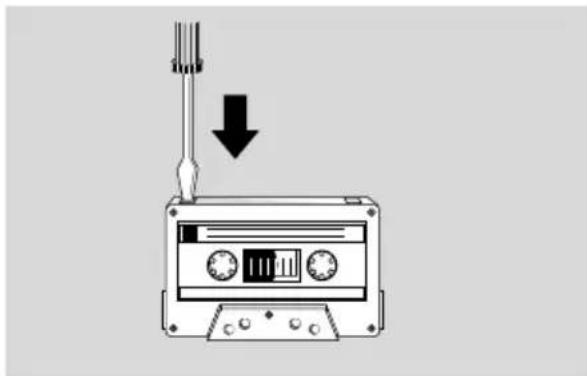
● To prevent accidental recording, break out the tab on the left shoulder of the tape side you want to protect.
- Press REC in Tuner, Disc or AUX mode, press REC, and "CHECK TAPE" will scroll on the display if there is no recordable tape in tape deck 2.
IMPORTANT!
– Recording is permissible if copyright or other rights of third parties are not infringed upon.
- Recording is possible only in tape deck 2.
Preparation for recording
1 Press TAPE (TAPE 1·2) to select TAPE 2.
2 Load a recordable tape into tape deck 2 with the full spool to the left.
3 Prepare the source to the recorded.
DISC – load the disc(s)
TUNER – tune to the desired radio station.
TAPE – load the prerecorded tape into tape deck 1 with the full spool to the left.
AUX/TV – connect external equipment.
When recording is in progress
1 Press DISC, TUNER or AUX/TV to select the source.
●You can connect a microphone to record the mixed sound in tape deck 2.
2 Start to play the selected source.
3 Press REC to start recording.
To stop recording
●Press ■ on the system.
Disc synchro recording
1 Press DISC to select the disc.
- Press |◀ or ▶| to select a desired track to record.
●You can record programmed tracks in the order you want.
2 Press REC to start recording.
→ "REC" will flash, but the first 7 seconds of the start passage will not be recorded.
Selecting another track during recording
1 Press ▶II to interrupt recording.
2 Press ◀ or ▶ to select another track.
3 Press ▶II to resume recording.
To stop recording
●Press ■.
→Recording and disc playback will stop simultaneously.
Dubbing tapes
1 Load the prerecorded tape into tape deck 1.
●You can set the tape to the desired passage where recording will start.
2 Press DUBBING.
→Playing and recording will start simultaneously.
→ "JBB 000" will be displayed.
●Dubbing of tapes is possible on one side of the tape only. To continue recording on the reverse side, at the end of side A for example, flip the tape to side B and repeat the procedure.
To stop dubbing
●Press ■.
Note:
- P less DUBBING twice for high speed dubbing, and the audio output will be muted at the same time.

Viewing clock
The clock (if it is set) will be shown in Standby mode.
● Press DISPLAY to select 12-hour or 24-hour mode.
→If the clock has not been set, "--:--" will blink (1 kHz) until you set the clock.
Setting the clock - see page 19.
Setting the timer
The system can switch to DISC, TUNER, TAPE or AUX mode automatically at a preset time, serving as an alarm to wake you up.
IMPORTANT!
- Before setting the timer, ensure that the clock is set correctly.
- The timer will always be switched on once set.
- The timer will not start if a recording is in progress.
- The volume of the timer will increase gradually from the minimum level to the last tuned volume level.
- The system will bring the timer forward 1 minute to turn on.
- The time can be set in 24-hour mode.
1 Press STANDBY ON on the system to STANDBY mode.
2 Press TIMER to select timer mode.
→TIMER will start to flash.
→The selected source will be displayed.
3 Press DISC, TUNER or TAPE to select timer mode. The corresponding source will appear on the display.
DISC - load the disc. To start from the specific track programmed. (refer to page 24, Disc Operations - program favorite tracks").
TUNER - Tune to the desired radio station.
TAPE2 - Load the prerecorded tape into tape deck 2.
4 Press |◀ or ▶| on the system to set hours.
5 Press ◀◀ or ▶▶ on the system to set the minutes.
6 Press TIMER to store the start time.
→ "TIMER ON" will be displayed for 3 seconds.
→The timer will start to work.
- At the preset time, the selected source will play before it switches to Eco Power standby mode (if no button is pressed within the time frame).
To exit without storing the setting
●Press ■ on the system.
To deactivate the timer
●Press and hold TIMER for more than 3 seconds.
To activate the timer (for the same preset time and source)
1 Press and hold TIMER for more than 3 seconds.
2 Press TIMER again to store the start time.
→The last set timer information will be shown for a few seconds and TIMER will appear on the display.
Notes:
- If the source is disc mode, playback will begin with the first track of the last selected disc or other trays if the disc is empty. If all disc trays are empty, the system will automatically switch to Tuner mode.
– During timer setting, if no button is pressed within 30 seconds, the system will exit timer setting mode automatically. - When the system is powered on, if the memorized volume level is less than 20, the system will automatically adjust to 20 increasingly. If the memorized volume level is more than 20, the system will adjust to the memorized level within 5 seconds.
- The timer will be cancelled when the power cord is disconnected or if a power failure occurs.
Setting the sleep timer
The sleep timer enables the system to switch to Standby mode automatically at a preset time.
- Press SLEEP on the remote control repeatedly and stop at the desired preset turn-off time.
→Following options are available (time in minutes):
1 5 → 3 0 → 4 5 → 6 0 → 9 0 → 1 2 0 → OFF; rightarrow ...
→ "SLEEP" will show on the display panel unless "OFF" is selected.
To check or change the setting
- Press SLEEP once to show the remaining time before switching off. If you continue pressing the SLEEP button, the next Sleep Timer option will appear on the display.
To cancel the sleep timer
- Press SLEEP repeatedly until "OFF" is displayed, or press the STANDBY ON button.
Sound control
IMPORTANT!
- This DVD Mini HiFi system can only produce 2.1 channel surround sound.
- Press SURROUND on the remote control to select surround or stereo mode.
→ The availability of the various surround sound modes (Dolby Digital Surround, DTS Surround, Virtual Surround Sound) depends on the number of speakers used and the incoming sound information available on the disc.
Notes:
- The default is Stereo. - Y ou cannot select the SURROUND SOUND mode if the SYSTEM MENU is turned on.
wOOx sound
There are three wOOx settings to enhance the bass response.
●Press wOOx ON-OFF to switch ON
(enhanced) or OFF (normal) the wOOx sound effect.
→ When wOOx is switched on, wOOx level will appear on the display.
→ When wOOx is switched off, "WOOX OFF" is displayed and wOOx icon will disappear from the display.
Note:
- Some discs or tapes might be recorded in high modulation, which causes a distortion at high volume. If this occurs, deactivate wOOx or reduce the volume.
Selecting sound effect
The digital sound effect allows you to select from various preset modes that control the frequency bands of sound to optimize certain musical styles. It greatly enhances the excitement and enjoyment of your favorite music.
●Press SOUND repeatedly to select the available sound effect.
Playing a DVD/VCD
●You can select Virtual Ambience Control as follows:
- A CTION, DRAMA, SCI-FI, CONCERT, WOOX1, WOOX 2, WOOX 3, WOOX OFF.
Playing a CD/MP3 or in Tuner or AUX-ANA mode
●You can select Digital Sound Control: - D IGITAL, CLASSIC, JAZZ, ROCK, WOOX 1, WOOX 2, WOOX 3, WOOX OFF.
Volume control
Changing the volume level
- Rotate VOLUME clockwise / anti-clockwise (or press VOL +/-) to increase or decrease the volume level.
→ "VOL XX" is displayed.
→ "VOL MAX" is displayed at maximum level.
- Press SUBW +/- to adjust the level of the subwoofer speaker.
→ "SUBW ××DB" is displayed.
→ The range is from -7dB to +8dB.
- Press REAR +/- to adjust the level of the surround speakers volume.
→ "RCAR x x DB" is displayed.
→ The range is from -7dB to +8dB.
- Press CENTER +/- to adjust the level of the center speakers volume.
→ "CNT x x DB" is displayed.
→ The range is from -7dB to +8dB.
Note:
- The above operations are valid only if you have 5.1 speaker connection.
For PHILIPS TVs only:
- Press TVVOL +/- on the remote control to adjust the volume of the TV.
Note:
- Y ou can press these buttons to adjust the speakers' levels during tone test.
Switching off the volume temporarily
●Press MUTE.
→ "MUTE ON" is displayed. Press MUTE again or increase the volume level to cancel the MUTE mode.
Listening through headphones
Connecting headphones to 📄 will switch off the speakers. The system will switch STEREO and the surround sound will be reduced to a stereo signal which is reproducible by standard headphones.
Disconnecting the headphones will switch on the speakers again. If you wish to enjoy surround sound again, switch the system back to surround sound.
Switching on/off
Switching the system on In standby/demonstration mode
●Press STANDBY ON.
→The system will go back to its previous status.
- Press DISC, TUNER, AUX, TAPE (or DISC, TUNER, AUX/TV on the remote control).
→The system will switch to the selected source.
In eco power standby mode
●Press ECO POWER.
→The system will switch to last selected source.
- Press DISC, TUNER, AUX/TV on the remote control to power on the system.
Switching the system to standby mode In demonstration mode
● Press and hold DEMO STOP ■ on the system.
In any other source mode (except Econ Power Standby mode)
- Press STANDBY ON (or ⏻ on the remote control).
→The time will appear on the display when the system is in Standby mode.
Switching to eco power standby mode
●Press ECO POWER to ECO POWER mode.
→ "ECO POWER" will be shown for 3 seconds and scroll from left to right on the display.
→The system will go to standby mode, and then to ECO Power mode in 5 seconds.
Power saving automatic standby
As a power-saving feature, the system will automatically switch to Standby mode if you don't press any button within 30 minutes in the stop mode.
Dimming the display
- Press DIM repeatedly to select different levels of brightness for the display: HIGH, MID or LOW.
Vocal
This function allows you to fade out the original vocal from a karaoke. You can use it to select different audio modes.
For DVD karaoke discs: AUDIO 1 VOCAL, AUDIO 2 VOCAL.
For VCD karaoke discs: LEFT VOCAL, RIGHT VOCAL or STEREO
- Press VOCAL.
→The Vocal indicator will flash until you rotate the JOG to select VOCAL ON or OFF.
Note:
- "PLEASE INSERT MIC" is displayed on your TV screen if you have not connected the microphone to the system in VOCAL ON mode.
Key control
This feature allows you to change the key tone when you play a DVD or VCD disc.
●Press KEY CONTROL.
→The Key Control indicator will flash until you rotate JOG to change the key tone level.
- Rotate JOG control to (0).
→If you don't adjust the key control level within 5 seconds, the indicator will turn off.
Echo
This feature allows you to add echo while singing or talking through a microphone.
- Press ECHO and rotate JOG to adjust the echo level between 0 and 8.
→The indicator will flash until you rotate the JOG to change the echo level.
Notes:
- E c ho will be disabled automatically when the microphone is unplugged.
- "PLEASE INSERT MIC" is displayed on your TV screen if you have not connected the microphone to the system in VOCAL ON mode.
Karaoke
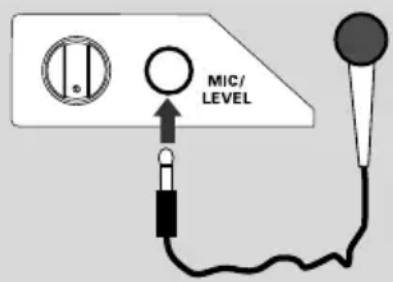
Connect a microphone (not supplied) to the system to sing along with the music source.
1 Connect a microphone to the MIC jack.
→ "MIC" will appear on the display. → "MICROPHONE PLUG IN" will display on your TV screen.
●Before connecting the microphone, set the microphone LEVEL to the minimum level to prevent howling.
2 Press DISC, TUNER, TAPE or AUX/TV to select the source to be mixed and start playback.
3 Adjust the volume of the source through VOLUME control.
4 Adjust the microphone volume through microphone LEVEL control.
Notes:
- K eep the microphone away from the speakers to prevent howling.
- “MICROPHONE PLUG OUT” will display on your TV screen when you plug out the microphone.
Listening to external sources
1 Connect the audio out terminals of the external equipment (TV, VCR, Laser Disc player, DVD player or CD Recorder) to the AUX/TV IN terminals of your system.
2 Press AUX/TV repeatedly to select TV/CDR mode directly.
→ "RUX/TV" will be displayed.
- If the sound from the external source is distorted, select TV/CDR mode.
Notes:
- Y ou are advised not to listen to and record from the same source simultaneously.
- All navigation sound control features are available.
AMPLIFIER SECTION
Output power 200 W Total power
Stereo mode (DIN) ..... 100 W + 100 W RMS
Surround mode (1 kHz) ...... DIN OUT
Frequency Response .. 100 Hz - 20 kHz / - 3 dB
Signal-to-Noise Ratio ....> 65dB (CCIR)
Input Sensitivity
AUX/TV In 500 mV
Output Sensitivity
Headphone 600 mV - 800 mV
Line Out 300 mV - 500 mV
TUNER SECTION
Tuning Range ....
FM 87.5 – 108 MHz ( 50 kHz steps)
MW 531 - 1602 kHz (9 kHz steps)
MW 530 – 1710 kHz (10 kHz steps)
26 dB Quieting Sensitivity ...... FM 20 dB
26 dB Quieting Sensitivity ...... MW 3162 mV/m
Image Rejection Radio ...... FM 25dB
MW 28 dB
IF Rejection Ratio ...... FM 60 dB
MW 24 dB
Signal-to-Noise Ratio ...... FM 60 dB
MW 40 dB
MW Suppression Ratio ...... FM 30 dB
Harmonic Distortion ...... FM Mono 3 %
FM Stereo 3%
MW 5%
Frequency Response ....
FM180 Hz - 10 kHz / ±6 dB
Stereo Separation ...... FM 26 dB (1 kHz)
Stereo Threshold FM 23.5 dB
TAPE SECTION
Frequency Response
Normal tape (type 1) .. 80 – 12500 Hz (8 dB)
Signal-to-Noise Ratio
Normal tape (type 1) ≥ 45 dBA
Wow and flutter .... ≤ 0.4% DIN
DVD SECTION
Laser Type......Semiconductor
Frequency Response .... 4 Hz - 20 kHz (44.1kHz)
4 Hz - 22 kHz (48kHz)
4 Hz - 44 kHz (96kHz)
Digital Output ....
..... SPDIF (Sony Philips digital interface) Coaxial
PCM IEC 60958
Dolby Digital/DTS ..... IEC 60958, IEC 61937
MAIN UNIT
Power Supply Rating ..... 110 - 127 / 220 - 240V
50/60HZ Switchable
Power Consumption
Active 90 W
Standby .... <15 W
Dimensions (w × h × d) .265× 310 × 394 (mm)
Weight 5.46 kg
SPEAKERS
Front speakers
System 3-way, Bass reflex
Impedance.... 3 Ω
Speaker drivers.... 6.5" woofer,
2" tweeter
Frequency response 50 Hz – 20 kHz
Dimensions (w × h × d) ....
240 × 350 × 310 (mm)
Weight 4.352 kg/each
WARNING
Under no circumstances should you try to repair the system yourself, as this will invalidate the warranty. Do not open the system as there is a risk of electric shock.
If a fault occurs, first check the points listed below before taking the system for repair. If you are unable to remedy a problem by following these hints, consult your dealer or service center.
Problem Solution
| No power. - Check if the AC power cord is properly connected. | |
| "UNREADABLE DISC" is displayed. | - Check if the disc is inserted upside down.- W ait until the moisture condensed at the lens has cleared.- Replace or clean the disc, see "Maintenance".- Use a readable disc or correctly recorded format MP3-CD. |
| No picture. - Select the appropriate video input mode on the TV set.- Check if the TV set is switched on.- Check the video connection.- Check if the system is securely connected. | |
| Distorted or poor picture. | - Sometimes a slight picture distortion may appear. This is not a malfunction.- Clean the disc.- Connect the system to the S-video input of your TV set. |
| The aspect ratio of the screen cannot be changed even though you have set the TV shape. TV systems. | - The aspect ratio is fixed on the DVD disc.- The aspect ratio may not be changed for some |
| The DVD player does not - Insert a readable disc.start playback. | - Check the disc type, color system and region code.- Clean the disc.- Place the disc with the playback side down.- Press SYSTEM MENU to turn off the setup menu.- Cancel the parental control rating function or change the rating level.- Moisture has condensed inside the system. Remove the disc and leave the system turned on for about an hour. |
| The system does not respond when the buttons are pressed. | - Disconnect the power plug from the jack, and insert again. |
| The language for the sound or subtitle cannot be changed when playing a DVD. | - Multi-language sound or subtitle is not recorded on the DVD.- Changing the language for the sound or subtitle is prohibited on the DVD. |
| No image is output when a function is selected. | - Make sure the component is connected correctly.- Press the correct function button for the input source. |
Sound cannot be heard or is of – Adjust the volume.
poor quality – Disconnect the headphones.
- Check that the speakers are connected correctly.
- Check if the stripped speaker wire is clamped.
- If the system is in pause, slow motion or fast forward/reverse mode, press ▶II to resume the normal play mode.
- Make sure the MP3-CD was recorded within 32-256 kbps bit rate with sampling frequencies at 48 kHz, 44.1 kHz or 32 kHz.
- If the signal is too weak, adjust the antenna or connect an external antenna for better reception.
- Increase the distance between the MiNi HiFi System and your TV set or VCR.
Recording or playback cannot be made
– Clean deck parts, see "Maintenance".
– Use only NORMAL tape.
- Apply a piece of adhesive tape over the missing tab space.
The tape deck door cannot open
- Remove and reconnect the AC power plug and switch on the system again.
Left and right sound outputs are reversed.
– Check the speaker connections and location.
The remote control does not function. sensor of the unit.
- Point the remote control at the remote control
— Reduce the distance to the player:
- Remove any possible obstacles.
- Replace the batteries with new ones.
- Check that the batteries are loaded correctly.
The display is dark.
- Press DIM again.
The timer is not working
- Set the clock correctly.
– If recording is in progress, stop it
The Clock/Timer setting is erased
- Power has been interrupted or the power cord has been disconnected. Reset the clock/timer.
Analog: Sound that has not been turned into numbers. Analog sound varies, while digital sound has specific numerical values. These jacks send audio through two channels, the left and right.
Aspect ratio: The ratio of vertical and horizontal sizes of a displayed image. The horizontal vs. vertical ratio of conventional TVs. is 4:3, and that of wide-screens is 16:9.
AUDIO OUT Jacks: Jacks on the back of the DVD System that send audio to another system (TV set, Stereo, etc.).
Bit Rate: The amount of data used to hold a given length of music; measured in kilobits per second, or kbps. Or, the speed at which you record. Generally, the higher the bit rate better the sound quality. However, higher bit rates use more space on a Disc.
Chapter: Sections of a picture or a music piece on a DVD that are smaller than titles. A title is composed of several chapters. Each chapter is assigned a chapter number enabling you to locate the chapter you want.
Component Video Out Jacks: Jacks on the back of the DVD System that sends high-quality video to a TV set that has Component Video In jacks (R/G/B, Y/Pb/Pr, etc.).
Disc menu: A screen display prepared for the selection of images, sound, subtitles, multi-angles, etc recorded on a DVD.
Digital: Sound that has been converted into numerical values. Digital sound is available when you use the DIGITAL AUDIO OUT COAXIAL or OPTICAL jacks. These jacks send audio through multiple channels, instead of just two channels as analog does.
Dolby Digital: A surround sound system developed by Dolby Laboratories containing up to six channels of digital audio (front left and right, surround left and right and center).
DTS: Digital Theater Systems. This is a surround sound system, but different from Dolby Digital. The formats were developed by different companies.
JPEG: A still-picture data compression system proposed by the Joint Photographic Expert Group, which features small decrease in image quality in spite of its high compression ratio.
MP3: A file format with a sound data compression system, "MPE" is the abbreviation of Motion Picture Experts Group 1 (or MPEG-1) Audio Lagerer 3. Through the MP3 format, one CD-R or CD-RW can contain about 10 times as much data volume as a regular CD can.
Multichannel: DVD is specified to have all sound tracks constitute one sound field. Multichannel refers to a structure of sound tracks having three or more channels.
Parental control: A function of the DVD to limit playback of the disc by the age of the users according to the limitation level in each country. The limitation varies from disc to disc; when it is activated, playback will be prohibited if the software's level is higher than the user-set level.
PCM (Pulse Code Modulation): A system for converting analog sound signal to digital signal for later processing without data compression.
Playback control (PBC): Refers to the signal recorded on video CDs or SVCDs for reproduction control. By using screen menus recorded on a Video CD or SVCD that supports PBC, you can enjoy interactive-type software as well as software having a search function.
Progressive Scan: It displays all the horizontal lines of a picture at one time, as a signal frame. This system can convert interlaced video from DVD into progressive format for connection to a progressive display. It dramatically increases the vertical resolution. A progressive scan TV set is needed to receive progressive scan output from the player.
Plug and Play (for tuner installation):
Once powered on, the system will prompt the user to proceed with the automatic installation of radio stations by simply pressing ▶II on the main unit.
Region code: A system allowing discs to be played only in preset regions. This unit will only play discs that have compatible region codes. You can find the region code of your unit from the product label. Some discs are compatible with more than one region (or ALL regions).
S-Video: Produces a clear picture by sending separate signals for luminance and the color. You can use S-Video only if your TV set has S-Video In jack.
Sampling Frequency: Frequency of data sampling when analog data is converted to digital data. Sampling frequency numerically represents how many times the original analog signal is sampled per second.
Surround: A system for users to create realistic three-dimensional sound fields full of realism by arranging multiple speakers around the listener.
Title: The longest section of a picture or music feature on DVD, music, etc., in video software, or the entire album in audio software. Each title is assigned a title number enabling you to locate the title you want.
VIDEO OUT jack: Jack on the back of the DVD System that sends video to TV.
- DEMO MODE
- PLUG & PLAY -FOR TUNER INSTALLATION
- CAUTION
- GENERAL INFORMATION/MAINTENANCE
- CONNECTIONS
- FUNCTIONAL OVERVIEW
- BASIC FUNCTIONS
- PREPARATIONS
- DISC OPERATIONS
- MP3 / PICTURE DISC OPERATIONS
- DVD MENU OPERATIONS
- TUNER OPERATIONS
- TAPE OPERATION/RECORDING
- CLOCK/TIMER OPERATIONS
- SOUND AND VOLUME CONTROLS
- OTHER FUNCTIONS
- FEATURES
- BUILT-IN DTS AND DOLBY DIGITAL DECODER, SUPPORTING VIRTUAL SURROUND AND STEREO
- ADDITIONAL COMPONENT CONNECTIONS
- NIGHT MODE
- PARENTAL CONTROL (RATING LEVEL)
- SLEEP TIMER
- PROGRESSIVE SCAN
- DISCS FOR PLAYBACK
- YOUR DVD MINI HI-FI SYSTEM WILL PLAY
- REGION CODES
- SUPPLIED ACCESSORIES
- ENVIRONMENTAL INFORMATION
- CARE AND SAFETY INFORMATION
- AVOID HIGH TEMPERATURES, MOISTURE, WATER AND DUST
- AVOID CONDENSATION PROBLEM
- DO NOT BLOCK THE VENTS
- CLEANING THE CABINET
- CLEANING DISCS
- CLEANING THE DISC LENS
- FINDING A SUITABLE LOCATION
- CLEANING THE HEAD AND THE TAPE PATHS
- DEMAGNETISING THE HEAD
- STEP 1: PLACING SPEAKERS
- NOTES
- STEP 2: CONNECTING SPEAKERS
- IMPORTANT
- USING VIDEO IN JACK (CVBS)
- USING COMPONENT VIDEO IN JACK (PR PB Y)
- USING S-VIDEO IN JACK
- USING AN ACCESSORY RF MODULATOR
- ON THE DVD MINI HI-FI SYSTEM
- STEP 6: CONNECTING A VCR OR CABLE/SATELLITE BOX
- VIEWING AND LISTENING TO PLAYBACK
- USING THE VCR FOR RECORDING DVDS
- TO VIEW DVD PLAYBACK WHILE RECORDING
- STEP 7: CONNECTING DIGITAL AUDIO EQUIPMENT
- RECORDING (DIGITAL)
- CONTROLS ON THE SYSTEM
- ① ECO POWER
- ② STANDBY ON
- ③ DISPLAY SCREEN
- ④ DISC TRAYS
- ⑤ DISC CHANGE
- ⑥ DISC 1 / DISC 2 / DISC 3
- ⑦ OPEN·CLOSE
- ⑧ INTERACTIVE VU METER
- ⑨ SENSOR
- ⑩ VOLUME
- ⑪ TAPE DECK OPERATION AUTO REPLAY
- DUBBING
- REC
- ⑫ VOCAL
- ⑬ JOG CONTROL
- ⑭ KEY CONTROL
- ⑮ ECHO
- ⑯ SOUND
- ⑰ WOOX ON·OFF
- WOOX LEVEL
- ⑱ MIC/LEVEL
- 19
- ⑳ TAPE DECK 1
- ②1 TAPE DECK 2
- ⑳ SOURCE
- DISC (DISC 1·2·3)
- TUNER (BAND)
- TAPE (TAPE 1-2)
- AUX/TV
- ②3 MODE SELECTION
- PLAY/PAUSE ▶ II
- SEARCH·TUNING ◀◀
- (ALBUM - / +)
- DEMO STOP/CLEAR
- PREV / PRESET / NEXT ◀
- (TITLE - / +)
- 24
- 25 SUBTITLE
- ②6 LANGUAGE
- 27PROGRAM
- ⑳ DISPLAY
- ⑲ CLOCK
- ③0 TIMER
- REMOTE CONTROL
- ① SOURCE
- ② DISC MENU (DISC MODE ONLY)
- ③ SYSTEM MENU (DISC MODE ONLY)
- ④ ▲ / ▼ / ◀
- ⑤ |◀◀
- ⑥ PLAY/PAUSE ▶II
- ⑦ STOP
- ⑧ SURROUND
- ⑨ SOUND
- ⑩ MODE
- ⑪ REPEAT A-B
- ⑫ POWER ⏻
- ⑭ VOL
- ⑮ OK
- ⑯ RESUME
- ⑰ MUTE
- ⑱ NIGHT (DOLBY DIGITAL MODE ONLY)
- 19 DIM
- ⑳ SLEEP
- ②1 SUBW +/- (FOR SUBWOOFER CONNECTION ONLY)
- REAR +/- (FOR 5.1 SPEAKER CONNECTION ONLY)
- CENTER +/- (FOR 5.1 SPEAKER CONNECTION ONLY)
- TVVOL
- PLUG AND PLAY (FOR TUNER INSTALLATION)
- IF PLUG AND PLAY HAS NOT BEEN INSTALLED
- REINSTALLING PLUG AND PLAY
- TO EXIT WITHOUT STORING THE PLUG AND PLAY
- DEMONSTRATION MODE
- ACTIVATING DEMONSTRATION
- DEACTIVATING DEMONSTRATION
- NOTE
- STEP 1: INSERTING BATTERIES INTO THE REMOTE CONTROL
- USING THE REMOTE CONTROL TO OPERATE THE SYSTEM
- STEP 2: SETTING THE CLOCK
- TO EXIT THE SETTING WITHOUT STORING
- VIEWING THE CLOCK
- STEP 3: SETTING THE TV SET
- SELECTING THE COLOR SYSTEM THAT MATCHES YOUR TV SET
- AUTO
- NTSC
- PAL
- STEP 4: SETTING SPEAKERS
- THIS FUNCTION IS ONLY AVAILABLE WHEN YOU HAVE CONNECTED OTHER 3.1-CHANNEL SPEAKERS
- STEP 5: SETTING LANGUAGE PREFERENCE
- PLAYING DISCS
- FOR MP3-CD ONLY
- USING THE DISC MENU
- TO SELECT A PLAYBACK FEATURE OR ITEM
- TO ACCESS OR REMOVE THE MENU
- BASIC PLAYBACK CONTROLS
- TO PLAY DISCS IN ALL THE DISC TRAYS
- TO START PLAYBACK FROM A SELECTED DISC TRAY
- TO INTERRUPT PLAYBACK
- TO STOP PLAYBACK
- SKIPPING TO ANOTHER TITLE (TRACK) / CHAPTER
- TO GO DIRECTLY TO ANY TITLE (TRACK) / CHAPTER
- FAST SEARCH
- CONTINUING PLAYBACK FROM THE LAST STOP POINT
- TO CANCEL THE RESUME MODE
- SELECTING VARIOUS MODE FUNCTIONS
- REPEAT PLAY MODE
- FOR DVD - REPEAT CHAPTER/TITLE
- FOR CVD/SVCD/VCD/CD - REPEAT CHAPTER/TITLE
- DURING PROGRAM PLAYBACK
- FOR MP3 REPEAT - TRACK/ALBUM/DISC MENU ON
- SHUFFLE PLAY MODE
- IN SHUFFLE PLAYBACK MODE
- TO CANCEL SHUFFLE MODE
- REPEATING A SECTION WITHIN A CHAPTER/TRACK
- PROGRAMMING FAVORITE TRACKS
- USING THE MENU BAR TO PROGRAM
- CHANGING DISCS DURING PLAYBACK
- SPECIAL DVD/VCD FEATURES
- CHANGING SUBTITLE LANGUAGE
- CHANGING SOUND TRACK LANGUAGE
- FOR CVD/SVCD/VCD
- FOR DVD
- FOR CVD, SVCD OR VCD
- SEARCHING FOR A PARTICULAR PASSAGE
- FOR DVD OR MP3
- FOR CVD, SVCD, VCD OR CD
- DISPLAYING THE DISC INFORMATION DURING PLAYBACK
- MOVING TO ANOTHER TITLE (TRACK) / CHAPTER
- PLAYING FROM A SELECTED POINT
- ZOOMING IN
- VIEWING FROM ANOTHER ANGLE
- ADVANCING BY FRAMES
- CHECKING THE CONTENTS OF DVD
- SPECIAL VCD/SVCD FEATURES
- PLAYBACK CONTROL (PBC)
- PLAYING A DISC WITH PBC FUNCTION
- PLAYING MP3 / PICTURE DISC (KODAK, JPEG)
- MP3 / JPEG PICTURE DISC
- IF THE MP3-CD MENU IS SWITCHED OFF
- KODAK PICTURE DISC
- DURING PLAYBACK, YOU CAN
- USING THE MENU BAR
- 1 IN DISC MODE, PRESS SYSTEM MENU
- 2 PRESS THE ◀ / ▶ / ▲ / ▼ ON THE REMOTE CONTROL TO NAVIGATE IN THE MENU
- 3 PRESS OK TO CONFIRM THE SELECTION
- TO REMOVE THE MENU
- USING THE SETUP MENU (USER PREFERENCE SETTINGS)
- REMOVING THE MENU
- SETTING THE TV SHAPE
- SETTING THE VIDEO OUT
- S-VIDEO
- PR PB Y
- IMPROVING THE IMAGE FOR PROGRESSIVE SCAN VIDEO OUTPUT SETTING
- OFF
- ON
- SETTING THE SCREEN SAVER
- SETTING THE DIGITAL OUTPUT
- ALL
- PCM ONLY
- SETTING THE PCM OUTPUT
- PCM 96K
- PCM 48K
- NIGHT MODE - TURNING ON/OFF
- CHANGING THE PASSWORD
- RESTRICTING PLAYBACK BY SETTING PARENTAL LEVEL
- RATING EXPLANATIONS
- MENU LANGUAGE
- DEFAULT
- TUNING TO RADIO STATIONS
- PRESETTING RADIO STATIONS
- AUTOMATIC PRESET PROGRAMMING
- TO BEGIN AUTOMATIC PRESET FROM A DESIRED PRESET NUMBER
- TO STOP STORING THE AUTOMATIC PRESET
- MANUAL PRESET PROGRAMMING
- TO STOP STORING THE MANUAL PRESET
- SELECTING A PRESET RADIO STATION
- DELETING A PRESET RADIO STATION
- CHANGING TUNING GRID
- TAPE PLAYBACK
- STOPPING PLAYBACK
- CHANGING THE PLAYBACK MODE
- REWINDING OR FORWARDING FAST WHEN PLAYBACK IS STOPPED
- RESETTING TAPE COUNTER NUMBER
- GENERAL INFORMATION ON RECORDING
- PREPARATION FOR RECORDING
- WHEN RECORDING IS IN PROGRESS
- TO STOP RECORDING
- DISC SYNCHRO RECORDING
- SELECTING ANOTHER TRACK DURING RECORDING
- DUBBING TAPES
- TO STOP DUBBING
- VIEWING CLOCK
- SETTING THE TIMER
- TO EXIT WITHOUT STORING THE SETTING
- TO DEACTIVATE THE TIMER
- SETTING THE SLEEP TIMER
- TO CHECK OR CHANGE THE SETTING
- TO CANCEL THE SLEEP TIMER
- SOUND CONTROL
- WOOX SOUND
- SELECTING SOUND EFFECT
- PLAYING A DVD/VCD
- PLAYING A CD/MP3 OR IN TUNER OR AUX-ANA MODE
- VOLUME CONTROL
- CHANGING THE VOLUME LEVEL
- FOR PHILIPS TVS ONLY
- SWITCHING OFF THE VOLUME TEMPORARILY
- LISTENING THROUGH HEADPHONES
- SWITCHING ON/OFF
- DIMMING THE DISPLAY
- VOCAL
- KEY CONTROL
- ECHO
- LISTENING TO EXTERNAL SOURCES
- AMPLIFIER SECTION
- TUNER SECTION
- TAPE SECTION
- DVD SECTION
- MAIN UNIT
- SPEAKERS
- WARNING
Brand : PHILIPS
Model : FW-D750
Category : Hi-Fi System