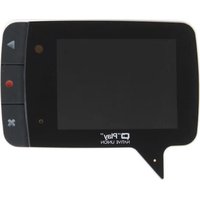
Play - Mp3 player Native Union - Free user manual and instructions
Find the device manual for free Play Native Union in PDF.


| Type | MP3 Player |
| Brand | Native Union |
| Model | Play |
| Dimensions (W x H x D) | 4.5 x 1.5 x 0.5 inches |
| Weight | 1.5 oz (42 g) |
| Battery Type | Rechargeable lithium-ion polymer |
| Battery Life | Up to 15 hours of playback |
| Charging Interface | Micro-USB (USB 2.0) |
| Internal Storage | 8 GB |
| Supported Audio Formats | MP3, WMA, WAV |
| Display | 0.96-inch OLED screen |
| Controls | Physical buttons (Play/Pause, Volume, Skip) |
| Output | 3.5 mm headphone jack |
| Connection | USB mass storage (drag & drop) |
| Care and Cleaning | Wipe with a soft, dry cloth. Do not use liquids or abrasives. |
| Safety | Keep away from water and extreme temperatures. Do not disassemble or crush. |
| Spare Parts & Repairability | No user-serviceable parts. Battery is not replaceable. |
| What's in the Box | Native Union Play MP3 player, USB charging cable, user manual |
Frequently Asked Questions - Play Native Union
User questions about Play Native Union
0 question about this device. Answer the ones you know or ask your own.
Ask a new question about this device
Download the instructions for your Mp3 player in PDF format for free! Find your manual Play - Native Union and take your electronic device back in hand. On this page are published all the documents necessary for the use of your device. Play by Native Union.
USER MANUAL Play Native Union
NATIVE UNION

"Play"
Instruction Manual
"Play" Multi-Message Video Memo Pad Designed by Fabien Nauroy

• Standby time : up to 45 days with messages, up to 6 months without messages

- Play time: Up to 4 hours

- Multi-message

• Video recording up to 180 seconds

- Magnetic back

• Time and date of messages

- 2.4" diagonal screen

- No computer needed

- User friendly

• LED message indicator
WHAT YOU GET IN THIS PACKAGE
1
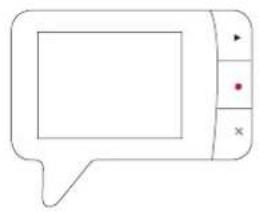
natural_image
Simple line drawing of a speech bubble with no text or symbols3


4

1 "Play" Multi-Message Video Memo Pad
2 Strap to keep your "Play" safe at hand
3 Instruction manual
4 Magnetic sticker plate
MAN SCREEN FUNCTIONS


Enter "RECORD" mode

Enter "PLAY" mode

Press and hold for 3 seconds
Back to Sleep mode (notification sound)
Device will go to standby when idle for 15 seconds Device will go to sleep when idle for 2 minutes
HOW TO USE "Play"CORD mode

Enter "RECORD" mode from Main Screen

Start recording after countdown (notification sound)
Any key press during countdown will cancel the operation

Exit "RECORD" mode and back to main screen
While recording

Delete message without saving

again to confirm delete (notification sound)

to save message

Stop recording and save message (notification sound)
White LED will start blinking until all new messages are viewed Notification will show when total duration of messages reaches 180 seconds Device will go back to main screen if idle for 6 seconds
HOW TO USE "Play" mode

Enter "PLAY" mode from Main Screen

Play current message shown on screen

Skip to next message
double press

Delete current message shown on screen

× again to confirm delete (notification sound)
to cancel delete

Delete ALL messages on device
press and hold 3 seconds
× again to confirm delete (notification sound)
to cancel delete
While playing

Pause the current message
again to resume

Delete current message
× again to confirm delete (notification sound)
to cancel delete
White LED will stop blinking when all new messages are viewed. Device will go back to main screen if idle for 6 seconds
HOW TO USE "Play" / TIME setup
While in SLEEP mode

Enter "DATE/TIME setup
simultaneously hold 9 seconds

While in DATE/TIME setup

To cycle through each setting parameter

To adjust the figure of the underlined parameter

Save current settings (notification sound)
Press 2 seconds

Exit without saving settings
HOW TO USE "Player INTERFACE
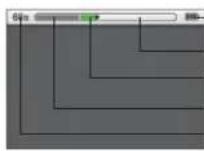
Battery level indicator
180 seconds Timeline bar
Unread message (green)
Read message
Time remaining for recording
BATTERY LEVEL INDICATOR

100% -> 60%

60% -> 20%

20% -> 5%

5% -> 0%

MESSAGE RECORDED
Duration of recorded message
Date and time of recorded message

CURRENT MESSAGE
Duration of current message
Date and time of message
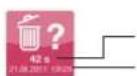
DELETE CURRENT MESSAGE
Duration of the message to be deleted
Date and time of the message to be deleted

DELETE ALL MESSAGES
Total number of messages to be deleted
Total duration of all messages to be deleted
SPECIFICATIONS
- Record time
180 seconds
- Camera pixels
0.3M VGA CMOS Camera
· LCD monitor
2.4 inches
· Screen resolution
TFT LCD 320(RGB) x240
Sleep mode
Standby when idle for 15 seconds.
Auto power off after 2 minutes
· Battery type
Requires 3 X AAA batteries (not included)
- Visual angle
68 degree
- Standby mode:
up to 45 days with messages,
up to 6 months without messages.
(based on 3 X AAA alkaline battery 1250mAh)
- Record mode:
up to 6.5 hours, based on 3 X AAA
alkaline type battery (1250mAh)
· Play mode
up to 4 hours, based on 3 X AAA
alkaline type battery (1250mAh)
- Memory Size
256Mb SDRAM
- Record file format
AVI
• Built-in microphone and speaker
· Magnet in the back panel
· LED Message indicator
FCC COMPLIANCE STATEMENT
This device complies with Part 15 of the FCC Rules. Operation is subject to the following two conditions: (1) this device may not cause harmful interference, and (2) this device must accept any interference received, including interference that may cause undesired operation.
Changes or modifications not expressly approved by the party responsible for compliance could void the user's authority to operate the equipment.
NOTE: This equipment has been tested and found to comply with the limits for a Class B digital device, pursuant to Part 15 of the FCC Rules. These limits are designed to provide reasonable protection against harmful interference in a residential installation. This equipment generates,
uses and can raciate radio frequency energy and, if not installed and used in accordance with the instructions, maybe cause harmful interference to radio communications. However, there is no guarantee that interference will not occur in a particular installation. If this equipment does cause harmful interference to radio or television reception, which can be determined by turning the equipment off and on, the user is encouraged to try to correct the interference by one or more of the following measures:
- Reorient or relocate the receiving antenna.
- Increase the separation between the equipment and receiver.
Connect the equipment into an outlet on a circuit different form that to which the recover is connected. - Consult the dealer or an experienced radio/TV technician for help.

Disposal of old electrical and electronic equipment:
After the implementation of the European Directive 2002/96/EU in the national legal system, the following applies:
Electrical and electronic devices may not be disposed of with domestic waste.
Consumers are obliged by law to return electrical and electronic devices at the
end of their services lives to the public collecting points set up for this purpose or
point sale. Details to this are defined by the national law of the respective country.
This symbol on the product, the instruction manual or the package indicates that
a product is subject to these regulations. By recycling, reusing the materials or
other forms of utilizing old devices, you are making and important contributions to protecting our environment.

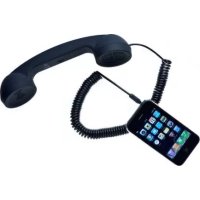
Brand : Native Union
Model : Play
Category : Mp3 player