
HTWP1000MWW - Washing machine HOTPOINT - Free user manual and instructions
Find the device manual for free HTWP1000MWW HOTPOINT in PDF.


| Product Type | Washing Machine |
| Brand | Hotpoint |
| Model | HTWP1000MWW |
| Capacity | 3.5 cu. ft. |
| Dimensions (W x D x H) | 27 x 27 x 43 inches |
| Weight | 145 lbs |
| Power Supply | 120V, 60Hz, 15A |
| Water Inlet | Hot and Cold |
| Wash Cycles | Normal, Quick, Heavy, Delicates, Rinse & Spin |
| Water Level | Auto Load Sensing |
| Spin Speed | Up to 700 RPM |
| Noise Level | Approx. 65 dB (Wash) / 75 dB (Spin) |
| Energy Consumption | About 350 kWh/year |
| Safety Features | Overflow protection, unbalanced load detection, child lock |
| Maintenance | Clean lint filter monthly; check hoses annually |
| Spare Parts | Available via Hotpoint authorized dealers |
| Repairability Index | Score: 7.5/10 (average) |
| Warranty | 1 year limited |
Frequently Asked Questions - HTWP1000MWW HOTPOINT
User questions about HTWP1000MWW HOTPOINT
0 question about this device. Answer the ones you know or ask your own.
Ask a new question about this device
Download the instructions for your Washing machine in PDF format for free! Find your manual HTWP1000MWW - HOTPOINT and take your electronic device back in hand. On this page are published all the documents necessary for the use of your device. HTWP1000MWW by HOTPOINT.
USER MANUAL HTWP1000MWW HOTPOINT
Safety Instructions .....2,3
Operating Instructions
Care and Cleaning
of the Washer 6
Control Panel 4
Control Settings ....4
Features 5
Loading and Using
the Washer 6
Troubleshooting Tips .....7-9
Consumer Support
Consumer Support....12
Warranty....11
Write the model and serial number here:
Model # ____
Serial # ____
You can find them under the lid of the washer.
IMPORTANT SAFETY INFORMATION. READ ALL INSTRUCTIONS BEFORE USING.
▲ WARNING!
For your safety, the information in this manual must be followed to minimize the risk of fire or explosion, electric shock, or to prevent property damage, personal injury, or loss of life.

WATER HEATER SAFETY
Under certain conditions, hydrogen gas may be produced in a water heater that has not been used for two weeks or more. Hydrogen gas can be explosive under these circumstances.
If the hot water has not been used for two weeks or more, prevent the possibility of damage or injury by turning on all hot water faucets and allowing them to run for several minutes. Do this before using any electrical appliance which is connected to the hot water system. This simple procedure will allow any built-up hydrogen gas to escape. Since the gas is flammable, do not smoke or use an open flame or appliance during this process.
PROPER INSTALLATION
This washer must be properly installed and located in accordance with the Installation Instructions before it is used. If you did not receive an Installation Instructions sheet, you can receive one by visiting www.Hotpoint.com or by calling 800.GE.CARES (800.432.2737).
■Install or store where it will not be exposed to temperatures below freezing or exposed to the weather, which could cause permanent damage and invalidate the warranty.
■Properly ground washer to conform with all governing codes and ordinances. Follow details in Installation Instructions.
■This washer does not include water supply hoses.
GE strongly recommends the use of factory specified parts. A list of factory hoses available for purchase are listed below. These hoses are manufactured and tested to meet GE specifications.
GE strongly recommends the use of new water supply hoses. Hoses degrade over time and need to be replaced every 5 years to reduce the risk of hose failures and water damage.
Parts and Accessories
Order on-line at GEAppliances.com today, 24 hours a day or by phone at 800.626.2002 during normal business hours.
Part Number Accessory
WH41X10207 4 ft Rubber Water Supply Hose
WX14X10005 4 ft Braided Water Supply Hose
YOUR LAUNDRY AREA
■Keep the area underneath and around your appliances free of combustible materials such as lint, paper, rags, chemicals, etc.
■Close supervision is necessary if this appliance is used by or near children. Do not allow children to play on, with or inside this or any other appliance.
Use this appliance only for its intended purpose as described in this Owner's Manual.
WHEN USING THE WASHER
■Never reach into the washer while it is moving. Wait until the machine has completely stopped before opening the lid.
■Do not mix chlorine bleach with ammonia or acids such as vinegar and/or rust remover. Mixing different chemicals can produce a toxic gas which may cause death.
■Do not wash or dry articles that have been cleaned in, washed in, soaked in or spotted with combustible or explosive substances (such as wax, oil, paint, gasoline, degreasers, dry-cleaning solvents, kerosene, etc.). These substances give off vapors that may ignite or explode. Do not add these substances to the wash water. Do not use or place these substances around your washer or dryer during operation.
■The laundry process can reduce the flame retardancy of fabrics. To avoid such a result, carefully follow the garment manufacturer's wash and care instructions.
■To minimize the possibility of electric shock, unplug this appliance from the power supply or disconnect the washer at the building's distribution panel by removing the fuse or switching off the circuit breaker before attempting any maintenance or cleaning.
NOTE: Turning the Cycle Selector Knob to an off position, or pressing PAUSE does NOT disconnect the appliance from the power supply.
■Never attempt to operate this appliance if it is damaged, malfunctioning, partially disassembled, or has missing or broken parts, including a damaged cord or plug.
WHEN NOT IN USE
■Turn off water faucets to relieve pressure on hoses and valves and to minimize leakage if a break or rupture should occur. Check the condition of the fill hoses; Hotpoint recommends changing the hoses every 5 years.
■Before discarding a washer, or removing it from service, remove the washer lid to prevent children from hiding inside.
- Do not attempt to repair or replace any part of this appliance unless specifically recommended in this Owner's Manual, or in published user-repair instructions that you understand and have the skills to carry out.
■Do not tamper with controls.

READ AND FOLLOW THIS SAFETY INFORMATION CAREFULLY.
SAVE THESE INSTRUCTIONS
About the control panel.
Quick Start Guide
LOAD SIZE TEMPERATURE
natural_image
Two identical circular diagrams with internal lines, no text or symbols present



Controls
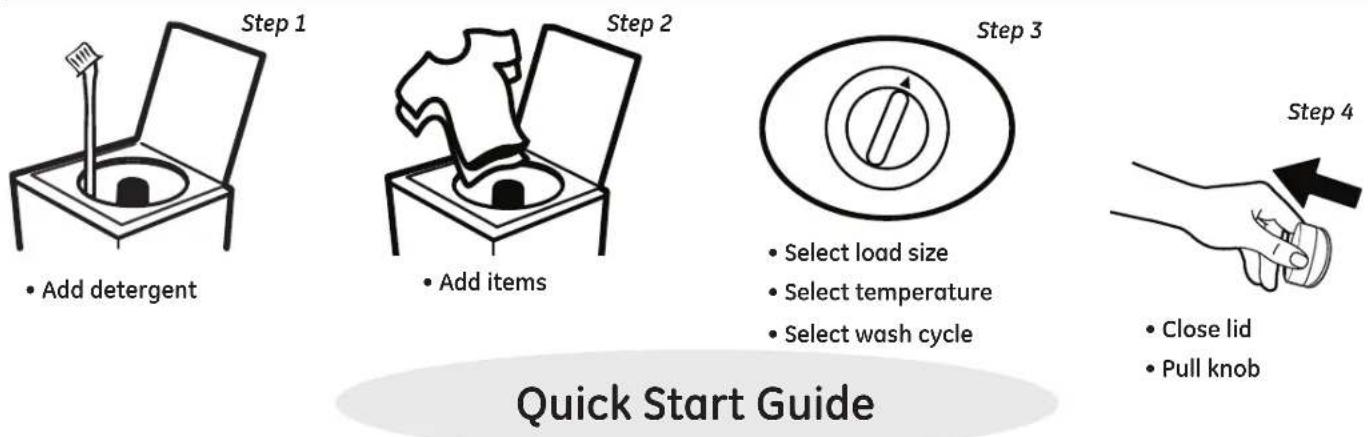
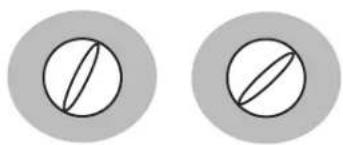
A Load Size (on some models) Loosely load items in the washer basket. Overloading may negatively impact wash performance. Adjust the load size accordingly.
B Temperature (on some models)
Select the water temperature for the wash and rinse cycles. Always follow fabric manufacturer's care label or instructions when laundering.
C Wash Cycle—Cycle Selector Knob The chart below will help you match the wash cycle setting with your items. The chart is ranked from greatest to least wash intensity.
Your washer may not have all these cycles.
WHITESFor heavy to lightly soiled cottons, household linens, work and play clothes.
(REGULAR WASH/FAST SPIN)
COLORSFor heavy to lightly soiled colors and jeans
(REGULAR WASH/FAST SPIN)
CASUALSFor heavy to lightly soiled cottons, household linens, work and play clothes.
(PULSED/FAST SPIN)
natural_image
Illustration of a hand pouring liquid into a basin (no text or symbols)Liquid Bleach Funnel
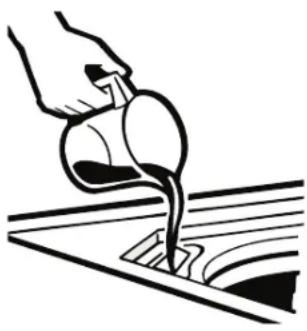
The water fill dilutes liquid chlorine bleach as the washer fills for the wash cycle.
1 Check clothing care labels for special instructions.
2 Measure liquid bleach carefully, following instructions on the bottle.
■ Never pour undiluted liquid chlorine bleach directly onto clothes or into the wash basket.
■ Do not pour powdered bleach into bleach funnel.
3 Before starting the washer, pour measured amount of bleach directly into bleach funnel. Avoid splashing or over-filling dispenser. If you prefer to use powdered bleach, add it into the wash basket with your detergent.
Do not mix chlorine bleach with ammonia or acids such as vinegar and/or rust remover. Mixing can produce a toxic gas which may cause death.
FAQ
Q: What is the difference between Heavy and Light settings?
A: For Whites and Colors, the wash agitation time is increased by 6 minutes and for Casuals, by 12 minutes. (Times are approximate)
Q: What is the difference between Regular and Pulsed?
A: Regular means the washer will continuously agitate during the wash cycle. Pulsed provides a more gentle wash cycle by including pause periods during the wash cycle.
Q: Which cycle is best for heavily soiled items?
A: Whites or Colors cycles have the greatest wash intensity. This cycle provides the best overall cleaning. Casuals should be used for wrinkle-free and permanent press items.
Q: How can I reduce linting?
A: Sort wash loads by fabric type and whether they collect lint (velveteen, corduroy) or produce lint (terry cloth, chenille). Wash small loads for a shorter amount of time.
Q: How much detergent do I use?
A: For best performance, always follow the detergent manufacturer's instructions on usage. Many detergents are concentrated, so consult the product label and follow the clearly marked lines on the detergent measuring cups. Excessive detergent can negatively impact the wash performance.
Loading and using the washer.
Always follow fabric manufacturer's care label when laundering
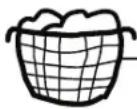
Sorting Wash Loads
Sort by color (whites, lights, colors), soil level, fabric type (sturdy cottons, easy care, delicates) and whether the fabric produces lint (terry cloth, chenille) or collects lint (velveteen, corduroy).
Proper Use of Detergent
Add detergent before adding items so that the detergent can work effectively. Using too little or too much detergent is a common cause of laundry problems.
For spots, apply pre-treatment to items as recommended on the product label. Application should be made in the basket to prevent overspray which may cause the coloring on the lid or graphics to fade.
You can use less detergent if you have soft water, a smaller load or a lightly soiled load.
When using high efficiency or concentrated detergents, consult the product label to determine amount required for optimum performance. Excessive detergent will negatively impact wash performance.
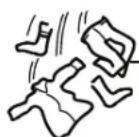
Loading the Washer
Load dry items loosely in the washer basket. When loading wet items, make sure you set the load/water level high enough to allow the items to move freely. Water level should just cover the items. To add items after washer has started, lift the lid and submerge additional items next to the agitator.
■Do not wrap long items like sheets or pants around the agitator.
■Do not wash fabrics containing flammable materials (waxes, cleaning fluids, etc.).
■Washer will not agitate or spin with the lid up, however the timer will continue to run.
Care and cleaning of the washer.
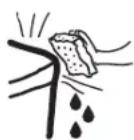
Wash Basket: Leave the lid open after washing to allow moisture to evaporate. If you want to clean the basket, use a clean soft cloth dampened with liquid detergent; then rinse. (Do not use harsh or gritty cleaners.)
Fill Hoses: Hotpoint recommends changing the hoses every 5 years.
Exterior: Immediately wipe off any spills. Wipe with damp cloth. Try not to hit surface with sharp objects.
Moving and Storage: Ask the service technician to remove water from drain pump and hoses. See the Installation Instructions packed with product for information on how to reinstall the shipping rod to keep the tub stationary when moving the washer. For more information, visit www.Hotpoint.com or call 800.GE.CARES (800.432.2737). Do not store the washer where it will be exposed to the weather.
Long Vacations: Be sure water supply is shut off at faucets. Drain all water from hoses if weather will be below freezing.

Troubleshooting Tips
Save time and money! Review the charts on the following pages,
or visit www.Hotpoint.com. You may not need to call for service.
| WATER Possible Causes What To Do | ||
| Too many suds | Too much detergent | · Measure your detergent carefully. Use less soap if you have soft water, a smaller load or a lightly soiled load. |
| Type of detergent · Switch to a lower sudsing detergent brand and follow instructions on package. | ||
| Soft water · Try less detergent. | ||
| Water leaks | Using too much detergent in washer a smaller load or a lightly soiled load. | · Use less detergent. Use less soap if you have soft water, |
| Fill hoses or drain hose is · Make sure hose connections are tight at faucets and improperly connected rubber washers are installed. Make sure end of drain hose is correctly inserted in and secured to drain facility. | ||
| Household drain may be clogged | · Check household plumbing. You may need to call a plumber. | |
| Drain hose loose | · Make sure drain hose is fully seated in back of washer and that the two retaining screws are fully seated. | |
| Drain hose rubs on wall | · Make sure drain hose does not make contact with the wall. May cause excessive wear on the hose. | |
| Constant water pressure to the fill hoses at the water source | · Tighten hoses at the faucets and turn the water off after each use. · Check condition of the fill hoses; they should be replaced every 5 years. | |
| Water temperature seems incorrect | Cooler water temperatures provide improved energy efficiency | · New laundry detergents have been formulated to work with cooler water temperatures without affecting wash performance. |
| Water supply is turned off or improperly connected | · Turn both hot and cold faucets fully on and make sure hoses are connected to correct faucets. | |
| Water valve screens are stopped up | · Turn off the water source and remove the water connection hoses from the upper back of the washer. Use a brush or toothpick to clean the screens in the machine. Reconnect the hoses and turn the water back on. | |
| House water heater is not set properly | · Make sure house water heater is delivering water at 120°F-140°F (48°C-60°C). | |
| Water pumped out before cycle is complete | Lid lifted or cycle was put in pause for over 24 hours | · Reset cycle. |
| Water won't drain | Drain hose is kinked or improperly connected sitting on it. | · Straighten drain hose and make sure washer is not Top of drain outlet should be less than 6 ft (1.8 m) above floor. |
| Washer pauses during wash or rinse cycle | This is normal | · This is normal. The washer alternates between agitate and soak during these cycles to get your clothes cleaner with less wear. |
| Washer pauses during spin cycle | This is normal | · The washer may pause during the spin cycle to remove soapy water more efficiently. |
Before you call for service...
OPERATION Possible Causes What To Do
| Washer won't operate | Washer is unplugged | Make sure cord is plugged securely into a working outlet. |
| Water supply is turned offTurn both hot and cold faucets fully on. | ||
| Controls are not set properlyCheck controls. | ||
| Lid is open-safety featureprevents agitation andspinning when lid is up | Close lid and reset cycle, to the beginning if necessary. | |
| Circuit breaker/fuse istripped/blown | Check house circuit breakers/fuses. Replace fuses orreset breaker. Washer should have separate outlet. | |
| Timer knob not pulled | Pull timer knob. | |
| Lid magnet missing | Call for service. | |
| Movement inside machinewhen shut off | Shifting mechanism isdisengaging the motor | When the machine is manually turned off, the shifter willdisengage the motor before completely shutting down.If lid is raised before the motor is disengaged, it will resumewhen lid is closed. |
| PERFORMANCE | Possible Causes What To Do | |
| Clothes too wet | Incorrect spin cycleselected | Make sure the spin cycle selected matches the load you arewashing. Some fabrics will feel wetter when rinsed with cold water. |
| Colored spots | Incorrect use of fabricsoftener | Check fabric softener package for instructions.Pretreat stain and rewash. |
| Dye transfer | Sort whites or lightly colored items from dark colors. | |
| Grayed or yellowedclothes | Not enough detergent | Use more detergent (especially with larger loads).Be sure to follow detergent manufacturer's directions. |
| Hard water | Use a water conditioner like Calgon brand or installa water softener. | |
| Water is not hot enough | Make sure water heater is delivering water at 120^-140^ ( 48^-60^ ). | |
| Washer is overloaded | Select load size to match clothes load. | |
| Detergent is notdissolving | Add detergent before you load items. | |
| Dye transfer | Sort clothes by color. If fabric label states wash separately,unstable dyes may be indicated. | |
| Lint or residue onclothes | Clothes are air or line dried | If you do not dry your clothes with a clothes dryer, yourclothes may retain more lint. |
| Incorrect sorting | Separate lint producers from lint collectors. | |
| Washing too long | Wash small loads for a shorter time than larger loads. | |
| Detergent not dissolving | Add detergent before you load items.Try a liquid detergent.Use warmer water temperature. | |
| Overloading | Load clothes loosely in the washer basket.Adjust load sizebased on items size and material.Make sure load size selected matches clothes load size. | |
| Incorrect use of fabricsoftener | Check fabric softener package for instructions. | |
PERFORMANCE (cont.) Possible Causes What To Do
| Pilling | Result of normal wear on poly-cotton blends and pilling fuzzy fabrics | ·While this is not caused by the washer, you can slow the process by washing garments inside out. |
| Snags, holes, tears, rips or excessive wear buttons, | Pins, snaps, hooks, sharp belt buckles, zippers and sharp objects left in pockets | ·Fasten snaps, hooks, buttons and zippers. ·Remove loose items like pins, objects in pockets and sharp buttons. ·Turn knits (which snag easily) inside out. |
| Undiluted chlorine bleach | ·Check bleach package instructions for proper amount. ·Never add undiluted bleach to wash or allow clothes to come in contact with undiluted bleach. | |
| Chemicals like hair bleach or dye, permanent wave solution | ·Rinse items that may have chemicals on them before washing. | |
| Wrinkling | Improper sorting | ·Avoid mixing heavy items (like work clothes) with light items (like blouses). ·Try a fabric softener. |
| Overloading or incorrect water level | ·Load your washer so clothes have enough room to move freely with water covering all of the clothes. | |
| Incorrect wash and dry cycles | ·Match Cycle selection to the type of fabric you are washing (especially for easy care loads). | |
| Repeated washing in water that is too hot | ·Wash in warm or cold water. |
| SOUNDS | Possible Causes What To Do | |
| "Metallic clicking" | Shifter mechanism is engaging or disengaging | The drive system will engage at the start of agitate and disengage when agitate is complete. This occurs multiple times during the wash. |
| "Click" when water stops filling | Relay switch | The relay makes a click sound when activated. The water level activates the relay and stops filling. |
| "Clicking" behind Control Panel during fill | Automatic Temperature Control Valve | This valve mixes in cold and hot water. The "clicking" is the valve turning on and off. |
| Water volume changes during fill | Automatic Temperature Control Valve | This valve mixes in cold and hot water. The sound changes when the valves are turned on and off. |
| Motor "whining up" or "coasting down" in spin | Motor ramping up/down during spin cycle | The motor will speed up incrementally during the spin cycle. When spin is complete, it will coast until it stops. |
| "Humming" | Water drain pump | The drain pump will make a humming sound when pumping out water after agitation stops and continue until spin is complete. |
| "Gurgling" | Water drain pump | When the pump starts drawing in air, It starts to gurgle. The washer should then begin spinning and the sound will continue until it is done spinning. |
Notes...
Hotpoint Washer Warranty.
All warranty service provided by our Factory Service Centers, or an authorized Customer Care technician. To schedule service, on-line, 24 hours a day, visit us at www.Hotpoint.com, or call 800.GE.CARES (800.432.2737). Please have serial number and model number available when calling for service.
Staple your receipt here. Proof of the original purchase date is needed to obtain service under the warranty.
For The Period Of: We Will Replace:
One Year
From the date of the Any factory specified part of the washer which fails due to a defect in materials or workmanship. During this limited one-year warranty, we will also provide, free of charge, all labor and related original purchaseTservice to replace the defective part.
What Is Not Covered:
■ Service trips to your home to teach you how to use the product.
■Improper installation, delivery or maintenance.
■Failure of the product if it is abused, misused, or used for other than the intended purpose or used commercially.
■Replacement of house fuses or resetting of circuit breakers.
■Products which are not defective or broken, or which are working as described in the Owner's Manual.
■Damage to the product caused by accident, fire, floods or acts of God.
■Incidental or consequential damage caused by possible defects with this appliance.
■Defects or damage due to operation in freezing temperatures.
■Damage caused after delivery.
■Product not accessible to provide required service.
EXCLUSION OF IMPLIED WARRANTIES—Your sole and exclusive remedy is product repair as provided in this Limited Warranty. Any implied warranties, including the implied warranties of merchantability or fitness for a particular purpose, are limited to one year or the shortest period allowed by law.
This warranty is extended to the original purchaser and any succeeding owner for products purchased for home use within the USA. If the product is located in an area where service by a GE Authorized Servicer is not available, you may be responsible for a trip charge or you may be required to bring the product to an Authorized GE Service location. In Alaska, the warranty excludes the cost of shipping or service calls to your home.
If you need to order replacement parts, we recommend that you only use GE factory specified parts. These parts are designed to work with your appliance and are manufactured and tested to meet GE specifications.
Some states do not allow the exclusion or limitation of incidental or consequential damages. This warranty gives you specific legal rights, and you may also have other rights which vary from state to state. To know what your legal rights are, consult your local or state consumer affairs office or your state's Attorney General.
Hotpoint Website
www.Hotpoint.com
Have a question or need assistance with your appliance? Try the Hotpoint Website 24 hours a day, any day of the year! You can also shop for more great Hotpoint products and take advantage of all of our on-line support services designed for your convenience.
Schedule Service www.Hotpoint.com
Expert Hotpoint repair service is only one step away from your door. Get on-line and schedule your service at your convenience 24 hours any day of the year! Or call 800.GE.CARES (800.432.2737) during normal business hours.
Real Life Design Studio ge.com
GE supports the Universal Design concept—products, services and environments that can be used by people of all ages, sizes and capabilities. We recognize the need to design for a wide range of physical and mental abilities and impairments. For details of GE's Universal Design applications, including kitchen design ideas for people with disabilities, check out our Website today. For the hearing impaired, please call 800.TDD.GEAC (800.833.4322).

Extended Warranties ge.com
Purchase a GE extended warranty and learn about special discounts that are available while your warranty is still in effect. You can purchase it on-line anytime, or call 800.626.2224 during normal business hours. GE Consumer Home Services will still be there after your warranty expires.
Parts and Accessories www.Hotpoint.com
Individuals qualified to service their own appliances can have parts or accessories sent directly to their homes (VISA, MasterCard and Discover cards are accepted). Order on-line today, 24 hours every day or by phone at 800.626.2002 during normal business hours.
If you need to order replacement parts, we recommend that you only use GE factory specified parts. These parts are designed to work with your appliance and are manufactured and tested to meet GE specifications.
Instructions contained in this manual cover procedures to be performed by any user. Other servicing generally should be referred to qualified service personnel. Caution must be exercised, since improper servicing may cause unsafe operation.

Contact Us www.Hotpoint.com
If you are not satisfied with the service you receive from Hotpoint, contact us on our Website with all the details including your phone number, or write to: General Manager, Customer Relations Hotpoint, Appliance Park Louisville, KY 40225
Register Your Appliance www.Hotpoint.com
Register your new appliance on-line—at your convenience! Timely product registration will allow for enhanced communication and prompt service under the terms of your warranty, should the need arise. You may also mail in the pre-printed registration card included in the packing material.
Lavadoras
Instrucciones
natural_image
Simple line drawing of a box with an open lid and a wavy shape inside, no text or symbols present.natural_image
Simple diagram with concentric ovals and a central vertical line, no text or symbols presentnatural_image
Two identical circular diagrams with internal lines, no text or symbols present



Controles

natural_image
Illustration of a hand pouring liquid into a container over a sink (no text or symbols)You can use less detergent if you have soft water, a smaller load or a lightly soiled load.
Garante: General Electric Company. Louisville, KY 40225
General Manager, Customer Relations
Hotpoint, Appliance Park
Louisville, KY 40225
Registre su electrodoméstico www.Hotpoint.com
- Safety Instructions .....2,3
- Operating Instructions
- Troubleshooting Tips .....7-9
- Consumer Support
- IMPORTANT SAFETY INFORMATION. READ ALL INSTRUCTIONS BEFORE USING.
- ▲ WARNING!
- WATER HEATER SAFETY
- PROPER INSTALLATION
- Parts and Accessories
- Part Number Accessory
- YOUR LAUNDRY AREA
- WHEN USING THE WASHER
- WHEN NOT IN USE
- READ AND FOLLOW THIS SAFETY INFORMATION CAREFULLY.
- SAVE THESE INSTRUCTIONS
- About the control panel.
- Quick Start Guide
- Controls
- Liquid Bleach Funnel
- FAQ
- Loading and using the washer.
- Sorting Wash Loads
- Proper Use of Detergent
- Loading the Washer
- Care and cleaning of the washer.
- Before you call for service...
- Hotpoint Washer Warranty.
- For The Period Of: We Will Replace:
- One Year
- What Is Not Covered:
- Hotpoint Website
- Schedule Service www.Hotpoint.com
- Real Life Design Studio ge.com
- Extended Warranties ge.com
- Parts and Accessories www.Hotpoint.com
- Contact Us www.Hotpoint.com
- Register Your Appliance www.Hotpoint.com
- Lavadoras
- Controles
- Registre su electrodoméstico www.Hotpoint.com
Brand : HOTPOINT
Model : HTWP1000MWW
Category : Washing machine