
XWDE 751480X W UK - Washing machine INDESIT - Free user manual and instructions
Find the device manual for free XWDE 751480X W UK INDESIT in PDF.
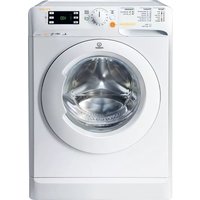


| Product Type | Freestanding Washer Dryer |
| Brand | Indesit |
| Model | XWDE 751480X W UK |
| Wash Capacity | 7.5 kg |
| Drying Capacity | 5 kg |
| Maximum Spin Speed | 1400 rpm |
| Energy Class | C |
| Annual Energy Consumption (Wash & Dry) | Approx. 617 kWh |
| Dimensions (H x W x D) | 85 x 59.5 x 53.5 cm |
| Weight | Approx. 70 kg |
| Power Supply | 220-240 V, 50 Hz |
| Water Connection | Cold water inlet only |
| Noise Level (Wash/Spin/Dry) | 52 dB / 74 dB / 60 dB |
| Programs | Cotton, Synthetics, Delicates, Wool, Rapid, Drying cycles |
| Special Functions | Delay Start, Child Lock, Partial Load, Anti-Crease |
| Drum Material | Stainless steel |
| Display Type | Digital LED |
| Door Opening | Left hinged, 180° opening |
| Filter Type | Fluff filter (in door) |
| Spare Parts Availability | 7 years after end of production |
Frequently Asked Questions - XWDE 751480X W UK INDESIT
User questions about XWDE 751480X W UK INDESIT
0 question about this device. Answer the ones you know or ask your own.
Ask a new question about this device
Download the instructions for your Washing machine in PDF format for free! Find your manual XWDE 751480X W UK - INDESIT and take your electronic device back in hand. On this page are published all the documents necessary for the use of your device. XWDE 751480X W UK by INDESIT.
USER MANUAL XWDE 751480X W UK INDESIT
THANK YOU FOR HAVING PURCHASED AN INDESIT PRODUCT.

To receive more comprehensive assistance, register the
appliance on
www.indesit.com/register
Prior to using the appliance, carefully read the Safety and installation instructions.

Prior to using the appliance, the bolts used for transport must be removed. For detailed instructions on the removal procedure, consult the safety and installation instructions.
CONTROL PANEL
- ON/OFF button
- START/PAUSE button and indicator light
- TEMPERATURE button
- DISPLAY
- OPTION button
- DRYING ONLY button
- DRYING button
- DELAYED START button
- SPIN button
- WASH CYCLE SELECTOR KNOB
- PUSH & WASH + DRY button

WASH CYCLE TABLE
| Maximum load 7 kgPower input in off mode 0.5 W / in left-on mode 8 W | Drying | Maximum load for drying (Kg) | Detergents and Additives | Recommended detergent | ||||||||
| Wash cycle | Temperature | Maximum spin (r.p.m.) | Maximum load for washing (Kg) | Duration (min-utes) | Wash | Fabric softener | Powder | Liquid | ||||
| Default | Range | 2 | 3 | |||||||||
| 1 | Sport | 30°C | -30°C | 600 | 4,0 | The duration of the wash cycles can be checked on the display. | 3,0 | O | - | √ | ||
| 2 | Dark | 30°C | -30°C | 800 | 5,0 | 3,0 | O | - | √ | |||
| 3 | Anti-odour | 60°C | -60°C | 1000 | 3,5 | 3,5 | O | √ | √ | |||
| 4 | Delicate | 30°C | -30°C | 0 | 1,0 | 1,0 | O | - | √ | |||
| 5 | Wool | 40°C | -40°C | 800 | 2,0 | 2,0 | O | - | √ | |||
| 6 | Rapid 30' | 30°C | -30°C | 800 | 3,5 | 3,5 | O | - | √ | |||
| 7 | White Cotton 90°C | 90°C | -90°C | 1400 | 7,0 | 5,0 | O | √ | √ | |||
| 8 | Synthetic | 60°C | -60°C | 1000 | 4,5 | 4,0 | O | √ | √ | |||
| 9 | Coloured | 40°C | -40°C | 1400 | 7,0 | 5,0 | O | - | √ | |||
| 10 | Eco Cotton 60° (1-2) | 60°C | -60°C | 1400 | 7,0 | 5,0 | O | √ | √ | |||
| 11 | Eco Cotton 20°C | 20°C | -20°C | 1400 | 7,0 | 5,0 | O | - | √ | |||
| 12 | Eco Synthetic 20°C | 20°C | -20°C | 1000 | 7,0 | 5,0 | O | - | √ | |||
| 13 | Wash&Dry 45' | 30°C | 30°C | 1400 | 1,0 | 1,0 | O | - | √ | |||
| 14 | AirFresh | - | - | - | - | 1,5 | -- | -- | ||||
| Rinse | - | - | 1400 | 7,0 | 5,0 | - | O | - | - | |||
| Spin + Drain * | - | - | 1400 | 7,0 | 5,0 | -- | -- | |||||
| Required dosage Optional dosage | ||||||||||||
The cycle duration indicated on the display or instruction manual is an estimate based on standard conditions. The actual duration may vary in relation to several factors, such as the temperature and pressure of the incoming water, ambient temperature, amount of detergent, load quantity and type, load balancing and any additional options selected.
1) Test wash cycle in compliance with regulation EN 50229 (Wash):
This cycle is designed for normally soiled cotton loads and is the most efficient in terms of both electricity and water consumption; it should be used for garments washable at 60°C. The actual washing temperature may differ from the indicated value.
Test wash cycle in compliance with regulation EN 50229 (Drying):
Select the 10 wash programme and set the drying level to for both loads. The first drying cycle must be carried out with the nominal load.
For all testing institutes:
2) Long cotton cycle: set cycle 10 at a temperature of 40°C.
* By selecting the cycle and excluding the spin cycle, the washer-dryer will drain only.
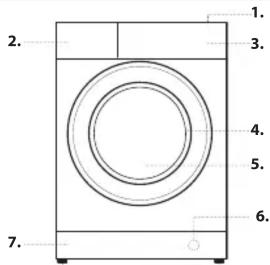
PRODUCT DESCRIPTION
- Top
- Detergent dispenser drawer
- Control panel
- Handle
- Porthole door
- Drain pump (behind the plinth)
- Plinth (removable)
- Adjustable feet (2)
8.
DETERGENT DISPENSER DRAWER
Compartment 1:
Do not pour detergent into compartment 1. Detergent should only be poured into compartment 2.
Compartment 2: Washing detergent (powder or liquid)
If liquid detergent is used, the removable plastic partition A (supplied) should be used for proper dosage. If powder detergent is used, insert the partition into slot B.
Compartment 3: Additives (fabric softener, etc.)
The fabric softener must never exceed the "max" level indicated on the central pin.
! Use powder detergent for white cotton garments, for pre-washing, and for washing at temperatures over 60°C. ! Follow the instructions given on the detergent packaging. ! To remove the drawer, press lever C and pull the drawer outwards.

WASH CYCLES
Follow the instructions on the symbols of the garment's wash care label. The value indicated in the symbol is the maximum recommended temperature for washing the garment.

Sport: a cycle designed for washing lightly soiled sports clothing (tracksuits, shorts, etc.); for best results, we recommend not exceeding the maximum load indicated in the "Wash Cycle Table". We recommend using liquid detergent and adding the amount suitable for a half-load.
Dark: use programme 2 to wash dark-coloured garments. This programme is designed to maintain dark colours over time. We recommend using a liquid detergent for the best results when washing dark-coloured garments.
When you select the drying function, at the end of the washing cycle the machine will automatically perform a delicate drying cycle that preserves the colours of the garments. The display will show the level "Max. load: 3 kg."
Anti-odour: use programme 3 for washing garments with bad odours (e.g. smoke, sweat, fried food). The programme is designed to remove bad odours while preserving the fabric fibres. Synthetics fabrics or mixed loads should be washed at 40°, and resistant cotton fabrics at 60°.
Delicate: use programme 4 to wash very delicate garments. It is advisable to turn the garments inside out before washing them. For best results, use liquid detergent on delicate garments.
When selecting an exclusively time-based drying function, a drying cycle is performed at the end of the wash cycle that is particularly delicate, thanks to light handling and appropriate temperature control of the water jet.
The recommended durations are:
1 kg of synthetic garments --> 150 min
1 kg of synthetic and cotton garments --> 180 min
1 kg of cotton garments --> 180 min
The degree of dryness depends on the load and fabric composition.
Wool - Wool Care:
The wool wash cycle of this machine has been approved by The Woolmark Company for the washing of machine washable wool products provided that the products are washed according to the instructions on the garment label and those issued by the manufacturer of this washing machine. The Woolmark symbol is a Certification mark in many countries. (M2227)

Rapid 30': this programme is designed to wash lightly soiled garments at 30° (excluding wool and silk) with a 3 kg maximum load in a short time: it only lasts 30 minutes and allows for saving time and energy.
White Cotton 90°C: suitable for resistant linen and cotton that are heavily soiled.
Synthetic: suitable for washing moderately soiled garments made of synthetic fibres (e.g. polyester, polyacrylic, viscose, etc.) or mixed synthetic-cotton fibres.
Coloured: a 30°C cycle that helps to preserve colours, suitable for cotton or synthetic coloured garments. It allows for reducing electricity consumption for heating the water while guaranteeing good washing results. Suitable for lightly soiled garments.
Eco Cotton 60°: suitable for washing moderately soiled cotton garments. At 60°C it is the standard cycle for washing cotton garments, and is the most efficient in terms of combined water and electricity consumption.
Eco Cotton 20°C: ideal for lightly soiled cotton loads. The effective performance levels achieved at cold temperatures, which are comparable to washing at 40°, are guaranteed by a mechanical action which operates at varying speed, with repeated and frequent peaks.
Eco Synthetic 20°C: ideal for mixed loads (cotton and synthetics) with a normal soil level. The effective performance levels achieved at cold temperatures are guaranteed by a mechanical action which operates at varying speed, across set average intervals.
Wash&Dry 45': select programme 13 for washing and drying lightly soiled garments (Cotton and Synthetic) in a short time. This cycle may be used to wash and dry a laundry load of up to 1 kg in just 45 minutes. To achieve optimum results, use liquid detergent and pre-treat cuffs, collars and stains.
AirFresh: ideal cycle to refresh garments and remove bad odours, in particular smoke, from cotton and synthetic items in 30' (max. 1.5 kg) without the washing phase.
Rinse: designed for rinsing.
Spin + Drain: designed to spin and drain the water.
DISPLAY
The display is useful when programming the machine and provides a lot of information.

The duration of the available wash cycles and the remaining time of a running cycle appear in section A; if the Delayed Start option has been set, the countdown to the start of the selected cycle will appear. Pressing the corresponding button allows you to view either the
maximum spin speed, temperature and drying time values attained by the machine during the set wash cycle, or the values selected most recently (if compatible with the set wash cycle).
The hourglass flashes while the machine processes the data on the basis of the selected cycle. After a maximum of 10 minutes, the × on remains steady lit and the final time remaining is displayed. The "hourglass" icon will then switch off approximately 1 minute after the final time remaining has been displayed.
The "washing phases" relative to the selected cycle and the "washing phase" of the running cycle appear in section B:
Wash
Rinse
Spin/Drain
Drying
When lit, the symbol indicates that the set "Delayed Start" value has appeared on the display.
There are three levels in section C relative to the washing options. Section D includes the icons related to the three different drying levels as well as the icon which lights up when a timed drying option is set.
Door locked indicator
When lit, the symbol indicates that the door is locked. To prevent any damage, wait until the symbol turns off before opening the door. To open the door while a cycle is in progress, press the START/PAUSE button ▷ if the symbol is off, the door can be opened.
FIRST-TIME USE
Once the appliance has been installed, and before it is used for the first time, run a wash cycle with detergent and no laundry, by setting the "Auto-Clean" cycle.
DAILY USE
Prepare the laundry by following the suggestions appearing under the "TIPS AND SUGGESTIONS" section.
Rapid programming
- Press the ON/OFF button; the START/PAUSE indicator light will flash slowly green.
- Open the door. Load the laundry while making sure not to exceed the maximum load quantity indicated in the cycle table.
- Pull out the detergent dispenser drawer and pour the detergent into the relevant compartments as described in "DETERGENT DISPENSER DRAWER" section.
- Close the door.
STARTING CYCLE
Press the PUSH & WASH + DRY button.
The machine will lock the door ( Symbol on) and the drum will start to rotate; the door will be unlocked ( Symbol off) and then locked again ( Symbol on) as preparation phase of each washing cycle. The "Clicking" noise is part of the door locking mechanism. Water will enter the drum and start the washing phase once the door is locked.
Traditional programming
- Press the ON/OFF button; the START/PAUSE indicator light will flash slowly green.
- Open the door. Load the laundry while making sure not to exceed the maximum load quantity indicated in the Wash Cycle Table.
- Pull out the detergent dispenser drawer and pour the detergent into the relevant compartments as described in "DETERGENT DISPENSER DRAWER" section.
- Close the door.
- Use the WASH CYCLE selector knob to select the desired wash cycle: it will be associated with a specific temperature and spin speed that can be modified. The duration of the cycle will appear on the display.
- Modify the temperature and/or spin speed: the machine automatically displays the maximum temperature and spin speed values set for the selected cycle, or the most recently-used settings if they are compatible with the selected cycle. Pressing the button gradually reduces the temperature down to the cold wash "OFF" setting. Pressing the button gradually reduces the spin speed until it is completely excluded ("OFF" setting). Pressing these buttons again restores the maximum values.
- Select the desired options.
STARTING CYCLE
Press the START/PAUSE button.
The machine will lock the door (symbol on) and the drum will start to rotate; the door will be unlocked (symbol off) and then locked again (symbol on) as preparation phase of each washing cycle. The "clicking" noise is part of the door locking mechanism. Water will enter the drum and start the washing phase once the door is locked.
PAUSING A CYCLE
To pause the wash cycle, press the START/PAUSE button again; the indicator light will flash amber. If the symbol is not lit, the door may be opened. To start the wash cycle from the point at which it was interrupted, press the START/PAUSE button again.
OPENING THE DOOR, IF NECESSARY
Once a cycle starts, the symbol turns on to signal that the door cannot be opened. While a wash cycle is running, the door remains locked. To open the door while a cycle is under way, for example, to add or remove garments, press the START/PAUSE button to pause the cycle; the indicator light will flash amber. If the symbol is not lit, the door may be opened. Press the START/PAUSE button again to continue the cycle.
CHANGING A RUNNING WASH CYCLE
To change a wash cycle while it is in progress, pause the washer-dryer using the START/PAUSE button (the relative indicator light will flash amber), then select the desired cycle and press the START/PAUSE button again. To cancel a cycle that has already begun, press and hold the ON/OFF button. The cycle will be stopped and the machine will switch off.
END OF THE CYCLE
This will be indicated by the word "END" on the display; when the symbol switches off, the door may be opened. Open the door, unload the laundry and switch off the machine. If you do not press the ON/OFF button, the washer-dryer will switch off automatically after about half an hour.
OPTIONS
- If the selected option is not compatible with the set wash cycle, the indicator light will flash and the option will not be activated.

Sport
This option allows for selecting the most suitable programme for any type of sports clothing, and is designed to remove dirt while optimally preserving the technical features of the garments. The various Sport option levels offer the following wash cycles:
- Sport Shoes, a cycle designed to safely wash up to 2 pairs of sports shoes simultaneously. N.B.: to dry 1 pair of shoes, we recommend setting drying time to 120'; to dry 2 pairs set it to 180'.
- Gym Kit, a cycle designed to simultaneously wash any type of sports clothing together with gym towels (Temperature 40°).
- Technical Wear, designed for specifically washing waterproof garments or clothing with special technical fibres like Gore-Tex, so as to optimise washing performance while preserving their technical properties over time. Do not use fabric softeners for garments with technical fibres.
Delayed Start
To set a delayed start for the selected cycle, press the corresponding button repeatedly until the desired delay period has been reached. When this option has been activated, the symbol lights up on the display. To remove the delayed start setting, press the button until the word "OFF" appears on the display.
Temperature
Each wash cycle has a pre-defined temperature. To modify the temperature, press the button. The value will appear on the display.

Each wash cycle has a pre-defined spin speed. To modify the spin speed, press the button. The value will appear on the display.
Setting the drying cycle
The first time the button is pressed, the machine will automatically select the maximum drying cycle which is compatible with the selected wash cycle. Subsequent presses will decrease the drying level and then the drying time, until the cycle is excluded completely ("OFF"). Drying may be set as follows:
A- Based on the desired laundry dryness level:
Cupboard: suitable for laundry which can be put back in a cupboard without being ironed.
Hanger: ideal for clothes which do not need to be dried fully. Iron: suitable for clothes which will need ironing afterwards. The remaining dampness softens creases, making them easier to remove.
B - Based on a set time period: between 210 and 30 minutes. If your laundry load to be washed and dried is much greater than the maximum stated load (see adjacent table of wash cycles), perform the wash cycle, and when the cycle is complete, divide the garments into groups and put some of them back in the drum. At this point, follow the instructions provided for a "Drying only" cycle. Repeat this procedure for the remainder of the load. Note: a cooling-down period is always added to the end of each drying cycle.
Drying only
Press button to perform the drying-only cycle. After selecting the desired cycle (compatible with the type of garments), press button to exclude the washing phase and start the drying phase at the maximum level for the selected cycle. The drying level or time may be set and changed by pressing the drying button (Not compatible with cycles 13 and 14).
Push & Wash + Dry
This function makes it possible to start an automatic wash and drying cycle either when the machine is off without having to press the ON/OFF button in advance, or after switching on the machine without having activated any button and/or selector (otherwise the Push&Wash+Dry function will be deactivated). To start the Push&Wash+Dry cycle press and hold the button for 2 seconds. The indicator lights up to show that the cycle has started. The wash and drying cycle is ideal for cotton or synthetic fabrics, as it washes them at a temperature of 30° and a maximum spin speed of 1000 rpm. During the drying cycle the maximum temperature is 60°C. At the end of the cycle the residual humidity will be the same as for the “level. Max recommended load 3 kg. The time displayed is the maximum time allowed by the Push&Wash+Dry cycle. If the load is lower than the maximum load or most garment are made of synthetic materials, the actual time of the cycle will be shorter. How does it work?
- Load the laundry (cotton and/or synthetic garments) and close the door.
- Pour the detergent and/or additives.
- Start the cycle by pressing and holding the Push&Wash+Dry button for 2 seconds. The relevant indicator light will turn green and the door will lock (the DOOR LOCKED symbol is lit).
NB: starting the cycle through the Push&Wash+Dry button activates an automatic non-customisable wash and drying cycle recommended for cotton and synthetic fabrics.
- The automatic cycle can be used only for washing, excluding the drying phase. Press the Push&Wash+Dry button and then the drying button is the drying icon of the "level will switch off. Maximum load for washing-only is 4 kq. The cycle cannot be customised further.
To open the door while an automatic cycle is under way, press the START/PAUSE button. If the DOOR LOCKED symbol is off, the door may be opened only during the washing phase. Press the START/PAUSE button again to restart the wash cycle from the point at which it was interrupted.
- At the end of the wash cycle the word END will light up.
TIPS AND SUGGESTIONS
Divide the laundry according to:
Type of fabric (cotton, mixed fibres, synthetics, wool, garments to be hand-washed). Colour (separate coloured garments from whites, wash new coloured garments separately). Delicates (small garments – such as nylon stockings – and items with hooks – such as bras: insert them in a fabric bag).
Empty the pockets:
Objects such as coins or lighters can damage the washer-dryer and the drum. Check all buttons
CARE AND MAINTENANCE
Before performing cleaning and maintenance, switch the washer-dryer off and disconnect it from the mains power. Do not use flammable liquids to clean the washer-dryer.
Disconnect the water and power supplies
Close the water tap after every wash. This will limit wear on the hydraulic system inside the washer-dryer and help to prevent leaks. Unplug the washer-dryer when cleaning it and during all maintenance work.
Clean the washer-dryer
The outer parts and rubber components of the appliance can be cleaned using a soft cloth soaked in lukewarm soapy water. Do not use solvents or abrasives. The washer-dryer has a "Auto-clean" cycle for its internal parts; it must be run without any load in the drum.
To optimise this cycle, it is possible to use either detergent (10% of the quantity specified for lightly soiled garments) or special additives to clean the washer-dryer. We recommend running a cleaning cycle every 40 wash cycles. To start the cycle press buttons and simultaneously for 5 seconds. The cycle will start automatically and will run for about 70 minutes. To stop the cycle, press the START/PAUSE > button.
Clean the detergent dispenser drawer
Wash it under running water; this operation should be repeated frequently.
Care for the door and drum
Always leave the porthole door ajar in order to prevent unpleasant odours from forming.
Clean the pump
The washer-dryer is fitted with an auto-cleaning pump that does not require any maintenance. Small items (such as coins or buttons) may sometimes fall into the protective pre-chamber situated at the base of the pump.
! Make sure the wash cycle has ended and unplug the appliance.
To access the pre-chamber:
- remove the cover panel on the front of the machine by first pressing it in the centre then pushing downwards on both sides to extract it;
- loosen the drainage pump cover by turning it anti-clockwise: it is normal for some water to leak out;
- clean the inside thoroughly;
- screw the cover back on;
- put the panel back in place, making sure the hooks slot in place before pushing the panel onto the appliance.
Check the water inlet hose
Check the water inlet hose at least once a year. If it is cracked or broken, it must be replaced: during wash cycles, the high pressure of the water could suddenly split the hose open.
! Never use hoses that have already been used.
LOAD BALANCING SYSTEM
Before every spin cycle, to avoid excessive vibrations before every spin and to distribute the load in a uniform manner, the drum rotates continuously at a speed which is slightly greater than the washing rotation speed. If, after several attempts, the load is not balanced correctly, the machine spins at a reduced spin speed. If the load is excessively unbalanced, the washer-dryer performs the distribution process instead of spinning. To encourage improved load distribution and balance, we recommend mixing small and large garments in the load.
ACCESSORIES
Contact our Technical Assistance Service to check whether the following accessories are available for this washer-dryer model.
Stacking kit
With this accessory you can secure the tumble dryer to the upper part of your washer-dryer to save space and facilitate loading and unloading of the tumble dryer.
TRANSPORT AND HANDLING
Do not lift the washer-dryer by gripping it from the upper section. Unplug the appliance and close the water tap. Check that the door and detergent dispenser drawer are tightly closed. Detach the filling hose from the water tap then detach the drain hose. Empty all the water remaining in the hoses and secure the latter so that they do not get damaged during transport. Apply the transport bolts back on. Repeat, in reverse order, the transport bolt removal procedure described in the "Health & Safety and Installation Guides".
Important: Not emptying contents from pockets may cause pump or drain blockages, or may damage the machine.
Do not wash items which do not have a wash label, or wash items that are not intended as machine washable.
DEMO MODE: to deactivate this function, switch the washing machine OFF. Then press and hold "Start/Pause" button, within 5 seconds press also
"ON/OFF" ⏻ button and hold both buttons for 2 seconds.
Your machine could occasionally fail to work. Before contacting the Technical Assistance Service, make sure that the problem cannot be easily solved using the following list. Anomalies Possible causes / Solution
| The machine does not switch on. | The appliance is not plugged into the socket fully, or not enough to make contact. |
| There is no power to the socket, or the fuse has blown in the mains plug. | |
| The wash cycle does not start. | The door is not closed properly. |
| The ON/OFF button has not been pressed. | |
| The START/PAUSE button has not been pressed. | |
| The water tap has not been turned on to allow water to flow into the machine. | |
| A delayed start has been set. | |
| The washer-dryer does not dry. | Check the 2 sections above. |
| The "Drying" is set to "OFF". | |
| The machine does not fill with water ("H2O" appears on the display). | The water inlet hose is kinked. |
| The water inlet hose is not connected to the water supply. | |
| The water pressure is too low. | |
| The water tap has not been turned on to allow water to flow into the machine. | |
| There is no water supply to the house. | |
| The inlet valve filter is blocked. | |
| The START/PAUSE button has not been pressed. | |
| The machine continuously fills with water and continually drains away or Water left in the drum or Stuck on wash. | The top of the drain hose is too low - It must be fitted at a height between 65 and 100 cm from the floor. |
| The drain hose is connected incorrectly to the sink trap allowing water to run into the machine, the drain hose must be positioned higher than the bottom of the sink to prevent water flowing down the drain hose. | |
| The end of the drain hose has been pushed too far down the standpipe, the 'U' bracket should be fitted 100 mm from the end of the drain hose. | |
| The machine does not drain or spin - (error lights flashing). | The Pump filter is blocked. |
| The drain hose is kinked. | |
| New Installation - The blanking cap or spigot has not been removed if connected under a sink. | |
| The drain hose or sink trap is blocked. | |
| The machine does spin. The 'Spin' Speed is set to "OFF". | |
| The machine does not heat or poor wash results. The 'Temperature' is set to "OFF". | |
| The programme takes too long. | Programme times will vary due to water pressure, the incoming water temperature and if the wash load goes out of balance. This will increase the programme times accordingly. |
| The Display sticks at one 'time to end' for more than 1 Minute or the Display changes the estimated 'Time to End' during the programme. | The display time is for guidance only - it is not a precise time to finish and may vary. |
| The washer-dryer vibrates a lot during the spin cycle. | The feet have not been adjusted, enabling the machine to rock. |
| New Installation - Either the Transit Bolts including the plastic spacers, or the Polystyrene Packaging have not been removed when installing the machine. | |
| The machine is trapped between cabinets and/or walls. | |
| The load is in a slight out of balance condition and machine is spinning, but at a lower speed. | |
| The machine is noisy. There will always be some motor, pump and drum noise during spin. | |
| The machine leaks from the dispenser. | The dispenser drawer is blocked with detergent and requires cleaning. |
| The water pressure is too high and requires turning down - turn down the tap on the water supply pipe slightly and try again. | |
| The machine is tilting forwards - It must be level when in its final position. | |
| The "Options" and START/PAUSE indicator lights flash rapidly and the display visualises an error code (e.g.: F-01, F-...). | Switch off the machine and unplug it, wait for approximately 1 minute and then switch back on again. If the problem persists contact Technical Assistance Centre. |
| The machine smells. | The machine requires a service wash. Run a auto clean wash cycle with detergent and no laundry. |
| The water level is too low when the machine is washing. | The water level is correct if it can be seen at the bottom of the door. |
| There is too much foam. | The detergent is not suitable for machine washing (it should display the text 'for washing machine' or 'hand and machine wash' or the like). |
| The Push & Wash + Dry function does not activate. | After switching on the machine, a control other than Push & Wash + Dry was activated. Switch the machine off and press the Push & Wash + Dry button. |

You can download the SAFETY AND INSTALLATION INSTRUCTIONS, OPERATING MANUAL, TECHNICAL SHEET and ENERGY DATA by:
- Visiting the website http://docs.indesit.eu. • Using the QR code.
- Alternatively, contact our Technical Assistance Service (the telephone number is indicated in the warranty booklet). When contacting the Technical Assistance Service, provide the codes shown on the adhesive label applied to the inside of the door.

- THANK YOU FOR HAVING PURCHASED AN INDESIT PRODUCT
- CONTROL PANEL
- TEST WASH CYCLE IN COMPLIANCE WITH REGULATION EN 50229 (WASH)
- TEST WASH CYCLE IN COMPLIANCE WITH REGULATION EN 50229 (DRYING)
- FOR ALL TESTING INSTITUTES
- PRODUCT DESCRIPTION
- DETERGENT DISPENSER DRAWER
- COMPARTMENT
- COMPARTMENT 2: WASHING DETERGENT (POWDER OR LIQUID)
- COMPARTMENT 3: ADDITIVES (FABRIC SOFTENER, ETC.)
- WASH CYCLES
- WOOL - WOOL CARE
- DISPLAY
- DOOR LOCKED INDICATOR
- FIRST-TIME USE
- DAILY USE
- RAPID PROGRAMMING
- STARTING CYCLE
- TRADITIONAL PROGRAMMING
- PAUSING A CYCLE
- OPENING THE DOOR, IF NECESSARY
- CHANGING A RUNNING WASH CYCLE
- END OF THE CYCLE
- OPTIONS
- SPORT
- DELAYED START
- TEMPERATURE
- SETTING THE DRYING CYCLE
- DRYING ONLY
- PUSH & WASH + DRY
- TIPS AND SUGGESTIONS
- DIVIDE THE LAUNDRY ACCORDING TO
- EMPTY THE POCKETS
- CARE AND MAINTENANCE
- DISCONNECT THE WATER AND POWER SUPPLIES
- CLEAN THE WASHER-DRYER
- CLEAN THE DETERGENT DISPENSER DRAWER
- CARE FOR THE DOOR AND DRUM
- CLEAN THE PUMP
- CHECK THE WATER INLET HOSE
- LOAD BALANCING SYSTEM
- ACCESSORIES
- STACKING KIT
- TRANSPORT AND HANDLING
Brand : INDESIT
Model : XWDE 751480X W UK
Category : Washing machine