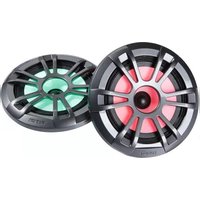
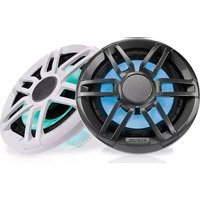
EL-F651SPG - Loudspeaker Fusion - Free user manual and instructions
Find the device manual for free EL-F651SPG Fusion in PDF.


| Product Type | Speaker (Haut-parleur) |
| Brand | Fusion |
| Model | EL-F651SPG |
| Speaker Size | 6.5 inches (165 mm) |
| Impedance | 4 Ohms |
| RMS Power Handling | 75 Watts |
| Peak Power Handling | 225 Watts |
| Sensitivity | 91 dB |
| Frequency Response | 40 Hz - 22 kHz |
| Crossover Frequency | 3 kHz |
| Woofer Material | Polypropylene cone with rubber surround |
| Tweeter Type | PEI dome tweeter |
| Mounting Depth | 2.1 inches (53 mm) |
| Cutout Diameter | 5.6 inches (142 mm) |
| Grille Included | Yes, black metal grille |
| Water Resistance | IPX5 (splash proof) |
| Weight | 1.2 kg per speaker |
| Dimensions (each) | 6.9 x 6.9 x 2.5 inches |
| Warranty | 1 year limited |
| Compliance | RoHS, CE |
Frequently Asked Questions - EL-F651SPG Fusion
User questions about EL-F651SPG Fusion
0 question about this device. Answer the ones you know or ask your own.
Ask a new question about this device
Download the instructions for your Loudspeaker in PDF format for free! Find your manual EL-F651SPG - Fusion and take your electronic device back in hand. On this page are published all the documents necessary for the use of your device. EL-F651SPG by Fusion.
USER MANUAL EL-F651SPG Fusion
EL Series Installation Instructions 2
Garmin c , the Garmin logo, FUSION f , the Fusion logo, and True-Marine m are trademarks of Garmin Ltd. or its subsidiaries, registered in the USA and other countries. These trademarks may not be used without the express permission of Garmin.
EL Series Installation Instructions
Important Safety Information
WARNING
Failure to follow these warnings and cautions could result in personal injury, damage to the vehicle or vessel, or poor product performance.
This device must be installed according to these instructions.
Disconnect the vehicle's or vessel's power supply before beginning to install this product.
CAUTION
Continuous exposure to sound pressure levels over 100 dBA may cause permanent hearing loss. The volume is typically too loud if you cannot hear people speaking around you. Limit the amount of time you listen at high volume. If you experience ringing in your ears or muffled speech, stop listening and have your hearing checked.
Always wear safety goggles, ear protection, and a dust mask when drilling, cutting, or sanding.
NOTICE
When drilling or cutting, always check what is on the opposite side of the surface.
It is strongly recommended that you have your audio system installed by a professional installer to ensure optimum performance.
You must read all installation instructions before beginning the installation. If you experience difficulty during the installation, go to www.fusionentertainment.com for product support.
What's In the Box
- 2 speakers
- 2 tinned, pre-terminated speaker wires (6 m)
- 8 Phillips stainless steel, 4.2 mm x 25.4 mm (8 gauge x 1 in.) mounting screws
- 2 mounting templates
- 2 grilles
Tools Needed
- Electric drill
- Drill bit (size varies based on surface material)
- Phillips screwdriver
- Wire strippers
- Crimping tool
- Electrical tape
- Appropriate saw or utility knife to cut surface material
- Marine sealant (optional)
NOTE: For customized installations, additional tools and materials may be needed.
Mounting Considerations
Selecting the correct mounting location is critical to optimize the performance of each speaker. FUSION ® speakers are designed to perform in the widest possible range of mounting locations, but the more you plan the installation, the better the speakers' sound will be.
- For the best performance, you should mount the speakers higher in the boat. Sound travels in the direction in which the speakers are facing, so if you mount them in a lower location, the sound quality and volume may not be not ideal.
- If you intend to mount the speakers outside the boat, you must mount them in a location well above the waterline, where they are not submerged or damaged by docks, pilings,
or other pieces of equipment. When mounted correctly, these speakers are rated IP65 for protection from the front of the speaker. Water exposure and damage to the rear of the speaker voids the warranty. This includes situations when the speakers are mounted in a sealed enclosure, especially if they are exposed to wash down. On supported models, using an enclosure with a port or vent exposed to the outside environment may allow water to collect and damage the speaker.
- You should select mounting locations that enable you to hear sound from both speakers at the same time to achieve a sound stage effect. To achieve this effect, you should not mount the speakers side-by-side.
- When possible, you should select mounting locations where the area behind each speaker is enclosed.
- You must select mounting locations that provide sufficient clearance for the mounting depth of the speakers as specified in the product specifications.
- For better bass performance, you should select a mounting locations that provide the appropriate space behind the speaker according to the optimum enclosure design requirements in the specifications section. Too small an area restricts bass, and too large an area compromises bass performance. Also, mounting a speaker close to an open area (where sound from the back of the speaker has a very short path to compete with sound from the front of the speaker) produces the least bass.
- On supported models, when a speaker is not exposed to the outside environment, you can achieve a better bass performance using an enclosure with a ported design. For supported models, the optimum enclosure design recommendations in the specifications section include dimensions for the optimum port size and length.
- You should select a flat mounting surface for the best seal.
- You should protect the speaker wires from sharp objects and always use rubber grommets when wiring through panels.
- You should select mounting locations that avoid potential obstacles, such as fuel and hydraulic lines and wiring.
- You should protect all terminals and connections from grounding and from each other. Failure to do so could result in permanent damage to the audio system and void the product warranty.
- To avoid interference with a magnetic compass, you should not mount the speakers closer to a compass than the compass-safe distance value listed in the product specifications.
- You must turn off the audio system before making any connections to the source unit, amplifier, or speakers. Failure to do so could result in permanent damage to the audio system.
Mounting the Speakers
Before mounting the speakers, you must choose a location following the guidelines above.
Before cutting the mounting surface you should verify that there is enough clearance for the speaker behind the surface. Refer to the specifications for clearance information.
1 Route the wires from the source to the speaker location, away from sources of electrical interference.
2 Trim the template and make sure it fits in the selected location.
3 Orient the template with the FUSION logo at the bottom of the template.
4 Secure the template to the selected location.
5 Using a rotary tool or jigsaw, cut the mounting surface along the inside of the line on the template.
6 Place the speaker in the cutout to test the fit.
7 If necessary, use a file and sandpaper to refine the size of the cutout.
8 After the speaker fits correctly in the cutout, ensure the mounting holes on the speaker line up with the pilot holes on the template.
9 If the mounting holes on the speaker do not line up, mark the new hole locations.
10 Using an appropriately sized drill bit for the mounting surface and screw type, drill the holes.
11 Remove the template from the mounting surface.
12 Connect the speaker wires ① while observing polarity.

13 If necessary, connect the LED wires (LED Wiring, page 3).
14 Place the speaker in the cutout.
15 Secure the speaker to the mounting surface using the included screws ②.
NOTE: Do not over tighten the screws, especially if the mounting surface is not flat.
16 Attach the grille to the speaker front (Attaching the Grille, page 3).
LED Wiring
Connecting the LED Wires
Before you connect the LED wires, you should determine which speaker LED color you want to use, and identify the corresponding speaker wire colors.
| Speaker LED Color Speaker Wire Color | |
| Red Red | |
| Green Green | |
| Blue Blue | |
| Yellow Red and green | |
| Magenta Red and blue | |
| Cyan Blue and green | |
| White Red, green, and blue | |
NOTE: This feature is available only on the sports model speakers.
You can control the color of the speaker LEDs through the polarity of the LED wires. You can splice the ground wire to multiple wires on the LED cable to customize the LED color.
The black wire on the LED cable is terminated with a 4 mm female bullet connector, and the color wires are terminated with 4 mm male bullet connectors. You can connect these to 4 mm bullet connectors on your wires (not included), or remove the bullet connectors to connect to the bare wires instead.
1 Connect a positive wire to the black wire on the LED cable.
2 Connect a ground wire to the wire on the LED cable according to the preferred speaker LED color.
3 Route the positive and negative wires, and connect them to a power source (Connecting the Sports Model Speakers LED Wires to Power, page 3).
Connecting the Sports Model Speakers LED Wires to Power
NOTE: This feature is available on only the Sports model speakers.
You must connect all 12 Vdc wiring to the LEDs to a 3 A fuse at the power-source end of the cable. You should connect the positive (+) power wire to a 12 Vdc power source through an isolator switch or circuit breaker to turn the speaker LEDs on and off. You can use the same isolator or circuit breaker controlling the power supply to your stereo, which allows you to turn the LEDs and the stereo on and off at the same time.
You should use 20 AWG (0.5 mm 4 ) or thicker wire to connect the LEDs to the battery.
1 Route the positive power (+) and negative ground (-) wires from the speaker to the battery.
2 Connect the negative wire to the negative (-) battery terminal.
3 Connect the positive wire to the positive (+) terminal through a 3 A fuse and isolator switch or circuit breaker.
Attaching the Grille
1 With the speakers mounted, hold the grille with the FUSION logo at the bottom, or at the 6 o'clock position.
2 Turn the grille counter-clockwise about 10 degrees, so the FUSION logo is at the 5 o'clock position.
3 Place the grille on the speaker, and twist it clockwise to secure it.
NOTE: You can press on the grille to snap it into place instead of twisting it.
Speaker Information
Registering Your EL Series
Help us better support you by completing our online registration today.
- Go to www.fusionentertainment.com.
- Keep the original sales receipt, or a photocopy, in a safe place.
Dimension Drawings
Side View

| 1 | 40 mm ( 137/64 in.) |
| 2 | 127 mm (5 in.) |
A Sports model speaker is shown, but the dimensions are the same for the Classic model.
Front View
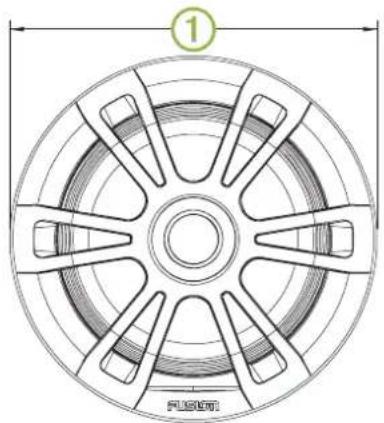
| 1 | 176 mm ( 615/16 in.) |
A Sports model speaker is shown, but the dimensions are the same for the Classic model.
Back View
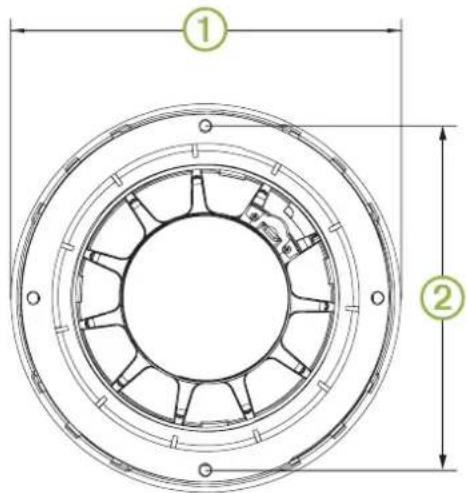
| 1 | 176 mm ( 615/16 in.) |
| 2 | 156 mm ( 61/8 in.) |
Cleaning the Speakers
NOTE: When mounted correctly, these speakers are rated IP65 for protection in the harsh marine environment from the front of the speaker. They are not designed to withstand high pressure water spray, which may occur when you wash down your vessel. Failure to carefully spray-clean the vessel may damage the product and void the warranty.
NOTICE
Do not use harsh or solvent-based cleaners on the speakers. Using such cleaners may damage the product and void the warranty.
1 Clean all salt water and salt residue from the speaker grille with a damp cloth soaked in fresh water.
2 Use a mild detergent to remove a heavy buildup of salt or stains.
Troubleshooting
Before you contact your FUSION dealer or service center, you should perform a few simple troubleshooting steps to help diagnose the problem.
If the FUSION speaker has been installed by a professional installation company, you should contact the company so the
technicians can assess the problem and advise you about possible solutions.
There is no sound coming from the speakers
- Verify that all connections from the source device and/or the amplifier are connected correctly to the speaker terminals.
The system lacks bass or high frequencies
- Verify that the correct wire polarity is observed between the source and speakers.
The wires should be connected positive to positive and negative to negative.
- Verify that the speakers are attached firmly to the mounting surface.
The audio is distorted
- Verify that the source volume is not too loud for the speaker, and reduce the volume if necessary.
- Verify that the panels surrounding the speaker on the vessel are not rattling.
- Verify that the source device and/or the amplifier are connected to the speaker terminals correctly.
- If the speaker is connected to an amplifier, verify that the input level of the amplifier is matched to the output level of the stereo. For more information, see the manual for the amplifier.
The LED lights will not turn on
- Verify that all wiring connections are correct and tight.
Specifications
| Max. power (Watts) 80 W | |
| RMS power (Watts) 20 W | |
| Efficiency (1 W/1 m) 84 dB | |
| Frequency response (+ 3 dB) 100 Hz to 15 kHz | |
| Min. mounting depth (clearance) 43 mm (1 11/16 in.) | |
| Mounting diameter (clearance) 130 mm (5 1/8 in.) | |
| Impedance 4 ohm | |
| Amplifier power-rating recommendation | From 20 to 40 W RMS, playing music |
| LED supply voltage (sports model speakers only) | From 10.8 to 16 Vdc |
| LED load current at 16 Vdc (sports model speakers only) | 150 mA per color |
| Optimum enclosure volume recommendation* | 8 L (0.3 ft. 3 ) |
| Operating temperature range From 0 to 50°C (from 32 to 122°F) | |
| Storage temperature range From -20 to 70°C (from -4 to 158°F) | |
| Cone material Polypropylene | |
| Water and dust rating IEC 60529 IP65 | |
*Sealed enclosure, fully filled with absorption material.
NOTE: This speaker is not intended to be installed in a vented or ported enclosure.
Compass-Safe Distances
All speakers contain magnets which may cause interference with instruments on your boat. The size of the magnet used in the speaker affects how much interference the speaker may cause.
Interference can cause deviations and variations in the readings of sensitive navigational equipment, such as magnetic compasses. These deviations can cause inaccuracies or offsets in the readings, but will not harm the equipment. To alleviate the deviations, adjust the compass for the deviation following the manufacturer's instructions or move the speaker away from the
navigational equipment. After moving a source of interference, you may need to recalibrate the compass.
If you are navigating solely by a magnetic compass, use extreme caution to place the speaker far enough away from the compass to avoid causing deviations in the readings.
To avoid deviations to navigational equipment, position the speakers so they are separated from the navigational equipment by at least the distance listed in the table below.
![graph TD A["①"] --> B["Central Component"] C["②"] --> B D["③"] --> B E["④"] --> B F["⑤"] --> B G["⑥"] --> B](/content/2026/06/1340341/images/e4c8ab026d39c7b08326d2cde2706854809794cc05c6ae2f666bab78291bc353.jpg)
| 1 | 171 cm (5 ft. 8 in.) |
| 2 | 171 cm (5 ft. 8 in.) |
| 3 | 254 cm (8 ft 4 in.) |
| 4 | 171 cm (5 ft. 8 in.) |
| 5 | 171 cm (5 ft. 8 in.) |
| 6 | 254 cm (8 ft 4 in.) |
Check Dimensions Before Cutting
6"

FUSON®
EL Series
6" Speakers
∅ 130 mm
(5 1/8in.)
156 mm (6 1/8 in.)
FUSON
FUSON
Important Safety and Product Information.... 2
Important Safety and Product Information
WARNING
Failure to heed the following warnings could result in an accident resulting in death or serious injury.
Marine Operation Warnings
- You are responsible for the safe and prudent operation of your vessel. This device does not relieve you from the responsibility of safely operating your vessel. Avoid navigational hazards and never leave the helm unattended.
- Always be prepared to promptly regain control of the vessel. Use caution near hazards in the water, such as docks, pilings and other vessels.
Hearing Damage Warning
Listening to the stereo at high volume can cause damage to your hearing.
Product Environmental Programs
Information about the Garmin product recycling program and WEEE, RoHS, REACH, and other compliance programs can be found at www.garmin.com/aboutGarmin/environment.
Declaration of Conformity
Hereby, Garmin declares that this product is in compliance with the essential requirements and other relevant provisions of Directive 1999/5/EC. To view the full Declaration of Conformity, go to www.fusionentertainment.com.
Software License Agreement
BY USING THE DEVICE, YOU AGREE TO BE BOUND BY THE TERMS AND CONDITIONS OF THE FOLLOWING SOFTWARE LICENSE AGREEMENT. PLEASE READ THIS AGREEMENT CAREFULLY.
Garmin Ltd, and its subsidiaries ("Garmin") grant you a limited license to use the software embedded in this device (the "Software") in binary executable form in the normal operation of the product. Title, ownership rights, and intellectual property rights in and to the Software remain in Garmin and/or its third-party providers.
You acknowledge that the Software is the property of Garmin and/or its third-party providers and is protected under the United States of America copyright laws and international copyright treaties. You further acknowledge that the structure, organization, and code of the Software, for which source code is not provided, are valuable trade secrets of Garmin and/or its third-party providers and that the Software in source code form remains a valuable trade secret of Garmin and/or its third-party providers. You agree not to decomplete, disassemble, modify, reverse assemble, reverse engineer, or reduce to human readable form the Software or any part thereof or create any derivative works based on the Software. You agree not to export or re-export the Software to any country in violation of the export control laws of the United States of America or the export control laws of any other applicable country.
Limited 1-Year Marine Consumer Warranty
Garmin New Zealand Limited, trading as FUSION Entertainment ("FUSION"), warrants that this FUSION Marine product is free from defects in material and workmanship, according to the following terms and conditions:
- The initial limited warranty for the FUSION product purchased extends to the first 12 months beginning on the date of purchase of the product.
- The limited warranty extends only to the original consumer purchaser (consumer) of the product and is not assignable or transferable to any subsequent purchaser/end user.
- The limited warranty extends only to consumers who purchase the product in one of the countries (or areas) set forth on www.fusionentertainment.com. The limited warranty is only valid in FUSION's intended country (or area) of sale of the product.
- During the limited warranty period, FUSION or its authorised service network will repair or replace (at FUSION's discretion), any defective product or parts thereof with new and return the product to the consumer in working condition. No charge will be made to the consumer for either parts or labour in repairing or replacing the product. All replaced parts and cosmetic parts should be free of defects at the time of shipment and, therefore shall not be covered under these limited warranty terms.
- Repaired product will be warranted for the balance of the original warranty period or for ninety (90) days from the date of repair, whichever is longer.
- All warranty claims must be accompanied with a copy of this warranty card, and a copy of proof of purchase. The consumer shall have no coverage or benefits under this limited warranty if any of the following conditions are applicable:
- The product has been subject to: abnormal use, abnormal conditions, improper storage, unauthorised modifications, unauthorised connections, unauthorised repair including but not limited to use of unauthorised spare parts in repairs, misuse, neglect, abuse, accident, alteration, improper installation, acts of God, spill of foods or liquids, maladjustment of
customer controls or other acts which are beyond the reasonable control of FUSION, including deficiencies in consumable parts such as fuses, and breakage or damage to antennae unless caused directly by defects in materials or workmanship, and normal wear and tear of the product.
- FUSION was not notified by the consumer of the alleged defect or malfunction of the product during the applicable limited warranty period.
• The product serial number or the accessory date code has been removed, defaced or altered.
- The product was used with or connected to an accessory not supplied by FUSION or fit for use with FUSION product, or used in a manner other than its intended use.
If a problem develops during the limited warranty period, the consumer should take the following step-by-step procedure:
1 The consumer shall return the product to any authorised FUSION dealer in authorised sales countries for repair or replacement processing. FUSION assumes no freight or shipping responsibility for returning goods to an authorised FUSION dealer, or return freight from an authorised dealer to the consumer submitting the warranty claim.
2 The consumer shall be charged for any parts or labour charges not covered by this limited warranty. The consumer shall be responsible for expenses related to removal and reinstallation of the product.
3 If the product is returned to FUSION after the expiration of the warranty period, FUSION's normal service policies shall apply and the consumer will be charged accordingly.
THE BENEFITS CONFERRED BY THIS LIMITED WARRANTY APPLY TO THE EXTENT THAT THEY ARE NOT SUPERCEDED BY ANY OTHER RIGHTS AND REMEDIES UNDER ANY APPLICABLE LEGISLATION THAT CANNOT BE EXCLUDED. OTHERWISE, TO THE EXTENT PERMITTED BY LAW, ANY IMPLIED WARRANTY IS EXCLUDED AND THE FOREGOING WARRANTY IS THE PURCHASER'S SOLE AND EXCLUSIVE REMEDY AND IS IN LIEU OF ALL OTHER WARRANTIES, EXPRESS OR IMPLIED. TO THE EXTENT PERMITTED BY LAW, FUSION SHALL NOT BE LIABLE FOR INCIDENTAL OR CONSEQUENTIAL DAMAGES OR A LOSS OF ANTICIPATED BENEFITS OR PROFITS, OUT OF USE OR INABILITY TO USE THE PRODUCT.
- Applicable law may not allow the limitation or exclusion of liability in some situations therefore the above limitations or exclusions may not apply to you.
- FUSION neither assumes nor authorises any authorised service centre or any person or entity to assume for it any other obligation or liability beyond that which is expressly provided for in this warranty.
- All warranty information, product features and specifications are subject to change without notice.
Limited 1-Year Marine Consumer Warranty for Australian Consumers
Garmin Australasia, 30 Clay Place, Eastern Creek, NSW 2766, Australia
EMAIL: australia@fusionentertainment.com PHONE: 1800 235 822
THE FUSION PROMISE OF QUALITY LIMITED 1-YEAR CONSUMER WARRANTY
This warranty is given in addition to other rights and remedies available to the consumer under Australian Consumer Law. In addition to the FUSION Warranty, our goods come with guarantees that cannot be excluded under the Australian Consumer Law. You are entitled to a replacement or refund for a major failure and for compensation for any others reasonably foreseeable loss or damage. You are also entitled to have the goods repaired or replaced if the goods fail to be of acceptable quality and the failure does not amount to a major failure.
Garmin New Zealand Limited, trading as FUSION Entertainment ('FUSION'), warrants this FUSION Product including, Speaker, Subwoofer, Amplifier, Head Unit, or genuine FUSION Accessory 'product' is free from defects in materials and workmanship. In accordance with the following terms and conditions:
- The limited warranty for the FUSION product purchased is only available for twelve (12) months after the date of purchase. - The limited warranty extends only to the original consumer of the product and may not be assigned or transferred to any other person or consumer without FUSION's prior written consent being provided.
- During the limited warranty period, FUSION or its authorised service network will repair or replace any defective or faulty product or parts at its own cost.
- Repaired or replaced product will be warranted for the balance of the original warranty period or for ninety (90) days after the date of repair, whichever is longer.
- All warranty claims must be notified to FUSION or its authorised Dealer in writing during the warranty period accompanied with a copy of this warranty card, proof of purchase date and the product with an intact and unaltered serial number or accessory date code.
This warranty will not apply if:
The consumer causes the Product to be of unacceptable quality or fails to take steps to prevent the product from becoming of unacceptable quality and/or it is damaged by abnormal use. Examples of goods becoming of unacceptable quality or of abnormal use by the consumer include:
• Storage of product under improper conditions.
- Exposure to excessive moisture or dampness.
- Exposure to excessive temperature extremes or other adverse environmental conditions.
- Unauthorised modifications of product, connections or otherwise unauthorised repairs including, but not limited, to the use of unauthorised parts in the repair of products.
- Improper use of or installation of, or interference with, product adjustments or controls and or including antenna breakage or damage due to misuse.
• Damage caused by consumables or by electricity supply.
- Acts of god (force majeure), exposure of product to food spills, or any other type of fluid ingress.
• Using the product in a way for which was not intended to be used or connecting it to an accessory not supplied by, specified by, or authorised by FUSION.
• Any other abnormal use of or conduct causing product to become of unacceptable quality.
Other exclusions:
- This warranty extends to the repair or replacement of FUSION product only and the consumer is responsible for any expenses relating to the removal or installation of the product or related services including the cost of delivering the product to FUSION or its authorised dealer.
- Repair work conducted by FUSION after this warranty has expired or if this warranty for any other reason this FUSION warranty does not apply is subject to FUSION's normal service policies and FUSION charges for labour and material may apply.
- This is a manufacturer's warranty provided to consumers of FUSION products. Variations to this warranty may only be made by FUSION and will be notified to the customer in writing or issued on the FUSION website. FUSION Dealers, agents and authorised dealers are not authorised to make changes or vary this FUSION warranty.
- All warranty information, product features and specifications are subject to change without notice.
- FUSION is not responsible for replacing or the cost of replacing any consumer data lost occurring either due to equipment failure or during the repair and replacement process.


- EL SERIES INSTALLATION INSTRUCTIONS
- IMPORTANT SAFETY INFORMATION
- WARNING
- CAUTION
- NOTICE
- WHAT'S IN THE BOX
- TOOLS NEEDED
- MOUNTING CONSIDERATIONS
- MOUNTING THE SPEAKERS
- LED WIRING
- CONNECTING THE LED WIRES
- CONNECTING THE SPORTS MODEL SPEAKERS LED WIRES TO POWER
- ATTACHING THE GRILLE
- SPEAKER INFORMATION
- REGISTERING YOUR EL SERIES
- DIMENSION DRAWINGS
- FRONT VIEW
- BACK VIEW
- CLEANING THE SPEAKERS
- TROUBLESHOOTING
- THERE IS NO SOUND COMING FROM THE SPEAKERS
- THE SYSTEM LACKS BASS OR HIGH FREQUENCIES
- THE AUDIO IS DISTORTED
- THE LED LIGHTS WILL NOT TURN ON
- COMPASS-SAFE DISTANCES
- FUSON®
- EL SERIES
- 6" SPEAKERS
- FUSON
- IMPORTANT SAFETY AND PRODUCT INFORMATION
- MARINE OPERATION WARNINGS
- HEARING DAMAGE WARNING
- DECLARATION OF CONFORMITY
- SOFTWARE LICENSE AGREEMENT
- LIMITED 1-YEAR MARINE CONSUMER WARRANTY
- LIMITED 1-YEAR MARINE CONSUMER WARRANTY FOR AUSTRALIAN CONSUMERS
Brand : Fusion
Model : EL-F651SPG
Category : Loudspeaker