
EBENCH KH 4438 MP3-CD-PLAYER - CD Player KOMPERNASS - Free user manual and instructions
Find the device manual for free EBENCH KH 4438 MP3-CD-PLAYER KOMPERNASS in PDF.


User questions about EBENCH KH 4438 MP3-CD-PLAYER KOMPERNASS
0 question about this device. Answer the ones you know or ask your own.
Ask a new question about this device
Download the instructions for your CD Player in PDF format for free! Find your manual EBENCH KH 4438 MP3-CD-PLAYER - KOMPERNASS and take your electronic device back in hand. On this page are published all the documents necessary for the use of your device. EBENCH KH 4438 MP3-CD-PLAYER by KOMPERNASS.
USER MANUAL EBENCH KH 4438 MP3-CD-PLAYER KOMPERNASS
Operating Instructions
Technical data
Voltage
AC adapter/alternating current: 230V 50Hz
or
DC/direct current: 1.2V× 2 type AA (NiCd, rechargeable)
1.5 V x 2 type AA (NiMh)
CD players
Laser
3-beam laser
Frequency response
100 Hz to 16 kHz
Features and functions
- Playing conventional audio CDs, CD Rs, CD RWs and MP3 CDs
- Electronic digital anti-shock system with a 45-second buffer (conventional CDs) or a 120-second buffer (MP3 CDs)
- Playing MP3 songs up to 256 kbps
- Album index - shows up to 99 albums
Song index - shows up to 255 songs - Showing the name of the song with up to 11 characters (ISO level I) or 31 characters (ISO level II)
- Scrolling the name of the song when playing
Automatic display of the information on the song ("ID 3 tags") - Skipping backwards/forwards to the beginning of the song (SKIP)
- Fast search backwards/forwards
- Repeat for repeatedly playing songs, programmed series of songs and albums
- Shuffle/random function for shuffle
- Program function for programmed playback of up to 99 songs
- Intro play function
- Bass boost system
- Auto switch off (30 seconds)
Voltage display in the LCD display - Battery charging with charging indicator
- Hold function (key lock)
Please read the operating instructions carefully before using the player
Safety instructions
- Do not remove the covers. The player is equipped with a laser that may cause injury to the eye if it comes into visual contact.
- Please ensure that no foreign matter gets into the player. The CD compartment is equipped with a safety system that switches the laser off automatically as soon as the CD compartment is opened. Should foreign matter get inside, it may cut off the safety system.
- Do not expose the player to strong shocks since they may damage it.
Please observe the following rules when selecting the location for your MP3 CD player:
- Keep the player away from sources of heat, direct exposure to sunlight, heating elements with an ambient temperature upwards of 60^ / 140^ , summer heat in cars where the passenger compartment can heat up to 110^ / 230^ or more since the player might suffer irreparable damage.
- The player's operating temperature is between 5^ and a maximum of 35^ / 41^ and 95^ .
- Please avoid setting up the player in humid or dusty rooms.
-
Please only place the player on level and stabile surfaces that are free of shocks.
-
Sudden temperature fluctuations may cause condensate to form in the inside of the housing or on the laser scanner. Condensate may especially form when
-
the player is brought from a cooler into a warmer room or into a cold room that is suddenly heated
- the player is brought from a climate-controlled room or car into a hot or humid room in the summer
Condensate may cause malfunctions. If this takes place, please do not use the player for about two hours until it has adapted to room temperature.
- Caution! Do not expose the player either to dripping or splashing water. Objects filled with water such as vases should not be placed on it.
- Do not block the ventilation openings on the player since it might overheat.
Controls and displays on the player
- CD compartment
-
SKIP button
-
MODE button
- STOP/OFF button
- PLAY/PAUSE button II
- LCD display
- EQ/PROG button
- ALBUM/ESP/10+ button
-
SKIP button
-
PHONES
-
Battery charging display
- OPEN slide
- VOLUME
- Line-out
- CHARGE slide
- BASS BOOST slide
- HOLD slide
- Battery compartment
19.DC IN 4,5 V
Skipping forwards to the beginning of the song/fast search forwards
Select mode
Stop CD playback/swi tch off
Start CD playback/pause
Liquid crystal display
Activate the equaliser function/program your own combination of songs
Select catalogues with MP3 CDs/activate the electronic digital anti-shock system/skip over 10 songs when searching for songs (only available with MP3 CDs)
Skipping backwards to the beginning of the song/ fast search backwards
Headphone jack with connection for remote control
Open the CD compartments
Volume regulation
Audio output
Switch battery charging on/off
Switch bass boost system on/off
Switch key lock on/off
Terminal for line adapter
Controls and displays on the remote control
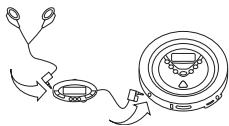
- Headphone jack
- STOP button
-
SKIP button
-
MODE button
-
EQ/PROG button
-
VOLUME
-
SKIP button
-
PLAY/PAUSE button
- LCD display
- Slide HOLD
- ALBUM/ESP/10+ button
Stop playback
Skip backwards to the beginning of the song/fast search backwards
Select playback mode
Activate the equaliser function/program your own
combination of songs
Volume regulation
Skip forwards to the beginning of the song/
fast search forwards
Start CD playback/pause
Liquid crystal display
Switch key lock on/off
Select catalogues with MP3 CDs/activate the electronic digital anti-shock system/skip over 10 songs when searching for songs (only available with MP3 CDs)
LCD displays
- PROG Display when playing programmed combination of songs
- SHUFF Display when shuffling
- INTRO Display when introduction function is activated
- MP3 Display when playing an MP3 CD
- CD Display when playing conventional CDs
- HOLD Display when the HOLD function is activated (key lock)
- REPT 1 Display when repeating playback of one song
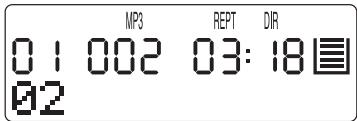
- REPT DIR Display when repeating playback of individual
songs of an album (only with MP3 CDs) - REPT ALL Display when repeating playback of all tracks on a
CD/of a programmed combination of songs - Display with low batteries
- Indicating the number of the current album
- Indicating the current song
- Indicating the time the current song has already played in minutes
- Indicating the time the current song has already played in seconds
- 1 Display of the activated ESP function
- Status line; this is the display of the information on the current song when playing MP3-CDs
Using the player
Power supply
Mains operation
Connect up the adapter for direct current to the DC IN direct current socket on the player and then put the plug into a socket (direct current).
Information on the direct current adapter
- Never touch the AC adapter when your hands are wet because there is the danger of an electrical shock.
- When the AC adapter is plugged in and batteries are in the player, battery operation is automatically switched off and the player switches to power operation.
- The shape and appearance of the plug on the illustration of the operating instructions may differ from that on the player.
Battery operation
Information on batteries
- Please always use two new batteries of the same kind when changing batteries.
- Batteries that do not satisfy the prescribed values may damage the player.
- Only charge batteries that are expressly made for that. Never attempt to open batteries. Batteries should not be exposed to greater heat and they should especially not be thrown into fire.
- Always dispose of batteries ecologically. You may obtain information on this from your local authorities.
- The player may be operated both with rechargeable NiCd batteries and conventional non-rechargeable NiMh batteries. Caution! Never charge conventional NiMh batteries. Before inserting non-rechargeable batteries, the CHARGE slide has to be in the OFF position since the player might suffer irreparable damage.
Inserting batteries
Insert the two rechargeable NiCd batteries supplied (type AA, 1.2 V) or conventional NiMh batteries (type AA, 1.5 V, non-rechargeable) into the battery compartment on the lower side of the player. Ensure that they are inserted correctly with the plus (+) and minus poles of the batteries at the marked locations.
Charging and using rechargeable batteries
Rechargeable batteries can be recharged in the player's battery compartment in about 15 hours. The rechargeable batteries supplied should be charged before using them for the first time. The same applies when the batteries have not been used over a longer period of time (more than 60 days). Furthermore, rechargeable batteries should always be completely empty before charging because their storage capacity might be reduced significantly (the memory effect).
- Open the battery compartment and insert 2 of the recommended rechargeable NiCd batteries (1.2 V - 600 mA).
- Connect the player to the power supply and then put the plug of the power supply into a socket. Switch the CHARGE slide to "ON" to start charging the batteries. If you have already inserted a CD/MP3 CD, the player starts playing automatically. Press the STOP button to stop playback. Press the STOP button twice to switch the player off. The batteries then continue to charge. The CHARGE indicator is illuminated during charging.
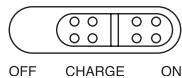
- Disconnect the player from the socket after charging for 15 hours and put the CHARGE button to OFF. Never charge longer than 18 hours continuously since this could be detrimental to battery power.
Note: You may also play CDs when charging.
- If your player's performance is drastically reduced in battery operation although the rechargeable batteries were properly charged, replace all of the batteries with new rechargeable NiCd batteries or non-rechargeable NiMh batteries.
- The playback/playing time may be reduced when charging for the first time or even after not using the player for a longer period of time. In this case, let the batteries discharge completely several times and then recharge them completely again.
Note
The symbol flashes when the batteries are weak. Replace the batteries or switch over to network operation when it flashes.
If there is no display when you press the PLAY/PAUSE button, check whether the batteries have been inserted into the player correctly. If this is the case, the batteries are empty. Change the batteries or switch over to network operation.
Caution! Please only use the AC adapter supplied for charging batteries.
General Functions
Automatic switch-on
When you press the PLAY/PAUSE button, the player is automatically switched on.
Automatic switch-off
The player is automatically switched off after 30 seconds when all of the songs on a CD have been played or you press the STOP button twice.
Digital electronic anti-shock system
The digital electronic anti-shock system is regulated by a semiconductor memory that keeps the complete sound playback from being impaired if the player is exposed to impact or vibration. In CD operation you may activate the digital electronic anti-shock system as follows:
Press the ALBUM/ESP/10+ button when the player is playing. The display shows "ESP ON". The display is removed with the symbol remaining in the display. Then the electronic anti-shock
system is activated. The digital data corresponding to a sound playback of 45 seconds is put into a read-ahead memory buffer. As soon as the memory buffer is full, which you can see on the bars in the memory display, it is overwritten with the next data (in turn also corresponding to 45 seconds of sound playback). If the player is exposed to impact in CD operation during playback, the data in the buffer are evaluated and sound playback can continue without problems. This gives the laser scanner time to stabilise and to read in new data from the CD. When the data from the memory have been captured, new data is put into the memory.
The battery power is quickly reduced by the anti-shock system being on. Therefore, if you are sure that the CD player is on a sturdy base and is not exposed to any shocks or vibration, leave the anti-shock system switched off.
In MP3 CD operation, the buffer records 120 seconds of music. The ESP function is constantly activated and cannot be switched off.
Bass Boost
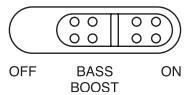
Use bass boost to improve sound playback or to amplify the bass range when using headphones.
Equaliser function
You may play music with a wide range of equaliser curves. You have a selection of POP, CLASSIC, JAZZ, DISCO and NORMAL. Each equaliser curve has its own characteristic way of intoning the treble range, mid-range and bass range. This means that you can adapt playback to a variety of music genres and your very personal habits and preferences. Press the EQ/PROG button during playback to activate the various equaliser curves. If you press the EQ/PROG button several times, you can go through the various equaliser curves and the equaliser curve selected is indicated in the display for a few seconds.
Hold mode/key lock
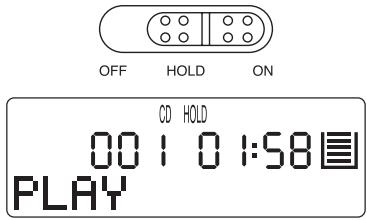
After you have entered all settings, put the HOLD slide to ON and "HOLD" appears in the display. All of the buttons are locked in this position so that you cannot play it by mistake. Push the HOLD button to OFF to deactivate key lock and the "HOLD" symbol is removed.
Conventional Audio-CDs
Playback
- When the player is turned off, you may activate it by pressing the PLAY/PAUSE button.
- First of all, turn the volume down before you plug in or unplug the headphones on the player or remote control.
- Connect up the latch plug of the headphones with the headphone jack PHONES on the player.
- Open the CD compartment with the OPEN slide.
-
Insert a CD with the labelled side upwards onto the axis in the middle of the CD compartment. Press the CD slightly until it locks noticeably onto the axis.
-
Close the CD compartment by pressing the cover down until it locks noticeably. The CD begins spinning, "READ" appears on the display and the total number of the songs and the overall playing time for the CD appears shortly on the display.
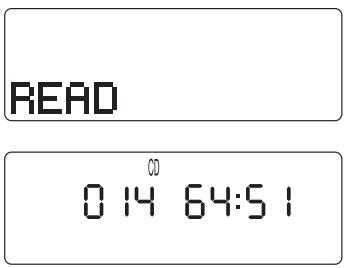
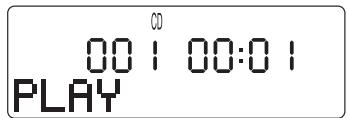
- Press the PLAY/PAUSE button to start playback; "PLAY" appears on the display. Adjust the desired volume during playback and regulate basses and trebles as required or activate the electronic anti-shock function. The time the current song has played is shown in the display during playback.
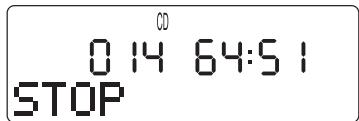
- If you wish to stop playback, press the STOP button. The total number of tracks the overall playback time is shown in the display.
- If you press the STOP button again, "POWER/OFF" is shown in the display and the player switches off.
Using the SKIP buttons
Press the SKIP button to skip forwards to the beginning of a song.
Press the SKIP button to skip backwards to the beginning of a song.
You can use fast search to find a specific place within a piece on the CD when you hold down the SKIP button during playback (forwards or backwards ). When you release the SKIP button again, playback begins at the same place in the song.
Programmed playback of CD songs
You can select up to 99 songs on a CD and program them to be played in the desired order.
- Press STOP and then the PROGRAM button.
- "PROG", the number of the first song and "P-01" are shown in the display.
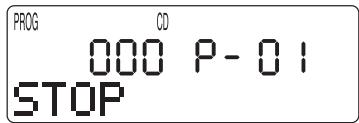
- Press the SKIP button or to select the first song for programming forwards or backwards.
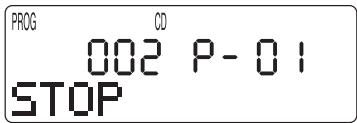
- Press the PROGRAM button again. The first song selected is now programmed and the display shows "P-02" for the second song to be programmed.
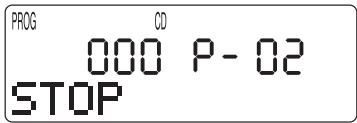
- Repeat steps 3 and 4 to program other songs.
- When you have finished programming songs, press the PLAY/PAUSE button and programmed playback starts with the first programmed song.
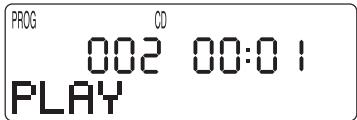
The CD player stops automatically as soon as all songs stored have been played. The selection of songs remains programmed until the CD compartment is opened or the player is switched off.
Intro Scan
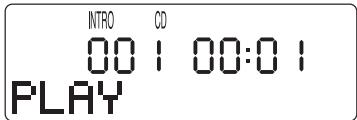
This function allows you to play the first 10 seconds of each song on a CD in order. In order to start the introduction function, press the STOP, and then the MODE button once. "INTRO" appears on the display. Now press the PLAY/PAUSE button.
Shuffle
The CD player automatically selects and plays all songs on the CD in random order with the shuffle function.
- Press the STOP and then the MODE button twice; "SHUFF" appears on the display.
- Now press the PLAY/PAUSE button to start shuffle.
Repeated playback of individual songs
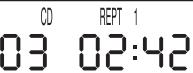
Press the MODE button once when playing a CD and "REPT 1" appears on the display. Then select a song to be played repeatedly with the SKIP buttons or . This song is then played repeatedly until the STOP or MODE button is pressed twice to change back to normal playback operation.
Repeated playback of all CD songs
Press the MODE button twice when playing a CD and "REPT ALL" appears on the display. All of the songs of the CD inserted will be repeated until the STOP or MODE button is pressed once to change back to normal playback operation.
CD
REPT
ALL
003
02:45
MP3 CDs
Note: The read in/scanning times are somewhat longer due to the greater memory capacity of MP3 discs.
Playback
- Open the CD compartment, insert the MP3 CD correctly, close the CD compartment and press the PLAY/PAUSE button.
- "READ" appears on the display and the player now reads in the information from the MP3 CD and shows it as follows:
READ
MP3
14 0156国
ISB-07
MP3
0100100:15国
SUPE
Selecting songs
You may select the desired song in MP3 operation in the same fashion as when playing conventional CDs with the SKIP buttons (forwards/backwards).
When selecting various songs from various catalogues, please select the catalogue prior to selecting the desired song from the catalogue. Then proceed as follows:
- Keep the ALBUM/ESP/10+ button pressed down and the first catalogue of the CD is shown in the display.
- Select the desired catalogue with the SKIP buttons or .
- Then press the PLAY/PAUSE button; the first song of the selected catalogue is shown in the display and playback starts.
You can select other songs in the desired catalogue with the SKIP button (forwards/backwards).
Repeated playback of individual songs
Repeated playback of the entire CD
Introduction function
Shuffle
Proceed in the same fashion to activate these functions as with conventional CDs (refer to the corresponding sections in the chapter on conventional CDs).
Repeated playback of songs in a catalogue
Press the MODE button during playback twice to repeatedly play all songs of the current catalogue. "REPT DIR" appears in the display.
Programmed playback
- Press the STOP and then the EQ/PROG button.
- Select the desired catalogue with the SKIP buttons (forwards/backwards).
- Press the EQ/PROG button again.
- Select the desired song in the desired catalogues with the SKIP buttons (forwards/backwards) and program it by pressing the EQ/PROG button again.
- Repeat the steps described above to program the other songs. You may program up to 99 songs in any order.
- When you have programmed all desired songs, start playback with the PLAY/PAUSE button.
After all programmed songs have been played, the player automatically changes into STOP mode. The songs you programmed remain in the memory until the CD compartment is opened or the player is switched off by pressing the STOP button again.
Searching for songs according to names
With MP3-conditions, you may search for songs by entering their names. You may only enter a maximum of 8 characters (letters or numbers). Before searching for songs, you should find out whether the name of the artist or the song title was stored first on the MP3 CD to identify the songs. Then either enter eight letters/numbers of the artist's name or eight letters of the song title.
- Press the STOP button and keep the MODE button pressed until "SONG SEARCH" appears in the display.
- Select the initial of the song you are searching for with the SKIP buttons (forwards/backwards) when the letter A appears on the display. You may also enter numbers.
- Press the MODE button to select the letter. Then a second letter is shown in the display. Proceed as described to select the second letter or second number. Press the STOP button to go back to the previous letter.
- After you have entered the song title or artist's name, press the PLAY/PAUSE button and your input is compared with the names stored on the MP3 CD. If it finds the song, it is automatically played back. If it finds several songs, it plays the first song it finds. If it does not find it, the display shows "NOT FOUND".
Remote control
You may use the following functions of the player with the remote control supplied: PLAY/PAUSE, STOP, SKIP (forward/back), MODE, ALBUM/ESP/10+, EQ/PROG, HOLD, volume. Furthermore, you can connect the headphones up to remote control.
Line-out jack
You may record music on another player with the line-out jack on the player by connecting the wire supplied with the line-out jack of the CD player and the input jack of a recorder (such as a cassette recorder).
If you would like to connect your MP3 CD player to another player to use its loudspeakers for playing music (for instance, your hi-fi player), you have to connect the wire supplied with the line-out jack of the CD player and the input jack (AUX/CD INPUT, etc.) to the player.
Cleaning the scanning lens
If there is dust on the scanning lens of the CD player, this may lead to malfunctions, especially tone disturbances during playback. If the scanning lens is soiled (for instance, with dust), you may clean it with a cleaner as used for cameras and accessories. Do not touch the scanner with your hands.
Cleaning the housing
Use a soft slightly moistened cloth for cleaning. Never use chemicals such as benzene, thinner, or similar things that could damage the finish. Please ensure that no liquid gets inside of the player.
Declaration of conformance
We, Kompernaß Handelsgesellschaft mbH, Burgstr. 21, D-44867 Bochum, Germany, herewith declare this product to be in conformance with all applicable international standards, safety requirements and the EC directives.
Type: KH 4438
Bochum, 31.10. 2002
Hans Komperr
- Managing Director -