
STEAMVAC SPOTTER - Portable carpet cleaner HOOVER - Free user manual and instructions
Find the device manual for free STEAMVAC SPOTTER HOOVER in PDF.


| Product Type | Portable Carpet Cleaner |
| Brand | HOOVER |
| Model | STEAMVAC SPOTTER |
| Power Supply Voltage | 120 V ~, 60 Hz |
| Clean Solution Tank Capacity | 1 gallon (4.5 liters) |
| Recovery Tank Capacity | Up to 1 gallon (4.5 liters) (auto shut-off) |
| Brush Type | Removable brushes |
| Agitator Speed | HI (high), LO (low), OFF (off) |
| Brush Rotation Indicator | Yes, visual indicator |
| On/Off Pedal | Yes |
| Handle Release Pedal | Yes |
| Liquid Pickup Function | Yes, for spills (max 6 mm depth) |
| Recommended Detergent Type | HOOVER Carpet and Upholstery Detergent |
| Filter | Yes, filter in recovery tank |
| Warranty | 1 year (parts and labor) |
| Included Accessories | Upper handle section, bolts, nuts, detergent |
| Use | Indoor, on carpets and upholstery |
| Grounding | Yes, 3-prong plug |
| Storage | Cord hooks, empty tanks |
Frequently Asked Questions - STEAMVAC SPOTTER HOOVER
User questions about STEAMVAC SPOTTER HOOVER
0 question about this device. Answer the ones you know or ask your own.
Ask a new question about this device
Download the instructions for your Portable carpet cleaner in PDF format for free! Find your manual STEAMVAC SPOTTER - HOOVER and take your electronic device back in hand. On this page are published all the documents necessary for the use of your device. STEAMVAC SPOTTER by HOOVER.
USER MANUAL STEAMVAC SPOTTER HOOVER
Deep cleans carpet fibers by applying hot tap water and cleaning solution.
Model number
Serial number
(Located on the data label on the back of the handle.)
Review these instructions before operating cleaner
Index
Important safeguards ....1
Assembling 2-4
How to use ....5-9
After cleaning....7
Agitator speed selector......5
Before you begin 7
Brush indicator ....5
Cleaning carpet 9
Description......4
Emptying the recovery tank .....6-7
Filling the clean solution tank.....5-6
Picking up spills ....8
If you have a problem......8
Lubrication 9
Service 9
© 1995,1996,2001 The Hoover Company


Important Safeguards!
When using an electrical appliance, always follow
basic precautions, including the following:
READ ALL INSTRUCTIONS BEFORE USING THIS APPLIANCE
WARNING:
To reduce the risk of fire, electric shock, or injury:
- Use indoors only.
- Use only on surfaces moistened by the cleaning process or small spills. Do not immerse product.
- Connect to a properly grounded outlet only. See "Grounding Instructions".
- Do not clean over floor electrical outlets.
- Do not use without tanks in place.
- Use extra care when cleaning on stairs. Do not place cleaner on stairs.
- Use cleaner only for its intended use as described in the instructions.
- The use of an extension cord is not recommended. If an extension cord is absolutely necessary, use at least a 16 gauge 3-wire cord which has a 3-prong grounding type plug and a 3-pole receptacle that accepts the machine plug.
- Unplug cleaner when not in use. Turn off all controls before unplugging. Always disconnect cord from electrical outlet before servicing the deep cleaner.
- Do not unplug by pulling on cord. To unplug, grasp the plug, not the cord. Never handle plug or appliance with wet hands.
- Do not pull or carry by cord, use cord as a handle, close door on cord or pull cord around sharp edges or corners. Do not run appliance over cord. Keep cord away from heated surfaces.
- Do not use with damaged cord or plug. If appliance is not working as it should, has been dropped, damaged, left outdoors, or dropped into water, take it to a Hoover Factory Service Center or Authorized Hoover Commercial Warranty Service Distributor.
- Close supervision is necessary when any appliance is used by or near children. Do not allow cleaner to be used as a toy or to run unattended at any time.
- Use only commercially available floor cleaners intended for machine application. Do not use any type of wax with deep cleaner.
- When using detergents and other cleaners with this machine, be certain the area is well ventilated.
- Keep detergents and other cleaners out of children's reach.
- Do not use to pick up flammable or combustible liquids such as gasoline or use in areas where they may be present.
- Do not pick up chlorine bleach, drain cleaner, gasoline or any other toxic material with this appliance.
- Do not pick up anything that is burning or smoking, such as cigarettes, matches, or hot ashes.
- Avoid picking up hard, sharp objects with the cleaner. They may damage the machine.
- Keep hair, loose clothing, fingers, feet and all parts of body away from openings and moving parts. Do not operate deep cleaner in bare feet or when wearing open toe shoes or sandals.
- Do not put any object into openings. Do not use with any opening blocked; keep free of dust, lint, hair, and anything that may reduce air flow.
- Avoid contact with carpets until they are dry. Keep children and pets away from carpets until they are completely dry.
- Store in a dry place. Do not expose machine to freezing temperatures.
Save these instructions!
Grounding Instructions
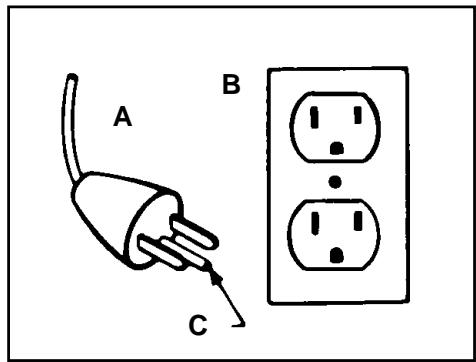
This appliance must be grounded. If it should malfunction or breakdown, grounding provides a path of least resistance for electrical current to reduce the risk of electric shock. This appliance is equipped with a cord having an equipment-grounding conductor (C) and grounding plug (A). The plug must be plugged into an appropriate outlet (B) that is properly installed and grounded in accordance with all local codes and ordinances.
DANGER-
Improper connection of the equipment-grounding conductor can result in the risk of electric shock. Check with a qualified electrician or service person if you are in doubt as to whether the outlet is properly grounded. Do not modify the plug provided with the appliance - if it will not fit the outlet, have a proper outlet installed by a qualified electrician. This appliance is for use on a nominal 120 volt circuit and has a grounding plug that looks like the plug (A) illustrated in the sketch.
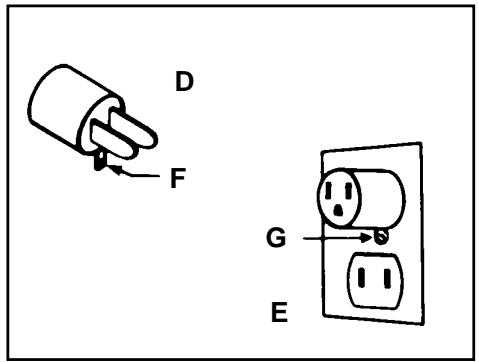
A temporary adapter (D) may be used to connect this plug to a 2-pole receptacle (E) if a properly grounded outlet is not available. The temporary adapter should be used only until a properly grounded outlet (B) can be installed by a qualified electrician. The green colored rigid ear, lug, or the like (F) extending from the adapter must be connected to a permanent ground such as a properly grounded outlet box cover. Whenever the adapter is used, it must be held in place by a metal screw (G).
NOTE: In Canada, the use of a temporary adapter is not permitted by the Canadian Electrical Code.
1. Assembling
Carton Contents
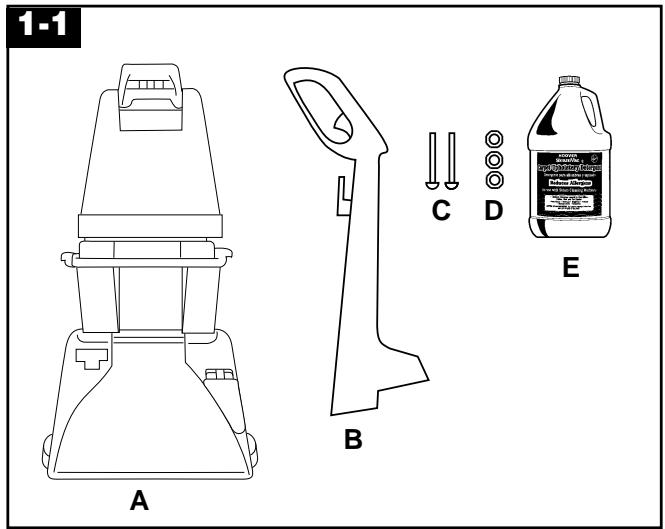
Unpack the cleaner from the carton and identify the parts shown. Remove and dispose of the packing.
A. Spotter/carpet cleaner B. Upper handle C. Bolts (2) D. Nuts (3 - one extra included) E. Carpet/Upholstery Detergent
Attach upper handle
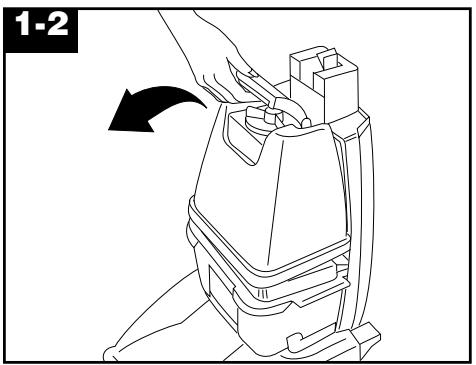
Remove clean solution tank (upper tank).
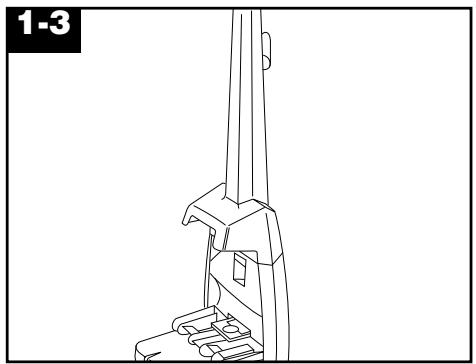
With cord hook to back of cleaner, push upper handle down onto lower handle.
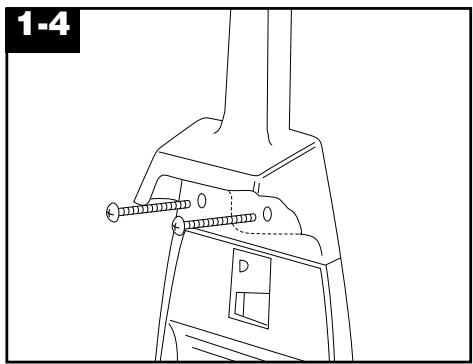
Push bolts into holes on front of handle. If bolts will not go through hole easily, handle is not pushed completely down.
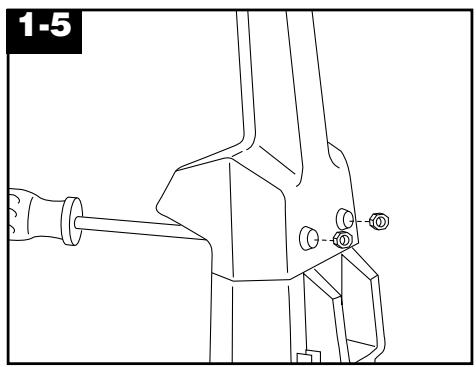
Place nuts in recessed areas on back of handle. Hold each nut in place while tightening each bolt securely with a Phillips screwdriver.
Only two nuts are needed on this model. The extra nut is not required but has been provided for your convenience.
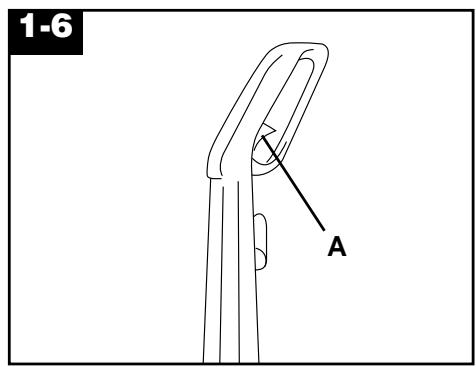
When handle sections are completely together, squeeze trigger (A) on upper handle to snap trigger rod in place.
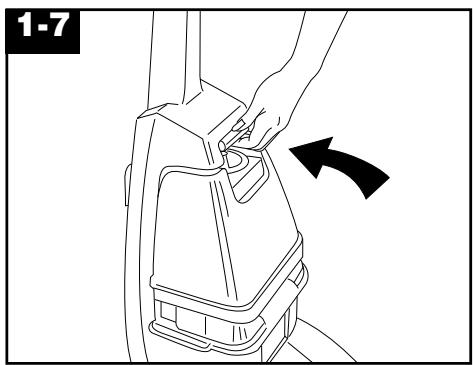
Replace clean solution tank (upper tank) by positioning bottom first. Press on tank handle to snap top of tank into place.
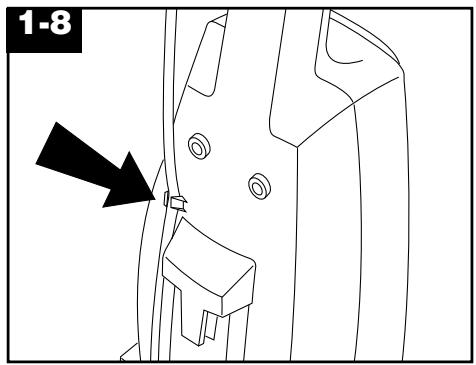
Press cord into cord clip on back of handle.
Pull cord tight.
2. How to use
Description
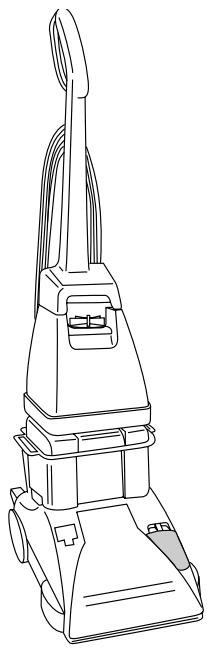
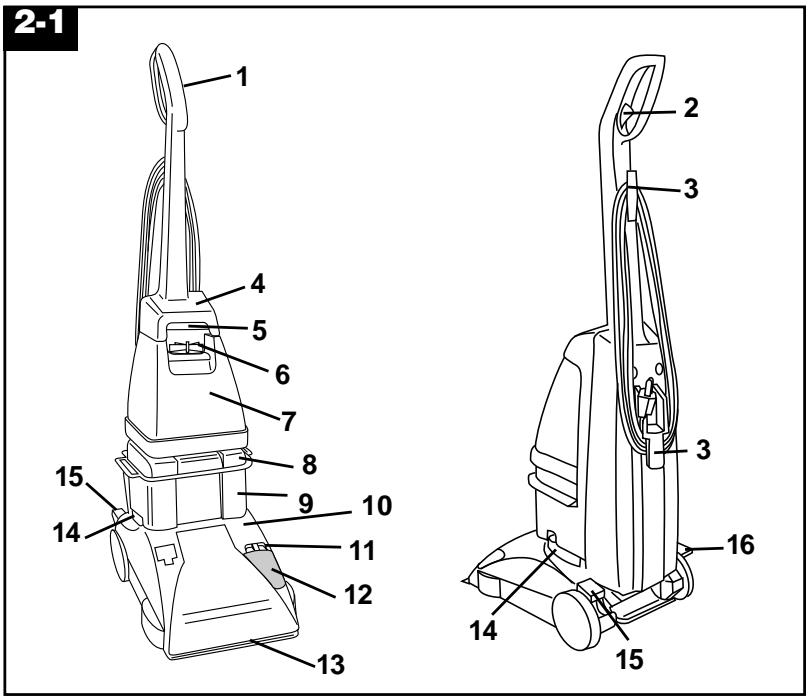
The assembled spotter/carpet cleaner will look like the drawing.
- Hand grip
- Solution trigger: press to release clean solution.
- Cord hooks: wrap cord around hooks for storage.
- Carrying handle
- Clean solution tank handle
- Clean solution tank cap/ measuring cup
- Clean solution tank: holds cleaning solution.
- Recovery tank lid
- Recovery tank: holds dirty solution.
10. Hood
- Agitator speed selector: slide selector to set brush speed on HI, LO, or OFF.
- Brush indicator: spins when brushes are rotating.
- Nozzle
- Recovery tank latches: one on each side of tank.
- ON/OFF pedal
- Handle release pedal: step on pedal to lower handle to operating position.
Operate deep cleaner only at voltage specified on data plate on back of cleaner.
ON/OFF pedal
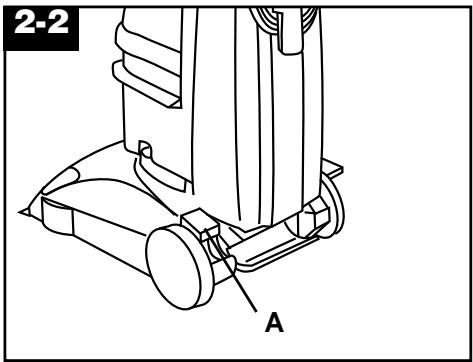
Plug spotter/carpet cleaner into a properly grounded outlet.
Step on pedal (A) to turn cleaner on. Step on pedal (A) again to turn cleaner off.
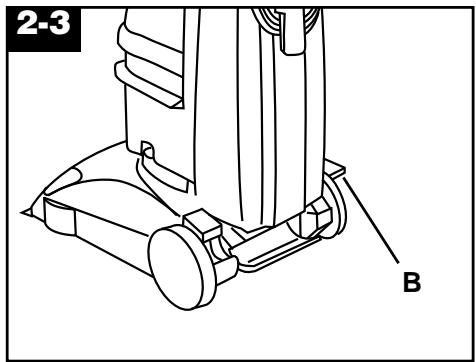
Handle release pedal
Step on pedal (B) to lower handle to operating position. Handle does not lock into a single position but “floats” to allow convenient operation.
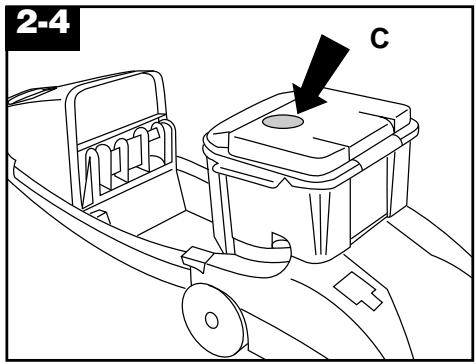
Automatic "shut-off"
When the recovery tank (lower tank) is full, the automatic “shut-off” mechanism will shut off the cleaner suction.
When this happens, the red float disk (C) will rise to the top of the recovery tank lid (see illustration). The cleaner will no longer pick up dirty solution and the motor sound will become noticeably higher in pitch.
When this happens, turn cleaner off and empty recovery tank before continuing use.
Check clean solution tank also; it may need to be refilled.
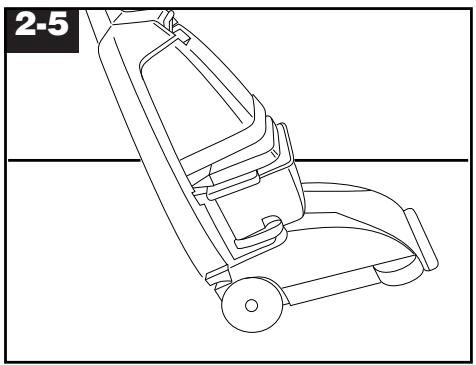
To transport
Turn cleaner off before transporting.
To move the cleaner from room to room, put handle in upright and locked position, tilt cleaner back on wheels, and push forward.

The cleaner may also be lifted by placing a hand under the upper clean solution tank handle as shown.
Agitator speed selector
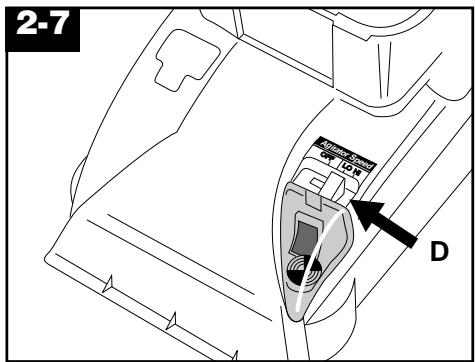
The ‘SteamVac’ cleaner has three agitator brush settings
HI - for normal cleaning of carpet.
LO - for gentle cleaning of carpet
OFF - when brushing is not desired (such as when picking up liquid spills).
Slide selector button (D) to the desired setting before cleaning.
Brush indicator
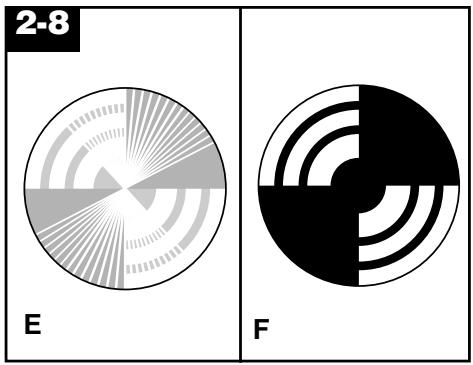
The brush indicator will spin (E) when the cleaner is turned on and the brushes are rotating.
If the indicator does not spin (F) and the pattern is visible when the cleaner is turned on, the brushes are not rotating.
There are two reasons why the brushes may not be rotating:
- Brush speed selector is turned OFF (see previous section)
- Brush indicator screen dirty
Cleaning indicator screen
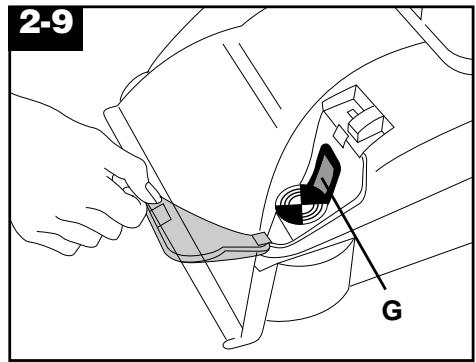
Turn cleaner off and disconnect from electrical outlet.
Remove clear cover and wipe off screen (G) with a damp cloth.
Snap cover back into position.
Tanks
Clean solution tank (upper tank)
The clean solution tank holds the cleaning solution that is to be dispersed onto the surface to be cleaned.
How to fill
Disconnect cleaner from electrical outlet.
Place cleaner handle in the upright, locked position.
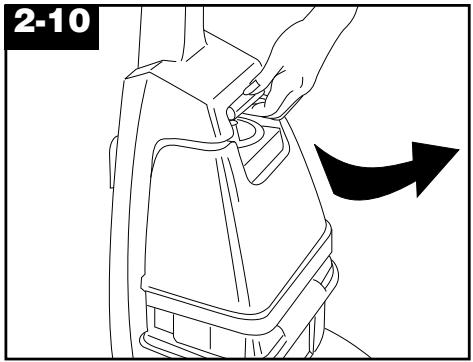
To remove tank, press down on handle and pull forward.
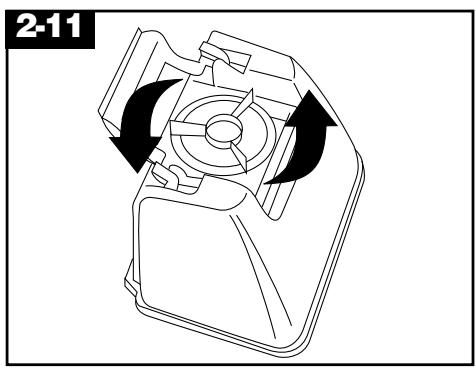
Carry tank to a sink. Rotate tank cap counterclockwise and lift up to remove cap.
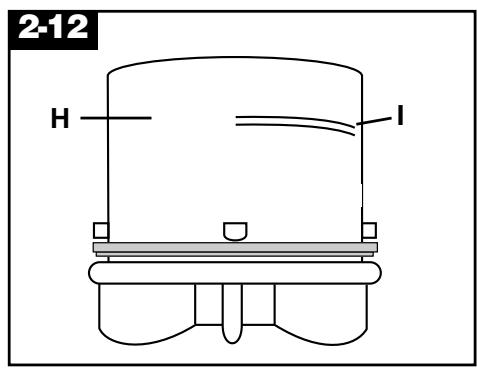
Turn cap (H) upside down to serve as a measuring cup.
Using cap, measure detergent following the chart:
For carpet,
Fill cap to fill line (I) (5 ounces) with HOOVER Carpet/Upholstery Detergent.
Do not use any type of wax with your 'SteamVac' cleaner.
To assure proper performance, it is recommended that only HOOVER detergent be used. It is specifically formulated for use with the cleaner.
CAUTION: Detergents contain Anionic and Nonionic Surfactants. Avoid contact with eyes and skin. In case of contact with eyes, flush with cold water for 15 minutes. In case of contact with skin, wash with water. If irritation persists, call a physician. For medical information (U.S.) call 1-800-752-7869.
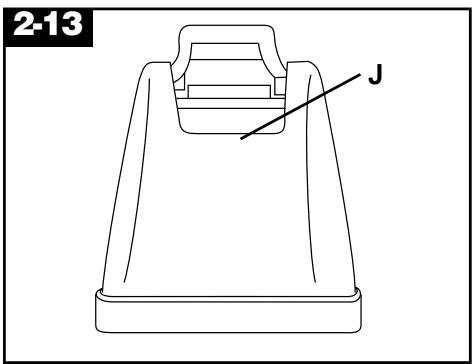
Pour detergent into tank. Fill tank to fill line (J) (1 gallon) with hot tap water.
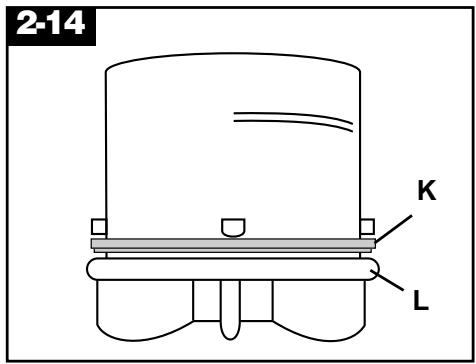
If rubber ring (K) on cap has displaced, replace it with uneven side against cap ledge (L) as shown.
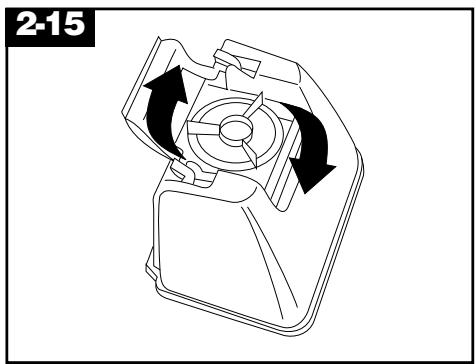
Replace cap. Rotate cap clockwise until it locks in place. Cap must be locked in place for proper performance and to prevent leaking.
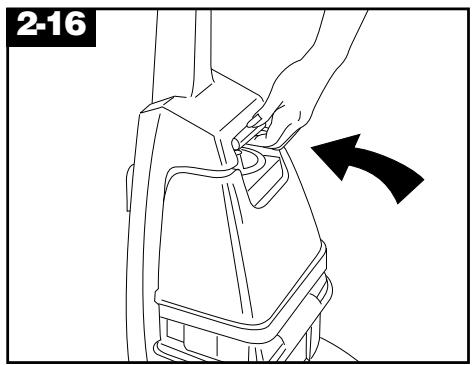
Position bottom of tank into unit and press on tank handle to snap tank into place.
Recovery tank
(lower tank)
The recovery tank holds the dirty solution that is picked up from the carpet.
When the recovery tank is full, the automatic “shut-off” will engage (see page 5) and the tank must be emptied.
How to empty
Turn cleaner off and disconnect from electrical outlet.
To prevent possible leaking, remove clean solution tank by pressing down on tank handle and pulling forward; set tank aside (do not set tank on furniture).
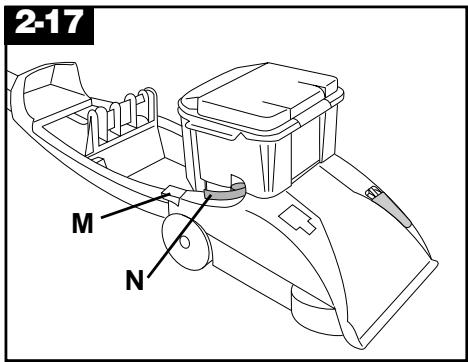
Step on handle release pedal (M) and lower handle until it rests on the floor.
Rotate recovery tank latches (N) outward (one on each side of tank).
Lift tank off of cleaner and carry it to a sink or drain.
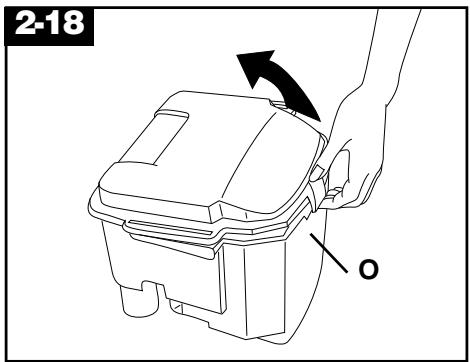
Unlatch back part of tank lid and remove lid. Empty tank. Pour dirty water out from the rear of the tank (O).
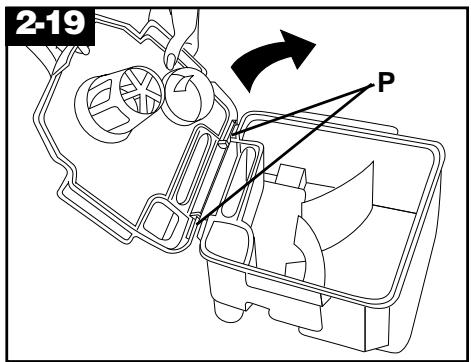
The lid replaces in a hinge-like manner. Position the front of lid under tabs (P) on front of tank. Rotate lid down onto tank. Make sure that the lid is secure on all sides before placing tank on cleaner. For full suction, it is important that the recovery tank lid is properly secured before cleaning.
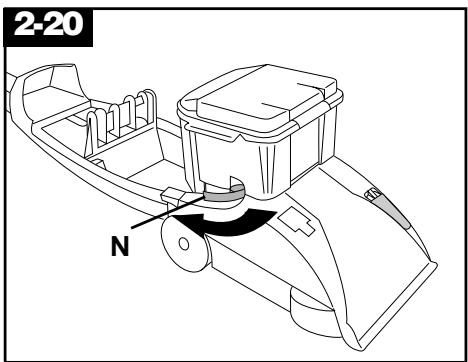
Replace tank and press down to ensure that it is properly seated in place. Rotate latches (N) (one on each side of tank) inward to lock tank in place. Raise handle to upright position and replace upper clean solution tank.
Before you begin cleaning
a. Vacuum thoroughly - For carpet, use a vacuum cleaner with an agitator for best results. Do not use the 'Steam-Vac' spotter/carpet cleaner as a dry vacuum cleaner.
b. Test for colorfastness - Mix detergent and water according to the instructions under "Fill solution tank". Wet a white absorbent cloth with the solution. In a small, hidden area, gently rub the surface with the dampened cloth. Wait ten minutes and check for color removal or bleed with white paper towel or cloth. If surface has more than one color, check all colors.
c. When cleaning entire floor, move furniture out of area to be cleaned (may not be necessary if only high traffic areas are to be cleaned). For furniture too heavy to move, place aluminum foil or wax paper under legs. This will prevent wood finishes from staining carpet. Pin up furniture skirts and draperies.
d. Pretreat spots and heavy traffic areas with HOOVER® PreCleaner* - Test PreCleaner for colorfastness by first spraying it on a hidden area; wait ten minutes and blot with white paper towels or cloth.
If no color change is visible, spray PreCleaner onto spots and traffic areas. Wait at least ten minutes. Use your 'SteamVac' cleaner to pick up PreCleaner and spot. Repeat until spot is removed; carefully scrub with a household scrub brush if necessary. Do not saturate carpet or upholstery with PreCleaner.
*Available at additional cost.
e. To prevent staining - use plastic or aluminum foil to protect wood or metal surfaces from possible water spray. f. To avoid wetting and possible damage to wood floors underneath area rugs/carpet - either move area rugs/carpet to a non-wood bare floor surface or place waterproof material (e.g. plastic) underneath them before cleaning.
After cleaning
a. Allow carpet to dry. To help prevent matting and resoiling the carpet, keep children and pets away from carpet until it is completely dry.
If it is necessary to walk on damp carpet, place towels or white cloths on the traffic areas.
If furniture must be replaced before the carpet is dry, use plastic or aluminum foil pads under legs of furniture so metal slides or wood finishes will not stain the carpet.
b. If desired, the carpet may be rinsed. Rinsing is not necessary for cleaning, but it may improve the surface's appearance after it is dry.
If rinsing is desired, be careful not to over-wet the carpet. Allow time for carpet to dry completely between cleaning and rinsing. To rinse, follow the same procedure for cleaning only using hot tap water with no detergent in the upper clean solution tank.
c. Empty tanks, rinse with clear water and let air dry.
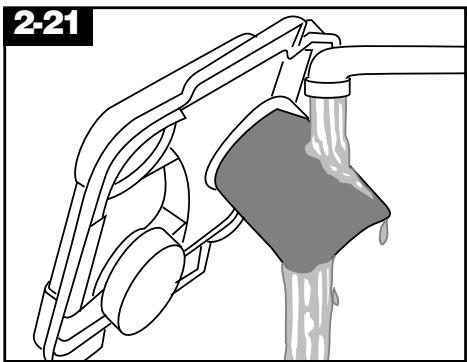
d. Remove debris from recovery tank filter and rinse with clean water. Note: If the filter must be removed for cleaning, it is easier to replace if the filter is wet. e. If desired, vacuum thoroughly after carpet has completely dried. This will help reduce any shading left by the cleaner's brushes.
To clean nozzle
If lint or other debris becomes lodged in the nozzle, do not attempt to remove nozzle cover.
Pour one to two cups of clear water on a non-carpeted floor. Do not pour water onto a wood floor.
Pick-up the water with the spotter/carpet cleaner. Repeat as necessary until debris is flushed out of nozzle.
To clean the outside of the machine, wipe off dirt with a cloth dampened in warm water and mild detergent. Do not use solvent or petroleum based products to clean the machine.
Removable brushes
Your deep cleaner is equipped with removable brushes for easy cleaning.
To remove brushes
Disconnect cleaner from electrical outlet.
To prevent possible leaking, remove the clean solution tank and recovery tank. Set the tanks aside.
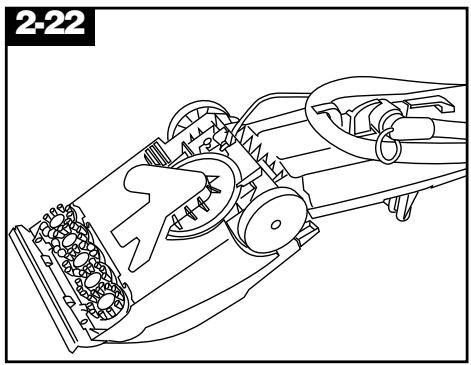
Press the handle release pedal to lower the handle. Turn the cleaner over so the bottom is facing up.
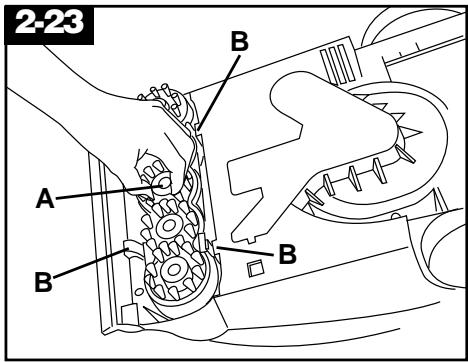
Grasp the inner portion of the brush (A) and pull the brush assembly out slightly to reveal the latches (B).
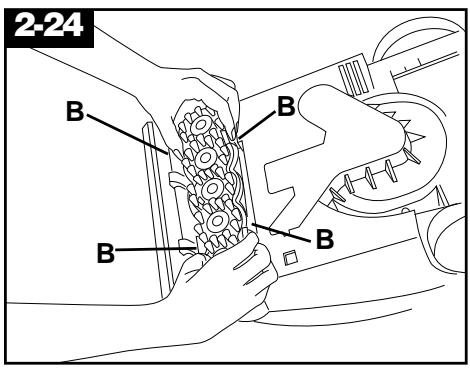
Press all four latches (B) and pull the brush block out. The brushes can be cleaned under running water.
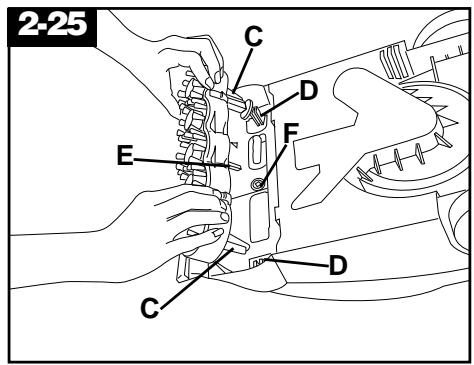
To replace the brushes
Align the posts (C) on both ends of the brush assembly with the slots (D) in the cleaner housing.
Make sure that the square post (E) also aligns with the square hole (F). Turn the brushes slightly until the post fits easily into the hole.
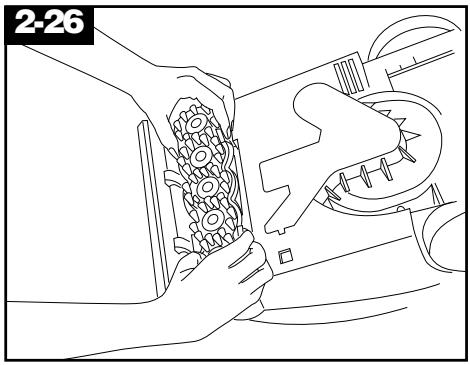
Press the brush assembly firmly to snap it into place.
Cleaning carpet
Read the "Before you begin cleaning" instructions.
Fill the clean solution tank (upper tank) according to the instructions for Fig. 2-10 through 2-16.
Move the speed selector to LO for gentle cleaning or HI for normal cleaning.
Dry your hands and plug the cord into a properly grounded outlet.
Do not clean over floor electrical outlets.
To avoid walking on damp carpet, start at the end of the room farthest from the door or path to the sink where the tanks will be emptied and filled.
Step on the handle release pedal and lower the handle to the operating position; turn the cleaner ON.
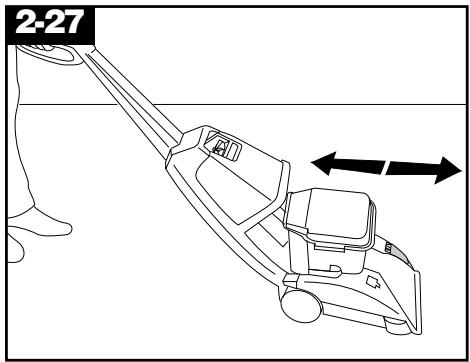
Squeeze the trigger to release cleaning solution and slowly push the cleaner forward (this equals one wet stroke). Continue to squeeze the trigger and slowly pull the cleaner back toward you (second wet stroke).
Release the trigger and slowly push the cleaner forward over the area just sprayed with solution (dry stroke). Then slowly pull the cleaner back toward you without squeezing the trigger (dry stroke).
Overlap strokes by one inch to help prevent streaking.
Keep the nozzle flat on the floor for both forward and reverse strokes.
For heavily soiled areas, repeat. To avoid saturating the carpet, do not use more than 4 wet strokes over one area. Always end with dry strokes.
It is best to alternate wet and dry strokes as described above.
For best cleaning results and to aid in faster drying of the carpet, end with more dry strokes. (Continue using dry strokes until little water is visible passing through the recovery tank lid.)
Empty the recovery tank when the motor sound becomes higher pitched and there is a loss in suction (see Fig. 2-4).
When finished cleaning, follow the “After cleaning” instructions.
Picking up spills
The HOOVER ‘SteamVac’ spotter/carpet cleaner may be used to pick up small liquid spills (1 gallon or less, never to exceed 1/4 inch in depth) on carpet.
Place the floor nozzle with brushes turned OFF in front of the spill. Pull the nozzle very slowly over the spill initially with suction only. Repeat with spray and suction. Although no cleaning solution can completely remove all spots, they can be treated by following the instructions provided by the manufacturer of the carpet being cleaned.
Do not use the cleaner to pick up flammable or combustible liquids or chemicals.
When finished cleaning, follow the “After cleaning” instructions.
Storage
Before storing:
- Empty solution tank and rinse thoroughly with clean water.
- Replace empty solution tank and turn cleaner ON. Squeeze trigger and push cleaner forward and back several times to expel any solution remaining in the cleaner's system. (Do not use cleaner on wood floors.)
- Empty recovery tank and rinse thoroughly with clean water.
Allow brushes and underside of cleaner to air dry thoroughly before storing cleaner on a carpeted or wood surface.
Do not store cleaner with a full solution tank in place.
3. If you have a problem
If a minor problem occurs, it usually can be solved quite easily when the cause is found by using the check list below.
Problem: Machine won't run
Possible cause
Possible solution
- Not firmly plugged in
- Plug in firmly
- No voltage in wall plug
- Check fuse or breaker
- Blown fuse/tripped breaker
- Replace fuse/reset breaker
Problem: Suction low
Possible cause
Possible solution
- Recovery tank lid not on correctly.
- Make sure lid is on securely.
- Recovery tank full/automatic shut off engaged.
- Remove and empty recovery tank.
Problem: Clean solution won't dispense
Possible cause
Possible solution
- Solution tank not firmly in place.
- Make sure tank is securely locked in position.
- Solution tank empty.
- Refill tank according to instructions for surface being cleaned.
- Recovery tank lid not on correctly. • Make sure lid is firmly in place.
Problem: Brushes/brush indicator won't rotate during floor cleaning
Possible cause
Possible solution
- Indicator screen dirty.
- Remove clear cover over indicator and clean screen. Replace cover
- Speed selector on OFF.
- Move speed selector to LO or HI.
Service
To obtain approved HOOVER service and genuine HOOVER parts, locate the nearest Hoover Factory Service Center or Authorized Hoover Warranty Commercial Service Distributor by:
- checking the Yellow Pages under “Vacuum Cleaners - Industrial & Commercial” OR -
- checking the list of Factory Service Centers provided with this cleaner OR -
- calling 1-800-944-9200 for an automated referral of authorized service outlet locations (U.S. only).
Please do not send your cleaner to The Hoover Company in North Canton for service; this will only result in delay.
If further assistance is needed, contact The Hoover Company Consumer Response Center, North Canton, Ohio 44720. Phone: 1-330-499-9499.
In Canada, contact Hoover Canada, Burlington, Ontario L7R 4A8. Phone: 1-800-263-6376.
Always identify your cleaner by the complete model number when requesting information or ordering parts. (The model number appears on the back of the cleaner handle.)
Lubrication
The motor is equipped with bearings that contain sufficient lubrication for the life of the motor. The addition of lubricant could cause damage. Do not add lubricant to motor bearings.
HOOVER Commercial/Industrial Products Warranty
Your HOOVER Commercial Product is warranted against original defects in material and workmanship for a period of one year from the date of purchase. This warranty covers only labor and parts to place this product in correct operating condition and does not cover any other damages, including consequential damages. This warranty does not apply to damage or malfunction caused by misuse, abuse, negligence, accident, or damage due to transport. This warranty applies when the appliance is purchased in the United States, including its territories and possessions, or in Canada, or from a U.S. Military Exchange. Appliances purchased elsewhere are covered by a limited one-year warranty that covers the cost of parts only.
Certain parts for your HOOVER Commercial Product require replacement in the ordinary course of use due to normal wear. These include belts, agitator roll sleeves, agitator bearings, brushes, bags, bulbs, etc. These parts are not covered by this warranty.
Warranty service on this product can be obtained only from a Hoover Factory Service Center (see the present listing on the opposite side of this warranty) or an Authorized Hoover Commercial Warranty Service Distributor. This warranty does not cover pickup, delivery, or transportation to or from a Service Center or Service Distributor. Proof of purchase may be required before service is rendered.
This warranty does not cover defects or damages caused by repair or alteration by anyone other than a Hoover Factory Service Center or an Authorized Hoover Commercial Warranty Service Distributor. The Hoover Company reserves the right to inspect any alleged defective product and make final decisions on any warranty claim.
If there are any questions concerning this warranty or the availability of warranty service outlets, write or phone the Consumer Response Center, The Hoover Company, 101 East Maple Street, North Canton, Ohio 44720. Phone: (330) 499-9499.
In Canada, contact Hoover Canada, Burlington, Ontario L7R 4A8, 1-800-263-6376.
HOOVER®
Quitamanchas/Limpia dor de Alfombras
SteamVac™
Commercial
are registered trademarks
- REVIEW THESE INSTRUCTIONS BEFORE OPERATING CLEANER
- INDEX
- IMPORTANT SAFEGUARDS
- WARNING
- SAVE THESE INSTRUCTIONS
- GROUNDING INSTRUCTIONS
- DANGER
- ASSEMBLING
- CARTON CONTENTS
- HOW TO USE
- DESCRIPTION
- ON/OFF PEDAL
- HANDLE RELEASE PEDAL
- AUTOMATIC "SHUT-OFF
- TO TRANSPORT
- TURN CLEANER OFF BEFORE TRANSPORTING
- AGITATOR SPEED SELECTOR
- BRUSH INDICATOR
- IF THE INDICATOR DOES NOT SPIN (F) AND THE PATTERN IS VISIBLE WHEN THE CLEANER IS TURNED ON, THE BRUSHES ARE NOT ROTATING
- CLEANING INDICATOR SCREEN
- TANKS
- CLEAN SOLUTION TANK (UPPER TANK)
- HOW TO FILL
- DISCONNECT CLEANER FROM ELECTRICAL OUTLET
- FOR CARPET
- DO NOT USE ANY TYPE OF WAX WITH YOUR 'STEAMVAC' CLEANER
- RECOVERY TANK
- (LOWER TANK)
- HOW TO EMPTY
- TURN CLEANER OFF AND DISCONNECT FROM ELECTRICAL OUTLET
- BEFORE YOU BEGIN CLEANING
- AFTER CLEANING
- TO CLEAN NOZZLE
- REMOVABLE BRUSHES
- TO REMOVE BRUSHES
- TO REPLACE THE BRUSHES
- CLEANING CARPET
- PICKING UP SPILLS
- DO NOT USE THE CLEANER TO PICK UP FLAMMABLE OR COMBUSTIBLE LIQUIDS OR CHEMICALS
- STORAGE
- IF YOU HAVE A PROBLEM
- PROBLEM: MACHINE WON'T RUN
- POSSIBLE CAUSE
- PROBLEM: SUCTION LOW
- PROBLEM: CLEAN SOLUTION WON'T DISPENSE
- PROBLEM: BRUSHES/BRUSH INDICATOR WON'T ROTATE DURING FLOOR CLEANING
- SERVICE
- LUBRICATION
- HOOVER COMMERCIAL/INDUSTRIAL PRODUCTS WARRANTY
- HOOVER®
- QUITAMANCHAS/LIMPIA DOR DE ALFOMBRAS
- STEAMVAC™
- COMMERCIAL
Brand : HOOVER
Model : STEAMVAC SPOTTER
Category : Portable carpet cleaner