
HCM-1100D - Coffee machine Heinner - Free user manual and instructions
Find the device manual for free HCM-1100D Heinner in PDF.


| Product Type | Coffee Machine |
| Brand | Heinner |
| Model | HCM-1100D |
| Dimensions (W x D x H) | 250 x 200 x 300 mm |
| Weight | 2.2 kg |
| Power Source | 220-240 V ~ 50/60 Hz |
| Rated Power | 1000 W |
| Water Tank Capacity | 1.2 L |
| Number of Cups | Up to 12 cups |
| Brewing System | Drip coffee maker |
| Filter Type | Permanent filter (reusable) |
| Keep Warm Function | Yes, automatic keep warm for 2 hours |
| Anti-Drip Valve | Yes, allows removing carafe mid-brew without dripping |
| Carafe Material | Glass with heat-resistant handle |
| Water Level Indicator | Yes, transparent tank with markings |
| Control Type | Push button with indicator light |
| Auto Shut-off | Yes, after brewing cycle completes |
| Descaling Indicator | No indicator, but recommended every 2 months |
| Cleaning | Removable filter basket and carafe are dishwasher safe |
| Safety Features | Overheat protection, automatic power off |
| Spare Parts Available | Carafe, filter basket, water tank |
| Repairability Index | Moderate; most parts replaceable |
| Included Accessories | Measuring spoon, instruction manual |
Frequently Asked Questions - HCM-1100D Heinner
User questions about HCM-1100D Heinner
0 question about this device. Answer the ones you know or ask your own.
Ask a new question about this device
Download the instructions for your Coffee machine in PDF format for free! Find your manual HCM-1100D - Heinner and take your electronic device back in hand. On this page are published all the documents necessary for the use of your device. HCM-1100D by Heinner.
USER MANUAL HCM-1100D Heinner
- Cafetiera digitala
- Capacitate: 1.5 l
- Putere: 900 W
- Culoare: Negru
VI. INSTRUCTIUNI DE UTILIZARE
Inaintea primei utilizari:
Copyright © 2013 Network One Distribution. All rights reserved.
http://www.heinner.com, http://www.nod.ro
CE
• Digital coffee maker
- Capacity: 1.5 L
- Color: Black
- Power: 900 W
Thank you for purchasing this product!
I. INTRODUCTION
Before using the appliance, please read carefully this instruction manual and keep it for future reference.
This instruction manual is designed to provide you with all required instructions related to the installation, use and maintenance of the appliance.
In order to operate the unit correctly and safety, please read this instruction manual carefully before installation and usage.
II. CONTENT OF YOUR PACKAGE
Digital coffee maker
User manual
Warranty card
i
III. SAFETY PRECAUTIONS
Attention! When using electrical appliances should always follow these basic precautions:
- Please carefully read the instruction manual before using the machine.
- This product is for household use only. Do not use for industrial purposes.
- Before connecting the coffee outlet, make sure the power supply is in correspondence with the information on the label.
- To avoid fire, electric shock and other injuries, do not immerse the power cord in water or other liquids.
- Please unplug from outlet when not in use and before cleaning.
- Do not use the machine if you notice damage to the electric cord.
- Do not use the appliance outdoors.
- Do not let cord hang over edge of table or come into contact with hot surfaces.
- When you want to unplug the appliance, pull the plug, not the cord.
- Return the defective product to the service center. The product should be repaired only by qualified persons.
- Use the device with attention to because steam will not burn.
- Do not touch hot surfaces.
- There cup placed on electric cookers / hobs / ovens for heating.
- Do not clean the detergent cup with cleaning cloth, steel fiber or other abrasives.
- Do not use another cup of coffee out of the original producer.
- Use mug with caution, as it is very fragile.
- Do not let the empty cup on the coffee maker stove heating, because it can crack /break.
- Place the machine on a flat, stable surface.
- Do not use the machine without it to have water in the container.
- Do not use the cup if you notice that the handle is loose or slack.
- If the cord is damaged, it must be replaced by the manufacturer or by the agent of service, to avoid causing accidents.
- The device should not be used by persons (including children) with physical, sensory or mental capabilities, or lack of experience or knowledge, unless they receive supervision or instruction concerning use of the appliance by a person responsible for their safety.
- Children should be supervised to ensure that they do not play with the product.
IV. PRODUCT DESCRIPTION
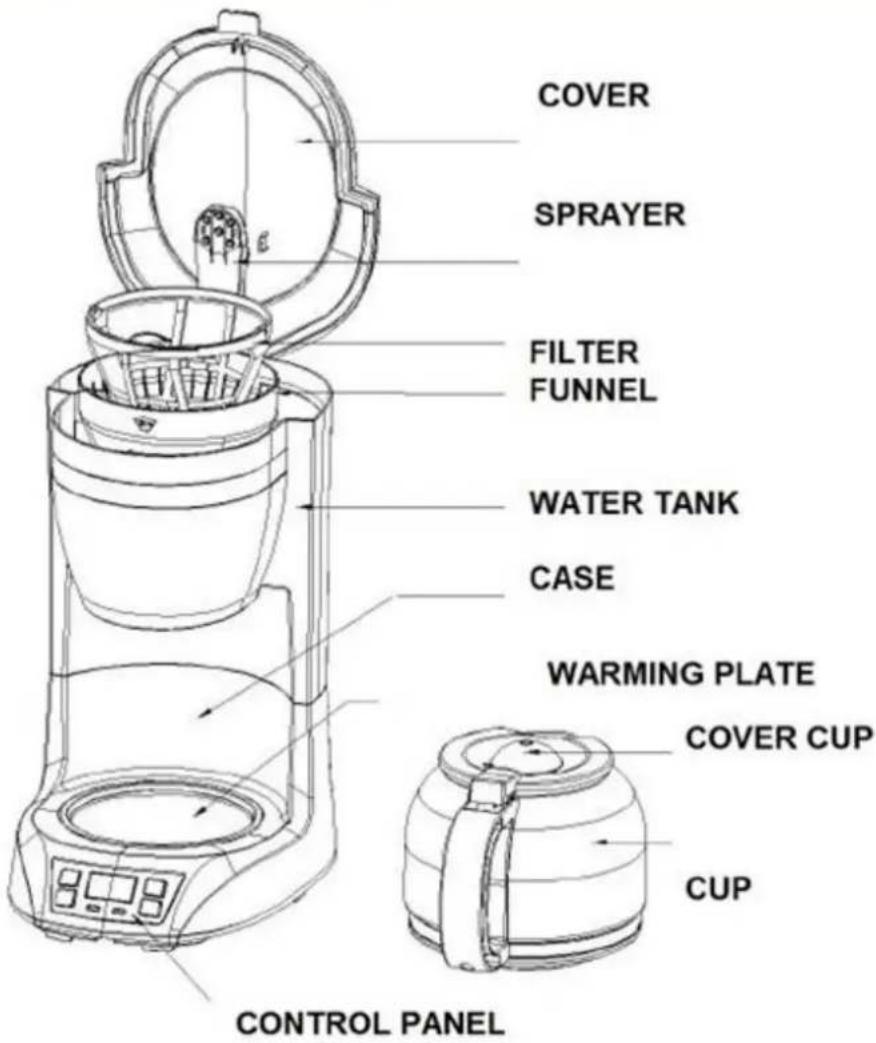
V. CONTROL PANEL
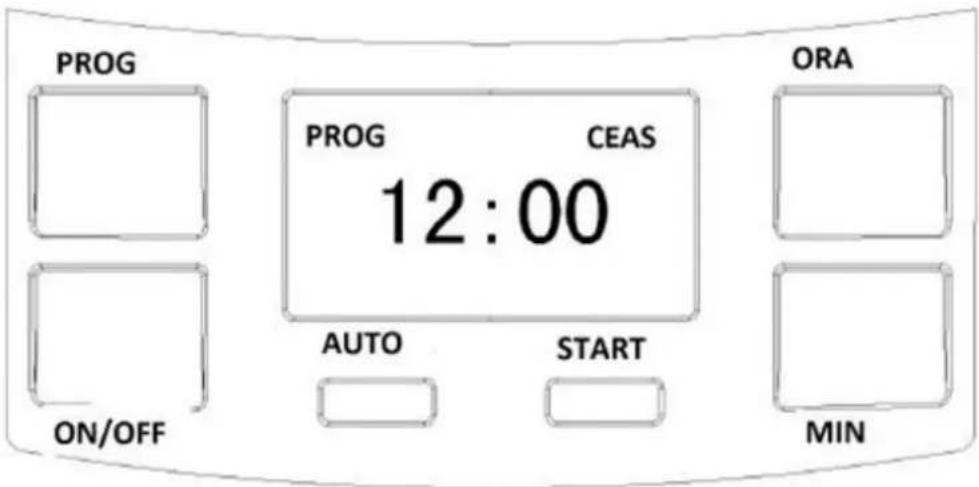
V. USING INSTRUCTION
Before the first use:
- Check that you have received all the accessories and if the unit is not damaged.
- Do not put coffee in the filter yet, add water reservoir to MAX value according to the following steps, perform this procedure once or twice and then pour the water out.
- Carefully clean bowl, lid, filter port and filter with warm water.
Making coffee immediately:
- Open the tank cover of the coffee maker, fill proper amount of water into the tank with the carafe. The water level should not exceed the MAX level.
- Add coffee ground into the filter. Usually a cup of coffee needs a leveled spoon of coffee ground, but you may adjust according to your taste properly.
- Then insert the filter in the filter port. Then place them in support of port filter and make sure they are properly assembled.
- Place the bowl on a heating plate.
- Insert the plug into the outlet, the LCD will display "12:00" (see Control Panel).
- Press the "ON / OFF" (on / off), the RUN indicator will flash red. The machine will start working.
- Brewing can be interrupted by pressing the ON / OFF 2 times. Power light goes off and the RUN indicator will not be displayed on the screen. The machine starts working again by pressing the ON / OFF.
Note: You can remove the dish and pour coffee anytime. The machine will stop automatically dropped. But time can not exceed 30 seconds.
- Do not open the reservoir cap when the coffee maker works. If you give off the hot water can damage the device.
- If you want to have coffee immediately after cooking, turn the camera off him not deconenctati outlet. The coffee will stay warm because hot plate. The maximum duration of maintaining hot coffee is 40 minutes. For a better tasting coffee, we recommend that you serve immediately after cooking.
Note: The amount of coffee that you get will be less than the water that you entered as part of the water is absorbed by the ground coffee. For your safety keep the cap closed when you pour, this will help keep coffee hot.
- Always switch off the coffee filter and remove it from the socket when not in use.
Note: Be careful when you pour the coffee, otherwise you can burn as hot freshly made coffee.
VI. AUTO START FUNCTION
If you do not want the coffee maker to start immediately, you can set automatic start function in the following way: for example, it is currently 5:10 PM, and if you want the coffee maker to start automatically at 08.15PM, follow the steps below:
- Press PROG once word clock will be displayed on the top right corner of the screen.
- Desired start time can be set by pressing the "Hour" and "MIN" to run the numbers.
Note: Cycle time is 24 hours.
- Press again "PROG" (program), and "TIMER" the (timer) will be displayed. This shows that you enter the "Set automatic start" (setting automatic start).
- Set the start time delayed by repeatedly pressing the "HOUR" and "MIN", which is 20.15 (Fig. 2).
- Press the ON / OFF twice, thereby AUTO indicator will light up. After about 10 seconds, the LCD will display the current time.
VII. MEMORY
If, during the operation of the appliance, the power supply has been interrupted or the power cord has been disconnected from electricity unintentionally, the machine will automatically continue brewing. If the pause time is more than 15 minutes, the display shows the default setting, the unit must be reprogrammed.
VIII. CLEANING AND MENTENANCE
WARNING: Make sure the machine is unplugged before cleaning. To protect against electrical shock, do not insert the power cord, plug or unit in water or any other liquid.
1) Clean all removable parts after each use in hot, soapy water.
2) Wipe the outer surface of the product with a soft damp cloth to remove stains.
3) During the cooking process can be in the form of drops of water can flow over the filter and the base of the device. To control leakage drops wipe the surface clean with a dry cloth after each usage.
4) Use a damp cloth to wipe carefully heated plate. Never use abrasive cleaners.
IX. CLEANING MINERAL DEPOSITS
To maintain efficient operation of filter coffee, you should regularly clean the mineral deposits left by water, depending on water quality in your area and frequency of usage. Proceed as follows:
- Fill the bowl with some white vinegar and three parts cold water
- Pour water and vinegar mixture in the tank, do not put ground coffee in the filter, turn on the camera and follow the "Instructions for Use", repeat the process until no longer flows out yellow liquid discard the mixture of vinegar and water, pour tap water in procestul tank and repeat until the water comes out it will not taste like vinegar.
- Press the ON / AUTO / OFF once and BREW indicator will be illuminated red. After a while the water will drop automatically.
- After filtering the equivalent of a glass, turn the power off by pressing again the ON / AUTO / OFF and BREW indicator will win over.
- Allow a 15 minute break and then repeat steps 3-5.
- Turn the camera on again by pressing the ON / AUTO / OFF and let the water in the tank to leak, this pan is completely empty needles.
- Before use, rinse at least three times.
X. TIPS FOR GETTING A GREAT COFFEE
- Cleaning the filter coffee is an essential process for getting a great coffee. Clean the machine regularly following the instructions in section "Cleaning and maintenance".
Always pour cold water and fresh coffee in the filter. - Store coffee in a cool, dry place. After opening a package of ground coffee, unsealed it well and store it in the refrigerator to maintain its freshness.
- For optimal taste of coffee, buy coffee beans and ground to a fine even before cooking.
- Do not reuse the coffee in the filter as this will significantly reduce the flavor of coffee. Reheating coffee is not recommended as it loses its flavor.
- Clean coffee filter when it becomes oily. Small drops of oil on the surface of black coffee prepared coffee is due to oil.
- This oil can occur more often if used heavily roasted coffee.
XI. TECHNICAL FICHE
| Power | 900W |
| Voltage | 220-240V, 50Hz |
| Capacity | 1.5 L |
| Color | Black |

Environment friendly disposal
You can help protect the environment!
Please remember to respect the local regulations: hand in the non-working electrical equipment's to an appropriate waste disposal center.

HEINNER is a registered trademark of Network One Distribution SRL. Other brands and product names are trademarks or registered trademarks of their respective holders.
No part of the specifications may be reproduced in any form or by any means or used to make any derivative such as translation, transformation, or adaptation without permission from NETWORK ONE DISTRIBUTION.
Copyright © 2013 Network One Distribution. All rights reserved.
www.heinner.com, http://www.nod.ro
http://www.heinner.com, http://www.nod.ro

This product is in conformity with norms and standards of European Community.
Importer: Network One Distribution
Str. Marcel Iancu, nr. 3-5, Bucharest, Romania
Tel: +40 21 211 18 56, www.heinner.com, www.nod.ro
HEINNER
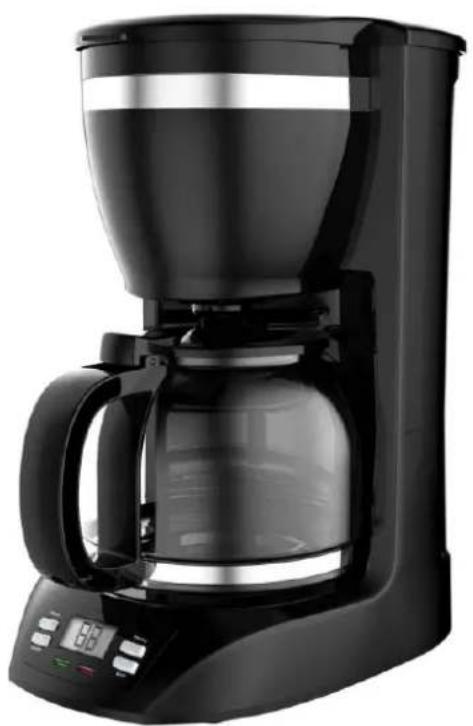
ЦИФРОВА КАФЕВАРКА
Модел : HCM-1100D
Copyright © 2013 Network One Distribution. All rights reserved.
http://www.heinner.com, http://www.nod.ro

Marcel Iancu Street, 3-5, Bucharest, Romania
Tel: +40 21 211 18 56, www.heinner.ro, www.nod.ro
HEINNER
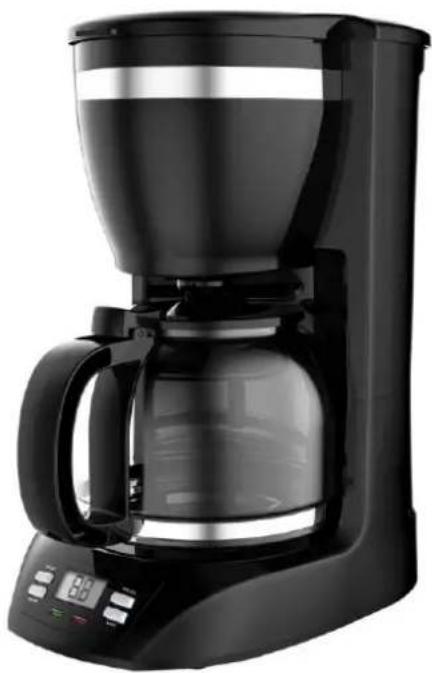
DIGITÁLIS KÁVÉFŐZŐ
Modell: HCM-1100D
VI. HASZNÁLATI ÚTMUTATÓ
VI. INSTRUKCJE UŻYTKOWANIA
Copyright © 2013 Network One Distribution. All rights reserved.
http://www.heinner.com, http://www.nod.ro


- INSTRUCTIUNI DE UTILIZARE
- INAINTEA PRIMEI UTILIZARI
- THANK YOU FOR PURCHASING THIS PRODUCT
- INTRODUCTION
- CONTENT OF YOUR PACKAGE
- SAFETY PRECAUTIONS
- USING INSTRUCTION
- BEFORE THE FIRST USE
- MAKING COFFEE IMMEDIATELY
- AUTO START FUNCTION
- MEMORY
- CLEANING AND MENTENANCE
- CLEANING MINERAL DEPOSITS
- TIPS FOR GETTING A GREAT COFFEE
- TECHNICAL FICHE
- ENVIRONMENT FRIENDLY DISPOSAL
- HEINNER
- HASZNÁLATI ÚTMUTATÓ
- INSTRUKCJE UŻYTKOWANIA
Brand : Heinner
Model : HCM-1100D
Category : Coffee machine