
DD-7 - Guitar effects pedal ROLAND - Free user manual and instructions
Find the device manual for free DD-7 ROLAND in PDF.


| Product Type | Digital delay musical effect pedal |
| Brand | ROLAND (BOSS) |
| Model | DD-7 |
| Dimensions (L x D x H) | 73 x 129 x 59 mm |
| Weight | 450 g |
| Power Supply | 9 V (alkaline battery 6F22 or AC adapter) |
| Power Consumption | 60 mA (max) |
| Approximate Battery Life | Approximately 5 hours of continuous use |
| Maximum Delay Time | 3200 ms (3.2 seconds) |
| Delay Modes | Standard, Reverse, Modulate, Analog, Hold, Warp, Twist |
| Input/Output | 6.35 mm mono jack (input, output, output B) |
| Compatible Expression Pedal | Roland EV-5 / Boss FV-500L (for feedback or level control) |
| Tap Tempo Function | Yes, via external pedal or by pressing and holding the footswitch for 2 seconds |
| Frequency Response | 40 Hz – 7 kHz (Standard mode) |
| Signal-to-Noise Ratio | 100 dB (IHF-A) |
| Power Indicator | LED (operation indicator) |
| Housing Material | Molded ABS, textured finish |
| Operating Temperature | 0 °C to +40 °C |
| Maintenance and Cleaning | Use a soft, dry cloth; do not use solvents or abrasive cleaners. |
| Safety | Do not expose to moisture, shocks, or excessive temperature. |
| Spare Parts and Repairability | Contact an authorized Roland/Boss service center for repairs; internal components are not intended to be replaced by the user. |
| General Information | Class B digital device compliant with Canadian interference-causing equipment regulations. |
Frequently Asked Questions - DD-7 ROLAND
User questions about DD-7 ROLAND
0 question about this device. Answer the ones you know or ask your own.
Ask a new question about this device
Download the instructions for your Guitar effects pedal in PDF format for free! Find your manual DD-7 - ROLAND and take your electronic device back in hand. On this page are published all the documents necessary for the use of your device. DD-7 by ROLAND.
USER MANUAL DD-7 ROLAND
Thank you, and congratulations on your choice of the BOSS DD-7 Digital Delay.
Before using this unit, carefully read the sections entitled: "USING THE UNIT SAFELY" and "IMPORTANT NOTES" (supplied on a separate sheet). These sections provide important information concerning the proper operation of the unit.
Additionally, in order to feel assured that you have gained a good grasp of every feature provided by your new unit, this manual should be read in its entirety. The manual should be saved and kept on hand as a convenient reference.
A battery is supplied with the unit. The life of this battery may be limited, however, since its primary purpose was to enable testing.
Copyright © 2008 BOSS CORPORATION
All rights reserved. No part of this publication may be reproduced in any form without the written permission of BOSS CORPORATION.
Main Features
- Achieves long delay times of up to 6.4 seconds. (*1) What's more, up to 40 seconds of loop play—or "sound on sound"—is possible in HOLD mode.
- Multiple delay modes include “MODULATE,” which adds a chorus effect to the delay sound, and “ANALOG,” which models the classic BOSS DM-2 analog delay pedal.
● Features two new stereo modes in addition to 2-in/2-out true stereo connections. - Provides stereo effects like "Panning" and "Effect + Direct."
- Parameters can be controlled using an optional expression pedal (Roland EV-5).
- The delay time can be set in realtime by pressing an optional footswitch (FS-5U) or the built-in pedal to input the tempo.
(*1) The delay time that can be set varies according to the mode.
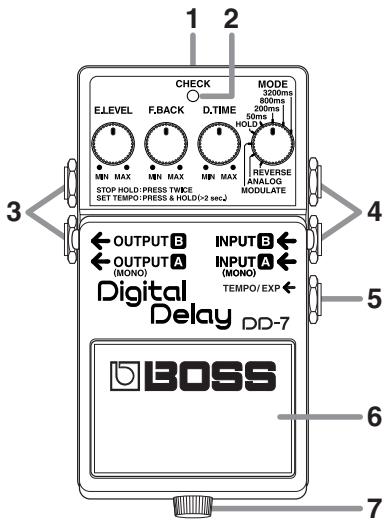
1. AC Adaptor Jack
Accepts connection of an AC Adaptor (PSA-series; optional). By using an AC Adaptor, you can play without being concerned about how much battery power you have left.
* If there are batteries in the unit while an AC adaptor is being used, normal operation will continue should the line voltage be interrupted (power blackout or power cord disconnection).
* Use only the specified AC adaptor (PSA-series).
* If the AC adaptor is connected while power is on, the power supply is drawn from the AC adaptor.
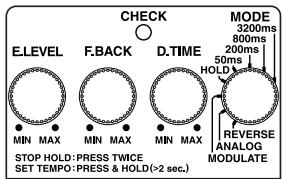
2. CHECK Indicator
This is a combination indicator, which indicates whether the effect is on or off, indicates the various functions (p. 12–20), and functions as the battery check indicator.
The indicator lights when an effect is ON.
* If this indicator goes dim or no longer lights while an effect is ON, or when the functions are indicated, the battery is near exhaustion and should be replaced immediately. For instructions on changing the batteries, refer to “Changing the Battery” (p. 22).
* The CHECK indicator shows whether the effect is on or off, and indicates the different functions. It does not indicate whether the power to the device is on or not.
3. OUTPUT-A (MONO) Jack OUTPUT-B Jack
The output jacks are used to connect the unit to an amplifier or another effects unit.
* The unit's functions differ according to how it is connected. Refer to "Setting the Output Method" (p. 16).
4. INPUT-A (MONO) Jack INPUT-B Jack
These jacks accept input signals (coming from a guitar, some other musical instrument, or another effects unit).
* The unit's functions differ according to how it is connected. Refer to "Setting the Output Method" (p. 16).
* The INPUT-A (MONO) and INPUT-B jacks double as power switches. Power to the unit is turned on when you plug into the INPUT-A (MONO) or INPUT-B jack; the power is turned off when the cable is unplugged. Be sure to disconnect any cord plugged into the INPUT-A (MONO) or INPUT-B jack when not using this effects device.
5. TEMPO/EXP Jack
This jack is for connecting an optional external footswitch (FS-5U) or an optional expression pedal (Roland EV-5).
You can make tempo settings using a foot-switch or manipulate various parameters using an expression pedal.
* Refer to "Setting the Tempo Using an External Footswitch" (p. 13), "Control Using an Expression Pedal" (p. 20).
6. Pedal Switch
This is used for switching the effect on and off, and for switching between the different functions (p. 12–15).
7. Thumbscrew
When this screw is loosened, the pedal will open, allowing you to change the battery.
* For instructions on changing the battery, refer to “Changing the Battery” (p. 22).
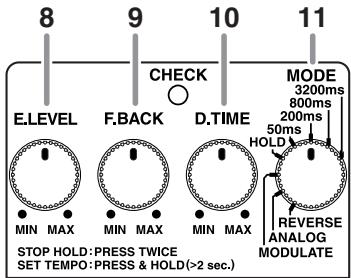
8. E.LEVEL (Effect Level) Knob
This adjusts the volume of the effect sound. Turn the knob clockwise to increase the effect sound. When set at the three o'clock position, the effect is played at the same volume as the direct sound.
* When the E.LEVEL knob is set to MAX while in REVERSE mode, only the effect sound is output, with the effect sound at the same level as the input sound.
9. F.BACK (Feedback) Knob
This adjusts the feedback level. The number of times the delay sound is repeated increases as the knob is turned to the right.
* This cannot be used in HOLD mode.
* Oscillation may occur when the knob is set at certain positions.
10.D.TIME (Delay Time) Knob
This adjusts the delay time. Turning the knob clockwise lengthens the delay time.
* This cannot be used in HOLD mode.
* The delay times that can be set vary according to the position of the MODE knob.
11. MODE Knob
This switches the delay effect.
● Ordinary Delay
| MODE Knob | Delay Time |
| 3200 ms | 800-3200 ms |
| 800 ms | 200-800 ms |
| 200 ms | 50-200 ms |
| 50 ms | 1-50 ms |
* The delay time is doubled when the DD-7 is connected for long delay output. For more information, refer to “Long” (p. 17).
● Specialized Delays
| MODE Knob | Delay Time |
| HOLD | 40 sec. *1 |
| MODULATE | 20-800 ms |
| ANALOG | 20-800 ms |
| REVERSE | 300-3200 ms |
*1 In HOLD mode, the maximum recording time is 20 seconds for stereo input or 40 seconds for monaural input.
* The delay time is doubled when the DD-7 is connected for long delay output. For more information, refer to “Long” (p. 17).
HOLD:
This records up to 40 seconds of a performance (when using monaural input), then plays it back repeatedly.
* For details, refer to "Using the HOLD (Overdubbing) Function" (p. 15).
MODULATE:
This produces a pleasant chorus effect by adding a small amount of undulations to the effect sound.
ANALOG:
The sound changes progressively with each repetition of the repeat sound. This tone is modeled on the BOSS “DM-2” Compact Delay.
REVERSE:
This delay produces an effect like playing back a tape in reverse.
You can adjust the E.LEVEL knob setting to get two different kinds of effect, "Effect Sound + Direct Sound" and "Effect Sound Only." Turning the E.LEVEL knob completely to the right switches this to "Effect Sound Only."
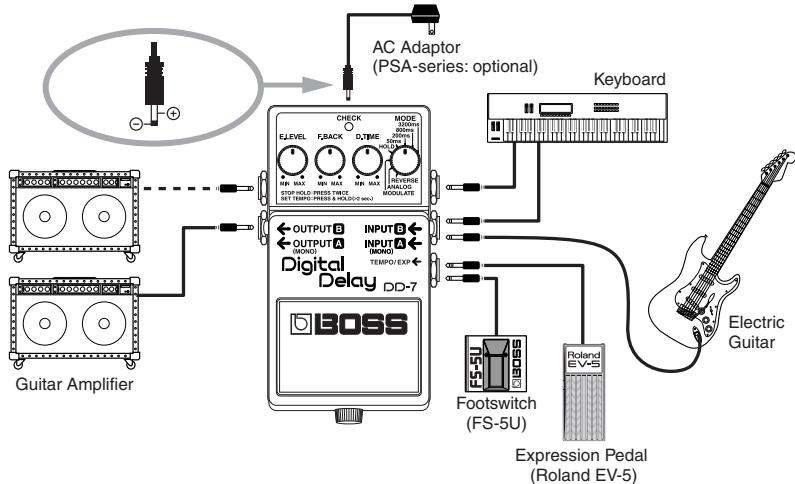
flowchart
graph TD
    A["AC Adaptor (PSA-series: optional)"] --> B["Check MODE"]
    B --> C["Digital Delay DD-7 BOSS"]
    C --> D["Output 0"]
    C --> E["OUTPUT 1"]
    C --> F["OUTPUT 2"]
    C --> G["OUTPUT 3"]
    C --> H["OUTPUT 4"]
    C --> I["OUTPUT 5"]
    C --> J["OUTPUT 6"]
    C --> K["OUTPUT 7"]
    C --> L["OUTPUT 8"]
    C --> M["OUTPUT 9"]
    C --> N["OUTPUT 10"]
    C --> O["OUTPUT 11"]
    C --> P["OUTPUT 12"]
    C --> Q["OUTPUT 13"]
    C --> R["OUTPUT 14"]
    C --> S["OUTPUT 15"]
    C --> T["OUTPUT 16"]
    C --> U["OUTPUT 17"]
    C --> V["OUTPUT 18"]
    C --> W["OUTPUT 19"]
    C --> X["OUTPUT 20"]
    C --> Y["OUTPUT 21"]
    C --> Z["OUTPUT 22"]
    C --> AA["OUTPUT 23"]
    C --> AB["OUTPUT 24"]
    C --> AC["OUTPUT 25"]
    C --> AD["OUTPUT 26"]
    C --> AE["OUTPUT 27"]
    C --> AF["OUTPUT 28"]
    C --> AG["OUTPUT 29"]
    C --> AH["OUTPUT 30"]
    C --> AI["OUTPUT 31"]
    C --> AJ["OUTPUT 32"]
    C --> AK["OUTPUT 33"]
    C --> AL["OUTPUT 34"]
    C --> AM["OUTPUT 35"]
    C --> AN["OUTPUT 36"]
    C --> AO["OUTPUT 37"]
    C --> AP["OUTPUT 38"]
    C --> AQ["OUTPUT 39"]
    C --> AR["OUTPUT 40"]
    C --> AS["OUTPUT 41"]
    C --> AT["OUTPUT 42"]
    C --> AU["OUTPUT 43"]
    C --> AV["OUTPUT 44"]
    C --> AW["OUTPUT 45"]
    C --> AX["OUTPUT 46"]
    C --> AY["OUTPUT 47"]
    C --> AZ["OUTPUT 48"]
    C --> BA["OUTPUT 49"]
    C --> BB["OUTPUT 50"]
    C --> BC["OUTPUT 51"]
    C --> BD["OUTPUT 52"]
    C --> BE["OUTPUT 53"]
    C --> BF["OUTPUT 54"]
    C --> BG["OUTPUT 55"]
    C --> BH["OUTPUT 56"]
    C --> BI["OUTPUT 57"]
    C --> BJ["OUTPUT 58"]
    C --> BK["OUTPUT 59"]
    C --> BL["OUTPUT 60"]
    C --> BM["OUTPUT 61"]
    C --> BN["OUTPUT 62"]
    C --> BO["OUTPUT 63"]
    C --> BP["OUTPUT 64"]
    C --> BQ["OUTPUT 65"]
    C --> BR["OUTPUT 66"]
    C --> BS["OUTPUT 67"]
    C --> BT["OUTPUT 68"]
    C --> BU["OUTPUT 69"]
    C --> BV["OUTPUT 70"]
    C --> BW["OUTPUT 71"]
    C --> BX["OUTPUT 72"]
    C --> BY["OUTPUT 73"]
    C --> BZ["OUTPUT 74"]
    C --> CA["OUTPUT 75"]
    C --> CB["OUTPUT 76"]
    C --> CC["OUTPUT 77"]
    C --> CD["OUTPUT 78"]
    C --> CE["OUTPUT 79"]
    C --> CF["OUTPUT 80"]
    C --> CG["OUTPUT 81"]
    C --> CH["OUTPUT 82"]
    C --> CI["OUTPUT 83"]
    C --> CJ["OUTPUT 84"]
    C --> CK["OUTPUT 85"]
    C --> CL["OUTPUT 86"]
    C --> CM["OUTPUT 87"]
    C --> CN["OUTPUT 88"]
    C --> CO["OUTPUT 89"]
    C --> CP["OUTPUT 90"]
    C --> CS["OUTPUT 91"]
    C --> CT["OUTPUT 92"]
    C --> CU["OUTPUT 93"]
    C --> CV["OUTPUT 94"]
    C --> CW["OUTPUT 95"]
    C --> CX["OUTPUT 96"]
    C --> CY["OUTPUT 97"]
    C --> CZ["OUTPUT 98"]
    C --> DA["OUTPUT 99"]
    C --> DB["OUTPUT 100"]

    subgraph Keyboard
        B
        D
        E
        F
        G
        H
        I
        J
        K
        L
        M
        N
        O
        P
        Q
        R
        S
        T
        U
        V
        W
        X
        Y
        Z
        AA
        AB
        AC
        AD
        AE
        AF
        AG
        AH
        AI
        AJ
        AK
        AL
        AM
        AN
        AO
        AP
        AQ
        AR
        AS
        AT
        AU
        AV
        AW
        AX
        AY
        AZ
        BA
        BB
        BC
        BD
        BE
        BF
        BG
        BH
        BI
        BJ
        BK
        BL
        BM
        BN
        BO
        BP
        BPB
        BOB
        BOB
        BOB
        BOB
        BOB
        BOB
        BOB
        BOB
        BOB
        BOB
        BOB
        BOB
        BOB
        BOB
        BOB
        BOB
        BOB
        BOB
        BOB
        BOB
        BOB
        BOB
        BOB
        BOB
        BOB
        B0000000000000000000000000000000000000000000000000000000000000000000000000000000000000000000000000000 |
* You can obtain a variety of different delay effects by changing how the connections are made. For more information, refer to “Setting the Output Method”(p. 16).
* When running the unit on battery power, inserting a plug into the INPUT-A (MONO) or INPUT-B jack will automatically switch the unit on.
* This unit is equipped with a protection circuit. A brief interval (a few seconds) after power up is required before the unit will operate normally.
* The use of an AC adaptor is recommended as the unit's power consumption is relatively high. Should you prefer to use batteries, please use the alkaline type.
* To prevent malfunction and/or damage to speakers or other devices, always turn down the volume, and turn off the power on all devices before making any connections.
* Some connection cables contain resistors. When connection cables with resistors are used, the sound level may be extremely low, or impossible to hear. For information on cable specifications, contact the manufacturer of the cable.
* If there are batteries in the unit while an AC adaptor is being used, normal operation will continue should the line voltage be interrupted (power blackout or power cord disconnection).
* Once the connections have been completed (p. 9), turn on power to your various devices in the order specified. By turning on devices in the wrong order, you risk causing malfunction and/or damage to speakers and other devices.
When powering up:
Turn on the power to your guitar amp last.
When powering down:
Turn off the power to your guitar amp first.
* When operating on battery power only, the unit's indicator will become dim when battery power gets too low. Replace the battery as soon as possible.
Operating the Unit
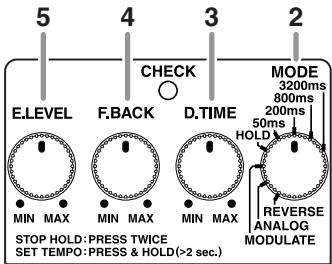
1. Turn on the effect
After you have finished making the connections (p. 9), press the pedal switch to turn the effect on (the CHECK indicator lights red).
* The DD-7 features a “seamless switching function” whereby the delay sound decays gradually, even after the effects are switched off.
* When in HOLD mode, the effect cannot be switched on or off.
* You can obtain a variety of different delay effects by changing how the connections are made. For more information, refer to “Setting the Output Method”(p. 16).
2. Select the mode
Use the MODE knob to select the mode to be used.
* Operations vary according to the mode. Refer to each operation.
3. Adjust the delay time
Adjust the delay time with the D.TIME knob.
4. Adjust the feedback level
Use the F.BACK knob to adjust the feedback level (or how much the sound is repeated).
* Oscillation may occur with certain input sounds, or when the knob is set at certain positions.
5. Adjust the volume
Adjust the volume level of the effect sound with the E.LEVEL knob.
Using the Tempo Delay
Tempo input allows you to set the delay time to match the tempo of a song by repeatedly pressing the pedal switch in time with the desired tempo. You can also use this method to change the delay time to any setting you like as you perform. Using tempo input, the delay time can be set within the range of 0.2–3.2 seconds.
* With long delay, the maximum setting is 6.4 seconds.
Setting the Tempo Using the Built-in Pedal
1. Select the mode
Use the MODE knob to select the mode to be used.
* Tempo input cannot be used in HOLD mode.
2. Switch to TEMPO mode
Hold down the pedal switch for at least two seconds (the CHECK indicator lights green).
* When an optional external footswitch (the FS-5U) is connected to the TEMPO/EXP jack, you won't be able to enter TEMPO mode by pressing the built-in pedal.
3. Begin inputting the tempo
Press the pedal switch in time with the song tempo (the CHECK indicator flashes red and green).
* The timing with which you press the pedal is converted to quarter-note beats.
4. Finish inputting the tempo
Hold down the pedal switch for at least two seconds to complete the setting (the CHECK indicator lights red).
* The tempo may become confused momentarily when you go from Step 3 to Step 4.
* Turning the D.TIME knob resets the delay time to that indicated by the knob's position.
Setting the Tempo Using an External Footswitch
Connecting an optional footswitch (FS-5U) to the TEMPO/EXP jack lets you set the tempo delay by inputting the tempo.
* You can input the tempo with the external pedal regardless of whether the effect is on or off.
1. Connect the FS-5U to the TEMPO/EXP jack
* Use a connecting cord with a 1/4" phone plug.
* On the FS-5U, move the polarity switch toward the jack.
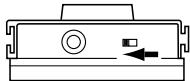
natural_image
Pure diagram of a device component with no text, numbers, or symbols* The FS-5L cannot be used.
2. Select the mode
Use the MODE knob to select the mode to be used.
* Inputting the tempo is not possible in HOLD mode.
3. Start inputting the tempo
Press the pedal switch in time with the song's tempo
(Effect off: CHECK indicator flashes red; effect on: CHECK indicator flashes red and green).
* The timing with which you press the pedal is converted to quarter-note beats.
* Tempo input using the built-in pedal is not possible.
* Turning the D.TIME knob resets the delay time to that indicated by the knob's position.
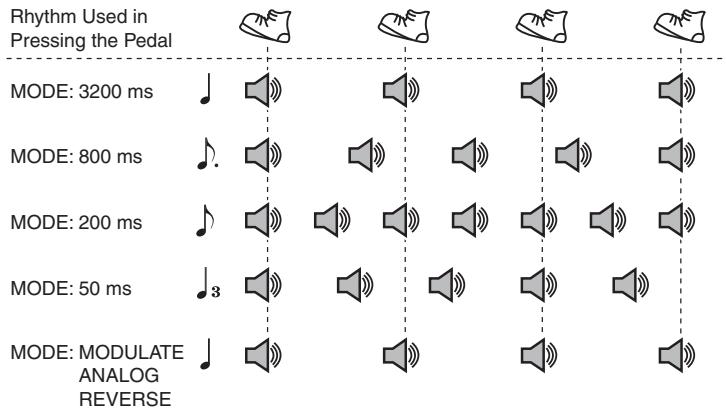
The delay sound produced is as shown in the figure.
* The CHECK indicator flashes red in time with the interval with which you press the pedal.
bar
| MODE | Rhythm Used in Pressing the Pedal | | --- | --- | | MODE: 3200 ms | ♩ | | MODE: 800 ms | ♩ | | MODE: 200 ms | ♩ | | MODE: 50 ms | ♩3 | | MODE: MODULATE ANALOG REVERSE | ♩ |* When the mode is MODULATE, ANALOG, or REVERSE, the effect at the position of the MODE knob is applied to the delay sound.
Using the HOLD (Overdubbing) Function
With the HOLD function, you can record up to 40 seconds of your performance, and then have that content played back repeatedly. You can also layer this as you perform something else, then record these together (overdub). You can keep the recorded content playing continuously as backing and produce other special effects.
1. Select HOLD
Set the MODE knob to HOLD (the CHECK indicator goes out).
2. Begin recording
Recording starts when you press the built-in pedal switch (the CHECK indicator flashes red).
* The maximum recording time is 20 seconds for stereo input or 40 seconds for monaural input.
* Recording continues even if you release the built-in pedal switch.
3. When recording is finished, playback starts Press the built-in pedal switch a second time to stop recording. Playback of what
you recorded begins simultaneously (the CHECK indicator flashes green).
4. Overdubbing
Press the pedal switch during playback to start overdubbing (The CHECK indicator flashes orange).
5. When overdubbing is finished, play-back starts
Pressing the built-in pedal switch during overdubbing stops overdubbing, and playback resumes (the CHECK indicator flashes green).
6. Adjust the volume
Use the E.LEVEL knob to adjust the volume of the playback sound.
7. Finish playback
To stop playback, press the pedal twice.
* Press the pedal two times in succession, keeping the interval between presses to one second or less.
* If a footswitch (FS-5U; optional) is connected to the TEMPO/EXP jack, you can stop playback by pressing the FS-5U.
Setting the Output Method
With the DD-7, you can obtain a variety of different delay effects by changing how the connections are made.
Panning
This produces panning delay with A input and A/B output.
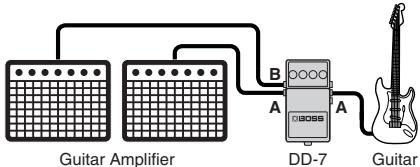
* The panning feature is not available in HOLD mode.
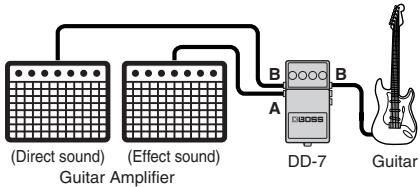
Effect + Direct
This produces effect + direct output with B input and A/B output.
flowchart
graph LR
    A["(Direct sound)"] --> C["DD-7"]
    B["(Effect sound)"] --> C["DD-7"]
    C --> D["Guitar"]
    C --> E["A"]
    C --> F["B"]
* A: effect, B: direct
* Switching off the effect outputs the direct sound from A.
Long
This produces long delay with A input and B output.
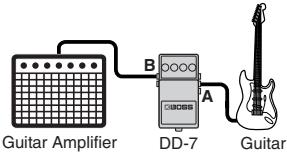
| MODE | Normal Delay | Long Delay |
| 3200ms | 800-3200 ms | 1600-6400 ms |
| 800ms | 200-800 ms | 400-1600 ms |
| 200ms | 50-200 ms | 100-400 ms |
| 50ms | 1-50 ms | 2-100 ms |
| HOLD | 40 sec. *1 | 40 sec. |
| MOUDULATE | 20-800 ms | 40-1600 ms |
| ANALOG | 20-800 ms | 40-1600 ms |
| REVERSE | 300-3200 ms | 600-6400 ms |
*1 In HOLD mode, the maximum recording time is 20 seconds for stereo input or 40 seconds for monaural input.
Stereo
This produces stereo delay with A/B input and A/B output.
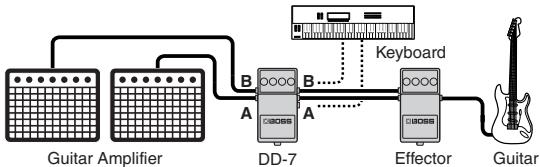
flowchart
graph LR
    A["Guitar Amplifier"] --> B["DD-7"]
    B --> C["Effector"]
    C --> D["Guitar"]
    E["Keyboard"] --> B
    F["A"] --> B
    G["B"] --> B
    H["A"] --> C
(chorus, flanger etc.)
* You can select any of three types of stereo delay modes. For more information, refer to “Setting the Mode for Stereo Delay”(p. 19).
Effect
This produces effect output with B input and A output.
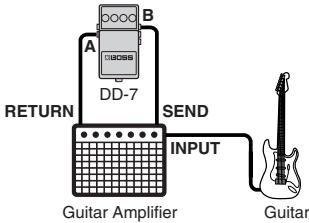
* The direct sound is not output from A, regardless of whether the effect is on or off.
* Be sure to lower the output level of any device being connected.
Setting the Mode for Stereo Delay
When using the DD-7 as a stereo delay, you can choose among three different operation modes. Each mode provides a different type of stereo delay effect.
* For detailed information on how to make the connections for stereo delay, refer to “Stereo”(p. 17).
-
Make the connection to the INPUT-A (MONO) jack and leave nothing connected to the INPUT-B jack
-
Hold down the built-in pedal and insert the plug to INPUT-B jack
The setting mode for stereo delay is enabled, and the CHECK indicator lights in orange.
- Select the stereo delay effect
Use the MODE knob to select the mode for stereo delay.
3200ms: This is a completely independent delay for A and B.
800ms: This is panning delay.
200ms: This is a stereo delay that imparts spatial broadness to reverberant sound.
- Save the settings
Press the built-in pedal switch to make the CHECK indicator rapidly flash in orange and save the settings.
After the settings have been saved, the unit returns to normal operation.
* Never switch off the power while the CHECK indicator is flashing rapidly.
* This setting is retained even while the power is turned off.
Control Using an Expression Pedal
Connecting an expression pedal (Roland EV-5; optional) to the TEMPO/EXP jack enables you to control the respective parameters of the E.LEVEL, F.BACK, and D.TIME knobs.
* Use only the specified expression pedal (Roland EV-5; optional). By connecting any other expression pedals, you risk causing malfunction and/or damage to the unit.
Making the Settings for Expression Pedal Functions
- Hold down the built-in pedal and connect the expression pedal
The function-setting mode for the expression pedal is enabled and the CHECK indicator lights in orange.
* The setting mode cannot be entered while HOLD MODE is selected.
* When connecting an expression pedal to the TEMPO/EXP jack, set the minimum volume for the connected expression pedal to the "MIN" position.
- Make the settings for the parameters Turn the E.LEVEL, F.BACK, and D.TIME knobs to set the maximum values of the ranges you want to control. If you don't want to control a particular parameter with the expression pedal, set its value to the "MIN" position.
* You can set only the maximum value of a parameter range controlled using the expression pedal. Setting the minimum value is not possible.
- Save the parameters
Press the built-in pedal switch to make the CHECK indicator rapidly flash in orange and save the settings.
After the settings have been saved, the unit returns to normal operation.
* Never switch off the power while the CHECK indicator is flashing rapidly.
* This setting is retained even while the power is turned off.
Attaching the Included Sticker
This device comes with a “mode sticker” and an “application sticker.”
Apply these to the DD-7 as shown in the figure.
Mode Sticker: This allows you to check the function of each mode.
Application Sticker: This allows you to check the difference in functions according to the input and output connections.
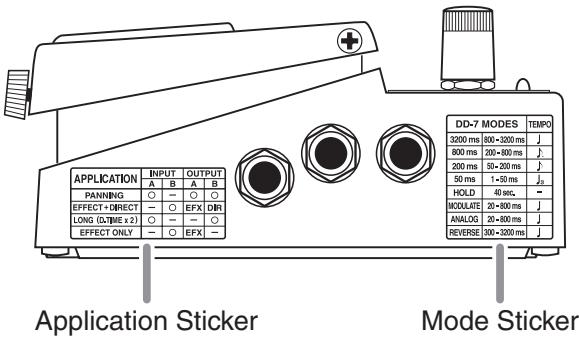
Changing the Battery
When the indicator goes dim or no longer lights while the effect is on, it means that the battery must be replaced.
Replace the battery following the steps below.
* The use of an AC adaptor is recommended as the unit's power consumption is relatively high. Should you prefer to use a battery, please use the alkaline type.
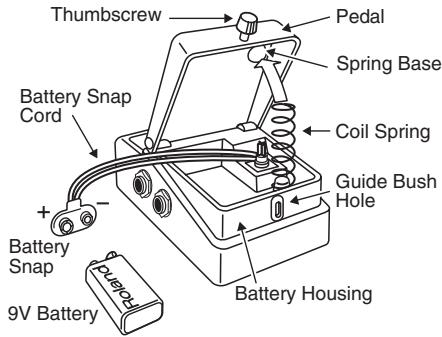
- Hold down the pedal and loosen the thumbscrew, then open the pedal upward.
* The pedal can be opened without detaching the thumbscrew completely.
-
Remove the old battery from the battery housing, and remove the snap cord connected to it.
-
Connect the snap cord to the new battery, and place the battery inside the battery housing.
* Be sure to carefully observe the battery's polarity (+ versus -).
- Slip the coil spring onto the spring base on the back of the pedal, and then close the pedal.
* Carefully avoid getting the snap cord caught in the pedal, coil spring, and battery housing.
- Finally, insert the thumbscrew into the guide bush hole and fasten it securely.
Troubleshooting
Power won't come on / CHECK indicator doesn't light:
- Is the specified adaptor (PSA-series; optional) properly connected?
Check the connection once more (p. 9).
* Never use any AC adaptor other than one specified for use with the DD-7.
- Is the guitar connected properly to the INPUT-A (MONO) or INPUT-B jack? Check the connection once more (p. 9).
* The power will not turn on without a plug connected to the INPUT-A (MONO) or INPUT-B jack.
* The CHECK indicator shows whether the effect is being applied or not, and is used to indicate other effects. It does not indicate whether the power to the device is on or not.
● Is the battery low or dead?
Replace with a new battery (p. 22).
* The battery that was supplied with the unit is for temporary use, intended primarily for testing the unit's operation. For extended use, we suggest replacing this with an alkaline battery.
● Is the MODE knob set to HOLD?
In HOLD mode, the CHECK indicator is normally off (the effect is off). This flashes while the pedal is held down (HOLD). The CHECK indicator lights for several seconds immediately after the power is turned on, then goes out.
* For details, refer to "Using the HOLD (Overdubbing) Function" (p. 15).
● Are you in TEMPO mode?
In TEMPO mode, the CHECK indicator flashes alternately in red and green.
* For details, refer to "Using the Tempo Delay"(p. 12).
No sound / Low volume:
- Is your instrument properly connected to the DD-7?
Check the connection once more (p. 9).
With certain kinds of connections, the direct sound won't be output (p. 16).
- Is the volume turned down on any guitar amp or effects device you have connected?
Check the settings of the connected device.
● Could you be using a connection cable that contains a resistor?
Use a connection cable that does not contain a resistor.
- Do you have the E.LEVEL knob turned to MAX in REVERSE mode?
The direct sound is not output when the E.LEVEL knob is set to MAX.
● Is the battery low or dead?
Replace with a new battery (p. 22).
* The battery that was supplied with the unit is for temporary use, intended primarily for testing the unit's operation. For extended use, we suggest replacing this with an alkaline battery.
The CHECK indicator has gone dim:
- Is the specified adaptor (PSA-series; optional) properly connected?
Check the connection once more (p. 9).
* Never use any AC adaptor other than one specified for use with the DD-7.
● Is the battery low or dead?
When the indicator goes dim or no longer lights while the effect is on, it means that the battery must be replaced (p. 22).
* The battery that was supplied with the unit is for temporary use, intended primarily for testing the unit's operation. For extended use, we suggest replacing this with an alkaline battery.
Only direct sound is produced:
- Is the guitar connected to the INPUT B jack, and the amplifier connected to the OUTPUT B jack?
Check the connection once more (p. 16).
Sound is distorted:
- Is the battery low?
As the battery is drained, the CHECK indicator dims, and the DD-7 may start to function incorrectly. Replace with a new battery (p. 22).
* The battery that was supplied with the unit is for temporary use, intended primarily for testing the unit's operation. For extended use, we suggest replacing it with an alkaline battery.
● Could the level of the sound being input be excessive?
With some guitars, distortion may be produced. Be careful of your guitar's output level.
Oscillation may occur with certain F.BACK knob settings.
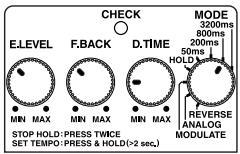
Solo Play
This sound is perfect for playing guitar solos.
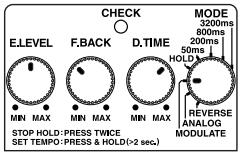
Modulate
Turning the E.LEVEL knob clockwise produces a progressively deeper chorus effect.
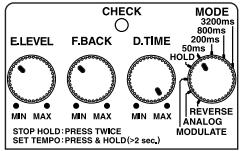
Hard Riff Sound
This provides a delay sound that works well when playing riffs with a hard distortion sound.
Analog
This produces gradual changes in the reverberant sound. When the D.TIME knob is set near the center position, what is produced is equivalent to the maximum delay time obtained with the BOSS DM-2.
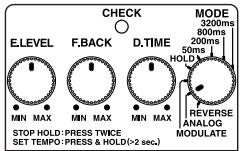
Reverse Playback Delay
This delay gives an effect somewhat similar to reverse playback. It's a sound that's just a little out of the ordinary.
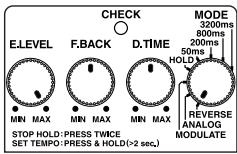
Doubling
This provides an effect similar to the sound of two guitars layered together.
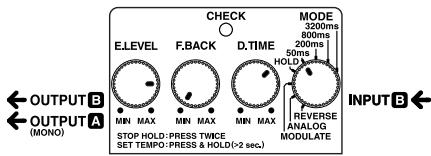
Room Ambience Sound
This delay simulates the sound that would be picked up by an ambience mic located on a stand within the room.
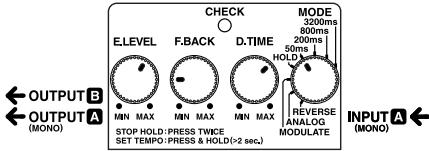
Trick Sound
Employs repetitions of delayed sound to create an oscillating sound. Unique effects can be obtained by adjusting the D.TIME knob.
* Care should be taken, since this effect tends to increase the volume.
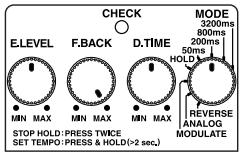
Setting Memo
$$ (\quad) (\quad) $$
$$ (\quad) (\quad) $$
DD-7: Digital Delay
Nominal Input Level ......-20 dBu
Input Impedance....1 MΩ
Nominal Output Level......-20 dBu
Output Impedance....1 kΩ
Recommended Load Impedance..10 kΩ or greater
Delay Time....1 ms–6400 ms
* Values may vary according to the mode and connections.
Maximum Recording Time......40 seconds (in HOLD mode)
Controls....Pedal switch, E.LEVEL knob, F.BACK knob, D.TIME knob, MODE knob
Indicator ....CHECK indicator
(Used for indication of TEMPO, HOLD, and to check battery)
Connectors ......INPUT-A (MONO) jack, INPUT-B jack,
OUTPUT-A (MONO) jack, OUTPUT-B jack,
TEMPO/EXP jack, AC adaptor jack (DC 9 V)
Power Supply ...... DC 9 V: Dry battery 6F22 (9 V) type (carbon)/
Dry battery 6LR61 (9 V) type (alkaline),
AC Adaptor (PSA-series: optional)
Current Draw ....55 mA (DC 9 V)
* Expected battery life under continuous use:
Carbon: 1.5 hours, Alkaline: 6 hours
These figures will vary depending on the actual conditions of use.
Dimensions 73 (W) x 129 (D) x 59 (H) mm
2-7/8 (W) × 5-1/8 (D) × 2-3/8 (H) inches
Weight 440 g / 1 lb (including battery)
Accessories....Owner's Manual
Mode Sticker, Application Sticker
Leaflet ("USING THE UNIT SAFELY," "IMPORTANT NOTES," and "Information")
Dry battery/9 V type (6LR61)
* The battery that was supplied with the unit is for temporary use-intended primarily for testing the unit's operation.
We suggest replacing this with an alkaline dry cell.
Options ...... AC adaptor (PSA-series)
Footswitch: FS-5U
Expression pedal: Roland EV-5
* 0 dBu = 0.775 Vrms
* In the interest of product improvement, the specifications and/or appearance of this unit are subject to change without prior notice.
For the USA
FEDERAL COMMUNICATIONS COMMISSION RADIO FREQUENCY INTERFERENCE STATEMENT
This equipment has been tested and found to comply with the limits for a Class B digital device, pursuant to Part 15 of the FCC Rules. These limits are designed to provide reasonable protection against harmful interference in a residential installation. This equipment generates, uses, and can radiate radio frequency energy and, if not installed and used in accordance with the instructions, may cause harmful interference to radio communications. However, there is no guarantee that interference will not occur in a particular installation. If this equipment does cause harmful interference to radio or television reception, which can be determined by turning the equipment off and on, the user is encouraged to try to correct the interference by one or more of the following measures:
– Reorient or relocate the receiving antenna.
– Increase the separation between the equipment and receiver.
- Connect the equipment into an outlet on a circuit different from that to which the receiver is connected.
- Consult the dealer or an experienced radio/TV technician for help.
This device complies with Part 15 of the FCC Rules. Operation is subject to the following two conditions:
(1) this device may not cause harmful interference, and
(2) this device must accept any interference received, including interference that may cause undesired operation.
Unauthorized changes or modification to this system can void the users authority to operate this equipment.
This equipment requires shielded interface cables in order to meet FCC class B Limit.
For Canada
NOTICE
This Class B digital apparatus meets all requirements of the Canadian Interference-Causing Equipment Regulations.