
2747 - Watch CASIO - Free user manual and instructions
Find the device manual for free 2747 CASIO in PDF.


| Product Type | Digital and analog watch |
| Brand | CASIO |
| Model | 2747 |
| Case dimensions | Approx. 45 x 40 x 12 mm |
| Weight | Approx. 50 g |
| Power supply | CR2016 lithium battery (or equivalent) |
| Battery life | Approx. 3 years (depending on use) |
| Main functions | Digital and analog time, auto calendar, alarms, stopwatch, countdown timer, phone (Telememo), world time |
| Water resistance | Splash resistant (not exactly specified) |
| Display | Digital with LED backlight |
| Care and cleaning | Clean with a soft, dry cloth; avoid water and chemicals |
| Safety | Do not disassemble; contains lithium battery, do not incinerate |
| Spare parts and repairability | Battery replaceable by a professional; other parts not available separately |
| General information | 2-year warranty (depending on retailer); made in Japan |
Frequently Asked Questions - 2747 CASIO
User questions about 2747 CASIO
0 question about this device. Answer the ones you know or ask your own.
Ask a new question about this device
Download the instructions for your Watch in PDF format for free! Find your manual 2747 - CASIO and take your electronic device back in hand. On this page are published all the documents necessary for the use of your device. 2747 by CASIO.
USER MANUAL 2747 CASIO
- Button operations are indicated using the letters shown in the illustration.
Each section of this manual provides you with the information you need to perform operations in each mode. Further details and technical information can be found in the "Reference" section.
General Guide
- Press to change from mode to mode. After you perform an operation (except for ) in any mode, pressing returns to the Timekeeping Mode.
- In any mode, press ⑧ to illuminate the display.

Timekeeping
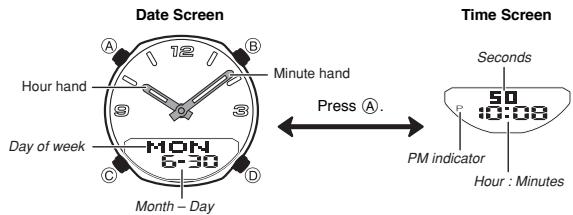
This watch features separate digital and analog timekeeping. The procedures for setting the digital time and analog time are different. In the Timekeeping Mode, press (A) to toggle the display between the date screen
Digital Time and Date
Use the Timekeeping Mode to set and view a digital display of the current time and date. When setting the digital time, you can also configure settings for summer time (Daylight Saving time or DST).
To set the digital time and date
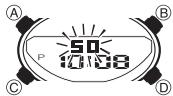
- In the Timekeeping Mode, hold down A until the seconds start to flash, which indicates the setting screen.
- Press (C) to move the flashing in the sequence sh below to select the other settings.

- When the setting you want to change is flashing, use ⑧ and ⑨ to change it as described below.
| Screen | To do this: | Do this: |
| 50 | Reset the seconds to 00. | Press ①. |
| OFF | Toggle between Daylight Saving Time (ON) and Standard Time (OFF). | Press ②. |
| P 10:38 | Change the hour or minutes. | Use ③ (+) and ⑧ (-). |
| 2003 | Change the year. | |
| 6-30 | Change the month or day. |
- Press A to exit the setting screen.
- Resetting the seconds only (without changing the hour, minute, or DST setting) causes the analog minute hand setting to be adjusted automatically. If you change the hour, minute, or DST setting, you should also use the procedure under "To adjust the analog time" to adjust the analog hands accordingly.
See "Digital Time Daylight Saving Time (DST) Setting" for details about the DST setting. - Resetting the seconds to Ⅲ while the current count is in the range of 30 to 59 causes the minutes to be increased by 1. In the range of 00 to 29, the seconds are reset to Ⅲ without changing the minutes.
- The day of the week is automatically displayed in accordance with the date (year, month, and day) settings.
The year can be set in the range of 2000 to 2099. - The watch's built-in full automatic calendar makes allowances for different month lengths and leap years. Once you set the date, there should be no reason to change it except after you have the watch's battery replaced.
To toggle between 12-hour and 24-hour timekeeping
In the Timekeeping Mode, press ⑤ to toggle between 12-hour timekeeping (indicated by A or P on the display), or 24-hour timekeeping.
- With the 12-hour format, the P (PM) indicator appears on the display for times in the range of noon to 11:59 p.m. and the A (AM) indicator appears for times in the range of midnight to 11:59 a.m.
- With the 24-hour format, times are displayed in the range of 0:00 to 23:59, without any indicator.
- The 12-hour/24-hour timekeeping format you select in the Timekeeping Mode is applied in all modes.
Digital Time Daylight Saving Time (DST) Setting
Daylight Saving Time (summer time) advances the digital time setting by one hour from Standard Time. Remember that not all countries or even local areas use Daylight Saving Time.
To toggle the Timekeeping Mode digital time between DST and Standard Time
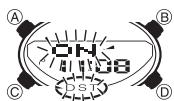
- In the Timekeeping Mode, hold down until the seconds start to flash, which indicates the setting screen.
- Press © once to display the DST setting screen.
- Press (D) to toggle between Daylight Saving Time (ON displayed) and Standard Time (OFF displayed).
- Press (A) to exit the setting screen.
- The DST indicator appears on the Timekeeping, Alarm, and Hand Setting Mode to indicate that Daylight Saving Time is turned on.
Setting the Analog Time
Perform the procedure below when the time indicated by the analog hands does not match the time of the digital display.
To adjust the analog time
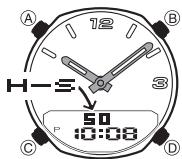
- In the Timekeeping Mode, press six times to enter the Hand Setting Mode.
- Hold down (A) until the current digital time starts to flash, which indicates the analog setting screen.
-
Press ⑥ to advance the analog time setting by 20 seconds. Holding down ⑥ advances the analog time setting at high speed.
-
If you need to advance the analog time a long way, press (D) and (B) at the same time. This locks the high speed hand movement, so you can release the two buttons. High-speed hand movement continues until you press any button. It will also stop automatically after the time advances 12 hours or if an alarm (daily alarm, Hourly Time Signal, or countdown alarm) starts to sound.
-
Press A to exit the setting screen.
To return to the Timekeeping Mode, press
Telememo
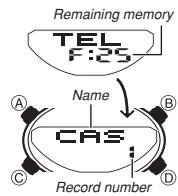
Telememo lets you store up to 30 records, each containing name and telephone number data. Records are automatically sorted based on the characters of the name. You can recall records by scrolling through them on the display.
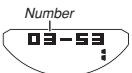
- A Telememo Mode record has a name field and a number field.
See "Character List" for details on how the watch sorts records. - All of the operations in this section are performed in the Telememoto Mode, which you enter by pressing
To create a new Telememo record
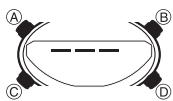
New Data Screen
- In the Telememo Mode, press ⑧ and ⑨ at the same time to display the new data screen.
- The new data screen shows ——, which indicates that there is no text in the name field.
- If the new data screen does not appear, it means that memory is full. To store another record, you will first have to delete some of the records stored in memory.
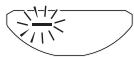
- Hold down (A) until the flashing cursor (---) appears in the name field of the display, which indicates the setting screen.
- Use ⑤ and ⑧ to change the character at the cursor position in the name field. The character changes in the following sequence.

-
You can input spaces, alpha characters, symbols, and numbers in a name. For details, see the "Character List".
-
When the character you want is at the cursor position, press to move the cursor to the right.
- Repeat steps 3 and 4 until the name is complete. - You can input up to eight characters for the nam
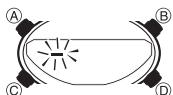
-
After you input the name, press as many times as necessary to move the cursor to the number field. You tell when you are in the name field because of the long cursor () . The number field has a short cursor () .
-
The name field has spaces for eight characters, so you must press to move the past the 8th character in order to get to the number field.
-
The number field has spaces for 16 digits. Pressing until the cursor moves past the 16th digit causes it to jump back to the first character of the name field.
-
Use ⑤ and ⑧ to change the character at the cursor position in the number field. The character changes in the following sequence.

- When the character you want is at the cursor position, press to move the cursor to the right.
- Repeat steps 7 and 8 until you complete number input.
- You can input up to 16 digits for the number.
- Press to store your data and return to the Telememo record screen (without the cursor).
- After you press to store data, the name flashes for about one second to indicate that records are being sorted.
Note that a record must have something input in the name field, otherwise you will not be able to store it.
To recall Telememo records
In the Telememo Mode, press (+) to scroll through Telememo records on the display.
- Only name data appears when you scroll through Telememo records.
- Press (A) to toggle the screen between the name and number fields.
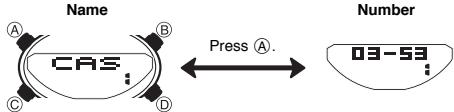
- The name and number scroll from right to left on the display. A separator (4) is inserted between the last character and first character of the data.
- Pressing ⑤ while the last Telememo record is on the display causes the new data screen to appear.
To edit a Telememo record
- In the Telememo Mode, use ⑥ to scroll through the records and display the one you want to edit.
- Hold down A until the flashing cursor appears on the display.
- Use © to move the flashing to the character you want to change.
4.Use 已 and to change the character.
-
For details on inputting characters, see "To create a new Telememo record" (step 3 for name input and 7 for number input).
-
After making the changes that you want, press to store them and return to the Telememo record screen.
To delete a Telememo record
- In the Telememo Mode, use ⑥ to scroll through the records and display the one you want to delete.
- Hold down until the flashing cursor appears on the display.
- Press (B) and (D) at the same time to delete the record.
- CLR appears to indicate that the record is being deleted. After the record is deleted, the cursor appears on the display, ready for input.
- Input data or press A to return to the Telememo record screen.
World Time
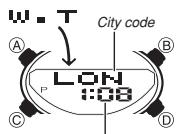
Current time for the selected city code
World Time digitally displays the current time in 30 cities (29 time zones) around the world.
- All of the operations in this section are performed in the World Time Mode, which you enter by pressing ⑥
World Time
The time settings of the Timekeeping Mode and the World Time Mode are independent of each other, so you must make separate settings for each. This watch is preset with a number of city codes, each of which represents the time zone where that city is located.
- Whenever you change the time setting for any city in the World Time Mode, the settings of all other cities are changed accordingly.
- If your location is not included in the preset city codes, select the preset city code that is in the same time zone as your location.
- For full information on city codes, see the "City Code Table".
To set the World Time

- In the World Time Mode, press ⑥ to scroll through city codes.
- Hold down (A) until the DST On/Off setting of the world time starts to flash, which indicates the setting screen.
- Press to move the flashing in the sequence shown below to select the other settings.

-
While a setting is flashing, use ⑤ and ⑧ to change it.
-
Pressing ① and ⑧ at the same time while any World Time setting is flashing causes the displayed time to change to the same setting as the current Timekeeping Mode time.
- While DST On/Off setting is selected (flashing), press ⑥ to toggle between Daylight Saving Time (C#N) and Standard Time (OFF).
-
While the hour or minutes setting is selected (flashing), use (+) and (-) to change it.
-
Press A to exit the setting screen.
To view the time in another city code
In the World Time Mode, press ⑤ to scroll through city codes.
To toggle a city code time between Standard Time and Daylight Saving Time

- In the World Time Mode, use ① to display the city code whose Standard Time/Daylight Saving Time setting you want to change.
- Hold down () until the DST On/Off setting of the world time starts to flash, which indicates the setting screen.
- Press to toggle between Daylight Saving Time (ON displayed) and Standard Time (OFF displayed).
-
Press A to exit the setting screen.
-
The DST indicator appears on the World Time Mode display to indicate that Daylight Saving Time is turned on.
- The above operation toggles all World Time city codes between Daylight Saving Time and Standard Time. Note that you cannot make settings for individual city codes.
Alarms
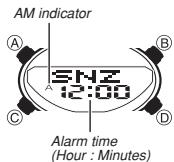
You can set three independent Daily Alarms. When an alarm is turned on, the alarm tone sounds when the alarm time is reached. One of the alarms is a snooze alarm, while the other two are one-time alarms. You can turn on an Hourly Time Signal that causes the watch to beep twice every hour on the hour.
- There are four screens in the Alarm Mode. Two are for one-time alarms (indicated by numbers RIL 1 and RIL 2), one is for a snooze alarm (indicated by SNIZ), and one is for the Hourly Time Signal (indicated by SIG).
- All of the operations in this section are performed in the Alarm Mode, which you enter by pressing
To set an alarm time
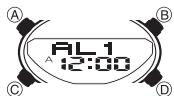
- In the Alarm Mode, use ⑤ to scroll through the alarm screens until the one whose time you want to set is displayed.

- To set a one-time alarm, display one of the screens indicated by an alarm number HL 1 or HL 2 . To set the snooze alarm, display the screen indicated by SNZ .
- The snooze alarm repeats every five minutes.
- After you select an alarm, hold down (A) until the hour setting of the alarm time
starts to flash, which indicates the setting screen. - This operation automatically turns on the alarm.
- Press to move the flashing between the hour and minute settings.
- While a setting is flashing, use (B) (+) and (B) (-) to change it.
- When setting the alarm time using the 12-hour format, take care to set the time
correctly as a.m. (A indicator) or p.m. (P indicator). 5. Press () to exit the setting screen.
Alarm Operation
The alarm sounds at the preset time for about 10 seconds, regardless of the mode the watch is in. In the case of the snooze alarm, the alarm operation is performed a total of seven times, every five minutes, or until you turn the alarm off.
- Alarm and Hourly Time Signal operations are performed in accordance with the Timekeeping Mode digital time.
- To stop the alarm tone after it starts to sound, press any button.
- Performing any one of the following operations during a 5-minute interval between snooze alarms cancels the current snooze alarm operation. Displaying the Timekeeping Mode setting screen Displaying the ^ setting screen
To test the alarm
In the Alarm Mode, hold down ① to sound the alarm.
To turn an alarm and the Hourly Time Signal on and off
1. In the Alarm Mode, use ⑤ to select an alarm or the Hourly Time Signal.
2. Press A to toggle it on and off.
- The indicators shown below appear on the display when the daily alarm and Hourly Time Signal are turned on. Each indicator disappears when the corresponding function is turned off.
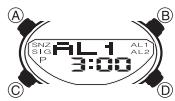

- The above on indicators appear on the display in all modes.
An on indicator on the display flashes while its corresponding alarm operation is
sounding - The snooze alarm on indicator flashes during the 5-minute intervals between alarms.
Countdown Timer
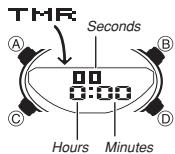
The countdown timer can be set within a range of one minute to 24 hours. An alarm sounds when the countdown reaches zero.
- All of the operations in this section are performed in the Countdown Timer Mode, which you enter by pressing
To set the countdown start time
-
In the Countdown Timer Mode, hold down until the hour setting of the countdown start time starts to flash, which indicates the setting screen.
-
Press to move the flashing between the hour and minute settings.
- While a setting is flashing, use (D) and (B) to change it.
To set the starting value of the countdown time to 24 hours, set a:cc - Press A to exit the setting screen.
To use the countdown timer
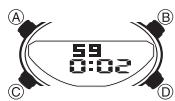
Press ⑥ while in the Countdown Timer Mode to start the countdown timer.
- When the end of the countdown is reached, the alarm sounds for 10 seconds or until you stop it by pressing any button. The countdown time is automatically reset to its starting value after the alarm stops.
-
Press 日 while a countdown operation is in progress to pause it. Press 日 again to resume the countdown.
-
To completely stop a countdown operation, first pause it (by pressing ① ), and then
press A. This returns the countdown time to its starting value. - The countdown timer measurement operation continues even if you exit the Countdown Timer Mode.
Stopwatch
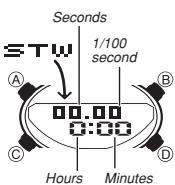
The stopwatch lets you measure elapsed time, split times, and two finishes.
The display range of the stopwatch is 23 hours.
59 minutes, 59.99 seconds.
- The stopwatch continues to run, restarting from zero.
after it reaches its limit, until you stop it.
- The stopwatch measurement operation continues even if you exit the Stopwatch Mode.
- Exiting the Stopwatch Mode while a split time is frozen on the display clears the split time and returns to elapsed time measurement.
- All of the operations in this section are performed in the Stopwatch Mode, which you enter by pressing
To measure times with the stopwach
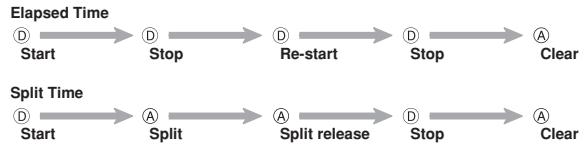
Two Finishes

Reference
This section contains more detailed and technical information about watch operation. It also contains important precautions and notes about the various features and functions of this watch.
Auto Return Feature
-
The watch automatically returns to the Timekeeping Mode if you do not perform any button operation for two or three minutes in the Telememo, Alarm, or Hand Setting Mode.
-
If you leave a screen with flashing digits or a cursor on the display for two or three minutes without performing any operation, the watch automatically exits the setting screen.
- Holding down © for about one second in any mode jumps directly to the Timekeeping Mode. This operation does not work while a setting screen is on the display.
Scrolling
The ⑧ and ⑥ buttons are used in various modes and setting screens to scroll through data on the display. In most cases, holding down these buttons during a scroll operation scrolls through the data at high speed.
Initial Screens
When you enter the Telememo, World Time, or Alarm Mode, the data you were viewing when you last exited the mode appears first.
World Time
- The UTC differentials associated with each city code are used to calculate World Time Mode times, based on the time you set for any one of the World Time cities.
- The UTC differential is a value that indicates the time difference between a
reference point in Greenwich, England and the time zone where a city is located - The letters "UTC" is the abbreviation for "Coordinated Universal Time", which is the world-wide scientific standard of timekeeping. It is based upon carefully maintained atomic (cesium) clocks that keep time accurately to within microseconds. Leap
seconds are added or subtracted as necessary to keep UTC in sync with the Earth's rotation.
Display Illumination Precautions
The light that illuminates the face uses two LEDs (light-emitting diode) and a light guide panel that cause the display to glow for easy reading in the dark. In any mode (except when a setting screen is on the display), press ⑧ to illuminate the display for about one second.
-
The illumination provided by the light may be hard to see when viewed under direct sunlight.
-
The light automatically stops illuminating whenever an alarm sounds.
- Frequent use of the light shortens the battery life.
Character List
| 1 | (space) | 11 | J | 21 | T | 31 | ? | 41 | 0 |
| 2 | M | 12 | K | 22 | U | 32 | : | 42 | 1 |
| 3 | E | 13 | L | 23 | U | 33 | # | 43 | 2 |
| 4 | C | 14 | M | 24 | U | 34 | : | 44 | 3 |
| 5 | D | 15 | N | 25 | X | 35 | : | 45 | 4 |
| 6 | E | 16 | O | 26 | Y | 36 | : | 46 | 5 |
| 7 | F | 17 | P | 27 | Z | 37 | : | 47 | 6 |
| 8 | G | 18 | Q | 28 | A | 38 | / | 48 | ? |
| 9 | H | 19 | R | 29 | ! | 39 | + | 49 | 3 |
| 10 | I | 20 | S | 30 | ? | 40 | ---- | 50 | 3 |
City Code Table
| CityCode | City | UTCDifferential | Other major cities in same time zone |
| PPG | PAGO PAGO | -11.0 | |
| HNL | HONOLULU | -10.0 | PAPEETE |
| ANC | ANCHORAGE | -09.0 | NOME |
| LAX | LOS ANGELES | -08.0 | SAN FRANCISCO, LAS VEGAS, VANCOUVER, SEATTLE,DAWSON CITY |
| DEN | DENVER | -07.0 | EL PASO, EDMONTON |
| CHI | CHICAGO | -06.0 | HOUSTON, DALLAS/FORT WORTH, NEW ORLEANS,MEXICO CITY, WINNIPEG |
| NYC | NEW YORK | -05.0 | MONTREAL, DETROIT, MIAMI, BOSTON, PANAMA CITY,HAVANA, LIMA, BOGOTA |
| CCS | CARACAS | -04.0 | LA PAZ, SANTIAGO, PORT OF SPAIN |
| RIO | RIO DE JANEIRO | -03.0 | SAO PAULO, BUENOS AROS, BRASILIA, MONTEVIDEO |
| ---- | -02.0 | ||
| ---- | -01.0 | PRAIA | |
| LON | LONDON | +00.0 | DUBLIN, LISBON, CASABLANCA, DAKAR, ABIDJAN |
| PAR | PARIS | +01.0 | MILAN, ROME, MADRID, AMSTERSDAM, ALGIERS,HAMBURG, FRANKFURT, VIENNA, STOCKHOLM |
| BER | BERLIN | ||
| CAI | CAIRO | +02.0 | ATHENS, HELSINKI, ISTANBUL, BEIRUT, DAMASCUS,CAPE TOWN |
| JRS | JERUSALEM | ||
| JED | JEDDAH | +03.0 | KUWAIT, RIYADH, ADEN, ADDIS ABABA, NAIROBI |
| MOW | MOSCOW | ||
| THR | TEHRAN | +03.5 | SHIRAZ |
| DXB | DUBAI | +04.0 | ABU DHABI, MUSCAT |
| KBL | KABUL | +04.5 | |
| KHI | KARACHI | +05.0 | MALE |
| DEL | DELHI | +05.5 | MUMBAI, KOLKATA |
| DAC | DHAKA | +06.0 | COLOMBO |
| RGN | YANGON | +06.5 | |
| BKK | BANGKOK | +07.0 | JAKARTA, PHNOM PENH, HANOI, VIENTIANE |
| HKG | HONG KONG | +08.0 | SINGAPORE, KUALA LUMPUR, BEIJING, TAPEI, MANILA,PERTH, ULAANBAATAR |
| TYO | TOKEYO | +09.0 | SEOUL, PYONGYANG |
| ADL | ADELAIDE | +09.5 | DARWIN |
| SYD | SYNEYDE | +10.0 | MELBOURNE, GUAM, RABAUL |
| NOU | NOUMEA | +11.0 | PORT VILA |
| WLG | WELLINGTON | +12.0 | CHRISTCHURCH, NADI, NAURU ISLAND |
*Based on data as of December 2002.