TE-2200 - Registre de caisse CASIO - Free user manual and instructions
Find the device manual for free TE-2200 CASIO in PDF.
Download the instructions for your Registre de caisse in PDF format for free! Find your manual TE-2200 - CASIO and take your electronic device back in hand. On this page are published all the documents necessary for the use of your device. TE-2200 by CASIO.
USER MANUAL TE-2200 CASIO
DEALER'S MANUAL Version 1.0 August 2005
Introduction & Contents
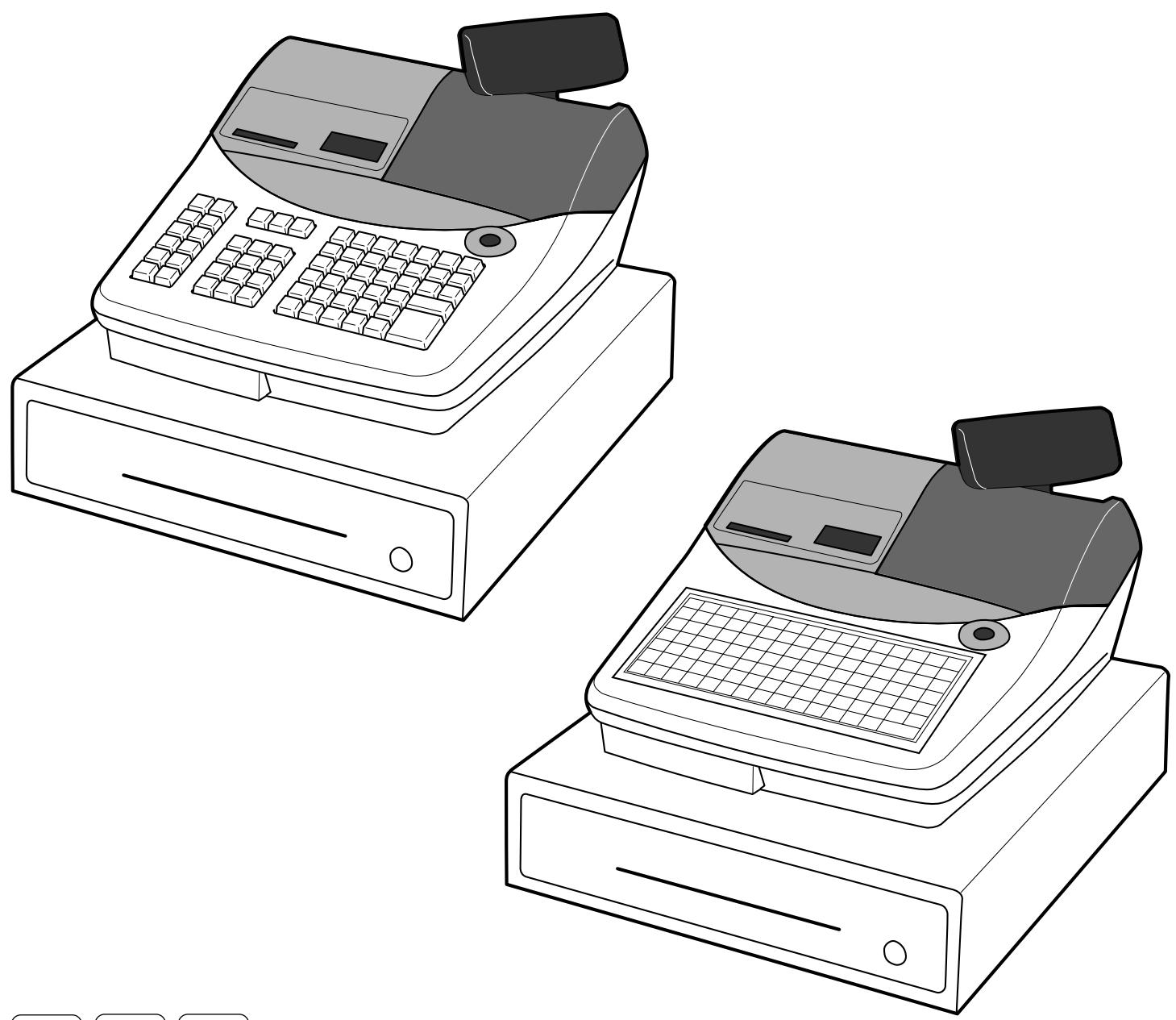
This manual is intended to be used as a reference to the TE-2200 and TE-2400 system. It provides details to allow whole understanding of the system capabilities, its operation, and how it can be used to solve many problems within the retail outlet. This manual consists of the following chapters: 1. Hardware configuration (for installation) This chapter describes the hardware of these models and their network systems. 2. IPL (initial program loading) This chapter describes how to download the application program to the terminal. 3. Initialization This chapter describes how to set up the peripheral devices and the terminals. 4. Programming This chapter explains actual programming procedure and functions. Manager mode X/Z report 7. Application system 8. Tips 9. Appendix:
Hardware configuration General configuration Hardware diagram.
Display Input/output connectors Online configuration... Peripheral ports and their connectable devices .14
IPL (Initial program loading) Memory map of the terminal. System configuration and procedure …
Via COM1 port (to receive IPL data from PC Via CF card (to send the IPL data to CF card). Via CF card (to send the IPL data to register) .
Initialization Machine initialization procedure Flag clear operation... Init 2 operation …… Entering diag mode. PASSWOTd nn
Programming (General explanation)
Program sub mode (P1 thru P7 mode). Entering the program sub mode
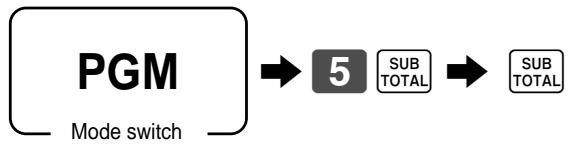
File allocation (Program 5).
File allocation program Programming procedure Issuing program reading report of program 5 mode Issuing procedure Report sample ……
Key allocation (Program 4).
Key allocation program Programming procedure Configuration of the physical key layout...
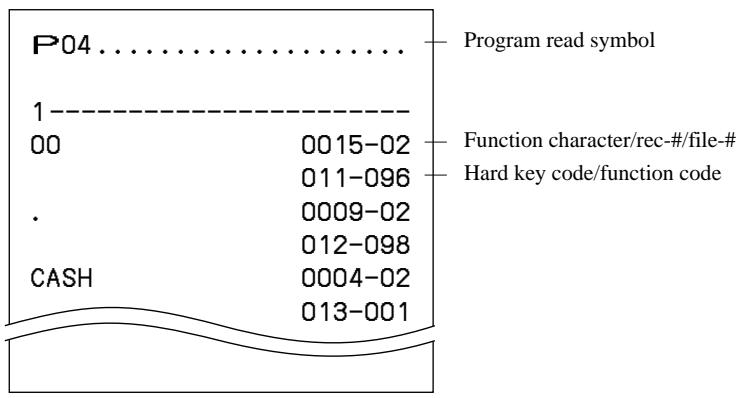
Issuing program reading report of program 4 mode 32 Issuing procedure Report sample ……
Key function/machine feature (Program 3)
General control program. Programming procedure … Program data (by address code)
Address code 01 (date order/password) Address code 02 (password)... Address code 03 (consecutive number) Address code 04 (tax system, rounding, etc.) Address code 05 (print control for receipt) Address code 06 (calculation & operation control) Address code 07 (menu & price shift) Address code 08 (print control for fixe. . Address code 09 (print control for fixed total repOr) Address code 10 (print control for taxable amount, till timer) Address code 13 (online control) … Address code 14 (currency exchange control) Address code 15 (print control for reports) . Address code 16 (print control for grand total) .
TE-2200/2400 Dealer's Manual 3
Introduction & Contents
Address code 17 (print control). Address code 18 (print control for guest receipt and slip). Address code 19 (order control) . Address code 21 (message contre Address code 25 (condiment etc.) … Address code 26 (check tracking) .… Address code 27 (clerk control Address code 28 (Euro). Address code 29 (Euro). Address code 30 (Internal thermal printer control) Address code 32 (direct maintenance PLU) Address code 31 (scanning)... Address code 33 (batch PLU maintenance Address code 34 (backlight control) Address code 36 (store/recall/auto new check number) Address code 37 (check number). . Department key/flat-PLU key/PLU program (Batch feature programming). Programming procedure Program data ….. Department key/flat-PLU key/PLU program (In Programming procedure Program data (by address code) Transaction key program Programming procedure Program data Clerk program . Secret number, drawer, check number programming Clerk detail link programming . Clerk other programming Other programs Time range programming . Table range programming. Tax table programming . Set menu programming Batch X/Z report programming Arrangement programming Check print control programming Mix & match programming …. Employee number programming Scheduler programming Bottle link table programming 1/0 parameter table programming Printer connection table programming Non PLU table programming Scanning PLU maintenance programming Batch maintenance PLU programming. Activation of batch maintenance PLU … Scanning PLU direct maintenance programming Scanning PLU individual programming. One touch NLU programming Issuing program reading report of program 3 mode Issuing procedure Report sample
By character keyboart
Character code list.
Editing characters Correcting a character just entered
Correcting and adding a PLU descriptor already set.
Correcting a key descriptor already set …
Correcting a message descriptor already se!
Issuing program reading report of program 2 mode Issuing procedure
Unit price program Programming procedure
Rate program <Currency exchange>
<Check>, <New balance>, Premium (%+>, <Discount (%-)>, <Rate tax:
AMOUNT PrOYFAM srrrnrrnnns, <ash>, <Check>, <New balance>, Plus (+>, <Minus (-)>, <Coupon>
Scanning PLU direct maintenance programming
Issuing program reading report of program 1 mode Issuing procedure
Report sample Program reading (Program 6) Issuing program reading report. Issuing procedure
Terminal connection table . Printer connection table AT command. Online password. 1/0 parameter table Miscellaneous message Printing guidance message . Error message … Registration guidance message . 139 X/Z guidance message …. Program guidance message
Auto-program & system utilities (Program 7) Auto-programming . Auto-programming functions Auto-programming operation
Other utilities Manager operation
Manager control mode (X1 mode) Entering the manager control mode Assign drawers for each clerk…..
Stock quantity maintenance (PLU/flat PLU/scanning PLU) .150
To add to the actual stock quantity of a PLU/flat PLU/scanning PLU To subtract from the actual stock quantity of a PLU/flat PLU/scanning PLU To input the new stock quantity of a PLU/flat PLU Clerk assignment.… To link clerk button/key to interrupt buffers To link clerk secret numbers to interrupt buffers . To link clerk numbers to clerk number keys .
Programming for the Euro.
Programming for the Austr:
Programming of items in the program 1 mode To enter the program 1 mode . To exitthe program 1 mode.
Read/reset report issuance
Preparation for issuing report. Money declaration Password (X2/Z2 mode)
Issuing read/reset report Programmability Issuing procedure
Application systems .
Appendix: Calculation method sisi
Appendix: Font code tables
Report sample Financial report Individual item/key repo 160 Fixed total report. Transaction key report PLU report PLU stock report. Department report Group report Clerk report Hourly sales report. Monthly report... Table analysis repo Open check report. Scanning PLU report. Scanning PLU stock report Mix & match report Time & attendance report . File reset...
Scanning PLU serres System configuration of the scanning PLU system Setup Barcode system PLU maintenance Scanning PLU registration Mix & match discount.
Check tracking system. System configuration .
Printing on the external printers System configuration of the external printer system Backup system Printing control options for order.
Future order . Usage Preparation
Automatic execution of Euro switchover by arrangement and scheduler
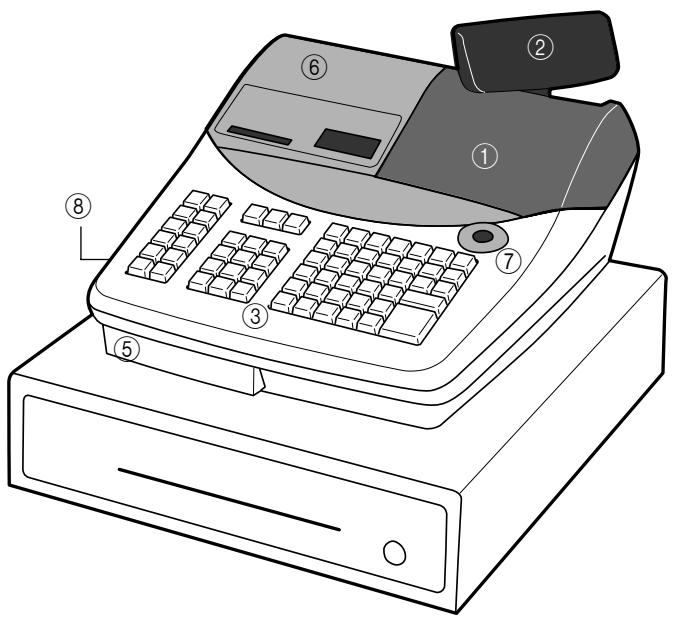
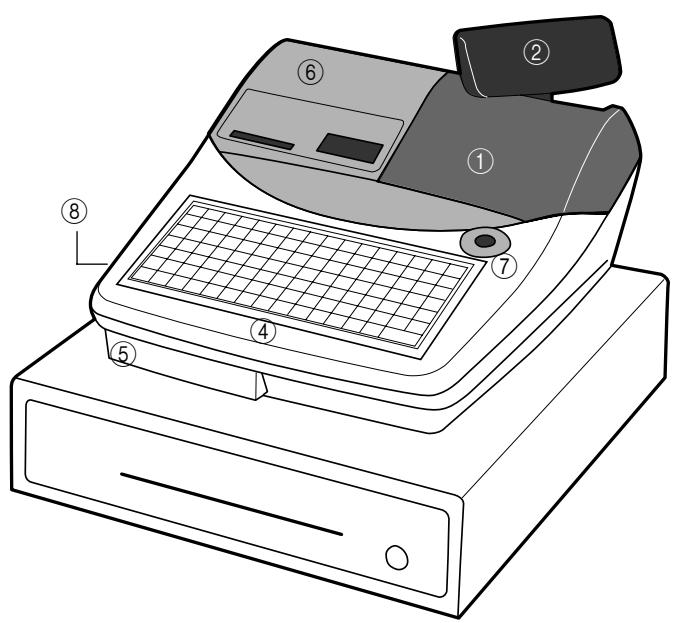
@ CF card slot cover
@) Connector cover (opposite side)
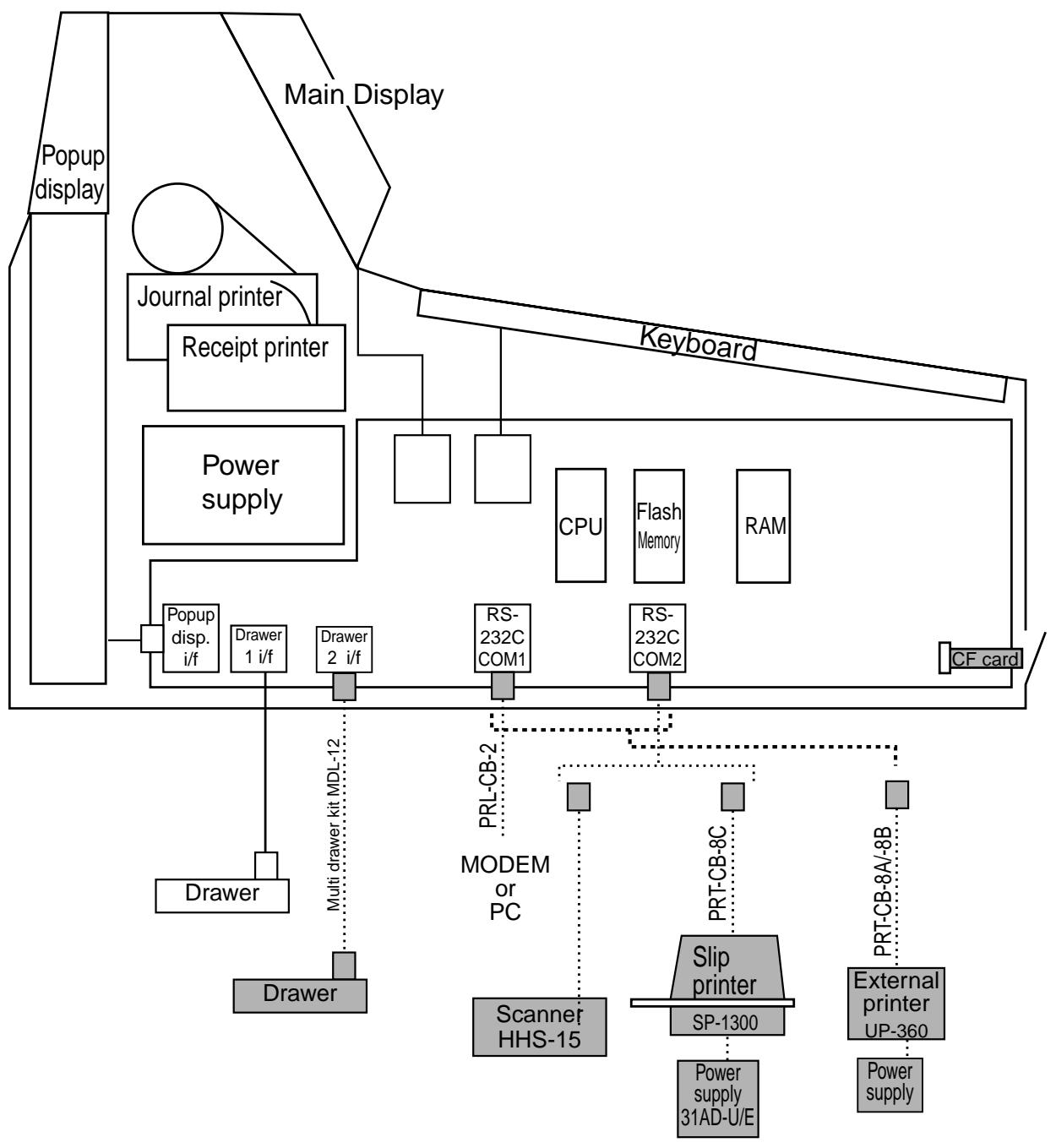
BIAD-U/E Note: Shadowed device and dot line indicate option devices.
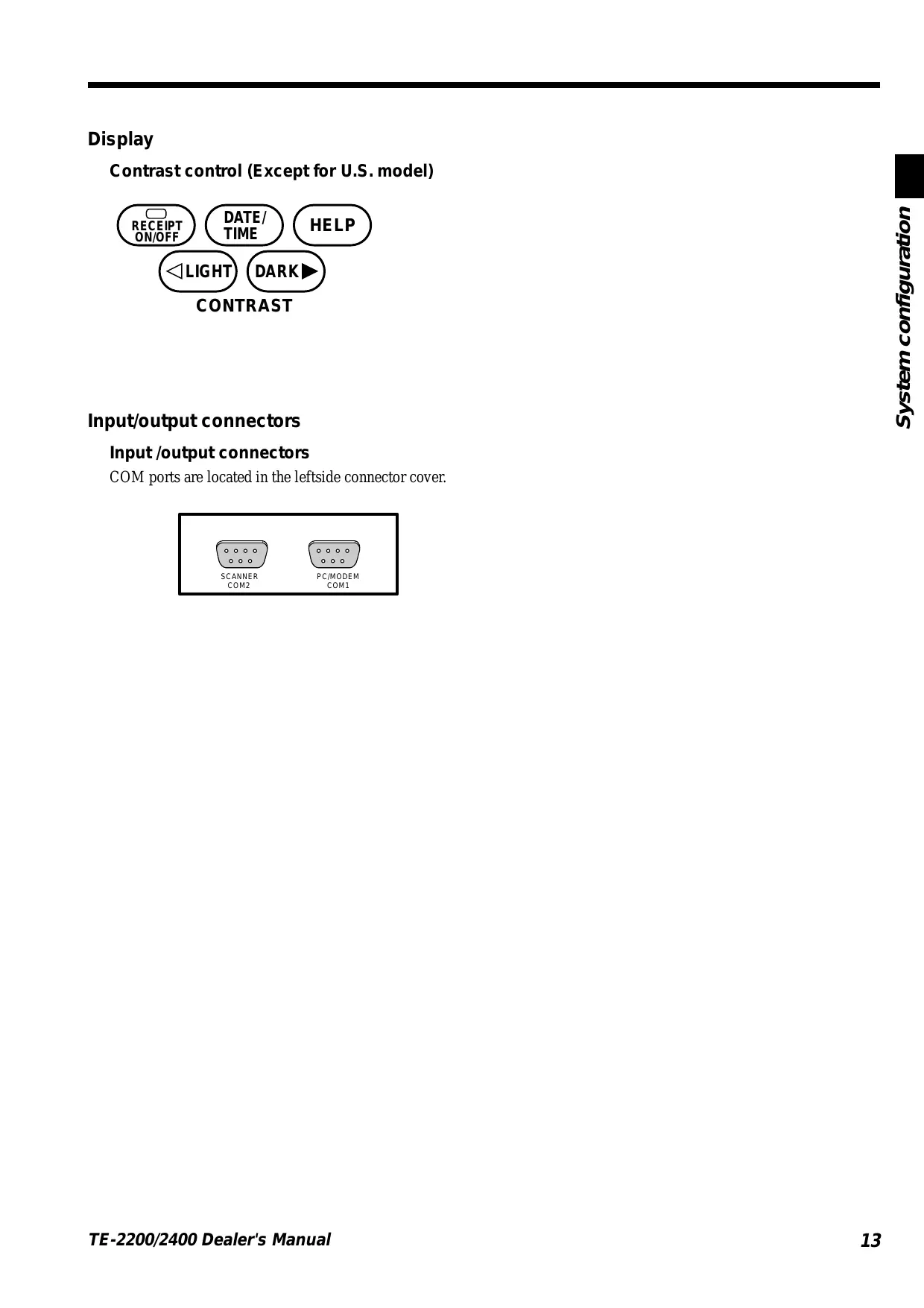
Display Contrast control (Except for U.S. model)
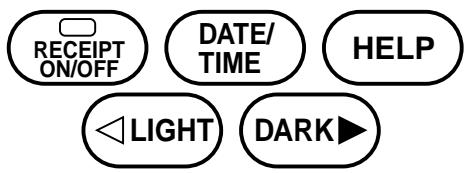
(æ) DATE/ Cuers) Que!) Coeur)
CONTRAST Input/output connectors
Input /output connectors COM ports are located in the leftside connector cover.
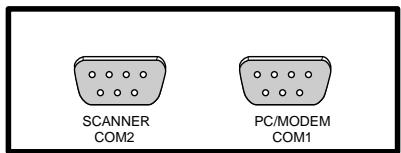
Peripheral ports and their connectable devices
: Drawer COM port Model D ° es pot | com | com MODEM/PC Ÿ ES : ’ TE-2200 ; TE-2400 Slip printer ra Scanner Ÿ Drawer 1 (Max 2) +“: can connect Available device/cable list External printer: UP-360 Printer cable: PRT-CB-8A (3m) or PRT-CB-8B(5m) Slip printer. SP-1300 Printer cable: PRT-CB-8C Power supply: AD31U orAD31E Scanner (Hand-held): HHS-15 Scanner (LASER): PSC Quick Scan 6000 Scanner (Fixed) PSC HS1250 MODEM: US Robotics 56K V.92 External Faxmodem/56K Faxmodem (U.S. only) PC cable: PRL-CB-2
Steps to define COM port/peripheral devices After connecting peripheral devices, programming of 1/0 parameter table, printer connection table are necessary.
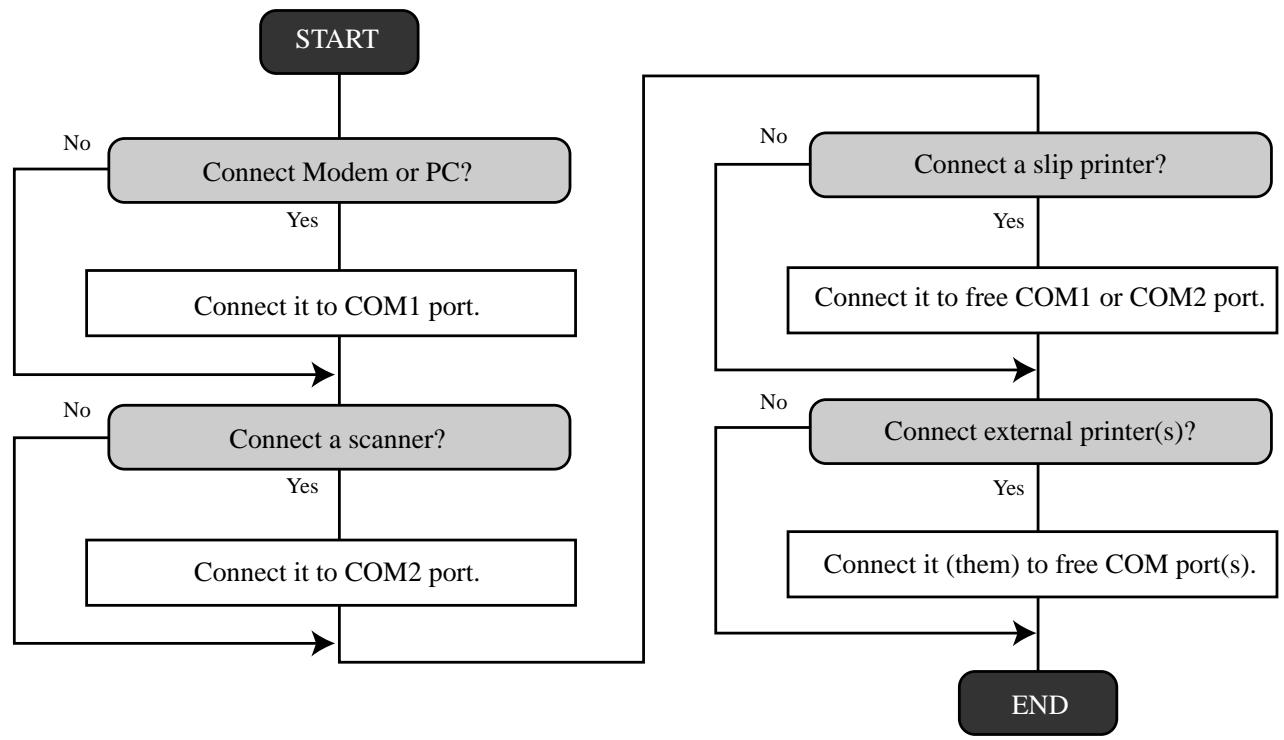
START No No Te — Connect Modem or PC? ] — Connect a slip printer? Yes Yes Connect it to COM1 port. Connect it to free COM1 or COM port. D D No No — Connect a scanner? ] r—{ Connect external printer(s)? Yes Yes Connect it to COM2 port. Connect it (them) to free COM port(s). ne —_—_—_—_——— END
(IPL (Initial program loading) )
IPL should be made before initializing when the application program has been modified.
Memory map of the terminal
The application programs are downloaded from PC (via COM port)/other terminal (via inline or COM port)/CF card to the internal flash memory.
backup data program data
work area Flash memory
Application program D Application program ROM IPL
bios, program loader some diagnosis
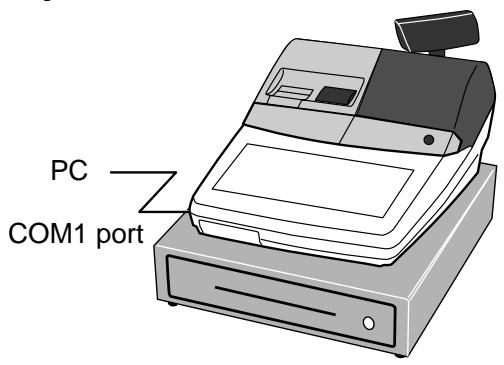
System configuration and procedure Via COM1 port (to receive IPL data from PC)
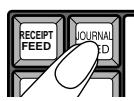
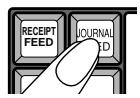
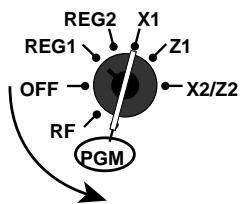
Operation 1. Set the mode switch to OFF position. 2. While holding down the JOURNAL FEED >, tum the mode switch to PGM position. 3. Release JOURNAL FEED > after the register shows “INIT”. 4. Enter “44449999” and press <SUBTOTAL>. 5. Enter “0” (communication speed: 38400 bps) and press <SUBTOTAL>. 6. Start the IPL program of the PC.
TE-2200/2400 Dealer's Manual 15
IPL (Initial Program Loading)
Via CF card (to send the IPL data to CF card)
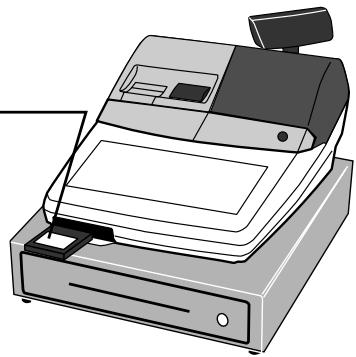
Operation 1. Set the mode switch to OFF position. 2. Open the CF card slot cover and insert the CF card securely. (Please check that the CF card is vacant. Refer to the “System utility section in PGM7”.) 3. Tum the mode switch to PGM position. 4. Enter “7” and press <SUBTOTAL>. 5. Enter “170” and press <SUBTOTAL>. 6. Enter “49” and press <CASH>. (In case of quitting, press <SUBTOTAL > instead of <CASH>.) 7. Tum OFF the register and pull out the CF card.
Via CF card (to send the IPL data to register)
1. Set the mode switch to OFF position.
2. Open the CF card slot door and insert the CF card securely.
3. While holding down the JOURNAL FEED >, tum the mode switch to PGM position.
4. Release JOURNAL FEED > after the register shows “INIT”.
5. Enter “44449999” and press <SUBTOTAL>.
6. Enter “20” and press <SUBTOTAL>.
Never plug/unplug the CF card during IPL.
Machine initialization procedure
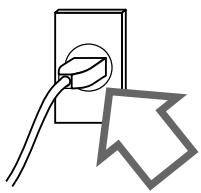
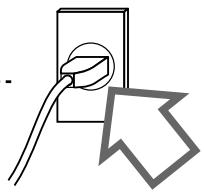
1. Plug the power cord into an AC outlet.
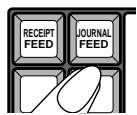
2. Hold down JOURNAL FEED>.
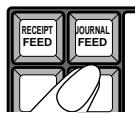
4. Release JOURNAL FEED>. -- :
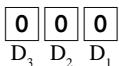
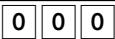
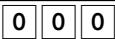
You should see “0000000000” on the display. 1f 10 zeros are not shown or another character are shown, immediately set the mode switch to OFF and restart from
the beginning of this procedure.
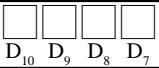
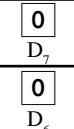
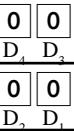
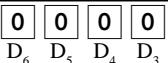
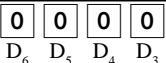
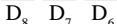
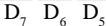
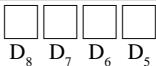
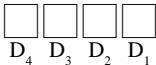
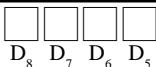
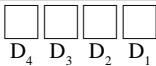
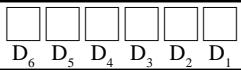
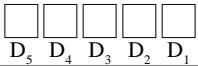
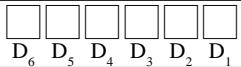
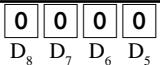
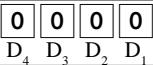
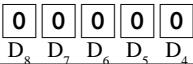
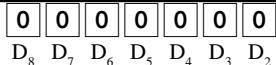
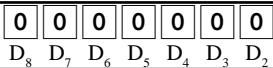
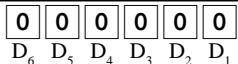
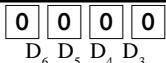
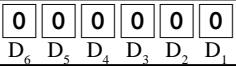
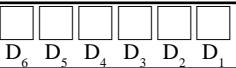
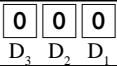
5. Enter 11-digit program code from the worksheet. ---- : . “ D,D,D,D, -D,D,D, 6. Press <SUBTOTAL > to register the program code. refer to Worksheet (Initialize) (Wait until beep twice.) 7. Press <SUBTOTAL > to register the program code.
TE-2200/2400 Dealer's Manual 17
Description Choice Program code Print password of PGM mode, when flag clear operation is performed. x = : D _ 11 Password in PGM3 -7 mode Significant CII] numbers D, D, D, D, Messages and descriptors are written in Significant CO] English = 0, French = 1, Spanish = 2, German =4 number D Model for U.S. or Canada (Date order: month/day/year) =2, Significant CO] Other area (9 7 &, Date order. day/month year) number 5 Other area (ff, Date order: day/month/yean 5 Fixed value: TE-2200: 25 Sgifcant C1] TE-2400: 04 numbers D, D, Use (© dlerk switch (clerk push switch)/ a
) Clerk secret number key *
Initialization patte: b D For scanning/() For check tracking Use Euro only. en 5
* When you select this option “Use clerk secret code key”, and your register doesn't have this key on the default keyboard, be sure to allocate <CLERK-#> (clerk secret number key) just after the initialization. (Do NOT tu to OFF before allocating this key.)
Please check the receipt after initialization operation (machine initialization, flag clear operation and init2) that the machine number is printed properly.
If error codes are printed on it, check the hardware and retry the operation.
P01 03-04-2004 11:58 + Mode symbol/date/time co MC#01 000001 + Clerk descriptor/Mc-No./consecutive No. INIT + INIT symbol (C) 2005 by CASIO COMPUTER CO. , LTD. + Copyright All rights reserved. TE-2200/2400 STD + Model name VER. innnn + ROM version LABEL _:nnnnnn — ROM label VER. innnn + ROM version LABEL :nnnnnn — ROM label INIT, innnnnnnnnnnnnn + Initialization code 0002-98 2000 + 1/0 parameter table record No./error code
1. Plug the power cord into an AC outlet, -----
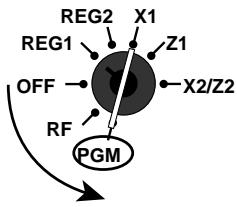
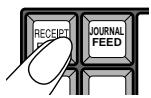
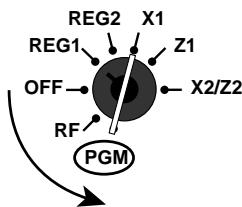
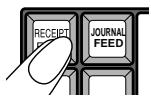
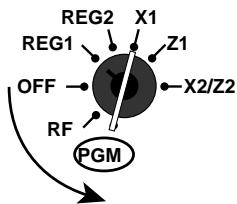
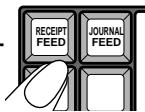
REG2 X1 REG, À /A 3. Tum the mode switch to PGM position, ---------- e" 4 - X2/22 RF/ 4. Release <RECEIPT FEED >. mens
You should see “FFFFFFFFFF” on the display.
1f 10 FSs are not shown or another character are shown, immediately set the mode switch to OFF and restart from the beginning of this procedure.
5. Press <SUBTOTAL> to complete. After completion of flag clear, receipt is issued.
Note: After flag clear, clerk 1 is assigned automatically. So do not program clerk 1 as not assignable or not operable in PGM mode.
REG2 X1 3. Turn the mode switch to PGM position. "777"
4. Release <RECEIPT FEED >. DUT You should see “FFFFFFFFFF” on the display. 1f 10 FSs are not shown or another character are shown, immediately set the mode switch to OFF and restart from
the beginning of this procedure.
5. Enter “8888888888” and press <CHECK TEND> to complete.
After completion, receipt is issued.
TE-2200/2400 Dealer's Manual 19
1. Plug the power cord into an AC outlet. ---
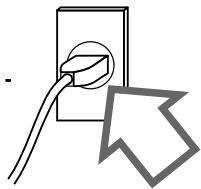
2. Hold down JOURNAL FEED>.
REG2 X1 REG LA 21 3. Turn the mode switch to PGM position. Ve us 4. Release JOURNAL FEED>. .-
5. Enter “99990000” and press <SUBTOTAL> to enter the diagnosis.
During initialize operation, you can program the password for PGM 3 -7. If it is set, every time you enter PGM 3 -7 mode, you must input this password by the following procedure.
1. Press <#1> (normally <CASH/AMT TEND>).
3. Press <#2> (normally <SUBTOTAL>). Otherwise, you can do nothing in the PGM 3 -7 mode.
(Programming (General explanation) ) Program sub mode (P1 thru P7 mode)
Program mode contains seven sub modes listed below. When you change the mode switch to PGM mode, the register is always in the PGM 1 mode. In case of using other mode, enter the sub mode number (2 - 7) and press <SUBTOTAL>.
* PGM: unit price, rate, date, time, scanning PLU unit price maintenance
* PGM2: descriptor, name, message
* PGM3: machine feature (general function, clerk, etc.), key feature (department, transaction), scanning PLU maintenance
+ PGM4: key allocation
* PGM5: file allocation
+ PGM6: program reading
+ PGM7: auto-program, system utility
Entering the program sub mode Procedure (for PGM 1, 2 mode)
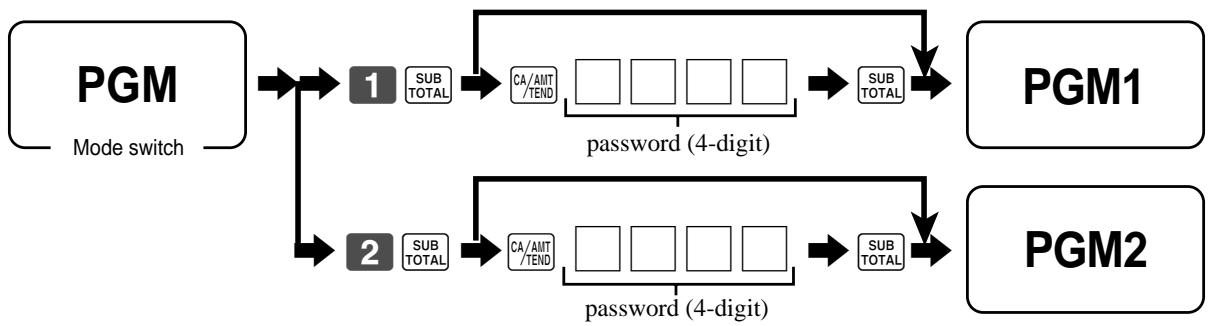
km COL + ETS password (4-digit)
1. Enter password for PGM 1, 2 mode. If the register has no password for the PGM1 and 2 mode, you need not to enter it.
2. Press <SUBTOTAL>. An error occurs if you try to enter the PGM1 or 2 mode without inputting a password (when one is programmed), or if the password you input does not match the one programmed for the register.
To avoid repetition, the above operation is abbreviated to the following for all of the other procedure in this manual.
This password is defined by the address code 02 of the general function program.
Procedure (for PGM 3 - 7 mode)
PGM |+E1- LILI] % $ PGM 3-7 Mode switch password (4-digit)
1. Enter password for PGM 3 - 7 mode. If the register has no password for the PGM 3 -7 mode, you need not to enter it.
2. Press <SUBTOTAL>. An error occurs if you try to enter the PGM 3 - 7 mode without inputting a password (when one is programmed), or if the password you input does not match the one programmed for the register.
To avoid repetition, the above operation is abbreviated to the following for all of the other procedure in this manual.
This password is defined during initialization operation.
TE-2200/2400 Dealer's Manual 21
Programming (General explanation)
(File allocation (Program 5) )
File allocation program
Programming procedure

Y PGM [HE [IT 1Ee [1-1 Mode switch | File record number (see next pages.) File attribution code (see below.) File number (see next pages.) File attribu- Consolidation file tioncode | daily sales | Periodic1 | Periodic2 | Daily sales | Periodic 1 | Perodic2
File allocation programming (P5)
*D: Allocate these files if you want to change the default message. *E: 67 for TE-2200, 77 for TE-2400Eu, 70 for TE-2400US.
*F: 84 for TE-2200, 112 for TE-2400.
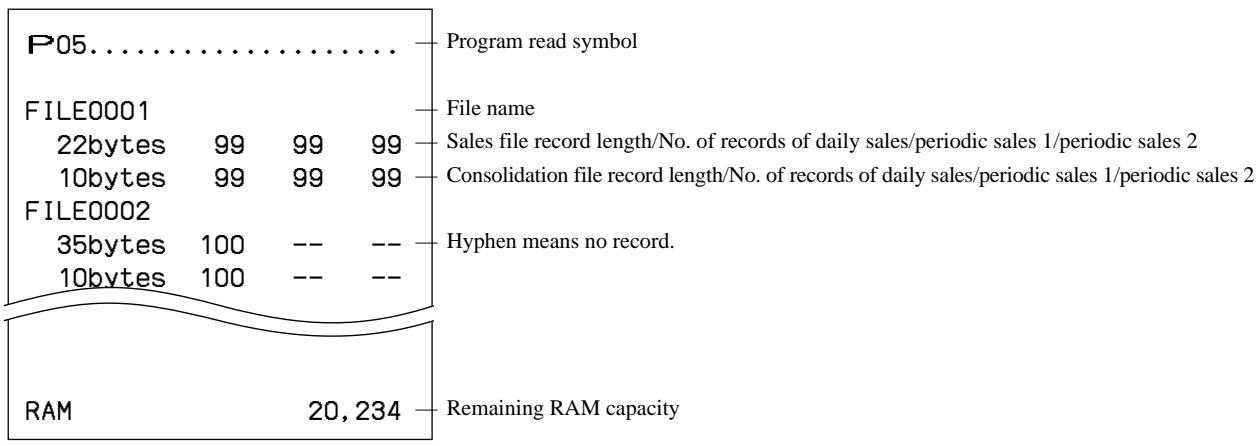
Issuing program reading report of program 5 mode
P05 — Program read symbol
FILEO001 — File name 22bytes gg gg gg —| Sales file record length/No. of records of daily sales/periodic sales 1/periodic sales 2
10bytes 99 99 gg — Consolidation file record length/No. of records of daily sales/periodic sales 1/periodic sales 2
FILEO002 85bytes 100 -- -- — Hyphen means no record. 1 S_ 100 -- --
RAM 20,234 — Remaining RAM capacity
File allocation programming (P5)
(Key allocation (Program 4) )
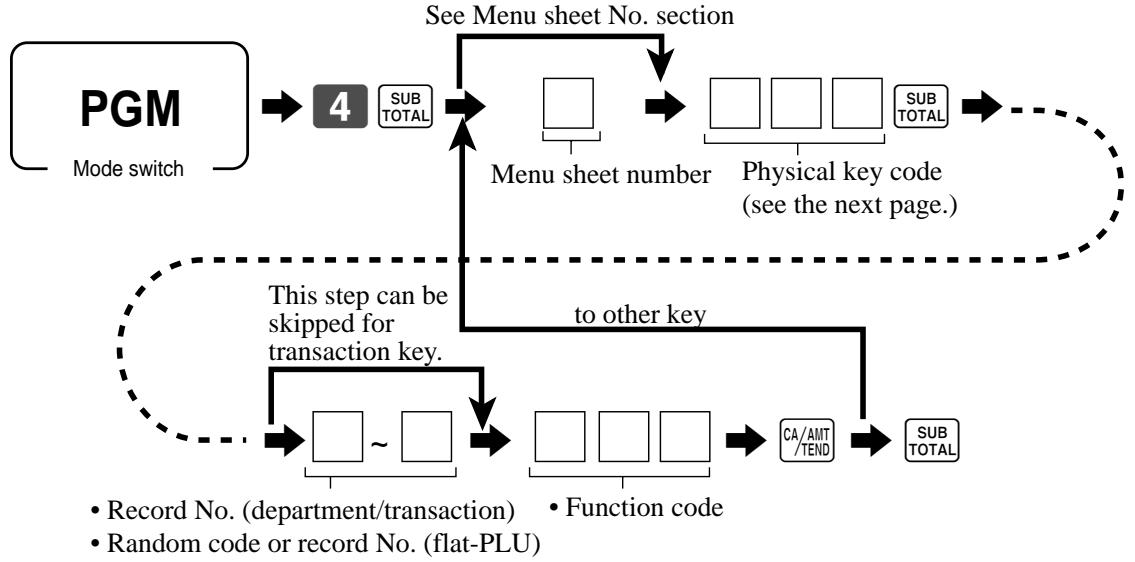
Key allocation program
Programming procedure
By pressing the appropriate key See Menu sheet No. section
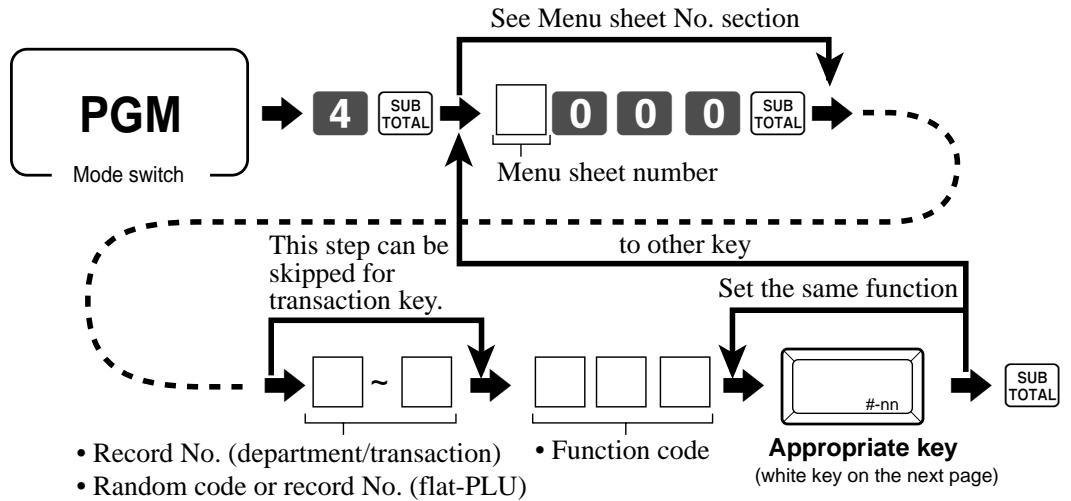
né This step can be to other key : Pa Key. Set the same function] , RER 14 } | + EX
— ï i : ï - * Record No. (department/transaction) * Function code Appropriate key + Random code or record No. (flat-PLU) {uhite key on the next page)
By entering physical key code See Menu sheet No. section
= = , Mode suitch Menu sheet number Physical key code : (see the next page.) ;
emmmmmmmmmmmmlnnnnnnnmn mm + 4 This step can be n skipped for to other key ! transaction key.
D F4) D END (rorat) L n
* Record No. (department/transaction) _* Function code
+ Random code or record No. (flat-PLU)
Menu sheet Description Description number (for transaction key) (for Dept/flat-PLU) 0 or skip entering| Set a function to the 1st - 6th menu sheets. | Set a function to the programmed menu sheet. 1 Set a function to the 1st menu sheet. Set a function to the 1st menu sheet. 2 Set a function to the 2nd menu sheet. Set a function to the 2nd menu sheet. 3 Set a function to the 3rd menu sheet. Set a function to the 3rd menu sheet. 4 Set a function to the 4th menu sheet. Set a function to the 4th menu sheet. 5 Set a function to the 5th menu sheet. Set a function to the 5th menu sheet. 6 Set a function to the Gth menu sheet. Set a function to the Gth menu sheet.
Key allocation programming (P4)
Configuration of the physical key layout TE-2200
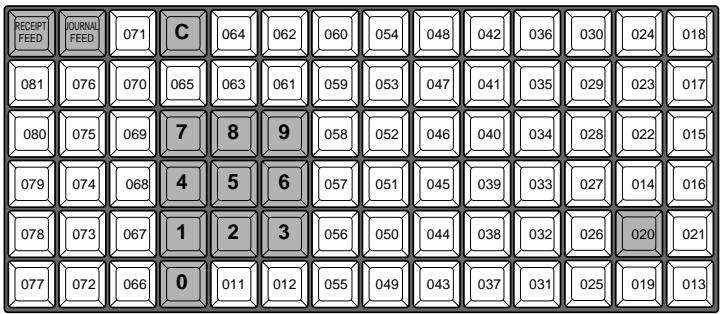
The shadowed key cannot be programmed with any other functions. <00>, <000>, and <.> functions are only allocated to <#011> or <#012> keys.
Function Code Initial character Function Code Initial character
À dd check 094 [ADD CHK Normal receipt 016 NRMRCT Arrangement 044 | ARG OBR 103 OBR Old check 092 | OLD CHK Bill copy 047 [BILL One touch NLU 138 NLU Botile return 053 |BR Open 067 OPEN Cancel 236 |CANCEL Open? 068 OPEN2 Cash amount tendered 001 CASH Open check 117 OPEN CHK Charge 002 | CHARGE Operator read/reset 073 | OPE X/Z Check endorsement 039 |CK.E Paid out 021 PD Check print 012 |CHKP Pick up 022 P.UP Check tender 003 |CHECK Plus 029 + Clerk number 072 |CLK# PLU 048 PLU# Clock-in/out 108 _|CLOCK-IN/OUT|| Previous balance 026 PB Coupon 023 |COUPON Previous balance subtotal 079 PBST Coupon 2 036 CPN2 Premium 030 a+ Credit 004 |CREDIT Price 049 | PRC Cube 090 |XXX Price change 104 PRC CHG Currency exchange 045 ÎCE Price inquiry 008 PRCINQ Customer number 043 CT Price shift 069 PRICE SHIFT Date/Time 101 JDATE/TIME Quantity/for 083 | QT Decimal point 098 |. Rate tax 031 TAX Declaration 061 |DECLA Recall 131 RECALL Department nn051 [DEPTnn Receipt 038 RCT Deposit 025 DEPOSIT Receipt on/off 076 RCT ON/O0FF Discount 028 % Received on account 020 RC Eat-in 128 JEAT-IN Red price 060 RED EBT tender 007 |EBTTD Refund 033 RF Enter 105 ENT Review O7 REVIEW Error correct 034 |CORR Separate check 095 SEP _CHK Flat PLU * nnnn063 |PLUnnnn Slip back feed/release 054 SB/R Food stamp status shift 059 |F/S Slip feed/release 056 SF/R Food stamp subtotal 081 |FSST Slip print 055 SLIP Food stamp tender 005 _|FSTD Square 084 XX Help 141 HELP Stock inquiry 009 STKINQ Ketten Bon 113 _|X/KETTEN Store 130 STORE Loan 019 |LOAN Subtotal 075 _| SUBTOTAL Lock out unused key 000 Table number 058 TBLY Manual tax 032 |TAX Takeout 129 TAKE=-OUT Media change 118 [MEDIA CHG Tax exempt 062 | EXEMPT Menu shift 064 |MENU Tax status shift 057 T/S Merchandise subtotal 080 |MDST Taxable amount subtotal 077 TAST Minus 027 |- Text print 011 PRT Multiplication/Date/Time 082 |X Text recall 010 CHAR Multiplication 100 |X Three zero 097 000 New balance 006 |NB Tip 015 TIP New check 091 NEW CHK Tray total 074 TRAY_ TL New/old check 093 NEW/OLD Two zero 096 00 No sale 042 ÎNS Validation 037 VLD Non-add 040 |# VAT 046 VAT Non-add/No sale 041 |#/NS Void 035 VOID
* These functions cannot be allocated on TE-2200.
Key allocation programming (P4)
Issuing program reading report of program 4 mode
Issuing procedure PGM |+ÆEB (x) + Mode switch
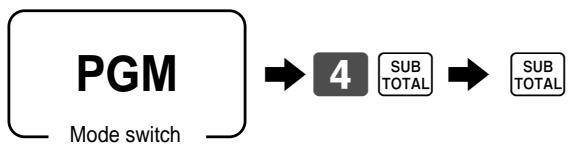
(Key function/machine feature (Program 3) )
General control program
Programming procedure

PGM EEel TaaES TITI]
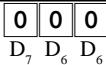
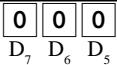
= Mode suitch Address code Program data (2 digits) (Max. 10 digits) Program data (by address code) Address code 01 (date order/password) Description Choice Program code Initial value Date order fi Depende SPA 23 Monty = 3 es, | [ant Monetary mode Significant [ Dependent upon 8 =0, 00 =L 008 =2 0000 =3 umber (0 — 3) 5, initialization code Password in Manager mode ETTICTT Floloïole D, D, D, D, | D, D, D, D, Password in X2/Z2 mode EIEET Flofololol D D: D, Di 4 3 72 D Address code 02 (password) Description Choice Program code Initial value : fi olfolfol[o Password in PGM1/PGM2 mode Significant C sn 1l 1l 10 Always “00” Lolo] tollo] D, D, D, D, Always "0000" toloïolo] | lolooïo|
D, D, D, D, | D, D, D, D Address code 03 (consecutive number)
Description Choice Program code Initial value Reset consecutive number after daily fixed total reset report is issued. xeszl E | (o] e e Alays 0" Lo Lo]
D, D Consecutive number set value. It starts “set value +1.”
Key function/machine feature (P3)
Address code 04 (tax system, rounding, etc.)
Description Choice Program code Initial value Apply rounding for registration. No munding = 0, FI SL IE? =, Danish = 3, Norwegian =4, Significant. (o] Singaporean =5, Finnish = 6, Australian = 7, South Africa = 8 number (0 -8) D, D, Tax system O|or|1 Single tax system (1 — 10) =0, U.S. tax system =1 Significant | d 0] El Canadian tax system = 2, Singaporean tax system =3 number (0 3) D, , Receipt issuance: Significant Î (o] Controlled by receipt onfoff switch/key = 0 Always on (sue) + 1, Always of not issue) =2 number (0 —2) D, D, Allow amount tender in RF/REG- mode operation. a xs= | [o Dash der open (sb) ab) (Dimmediately when the transaction is finalized. b 7 7 @After validation compulsory is released. ? Food stamp system (in case of D, = 1) Significant Payable =0, Illinois rule = 1, New Jersey rule =2 number (0 2) [ |] [o] Tax exempt quantity of donuts tax. (in case of D, = 2) Significant D, D, 0 9 (“0” means "No donuts tax”.) number (0 —9) Rounding of results produced by departments, PLUS and scanning PLUS Round off +0 CL] Lo] programmed with package prices and package quantities RGUnd up = 2 D. Maximum value High amount limit specification for cash in drawer amount, . El] [olo] (Sentinel function) Number of zeros D, D, , D, Almays "00" tollo] Lolo] 2 1 2 D Rounding IF 1 rounding Australian rounding Last 1 digit of subtotal Result Last 1 digit of 0-2 5 subtotal/cash change Result 3-7 5 0-2 0 5-9 10 3-7 5 8-9 10 IF 2 rounding Last 1 digit of subtotal Result Norwegian rounding — Last 1 digit of 04 0 subtotal Result 5 10 00-24 Q Singaporean rounding 2-74 50 Last 1 digit of 75-99 100 item, % +, % - registration Result 0-2 0 Finnish rounding 3-7 5 Last 1 digit of subtotal/cash change Result 8-9 10 0-2 0 Danish rounding 3-7 5 Last 1 digit of = subtotal/change Result 5-9 10 00-12 TT) South Africa rounding 13237 5 Last 1 digit of subtotal Result 38-62 50 0-4 0 63-87 75 5-9 5 88-99 100
Address code 05 (print control for receipt)
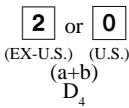
Description Choice Program code Initial value Print total line during finalization. a xes=0 Time system: b [o] D 24 hour system, @) 12 hour system (atbto) (bte) n Feed one line after issuing receipt. c " Print consecutive number by double sized letter (up to 3 digits). a = bo] ) (a#b) Buffered receipt print"! b Go D, Skip item lines on jounal. (joumal skip) a [] (o] (a+b) (a+b) Breakdown set menu printing on receipt, post receipt, guest receipt. b De Always “000” tolofo (C lolo] Print number of item sold. a jo ct = [2]or[0 ns (ŒXUS) (US) Print tax symbols. b Yes = 9 D, G$ : Yes =0 Lo] Ignore receipt/journal paper end (not effective for extemal printer). xes=0 î Print multiplication or item consolidation in one line. [o ] Print [ C ] operation. a Lo] Print number of customers on header. b (atb+c) (atb+e) D 1 Print PLU number on receipt. c
#1: Select “Yes” if you want to print receipts with watermarks.
TE-2200/2400 Dealer's Manual 35
Key function/machine feature (P3)
Address code 06 (calculation & operation control)
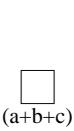
Description Program code Initial value Follow the taxable status and commission status of previous item when +/- a operation is performed. Force to register rate tax before finalization. b er) AUR D "] w
Force a money declaration by { # ], [ns], (43) before read/reset operation. | c
Force to press [5%] before finalization a
Allow credit balance while finalization. b
(a+b+c) (a+b+c) D, D, Allow multiple refund/register minus operation. c Afect the result of 4, %4/%-, mix & match to the item. (Nettotalling) | à G 0 Include add-on/add-in tax in net total b Gp Fa Indlude commission in net total. a a 0 Treatment of department key numeric inputs: (a) (ab)
(D Treat as amount ovemide b ) Treat as quantity extensions
Clearthe key buffer when a receipt is issued. (REG1/2 only) a Lo] Sounds key catch tone. b Porn to D, D, Allow to issue post receipt, even if the original one is issued. c Allow progrun 1 programming in the manager control mode a (X1 mode). 0 Display “seconds” during time display. b En di Connect slit drawer. c RF mode status a Prohibit registration when the stock quantity becomes negative. b Lo] Fe È geeve. Cr) (abc) D, D, Alert when the stock quantity becomes under minimum stock quantity. c Affect to stock quantity even if the refund operation. a
Treatment of flat-PLU/One touch NLU Key numeric inputs: (D Treat as amount ovemide (effective for flat PLU only) b
Treat as quantity extensions (tbe) (atbtc) s :
Allow one registration of #-, %H%- per one transaction. c
Display separator. b Gt à Gb)
Allow numeric entry while compulsory drawer opening. a G
0 PLU numbering: () By memory No. (sequential), @) By random code b @ Gi)
Address code 07 (menu & price shift)
Description Choice Program code Initial value Maintenance of last menu shift: (D Do not maintain [] [o <) Until next menu shift specification po) D @ Within this transaction 8 Maintenance of last price shit (D Do not maintain [o <@ Until next price shift specification D @ Within this transaction 7 Always "0" Lo D Sheet number of the parent menu sheet a fat Lo No =0 Summed up menu sheet 1 to parent menu sheet. a Yes=l No =0 CO n Summed up menu sheet 2 to parent menu sheet, b Pa =2 © (atb+c) (a+b+c) D, Di Summed up menu sheet 3 to parent menu sheet. c Summed up menu sheet 4 to parent menu sheet. a Summed up menu sheet 5 to parent menu sheet, b [] [o (a+b+c) (a+b+c) Summed up menu sheet 6 to parent menu sheet. c ' ° Always "0" [o D, Yes = [o Reset child menu sheets with parent menu sheet together. Nef 2
L This program is not effective for TE-2200.
TE-2200/2400 Dealer's Manual 37
Key function/machine feature (P3)
Address code 08 (print control for fixed total report)
Description Choice Program code Initial value Print gross sales total on fixed total report (GROSS) a xes=0 Te ] Print net sales total on fixed total report (NET) No =2 po te) = N 10 Print cash in drawer total on fixed total report (CA D) c Her ‘ Print difference between money declaration and cash in drawer total on fixed | à Yes =0 total report (CATL, CA+, CA) (Skip these lines, if "CA ID” is set to skip.) No =1 b Yes =0 Print charge in drawer total on fixed total report (CHI D) js=0 ch do Print difference belween money declaration and charge in drawer total on Yes =0 Di o fixed oil report (CHTL, CH+, CH) (Skip tese lines it "CHID" is set | © Fer: skip. Print check in drawer total on fixed total report (CK 1D) a Po dHerence Helveen money decleralon and check der UIATOn |, = og to report (CKTL, CK+, CK-) (Skip these lines, if is set to eo (@bro) Print credit in drawer total on fixed total report (CRID( 1 ) - (4 )) c ‘ ° Print difference bebveen money declaration and credit in drawer Wal on Fed total report (RTL, CR#, CR-) (Skip tese lines it 'CRID" issu | à skip. Print food stamp in drawer total on fixed total report (FS1D) b Cr) api) Print food stamp cash change total on fixed total report (FSCACG) € ? ’ Print EBT in drawer total on fixed total report (EBTTL) a Print EBT cash change total on fixed total report (EBTCACG) b [7] El api) CE) Print RF mode total on fixed total report (RF) c ‘ ° Print the net number of customers on fixed total report (CUST) a = D) Print the average sales per customer on fixed total report (AVER) b Fa 5, ) Print check cashing handling fee total on fixed total report (FEE) a 7 Print temporary finalize service charge total on fixed total report (+) b [] por nl P (bte) bo) D, D, Notused c Print commission 1 total on fixed total report (C1) a Print commission 2 total on fixed total report (C2) b Cr) eo Print foreign currency cash in drawer and check in drawer totals on fixed |, Ds 3 total report (CECA 4, CECK 1 —4) Print <MINUS>, <COUPON>, <%-> and mix & match operation nettotal | à Yes=0 on fixed total report (DC) No =1 Print <REFUND > and <VOID> operation net total on fixed total report b Yes =0 (REF) No =2 to api) Print total number of <CLEARS> operation net total on fixed total report ; Yes =0 . : (CLEAR) No=4 Print nontaxable totals on fixed total report (NON. TAX) a xs 21 Yes =0 Print rounding totals on fixed total report (ROUND) b No =2 +) ï Print cancéllation total on fixed total report (CANCEL) c Ys=?
Address code 09 (print control for fixed total report)
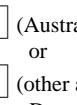
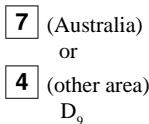
Description Choice Program code Initial value Print taxable amount 1 total on fixed total report (T A1) a xs 20 Print tax 1 total on fixed total report (TX 1) b Go) @bro Print tax exempt 1 total on fixed total report (EX1) c . . Print taxable amount 2 total on fixed total report (T A2) a (Australie) or Print tax 2 total on fixed total report (TX2) b eo) [4] (other area) , D, Print tax exempt 2 total on fixed total report (EX2) c ° Print taxable amount 3 total on fixed total report (T A8) a Print tax 3 total on fixed total report (TX3) b (a+b+c) Print tax exempt 3 total on fixed total report (EX3) c ‘ Print taxable amount 4 total on fixed total report (T A4) a Print tax 4 total on fixed total report (TX4) b (abc) «pro Print tax exempt 4 total on fixed total report (EX4) c ? ? Print taxable amount 5 total on fixed total report (T A5) a Print tax 5 total on fixed total report (TX5) b (apte) «pro Print tax exempt 5 total on fixed total report (EX5) € 5 5 Print taxable amount 6 total on fixed total report (T A6) a Print tax 6 total on fixed total report (TX6) b (apte) Print tax exempt 6 total on fixed total report (EX6) c . Print taxable amount 7 total on fixed total report (T A7) a Print tax 7 total on fixed total report (TX7) b @ib+e) (pt) Print tax exempt 7 total on fixed total report (EX7) c : ‘ Print taxable amount 8 total on fixed total report (T A8) a Print tax 8 total on fixed total report (TX8) b eo bo Print tax exempt 8 total on fixed total report (EX8) c ° | Print taxable amount 9 total on fixed total report (T A9) a Print tax 9 total on fixed total report (TX9) b apte tro Print tax exempt 9 total on fixed total report (EX9) © s : Print taxable amount 10 total on fixed total report (T A 10) a Print tax 10 total on fixed total report (TX 10) b (apte) «ro Print tax exempt 10 total on fixed total report (EX 10) c : :
TE-2200/2400 Dealer's Manual 39
Key function/machine feature (P3)
Address code 10 (print control for taxable amount, till timer)
Description Program code Initial value Print taxable amount 1 on receipt/joumal Q Print taxable amount 2 on receipt/joumal eo ee Print taxable amount 3 on receipt/joumal . © Print taxable amount 4 on receipt/joumal Q Print taxable amount 5 on receipt/joumal eo ere Print taxable amount 6 on receipt/journal ° . Print taxable amount 7 on receipt/joumal Print taxable amount 8 on receipt/joumal. | [o (atbtc) @tto Print taxable amount 9 on receipt/joumal ° ° Print taxable amount 10 on receipt/joumal. L lo Always "0" to Lo D, D Prohibit registrations, (D while all drawers are opened. @ while clerk's own drawer is opened. © [ [o = a+ Ignore compulsory drawer sensor. Yo =0 Fa Fa Till timer (00 - 59 minutes) Significant | to]lo] numbers D, D, D Till timer (00 - 59 seconds) Significant CET to]lo] numbers D, D, M) Address code 13 (online control) Description Choice Program code Initial value Issue reset report at satellites during Z consolidation. * (for in/online master/satellite) [ ] [ 0 | Add daily total data to consolidation file when reset operation has been (sb) (ab) performed. (for inline master/satellite) D, D, Prohibit operation when data exists in the consolidation file. [1] (o] D, 4 Always "000" tollolto] tol[ol[o] D, D, D, D
* This option is effective, when consolidation is activated by job command.
Address code 14 (currency exchange control)
TE-2200/2400 Dealer's Manual 41
Key function/machine feature (P3)
Address code 15 (print control for reports)
Description Program code Initial value Zero skip department report. a 5 (ab) (a+b) Zero skip clerk report. b ns In Zero skip transaction report. a Zero skip PLU report. b © ip e Gt) (a+b+c) h A Zero skip houriy report. c Zero skip group report. a Yes =0 Q Zero skip monthly report. b Ko: ape) do e û Yes =0 Zero skip table analysis report. c Kr Skip a not clocked out employee on the time & aftendance report. a js 20 5 (ab) (a+b) Zero skip mix & match report. b ; D, Prohibit issuing "OPEN CHECK Z” report. a E » 0 Prohibit issuing “Daily Z” report, if opened check exists. b 5) @H) o 6 Skip the non-programmed record of scanning PLU saving data to CF cam | c je 29 Exclude the record No. field from scanning PLU saving data to CF card a je 29 Open cash drawer when the financial or fixed total report is issued. b Q (ab) (sb) Print PLU number on the PLU report. c : : Print sales ratio. a Q Issue double Z report. b (agro) (+) ‘ ï Print the recalculate amount of taxable amount and tax amount of single tax. | c Print average sales in the monthly report. a Contents of QoubIeZ Rp 4 5 Q (D: Fixed total report only, @: Batch report * Sixed total should be Ineluded mm this batch. re) (gro Reset actual stock quantity after PLU reset report issuance by batch X/Z. 0 Print reset counter. a Q Print item discount totalizer. b (ape (ape Print order of PLU report: e . . ( Memory No. (sequential), @ = Random code With character of X/Z data stored to CF card a With random code of X/Z data stored to CF card b Û pre) (a+b+c) 1 With OBR code of X/Z data stored to CF card c
Address code 16 (print control for grand total)
Description Choice Program code Initial value Contents of the periodic 1 total: + Normal registration only = 0 Significant [ [o] + Training registration only = 1 number (0 — 2) 5 5 + Both normal registration and training registration = 2 1 L Contents of the periodic 2 total: + Normal registration only = 0 Significant [ [o] raining registration only = 1 number (0 — 2) D D + Both normal registration and training registration = 2 ! ‘ Joumal printing of the periodic 1 report a [ G 0 Journal printing of the periodic 2 report b FA Fa Print consecutive number range of the day on daily fixed total report. L Î 2 ]
Address code 17 (print control)
Description Program code Initial value Money declaration compulsory (cash) in REG/RF mode a 0 Money declaration compulsory (charge) in REG/RF mode b eo eo 1 n Money declaration compulsory (check) in REG/RF mode c Money declaration compulsory (credit) in REG/RF mode Î Lo Always “0” to to D 8 D 8 Commission: (D Taxable amount xcommission rate a @) (Taxable amount + VAT) Xcommission rate [ [o Whenever pressing <PLUS>, <MINUS>, or <COUPON > the amount b ab) (tb) registered is proportioned among all taxable amounts. Yes =2 3 7 Rounding of commission Significant | To Round off = 0, Cut off = 1, Round up =2 number (0 2) D, : : No =0 Append two zeros in unit price programming. a Le | Co Print normal price and the difference between the normal price and the b a+b) (sb) reduced price on receipt. 5 5 Print date on receipt. a 0 Print date on journal b ro) eo D 4 D 4 Print consecutive number on receipt/journal. c Print time on receipt. a 0 Print time on journal. b Bo bic) D 3 3 Merge the same department/PLU/scanning PLU registration on buffered € receipt and post receipt. (Item consolidation) Always “00” toto] toto]
D, D, D, D Address code 18 (print control for guest receipt and slip)
Description Choice Program code Initial value Maximum printing lines of slip (00 99) Significant C [ q E] Ship paning pool a Low =0 “Maximum pinting lines of slip” is necessary, if you select “High” High =2 | [o a+ +b) Classify registered item by group on slip & guest receipt. b jo 29 p? 5” Always “0 to [o D, D, Yes =0 Print date on slip & guest receipt. a No =1 Print ti lip & guest receipt b xs 20 Co rint time on slip & guest receipi No =2 ex dk Print: c ‘ ‘ € Total only, @ Detail when D6 =4 (item consolidated) Slip print range: a (D Atthe top of the transaction, @) This receipt Q Enable slip auto line find. b Ye = age & de Merge the same department/PLU/scanning PLU registration on slip & guest | c No =0 ° ° receipt. (Item consolidation) Yes =4 Significant Slip auto feed lines (00 — 99) DS L L | lo pl 2 D 2 D: Address code 19 (order control) Description Choice Program code Initial value Print order with order character. a G] (a+b) (a+b) Print order with amount. b A D, Alert when the order printer 1 goes down. a IF "No”, backup processing is performed.) n G Q Alert when the order printer 2 goes down. (IF “No”, backup processing is performed.) b (+0) (bre) û : Breakdown set menu printing on order. c Print double-height characters in UP-360/(intemal R/] printer). CU] Lo] {not only for order, but also effective for receipt) D, Show guidance for backup print of order. (when it is backed up from R/J) [1] F | D A Always "0" Lo] Lo] D, D Cut order. a 1) L ol A à Print dashed lines (hyphens). b 5” D, Print orders even if training clerk is registered items. a n G] Merge the same department/PLU/scanning PLU registration on order receipt | 3 ab) (tb {Item consolidation) à : _ Significant Number of feed lines before order printing (0 — 9) gi [1] _ Significant Number of feed lines after order printing (0 9) gi E ]
TE-2200/2400 Dealer's Manual 45
Description Choice Program code Initial value Enable to register a non-department link PLU. L Lo : Subtotal display: @ Both “rounded” and “not rounded” subtotal | 1 (Australie) 2 Only “not rounded” subtotal 5 [oJ on (This option is effective for selecting Eu/Aus rounding specification only.) 3 (other area) 3 Previous item void: fn] @ By using VOID> ordinary procedure By using <REVIEW> D, Restrict (to 0 or 5) on the last one digit for amount tender. a [a ]taustralia) or Obey registration quantities of child PLU to its parent PLU. b eo) [0 ] (other area) D 1 Restriction (to 0 or 5) on the last one digit for <CASH>, <RC>, <PD>, e money declaration amount (by <CASH> or NON ADD >) m Address code 26 (check tracking) Ë Description Choice Program code Initial value Check tracking method: a @ Check No. @ Table No. | Lo È Maximum digit of check number: @b) @) (D 6-digit, @) 12-digit b D, D, if you use “table analysis’ or “table range”, select (©) Tax calculation by new balance [ Lo] (Calculation result is not saved into totalizer.) D, D. Enable to perform <NEW/OLD > during check tracking/clerk interrupt. a G] a#b) (a+b) Print previous balance amount, when registration begins 0 with old check. b A D, Always "000" tollolo] tollollo] D, D, D, D, D, D, Address code 27 (clerk control) Description Choice Program code Initial value Enable clerk/cashier interrupt. a G Q Print of clerk/cashiers name on receipt following sign back on at D,, =1. b (+) (a) (enable clerk/cashier interrupt) û Di Always “0000000” oi - [oi Co . lo] 9 7 o © 3 Auto sign-off timer (in second) (“00” means no auto sign-off.) Significant L ] E | O | [o ] 2 D 2
Key function/machine feature (P3)
Address code 28 (Euro)
Description Choice Program code Initial value Define Euro as the main currency. Yes 20 [1] to] = D D, Select rounding option: Significant 0 Round of 0, CU of = 1, Round up =2 er (0 — 2) mu BI ne Signe [11 LI focoioioiel Exchange rate (within 6-digits) DS 5,5,5/5,0/5,[D,D-D,D D D. Decimal PoIRosIÉOn OF exchange rate: Integer on! HA 1stdecimal place = 1 Znd decimal place = 2, 3 decimal place = 3 Significant Ath decimal place = 4, 5th decimal place = 5, 6th decimal place = er (0 6) Example: (D8 -D2) 1 Euro = 1.977 DM; Set “0019773” 1 Euro = 1957.77319 Lit; Set "1957772" Always 0" Lo] D, Address code 29 (Euro) Description Choice Program code Initial value joe mode of sub current Significant “000 21 000 =2 0009 =3 number (0-3) dl A rounding for sub currency. und ding = 0, IFI = 1, IF2 à 2 Danish =3, Norwegian =4, Finnish = 6 1 mean Lo] Australia = 7, South Africa = D, Cash drawer number of sub currency: 0 -2 Significant n (“0” means main drawer.) number (0 —2) D
€ Main curency only, @) Main and sub currency
Print tendered amount in sub currency converted to main currency, jo I 9 Selection of the currency of subtotal printout: @=0
Print total in sub currency by double sized letter.
Selection of the currency of change: (© Main currency, () Sub currency
Printthe cash in drawer of sub currency on fixed total reports. (Uf the cash in drawer of main currency is skipped, this line is also skipped.)
Display symbol of sub currency: D Ë (Euro), @ L (Local)
The current de rest (1 00,25 50, 79) on Latine IG for amount tendered: () Main currency, ) Sub curency {lt is necessary to set this restniction to CAGH> key.)
Print rounding total of sub currency on fixed totalier report.
Last 1 digit for sub currency monetary amount entries to 0 or 5.
Selection of the change amount printout: € Main and sub currency, (@) Dependent upon D, - a of this worksheet
Calculation method of change amount in sub currency:
@ Convert the change amount in main currency into sub currency. @b) @) Subtract the equivalent value of subtotal amount in sub currency from D D, the equivalent value of the tendered amount in sub currency. Always “000” 0]0/|0 0/|0/[0 D, D, D D, D, D
* Refer to the Address code 04 programming
Address code 30 (Internal thermal printer control)
Description Choice Program code Initial value Joumal compressed print (print by half height characters) Jo = C QI Always “000” tololo] tololo) D, D, D D, D, D,
Address code 31 (scanning)
Description Choice Program code Initial value The oldest item is deleted if the scanning PLU file becomes full. [ [o Gf “No” is selected, alert only.) 5, D, Print consolidated scanning PLU reset report. (only for master) * a G] (a+) (a#b) Print report before scanning PLU Z consolidation. * b . ; Print scanning PLU code on receipt. a Print scanning PLU code on joumal b eric bte ë Û Print scanning PLU code on report. c Always “00” Lolo] too] D, D, D, D, Inactive days: Significant [ I I | Î 0 Il 0 I 0 ] (If a scanning PLU did not move during these days period, this item will numbers be printed on the Inactie scanning PLU report} (000 - 990) D, D, D, D, D,
* These options are also effective, when consolidation is activated by job command.
Address code 32 (direct maintenance PLU)
Description Program code Initial value
Skip the unit price field programming of direct maintenance PLU file in a
Skip the optimum stock field programming of direct maintenance PLU file [ Lo]
in PGM 3 mode. D, D.
Skip the unit price field programming of direct maintenance PLU file in a
Skip the link field programming of direct maintenance PLU file in PGM3 |h [o]
Skip the character field programming of direct maintenance PLU file in © ‘ ‘
Skip the status field programming of direct maintenance PLU file in PGM 3 | à
Skip the bottle link field programming of direct maintenance PLU filein | ph [o]
PGM 3 mode. (a+b+ (a+b+c)
Skip the mix & match field programming of direct maintenance PLU filein | & ‘ :
Key function/machine feature (P3)
Address code 33 (batch PLU maintenance)
Description Choice Program code Initial value Skip the record No. designation of batch maintenance PLU file. jo = 9 Cl [o (a+b) (a+b) Skip the optimum stock field programming of batch maintenance PLU file. jo 29 10 10 Skip the unit price field programming of batch maintenance PLU file. jo = 9 Skip the link field programming of batch maintenance PLU file. No =0 Lo] ip programming Yes=2 (a+b+c) (a+b+c) Skip the character field programming of batch maintenance PLU file. No =0 : ° Skip the status field programming of batch maintenance PLU file. jo =. 9 No =0 [] [o Skip the bottle link field programming of batch maintenance PLU file. ot) ego ee e e Skip the mix & match field programming of batch maintenance PLU file. jo 2? Always “000” tollolo] tollolo] , D, , D, D, “00” o[o] toTo Always 00 l 4 D, D, 3 Always “00” tollo toto] D, D, , D Address code 34 (backlight control) Description Choice Program code Initial value Available =0 0 Bai nt | D cl Always "0" [o (o] D, D, Backdight off timer (01 59 min. “00” means always on.) Senicant L ( ] to][o]
* This program is only effective for Eu.
Address code 36 (store/recall/auto new check number)
* The starting number should be smaller than the ending number. * If the starting number is bigger than the ending number, the E056 is occurred.
Key function/machine feature (P3)
Department key/flat-PLU key/PLU program (Batch feature programming)
Programming procedure
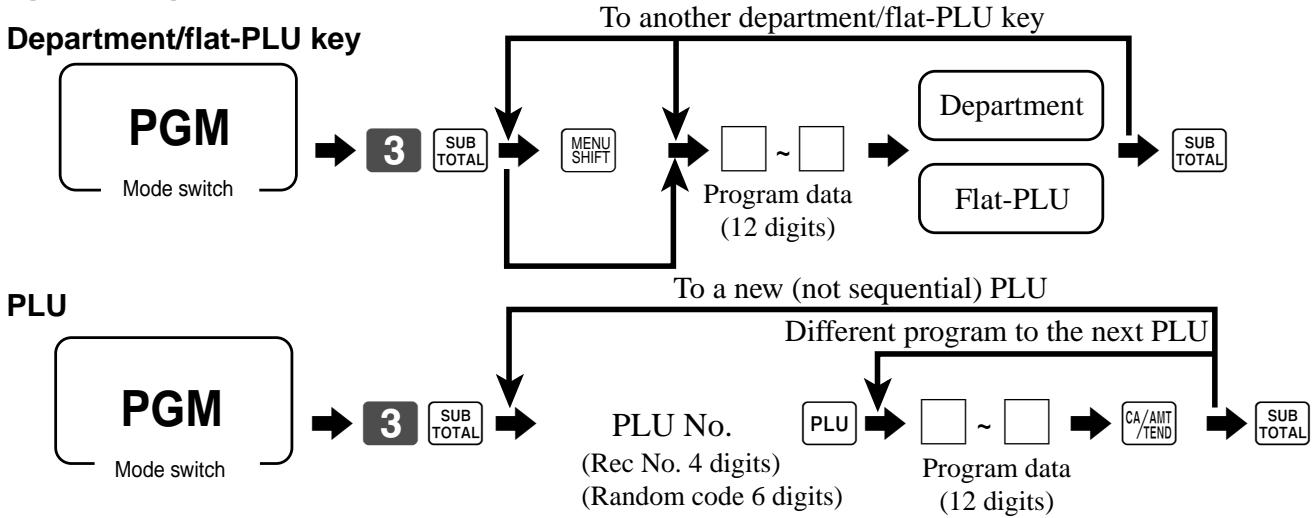
To another department/flat-PLU key
Department/flat-PLU key
DC-C7 + À Program data (12 digits)
To a new (not sequential) PLU PLU Different program to the next PLU PGM |» PLU No. D |-[|+ Mode switch (Rec No. 4 digits) Program data (Random code 6 digits) (12 digits) Program data Description Choice Program code Initial value Single item control: Significant CT Lo] Normal receipt = 0, Single item receipt =3 number D, à Price change registration is enable. à No =0 (Only effective for scanning PLU linked to this department) Yes=1 Multiplication registration is enable. b No =0 Lo] (Only effective for scanning PLU linked to this department) Yes =2 (bic) (ab) COmpuSOT Input unit pce mena u No =0 D u (Only effective for scanning PLU linked to this department) Yes =4 Normal/condiment/preparation (Not for department) Significant 0 Nonnal item = 0, Condiment = i, Preparation = 2 number ( l a Disable operation in RF/REG- mode. a 0,29 Disable operation in REG 2 mode. b ÿe.=2 [] Lo] 5 = atb+c) (a+b+c) Disable operation in REG 1 mode € 0,29 D, D, Taxable status: CL] tollo] See the next page. D, D, D, Enable 0 unit price a LE = Q Enable negative price. b Ÿ2,=9 go cd 1, No =0 , A Has c Yes =4 Always "0" [1 to] D, Low digit limitation (LDL) for manually entered unit price. Significant D | o | Muriple validation: Yas= | (£ “No”, validation is allowed only one time.) a 529 = G : No =0 0 Print difference between the normal price and reduced price. b ÿo,=9 ego eo Open PLU (only for PLU) c 0,29 : ? Commission 1 a ÿ2=9 Commission 2 b o.= [] [0] GER abc) (atb+c) Prepared tax status (Canadian tax) c res=0 D D Compulsory number of condiment/preparation PLU input. Sgen E | ( | 1 1
for the U.S./Singapore
Food stamp (for Singapore, always 0”) L Taxable 1 status Taxable 3 status for Canada Donuts status a 2 E | Non tax =0 Taxable 3 =3 Taxable 1 & 3=6 Signifi [ | Taxable 1 =1 Taxable 4 =4 Taxable 1 & 4 =7 gicant Taxable 2 =2 Taxable 1 & 2=5 number D, for Other area Non tax =0 Taxable 4 =4 Taxable 8 =8 Taxable 1 =1 Taxable 5 =5 Taxable 9 =9 Significant [ I ] Taxable 2 =2 Taxable 6 =6 Taxable 10 = 10 numbers D, D Taxable 3 =3 Taxable 7 =7 s 7
TE-2200/2400 Dealer's Manual
Key function/machine feature (P3)
Department key/flat-PLU key/PLU program (Individual feature programming)
Programming procedure
Depariment/flat-PLU key To another department/flat-PLU key
PGM A EA = EA HE» GE» 0-0 »
Mode switch Address code Program data
To a new (not sequential) PLU PLU -
Different program to the next PLU PGM Mode switch
Range (Department/PLU/flat-PLU)
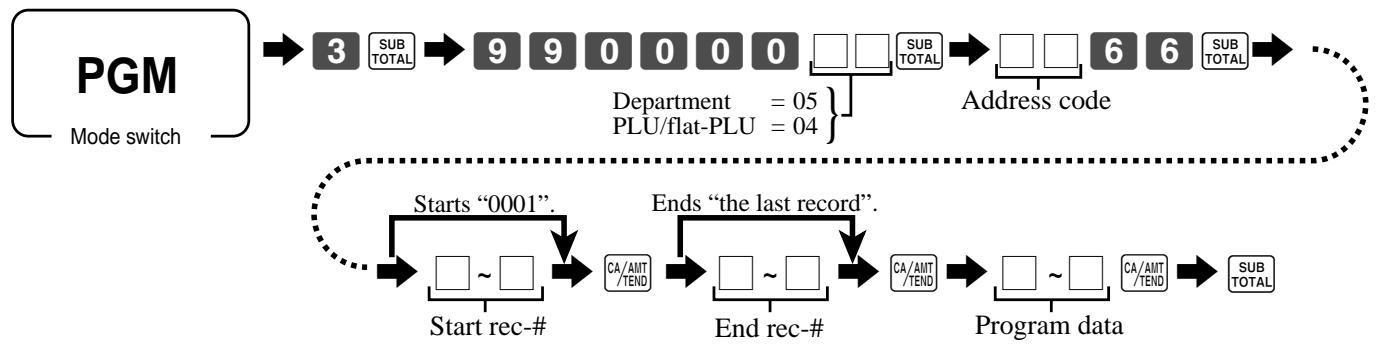
Peu E* 000000 +066 - Depment =05 } Address code p Mode switch PLU/flat-PLU = 04 Ë
d Starts “000 Ends “the last record”. em [1-0] D ]-[] D ]-ClEe GA —— —— Start rec-# End rec-# Program data
Program data (by address code) Address code 11 (link)
Key function/machine feature (P3)
Address code 17 (Bon receipt control)
Description Choice Program code Number of Bon receipts (1 9) Significant [] (£ "0", no Bon is issued.) number 5 Other address code Address Description Choice Program code 18 Single item control: Significant = Normal receipt = 0, Single item receipt = 3 number Price change registration is enable. a No =0 (Only effective for scanning PLU linked to this department) Yes=1 19 Multiplication registration is enable. b No =0 (Only effective for scanning PLU linked to this department) Yes=2 @bro) Compulsory input unit price manually. © No =0 (Only effective for scanning PLU linked to this department) Yes=4 o1 Normal/condiment/preparation Significant [] Normal item =0, Condiment = 1, Preparation = 2 number _ No =0 Disable operation in RF/REG- mode. a Pat 02 | Disable operation in REG 2 mode. b No =0 pe Yes =2 Gb) No =0 Disable operation in REG 1 mode. c Ya 03 Taxable status: Significant CI] See the status table of the batch feature programming section. numbers ) No =0 Enable 0 unit price. a Pat w No =0 05 Enable negative price. b Pa 22 (a+b+c) No =0 Hash c Ya ; Significant 07 Low digit limitation (LDL) for manually entered unit price. ben CU] Multiple validation: a Yes =0 (£"No”, validation is allowed only one time.) No =1 4 Print difference between the normal price and reduced price. b et) (a+b+c) j No =0 Open PLU (Only for PLU) c me No =0 Commission 1 a Paz No =0 09 Commission 2 b F222 (a+b+c) Yes =0 Prepared tax status (Canadian tax) c No =4 Significant 10 | Compulsory number of condiment/preparation PLU input. pin CO]
Transaction key program
Programming procedure

To another transaction key Mode switch Program data Program data <CASH>, <CHARGE >, <CHECK> Description Choice Program code Restriction (to 0, 5) on last digit for amount tendered. No =0 [] (Only effective for <CHARGE> or CHECK >) Yes=1 D, Allowable number of validation printing (“0 means no limitation) *1°2"%#1*5 Signifieant number mn BE ù
Force validation operation, *1"2"3"1 a
ab) nm Restriction [to 00, 25, 50, 75) on Last two dits for amount tendered b (Only for <CASH> in Danish rounding) * ù Ë Disable operation in RF/REG- mode. "4" a Disable operation in REG2 mode, ‘1 b do ë Disable operation in REG1 mode. *11*5 c ° Force batch slip printing. *1"2* a Force check endorsement printing (Only for <CHECK>). 1" b Go)
D 8 Force check printing (Only for <CHECK >). 1° c Prohibit entry of a partial payment a Prohibit the entry of the amount tendered b eo Force entry of the amount tendered. € ? Print VAT breakdown. “1°? a Check cashing commission (Only for <CHECK>) © b [] Use an amount @ Use arate are Validation amount ++ el] Subwotil=0 D € Print subtotal amount _@) Print amount tendered Tender = 4
Perfor Finnish rounding. Not
High amount limit specification for subtotal and tendering amounts. o-9) Number of zer0s 5 ra 1 D, Maximum value High amount limit specification for change amount due. 7 [ Number of zer0s 55
*1 Those are valid options for Auto Cash as well
12Those are valid options for Sinqle tem as el
+3 Those are valid options for Cashing a check as well.
24 Those are valid opons for Cumency exchange Gnclude pat tende) gs we. +5 Those are valid options for Media change (include partial tender) as well.
TE-2200/2400 Dealer's Manual 57
Description Choice Program code Restriction (to 0, 5) on last digit for amount tendered. No 20 Allowable number of validation printing (“0” means no limitation) Significant number L ] ù : . No =0 . No =0 Disable operation in RF/REG- mode. a Yes =1 . No =0 Disable operation in REG2 mode. *! b Yes =2 Æ 1, D . No =0 : Disable operation in REG1 mode. *! c Yes =4 No =0 Force batch slip printing. Yes=l C ] | No =0 Prohibit entry of a partial payment a Yes =1 No =0 (1 Prohibit the entry of the amount tendered b Yes 22 Gi) : No =0 Force entry of the amount tendered. © Yes 4 l No =0 Print VAT breakdown. a Yes =1 = Validation amount pl Subtotal=0 (tb) €) Print subtotal amount _ (@) Print amount tendered Tender =4 D; No =0 Perform Finnish rounding. Yes =4 Q Maximum value 0-9 High amount limit specification for subtotal and tendering amounts. (0-9 CI Number of zeros D, (0-9) l Always "0" (ol
D Specify credit in drawer total in the fixed totalizer
*TThose are valid options for Media change (include partial tenden as well
<FOOD STAMP TENDER >, <EBT>
Description Choice Program code Allowable number of validation printing (“0 means no limitation) Significant Eumber D | ü Force validation operation. [] Do Disable operation in RF/REG- mode. a Disable operation in REG2 mode. b eo Disable operation in REG1 mode. € : Force batch slip printing. a C] (a+b) Prohibit over tendering. (only for <EBT>) b D, Always "0" (ol D, Print VAT breakdown. a ] Validation amount 5| Suwa=0 ab) @ Print subtotal amount (@) Print amount tendered Tender =4 5 Always "0" to D, Maximum value High amount limit specification for subtotal and tendering amounts. Li CI Number of zeros D, Always “00” Lolo D, D, <NEW BALANCE> Description Choice Program code Allowable number of validation printing (“0 means no limitation) Significant Eumber ( u Force validation operation. a ] Cancel the transaction if no item is registered b Go Disable operation in RF/REG- mode. a Disable operation in REG2 mode. b eo Disable operation in REG1 mode. c : Force batch slip printing. a Open drawer when the key is pressed. b [ 4 No receipt is issued. c ‘ Function after normal (not in check tracking) registration: Significant [] Operation error = 0, Auto Cash = 1, New balance = 2 number 5. Print VAT breakdown. a No =0 Yes=1 C] Service charge nu b| Amowt=0 (sb) (D Use an amount @ Use a rate Rate =2 6 Always “00000” Lollolololo] D, D, D, D, D,
Key function/machine feature (P3)
Description Choice Program code No =0 Disable operation in RF/REG- mode. a Le No =0 0] Disable operation in REG2 mode b Po =9 ao No =0 : Disable operation in REG1 mode: c LA Always "0" to] D, Disable to change mode switch after registration. a No =0 {only effective for <character recall>) Yes=1 CO] = +b) Print characters on receipt, guest receipt, or slip. b Yes=0 (D) Always “0000” tollollo]fo D: D, D, Always “00” tollo] D, D <TIP> Description Choice Program code Multiple validation Yes =0 C] {£ “No”, only one validation printing is possible.) No =4 D, Always "0" (ol Du No =0 Disable operation in RF/REG- mode. a No 20 No =0 [7] Disable operation in REG2 mode b No 20 eo No =0 Disable operation in REG1 mode: c No 20 Always “00000” tololololo] D, D, D, D, D, High digit limitation (HDL) for manually entered unit price Significant C] (9° means NOT allow manual entry) number 5, Always “00” tolto D, D,
Description Choice Program code u No =0 Restriction (to 0, 5) on last digit for amount tendered. Le) L ] Allowable number of validation printing (“0 means no limitation) Signifigant number L ] ù Force validation operation. (only effective after receipt issuance) Jo = L | No =0 Disable operation in RF/REG- mode. a No z0 No =0 Disable operation in REG2 mode. b Yo, 29 ee No : Disable operation in REG1 mode. c No Always "0000" toloolo] BE Maximum value High amount limit specification for entering amounts = El m Number of zeros ; ë Always “00” Lolo D, D, Q <RECEIVED ON ACCOUNT», <PAID OUT> Description Choice Program code Allowable number of validation printing (“0” means no limitation) Significant Eumber (1 ü Force validation operation, No =0 [] es=1 D, No =0 Disable operation in RF/REG- mode. a No =0 No =0 (] Disable operation in REG2 mode. b No =0 eo No =0 : Disable operation in REG1 mode. c No 20 Always “0000” tolololo] D, D, D, D, Maximum value High amount limit specification for entering amounts … CI Number of zeros D, D, Always “00” Lolo D, D,
These programmable options are not effective for the Euro function.
TE-2200/2400 Dealer's Manual 61
Key function/machine feature (P3)
Description Choice Program code Multiple validation (If “No”, only one validation printing is possible.) Yes (E ù Always "0" lo D, 0 No =0 Disable operation in RF/REG- mode. a Jo ct Disable operation in REG2 mode. b Jo zt bio) No =0 Disable operation in REG1 mode. c Jo z0 Taxable status: LIT See below. D, D, Allow credit balance. (-, CPN only) L 6 Always "0" Lo D, Allow key operation after <SUBTOTAL>. a = ab) Allow key operation after item registration. b xes=0 D, High digit limitation (HDL) for manually entered unit price Significant | (‘9 means NOT allow manual entry.) number No =0 Commission 1 a Jo ct No =0 Commission 2 b Jo zt eo Prepared tax status (Canadian tax) c xes=0 : Always "0" 0 D Taxable status for the U.S./Singapore Food stamp (for Singapore, always “0") et [] No =0 Taxable 1 status a F1 No =9 0] Taxable 2 status b Yes =2 api No =0 Taxable 3 status € LE: for Canada Donuts status (D,D,="99" means donuts and all taxable) No 29 M Taxable 1 & 3 fi [ | Taxable 1 & 4 =7 Significant Taxable 2 =2 Taxable 1 & 2=5 numer D; for Other area Taxable 4 =4 Taxable 8 =8 Significant OL 10 numbers 5/5 AL taxable = 99 se De
<DEPOSIT> Description Choice Program code Restriction (to 0, 5) on last digit for amount tendered. No = (E u 0" 0 Always “0 Dh Force validation operation. à No =0 (only effective after receipt issuance) Yes =1 [ = @B) Multiple validation (If “No,” only one validation is possible.) b Jo =0 D, Disable operation in RF/REG- mode. a No = Disable operation in REG2 mode. b No = Para Disable operation in REG1 mode. c Jo =0 BE Always 0” to D, m Key attibution DEPO+ 20 L Ë Open cash drawer No = | 5 à Media definition: Sioif x : : gnificant à Cash 0, Charge =1, Check =2, Credit 1 2 4, Chat 2 = 4, Credit 3 = 5, Credit 4 =6 number D, Maximum value High amount limit specification for entering amounts : U] Number of zeros , D, Always “00” toto]
Key function/machine feature (P3)
Description Choice Program code Multiple validation (If “No”, only one validation printing is possible.) xs =? (] u Always “0 to] D 10 Disable operation in RF/REG- mode. Disable operation in REG2 mode. d Es 1, D, Disable operation in REG1 mode. Taxable status: CI See below. D, D, Key attribution +20 = ab Print when registered. Yes=0 (D) Always “00” High digit limitation (HDL) for manually entered unit price Significant (9° means NOT allow manual entry.) number Prepared tax status (Canadian tax) xs =? Always "0" 1 Taxable status for the U.S./Singapore Food stamp (for Singapore, always “0') Ro] D No =0 Taxable 1 status Faut No =0 0] Taxable 2 status Yes =2 a) No =0 Taxable 3 status Fed for Canada Donuts status (D,D,="99” means donuts and all taxable:) Ro] CT d = D, Non tax =0 Taxable 1 & 3=6 f C] Taxable 1 Taxable 1 & À =7 Significant Taxable 2 =2 number D; for Other area Non tax =0 Taxable 1 Significant CI Taxable 2 Taxable 10 = 10 numbers 5 Taxable 3 =3 AÏ taxable = 99 e D
<PREMIUM (%+)>, <DISCOUNT (%-)>
Description Choice Program code Multiple validation Yes =0 Î G£"No”, only one validation printing is possible.) No =4 D, Always "0" Lo D Disable operation in RF/REG- mode. a Disable operation in REG2 mode. b x D, Disable operation in REG1 mode. c Taxable status: CI] See below. D, D, No =0 Prohibit manual rate override. Yo, 29 L Roundin Significant | Round of = 0, cut off = 1, round up =2 number 5. Allow key operation after <SUBTOTA L >. a xes=0 = aHb) Allow key operation after item registration. b xes=0 D, Always "0" to D 3 Commission 1 a Commission 2 b (ape Prepared tax status (Canadian tax) c xes=0 : Always "0" Q D, Taxable status for the U.S./Singapore Food stamp (for Singapore, always 0) L ] F Taxable 1 status a Taie sans , db D, Taxable 3 status c for Canada
Donuts status (D,D,="99" means donuts and all taxable.)
Non tax = Taxable 3 Taxable 1 & 3 Signifi [ ]
Taxable 1 Taxable 4 = Taxable 1 & 4 =7 ignicant
Taxable 2 =2 Taxable 1 & 2=5 number D, for Other area
Non tax =0 Taxable 4 =
Taxable 1 Taxable 5 Significant Ol
Taxable 2 Taxable 6 0 numbers
Taxable 3 Taxable 7 AI taxable =99 e D;
TE-2200/2400 Dealer's Manual
Key function/machine feature (P3)
<RATE TAX> Description Choice Program code Disable operation in RF/REG- mode. jo ct Disable operation in REG2 mode. et) bo) D, No =0 Disable operation in REG1 mode. me Always “00” too] D, D, No =0 Prohibit manual entry. ot) ue Roundin Significant [ Round off =0, cut off =1, round up =2 number 5. Always “0000” tollololo] 4 D 2 1 <MANUAL TAX> Description Choice Program code Multiple validation Yes=0 [ (£"No”, only one validation printing is possible.) No =4 D, Always 0" [o Du No =0 Disable operation in RF/REG- mode. Let Disable operation in REG2 mode. et) ) No =0 Disable operation in REG1 mode. me Always “00000” [ololololo] D, D, D, D, D, High digit limitation (HDL) for manually entered unit price Significant [ (‘9° means NOT allow manual entry.) number D, Always “00” toto] 2 <ERROR CORRECTION/CANCEL> Description Choice Program code No
Disable operation in RF/REG- mode
Yes=1 No =0 Disable operation in REG2 mode Yes =2 No =0 Disable operation in REG1 mode Yes =4
À range of cancellation: () Complete cancellation/2) Current receipt only
These programmable options are not effective for error correction function.
Description Program code Disable operation in RF/REG- mode. a Disable operation in REG2 mode b @ 0 Disable operation in REG1 mode c
À range of iiem correction: 5) From the beginning of this transaction a 2) Current receïpt only
A ffect stock quantity b Gi ) <RECEIPT> Description Choice Program code Maximum number of post receipts (0 — 9) Significant C] (‘0” means 1 post receipt.) number D, Always “00” toTo] u Dis No =0 Disable operation in RF/REG- mode. a F1 No =0 CO] Disable operation in REG2 mode: b jo 5 No =0 ° Disable operation in REG1 mode: c jo = Almays “0° to] D, No =0 Print current time on guest receipt. Yes =d [1 Yes =0 Clear finalized check Yes = L | Almays “0° to] D; Print journal when receipt is issued by <RECEIPT >. Jo = L | Receipis issued Dy: «"Receipt 1 (printer connection table)" = Significant = +"Receipt 2 (printer connection table) number «’Receipt 3 (printer connection table)" = D, Line number of guest bottom message (00 — 10): Significant FRE ee | Lo
TE-2200/2400 Dealer's Manual 67
Description Choice Program code : No =0 Disable operation in RF/REG- mode. a Yo, 29 Disable operation in REG2 mode. b et) tro No =0 Disable operation in REG1 mode. c jo 20 Always 0" [o D E Allo mode change or clerk change after on add registration as fist ansaction. Yes =0 Î (only for non-add function) No =1 D. Always “0000” toïloïlol[o] 5 D, D, 3 Always “00” toto] D,D,
<CUSTOMER> Description Choice Program code No =0 Disable operation in RF/REG- mode. Jo ct No =0 mi) Disable operation in REG2 mode. ss eo No =0 : Disable operation in REG1 mode. Let Always "0" o| D, Input method: Significant Aîow replacement = 0, Prohibit replacement = 1, Add enter value = 2 number 5. Always “000000 tolololofolo] D, D, D, à D, <ARRANGEMENT> Description Choice Program code Significant Secret code (0000 - 9999) bars C D Yes =0 Enable operation in X 1 mode. je 20 Enable operation in Z1 mode. (appto) o Enable operation in X 2/Z2 mode. Enable operation in RF/REG- mode. Enable operation in REG2 mode. eo D, Enable operation in REG1 mode. Always "0" 0] D, No =0 Treat numeric entry as arrange table number jt = Significant
Arme ani as OT TE-2200/2400 Dealer's Manual
Key function/machine feature (P3)
Description Choice Program code No =0 Disable operation in RF/REG- mode. Yes =1 No =0 Disable operation in REG2 mode Yes 22 (ep) No =0 | Disable operation in REG1 mode: Yes 4 ter o Define amount symbol. (0, 1 -4) Significant [] ("0° means local currency symbol.) number D, Define foreign currency totalizer. (0, 1 -4) Significant [] ("0” treats as “1”.) number Rounding Significant LC] Round off = 0, cut off = 1, round up =2 number D, Always 0° to] D, Monet Significant C] 200 =2, number D, Decimal =0 Monetary symbol for decimal Conma=l [] (a+b) Comma =0 Monetary symbol for separator Decimal = 4 D, A sqning ar number 0 2 Significant [1 (‘0° means drawer 1. number (0 —2) D, BILL> Description Choice Program code No =0 Disable operation in RF/REG- mode. Yes=l Disable operation in REG2 mode. No =0 Q Yes =2 (bte) No =0 | Disable operation in REG1 mode: Yes =4 Always “00000” Lololololo] D D, D, D, Receiptis issued Dy: «’Receipt 1 (printer connection table) Significant Receipt 2 (printer connection table) number (
<SLIP> Description Choice Program code
Disable operation in RF/REG- mode. a
Disable operation in REG2 mode. b ( E D,
Disable operation in REG1 mode. c
Force slip batch printing from the beginning of the transaction. a
If “No”, controlled by general function.) C]
Print issuing time b (sb)
(only effective when slip is printed from the beginning of the transaction). :
Clear finalized check.
Always "0" à No =0 Print joumal when slip is printed. No 20 Always “000” ; D, D, <TAX SHIFT>, <TAXABLE SUBTOTAL> Description Choice Program code Maintain of tax shift (D Do not maintain. 2) Until next tax shift specification. D, Disable operation in RF/REG- mode. a Disable operation in REG2 mode. b No = tee No =0 Disable operation in REG1 mode. c Pad Taxable status (00, 01 — 10) Significant LI] ('00” means taxable 1.) numbers D, D Always “000000” tofololololo]
D, D, D, D, D, D TE-2200/2400 Dealer's Manual 71
Key function/machine feature (P3)
<EXEMPT> Description Choice Program code Disable operation in RF/REG- mode. Disable operation in REG2 mode. Æ 1, D, Disable operation in REG1 mode. : *U.S., Singapore: Exempt tax 1 [ 0 ] Ds Exempt tax 2 C] (atb+c) Exempt tax 3 D, * Canada: Not exempt donuts tax = 0 Significant Exempt donuts tax 1 =1 er Exempt all (lex 1 - 4) =0 Exempt tax Exempt tax Exempt tax 3 =3, Significant Exempt tax 4 =4, Exempt tax 1 & 2 =5, number Exempt tax 1 & 3=6, Exempt tax 1 & 4 =7 + Other area Exenpral tx 1-10 = ue un Exempt tax Exempt tax 2 =02, Exempttax 3 =05, Exempt Bt Éxempl tax 5 =05, Exempt tax 6 — 06. Significant ml Exempt tax 7 = 07, Exempt tax 8=08, Exempt tax 9 =09, numbers à D, Exempt tax 10 = 10 Exemptadd-in tax from subtotal amount. No z0 [1 xempt add-in tax from s amoun! Yes=1 5 Always "00000" tolofololo) y D, D, D, D, D <MENU> Description Choice Program code Disable operation in RF/REG- mode. No =0 Yes=1 No =0 Î Disable operation in REG2 mode. Yes =2 bio) D, No =0 Disable operation in REG1 mode. Yes =4 Always "0" Define assigning menu sheet number. (0, 1 — 6) Significant (If you set *0”, menu sheets are assigned one by one.) number Always “000000” tolololololo D, D, D, D, D, D <OPEN> Description Choice Program code Disable operation in RF/REG- mode. No =0 Yes=1 No =0 Disable operation in REG2 mode. F222 bio) D, No =0 Disable operation in REG1 mode. Der Always “0” (ol D “ ñ No =0 Release “High amount limit. Yo, 29 ml
tollololololo D, D, D, D, D, D
<OPEN2> Description Program code Disable operation in RF/REG- mode a Disable operation in REG2 mode b (5 1, De Disable operation in REG1 mode c Alays “0° D] De Release customer number compulsory. a Release table number compulsory. b 5 1, D, Release check number compulsory. c Release credit balance error. a {If “Yes,” you can finalize the transaction even if the subtotal is negative.) Release tax calculation compulsory before finalizing. b Æ 1, D Release guest receipt compulsory. c Release validation compulsory. a Release check endorsement compulsory. b Æ 1, D, Release check print compulsory. c Release slip auto batch print compulsory. (programmed by clerk) a on (a+b) Release slip manual batch print compulsory. (programmed by finalize key) | b D, Release condiment compulsory. L | Release eat-in/takeout compulsory, É | Always "0" to] D, <PRICE SHIFT> Description Program code Disable operation in RF/REG- mode. a Disable operation in REG2 mode b Æ 1, D, Disable operation in REG1 mode c avast o Define assigning price shift number. (0, 1 — 3) Significant CO] (If you set “0”, price shift numbers are assigned one by one.) number Always “000000” tolololololo] D, D, D, D, D, D,
TE-2200/2400 Dealer's Manual 73
Key function/machine feature (P3)
<REVIEW> Description Choice Program code No =0 Disable operation in RF/REG- mode. Yes=l No =0 | Disable operation in REG2 mode. Yes =2 GB) No =0 ° Disable operation in REG1 mode. Yes =4 The reviewed range of item €D From the beginning of this transaction @) Current receipt only Pr ah Display “Check number”, “Table number”, and “Customer number” Ro) ï Always “0000000” o[ofolofolofo] D, D, D, D, D, D, D <CLERK NUMBER> Description Choice Program code No =0 Disable operation in RF/REG- mode. Yes=l Disable operation in REG2 mode. je dr 9 No =0 Disable operation in REG1 mode. Yes =4 Lays “0000 tolooïo! Always “0000 D, D, D, D. Clerk secret number (0000 — 9999) Significant TITI] (‘0000” means no secret number.) numbers D, D, D, D, <OPERATOR X/Z> Description Choice Program code No =0 Disable operation in RF/REG- mode. Yes=1 No =0 [1] Disable operation in REG2 mode. Yes =2 (abc) No =0 Ds o = Disable operation in REG1 mode. Yes =4 Always 0" to] D,
Issue consolidation report./Issue stand-alone report. gérndaone =0 L Always “000000”
<SUBTOTAL>, <MERCHANDISE SUBTOTAL>
Description Program code Multiple validation (£"No”, only one validation printing is possible.) n Always “0 Ü D 10 Disable operation in RF/REG- mode. a Disable operation in REG2 mode. b En D, Disable operation in REG1 mode. c Always “00” toto] D, D, Include add-on tax. (<SUBTOTA L > only) a xs 29 | F No =0 (ab) Print when key is pressed. b Yo =0 k Always “00000” toloïlololo] D, D, D, D, D,
TE-2200/2400 Dealer's Manual 75
Key function/machine feature (P3)
<MULTIPLICATION>, <QUANTITY/FOR >, <SQUARE >, <CUBE >
Description Choice Program code No =0 Disable operation in RF/REG- mode. a Le Disable operation in REG2 mode. b No =0 Yes =2 (a+b+c) No =0 ° Disable operation in REG1 mode. c Yes 4 Always “00” too] D.
Multiplication procedure: (<KETTEN BON> and <X > only)
(D Quantity XA mount, 2) Amount XQuantity D Rounding: Significant | Round of =0, cut off = 1, round up=2 number D. Always “0000” tololollo , D, D, D, <NEW CHECK», <NEW/OLD CHECK> Description Program code Disable operation in RF/REG- mode. a Disable operation in REG2 mode. b upo Disable operation in REG1 mode. c Always “0” (ol D, Enable auto check assignment No =0 [1] Yes=1 D, Always “000000” ofololololo D, D, D, D, D, D
Description Choice Program code No =0 Disable operation in RF/REG- mode. No 29 Disable operation in REG2 mode. Jo 2 @ibro) Disable operation in REG1 mode. No =0 Yes=4 Always “00000” tololololo] , D, D, D, D, High digit limitation (HDL) for manually entered unit price Significant [ ("9 means NOT allow manual entry.) number 5 Always "0" [o D 2 Prohibit to change price greater than the preset price jo I 9 [ Prohibit to change price less than the preset price. No =0 9 <CLOCK-IN/OUT> Description Choice Program code No =0 Disable operation in RF/REG- mode. jt Disable operation in REG2 mode. Jo 2 E D, No =0 Disable operation in REG1 mode. er] Always “00” too] , D, High digit limitation (00 — 10), “00” means no limitation. Significant E LE ] : D Always “00” Lolo] 4 D 3 Usage:Both CLOCK-IN and CLOCK-OUT =0, Significant Î
CLOCK-IN only =1, CLOCK-OUT only =2 number D Issue receipt during CLOCK-IN/OUT. xs 20 E TE-2200/2400 Dealer's Manual
Key function/machine feature (P3)
<EAT-IN>, <TAKEOUT> Description Choice Program code Disable operation in RF/REG- mode. a No =0 Yes=1 n b No =0 Disable operation in REG2 mode. No =0 io Disable operation in REG1 mode. c No =0 ° Yes=4 *U.S., Singapore: Yes =0 Exempt tax 1 a esz0 [o] Yes =0 : Exempt tax 2 b js C] (ab+c) Yes =0 Exempt tax 3 c rl D, + Canada Not exempt donuts tax =0 Significant CO] Exempt donuts tax 1 =1 number D, Exempt all (ax 1 4) =0 Exempt tax 1 =1, Exemptiax2=2, … Exempttax3=3, Significant CO] Exempt tax 4 =4 Exempt tax 1 & 2=5, number D Exempt tax 1 & 3=6, Exempt tax 1 & 4 =7 7 + Other area Eat Qt 0 Eempttax 2-02, Exempttax 3 =03 xempt =01, XemM] =02, xempt =05, Exemptiax 4=04 Exemptiax 5-05, Exempttax 6 =06, Significant [0] Exempt tax 7 = 07, Exempt tax 808, Exempt tax 9 =09, numbers D, D, Exempt tax 10 = 10 Subtract add-in tax from subtotal amount. a No =0 (only subtracted when the tax is exempted.) Yes=1 [ | 0 y No =0 (a+b) Print when the key is pressed. b pl b, Always "0" to] D; Change tax status to: (only effective for VAT) VAT Ï =01, VAT 2 =02, VAT 3 =03, VAT 4 =04, VAT 5 =05, Significant El] VAT 6 =06, VAT 7 =07, VAT 8 =08, VAT 9 =09, VAT 10 =10 numbers 55 00”: No change is made.) 1 Always “00” Lolo] 2 D, <ONE TOUCH NLU> Description Program code Disable operation in RF/REG- mode. a Disable operation in REG2 mode. b Æ 1, D, Disable operation in REG1 mode. c Always “00000” tololololo] D, D, D, D, D, _ Significant Linked one touch NLU record number (000 - 999) can E un | 5)
Disable operation in RF/REG- mode. a No]
Disable operation in REG2 mode. b Yes 22 eo
Disable operation in REG1 mode. c No]
Always "0000000" toNoNooïoïofo É D, D, D, D, D, D, D,
À range of item correction: GFrom the beginning of this transaction
@Current receipt only D, <VALIDATION> Description Choice Program code No =0 Disable operation in RF/REG- mode. a No =0 Disable operation in REG2 mode. b jo if «a 1, No =0 | Disable operation in REG1 mode. c No =0 Always “00” Print total validation to: Significant Slip (paper is inserted in slip printer) or R/] =0, Slip only = 1, RJ only =2 number Number of copies by slip validation (0 9) Significant (‘0” means 1 copy.) number Number of auto feed lines between slip validation printing (00 — 99) Significant numbers Number of line feeds before slip validation (00 — 99) Significant numbers
<PRICE INQUIRY>, <STOCK INQUIRY >, <CHECK PRINT>, <REFUND>, <COUPON2>,
Secret number, drawer, check number programming
Programming procedure To a new (not sequential) clerk
Mode switch Record No. . 2° Data Description Choice Program code
Check number for clerk interrupt gmifican SU TU Assigning drawer number: 00 - 02 Significant LI]
("00° means drawer 1.) numbers
Clerk secret number Significant OU numbers DD, DD,
Clerk detail link programming To a new (not sequential) total
Programming procedure
PGM SUB SUB HE 1B0E Mode switch Record No. * File No.
Fixed totalizer: 01 Transaction key: 02 PLU: 04 Department: 05 Group: 06
Record No. * File No.
Clerk other programming Programming procedure (individual)
To a new (not sequential) clerk To the next clerk
Programming procedure (by range)
PGM +» DO00D0D0U Mode suitch Starts “0001” Ends “the last record”. —— Start rec-# Program data Address code 67 (Clerk control) Description Choice Program code v No =0 Check number compulsory Yes 4 me No =0 Table number compulsory a Yes =1 Number of customer compulsory b we (are) A No =0 Guest receipt compulsory (at finalization) c jt Guest receipt compulsory (at new balance) a No 20 No =0 Slip auto-batch print compulsory (at finalization) b jt ao Slip auto-batch print compulsory (at new balance) c No 20 Clerk attribution: Significant CO] Cashier = 0, Clerk = 1, Manager =2 number No =0 Training clerk a Yes=l = No =0 (ab) Affect stock quantity even if assigning a training clerk b Yes 4 D, Enable to open clerk created by other clerk a No 20 No =0 (0 Disable to sign on b Yes =2 (ep) No =0 | Sign off at finalization (secret number only) c jt Always 0° Lol D, En No =0 Compulsory Eat-in/Takeout operation Yes 22 mu Always “00” 0110 D, D,
TE-2200/2400 Dealer's Manual 81
dress code 68 (Commission rate) Description Choice Program code Commission rate 1 (integer: 00 - 99) Significant LI] numbers D, D, Commission rate 1 (decimal: 00 99) Significant CI] numbers D, D, Commission rate 2 (integer: 00 - 99) Significant 1] numbers 15, Commission rate 2 (decimal: 00 - 99) Significant (7 numbers D, D, dress code 69 (Table number range) Description Choice Program code Minimum range for table range (1 — 999909) Significant CITE] (‘0” means n0 programming. numbers D, D, D, D, D, D, Maximum range for table range (1 — 999999) Significant | [TE 1] (‘0” means no programming.) numbers 5 D, D, D, D, dress code 70 (Mode control) Description Choice Program code Disable to operate in PGM mode. Disable to operate in RF/REG- mode. [1] (a+b+c) Disable to operate in REG1 mode. Do Disable to operate in REG2 mode. Disable to operate in X 1 mode. eo Disable to operate in Z1 mode. ! Disable to operate in X 2/Z2 mode. L he Always "0" Lo D, Enable to finalize a transaction if the clerk is assigned by clerk key. | Enable to finalize a transaction if the clerk is assigned by clerk code/switch. Fa Skip programming fields of batchydirect PLU maintenance fe in accordance with the general function program (address code 32, 33). [ Enable to issue individual key reset report. (ab) Enable to issue read/reset report by file. Enable to issue batch read/reset report. EH Enable to issue operator reset report. D Default menu sheet number (0 — 6) after signing on. Significant number Enable to use 1st menu sheet. Yes=0 Enable to use 2nd menu sheet. mu (atb+c) Enable to use 3rd menu sheet. D Enable to use th menu sheet. Enable to use 5th menu sheet. (a+)
Enable to use Gth menu sheet, D Other programs Time range programming Programming procedure To a new (not sequential) record
1 Mode switch Record No. Program data Program data Description Choice Program code _ Significant Start time (hour: 00 - 23) ignifican mal Start time (minute: 00 — 59) Significant CI] numbers D, D, End time (hour: 00 - 23) Significant CI] numbers D, D, End time (minute: 00 — 59) Significant [ Il ] numbers D, D,
Table range programming
Programming procedure To a new (not sequential) record
Key function/machine feature (P3)
Tax table programming
Programming procedure
Rounding/tax table system code ‘!
Sum of a cyclic pattern
Number of values in each cyclic pattem
Sum of values in each non-cyclic pattem
Actual value of difference of the non-cyclic and cyclic values You must enter these values in 4-digit block. If the last block comes out to be only two digits, add two zeros.
Loop to input the next block.
Tax system code specification
*1 Rounding/Tax-system code D,)D, Rounding Rounding code specification 4] -- | Singapore rounding D, | D) Rounding. -- [ 1 [Tex table only 5 | O || Rounding off two decimal places =: [2 | ULS. tax table with tax rate or add-on tax only 9 | O | Rounding up to two decimal places -- | 3 | Add-in tax rate 0 | 0/7] Cutoff two decimal places - | 4 | Tax-on-tax (Canada, Singapore) - | 6 | VAT-on-tax (Thailand) «| 7 VAT & VAT 2
Canadian tax system For both add-on and add-in tax systems. To program Tax-on-tax system, you must use the tax address “0225”, “0325” or “0425.” To program Donuts tax system, you must use the tax address “0125” or “0225.”
Example 1: Add-on rate tax 8.25%
0 (no limitation) 5002 (Round off) 0
Tax rate (2-digit for integer + 4-digit for decimal) Tax table maximum value ("0" means unlimited). Rounding/tax table system code . Sum of a cyclic pattern … Number of values in each cyclic patte. Number of values in each non-cyclic pattern . Actual value of difference of the non-cyclic and cyclic values 0
Example 2: US. tax table without rate setting
Number of values in each cyclic pattern … Number of values in each non-cyclic pattern Actual value of difference of the non-cyclic and cyclic values
0 %(Table only) 0 (Table only) 01 (Table only) 50 (17+17+16) 3 24 (10+14 10, 14, 17, 17,16
Tax table No. (0125 0325)
Tax rate (2-digit for integer + 4-digit for decimal) Tax table maximum value (“0” means unlimited). Rounding/tax table system code
Sum of a cyclic pattern
Number of values in each cyclic pattem
Sum of values in each non-cyclic pattem
Actual value of difference of the non-cyclic and cyclic values.
You must enter these values in 4-digit block. If the last block comes out to be only two digits, add two zeros.
Example 3: U.S. tax table with rate setting
TAX Price range Max. break point Diff Patt (7%) [Min. break point | Max. break point Upper | Lower IlLerence atem $.00 $.0I $.07 T Ù =
2. 19.93 One all sales above $20.07, compute the tax at the rate of 7%. Tax rate (2-digit for integer + 4-digit for decimal) 7% Tax table maximum value (“0” means unlimited). 2007
Tax table maximum value (“0” means unlimited). Rounding/tax table system code Sum of a cyclic pattern
Number of values in each cyclic pattern
Sum of values in each non-cyclic pattem
Actual value of difference of the non-cyclic and cyclic values.
You must enter these values in 4-digit block. If the last block comes out to be only two digits, add two zeros.
TE-2200/2400 Dealer's Manual 87
[110] Tax rate (2-digit for integer + 4-digit for decimal) ne Always “0” lolo] à [3] Rounding/tax table system code
Example 5: Singapore tax
Tax table 1 Country tax Round off/tax on tax PG M Tax table 2 Service charge … Round off/tax on tax Mode switch
Tax table 3 GST Round off
Tax table 2 Tax table 3
Set menu programming
To a new (not sequential) record
Programming procedure
Batch X/Z report programming
Programming procedure
PLU code Rec # within 4 digits
Random code: within 6 digits
To a new (not sequential) record
PGM |+E To the next record
Mode switch Record No. Program data Program data Control flag (1st field) Description Choice Program code Save X data to CF card. a No =0 Yes=1 No =0 Save Z data to CF card. b Ye 2 (abc) ï Issue report, in case of saving data to CF card. c No =0 Yes =4 Always “0 (ol D, No =0 Disable operation in X 1 mode. a Yes =1 No =0 Disable operation in Z1 mode. b Yes 22 eo Disable operation in X 2/Z2 mode c jo Report contents in the X 2/Z2 mode: Significant Read report of periode tal 1 + Reset report of periodic total 1 =1 be [] + Read report of peiodic total 2 =2 … » Reset report of periodic total 2 = 3 D, Report code (2nd - 11th field) Description Choice Program code Report code: Fixed totalizer = 11, Transaction key =12, PLU =14, PLU by group =24, Department = 15, Group = 16, Clerk = 17, Time zone = 19, Monthly Signifcant CL] Scanning PLU = 26, Table analysis = 28, Employee = 29, Rx match 2 61, D, D, PLU stock =64, PLU stock by group =34
Key function/machine feature (P3)
Arrangement programming
Programming procedure
PGM mEEe)-T OE)S ee] (ae.
* The same should be pressed. ** Vacant record search: If you want to set an arrangement program to a new record, “vacant record search”
is possible. (enter Ke Ko ER EX instead of entering a record No.)
Check print control programming
Programming procedure To a new (not sequential) record
PGM |» EE Mode switch Record No. Program data Program data Description Choice Program code PETER EE eo Printing amount, 2: Printing amount (double size), 3: Printing date, 4: Painting date (double size) Significant [1 5: Check endorsement message 1st line, 6: Check endorsement message 2nd line, number D. 7: Check endorsement message 3rd line, 8; Check endorsement message dth line 5 Feed before printing. a Ye = Normal =0 Feed direction b| Reverse=2 (arc) D, Feed one line after printing. * € Je 20 No. of feed lines before printing (0 —9) Signifcant L] : Printing offset digits (00 - 39) Significant [10] g g numbers D, D,
*TF you set “0” to this option, one line back feed is made automatically.
Mix & match programming Programming procedure
To a new (not sequential) record \ To the next record
LL Mode switch Record No.
Program data Program data (st field) (2nd field) Program data [ Description I Choice [__ Program code ] *Amount (1st field) Signifeant | [UOTE Discount amount numbers D, D, D, D, D, D, + Flag Cnd field) Taxable status (see below) D, D, Always “0” to] D, Mix & maïch ype : Discount 1 = 0: Discount every required quantity Significant Discount 2 = 1: Discount once number Discount 3 = 2: Discount continuously Significant Mix & match required quantity ne Des ;
* Example: (item unit price = $3.00, required quantity = 3, discount amount = $0.50)
+ Discount 1: $3.00, $3.00, $2.50, $3.00, $3.00, $2.50, $3.00, $3.00, $2.50 … + Discount 2: $3.00, $3.00, $2.50, $3.00, $3.00, $3.00, $3.00, $3.00, $3.00 … + Discount 3: $3.00, $3.00, $2.50, $2.50, $2.50, $2.50, $2.50, $2.50, $2.50 …
Taxable status for the U.S./Singapore
Food stamp (for Singapore, always 0) LE ] Taxable 1 status a Taie sans , db Ds
for Canada Donuts status (D,D,="99" means donuts and all taxable.) No = L ] Non tax =0 Taxable 3 =3 Taxable 1 & 3=6 Signifi Taxable 1 =1 Taxable 4 =4 Taxable 1 & 4 =7 once Taxable 2 =2 Taxable 1 & 2=5 number
for Other area Non tax =0 Taxable 4 =4 Taxable 1 =1 Taxable 5 =5 Significant [ Il Taxable 2 =2 Taxable 6 =6 0 numbers D, D Taxable 3 =3 Taxable 7 =7 AI taxable = 99 5 5
TE-2200/2400 Dealer's Manual 91
Key function/machine feature (P3)
Employee number programming
Programming procedure To a new (not sequential) record
PGM (HE Mode switch Record No. Program data Description Choice Program code Employee number (0000000001 - 9999999999) Sigrificant CILT - CIE] Di De D, D,
Scheduler programming
Programming procedure
T T Program data 1 Program data 2 Program data 3 Description Choice Program code Designate clerkc by record number Significant CI] ("00 means the first record.) numbers D, D, Scheduler type 1: Significant | Execute one time = 0, Execute every day = 1, Execute every week = 2 number D, Scheduler type 2: Significant Execute if the cash ter the OFF mode =0, Not execute 1 te cash register sin the OFF mode = 1 number D, Execute kind: Significant | Switch menu shif/price shift = 0, Arrangement = 1, Job command = 2 number ; Wait until the drawer (compulsory drawer) is closed. xs . 9 E 1 Program data 2 [ Description I Choice [__ Program code + Execute kind: Switch menu shift/price shift Switch to: 1st menu sheet = 1, 2nd menu sheet = 2, 3rd menu sheet = 3, Significant | Ath menu sheet = 4, 5th menu sheet = 5, Gth menu sheet = 6, No change = 0 number D, Switch to Significant [ st price = 1, 2nd price = 2, 3rd price =3, No change = 0 number 5, + Execute kind: Arrangement Arrangement table record No Signieant | [TNT numbers D, D, D, D, D, D + Execute kind: Job command * Refer to the "Job command” table. Job command No Signieant | [CIO numbers D,D,D,D, D, D Always “00” too] , D, Always 0" Lo ' D Job command parameter Signficant OIOIIET numbers D, D, D, D, D, Program data 3 Description Choice Program code Execute year (00 99; means 2000 - 2099) Significant [1 numbers D, D, 212 00" Significant Execute month (01 — 12, “00” means no programming) Lines sn Execule day or execute day of a week: Day (01 - 31 “00” means no programming) Significant CI] {Day of a week; Sunday = 00, Monday =01, Tuesday = 02, Wednesday = 03, numbers ‘Thursday = 04, Friday = 05, Saturday = 06) 6 D; Execute hour (00 — 23) Significant EE] numbers D, D, Execute minute (00 - 59) Significant LI] numbers D, D,
Description Job No. |GrouprterminalID] Parameter
Default menu sheet number after signing on. (D, of address code 70 of clerk programming) 030770 00 Ocddee
Disabled menu sheet number (DD, of address code 70 of clerk programming) 030771 00 fgddee
Switching to dual (Euro/local) currency system to Euro only system 200107 00 002002
Baïch maintenance activation 074070 00 000000
Delete file in CF card. 070030 00 DOOPDP,
c: Input default menu sheet number (0 — 6). (This automatically changes the D, value of address 70 of clerk programming by job command.)
dd: Input the start record number of clerk. ee: Input the end record number of clerk.
rogram restrictive status of menu sheet 1 —3. (This automatically changes the D, value of address 70 of clerk programming by job command.) rogram restrictive status of menu sheet 4 —6. (This automatically changes the D, value of address 70 of clerk programming by job command.)
Bottle link table programming
Programming procedure To a new (not sequential) total
Programming procedure To a new record To the next record
Mode switch Record No. Program data
Note: Please perform the following procedure after this program. 1. Power off the register, and connect all peripheral devices to COM ports. 2. Power on all peripheral devices. 3. Flag clear the register.
Program data (Address 01: for COM 1 port)
Description Choice Program code Tntemational character set number for extemal printer: 00: U.S.A. 01: France, 02: German, 03: U.K., 04; Denmark(1), 05: Sweden, Signifcant OT
06: Italy, 07: Spain(1), 09: Norway, 10: Denmark(2) numbers DD Intemational character set page number for extemal panier.
0000: Multilingual + Euro, 0002: Multilingual, 0003: Portuguese, Significant
0004: Canadian French, 0005: Nordic numbers D,D,D,D, Always" 0000” ol[ololo D, D, D, D, Extemal printer: Significant UP-360 = 00 numbers LD Connected device: PC/ECR direct connection = 00, MODEM = 30, Significant OI] Extemal printer (as extemal printer 1 in printer connection table) =80, numbers 55 Extemal printer (as extemal printer 2 in printer connection table) = 81 4 D, Baud rate: Significant [] Refer to the baud rate/device table. number ) Always0" Lol D: Program data (Address 02: for COM 2 port) Description Choice Program code Tniemational character set number for extemal/slip printer: Significant 00: U.S.A. 01: France, 02: German, 03: U.K., 04: Denmark(1), 05: Sweden, ES 06: Italy, 07: Spain(1), 09: Norway, 10: Denmark(2) numbers Di Dis Intemational character set page number for extemal/Slip printer: For SP-1300: 0000: Multilingual + Euro, 0002: Multilinqual, 0003: Portuquese, 0004: Canadian French, 0005: Nordic, 0006: Slavic, 0007: Cyrille, Significant 0008: Turkish, 0009: Windows code page numbers 55-55 For UP-360: mou oumou
0000: Multilingual + Euro, 0002: Multilingual, 0003: Portuguese, 0004: Canadian French, 0005: Nordic
Extemal prnter/ship prnter/scanner. + Extemal printer (D,D, = 80, 81): UP-360 = 00 Significant * Slip printer (D,D, = 70): SP-1300 = 00 numbers
+ Scanner (D,D, = 20): HHS-15 = 00, Quick Scan 6000 = 01
Scanner = 20, Slip printer = 70, Significant Extemal printer (as extemal printer 1 in printer connection table) = 80, numbers D, D ÆExtemal printer (as external printer 2 in printer connection table) = 81 Fo Baud rate: Significant [] Refer to the baud rate/device table. number 5 Always"0" to]
Reference (Baud rate/device table)
External printer (UP-360) | 9600bps (D, =0) | 19200bps (D, =1)
Slip printer (SP-1300) 9600bps (D, = 0) None
MODEM 19200bps (D, =0) | 9600bps (D, =2) | 4800bps (D, =3) PC/ECR direct connection | 19200bps (D, =0) None
Printer connection table programming
Programming procedure
PGM |*E To the next record
Order (1) 220, Order (2 = 21, Orter (3) +22 m numbers D, D,
Programming procedure To a new record
* Long version barcode (with price check digit)
Fi F2 JL 12 13 4 15 PIC, Pl P2 P3 P4, (CID,
T T T T T Flag Item code Price check digit Price Check digit Program code: 1005000000072F1F20
- Long version barcode (without price check digit)
Scanning PLU maintenance programming Batch maintenance PLU programming
Programming procedure
Proceeds the next vacant record.
8 0-0 + L T u T —— Bottle link Mix & match Optimum stock *1 *1 *1
“1 Skip by general function programming address code 33.
Activation of batch maintenance PLU Activation procedure
Scanning PLU direct maintenance programming
“1 Skip by general function pro- gramming address code 32.
Scanning PLU individual programming
Co] [1] Co] (Batch maintenance) Se) + (OI ED 62 68 2 dre
Programming procedure
“Address code 13,20,21,23:
Key function/machine feature (P3)
Program data Action code Description Choice Program code Action code: Addition = Significant Modification = 1 number 5 Deletion = 2 (Not effective for direct PLU maintenance)
Unit price/quantity (Address code 21 for individual feature programming)
Description Choice Program code Integer part CITE] : (0000 - 9999) D, D, D Unit quantity (0.01 - 9999.90) 2 lui Decimal part CI] (00 90) , D, : Significant Unit price (000000 -- 999999) DS GC sn ] 1] Link-# (Address code 11 for individual feature programming) Description Choice Program code Link group record No. (00 - 99) Significant sa Link department record No. (00 99) Significant su | Bottle link (Address code 13 for individual feature programming) Description Choice Program code Bottle link record No. (0000 - 9999) Significant CCE] numbers D, D, D, D, Optimum stock (Address code 14 for individual feature programming) Description Choice Program code Optimum stock quantity (0.001 99.999) Significant CIE] Enter without decimal point. numbers D, D, D, D,
Mix & match (Address code 20 for individual feature programming)
Description Choice Program code Link mix & match record No. (00 - 99) Significant UE] numbers D, D,
Status (Address code 23 for individual feature programming)
Description Choice Program code Taxable status: Significant CI See below. (In case of “00”, follow the linked department taxable status.) numbers D, D, Always "0" Lo] D, Always "0" [o] y D- Enable 0 unit price. a (Use this bit to change the status with that of the linked department.) Enable negative price. b 5 {Use this bit to change the status with that of the linked department.) tbe) 2 Hash c (Use this bit to change the status with that of the linked department.) Permit price change operation a (Use this bit to change the status with that of the linked department.) Permit multiplication operation b (Use this bit to change the status with that of the linked department.) (a+b+c) Price input compulsory e ‘ (Use this bit to change the status with that of the linked department.) Taxable status for the U.S./Singapore Food stamp (for Singapore, always 0") D | Taxable 1 status a Taie sans , Eh D, Taxable 3 status c for Canada Donuts status jo 21 LE ] Non tax =0 Taxable 3 =3 Taxable 1 & 3=6 Sienif C] Taxable 1 =1 Taxable 4 = Taxable 1 & 4 =7 ignicant Taxable 2 =2 Taxable 1 & 2 =5 number D; for Other area Non tax =0 Taxable 4 Taxable 8 =8 Taxable 1 = 1 Taxable 5 Taxable 9 =9 Significant El Taxable 2 = 2 Taxable 6 Taxable 10 = 10 numbers Taxable 3 =3 Taxable 7 = 7 ss One touch NLU programming Programming procedure To the next record Code PGM |»EEæ) !- | Scanning
Le Mode switch Rec No. (up to 3 digits)
TE-2200/2400 Dealer's Manual 103
Issuing program reading report of program 3 mode
General control program
CT BATCHO1 0001-29 00 11-12-17-15-00 00-00-00-00-00 BATCHO2 0002-29 01 11-12-17-15-00 0001-30 GROSS 0001-01 0002-30 0002-01 ET 0001-38 000001 REG1 204-000 1 001-000 2 002-000 DEPTO1 026-051 CASH 013-001 CSHRO1 0001-061 0000000000 CSHI 0002-061 00000000 00 0000000000 0002-62 000000 MC#01 0001-91 0001-93 000000 + 0002- 100000 0001-98 0000000 0 € 0002-98 00000000000000
Clerk detail link program
(Character (Program 2) )
Programming descriptors To other address code
Programming procedure To the next address code Rec No. File No.
= ii []-LIT IL] ———— “ : ” secti Mode switch Address code [F7 See “Entering characters” section. Programming data
Fixed totalizer (up to 12 characters)
Address Contents Initial character | | Address Contents Initial character code code DTUT Gross sales total GROSS 5201 Clerk commission 2 total C-2 0201 | Nersales total NET 5301 [Foreign currency cash in drawer 1 CECAT 0301 [Cashindrawer CAID BA0I_ [Foreign currency check in drawer I CECK1 0401 | Cash declared amount CATL 5501 [Foreign currency cash in drawer CECAZ 0501 | Declared short cash amount CA- 5601 | Foreign currency check in drawer 2 CECK2 U601 Declared over cash amount CA+ 5701 Foreign currency cash in drawer 3 CECA3 0701 | Charge in drawer CHID SOI [Foreign currency check in drawer 3 CECK3 0801 | Charge declared amount CHTL 5901 [Foreign currency cash in drawer 4 CECAA 0901 | Declared short charge amount. CH- 6001 [Foreign currency check in drawer 4 CECKA TO0T Declared over charge amount CH+ 6T0T Reduction DC TT0T Check in drawer CKID 6201 Coupon COUPON 1201 Check declared amount CKTL 6301 Ttem retum REF 1301 | Declared short check amount Ck- 640 [Clear counter CLEAR 1401 | Declared over check amount CKk+ 6501 |[Rounding2* ROUND TSUI | Credit 1 in drawer CRID(1) 6601 [Rounding 1 ROUND T601 | Credit 2 in drawer CRID(2) 6701 [Cancellation CANCEL. 701 | Credit 3 in drawer CRID(3) 6801 {Money declaration DECLA T801 | Creditd in drawer CRID(4) GY0I | Taxable amount TAÏ T90T | Credit declared amount CRIL TOO [Tax 1 Tx1 00T Declared short credit amount CR- TIOT Tax exempt T EXx1 2101 Declared over credit amount CR+ 7201 Taxable amount 2 TA2 2201 Cash in drawer * CAID2 OT Tax TX2 2301 | Cash declared amount * CATL2 HOT [Tax exempt 2 EX2 2401 | Declared short cash amount * CA- 2 7501 [Taxable amount 3 TA3 50T Declared over cash amount * CA+_2 7601 Tax 3 TX3 2601 | Charge in drawer* CHID2 TTOI_ [Tax exempt 3 EX3 2701 | Charge declared amount * CHTL2 UT | Taxable amount 4 TA4 2801 | Declared short charge amount * CH- 2 TO0I [Tax 4 TX4 LUE Declared over charge amount CH+_2 BOOT Tax exempt 4 EX4 300 Check in drawer * CKID2 BT0T Taxable amount 5 TAS 3101 Check declared amount * CKTL2 8201 Tax 5 TX5 3201 | Declared short check amount * cKk- 2 8301 [Tax exempt5 EX5 3301 | Declared over check amount * CKF 2 401 [Taxable amount 6 TAG 340T Credit I in drawer * CRID2(1) 8501 Tax 6 TX6 3501 | Credit Z in drawer* CRID2(2) 8601 [Tax exempt EX6 3601 Credit 3 in drawer * CRID2(3) B70I Taxable amount 7 TA7 3701 [Credit in drawer* CRID2(4) 8801 [Tax TX7 3601 | Credit declared amount * CRTL2 890 [Tax exempt 7 EX7 390T Declared short credit amount * CR- 2 9001 Taxable amount 8 TA8 4001 Declared over credit amount CR+ 2 ST0T Tax 8 TX8 4T0T | Food stamp in drawer FSID U20I [Tax exempt EX8 4201 | Food stamp cash change FSCACG V30T_—[Taxable amount 9 TA9 4301 [ET indrawer EBTIL GOT [Tax 9 TX9 HOT EBT cash change EBTCACG 9501 Tax exempt 9 EX9 450T Refund mode total RF 9601 Taxable amount 10 TA10 4601 | Customer count CUST 70 [Tax 10 TX10 TO | Average sales per customer AVRG BOT [Tax exempt 10 EX10 4601 | Check cashing service fee FEE 9901 [Nontaxable amount NON IAX ÆJ0T New balance fee + 5001 | (not used) NB * Totalizers for sub currency EU Clerk commission 1 total c=1
TE-2200/2400 Dealer's Manual 105
Character programming (P2)
Group character Up to 12 characters
Table analysis character
Address Contents Initial character 0118 Table 01 TBLO1 0218 Table 02 TBLO2 0318 Table 03 TBLO3 9918 Table 99 TBL99
Grand total character
AQGEeS Contents Initial character
0123 | main currency symbol (2), @ (2), No. (2), split pricing (2), not used (1) US. T 6€ No7 ; #1 training filler (1), training symbol (1), not used (1), sub currency symbol (2) Others! 1-1 @NO/ 1 PkKI 1 € 1
0223 | No. of item sold (2), No. of customer (2), scalable item @ (2), US. [NoCT LB *aT ;; scale weight (2), new price (2), multiplication display (2) Othes|NoCT@ LB KO 111
Character programming (P2)
Address Contents Initial character 5023 | elementtitle 8 of CF X/Z report (16) OLD, AMOUNT, 5123 | elementtie 9 of CF X/Z report (16) RED 1AMOUNTI 1 1 11 5223 | elementüitle 100f CF X/Z report (16) STOCK iririiiu 5323 | elementtidle 11 of CF X/Z report (16) CUSTIOMER 1 ir 5423 | elementtitle 120f CF X/Z report (16) CROSS. JAMOUNT 1: 5523 | elementtidle 130f CF X/Z report (16) NET Norriiniin 5623 | elementüitle 140f CF X/Z report (16) NET AMOUNT 11 5723 | elementtidle 15 of CF X/Z report (16) GROSS QUANTI TiV: 5823 | elementtitle 16 0f CF X/Z report (16) No lof} DISCOUNT: 5923 | elementtie 170 CF X/Z report (16) DISCOUNT 1AMOUNIT: 6023 | elementtitle 18 of CF X/Z report (16) RANDOM CODES 11 1 6123 | elementtidle 19 CF X/Z report (16) OBR (CODE rirrin 6223 | elementtitle 20 of CF X/Z report (16) CLOCK TN DATE ! 6323 | elementtidle 21 of CF X/Z report (16) CLOCK: IN (TIME: 6423 | elementtitle 22 of CF X/Z report (16) CLIOCK OUT, DATE, 6523 | elementtitle 23 of CF X/Z report (16) CLOCK OUT: TIME: 6623 | elementtitle 24 of CF X/Z report (16) WORKING. TIME 6723 | element title 25 of CF X/Z report (16) EMPLOYE: NAME: 1 6823 | elementtitle 26 of CF X/Z report (16) EMPLOYÉE No 6923 | elementtile 270 CF X/Z report (16) CLERKI vorrinnin 7023 | element title 28 of CF X/Z report (16) START TIME 7123 | elementtidle 29 of CF X/Z report (16) END TIME roniin 7223 | elementtitle 30 of CF X/Z report (16) PRICE ISHTET 1 7323 | model name 1 of CF X/Z report (16) TE-2200 rrriin 7423 | model name 2 of CF X/Z report (16) TE-2400 111111: 7523 | headertitle 1 of CF X/Z report (16) MODEL nrriiniin 7623 | headertitle 2 of CF X/Z report (16) MACHINE iii 7723 | headertitle 3 of CF X/Z report (16) REPORT Dorian 7823 | headertitle 4 of CF X/Z report (16) FILE oorii 7923 | headertitle 5 of CF X/Z report (16) MODE Trrrrmmnnt 8023 | headertitle 6 of CF X/Z report (16) Z (COUNTER , 1,11 8123 | headertitle 7 of CF X/Z report (16) DATE NTI nt 8223 | headertille 8 of CF X/Z report (16) TIME sonne
Message Up to 24 characters Address Contents Initial character Yours
0132 | Istline of logo message YOUR RECEIPT 0232 | 2ndline of logo message THANK YOU 0332 | 3rdline of logo message CALL AGAIN 0432 | Ath line of logo message 0532 | 1stline of commercial message 0632 | 2nd line of commercial message 0732 | 3rd line of commercial message 0832 | 4th line of commercial message 0932 | 1stline of bottom message 1032 | 2nd line of bottom message 1132 | 3rd line of bottom message 1232 | Ath line of bottom message 1332 | 1stline of bill top message 1432 | 2nd line of bill top message 1532 | 3rd line of bill top message 1632 | Ath line of bill top message 1732 | Istline of bill copy message 1832 | 2nd line of bill copy message 1932 | 3rd line of bill copy message 2032 | Ath line of bill copy message 2132 | 1stline of bill bottom message 2232 2nd line of bill bottom message 2332 3rd line of bill bottom message 2432 Ath line of bill bottom message 2532 | Post receipt message DUPLICATE RECEIPT 2632 | 1stline of guest intermediate message 2732 | 2nd line of guest intermediate message 2832 | 3rdline of guest intermediate message 2932 | 4th line of guest intermediate message 3032 | 1st line of guest bottom message 3132 | 2nd line of guest bottom message 3232 | 3rd line of guest bottom message 3332 | Ath line of guest bottom message 3432 | 5th line of guest bottom message 3532 | Gth line of guest bottom message 3632 | 7th line of guest bottom message 3732 | 8th line of guest bottom message 3832 | 9th line of guest bottom message 3932 | 10th line of guest bottom message 4032 | 1stline of Australian GST MOF message | TAX INVOICE 4132 | 2ndline of Australian GST MOF message *x INDICATES
4232 | 3rdline of Australian GST MOF message TAXABLE SUPPLY TE-2200/2400 Dealer's Manual
Character programming (P2)
Report header Up to 12 characters
Address Contents Initial character 0124 Fixed totalizer report FIX 0224 | Transaction key report TRANS 0324 PLU report PLU 0424 | Depatmentrepot DEPT 0524 | Grouprepot GROUP 0624 Cashier/clerk report CASHIER 0724 Not used 0824 | Houny sales report HOURLY 0924 Monthly sales report MONTHLY 1024 Not used SUB DEPT 1124 Table analysis report ANALYSIS 122 | Opencheck report OPEN CHK 1324 Scanning PLU SCAN PLU 1424 Houny item HOURLY ITEM 1524 PLU stock report PLU STOCK 1624 Financial report FLASH 1724 Mix & match MIX&MATCH 1824 PLU by amount PLU AMT 1924 | PLU by quantity PLU QTY 2024 | Departmentby amount DEPT AMT 2124 | Departimentby quantity DEPT QTY 2224 Scanning PLU best PLU BEST 2324 Inactive scanning PLU NON ACTIVE 2424 Individual item INDIVIDUAL 2524 Not used NFP 2624 Time & attendance ATTENDANCE
Slip/external printer message Up to 40 characters (Contents are the same as file032.)
Address Contents Initial character 0134 | Slip/extemal printer message O1 YOUR RECEIPT 0234 | Slip/extemal printer message 02 THANK YOU 0334 | Slip/extemal printer message 03 CALL AGAIN
4134 | Slip/extemal printer message 41 * INDICATES TAXABLE SUPPLY Recall character message Up to 40 characters
Address Contents Initial character 0139 Recall character 01 0239 Recall character 02 0339 Recall character 03
99939 | Recall character 999
Mix & match character Up to 12 characters
Address Contents Initial character 0151 Mix & match 01 DISCOUNTO1 0251 Mix & match 02 DISCOUNTO2 0351 Mix & match 03 DISCOUNTO3 9951 Mix & match 99 DISCOUNT9g
Employee character Up to 12 characters
Addgess Contents Initial character 0161 Employee 01 CSHRO1 0261 Employee 02 CSHRO2 0361 Employee 03 CSHRO3 9961 Employee 99 CSHR99
TE-2200/2400 Dealer's Manual 111
Character programming (P2)
Terminal connection table Up to 8 characters Address Contents Initial character 0191 | Physical No. 01 MC#01 AT command Up to 62 characters Address Contents Initial character 0196 | Command setto MODEM AT COMMANDHXXX — — —##X
0296 | onhook, confimation ATA ATIA Error message Up to 16 characters
Address Contents Initial character 0180 | Enorcode E001 0280 | Mode switch position changed before... | Wrong mode 0380 | Enorcode E002 23880 | Flash memory fomat is illegal. Illegal format
Address Contents Initial character 0181 |Guidance message of NFP Ist line Not Found PLU 0281 |Guidance message of NFP 2nd line Input Unit Price 0381 |Guidance message of NFP 3rd line and press DEPT 2281 | Guidance message of price comp dthline| > key
Online password Up to 8 characters
AÎSESS Contents Initial character
0197 | Online password
TE-2200/2400 Dealer's Manual 113
Character programming (P2)
Programming item/key descriptors
Programming procedure
Department key/transaction key To another department/transaction key
[F See “Entering Transaction key
characters” section.
PLU To a new (not sequential) PLU To_the next PLU PGM FE] PLUNo.
Mode switch (Rec No,: 4 digits) [7 See “Entering characters” section. (Random code: 6 digits)
Flat-PLU key To another flat-PLU key
Chances 9 (59 CHEPIUIE Je
Mode switch + See “Entering characters” section.
Department up to 16 characters
Contents Initial character Department 01 DEPTO1 Department 02 DEPTO2 Department 03 DEPTO3 Department 99 DEPT99 PLU/flat-PLU up to 16 characters PLU No Contents Initial character 0001 PLU 0001 PLUO001 0002 PLU 0002 PLUO002 0003 PLU 0003 PLUO003
Maximum No: Depend on the model
Transaction key Up to 12 characters
Function Code Initial character Function Code Initial character
A dd check 094 [ADD CHK Normal receipt 016 NRMRCT Arrangement 044 | ARG OBR 103 | OBR Old check 092 | OLD CHK Bill copy 047 |BILL One touch NLU 138 NLU Bottle retun 053 [BR Open 067 OPEN Cancel 236 |CANCEL Open2 068 OPEN2 Cash amount tendered 001 CASH Open check 117 OPEN CHK Charge 002 | CHARGE Operator read/reset 073 OPE X/Z Check endorsement 039 |CK.E Paid out 021 PD Check print 012 |CHKP Pick up 022 P.UP Check tender 003 | CHECK Plus 029 + Clerk number 072 |CLK# PLU 048 PLU# Clock-in/out 108 | CLOCK-IN/OUT|| Previous balance 026 | PB Coupon 023 | COUPON Previous balance subtotal 079 PBST Coupon 2 036 |CPN2 Premium 030 + Credit 004 CREDIT Price 049 | PRC Cube 090 |XXX Price change 104 PRC CHG Currency exchange 045 ÎCE Price inquiry 008 PRCINQ Customer number 043 [CT Price shift 069 PRICE SHIFT Date/Time 101 |DATE/TIME Quantity/for 083 | QT Decimal point 098 . Rate tax 031 TAX Declaration 061 _|DECLA Recall 131 RECALL Department nn051 |[DEPTnn Receipt 038 RCT Deposit 025 JDEPOSIT Receipt on/off 076 RCT ON/OFF Discount 028 % Received on account 020 RC Eat-in 128 JEAT-IN Red price 060 RED EBT tender 007 |EBTTD Refund 033 RF Enter 105 JENT Review 071 REVIEW Error correct 034 |CORR Separate check 095 SEP _CHK Flat PLU * nnnn063 | PLUnnnn Slip back feed/release 054 | SB/R Food stamp status shift 059 |F/S Slip feed/release 056 | SF/R Food stamp subtotal 081 |FSST Slip print 055 SLIP Food stamp tender 005 [FSTD Square 084 XX Help 141 |HELP Stock inquiry 009 STKINQ Ketten Bon 113 ][X/KETTEN Store 130 | STORE Loan 019 |LOAN Subtotal 075 | SUBTOTAL Lock out unused key 000 Table number 058 TBLY Manual tax 032 |TAX Takeout 129 TAKE=OUT Media change 118 MEDIA CHG Tax exempt 062 EXEMPT Menu shift 064 |MENU Tax status shift 057 T/S Merchandise subtotal 080 | MDST Taxable amount subtotal 077 TAST Minus 027 |- Text print 011 PRT Muliiplication/Date/Time 082 |X Text recall 010 CHAR Multiplication 100 }X Three zero 097 000 New balance 006 [NB Tip 015 TIP New check 091 NEW CHK Tray total 074 | TRAY IL New/old check 093 |NEW/OLD Two zero 096 | 00
No sale 042 [NS Validation 037 VLD Non-add 040 ]# VAT 046 VAT Non-add/No sale 041 [#/NS Void 035 | VOID TE-2200/2400 Dealer's Manual 115
Character programming (P2)
Programming item/clerk descriptors by range
Programming procedure
Start rec-# End rec-# Program data (Max. 4 digits) (Max. 4 digits) (character) Program data Department up to 16 characters Contents Initial character
Department 01 DEPTO1
Department 02 DEPTO2
Department 03 DEPTO3
Department 99 DEPT99 PLU/flat-PLU up to 16 characters
PLU No Contents Initial character
0001 | PLU 0001 PLUO00!1
0002 | PLU 0002 PLUO002
Maximum No: Depend on the model.
By character keyboard TE-2200 character keyboard
put" F Fr le J u i © e , enter "DBL'"A" "SHIFT”p" “p’l'"e" “SPACE” “CAP”J" “SHIFTw ‘ÿ"C ‘e” (l]
TE-2200 US TE-2200/2400 Dealer's Manual 117
Character programming
TE-2400 character keyboard
Example: mpu" À F Fr le ] u i ce 2 enter “DBL’"A” “SHIFT’“p” “p’ “le” “SPACE” “CAP’‘J" “SHIFT'“u” ‘“i” “ce” ‘“e” [00] Lalulalalelalelelzle MENU FD JR | v: dl - A d': , * d'' 4444444444 A'AAAAAAAAA 751: AAAAAAAAA .! 1: 5:15 4 : PP cel, M LE 1 2 Ÿ#2 Le Éd w [w L ie Lo À + DE 0 00! “| #1 |TE-2400Eu peus CES A? |#2 Êæ TE-2400 US
@ Shift key TE-2200: Pressing this key shifts the character through the upper- case letter, lower case letter and numerics. TE-2400: Pressing this key shifts the character from the uppercase letter to lower case letter and vice versa.
Move the cursor to the left one by one to modify characters.
© Right cursor key Move the cursor to the right one by one to modify charac- ters.
@) Double size letter key
Specifies that the next character you enter a double size character.
You must press this key before each double size character.
@ Space key Set a space by depression. @ CAP key Pressing this key shifts the character to the uppercase letter.
@ Alphabet keys Use those keys to enter characters.
@) Numeric keys Use those keys to enter program codes, memory number and character codes.
@ Character fixed key Press this key to fix all entered characters before you assign them to function keys, PLUS, department keys and so on. @ Backspace/Character code fixed key Registers one character with code (2 or 3 digit). Clears the last entered character, much like a back space
key. @ Program end key
Terminates the character programming. @ Character enter key
Registers the programmed characters. @ Insert/Override key
Press this key to change the status “Insert” between the original characters or “Override” the original characters.
Every time you enter a character, choose character codes by the character code list (below) and press the ME key to setile it. A fter you complete entering characters, press the [M] key to fix them.
Character programming (P2)
Correcting a character just entered
OPERATION DISPLAY (character) “L'"E" "N°" “O” “N” <= Enter LENON, instead of LEMON. LENONE <= Press left arrow key three times. LEON < Override mode LEON °M” < Enter “M”. LEMIN Correcting and adding a PLU descriptor already set OPERATION DISPLAY (character) M < Enter"00”. [15] <= Enter PLU No. Lemon “S”, “o”,“d”, “a”, “” <= Enter “Soda” and “space”. Soda llemon < Override mode Soda llemon °L" <= Enter"L”. Soda Lemon Correcting a key descriptor already set OPERATION DISPLAY (character) M < Enter"00”. < Designate an appropriate key IBENON <= Press right arrow key two times. LEON °M” < Enter “M”. LEMLON [| <= Delete “N”. LEMON Correcting a message descriptor already set OPERATION DISPLAY (character) OUR <= Enter record and file number. IRASS <= Press right arrow key two times. GR4ISS “0” <= Enter "O”. GROLISS [| <= Delete"A”. GROSS
* Reverse or blinking digit indicates cursor position.
Issuing program reading report of program 2 mode
Fixed totalizer character
Transaction key character
Department character
Report header character
Terminal connection table character
Character programming (P2)
(Unit price/rate (Program 1) )
* You can use <X >, <X/XX > or <X/KETTEN> instead of these keys.
Unit price program Programming procedure Programming the 1st unit price and unit quantity (to department/flat-PLU key)
To another department/flat-PLU key
PGM mn 0-0 Mode switch À Program data (12 digits)
TE-2200/2400 Dealer's Manual 123
Unit price/rate programming (P1)
Programming the unit price and unit quantity (to PLU)
To a new (not sequential) PLU Different program to the next PLU Same program
#00 = $09050 > VOB 0E
<CHECK>, <NEW BALANCE >, <PREMIUM (%+)>, <DISCOUNT (%-)>, <RATE TAX>
PGM [+68 [| 18 [+ dE Mode switch Integer Decimal (Max. 2-digits) (Max. 2-digits)
Preset rate Amount program
<CASH>, <CHECK>, <NEW BALANCE >, <PLUS (+)>, <MINUS (-)>, <COUPON>
PGM |»EBE)æ. I I I IL] dE DIT Mode switch Amount (Max. 6-digits)
Scanning PLU direct maintenance programming
Programming procedure
® en | nx-+000n}) “…
7 “1 Skip by general function programming address code 32. ! Program data Description Choice Program code integer Unit quantity (0.01 - 9999.99) Cu Din, CN Unit price (000000 -- 999999) bee pen
TE-2200/2400 Dealer's Manual 125
Unit price/rate programming (P1)
Issuing program reading report of program 1 mode
(Program reading (Program 6) )
Issuing program reading report
Program reading (P6)
Unit quantity/unit price
PLU range PLU descriptor/rec-#file-# PLU random code
PLU range PLU descriptor/rec-#file-# Address code 01 - 10, 18 program Address code 11 program Address code 12 program Address code 13 program Address code 14 program Address code 15 program Address code 16 program Address code 17 program
Program reading (P6)
Department range Department descriptor/rec-#file-#
Program 3 mode symbol
Department descriptor/rec-#file-# Address code 01 — 10, 18 program Address code 11 program Address code 15 program Address code 16 program Address code 17 program
Program reading (P6)
PLU by range 0001-82 Input end No. an 0004-82
Program reading (P6)
(Auto-program & system utilities (Program 7) )
Using the auto-program function makes it possible to save and load the terminal program files. Methods available for saving the terminal program are as follows:
1) Saving onto a personal computer connected through online.
2) Saving onto a CF card.
To ensure quick recovery from a corrupted file resulting from user error or system failure, it is recommended that you maintain backup copies of current terminal programs on a file basis. Terminal program files can be loaded using procedures opposite to those used for saving.
Data except for program data and totalizer/counters, such as subtotal amount, item counter, and work area, cannot be saved by the auto-programming function.
Never plug/unplug the CF card during auto-programming.
Auto-programming functions The terminal is capable of saving and loading terminal program files. The terminal has the following transfer functions:
1) Copy complete terminal files (send/receive: activation by source terminal) :Command code 900 This function copies complete terminal files (except system work files) with counter and totalizers. When a file is not reserved on the target terminal, the file is created automatically. This function is used for backing up a terminal.
2) Copy all terminal files (send/receive: activation by source terminal): Command code 090 (or 990)
This function copies all terminal files (except system work files and terminal ID No.) with counter and totalizers. When a file is not reserved on the target terminal, the file is created automatically. This function is used for copying a terminal data to other terminal.
3) Copy all terminal program files (send/receive: activation by source terminal): Command code 092 This function copies all terminal files (except system work files, terminal ID No. 1/0 parameter table file, and consecutive No.) without counters and totalizers. When a file is not reserved on the target terminal, the processing file is skipped.
4) Copy all terminal program files with file allocation (send/receive: activation by source terminal): Command code 992 This function copies all terminal files (except system work files, terminal ID No. 1/0 parameter table file, and consecutive No.) without counters and totalizers. When a file is not reserved on the target terminal, the file is created automatically.
5) Copy individual terminal program files (send/receive: activation by source terminal) Command code Oxx (xx: file No.) This function copies the specific terminal program file (except system work files) without counters and totalizers. When the specific file is not reserved on the target terminal, it is skipped.
6) Copy individual terminal program files with file creation (send/receive: activation by source terminal)
Command code 9xx (xx: file No.) This function copies the specific terminal program file (except system work files) without counters and totalizers. When the specific file is not reserved on the target terminal, it is allocated automatically.
TE-2200/2400 Dealer's Manual 141
Auto-programming/system utilities (P7)
File a un Command | Command | Command | Command No. File description 900 090/990 | ‘092/992 | Oxx/9ux 081 | Registration guidance message 2 2 2 081/981 082 | X/Z guidance message Ÿ Pz Ÿ 082/982 083 | Program guidance message Ÿ Pz Ÿ 083/983 085 | Help message Ÿ Pz Ÿ 085/985 086 | Slip print buffer 2 Pz en
Auto-programming operation
To CF card Default file name PGM |=# 710 El nn Im) Lomme Mode switcl Command code * File name (Execution) (file name:8 + suffix: 3) po (Cancellation) * File name: You can use only the capital alphabet (A -Z), numeric (0. 1 -9) and minus sign. Note: You cannot overwrite the same file name. Ifthere is no enough room for auto-program delete other files in the CF card or formatit. If you use the CF card for the first time, format it. From CF card P G M File selection by (Execution) the cursor keys Mode switch (Cancellation)
Issuing system error log report
Total working time Start date
Rec-#job No./error code (Refer to the appendix.)/date
Time/destination terminal ID TE-2200/2400 Dealer's Manual 145
Auto-programming/system utilities (P7) Issuing CF card directory report
EE Cf. The meaning of file name: F ILEnnnn. mmm nnnni: file number, mmm: auto-programming command code
Deleting a file from CF card
p GM d File selection by EN (Execution)
Set the AT command to MODEM Before executing this command, you should connect a MODEM.
PGM ++ DOED Excuion) Mode switch (Cancellation) Report sample ee (4810) Modem set Zn AT&V — Modem response ACTIVE PROFILE: Normal End Set the graphic logo to the external printer Before executing this command, you should connect UP-350. PG M (Execution) Mode switch (Cancellation)
TE-2200/2400 Dealer's Manual 147
Auto-programming/system utilities (P7)
(Manager operation )
This section describes modes and operations that are generally used by management only. Besides user programming procedure, it also describes how to perform clerk assignments for clerk interrupt function and set stock quantities.
Manager control mode (X1 mode)
Manager control consists of the six operations listed below. A ccess to these operations can be restricted by password that makes it impossible to perform operations unless the correct password is input.
* Drawer assignments for each clerk (when optional multi-drawer system is used)
* Stock quantity maintenance
* Clerk assignment for clerk interrupt function
* Clerk number to clerk number key
* Programming for the Euro
* Programming for Australian GST
* Program 1 programming (programming unit prices for department keys, PLUS; programming unit prices, rates, times, dates for function keys)
+ Master re-connection
* Resetting the busy flag
Entering the manager control mode
Mode switch Password (4-digit)
1. If the register has no password for the manager mode, you need not to enter it.
2. Press the clerk number key if you want the password you input not to appear on the display.
3. An error occurs if you try to enter the manager control mode without inputting a password (when one is programmed), or if the password you input does not match the one programmed for the register.
To avoid repetition, the above operation is abbreviated to the following for all of the other procedure in this section.
Assign drawers for each clerk
Procedure (by clerk button)
mm Signonbyclerkbutton m [] d =
Drawer assignment Drawer 1 =0, 1 Drawer 2 =2
BE Procedure (by clerk code)
+ CS 000D,S Drawer assignment Clerk No. Drawer 1 =0, 1 Drawer 2 =2
1. Each clerk can be assigned a drawer when optional multi-drawer system is being used. 2. Input a 4-digit clerk number (0001 — 9999) that identifies the clerk you want to assign the drawer to.
TE-2200/2400 Dealer's Manual 149
Stock quantity maintenance (PLU/flat PLU/scanning PLU)
You can make changes in actual stock quantities for PLU using the procedures described in this section.
To add to the actual stock quantity of a PLU/flat PLU/scanning PLU Procedure for PLU To a new PLU To the next PLU Same value to
the next PLU BE. )-Cleel]-Cl%+ PLU No.random code Added value
the next PLU Procedure for flat PLU Ÿ
2211 20 RER EL 27 Added value
To a new scanning PLU
[] _ Cl EN Scanning |
Procedure for scanning PLU
2215 LA Added value LS LIL] m (ce) æ LC I-L1 —— | Scanning PLU code Added value To subtract from the actual stock quantity of a PLU/flat PLU/scanning PLU Procedure for PLU To a new PLU To the next PLU Same value tol the next PLU A0) eEe CIC] PLU No./random code Subtracted value To a new flat PLU Procedure for flat PLU Ÿ Same value to the next PLU sd | ARR ÿ$ 1 Subtracted value Procedure for scanning PLU To a new scanning PLU
p d for PLU To a new PLU rocecure for To the next PLU ame value to the MGR SDS EE PLU No./random code Adjusted value Procedure for flat PLU Jo a new flat PLU Same value to the next PLU MGR LVURLRE, —— Adjusted value Procedure for scanning PLU To a new scanning PLU CL] ]= Scanning MGR » 0 LA A djusted value > “ie ee [0
—,_— . Scanning PLU code Adjusted value Clerk assignment
Linking a clerk to a clerk interrupt buffer enables clerk interrupt while a transaction is in progress. To link clerk button/key to interrupt buffers
. (E2 ds by clerk button/key mb | |- + ign on by clerk bui ey C] UC]
Check No. for clerk interrupt To link clerk secret numbers to interrupt buffers (Max. 6 digits)
bo-Ce 0 Check No. for Clerk No. (4 digits)
clerk interrupt (Max. 6 digits)
Procedure To other clerk
To link clerk numbers to clerk number keys
Procedure To other clerk
ES CUTE TS No. (4 digits)
Note: To clear the programming, enter “000000.”
TE-2200/2400 Dealer's Manual 151
Programming for the Euro
This procedure is used for defining main/sub currency, currency exchange rate for the Euro, and drawer number for sub currency at the same time. Please follow the guidance receipts issued in each time during this procedure.
General procedure G ge [EE Guidance message EE] means
# Guidance n message
(enter “1”) refer to type 1 procedure
Currency definition type (enter "2”) A4 refer to type 2 procedure
(enter “3”) refer to type 3 procedure
refer to type 4 procedure
Note: After this operation, the Init 2 (Memory all clear except the program area) is automatically performed. Data (Currency definition type)
Description Choice Program code Currency definition type =
Main ca, su = Euro, change ca. 1
Main = local, sub = Euro, chan 2] Sont [] Main = Euro, sub = local, han 3 D, Euro only (No sub curency) … 4
* Once you have chosen one of these numbers, do NOT select the smaller number of the type.
Type 1 procedure Guidance Result message printing
d [] [] [] [] [] [] Là d LI, (Execution) Currency conversion rate Drawer No. (Cancellation)
Type 2 procedure Guidance Result message printing D CITE] me 1, (Execution) T T | Currency conversion rate rawer No]
* This step is skipped, if the rate had been already set.
Unit price conversion
T Currency conversion rate
* This step is skipped, if the rate had been already set.
* This step is skipped, if the rate had been already set. | * The unit price conversion is skipped, if the Euro had been used as main currency.
Data (Currency conversion rate)
Descriphon. Choice Program code Currency exchange rate: (6 digit with decimal point Key) Significant CII] example: 1 Euro = DM 1.95583 numbers D, D, D, D, D, D,
Data (Drawer number for sub currency)
Description Choice Program code Cash drawer number of sub currency: 0 - 2 Significant
(“0” means main drawer) number D Date (Unit price conversion to Euro)
Description Choice Program code AITunit price (deparment, PLU, Har-PLU, scanning PLU) are
converted in Euro. Yes =0
Note: A unit price/rate of the following function keys (<CASH>, No =1 5
<CHECK>, <NB>, <+>, <->, <COUPON>) are set to zero.
Automatic execution of this procedure on the preset date/time
You can execute this Euro switchover procedure automatically by using arrangement and scheduler. Please refer to the programming example on page 184.
TE-2200/2400 Dealer's Manual
BE Manager operation
Programming for the Australian GST This procedure is used for defining * Tax symbol (*) is printed. + Taxable amount (receipt) is skipped. + “GST INCLUDED" is set to the TX 1 descriptor. + “TAXABLE AMT" is set to the TA 1 descriptor. «+ Total line is printed even in direct (cash) sales. * Australian rounding is set. + “$" is set to the monetary symbol. * Print “MOF message” on receipt. + Tax (10% tax rate, add-in tax, fraction rounding off) is set to the tax table 1. No data is set to other tax tables. * The taxable amount and tax amount except TA 1/TX 1 are not printed on fixed totalizer report. + “RND/ST" is set to the subtotal descriptor for display. * After subtotal, both “rounded ST” and “not rounded ST” are displayed. at the same time.
Programming of items in the program 1 mode
Use the manager control mode to program the items in the program 1 mode. These items can be preset to prohibit program- ming by manager control mode. The following is a list of items that you can program using the manager control mode.
* Unit prices for departments, and PLUS
* Unit prices for the plus, minus, coupon keys
* Second unit price for PLU
* Percentage for discount/premium key
* Rate or amount service charge for check cashing using the check tender key
* Rate or amount service charge for temporary finalization using the new balance key
* Currency exchange rate for currency exchange key
* Scanning PLU direct maintenance
To enter the program 1 mode
1. The register enters the program 1 mode at this point. You do not need to change the mode switch to the program position. 2. Perform program 1 programming as explained in the programming manual.
To exit the program 1 mode
Change the position of the mode control key to another setting (REG1/2, RF, OFF, Z1, X 2/22 or PGM). This procedure cancels program 1 mode of manager control (X 1) mode.
(Read/reset reportissuance )
Preparation for issuing report
Money declaration There are two ways to declare the money in drawer amount; money declaration in the REG1/REG2/RF mode or money declaration in the X1/Z1 mode. Both declarations release “money declaration compulsory.” Money declaration in the REG1/REG2/RF modes
The register stores the declaration amount, declaration over and declaration short totalizers for each payment medium, and you can issue reporis in the status of each totalizer.
Sub Dh Amour (Max. 10-digits)
+ Declaration amount: Stores declared amount (added in the REG1/2, subtracted in RF).
* Declaration over: Stores difference between declared amount and in drawer amount if declared amount is greater than the in drawer amount.
* Declaration short: Stores difference between declared amount and in drawer amount if declared amount is less than the in drawer amount.
Money declaration in the X1/Z1 modes
us ” (#] XLZL mr) æ []-[] +
Password (X2/Z2 mode) Without entering password of X 2/Z2 mode, an error will occur if it is programmed.
Press the clerk number key if you want the password you input not to appear on the display.
Issuing read/reset report
* The formats of read reports are similar to those of reset reports, except that the reset reports contain the symbol “Z” and the non-resettable number of resets at the top. Also, the non-resettable grand total is printed on the fixed totalizer reset report.
* If money declaration is programmed as compulsory, you must input an amount before you can perform read or reset operations, otherwise an error will occur.
“xs printed on the left side of the “X or Z” symbol on the read or reset report if an overflow occurs in any of the counters ortotalizers.
* A report header message (report title) that indicates the report code and report contents is printed in the header line of each report. The report header message is programmable up to maximum of 12 characters. Note that the report header is pro- grammable for each totalizer file or for batch X/Z report file record, not for each report code.
TE-2200/2400 Dealer's Manual 155
Report issuance can be programmed with the following features: * Suppress printing of zero total lines. + Money declaration compulsory * Report header message (report title) + Print sales ratio + Suppress printing of grand total * Print two copies of the fixed total reset report. * Print PLU number/random PLU codes on the PLU report and individual report. + Clear (reset) actual stock quantity when the stock reset report programmed in a batch report is issued. * Printing control for totalizers and counters in the fixed total report * Start time period for the hourly sales and hourly item report * Print the monthly sales average amount on the monthly sales report.
The following procedures are available for issuing reports: + Individual read/reset report issuance. + PLU/scanning PLU range read/reset report issuance + Report code input for individual files for read/reset report issuance + Batch read/reset report issuance for string report - File reset (clear totalizers/counters) with no report
Individual report «Finance report
+ Individual item/key report
Note: Press to terminate this procedure.
Là Scanning Individual clerk/PLU by group, dept./PLU stock by group, dept. report
D CI-C1 EE) C1 CEE à FA)
Report code Target No.
Note: Press to terminate this procedure.
PLU individual by group 1020014 | 102#114 | 102#214 | 1020314 | 102#414 | 102#514 | Group-No.
PLU individual by department 2020014 | 202#114 | 202#214 | 2020314 | 202#14 | 202#14 | Department-No.
PLU stock individual by group 1020064 | |. |... |. | Group-No.
PLU stock individual by department 2020064 | - | -.. | .. |... | Department-No.
Individual open check report x:1 | 088 ) Mode switch C]-[] à (By der)
Clerk rec-# [] s U] > (By check No.)
Range report + PLU range report + Scanning PLU range report
to terminate this procedure.
XLZL1 | 0-[] X 2/Z2 Report code Mode sur Note: Press [à
Start No. “! to terminate this procedure.
“If you skip to enter the start No. it starts the first record No./random code. “2? If you skip to enter the end No, it starts the last record No./random code.
TE-2200/2400 Dealer's Manual
Daily [Perodic 1|Penodic 2 | Daily | Peñodic 1| Penodic 2 [Start number End number PLU range by record number 10014 | 1#114 | 1#214 | 10314! 1#414 | 1#514 |Startrec-No. End rec-No: PLU range by random code 10014 | 1#114 | 1#214 | 10314! 1#414 | 1#14 |Statrandomcode | Endrandom code PLU stock range by record number 10064 | --- | --. |10364| -- | Start rec-No. End rec-No. PLU stock range by random code 10064 | --- | --. |10364| -- | Start random code | End random code Scanning PLU by range group 1000026! ---- | -- |... |... |... Start group-No. | End group-No. Scanning PLU by range department 2000026! --- | - |. |. | [Start department-No. | End department-No.
Scanning PLU best 50 by range department | 80026 | -- | -.. |. |. | [Start department-No. | End department-No.
Scanning PLU inactive item by range department | 90026 | -- |. |. |. | [Start department-No. | End department-No
Scanning PLU stock by range group 1000065,
Start group-No. | End group-No.
Scanning PLU stock by range department |2000065| --- | -. | -. |. | [Start department-No. | End department-No.
Individual file report
X1/Z1 | []- NB? |” amine port code Mode switch Report code (Read: #=0 / Reset: #=1) Report name Consolidation file Daily |Periodic 1|Periodic2| Daïly |Periodic 1] Periodic 2 Fixed totalizer 11 #11 #211 311 #11 #511 Transaction key 12 #112 #212 312 #112 #512 PLU by record number/random code (all) 14 #114 #214 314 #114 #514 best 50 (amount order) 60014 60114 60214 60314 60414 60514 best 50 (quantity order) 70014 70114 70214 70314 70414 70514 Dy group 24 #24 AU 324 AU #52 menu (1st) (except TE-2200) 81 #181 #281 381 #181 #581 menu (2nd) (except TE-2200) 82 #182 #282 382 #182 #582 menu (3rd) (except TE-2200) 83 #183 #283 383 #183 #583 menu (4th) (except TE-2200) 84 #184 #284 384 #184 #584 menu (5th) (except TE-2200) 85 #185 #285 385 #185 #585 menu (6th) (except TE-2200) 86 #186 #286 386 #186 #586 PLU stock all PLU by record number COR by group EC SES Department 15 #215 best 50 (amount order) 60015 60215 best 50 (quantity order) 70015 70215 Group 16 #216 Clerk 17 #217 Hourly sales 19 #219 Monthly sales 20 #220 Open check 25 | -. | total only 40025 mens | Scanning PLU by range department (all) 26 CS Scanning PLU stock by range department (all) 65 | -. | Table analysis 28 #228 Mix & match 61 #261 Time & attendance COR RS
Report code Note: If you skip to enter the report code, the 1st batch X/Z is executed.
The value (record No. of the batch X/Z file - 1)
“Issue daily file report” = 00
“Issue consolidation file report” = 03 In Z1 mode,
“Issue daily file report” = 00
“Issue consolidation file report” = 03 In X2/Z2 mode,
“Issue periodic 1/2 read/reset file report” = 00
(Read/reset and periodic 1/2 are the dependent upon the control flag of the batch X/Z file.)
“Issue periodic 1 file read report” = 01 “Issue periodic 1 file reset report” =11 “Issue periodic 2 file read report” = 02 “Issue periodic 2 file reset report” = 12 “Issue periodic 1 consolidation file read report” =04 “Issue periodic 1 consolidation file reset report” = 14 “Issue periodic 2 consolidation file read report” =05 “Issue periodic 2 consolidation file reset report” = 15 File reset
X 03-04-2006 19:00 + X1 mode symbol/date/time co! Mc#01 000001 “+ Clerk descriptor/Mc-No./consecutive No. x FLASH — Report header/title 0000071 “+ Report code DECLA $13,575.07 + Declared amount of main currency -1.36 | Difference between declared amount and accumulated amount EURO MONEY €26. 33 “| Declared amount of sub currency 1.73 7 Difference between declared amount and accumulated amount GROSS 2734.973 | Gross character/gross quantity $15,862.37 | Gros amount NET No 846 + Net character/net count $18,601.80 + Netamount CAID $13,576,43 + Cashin drawerof main currency CATL $13, 575.07 + Declared cash in drawer amount of main currency CA- 1.36 “+ Declared short cash amount CA1D2 €28. 06 “+ Cash in drawer of sub currency CATL2 €26. 33 “| Declared cash in drawer of sub currency CA= 1.73 “+ Declared cash in drawer amount of sub currency F2 FSI0 7-63 — Food stampin drawer EBTTL -4,63 + EBT total in drawer
DECLA $18,575. 07 - -1.36 +
EURO MONEY €26.33 + -1.738 +
GROSS 2734.973 + $15,362. 37 -
NET No 846 + $13, 601.80 -
CAID $13,576. 43 - CATL $13,575. 07 - CA- $1.36 + CAID2 €28.06 + CATL2 €26.33 + CA= $1.73 + REZ 120 TES "#76 EBTTL -4.63 + RF No 1 si $10.25 -
TE-2200/2400 Dealer's Manual
Mode symbol/date/time Clerk descriptor/Mc-No./consecutive No.
Report header/title/reset counter (Z only) Report code
Declared amount of main currency Difference between declared amount and accumulated amount Declared amount of sub currency
Difference between declared amount and accumulated amount
Gross character/gross quantity
Net character/net count
Cash in drawer of main currency
Declared cash in drawer amount of main currency Declared short cash amount
Cash in drawer of sub currency
Declared cash in drawer of sub currency Declared cash in drawer amount of sub currency
Food stamp in drawer EBT total in drawer
Refund mode count Refund mode total
Average sales amount per customer Check cashing service fee total New balance fee
Clerk commission 1 total
Clerk commission 2 total
Foreign currency cash in drawer 1 Foreign currency check in drawer 1
Reduction total Coupon total
Rounding total of sub currency Rounding total of main currency Cancellation count
Taxable amount 1 total Tax amount 1 total
Grand total 1 Grand total 2 Grand total 3 Consecutive number range of the day
Transaction key report
$64.48 VLO No 3 RCT No 18 STORE No 23 RECALL No 23
Transaction keys are printed by function code order.
Mode symbol/date/time Clerk descriptor/Mc-No./consecutive No.
Report header/title/reset counter (Z only) Report code
Cash count Cash total Charge count
83.933 $1, 373.39 $26.35 $18.98 $56.37
Less 2 | TTAITR —————e—
207.933 | $2,871.63 | $44.31 $86.53 |
PLUO001 25.27% OLD PRC RED PRC DISCOUNT #000001 DISCOUNT #000500 TL RED PRC DISCOUNT By group/department report CT GROUPO1 .01 PLUO001 83.933 25.27% $1,373.39 OLD PRC $26.35 RED PRC $18.98 DISCOUNT $56.37 #000001 83.933 $1, 378.89 RED PRC $26.35 DISCOUNT $56.37 PLUO101 9 12.27% $389. 80 OLD PRC $6.35 RED PRC $1.98 DISCOUNT $9.37 RED PRC $1.98 DISCOUNT $9.37 ER,
TE-2200/2400 Dealer's Manual
Mode symbol/date/time Clerk descriptor/Mc-No./consecutive No.
Report header/title/reset counter (Z only) Report code
PLU range (range report only)
PLU character/quantity
Quantity total Amount total
Classification title (by group/dept.)
PLU character/quantity
Sales ratio/amount Old price total Red price total Discount total
PLU code (4-digit) or Random code (6-digit)
Total column of this classification
Not classified items
+ Total column of not classified items
PLU code (4-digit) or Random code (6-digit)
Quantity total Amount total Red price total Discount total
Mode symbol/date/time Clerk descriptor/Mc-No./consecutive No.
Report headerfttle Report code
PLU range (range report only)
PLU character/optimum stock quantity Current stock quantity
PLU code (4-digit) or Random code (6-digit) * means out of optimum stock quantity
By group/department report CT GROUPO1 ve — Classification title (by group/dept.) PLUO001 —| PLU character/optimum stock quantity —| Current stock quantity #000001 —| PLU code (4-digit) or Random code (6-digit) PLUO002 *x 15 — * means out of optimum stock quantity 3 #000002 GROUPO2 02 PLUO010 30 73 #000010 PLUO011 20 23 LH Department report All department report A 03-04-2006 19:30 — Mode symbol/date/time co1 MC#01 000007 “| Clerk descriptonMc-No./consecutive No. Z DEPT 0001 —+ Report header/title/reset counter (Z only) 0001015 + Report code DEPTO1 83.933 — Department character/quantity 25.27% $1,373.39 | Sales ratio/amount OLD PRC $26.35 —+ Old price total RED PRC $18.98 —+ Red price total DISCOUNT $56.37 + Discount total DEP 23 RU DISCOUNT 00 TL 207.983 - quantity total $2,871.63 + Amounttotal RED PRC $44.31 + Red price total DISCOUNT $86.53 | Discount total
TE-2200/2400 Dealer's Manual 165
Ranking Department character/quantity Sales ratio/amount
Quantity total Amount total Red price total Discount total
Mode symbol/date/time Clerk descriptor/Mc-No./consecutive No.
Report header/title/reset counter (Z only) Report code
Group character/quantity Sales ratio/amount
Quantity total Amount total
Z 03-04-2006 19:10 — Mode symbol/date/time co1 MC#01 000008 —+ Clerk descripto”Mc-No./consecutive No. Z CASHIER 0001 —+ Report header/title/reset counter (Z only)
DECLA $13,575.07 | Declared amount of main currency —1.36 — Difference between declared amount and accumulated amount EURO MONEY €26.33 — Declared amount of sub currency —1.73 — Difference between declared amount and accumulated amount C01 1 —+ Clerk (manager) name/drawer No. GROSS 2734.973 — Gross character/gross count $15,362.37 — Gross amount NET No 846 —+ Net character/net count $13,601.80 + Netamount CAID $13,576.43 — Cashin drawer CHID $4.87 —+ Charge in drawer CKID $273.97 —+ Checkin drawer
Separator between manager and cashier Clerk (cashier) name/drawer No.
GROSS 734 $7, 362.37 NET No 346 6 CLEAR No
Separator between cashier and clerk Clerk name/drawer No.
Z MONTHLY 0001 - 0001020 - Tics 1 GROSS 198.486 - $1,373.39 - NET No 12 + $1,373.39 - 2 GROSS 498 $4, 253.64 eo $4, - 64 TL GROSS 74657 + $12,871.63 + $0.17 - NET No 574 + $12,881.00 - $22.44 -
Mode symbol/date/time Clerk descriptor/Mc-No./consecutive No.
Report header/title/reset counter (Z only) Report code
Day Gross count Gross total Net count Net amount
Gross amount total Average gross sales total Net count total
Net amount total Average net sales total
Table analysis report
TE-2200/2400 Dealer's Manual
Mode symbol/date/time Clerk descriptor/Mc-No./consecutive No.
Report header/title/reset counter (Z only) Report code
Table character/customer count Sales ratio/net amount
Customer count total Net amount total
Mode symbol/date/time Clerk descriptor/Mc-No./consecutive No.
Report header/ttle Report code
Mode symbol/date/time Clerk descriptor/Mc-No./consecutive No. Table No./No. of customer
Print “BUSY”, if the check is currently opened.
No. of open check Open check total
Scanning PLU report By group/department report
Mode symbol/date/time Clerk descripto/Mc-No./consecutive No.
Report header/title/reset counter (Z only) Report code
Classified title (by group/dept) Scanning PLU character/quantity Sales ratio/total
—+ Total of this classification
Quantity total Amount total
TL 12653 T $273,375.98 -
—+ Total of this classification
Quantity total Amount total
Scanning PLU character/quantity Sales total
+ Total of this classification
Quantity total Amount total
Scanning PLU stock report
Mode symbol/date/time Clerk descripto/Mc-No./consecutive No.
Report header/title/reset counter (Z only) Report code
Classified title (by group/dept)
Scanning PLU character/optimum stock quantity Actual stock quantity
* indicates stock shortage
Mode symbol/date/time Clerk descripto/Mc-No./consecutive No.
Report header/title/reset counter (Z only) Report code
Mix & match character/count Mix & match total
Count total Amount total
Time & attendance report
File reset PLU reset
TE-2200/2400 Dealer's Manual
Mode symbol/date/time Clerk descriptor/Mc-No./consecutive No.
Report header/title/reset counter (Z only) Report code
Employee name/employee No
Clock-in/out date/clock-in time/clock-out time Work time
Mode symbol/date/time Clerk descriptor/Mc-No./consecutive No.
Report header/title/reset counter Report code
Mode symbol/date/time Clerk descriptor/Mc-No./consecutive No.
(Application systems )
Scanning PLU You can register items by scanning. System configuration of the scanning PLU system
1. After connecting a barcode scanner, program 1/0 parameter table to fit the scanner.
2. Allocate scanning PLU function keys (such as <OBR>, <One touch NLU>, <PRICE CHANGE», and <PRICE IN-
QUIRY >). If you use multi price, allocate <PRICE SHIFT > too. 3. Allocate scanning PLU files and non-PLU table file. 4. Program the non-PLU table to suit your scanning system. 5. Program batch maintenance PLU file to add items.
6. Activate the batch maintenance PLU file.
A Application systems
PLU maintenance There are three ways to maintain scanning PLU, i.e. not found PLU maintenance, batch PLU maintenance and direct PLU maintenance. Not found PLU maintenance When an item which code is not existed in the scanning PLU file is registered, the “Not found” error occurs. You can
register this item by not found PLU maintenance procedure. A fter this maintenance, this item is registered without the “Not found” error and stored in the PLU file.
Batch maintenance is used for adding items to the scanning PLU file, changing the scanning PLU item programming data or deleting items from the scanning PLU file.
@ Program the batch maintenance PLU file.
@) Activate the batch maintenance file.
Direct maintenance is used for adding items to the scanning PLU file, or changing the scanning PLU item programming data.
@ Program the direct maintenance PLU file.
TE-2200/2400 Dealer's Manual 177
A Application systems
Price change operation
When a scanning PLU item is programmed to enable to change price, you can change the unit price temporarily. The preset price in the scanning PLU file is not changed by this operation. You can restrict the temporary price is less/greater than the programmed unit price by the general function program.
OPERATION RECEIPT (81.20) [1foflo] 1 SCAN-PLUOOO1 1.00 L Temporary unit price #49012361 TL - 1. 00 Item
“Scanning” CASH °1.00
This item should be programmed as
“Enable to price change.” Payment
Force to enter price manually
When a scanning PLU item is programmed to force to enter unit price, you must enter the unit price. The preset price in the scanning PLU file is not changed by this operation. You can restrict the temporary price is less/ greater than the programmed unit price by the general function program.
OPERATION RECEIPT ($1.20) “Scanning” 1 SCAN-PLUO001 -1.00 Scan-PLU Ÿ The message “Input Price” is shown. #49012361 $1.00 Item 1 0 TL -1-00 PLU code 49012361 [1foflo] CASH 1-00 Dept. 1 Payment) Cash $1.00 CA)
Multiple price Before registering multiple price PLU, allocate PRICE SHIFT > and program the appropriate price shift number to the key.
OPERATION RECEIPT Scan-PLU ($1.00) “Scanning” 1 SCAN-PLU(1St) :1.00 Item 1 | (strec.) No <PRICE SHIFT> designates the #49016321 PLU code 49016321 | 1strecord of the item. 1 SCAN-PLU(2nd) :2.00 es eng isennegns #49016321 Scan-PLU) (42.00) 1 SCAN-PLU(3rd) 6.00 Item 2 |(2nd rec.) : “Scanning” #49016321 ÉEÉRR PP PP EYE TL -8.00 [____JPEU codel49016321 CASH -8.00 San LU (66.00) Item 3 . : tee “Scanning”
Payment, (Cash $9.00
Mix & match discount
There are three types of mix & match processing:
* Discount 1 (discount every required quantity)
* Discount 2 (discount one time per one transaction)
+ Discount 3 (discount continuously)
Mix & match discount affects to the item totalizer, link department totalizer and link department discount totalizer, when the “Net totaling” option is selected.
Discount type 1: In this type of processing, a discount is made when the quantity of a particular scanning PLU reaches a certain number during registration.
For example, assume that when three units of a particular scanning PLU, $0.34 a piece, are sold at $1.00. In this case, a
discount is made automatically when the third unit of that scanning PLU is registered.
OPERATION RECEIPT Scan-PLU| (60.34) “Scanning” | 1 scAN-PLUO00! -0.34 Le ü on #49012361 Item [49012367 Scanning 1 SCAN-PLUOOO1 -0.34 3 4$ canning” #49012361 [EL 7 | 1 SCAN-PLUOO01 -0.34 : Mix & match discount is mad Discount $0.02 PSE CROIS Ra #49012361 Et DISCOUNTO -0.02 -| piscount amount Payment $1.00 TL -1.00 CASH 1,00
In this type of processing, a discount is made when the quantity of a particular scanning PLU reaches a certain number during registration. But this discount is made only one time per one transaction.
A Application systems
In this type of processing, a discount is made when the quantity of a particular scanning PLU reaches a certain number during registration. A nd this discount is made after this item registration.
Payment] Cash $1.32 | Scanning 1 SCAN-PLUO00! -0.34 Mix & match discount is made. #49012361
Printing on the external printers You can print receipts/orders on external printer. Maximum 2 extemal printers can be connected to a terminal. It is possible to print out to another printer (1.e. another external, or internal R/J) for backup. The printouts from R/J printer and external printer can be divided into 3 types; 1. Receipt type, 2. Report type, and 3. Order
For receipt type, only <RECEIPT > and <BILL > have this option - Receipt 1/Receipt 2/Receipt 3 - of the target printer; R/ J, external 1, or external 2.
For report type, you can define one target printer; R/J, external 1 or extemal 2.
For order type, each item has its own option - Order1/Order 2/Order 3 - of the target printer; R/J, external 1, or external 2.
_ ltemkey | _ Printer definition .___. __.VO parameter _. ï PPTRng eceipt type 1 -3 ii ofthis terminal ! ILL> noi | <RÉCEIPT> Main = RJ, external 1 or ii > (OR/ : ternal 2 ! *Receipttype -}] Receipt type definition Backup SR, exemal 1or ! ï external 2 ! Report type local 1 = j external Main =R/, external 1 or con por 1 . - external 2 rinter model | Report iype Backup =R/, extemal 1 or * | local 2 = ! ! external 2 | COM port ! ! ! | Printermodel| : (T !DEPT> rder type 1 -3 ol !<PLU/F lat PLU> ï Main =R/, extemal 1 or ! * Order type --B order type definition external 2 ! ! Backup =R/, extemal 1 or ! external 2 ! System configuration of the external printer system + Maximum 2 printers/1 terminal (Refer to the system configuration chapter.) * Extemal printer buffer (file 049) should be allocated. (Refer to the program 5 chapter.) Setup 1. Program the target printer (Order, Order 2, Order 3) to each item by address 16 of the item individual feature program- ming.
2. Program the target printer (Receipt 1, Receipt 2, Receipt 3) to <BILL> or <RECEIPT >. If you want to print out these receipt to an extemal printer, select “Buffered print” of the address 05 of the general function program.
3. Program the main printout destination and backup destination to the printer connection table.
4. Program the 1/0 parameter table to define the peripheral devices including external printer(s).
Note: FC operation is necessary, if you change the 1/0 parameter table.
Backup system If the main destination printer is out of order (such as power failure, or paper out), the terminal sends this data to the backup destination printer automatically.
Note: 1. The destination of normal registrations is “Receipt 1” (fixed). “Buffered print” of the address 05 of the general function is necessary. 2. The destination of post receipts/guest receipts is programmable. “Buffered print” of the address 05 of the general function is NOT necessary. 3. The destination of bill copy is programmable. “Buffered print” of the address 05 of the general function is necessary. 4. You cannot back up the printouts to the R/J printer to external printers. That is, R/J printer is the last backup printer.
TE-2200/2400 Dealer's Manual 181
A Application systems
Printing control options for order
Below shows the summary of the programmable options for order printing.
for, ï loc: Programmable option for R/J role Frogram Number of feed lines before order printing (1 9) Ÿ Address code 19 of the general control program Number of feed lines after order printing (1 9) Ÿ Address code 19 of the general control program Cut order Ÿ Address code 19 of the general control program Show guidance for backup print of order. Ÿ Address code 19 of the general control program Alert when the external printer goes down. Ÿ Address code 19 of the general control program Baud rate Ÿ 1/0 parameter table Backup destination Ÿ Printer connection table Merge the same item registration on order receipt. Ÿ Ÿ Address code 19 of the general control program (Item consolidation) Breakdown set menu printing on order. Ÿ Ÿ Address code 19 of the general control program Print order with amount. Ÿ Ÿ Address code 19 of the general control program Print order with order character. Ÿ Ÿ Address code 19 of the general control program Print order even if training clerk is registered items. Ÿ Ÿ Address code 19 of the general control program Printing color of order Ÿ Address code 16 of item program Definition of order 1 -3 Ÿ Ÿ Address code 16 of item program Definition of order character Ÿ Ÿ Address code 16 of item program
You can control your employees’ working time.
For this function, the employee file (file 061), the time and attendance file (file 019) and the <CLOCK-IN/OUT > key is
1. Press the <CLOCK-IN/OUT > key, enter employee number and press the <CLOCK-IN/OUT > key. A nd then press the
If you enter the employee number who has clocked in already, this operation is treated as clocked-out.
1. Press the <CLOCK-IN/OUT > key, enter employee number and press the <CLOCK-IN/OUT > key. A nd then press the
If you enter the employee number who does not have clocked in yet, this operation is treated as clocked-in.
This is an enhancement of the training function. By using the original training specification, the training clerk cannot accept any customer. Because no journal printing and no memory affection of this function is made. By using “Future order”, you can get this sales data and journal printing even if the transaction is registered by the training clerk. Usage
Receipt issuance: OFF
1. Start training. (Sign on a training clerk.) During training
2. Register items and finalize this transaction. In case of accepting a customer
3. Register items and finalize this transaction.
4. Issue receipt or slip. (Press GUEST RECEIPT > or <SLIP PRINT >.) Joumal printing and memory affection is made at this point.
5. End training. (Sign off the clerk.) Preparation
1.Allocate GUEST RECEIPT > or <SLIP PRINT >. (See program 4.)
2. Set training flag to the training clerk. (See clerk program in the program 3 mode.)
3. Set the option “print journal when the key is pressed” to the key <GUEST RECEIPT»>, <SLIP PRINT>.
4. Set to affect training registrations to the periodic 1 (or 2) total, all registrations (both normal and training) to the periodic 2 (or 1) by the address code 16 of the general control program in the program 3 mode.
5. Set space to the training filler and future order message in the special character table in the program 2 mode.
This function is used for specifying if the customer eat in the restaurant or takeout. When the <EAT-IN> or <TAKEOUT> is pressed before finalize operation, the “Eat-in/takeout” compulsion is released and the tax exemption is applied.
After pressing <EAT-IN> or <TAKEOUT >, only finalize operation is possible.
The compulsion is released by <OPEN2>, so be sure to allocate this key before using this function.
Automatic execution of Euro switchover by arrangement and scheduler The following sample shows an automatic execution program of arrangement and scheduler. Sample program Execution date/time: 31. December 2003 23:59 Currency definition type: 3 (Main currency = Euro, Sub currency = Local, Change = Euro) Currency conversion rate: 1 Euro =6.55957 F Franc Drawer of sub currency: Main Unit price conversion: Yes
Turn the mode switch to PGM. + EL Ex
‘The same should be pressed.
‘?Vacant record search: If you want to set an arrangement program to a new record, “vacant record search” is possible. (enter KB KB ŒB EX instead of entering a record No.)
‘#A clerk who is programmed to enable to operate in X 1 mode must be signed on.
“4 If necessary, sign on the original clerk who is programmed to disable to operate in X 1 mode.
-s 00080 [IT] BRELE Cle record No: cdto Above arrangement rangement table No, + Set a clerk who is programm ici enable to operate in X 1 mode. (up to 6 digits)
MAOLSLi 1215111215 15 19 ELA Execution date/time
(Appendix: Calculation method )
The following calculation methods of totalizer memories are explained in this chapter. * Al formules in these explanations are calculated in the registration mode. * Inthe RF mode, the values in totalizers are calculated using the opposite sign. * In the REG- mode, the value in totalizers and counters are calculated using the opposite sign.
Fixed total file Total or Counter Increments or Decrements by Gross sales quantity Number of products registered for Departments + PLUs + Scanning PLUS (non hash)
{For Department, PLUs and Scanning PLUs
Single items Multiplication Split price Square
Number of products registered for Departments + PLUs + Scanning PLUS (non hash) {For Department, PLUs and Scanning PLUs
In gross/net calculation: 1) When gross calculation is | A djustment amounts in Minus, Plus, Discount (%-), Premium (%+), Coupon transactions 2) Vienna calculation is are not reflected specified Adjustment amounts in Minus, Plus, Discount (%-), Premium (%+) Coupon transactions arel reflected. Net sales quantity #1 (When a transaction is finalized for sale. For REG- mode -1 is affected.)
{Department + PLU + Scanning PLU product registration amounts - Last item void amounts for the above
- Item retum amounts for the above
- Previous item void amounts for the above
- Cancel amounts for the above}
+ {Plus (+key) + Premium (%+ key)
- Error correction amounts
- Cancel amounts} - {Minus (- key)
- Discount(%- key) - Coupon
- Error correction amounts
- Cancel amounts} + {Manual tax
- Error correction amounts
+ Results of tax table calculations (add-on tax)
Increments or Decrements by
Medium in drawer (Cash, charge, check, credit, Food stamp, EBT)
Sales total or tendered total by specified medium
+Received on account total (Cash in drawer only)
- Paid out (Cash in drawer only)
+ Loan totals (by selected medium)
- Pick up totals (by selected medium)
- Change amounts (Cash in drawer only)
- Total of check cashing transaction (When specified as cash in drawer)
Declared short medium Declared medium in drawer
amount - Medium in drawer
(except Food stamp, EBT) (Only effective when the result of this formula becomes negative) Declared over medium Medium in drawer
amount - Declared medium in drawer
(except Food stamp, EBT)
(Only effective when the result of this formula becomes negative)
Number of RF mode items
+1 (When cash sales, charge sales, credit sales, and check sales transaction are finalized in the RF/REG- mode.)
Absolute value of total sales amount for RF/REG- mode registrations.
Entered number of covers
Average sales per customer
Net sales amount / Customer count
Check cashing service fee
+ Check amount xXService ratio or + Service fee amount
+ MD/ST amount x Service charge ratio or + Service charge fee amount
Clerk commission total
Item sales (commissionable) xClerk commission rate
Foreign currency in cash drawer
Entered amount in cash payment in foreign currency.
Foreign currency in check drawer
Entered amount in check payment in foreign currency.
Discount amount + Registered amount of Minus/Discount key
Coupon amount + Registered amount of Coupon key
Item return amount + Registered item amount by RF/Void key
Clear count +1(REG, RF, REG- mode) (When the <CLEAR> key is pressed.) Declaration count +1 (whenever declaration is performed)
Rounding + Fraction amount by roundings
(Roundings include IF1/2, Danish, Norwegian, Singaporean, and Finnish.)
Subtotal of taxable amount at finalization of sale (in case of add-on tax) Subtotal of taxable amount - VAT (in case of add-in tax)
Result of calculation using tax table for taxable amount at finalization of sales
GTI Grand total of net sales totals
{Registration amount (Department, PLU)
Net sales total - add-on tax - add-in tax - commission
(Appendix: Font code tables )
These models have the capability to print/display in Slavic, Greek, Cyrillic, Baltic, Arabic fonts.
If you want to use these special font set, initialize the machine and enter the special initialization code (D,, - D.,) before the
original code 1 (D,, - Standard font set (default)
(Appendix: Peripheral device configuration ) UP-360
Dip switch is located at the bottom of the printer.
SW No. Function ON OFF | 1_[Resetby DTR Yes No 2 [reserved = fixed CN UP-360 Bottom view 3 [Protocol DTR/DSR [XON/XOFF Transmission pari ti 1 à Transmision speed Seed scung £ ENT No. as ENT No. 6 : bps| 4 is 67 7 jean ee pariysenng 4800 [OFFIOFF| | Non [OFF(OFF 8 |undifined me me 9600 JOFF|ON Even JOFF|ON 9 _|Low power comsumption Yes No 19200 | ON JOFF Odd |ONIOFF 10 |undifined 38400 |ON JON Non [ON]|ON SP-1300 DIP switch under the document table SW No. Function ON OFF on 1 osuéruseng | Seetouért seting GAAANAONUE 2 ofr[ 17343557 8 910 3 Data length 8 bits Tbits 4 [Partycheck Disabled_ | Enabled Baud rate setting 5 Parity Odd Even SW No. 6 Handshake DTR/DSR [XON/XOFF bps [7 [8 7 Receive buffer size 2kbytes * | 35 bytes 1200 (OFFIOFF 8 |Charactercode set Katakana | PC437 2400 [ON (OFF 9 Pin 6 (DSR)resetsignal | Enabled | Disabled 4800 (OFF| ON 10 [Pin25(INIT)resetsignal | Enabled | Disabled 9600 [ON [ON
* Please select this option.
| | Appendix (Peripheral configuration)
TE-2200/2400 Dealer's Manual 191
Appendix (Peripheral configuration)
Select these options:
1. Interface selection: SNI RS-232C interface selection 2. Baud rate: Baud rate = 9600 bps 3. Data format settings: Parity =Odd Stop bits =One Data bits = Eight bits 4. Software control: Hardware control = Enable CTS/RTS flow control Software control = Disable X on/X off 5. RS-232C ACK/NAK options: ACK/NAK enable = Disable ACK/NAK 6. Setting symbology specific label identifiers: Transmit label L.D. as prefix
“SNIRS232C” default value:
1. General features: Audible signal = Enable Power-up beeping = Enable Beeper volume = Low Beeper duration = 100ms When to beep = Beep/LED after decode Low power mode = Disable Debug mode = Disable Auto sense stand mode = Disable
2.RS-232 I/F settings: RS-232 1/F = N/A SNIRS-232 I/F = Enable Baud rate = 9600 Parity = Odd Stop bit=1 Data bit =8 Hardware control = Use CTS/RTS flow control Software control = Disable = X on/X off Intercharacter delay = 0 Keyboard wedge 1/F settings: KBD wedge I/F type = N/A External keyboard/No keyboard = N/A Send control characters = N/A Intercharacter delay = N/A 3. Label transmit format config items: Prefix = Disable Suffix = Global D00 Label LD. control = Transmit as prefix UPC-A label I.D. =4100 4. Symbology: UPC/EAN = Enable 5. UPC/EAN options: UPC-A to EAN-13 expansion = Expand UPC-E to UPC-A expansion = Don't expand EAN-8 to EAN-13 expansion = Don't expand UPC-E to EAN-13 expansion = Don't expand
(Appendix: File record format
Fixed totalizer file Fixed totalizer (daily)
File name: Fixed totalizer (daily) File No.: 001 Max. allocatable records: 99(fixed)
Character Counter | Totalizer
Fixed totalizer (periodic/consolidation)
File name: Fixed totalizer (periodic 1) File No.: 101 Max. allocatable records: 99(fixed) File name: Fixed totalizer (periodic 2) File No.: 201 Max. allocatable records: 99(fixed) File name: Fixed totalizer (daily consolidation) File No.: 301 Max. allocatable records: 99(fixed) File name: Fixed totalizer (periodic 1 consolidation) File No.: 401 Max. allocatable records: 99(fixed) File name: Fixed totalizer (periodic 2 consolidation) File No.: 501 Max. allocatable records: 99(fixed) 0 5 10 Counter | Totalizer Rec No. Description (Rec No. Description (Rec No. Description
001 [Gross sales total 034 Credit T in drawer * 067 [Cancellation
002 [Net sales total 035 {Credit 2 in drawer * 068 [Money declaration count
003 [Cash in drawer 036 _|Credit 3 in drawer * 069 _|Taxable amount T
004 |Cash declared amount 037 _|Credit 4 in drawer * 070 [Tax T
005 _|Declared short cash amount 038 _|Credit declared amount * 071 [Tax exempt 1
006 _|Declared over cash amount 039 |Declared short credit amount * 072 |Taxable amount 2
007 Charge in drawer 040 |Declared over credit amount * 073 [Tax2
008 |Charge declared amount 041 [Food stamp in drawer 074 [Tax exempt2
009 _|Declared short charge amount 042 | Food stamp cash change 075 _|Taxable amount
010 |Declared over charge amount 043 JEBT in drawer 076 |Tax3
011 {Check in drawer 044 |EBT cash change 077 |Tax exempt3
012 [Check declared amount 045” |Refund mode total 078 |Taxable amount 4
013 |Declared short check amount 046 |Customer count 079 Tax 4
014 |Declared over check amount 047 [Average sales per customer 080 [Tax exempt 4
015 {Credit I in drawer 048 |Check cashing service fee 081 _|Taxable amount 5
019 [Credit declared amount 052 |Clerk commission 2 total 085 |Tax 6
020 |Declared short credit amount 053 |Foreign currency cashin drawer 1 086 [Tax exempt6
021 |Declared over credit amount 054 | Foreigncurrency checkindrawer1 ü Taxable amount
022 |Cashin drawer * 055 | Foreign currency cashin drawer 2 088 [Tax 7
026 [Charge in drawer * 059 | Foreign currency cash in drawer 4 092 [Tax exempt8
027 _|Charge declared amount * 060 | Foreigncurrency checkin drawer4 093 _|Taxable amount 9
028 |Declared short charge amount * 061 [Reduction 094 ]Tax 9
* Totalizers for sub currencies
| | Appendix (File record format)
Appendix (File record format)
Transaction key file
Transaction key (daily) File name: Transaction key (daily)
File No.: 002 Max. allocatable records: 999
Max. allocatable records. Max. allocatable records. Max. allocatable records. Max. allocatable records. Max. allocatable records.
: see above : see above : see above : see above : see above
Department file Department (daily)
File name: Department (daily) File No.: 005 Max. allocatable records: 99 0 16 23 25 28 31 34 39 44 49 54 59 D E î | old Red Character Program | Link @ | HALO | Counter | Totalizer | Discount | amount | amount Ë totalizer | totalizer | totalizer Department (periodic/consolidation) File name: Department (periodic 1) File No.: 105 Max. allocatable records: 99 File name: Department (periodic 2) File No.: 205 Max. allocatable records: 99 File name: Department (daily consolidation) File No.: 305 Max. allocatable records: 99 File name: Department (periodic 1 consolidation) File No.: 405 Max. allocatable records: 99 File name: Department (periodic 2 consolidation) File No: 505 Max. allocatable records: 99 0 5 10 15 20 25 _ [Discount| Old Red Counter | Totalizer | totalizer | amount | amount totalizer | totalizer Group file Group (daily) File name: Group (daily) File No.: 006 Max. allocatable records: 99 0 12 17 22 Character Counter | Totalizer Group (periodic/consolidation) File name: Group (periodic 1) File No.: 106 Max. allocatable records: 99 File name: Group (periodic 2) File No.: 206 Max. allocatable records: 99 File name: Group (daily consolidation) File No.: 306 Max. allocatable records: 99 File name: Group (periodic 1 consolidation) File No.: 406 Max. allocatable records: 99 File name: Group (periodic 2 consolidation) File No.: 506 Max. allocatable records: 99
File name: Clerk (programming)
File name: Clerk detail link
Record No/ là S Scanning Ë, 2
. allocatable records: . allocatable records: . allocatable records: . allocatable records: allocatable records: . allocatable records:
: 99 x 99 : 99 x 99 : 99 x 99 : 99 x 99 : 99 x 99 : 99 x 99
File No.: 030 Max. allocatable records: 200
Hourly sales file Hourly sales (daily)
File name: Hourly sales (daily)
No.of | Gross customer | total
Monthly sales (daily, periodic/consolidation)
File name: Monthly sales (daily) File name: Monthly sales (periodic 1) File name: Monthly sales (periodic 2)
File name: Monthly sales (daily consolidation) File name: Monthly sales (periodic 1 consolidation) File No. File name: Monthly sales (periodic 2 consolidation) File No.
Counter | Totalizer (Gross) | (Gross)
: 31 (fixed) : 31 (fixed) : 31 (fixed) : 31 (fixed) : 31 (fixed) : 31 (fixed)
| | Appendix (File record format)
Scanning PLU files Scanning PLU file (daily)
Character @ Ë Counter |Totalizerl Ë
Table analysis (daily) File name: Table analysis (daily)
File name: Table analysis (periodic 1) File name: Table analysis (periodic 2)
Time and attendance file
Time and attendance (daily) File name: Time and attendance (daily)
Clock-in date| Clock-in time]
Clock-out timd Employee rec#
Next rec-# Work time
Grand total file Grand total (daily)
Special character file
File name: Special character 0 16
File No: 023 Max. allocatable records: 42 (fixed)
See page nn of this manual for the detail of each record.
ÉÉRAEEEEERE Character recall file
File name: Character recall 0
Character Check print file Check print File name: Check print 0 3 Scheduler file Scheduler File name: Scheduler 0 3 10 15 22 Date/ È Job time Work
Key/character key table record No. TE-2200
[TEE No character can be programmed to shadowed keys.
TE-2200/2400 Dealer's Manual
depends on the model
File No. Record No./random| PLU code File No.
Record No./random| PLU code File No.
Key/key table record No. TE-2200
ECC The shadowed key cannot be programmed with any other function keys.
Backup pri D Backup prie
Operation start date file File name: Operation start date File No.: 094 Max. allocatable records: 1 (fixed) 0 4
Operation start date
Initialize code file
File name: Initialize code File No.: 095 Max. allocatable records: 1 (fixed) 0 7
Appendix (File record format)
AT command file File name: AT command
Online password file
File name: Online password 0 8
Graphic image files Graphic logo file File name: Graphic logo Graphic logo file (for external printer) File name: Graphic logo Watermark print file File name: Watermark print
File No.: 080 Max. allocatable records: 191(fixed)
0 16 Character Rec-No. Meaning Default (English) message 001 Error code (do NOT change) EO01 EGO + 002 Mode switch position changed before finalization. Wrong mode HRONG NODE 003 Error code (do NOT change) E003 qe 004 | Clerk button pressed before fnalization of a registration being performed under another clerk Wrong operator [MPONG DPERATOR button. The signed on clerk differs from the clerk performed the tracking check registration. 005 Error code (do NOT change) E004 E 006 | Initialization or unit lock clear operation in progress. Error INIT/FC Fi 007 Error code (do NOT change) E005 ED 008 | Memory allocation exceeds total memory capacity. (1/2) Tautticientn JS 009 | Memory allocation exceeds total memory capacity. (2/2) emory END: 010 Error code (do NOT change) E008 [EGDS 011 Registration without entering a clerk number. Please sign on [PLERSE SIGN ON 012 Error code (do NOT change) E009 RE] 013 | Operation without entering the password. Enter password JENTER PASSNORI 014 Error code (do NOT change) EO10 EC ID 015 | The drawer is left open longer than the program üime (drawer open alarm). Close the drawer ÊLUSE THE DFANER 016 Error code (do NOT change) EO11 EST 017 | Atfempt to register while the cash drawer is open. Ciose the drawer [LOGE THE DAANER 018 Error code (do NOT change) E013 RE] 019 | Joumal paper near end. (option) (1/2) Journal paper ne UOURNAL PAPER NÉ 020 | Joumal paper near end. (option) (2/2) ar end 17 ENT 021 Error code (do NOT change) E016 EC 16 022 | Two consecutive transactions attempted in the refund mode. (1/2) Change back to RCHANGE RCE TOP 023 Two consecutive transactions attempted in the refund mode. (2/2) EG mode EG NODE 024 Error code (do NOT change) EO17 EC 025 Attempt made to register an item without inputting a check number. (1/2) Enter CHK/TBL nu [ENTER CHRCTBL AU 026 | Attempt made to register an item without inputting a check number. (2/2) mber MER 027 Error code (do NOT change) E018 EC: 028 | Attempt made to register an item without mputting a table number. (1/2) Enter Table numbENTER TABLE HUND 029 | Atiempt made to register an item without mputting a table number. (2/2) Er EP 030 Error code (do NOT change) E019 RE] 031 Finalize operation attempted without entenng the number of customer. (1/2) Enter number of [ENTER NUMBER OF 032 | Finalize operation attempted without entering the number of customer. (2/2) customers LQUSTORERS 033 Error code (do NOT change) E021 Eco 034 | No department linked PLU is registered. No DEPT Link FO DEPT LINK 035 not used 036 not used 037 Error code (do NOT change) E023 038 | Actual stock quantity becomes less than the minimum stock quantity. Stock shortage 039 Error code (do NOT change) E024 040 | Actual stock quantity becomes/is negative. No stock 041 Error code (do NOT change) E025 042 | Scale read error/perform non-scale registration to scalable item. (1/2) Tllegal scale re 043 | Scale read error/perform non-scale registration to scalable item. (2/2) ad or entry 044 Error code (do NOT change) E026 045 | No condiment/preparation PLU is registered. (1/2) Enter condiment/ 046 | No condiment/preparation PLU is registered. (2/2) preparation PLU 047 Error code (do NOT change) E029 d 048 | Item registration js prohibited, while partial tender. (1/2) In îhe tender op[I 049 | Item registration is prohibited, while partial tender. (2/2) Eration 050 Error code (do NOT change) 051 | Finalization of a transaction attempted without registening rate-tax. (1/2) PRESS PATE IAE
052 | Finalization of a transaction atfempted without registening rate-tax. (2/2) ES TE-2200/2400 Dealer's Manual
056 | Finalizaïion of a transaction attempted without confirming of the food stamp subtotal. Press FSST key [PRESS FSST KEU
057 Error code (do NOT change) E033
058 | Finalize operation atfempted without entering amount tender. (1/2) Enter tendered à
059 | Finalize operation atfempted without entering amount tender. (2/2) mount
060 Error code (do NOT change) E035
063 Error code (do NOT change) E036
064 | Contents of the drawer exceed programmed limit. (1/2) Remove money ro
065 | Contents of the drawer exceed programmed limit. (2/2) m_the drauer
066 Error code (do NOT change) E037
067 | High amount lock out/ow digit lock out error (1/2) Digit or amount
068 | High amount lock out/ow digit lock out error (2/2) Timitation over
069 Error code (do NOT change) E038
070 | Read/reset operation without declarng cash in drawer. Perform money de This error appears only when this function is activated. (1/2)
071 Same as above (2/2) claration
072 Error code (do NOT change) E040
073 | Attempt to register a new transaction without issuing a guest recelpt. (1/2) Issue guest rece
074 | Attempt to register a new transaction without issuing a quest recelpt. (2/2) ipt
075 Error code (do NOT change) E041
076 | Attempt to register a new transaction without validation. Print validation
077 Error code (do NOT change) E042
078 | Validation paper (slip printer) has run out. (1/2) Insert VLD paper
079 | Validation paper (ship printer) has run out. (2/2) and retry
080 Error code (do NOT change) Eûd4
BI | Attempt to register a new transaction without printing check. Print Cheque
082 Error code (do NOT change) E045
083 | Attempt to register a new transaction without printing check endorsement. (1/2) Print Check Endo
084 | Attempt to register a new transaction without printing check endorsement. (2/2) rsement
085 Error code (do NOT change) E046
086 Registration buffer full. Separate check buffer full. REG buffer full
087 Error code (do NOT change) E047
088 | Attempt to register a new transaction without prnüng slip. Print bill
089 Error code (do NOT change) E048
090 | No paperis inserted or paperis outin the slip printer. (1/2) Insert slip pape
091 | No paperis inserted or paper is out in the slip printer. (2/2) F and retry
092 Error code (do NOT change) E049
093 | Check tracking index memory full. (1/2) Check memory fui
09 | Check tracking index memory full. (2/2) T
095 Error code (do NOT change) E050
096 | Check tracking detail memory full. (1/2) DETAIL memory fu
097 Check tracking detail memory full. (2/2) il
098 Error code (do NOT change) E051
099 | Attempt to made use <New Check> Lo open a new check using a number that is already CHK/TBL No. is 0 used for an existing check in check tracking memory. (1/2)
100 Same as above (2/2) ccupied CEUPIES
101 Error code (do NOT change) E052 E05e
102 | Attempt to made use <Add Check», <Separate Check> to open a check using a number CHK/TBL No. is B[CHK/ TEL HO. IS 3 that is already opened. (1/2)
103 Same as above (2/2) usy us
104 Error code (do NOT change) E053 E053
105 | Attempt made to use <OId Check> reopen a new check using a number that js not used CHK/TBL No. is nICMRe TEL HD IS N for an existing check in check tracking memory. (1/2)
106 Same as above (2/2) ot opened OT GPENET
107 Error code (do NOT change) E054 E054
108 Check number range over (1/2) Out of CHK/TBL NJOUT OF CHK°TBL HN
109 Check number range over (2/2) o. range D. FANGE
110 Error code (do NOT change) E055 E055
111 | Normal registration is prohibited during separate check operation. (1/2) In the GE E
112 Normal registration is prohibited during separate check operation. (2/2) peration Fi
113 Error code (do NOT change) E056 E T14 | Store/auto new check range full CHK range full [CHA PANGE FULL
Rec-No. Meaning Default (English) message 115 Error code (do NOT change) E059 ESS T16 | Attempt to finalize a transaction without specifying <EAT-IN> or TAKE-OUT >. (1/2) Press ERT-IN or 117 | Atiempt to finalize a transaction without specifying <EAT-IN> or AKE-OUT >. (2/2) TRE-OUT Key TT8 Error code (do NOT change) E060 119 External printer offline Printer offline 120 Error code (do NOT change) EO6T 121 Extemal printer went down. Printer error 122 Error code (do NOT change) E062 123 Extemal printer paper end (1/2) Printer paper en 124 Extemal printer paper end (2/2) q 125 Error code (do NOT change) E063 126 Extemal printer is now printing, Printer busy 127 Error code (do NOT change) E064 128 Printing buffer full (1/2) Print buffer ful [PRINT BUFFER FUL 129 Printing buffer Full (2/2) T 130 Error code (do NOT change) E075 131 Attempt to finalize a transaction when balance is less than or equal to zero. (1/3) [Nesative balance 132 Attempt to finalize a transaction when balance is less than or equal to zero. (2/3) [cannot be final 133 Attempt to finalize a transaction when balance is less than or equal to zero. (3/3) | ized 134 Error code (do NOT change) E085 135 Data exists in the consolidation file. (1/2) Data exist in co 136 Data exists in the consolidation file. (2/2) nsolidation file 137-138 | not used 139 Error code (do NOT change) E099 140 Disable to read/reset or consolidate the not found PLU item. Check NFP items TAT Error code (do NOT change) E100 142 Prohibit master operation. (1/2) Operate at the M 143 Prohibit master operation. (2/2) aster termina 144 Error code (do NOT change) E101 145 Scanning PLU direct maintenance/batch maintenance file becomes full. (1/3) PLU maintenance 146 Scanning PLU direct maintenance/batch maintenance file becomes full. (2/3) file full. Press a IT Scanning PLU direct maintenance/batch maintenance file becomes full. (3/3) <H2> to exit. se: T 148 Error code (do NOT change) E102 E 10e 149 Not found PLU file becomes full. (1/3) NFP maintenance HFP HAINTENANCE 150 Not fount PLU file becomes full. (2/3) file full. Press [FILE FULL. PRESS 151 Not found PLU file becomes full. (3/3) <H2> to exit. de: TO EXIT 152 Error code (do NOT change) E105 E10S 153 Scanning PLU/not found PLU file Full PLU file full PLU FILE FULL 154 Error code (do NOT change) EIZI ETBT 155 Network startup error. (1/2) Tnline startup © [INLINE STARIUP € 156 Network startup error. (2/2) rror FROP 157-158 | not used 159 Error code (do NOT change) E139 160 Attempt to register <-> or <CPN> when the balance becomes negative. (1/2) Negative balance 16 Attempt to register <-> or <CPN> when the balance becomes negative. (2/2) Îs not allowec 162-164 | not used 165 Error code (do NOT change) E146 EME 166 Arrangement file is full. (1/2) Arrangement file |APRANGENENT FILE 167 Arrangement file is full. (2/2) full FULL 168-169 | not used TT Error code (do NOT change) E170 171 No CF card is set. Insert CF card 172 Error code (do NOT change) E202 173 Can not read, because no designated file is in the CF card or intemal flash memory File not founc 174 Error code (do NOT change) E203 175 Tnsufficient memory in the CF card or intemal flash memory. (1/2) Insufficient mem 176 Tnsufficient memory in the CF card or intemal flash memory. (2/2) ory T Error code (do NOT change) E204 178 Write protect switch of the CF card is on. (1/2) Check the write 179 Write protect switch of the CF card is on. (2/2) protect switch 180 Error code (do NOT change) E205 T8T Can not write, because designated file has already been in the CF card orintemal [File already exi flash memory. (1/2) 182 Same as above (2/2) st Eu
TE-2200/2400 Dealer's Manual 211
Appendix (File record format)
Rec-No. Meaning Default (English) message T83 Error code (do NOT change) EOBE €066 184 Attempt to print the last separated transaction on slip. (173) Print from the b T85 Atiempt to print the last separated transaction on slip. (2/3) eginning of the T86 Atiempt to print the last separated transaction on slip. (3/3) transaction 187 Error code (do NOT change) E015 188 Printer error: Paper jam, Printer head is released. (1/2) Check R/J printe 189 Printer error: Paper jam, Printer head is released. (2/2) r 190 Error code (do NOT change) E201 191 Flash memory format is illegal. Tllegal Format 192 Error code (do NOT change) E140 193 This sheet holder is prohibited by PGM. Wrong menu 194 Error code (do NOT change) E164 195 Employee No. is not found. (1/3) Employee No. is 196 Employee No. is not found. (2/3) not Found in the 197 Employee No. is not found. (373) Enployee File 198 Error code (do NOT change) E165 199 This employee is not clocking in. (1/2) Employee No. is 200 This employee is not clocking in. (2/2) not Clocking-ir 201 Error code (do NOT change) E166 202 This employee No. is used on another terminal. (1/2) Employee No. is 203 This employee No. is used on another terminal. (2/2) Occupied 204 Error code (do NOT change) EL 205 Time & attendance file becomes full. (1/2) Time&Attendance 206 Time & attendance file becomes full. (2/2) file ful 207 Error code (do NOT change) E17T 208 Time & attendance data communication error (1/3) TimekAttendance 209 Time & atiendance data communication error (2/3) Data Communicati 210 Time & atiendance data communication error (3/3) on Error 211 Error code (do NOT change) E110 212 Communication error message with master terminal (1/3) Master is busy/d 213 Communication error message with master terminal (2/3) oun. Retry:<CA 214 Communication error message with master terminal (3/3) Remove : <5T> 215 Error code (do NOT change) E103 216 Entered scanning PLU code is illegal or not found. (1/3) PLU Code is not 217 Entered scanning PLU code is illegal or not found. (2/3) exist. Input PLU 218 Entered scanning PLU code is illegal or not found. (3/3) Code 219 CHKYTBL master is removed from the system. (1/4) XkPress<DKey *k 220 CHRITBL master is removed from the system. (2/4) CHK/TBL Master i 221 CHKYTBL master is removed from the system. (3/4) 5 removed from 5 222 CHK/TBL master is removed from the system. (4/4) ystem 223 Error code (do NOT change) E070 224 The terminal connected with the target printer is busy/down. (1/2) Target print ter 225 The terminal connected with the target printer is busy/down. (2/2) minal_busy/dour 226 Error code (do NOT change) E071 227 The print buffer of the terminal connected with the target printer becomes Full. (1/2) [Target termina 228 The print buffer of the terminal connected with the target printer becomes full. (2/2) [print 8F full 229 Error code (do NOT change) E073 230 Receipt/order print error (1/3) Vour receipt/ord 231 Receiporder print error (2/3) er may not be is 232 ReceipYorder print error (3/3) sued 233 Error code (do NOT change) E012 234 | Joumnal paper end (1/2) Journal paper en PAPER EN 235 | Joumnal paper end (2/2) d 236 Error code (do NOT change) E013 237 Receipt paper end (1/2) Receipt paper en PAPER EN 238 Receipt paper end (272) d
Miscellaneous message file
| | Appendix (File record format)
File name: Miscellaneous message File No.: 078 Max. allocatable records: 58 (fixed) 0 16 Character Rec-No. Meaning Default (English) message DOI Register total working time message GI] JTIIMIE 002 Register start date message S[TjafRIT] [faite 003 RAM message in PGM5 RAI 004 bytes message in PGM5 blultlefs 005 FILE message in PGM5 FIIILIE 006 ROM version message VIEÏR 00° ROM Tabel name message AOGEBE 008 TPL message while initial program loading [PIE 009 INIT message while initializing INITIT 010 FC message while flag clear FI OIT Error End message after completion of communication Efrfrlofr] [Elnla 012 Normal End message after completion of communication Njofr[miali] [Efnla [UE] not used 04 Separator of date symbol | 015 Day of a week (monday) CJMIO IN 016 Day of a week (tuesday) ue OT Day of a week (wednesday) ue D UE] Day of a week (fhursday) C[TIHIU OT9 Day of a week (Friday) CJFIRII 020 Day of a week (saturday) CJSTAIT 021 Day of a week (sunday) CJsJuiN 022 Communicating message 2REEEEREEREEEEET 023 Program downloading/uploading message aluiTio| [P]6m 024 Flash memory message FLASH 025 Inline message TINILILIN|E 026 Online COMT port message clofm]i 07 Job No. message J[0[B] [No 028 REGT mode message in arrangement program R[E[G I 029 REG mode message in arrangement program R[EIGI2 030 RF mode message in arrangement program R|F DST not used 032 1 mode message in arrangement program *[L 033 T mode message in arrangement program z]1 034 2/Z2 mode message in arrangement program x[2]/[2/2 035 Receïpt on/off message in arrangement program R[cIT| ofnf/lofFlr 036 Menu sheet Tst page message in arrangement program IEUUAE Ü. Menu sheet 2nd page message in arrangement program IAUUAE 038 Designation of sub currency to the Euro message E[UIR(O] Jmjofnjelu 039 Designation of sub currency to the local money message LO[CIAIL [mlofnelu 040 Daïly read report message * 042 Daily reset report message a 042 Periodic 1 read report message HE 043 Periodic T reset report message aan 0x Periodic 2 read report message *[K[2 045 Periodic 2 reset report message ane 046 Daïly consolidation read report message C 0g Daïly consolidation reset report message C 048 Periodic T consolidation read report message x]1 049 Periodic 1 consolidation reset report message AE 050 Periodic 2 consolidation read report message HE 051 Periodic 2 consolidation reset report message C[z[212 052 Model name (do NOT change) 053 Taxable amount T descriptor for Australian GST TlalkjalBILIE] JalmiT 054 Tax amount 1 descriptor for Australian GST G[SIT N[cIL[ub|E D 055 Main currency monetary symbol for Australian GST E 056 Taxable T symbol for Australian GST * 05 Subtotal key descriptor (display) for Australian GST AUDAEL
058 Delete file in the CF card. DjE[L|EÏT]E TE-2200/2400 Dealer's Manual 213
PLU range report message 1st line (quote from rec-001)
Input end No. message 1st line
Input end No. message 2nd line
PLU stock range report message 1st line
STOCK by RANGE Input start No. message 1st line (quote from rec-002)
Input start No. message 2nd line (quote from rec-003)
PLU stock range report message 1st line (quote from rec-006)
STOCK by RANGE Input end No. message 1st line (quote from rec-004)
Input end No. message 2nd line (quote from rec-005)
007 PLU individual group report message 1st line PLU by GROUP
008 Input target No. message 1st line Input No. and pr 009 Input target No. message 2nd line ess <H1>
010 PLU individual department report message 1st line PLU by DEPT Es Input target No. message 1st line (quote from rec-008) Input No. and pr me Input target No. message 2nd line (quote from rec-009) ess <H1>
011 PLU individual subdepartment report message 1st line PLU by SUBDEPT
- Input target No. message 1st line (quote from rec-008) Input No. and pr = Input target No. message 2nd line (quote from rec-009) ess <H1>
012 Group stock report message 1st line STOCK by GROUP
= Input target No. message 1st line (quote from rec-008) Input No. and pr me Input target No. message 2nd line (quote from rec-009) ess <H1>
013 Department stock report message 1st line STOCK by DEPT Input target No. message 1st line (quote from rec-008)
Input target No. message 2nd line (quote from rec-009)
Subdepartment stock report message 1st line
STOCK by SUBDEPT Input target No. message 1st line (quote from rec-008)
Input target No. message 2nd line (quote from rec-009)
Individual clerk report message 1st line
Individual CLK Input target No. message 1st line (quote from rec-008)
Input target No. message 2nd line (quote from rec-009)
Scanning PLU by group report message 1st line
SCAN PLU by GP Input start No. message 1st line (quote from rec-002)
Input start No. message 2nd line (quote from rec-003)
Scanning PLU by group report message 1st line (quote from rec-016)
SCAN PLU by GP Input end No. message 1st line (quote from rec-004)
Input end No. message 2nd line (quote from rec-005)
d press D Scanning PLU by department report message 1st line
SCAN PLU by DEPT Input start No. message 1st line (quote from rec-002)
Input start No. message 2nd line (quote from rec-003)
Scanning PLU by department report message 1st line (quote from rec-017)
SCAN PLU by DEPT Input end No. message 1st line (quote from rec-004)
Input end No. message 2nd line (quote from rec-005)
d press D Scanning PLU by subdepartment report message 1st line
SCAN PLU by SDPT Input start No. message 1st line (quote from rec-002)
Input start No. message 2nd line (quote from rec-003)
Scanning PLU by subdepartment report message 1st line (quote from rec-018)
SCAN PLU by SDPT Input end No. message 1st line (quote from rec-004)
Input end No. message 2nd line (quote from rec-005)
Default (English) message
PLU best report message 1st line
PLU T by DEPT PLU BEST By HEPT Input start No. message 1st line (quote from rec-002)
Input start No. [INPUT START NO Input start No. message 2nd line (quote from rec-003)
PLU best report message 1st line (quote from rec-016)
Input end No. message 1st line (quote from rec-004)
Input end No. message 2nd line (quote from rec-005)
A PLU BEST by DEPT [Pi d press > 3
E PLU inactive report message 1st line PLU NON ACTIVE fi
Input start No. message 1st line (quote from rec-002) Input start No. [1 TA Input start No. message 2nd line (quote from rec-003) and press <H1> [ANR PRESS :41
PLU inactive report message 1st line (quote from rec-020) PLU NON ACTIVE [PEU NON ACTIVE Input end No. message 1st line (quote from rec-004) Input end No. an [INPUT Q. = Input end No. message 2nd line (quote from rec-005) d press <H1» D PRE 5
— Execution message (quote from rec-023) Start Ves:<H1> cu. Cancellation message (quote from rec-024) No:<H2> NO ‘4e 027 NFP maintenance file reset message 1st line NFP MAINT reset [NP HAINT EE Execution message (quote from rec-023) Start Ves:<H1> START YESC:4 ES Cancellation message (quote from rec-024) No:<H2>
028 PLU stock maintenance (addition) message 1st line PLU STOCK
029 PLU stock maintenance (addition) message 2nd line Add stock ATY 030 PLU stock maintenance (input new stock) message 1st line PLU STOCK
031 PLU stock maintenance (input new stock) message 2nd line Input new QTY 032 Inline consolidation (terminal by terminal) message 1st line INLINE — 033 Input target machine No. message 1st line Input Term No. 034 Input target machine No. message 2nd line
me Inline consolidation message 1st line (quote from rec-032)
035 Input report code message 1st line
036 Input report code message 2nd line e
037 Inline consolidation (all terminal) message 1st line == INLINE
= Input report code message 1st line (quote from rec-035) Input Report COD = Input report code message 2nd line (quote from rec-036) E and press <H1» 038 PLU reset message 1st line PLU Z clear
EE Execution message (quote from rec-023) Start Ves:<H1> ES Cancellation message (quote from rec-024) No:<H2>
039 Reconnection master terminal message 1st line Master Connect 040 Reconnection master terminal message 2nd line Start E<HD> 041 Reconnection master terminal message 3rd line :<H2>
042 Succeeded result message of master reconnection 1st line Master Connectio 043 Succeeded result message of master reconnection 2nd line n Normal End
Batch maintenance programming message 1st line (quote from rec-028)
Input action code message Ist line
Input action code message 2nd line Dele
034 Input tax rate message 2nd line nd p
Es Tax table programming message 1st line (quote from rec-032) Tax table
038 Input rounding/calculation type message Tst line Input rounding,
039 Input rounding/calculation type message 2nd line cal.type and pre
040 Input rounding/calculation type message 3rd line ss >
== Tax table programming message Tst line (quote from rec-032) Tax table
041 Input sum of cyclic pattems message st line Input sum of cyc
04 Input sum of cyclic pattes message 2nd line li patt ns and
043 Input sum of cyclic pattems message 3rd line
== Tax table programming message Ist line (quote from rec-032)
04 Input No. of cyclic patterns message Ist line
045 Input No. of cyclic patterns message 2nd line
046 Input No. of cyclic patterns message 3rd line
Es Tax table programming message 1st line (quote from rec-032) Tax table
== Tax table programming message Tst line (quote from rec-032) Tax ECS
Input No. of records of file message Tst line
Input No. of records of file message 2nd line
Input No. of records of file message 3rd line
Program reading by range message Tst line (quote from rec-03)
Input start No. message Tst line (quote from rec-002)
Input start No. message 2nd line (quote from rec-003)
= Input command code message 1st line (quote from rec-013) Start Ves:<41>
D Auto-program (CF card to register) message st Tine Restore CF
= Input command code message 2nd line (quote from rec-075) nd press <#1>
= Input command code message 1st line (quote from rec-074) Input OPE CODE art ü = Input command code message 2nd line (quote from rec-075) nd press <#1> Hi gt 079 Auto-program (register to COM port) message 1stIine COM AUTO PGM CON AUTO PEN = Input command code message Ist line (quote from rec-074) Input OPE CODE 4/7. £ = Input command code message 2nd line (quote from rec-075) nd press <#1> nm 080 Send IPL data to INLINE message 1st line TPL to INLTNE TE = Input command code message 1st line (quote from rec-074) Input OPE CODE a €, = Input command code message 2nd line (quote from rec-075) nd press <#1> nm 081 Send IPL data to CF card message Tst line TPL to CF I
= Input command code message 2nd line (quote from rec-075) nd press <#1>
082 Send IPL data to COM port message 1st line TPL to COM PORT
= Input command code message 1st line (quote from rec-074) Input OPE CODE a
089 Error message 2nd line of an attempt of adding an existing item in the PLU file [he PLU FILE
090 Error message Tst Tîne of an attempt of adding an existing item in the batch maintenance fle [PLU 15 occupied
DOI Error message 2nd line of an aftempt of adding an existing item in the baïch maintenance file [Modify:<H1> Ski
092 Error message 3rd line of an attempt of adding an existing item in the baïch maintenance file
== [NFP Maintenance (quote from rec-015) NEP Maintenance [ue HRINTE 093 Field number inputting for partial maintenance Input Field No. [ImPyT fI
es Direct Maintenance (quote from rec-025) Direct Mainte
Es Field number inputting for partial maintenance (quote from rec 093) Input Field No.
EE Batch Maintenance (quote from rec-028) Batch Mainte
= Field number inputting for partial maintenance (quote from rec 093) Input Field No.
094 Restore from CF activation 1st line Restore CF
095 Restore from CF activation 2nd line Select FILE NAME
096 Restore from CF activation 3rd line and press 1»
09 Delete file From CF activation IstIine Delete CF 3E EE Delete file from CF activation 2nd line (quote from rec 095) Select FILE NAME
= Delete file from CF activation 3rd line (quote from rec 096) and press <H1>
es Save to CF activation Ist line (quote from 076) Save to CF
0 16 Character Rec-No. Meaning Default (English) message 001 Guidance message of registering not found PLU 1st line Not Found PLU HOT FEI PEU 002 Guidance message of registering not found PLU 2nd line Input Unit Price 003 Guidance message of registering not found PLU 3rd line and Press DEPT 004 Guidance message of registering not found PLU 4th line key 005 Guidance message of backup printing of order 1st line ackup Print 006 Guidance message of backup printing of order 2nd line <CA>:Backup <ST> 007 Guidance message of backup printing of order 3rd line :Retry 008 Guidance message of scanning PLU price input compulsory 1st line Price Entry 009 Guidance message of scanning PLU price input compulsory 2nd line Input Unit Price PRICE 010 Guidance message of scanning PLU price input compulsory 3rd line , and Press <PRC PRE 011 Guidance message of scanning PLU price input compulsory 4th line > keu 012 {not used) 013 {not used) 014 (not used) 015 (not used) 016 Guidance message of registering employee 1st line Timesñttendance 017 Guidance message of registering employee 1st line Input EMPLOYÉE N 018 Guidance message of registering employee 3rd line o. and press <CL 019 Guidance message of registering employee 4th line OCK=IN/OUT 020 Guidance message of clock-in operation 1st line CLOCK-IN OK? 021 Guidance message of clock-in operation 2nd line Mes:<CA> No:<ST> 022 Guidance message of clock-out operation 1st line CLOCK-OUT OK? 023 Guidance message of clock-out operation 2nd line (quote from rec-021) Mes:<CA> No:<ST>
File No.: 085 Max. allocatable records: 199 (fixed)
<X/FOR> instead of <X > for the US.
0 24 Character Note: It is necessary to allocate this file, if you want to make your original help. Rec-No. Meaning Default (English) message 001 Header message of help receipt (1/19) ENTER NUMBER THEN 002 Header message of help receipt (2/19) PRESS <HELP> KEY. 003 Header message of help receipt (3/19) 004 Header message of help receipt (4/19) OT:HOW TO PROGRAM 005 Header message of help receipt (5/19) DATE AND TIME? 006 Header message of help receipt (6/19) 007 Header message of help receipt (7/19) O2:UNIT PRICE FOR 008 | Header message of help receipt (8/19) DEPARTMENTS AND PLUS 009 Header message of help receipt (9/19) 010 Header message of help receipt (10/19) O3:HOW TO PROGRAM 011 Header message of help receipt (11/19) TAX TABLE? 012 Header message of help receipt (12/19) 013 Header message of help receipt (13/19) O4:HOW TO REPLACE 014 Header message of help receipt (14/19) PAPER ROLL? 015 Header message of help receipt (15/19) 016 Header message of help receipt (16/19) O5:HOW TO TAKE REPORTS? 017 Header message of help receipt (17/19) 018 Header message of help receipt (18/19) 019 Header message of help receipt (19/19) 020 First help item message (1/17) O1:HOW TO PROGRAM 021 First help item message (2/17) DATE AND TIME? 022 First help item message (3/17) 023 | Fisthelp item message (4/17) TITURN MODE KEY TO PGM. 024 First help item message (5/17) 025 First help item message (6/17) 2)ENTER HHMM 026 First help item message (7/17) PRESS <X> KEY. 027 First help item message (8/17) 028 First help item message (9/17) B)PRESS <C> KEY. 029 First help item message (10/17) 030 First help item message (11/17) A)JENTER YYMMDD 031 First help item message (12/17) PRESS <X> KEY. 032 First help item message (13/17) 033 First help item message (14/17) BIPRESS <C> KEY. 034 First help item message (15/17) 035 First help item message (16/17) 036 First help item message (17/17) 037 Second help item message (1/53) O2:UNIT PRICE FOR 038 Second help item message (2/53) DEPARTMENTS AND PLUS 039 Second help item message (3/53) 040 Second help item message (4/53) A)SET UP UNIT PRICES FOR] 041 Second help item message (5/53) DEPARTMENTS 042 Second help item message (6/53) 043 Second help item message (7/53) <DEPT> MEANS DEPARTMENT 044 Second help item message (8/53) KEY. 045 Second help item message (9/53) 046 | Second help item message (10/53) TITURN MODE KEY TO PGM. 047 Second help item message (11/53) 048 Second help item message (12/53) 2)JENTER XXXXXx 049 Second help item message (13/53) THEN PRESS <DEPT>.
(Appendix: Compulsory )
This section explains the priority compulsions and the methods to solve them.
Compulsions at the first item registration
Released by Priority |Error code Meaning <OPEN2> Action 1 E017 Force to enter check number. Ÿ Register check number by <NEWCHK>, <OLDCHK >, <SEPCHK>. 2 E018 Force to enter table number. Ÿ Register table number. 3 E019 Force to enter the number of Ÿ Register the number of customer. customer. Compulsion during item registration Released by Priority | Error code Meaning <OPEN2> Action 1 E026 Force to register condiment/preparation| Ÿ Register condiment/preparation item. item. 2 E041 Force to validate. Ÿ Perform validation. Compulsions during finalizing Released by Priority | Error code Meaning <OPEN2> Action 1 E030 Force to register RATE TAX >. Ÿ Register <RATE TAX >. 2 E075 Disable to finalize while the ST Ÿ Register items until the ST amount becomes positive. amount is negative or equal to zero. 3 E059 Force to register <EAT-IN> or Ÿ Register <EAT-IN> or <TAKEOUT >. <TAKEOUT>. 4 E032 Force to register <FSST >. Press <FSST>. 5 E031 Force to register <ST >. Press <ST >. 6 E033 | Force to enter tendered amount. Enter tendered amount. 7 E047 Force to print slip auto batch printing Ÿ Insert paper to slip printer. Compulsions after finalization Released by Priority | Error code Meaning <OPEN2> Action 1 E047 Force to slip batch print manually. Ÿ Insert paper to slip and press <SLIP>. 2 E040 Force to issue guest receipt. Ÿ Issue guest receipt. 3 E041 Force to print validation. Ÿ Insert paper and press VA LID >. 4 E044 Force to print check. Ÿ Insert check to slip and press <CHK PRT >. 5 E045 Force to print check endorsement. Ÿ Insert check to slip and press <CHK ENDS>.
TE-2200/2400 Dealer's Manual
Appendix (Compulsory)
Mode switch position changed before finalization.
Retum the mode switch to its onginal setting and finalize the operation.
CTexk button pressed before fnalization of a registre tion being performed under another clerk button
The signed on clerk differs from the clerk perfommed the tracking check registration.
Press the onginal clerk button and finalize the transaction before pressing another clerk button. Input correct check number or assign the proper clerk number.
Error INIT/FC Initialization or unit lock clear operation m progress.
Memory allocation exceeds total memory capacity.
Registration without entenng a clerk number.
Enter a clerk number.
Operation without entering the password.
The drawer1s Îeft open longer than the program üme (drawer open alarm).
Atfempe to register while the cash drawer 1 open.
Shut the cash drawer.
Change back to REG mode
Two consecutive transactions attempted in the refund mode.
Switch to another mode and then back to the RF mode for the next transaction.
Enter number of customers
Finalize operation atempied without enterng te number of customer.
Enter the number of customer.
No department linked PLU 35 registered.
Correct the program.
A ctual stock quantity becomes less than the minimum stock quantity.
Perform stock maintenance.
Actual stock quantity becomesis negative.
Perform stock maintenance.
preparation PLU No condimentpreparation PLU is registered.
Register condimeny/preparation PLU.
In the tender operation
Tom registrabion is prohbited, while partial tender.
Finalize the transaction.
Finalization of a transaction atfempted without registering rate-tax
Finalization of a transaction attempted without confirming the subtotal.
Finalization of a transaction attempted without confirming of the food stamp subtotal.
Enter tendered amount
Finalize operation attempted without entering amount tender.
Enter the amount tendered.
Change amount exceeds Limit
Change amount exceeds preset finit.
Input amount tendered again.
Remove money From the drawer
Contents of the drawer exceed programmed finit.
Perfonn pick up operation.
Digit or amount limitation over
High amount lock out/low digit lock out error
Enter correct amount.
Perform money declaration
Read/reset operation without declaring cash in drawer. This error appears only when this function is activated.
Perfonn money declaration.
Atiempt to register a new transaction without issuing à guest receipt.
Issue a guest receipt.
Perfomn validation operation.
Insert VLD paper and retry
Validation paper (Slip printer) has run out.
Insert new validation paper.
Atfemp to register a new transaction without printing check.
Atfempt to register a new transaction without printing check endorsement.
Perform check endorsement.
E046 (REG buffer full Registration buffer Full. Finalize the transaction. Separate check buffer full. Allocate sufficient separate check buffer. E047 Print bill Attempt to register à new transaction without printing slip | Perform slip printing operation. E048 |Insert slip paper No paperis inserted or paper is out in the slip printer | Insert new slip paper. and retry
Appendix (Error code)
Error code (.. continued)
ET Message Meaning Action E049]CHECK memory full Check tracking index memory full. Finalize and close the check number currently used. E050[DETAIL memory full Check tracking detail memory Tu. Finalize and close the check number currenily used. EUS1ICHR/TBL No. is occu- | Atiempt io made use <New Check> to open a new Finalize and close the check thatis currenily under the pied check using a number that is already used for an number that you want to use or use a different check existing check in check tracking memory. number. E052[CHK/TBL No. is busy | Atfempt io use the same check number whilstthe Use another check number or close the check at that specified number is being used in the other terminal. | terminal. E053|CHK/TBL No. is not Atempt made to use <UId Check> reopen a new check| Use the correct check number (if you want 1o reopen a opened using a number that is not used for an existing check in] check that already exists in check tracking memory) or check tracking memory. use <New Check> to open a new check. E054|0ut of CHRK/TEL No. CHECK number range over Enter correct number. range E055|In the SEP CHK opera | Nommal registalion is prohibited during separate check| Terminate separate check operation. tion operation. E056[CHK range full AIT check number are occupied in range. Recall the stored data.
Extemal printer went down.
Printing buffer Full
Print from the begin ning of the transac- tion
AHempt to print The last separated transaction on slip.
Prin from the beginning of the transaction
Negative balance cannot be finalized
A temp to finalize a transaction when balance is Iess than or equal to zero.
Register Tem(s) until the balance becomes positive amount.
Data exist in con- solidation file
Daïa exists in the consolidation file,
Operate at the master terminal
PIOHIBIE master operation.
Perfonm it at master terminal
PLU maintenance file full. Press <#2> to exit
Scanning PLU direct maïntenance/baïch maintenance file becomes full.
Terminale the maintenance.
PLU Code is not exist. Input the PLU Code
PLU code is not existed in the file.
Enter proper PLU code.
Scanning PLU/not found PLU file full
PLU FILE The designated item has already existed in the scanning] PLU file.
Close the journal platen arm
The journal plafen am is opened.
The receipE platen arm is opened.
Close the receipt platen am.
Negative balance is not allowed
Atempr to register <-> or <CPN> when the balance becomes negative.
Enter proper minus/coupon amount.
Arrangement file is full.
Berthe arrangement propeny.
Employee No. is not Found in the Employee File
AÜempt io enter à WIOng employés number WIR IS not set to the employee file.
Enter proper employee number
Employee No. is not Clocking-in.
Atemptto clock out the employee Who 1s not clocked in.
Enter proper employee number
E166|Employee No. is Atemptto clock in the employee who has clocked in | Enter proper employee number. Occupied already.
E176|Time&Attendance file | Time and atfendance file becomes Full. Delete unused employee number or reallocate the üme full and attendance file.
E200[Insert CF card No UF candis set. SeLCF card
E201[ITlegal Format IIlegally Fonmatied CF card Formar the CF card.
E202/File not found The designated file is not found in the CF can. Enter proper file name.
Tnsufficient memory in the CF card.
Use a vacant (formatted) CF card.
Tan not Write, because designated file has already been
Check the operalion and rehy.
code Meaning code Meaning File 1/0 errors 2022 |FilelOenor
750 | File cannothe created. 2023 |Renyenwr
751 |Nodesignaeddnve 2021 | Receive SYN emor
752 | FCB area shortage of flash memory 2025 | ReceiveFINenor
753 | No appropriate record numbers designated. 2026 | FINisin sending sequence whole recalling n write)
754 |Nopatitionexists. 2027 | Ilegal fomat
755 | Novacantrecondis remained. 2028 | Illegalcommand
756 | Changngis notpermited. 2029 | Busy withresponse
757 | The designate file cannot be found. 2030 | Communication abortion
758 | The same file has already existed. 2031 | Online receiving hardware enor
759 | The same page has already existed. 2032 | Inline receiving hardware error
760 | No vacantrecondis remained. 2033 | Onlinereceivingovemun
762 | The contents ofintemel memory and CF can are different. 2034 | Online sending hardware envr
763 |The contents of scanning PLU file amongthe mastersatellite || 2035 | Inline sending hardware error
terminals are different. 2036 | Tokenis not detected while sending
764 | Write error 2037 | Time over while detecting DSR ON Program data send/receive (auto-program) errors
2900 | Break operation
788 __|Thefileis already existed in the CF card. Communication errors
2010 | WAK receive error
2017 | Not found PLU area error
arrangement 25, 31, 69, 90, 115, 204 arrangement table 25, 127, 135 AT command 24, 112, 127, 138 AT command file 208
Australian GST 47, 154
auto-program 141, 144
average sales per customer 186
backup system for external printer 181 Baltic font 189
batch feature programming 52
Bon receipt control 56
bottle link table 26, 95, 127, 136, 199 bottle return 31, 79, 115
calculation & operation control 36 calculation method 185
cancel 31, 79, 115, 185
cash 31, 57, 115, 125
CF card directory report 146 character code 119 character key table 26 character key table file 205 character keyboard 117 character print 60
character recall 26, 60, 127, 135 character recall file 204
check cashing service fee 186
clerk 25, 89, 106, 127, 131, 157, 159 clerk assignment 149, 151
clerk detail 25, 134, 196
clerk detail link 25, 80, 127, 196 clerk file 25, 196
clerk number 31, 74, 115, 149 clerk program 80
clock-in/out 31, 77, 115
consecutive number 24, 33
currency exchange 31, 70, 115, 125 currency exchange control 41 customer 69, 186
customer number 31, 115
declaration 31, 38, 79, 115, 160, 161, 167, 186 deleting a file from CF card 146
24, 31, 52, 54, 115, 116, 127, 130, 159 department best 50 159
department report 165
discount 31, 65, 115, 125, 185, 186
drawer 12, 14, 34, 38, 40, 58, 59, 80, 149, 152 drawer assignment 149
eat-in 31, 78, 115, 183
editing character 120
employee 25, 111, 127, 136 employee file 200
financial report 160
fixed totalizer 24, 89, 105, 127, 128, 159, 185 fixed totalizer file 193
flat-PLU 31, 52, 54, 115, 116 fontcode 187
food stamp shift 31, 79, 115 food stamp subtotal 31, 79, 115 food stamp tender 31, 59, 115 foreign currency in drawer 186 formatting CF card 146
function and total file 24
general control 26, 127, 132 general control file 201
general control program 33
grand total 25, 106, 127, 132, 186 grand total file 201
graphic image file 208
graphic logo file 208
group 24, 89, 106, 127, 130, 159 group file 195
high amount limit 55
hourly sales 24, 127, 131, 159 hourly sales file 197
hourly sales report 168 HS1250 14
1/0 parameter table 24, 96, 127, 138 1/0 parameter table file 208
in drawer 155, 160, 161, 167, 186 individual feature programming 54 individual item/key report 160
IPL (Initial program loading) 15
issuing program reading report 127 item/clerk descriptors by range 116
link 54 loan 31, 61, 115, 186
money declaration 37, 155, 156 money declaration in the REG1/REG2/RF modes 155
monthly sales 25, 159
monthly sales file 197
new balance 31, 59, 115, 125 new balance fee 186
not found PLU 177, 178, 179
online password 24, 127, 138
TE-2200/2400 Dealer's Manual
online password file 208 open 31, 115
open check 31, 79, 115, 159 open check report 169 open2 31, 73, 115 operation control 36 operation start date file 207 operator display 11 operator read/reset 31, 115 operator x/z 74
order control 45, 55
paid out 31, 61, 115, 186
password 20, 21, 33, 155
peripheral device 14, 191
pick up 31, 61, 115, 186
PLU 24, 31, 52, 54, 79, 115, 116, 127, 129 PLU best 50 159
PLU by group 89, 159
PLU by record number/random code 159 PLU file 194
PLU individual by department 157
PLU individual by group 157
PLU range by random code 158
PLU range by record number 158
PLU stock all PLU by record number 159 PLU stock by group 89, 159
PLU stock individual by department 157 PLU stock individual by group 157
PLU stock range by random code 158 PLU stock range by record number 158 PLU stock report 164
plus 31, 62, 115, 125, 185
premium 31, 65, 115, 125, 185 preparation 227
previous balance 31, 64, 115
previous balance subtotal 31, 79, 115 price 31, 79, 115
price change 31, 77, 115, 175
price shift 31, 37, 73, 115, 175
print control for fixed total report 38, 39 print control for grand total 43
print control for guest receipt and slip 45 print control for receipt 35
print control for report 42
print control for taxable amount 40 printer connection table 24, 127, 137, 181, 207 printer cover 11
printing guidance message 26, 112, 127, 138 printing guidance message file 214 printing history 2
program reading report of program 1 126 program reading report of program 2 121 program reading report of program 3 104 program reading report of program 4 32 program reading report of program 5 27 program sub mode 21
rate tax 31, 66, 115, 125
read/reset report 155
received on account 31, 61, 115, 186 red price 31, 79, 115
report (individual item/key) 156
report header 26, 110, 127, 133 report header file 202
sales ratio 156 scanner 12, 14 scanning 49
scanning PLU 25, 127, 131, 159, 175 scanning PLU best 50 by range department 158 scanning P LU by range department 158 scanning PLU by range group 158 scanning PLU direct maintenance 100, 125 scanning PLU file 25, 198
scanning P LU inactive item by range department 158
scanning PLU index 25
scanning PLU maintenance 99
scanning PLU report 170
scanning PLU reset 159, 173
scanning system setup 175
scheduler 26, 93, 127, 136 scheduler file 204
setthe AT command to default value 147 setthe AT command to MODEM 147 Singapore tax 88
slip back feed/release 31, 115
slip backfeed/release 79
slip feed/release 31, 79, 115
slip print 31, 115, 183
special character 26, 107, 127, 132 special character file 202
system error log file 208
system error log report 145
system utilities 141
takeout 31, 78, 115, 183
tax shift 31, 71, 115
tax table 26, 84, 127, 133
taxable amount subtotal 31, 115 taxable status 53, 62, 64, 65, 91, 103 taxable subtotal 71
time & attendance 159
time & attendance report 173
time and attendance 25, 182
time and attendance file 25, 200
transaction key 24, 89, 115, 127, 128, 159, 194 transaction key program 57
transaction key report 162
tray total 31, 75, 115
U.S. tax table with rate setting 87 U.S. tax table without rate setting 86 unit price 123
unit price and unit quantity (1st) 123 UP-360 12, 191
validation 31, 79, 115 VAT 31, 79, 115 void 31, 67, 115, 185
ManualGo.com