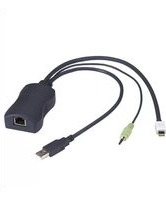
KV1409A - Computer Cable Black Box - Free user manual and instructions
Find the device manual for free KV1409A Black Box in PDF.


| Product Type | Computer Cable |
| Brand | Black Box |
| Model | KV1409A |
| Length | 1.8 m (6 ft) |
| Weight | 100 g (0.22 lb) |
| Connector Type | VGA (DB15) Male to Male |
| Color | Black |
| Power Requirements | None (passive) |
| Primary Function | Transmit analog video signal from computer to monitor |
| Compatibility | Devices with VGA ports; supports resolutions up to 1920x1080 |
| Shielding | Triple shielding for EMI/RFI protection |
| Jacket Material | PVC |
| Operating Temperature | 0°C to 50°C (32°F to 122°F) |
| Storage Temperature | -20°C to 60°C (-4°F to 140°F) |
| Maintenance | Wipe with a dry, lint-free cloth; avoid liquids |
| Safety Precautions | Do not bend or twist cable excessively; keep away from heat sources |
| Spare Parts | Not applicable (cable is a single unit) |
| Repairability | Not user-serviceable; replace if damaged |
| Certifications | RoHS, CE |
| Package Contents | 1 x VGA cable |
Frequently Asked Questions - KV1409A Black Box
User questions about KV1409A Black Box
0 question about this device. Answer the ones you know or ask your own.
Ask a new question about this device
Download the instructions for your Computer Cable in PDF format for free! Find your manual KV1409A - Black Box and take your electronic device back in hand. On this page are published all the documents necessary for the use of your device. KV1409A by Black Box.
USER MANUAL KV1409A Black Box
Server Access Modules (SAMs)
Connect one or two servers or peripherals to a ServSwitch CX, ServSwitch CX Uno, or ServSwitch CX with IP.
Work with USB, PS/2 with audio, USB with audio, Sun with audio, dual USB, dual USB and audio, RS-232, DisplayPort, and mini DisplayPort interfaces.
natural_image
Close-up of a blue VGA connector with gray cable, white port, and USB plug (no text or symbols visible)Trademarks Used in this Manual
Black Box and the Double Diamond logo are registered trademarks, and ServSwitch is a trademark, of BB Technologies, Inc.
Mac is a registered trademark of Apple, Inc.
Linux is a registered trademark of Linus Torvalds.
Windows is a registered trademark of Microsoft Corporation.
Sun is a registered trademark of Sun Microsystems, Inc.
Unix is a registered trademark of X/Open Company.
Any other trademarks mentioned in this manual are acknowledged to be the property of the trademark owners.
We're here to help! If you have any questions about your application or our products, contact Black Box Tech Support at 724-746-5500
or go to blackbox.com and click on "Talk to Black Box."
You'll be live with one of our technical experts in less than 30 seconds.
Federal Communications Commission and Industry Canada Radio Frequency Interference Statements
This equipment generates, uses, and can radiate radio-frequency energy, and if not installed and used properly, that is, in strict accordance with the manufacturer's instructions, may cause interference to radio communication. It has been tested and found to comply with the limits for a Class A computing device in accordance with the specifications in Subpart B of Part 15 of FCC rules, which are designed to provide reasonable protection against such interference when the equipment is operated in a commercial environment. Operation of this equipment in a residential area is likely to cause interference, in which case the user at his own expense will be required to take whatever measures may be necessary to correct the interference.
Changes or modifications not expressly approved by the party responsible for compliance could void the user's authority to operate the equipment.
This digital apparatus does not exceed the Class A limits for radio noise emission from digital apparatus set out in the Radio Interference Regulation of Industry Canada.
- Specifications....6
- Overview 7
2.1 Introduction....7
2.2 Available Models 7
2.3 What's Included 8
2.4 Hardware Description....8
2.4.1 KV1400A....8
2.4.2 KV1401A 9
2.4.3 KV1402A 9
2.4.4 KV1403A....10
2.4.5 KV1404A 11
2.4.6 KV1405A 12
2.4.7 KV1406A....13
2.4.8 KV1407A....14
2.4.9 KV1408A 15
2.4.10 KV1409A....16
- Installation 17
3.1 Installation Steps.... 17
3.2 Typical Applications....17
3.2.1 KV0081A or KV0161A....17
3.2.2 KV0424A-R2 17
3.2.3 KV1416A-R2 18
- Troubleshooting....19
4.1 Contacting Black Box.... 19
4.2 Shipping and Packaging 19
1. Specifications
Operating System — Linux ^® , Unix ^® , Mac ^® , Sun ^® , Windows ^® 32/64 bit
Interface — KV1400A: PS/2,
KV1401A: USB,
KV1402A: PS/2 with audio,
KV1403A: USB with audio,
KV1404A: Sun with audio,
KV1405A: dual USB,
KV1406A: dual USB and audio,
KV1407A: quad IP RS-232;
KV1408A: DisplayPort, USB and audio;
KV1409A: Mini DisplayPort, USB, and audio
Distance (Maximum) —
Between SAM and ServSwitch CX or CX Uno:
KV1400A–KV1404A: 164 ft. (50 m) with ServSwitch CX 4-User, 32 ft. (10 m) with ServSwitch CX Uno;
KV1405A, KV1406A: 32 ft. (9.8 m) over CATx cable, resolutions are higher at shorter distances;
KV1407A: 32 ft. (9.8 m) over CATx cable;
KV1408A–KV1409A: 164 ft. (50 m) with ServSwitch CX 4-User, 32 ft. (10 m) with ServSwitch CX Uno and CX Uno with IP;
Between SAM and User Station: All: 328 ft. (100 m), 1920 x 1200 @ 60 Hz;
656 ft. (200 m), 1600 x 1200 @ 60 Hz;
984 ft. (300 m), 1280 x 1024 @ 60 Hz
Resolutions — 1920 x 1200 @ 60 Hz (328 ft. [100 m]), 1600 x 1200 @ 60 Hz (656 ft. [200 m]), 1280 x 1024 @ 60 Hz (984 ft. [300 m])
Connectors — KV1400A: (1) RJ-45, (2) 6-pin mini DIN, (1) HD15 M;
KV1401A: (1) RJ-45, (1) USB Type A M, (1) HD15 M;
KV1402A: (1) RJ-45, (2) 6-pin mini DIN, (1) HD15 M, (1) 3.5-mm plug;
KV1403A: (1) RJ-45, (1) USB Type A M, (1) HD15 M, (1) 3.5-mm plug;
KV1404A: (1) RJ-45, (1) 8-pin mini DIN, (1) HD15 M, (1) 3.5-mm plug;
KV1405A: (2) RJ-45 F, (1) USB Type A M, (1) HD15 M;
KV1406A: (2) RJ-45 F, (1) USB Type A M for keyboard and mouse, (1) HD15 M, (2) 3.5-mm plug;
KV1407A: (1) RJ-45, (1) DB9 F;
KV1408A: (1) DisplayPort M, (1) USB Type A M; (1) 3.5-mm plug;
KV1409A: (1) Mini DisplayPort M, (1) USB Type A M, (1) 3.5-mm plug
Indicators — All: (1) Power LED on RJ-45 connector
Power — KV1401A, KV1403A, KV1405A, KV1406A, KV1408A–KV1409A: Input: USB; 500 mA @ 5 VDC;
KV1400A, KV1402A: Input: PS/2: 500 mA @ 5 VDC;
KV1404A: Input: Sun: 500 mA @ 5 VDC;
KV1407A: Input: DB9 interface-powered
Size — KV1400A–KV1404A: 1.1"H x 1.75"W x 3.25"D (2.8 x 4.5 x 8.3 cm);
KV1405A–KV1407A: 1.1"H x 1.9"W x 3.25"D (2.8 x 4.8 x 8.3 cm);
KV1408A–KV1409A: 3.25"H x 1.1"W x 1.9"D (8.9 x 2.8 x 4.8 cm)
2. Overview
2.1 Introduction
The Server Access Modules (SAMs) (part numbers KV1400A–KV1409A) connect servers to the ServSwitch CX, ServSwitch CX Uno, or ServSwitch CX with IP. Modules (part numbers KV1400A–KV1406A and KV1408A–KV1409A) are compatible with the ServSwitch CX and ServSwitch CX Uno. Modules KV1408A–KV1409A also work with the ServSwitch CX with IP. KV1407A module only works with the Quad IP CX Switch (KV4161A).
2.2 Available Models
Table 2-1. Available SAMs.
| Product Code | Module Name Application | |
| KV1400A | ServSwitch CX Server Access Module, PS/2 | Connects PS/2 servers to the ServSwitch CX, ServSwitch CX Uno, or ServSwitch CX with IP. |
| KV1401A | ServSwitch CX Server Access Module, USB | Connects USB servers to the ServSwitch CX, ServSwitch CX Uno, or ServSwitch CX with IP. |
| KV1402A | ServSwitch CX Server Access Module, PS/2 with audio | Connects PS/2 servers with audio to the ServSwitch CX, ServSwitch CX Uno, or ServSwitch CX with IP. |
| KV1403A | ServSwitch CX Server Access Module, USB with audio | Connects USB servers with audio to the ServSwitch CX, ServSwitch CX Uno, or ServSwitch CX with IP. |
| KV1404A | ServSwitch CX Server Access Module, Sun with audio | Connects Sun servers with audio to the ServSwitch CX, ServSwitch CX Uno, or ServSwitch CX with IP. |
| KV1405A | ServSwitch CX Dual CATx Server Access Module, USB | Dual-access SAM enables you to share a single computer between two switches for redundancy. |
| KV1406A | ServSwitch CX Dual CATx Server Access Module, USB and audio | Dual-access SAM enables you to share a single computer between two switches for redundancy. |
| KV1407A | ServSwitch CX Quad IP CATx Server Access Module, Serial | Use this SAM to gain RS-232 connectivity to target machines. This model supports ServSwitch Quad IP CX (KV4161A) only. |
| KV1408A | ServSwitch CX Server Access Module, DisplayPort, USB, and audio | Connect the ServSwitch CX to DisplayPort targets with USB using this SAM. |
| KV1409A | ServSwitch CX Server Access Module, Mini DisplayPort, USB, and audio | Connect the ServSwitch CX to Mini DisplayPort targets with USB using this SAM. |
2.3 What's Included
Your package should contain the following items. If anything is missing or damaged, contact Black Box Technical Support at 724-746-5500 or info@blackbox.com.
- Server Access Module
2.4 Hardware Description
Figures 2-1 through 2-10 show the server access modules. Tables 2-2 through 2-10 describe their connectors.
2.4.1 ServSwitch CX Server Access Module, PS/2 (KV1400A)
natural_image
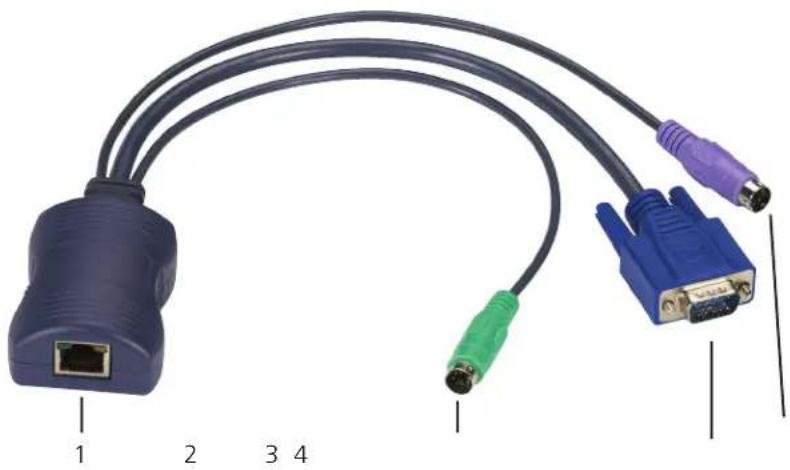
Coiled network cable with labeled connectors (no text or symbols on the cable itself)Figure 2-1. KV1400A.
Table 2-2. KV1400A connectors.
| CalloutNumber inFigure 2-1 Connector Description | |
| 1 (1) RJ-45 Connects to ServSwitch CX and CX Uno. | |
| 2 (1) 6-pin mini DIN Connects to keyboard or mouse port on target computer. | |
| 3 (1) HD15 M Connects to video out port on target computer. | |
| 4 (1) 6-pin mini DIN Connects to keyboard or mouse port on target computer. | |
2.4.2 ServSwitch CX Server Access Module, USB (KV1401A)

natural_image
Diagram of a USB cable with two connectors labeled 1, 2, and 3, showing port, port, and VD connector (no text or symbols on the cable itself)Figure 2-2. KV1401A.
Table 2-3. KV1401A connectors.
| CalloutNumber inFigure 2-2 Connector Description |
| 1 (1) RJ-45 Connects to ServSwitch CX and CX Uno. |
| 2 (1) USB Type A M Connects to USB port on target computer. |
| 3 (1) HD15 M Connects to video out port on target computer. |
2.4.3 ServSwitch CX Server Access Module, PS/2 with Audio (KV1402A)

Figure 2-3. KV1402A.
Table 2-4. KV1402A connectors.
| CalloutNumber inFigure 2-3 Connector Description |
| 1 (1) HD15 Connects to video out on the target computer. |
| 2 (1) 3.5-mm plug Connects to target computer's audio out. |
| 3 (1) 6-pin mini DIN Connects to target computer's keyboard/mouse PS/2 port. |
| 4 (1) 6-pin mini DIN Connects to target computer's keyboard/mouse PS/2 port. |
| 5 (1) RJ-45 Connects to ServSwitch CX and CX Uno. |
2.4.4 ServSwitch CX Server Access Module, USB with Audio (KV1403A)

Figure 2-4. KV1403A.
Table 2-5. KV1403A connectors.
| CalloutNumber inFigure 2-4 Connector Description |
| 1 (1) RJ-45 Connects to ServSwitch CX and CX Uno. |
| 2 (1) HD15 M Connects to video out on the target computer. |
| 3 (1) USB Type A Connects to target computer's USB port. |
| 4 (1) 3.5-mm plug Connects to target computer's audio out port. |
2.4.5 ServSwitch CX Server Access Module, Sun with Audio (KV1404A)

Figure 2-5. KV1404A.
Table 2-6. KV1404A connectors.
| CalloutNumber inFigure 2-5 Connector Description |
| 1 (1) RJ-45 Connects to ServSwitch CX and CX Uno. |
| 2 (1) 8-pin mini DIN Connects to target computer's keyboard/mouse port. |
| 3 (1) HD15 M Connects to target computer's video out port. |
| 4 (1) 3.5-mm plug Connects to target computer's audio out port. |
2.4.6 ServSwitch CX Dual CATx Server Access Module, USB (KV1405A)

natural_image
Close-up of a USB cable with two connected ports, one labeled 1, the other 2 and 3 (no text or symbols on the cable itself)Figure 2-6. KV1405A.
Table 2-7. KV1405A connectors.
| CalloutNumber inFigure 2-6 Connector Description |
| 1 (1) HD15 M Connects to video out on target computer. |
| 2 (1) USB Type A M Connects to USB port on target computer. |
| 3 (2) RJ-45 F Connect to ServSwitch CX or CX Uno units. |
2.4.7 ServSwitch CX Dual CATx Server Access Module, USB and Audio (KV1406A)
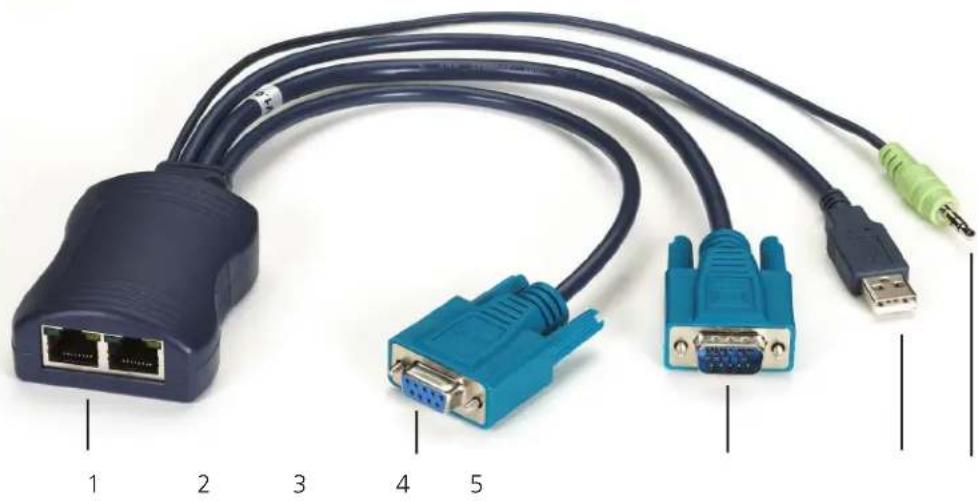
Figure 2-7. KV1406A.
Table 2-8. KV1406A connectors.
| CalloutNumber inFigure 2-7 Connector Description |
| 1 (2) RJ-45 Connect to ServSwitch CX or CX Uno. |
| 2 (1) DB9 F Connects to RS-232 serial port on target computer. |
| 3 (1) HD15 Connects to video out on target computer. |
| 4 (1) USB Type A Connects to keyboard/mouse port on the target computer. |
| 5 (1) 3.5-mm plug Connects to video out on the target computer. |
2.4.8 ServSwitch CX Quad IP CATx Server Access Module, Serial (KV1407A)

natural_image
Close-up of a blue Ethernet cable with two connected VGA connectors (no text or symbols visible)Figure 2-8. KV1407A.
Table 2-9. KV1407A connectors.
| CalloutNumber inFigure 2-8 Connector Description |
| 1 (1) RJ-45 Connects to ServSwitch CX or CX Uno. |
| 2 (1) DB9 F Connects to DB9 serial port or RS-232 device. |
NOTE: The KV1407A only works with the KV4161A and Quad IP User KVM Switch Module.
2.4.9 ServSwitch CX Server Access Module, DisplayPort, USB and Audio (KV1408A)

natural_image
Close-up of a USB network cable with four labeled connectors (no text or symbols on the cable itself)Figure 2-9. KV1408A.
Table 2-10. KV1408A connectors.
| CalloutNumber inFigure 2-9 Connector Description |
| 1 (1) DisplayPort M Connects to DisplayPort on target computer. |
| 2 (1) 3.5-mm plug Connects to video out on the target computer. |
| 3 (1) USB Type A M Connects to USB port on the target computer. |
| 4 (1) RJ-45 Connects to ServSwitch CX and CX Uno. |
2.4.10 ServSwitch CX Server Access Module, Mini DisplayPort, USB and Audio (KV1409A)

natural_image
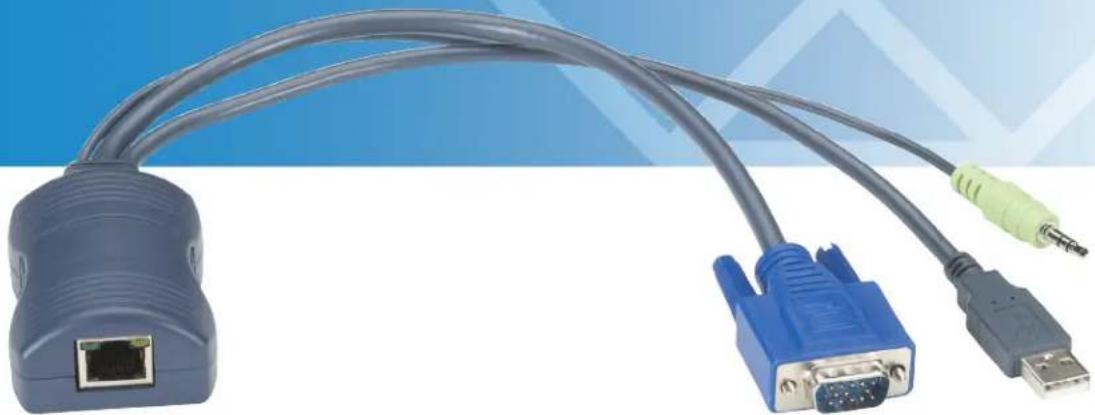
Close-up of a USB network cable with ports and connectors, labeled 1 to 4 (no text or symbols on the cable itself)Figure 2-10. KV1409A.
Table 2-11. KV1409A connectors.
| CalloutNumber inFigure 2-10 Connector Description |
| 1 (1) Mini DisplayPort M Connects to Mini DisplayPort on target computer. |
| 2 (1) 3.5-mm plug Connects to audio out port on target computer. |
| 3 (1) USB Type A M Connects to USB port on target computer. |
| 4 (1) RJ-45 Connects to ServSwitch CX or CX Uno. |
3. Installation
3.1 Installation Steps
- Connect the ServSwitch CX or CX Uno to the RJ-45 port on the server access module (SAM).
- Connect the remaining connectors to a compatible target computer.
3.2 Typical Applications
3.2.1 KV0081A or KV0161A
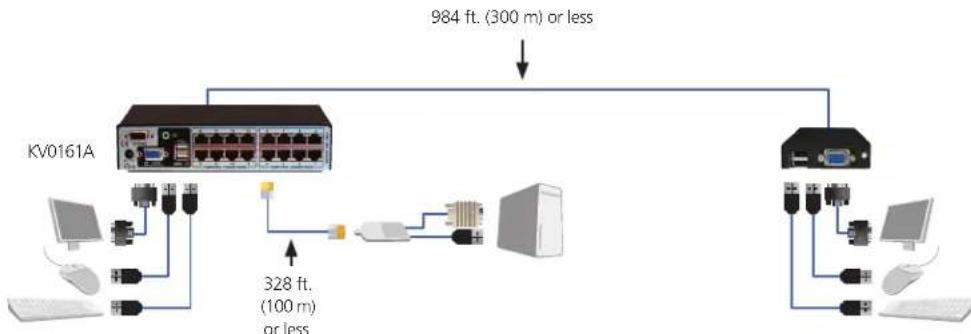
The SAMs work with the ServSwitch CX Uno, 8-Port (KV0081A), or ServSwitch CX Uno, 16-Port (KV0161A). They provide high-end, multiplatform KVM switching over CATx with remote access. Place the remote console up to 984.3 feet (300 m) away. The ServSwitch supports resolutions up to 1920 x 1200 at 60 Hz (when used at distances less than 328 feet [100 m]), and reads DDC EDID from the display to avoid plug-and-play issues.
flowchart
graph TD
    A["KV0161A"] --> B["USB Port"]
    A --> C["Computer"]
    A --> D["USB Port"]
    A --> E["Computer"]
    A --> F["USB Port"]
    B --> G["328 ft. (100 m) or less"]
    C --> H["328 ft. (100 m) or less"]
    D --> I["328 ft. (100 m) or less"]
    E --> J["328 ft. (100 m) or less"]
    F --> K["328 ft. (100 m) or less"]
    L["984 ft. (300 m) or less"] --> M["Switch"]
    N["Switch"] --> O["Switch"]
    P["Switch"] --> Q["Switch"]
Figure 3-1. Application diagram #1.
3.2.2 KV0424A-R2
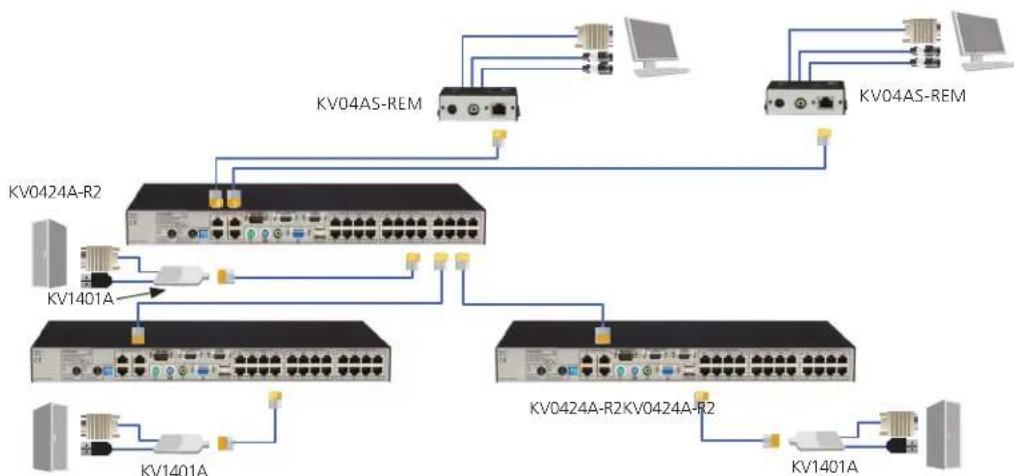
The SAMs also work with the ServSwitch CX, (1) Local Console Port + (4) Users, (24) Servers (KV0424A-R2). Up to four users can access and control 24 multiplatform servers via CATx cable. The switch can support up to 1920 x 1200 resolution and can switch via on-screen menus. This ServSwitch is ideal for small and mid-size data centers.
flowchart
graph TD
    subgraph KV0424A-R2
        A["Switch"] --> B["KV04AS-REM"]
        A --> C["Switch"] --> D["KV04AS-REM"]
        E["Switch"] --> F["KV0424A-R2"]
        G["Switch"] --> H["KV0424A-R2"]
        I["Switch"] --> J["KV0424A-R2"]
    end
    KV0424A-R2 --> B
    KV0424A-R2 --> F
    KV0424A-R2 --> H
    KV0424A-R2 --> J
    KV0424A-R2 --> K
    KV1401A --> L["Switch"] --> M["Switch"] --> N["Switch"] --> O["Switch"] --> P["Switch"] --> Q["Switch"] --> R["Switch"] --> S["Switch"] --> T["Switch"] --> U["Switch"] --> V["Switch"] --> W["Switch"] --> X["Switch"] --> Y["Switch"] --> Z["Switch"] --> AA["Switch"] --> AB["Switch"] --> AC["Switch"] --> AD["Switch"] --> AE["Switch"] --> AF["Switch"] --> AG["Switch"] --> AH["Switch"] --> AI["Switch"] --> AJ["Switch"] --> AK["Switch"] --> AL["Switch"] --> AM["Switch"] --> AN["Switch"] --> AO["Switch"] --> AP["Switch"] --> AQ["Switch"] --> AR["Switch"] --> AS["Switch"] --> AT["Switch"] --> AU["Switch"] --> AV["Switch"] --> AW["Switch"] --> AX["Switch"] --> AY["Switch"] --> AZ["Switch"] --> BA["Switch"] --> BB["Switch"] --> BC["Switch"] --> BD["Switch"] --> BE["Switch"] --> BF["Switch"] --> BG["Switch"] --> BH["Switch"] --> BI["Switch"] --> BJ["Switch"] --> BK["Switch"] --> BL["Switch"] --> BM["Switch"] --> BN["Switch"] --> BO["Switch"] --> BP["Switch"] --> BPB["Switch"] --> BPN["Switch"] --> BPN
    end
    KV1401A --> L
    KV1401A --> M
    KV1401A --> H
    KV1401A --> J
    KV1401A --> J
    KV1401A --> J
    KV1401A --> K
    KV1401A --> K
    KV1401A --> K
    KV1401A --> K
    KV1401A --> K
    KV1401A --> K
    KV1401A --> K
    KV1401A --> K
    KV1401A --> K
    KV1401A --> K
    KV1401A --> B
    KV1401A --> B
    KV1401A --> B
    KV1401A --> B
    KV1401A --> B
    KV1401A --> B
    KV1401A --> B
    KV1401A --> B
    KV1401A --> B
    KV1401A --> B
    KV1401A --> BB
    KV1401A --> BB
    KV1401A --> BB
    KV1401A --> BB
    KV1401A --> BB
    KV1401A --> BB
    KV1401A --> BB
    KV1401A --> BB
    KV1401A --> BB
    KV1401A --> BB
    KV1401A --> B
    KV1401A --> BB
    KV1401A --> BB
    KV1401A --> BB
    KV1401A --> BB
    KV1401A --> BB
    KV1401A --> BB
    KV1401A --> BB
    KV1401A --> BB
    KV1401A --> B
    KV1401A --> B
    KV1401A --> B
    KV1401A --> B
    KV1401A --> B
    KV1401A --> B
    KV1401A --> B
    KV1401A --> B
Figure 3-2. Application diagram #2.
3.2.3 KV1416A-R2
And, the SAMs work with the ServSwitch CX KVM Switch with IP, (1) Analog Console Port + (4) Users, (16)
Servers (KV1416A-R2). Run this multiplatform switch over CATx cable and access servers over the Internet. Connect one remote user and up to three local users. IP support enables you to access servers remotely. This ServSwitch provides 1600 x 1200 remote resolution with scalable windows.

flowchart
graph TD
    A["KV1416A-R2"] -->|LAN| B["IP user"]
    A -->|CATx| C["KV1401A"]
    A -->|CATx| D["KV1401A"]
    A -->|CATx| E["KV1401A"]
    A -->|CATx| F["KV1401A"]
    A -->|CATx| G["KV1401A"]
    A -->|CATx| H["KV1401A"]
    A -->|CATx| I["KV1401A"]
    A -->|CATx| J["KV1401A"]
    A -->|CATx| K["KV1401A"]
    A -->|CATx| L["KV1401A"]
    A -->|CATx| M["KV1401A"]
    A -->|CATx| N["KV1401A"]
    A -->|CATx| O["KV1401A"]
    A -->|CATx| P["KV1401A"]
    A -->|CATx| Q["KV1401A"]
    A -->|CATx| R["KV1401A"]
    A -->|CATx| S["KV1401A"]
    A -->|CATx| T["KV1401A"]
    A -->|CATx| U["KV1401A"]
    A -->|CATx| V["KV1401A"]
    A -->|CATx| W["KV1401A"]
    A -->|CATx| X["KV1401A"]
    A -->|CATx| Y["KV1401A"]
    A -->|CATx| Z["KV1401A"]
Figure 3-3. Application diagram #3.
NOTE: Refer to the ServSwitch CX or CX Uno user manual for more information.
4. Troubleshooting
4.1 Contacting Black Box
If you determine that your Server Access Module is malfunctioning, do not attempt to alter or repair the unit. It contains no user-serviceable parts. Contact Black Box Technical Support at 724-746-5500 or info@blackbox.com.
Before you do, make a record of the history of the problem. We will be able to provide more efficient and accurate assistance if you have a complete description, including:
• the nature and duration of the problem.
- when the problem occurs.
• the components involved in the problem.
- any particular application that, when used, appears to create the problem or make it worse.
4.2 Shipping and Packaging
If you need to transport or ship your Server Access Module:
- Package it carefully. We recommend that you use the original container.
- If you are returning the unit, make sure you include everything you received with it. Before you ship for return or repair, contact Black Box to get a Return Authorization (RA) number.
Black Box Tech Support: FREE! Live. 24/7.
Tech support the way it should be.
natural_image
Close-up portrait of a smiling man holding a small ear cap against a blue background (no text or symbols visible)Great tech support is just 30 seconds away at 724-746-5500 or blackbox.com.

BLACK BOX®
NETWORK SERVICES
About Black Box
Black Box provides an extensive range of networking and infrastructure products. You'll find everything from cabinets and racks and power and surge protection products to media converters and Ethernet switches all supported by free, live 24/7 Tech support available in 30 seconds or less.
© Copyright 2012. Black Box Corporation. All rights reserved.
KV1400A, version 1

- Server Access Modules (SAMs)
- Connect one or two servers or peripherals to a ServSwitch CX, ServSwitch CX Uno, or ServSwitch CX with IP.
- Trademarks Used in this Manual
- Federal Communications Commission and Industry Canada Radio Frequency Interference Statements
- Specifications
- Distance (Maximum) —
- Overview
- Introduction
- Available Models
- What's Included
- Hardware Description
- ServSwitch CX Server Access Module, PS/2 (KV1400A)
- ServSwitch CX Server Access Module, USB (KV1401A)
- ServSwitch CX Server Access Module, PS/2 with Audio (KV1402A)
- ServSwitch CX Server Access Module, USB with Audio (KV1403A)
- ServSwitch CX Dual CATx Server Access Module, USB (KV1405A)
- ServSwitch CX Dual CATx Server Access Module, USB and Audio (KV1406A)
- ServSwitch CX Quad IP CATx Server Access Module, Serial (KV1407A)
- ServSwitch CX Server Access Module, DisplayPort, USB and Audio (KV1408A)
- ServSwitch CX Server Access Module, Mini DisplayPort, USB and Audio (KV1409A)
- Installation
- Installation Steps
- Typical Applications
- KV0081A or KV0161A
- KV0424A-R2
- KV1416A-R2
- Troubleshooting
- Contacting Black Box
- Shipping and Packaging
- Black Box Tech Support: FREE! Live. 24/7.
- BLACK BOX®
- NETWORK SERVICES
- About Black Box
Brand : Black Box
Model : KV1409A
Category : Computer Cable