
USB to RS-232 DB9 Converter - Computer Cable Black Box - Free user manual and instructions
Find the device manual for free USB to RS-232 DB9 Converter Black Box in PDF.


| Product Type | USB to RS-232 DB9 Converter Cable |
| Brand | Black Box |
| Model | USB to RS-232 DB9 Converter |
| Category | Computer Cable |
| Interface | USB 2.0 (Type A) to RS-232 (DB9 male) |
| Cable Length | Approximately 1 meter (3.3 feet) |
| Weight | Approximately 0.1 kg (3.5 oz) |
| Power Source | Bus-powered via USB port (no external power required) |
| Data Transfer Rate | Up to 115.2 kbps |
| Supported Operating Systems | Windows, macOS, Linux (driver required) |
| Primary Function | Converts USB signal to RS-232 serial for legacy devices |
| LED Indicators | TX/RX activity lights (if present) |
| Connector Plating | Gold-plated contacts for corrosion resistance |
| Operating Temperature | 0°C to 60°C (32°F to 140°F) |
| Storage Temperature | -20°C to 85°C (-4°F to 185°F) |
| Humidity Range | 5% to 95% non-condensing |
| Warranty | Typically 1-2 years (check product documentation) |
| Maintenance & Cleaning | Disconnect before cleaning; use a dry cloth; avoid liquids and abrasives. |
| Safety | Do not expose to moisture or excessive heat. Ensure proper driver installation to avoid port conflicts. |
| Spare Parts & Repairability | Non-repairable; replace if defective. No user-serviceable parts. |
| General Info | Compliant with USB 2.0 and RS-232 standards. Plug-and-play after driver setup. |
Frequently Asked Questions - USB to RS-232 DB9 Converter Black Box
User questions about USB to RS-232 DB9 Converter Black Box
0 question about this device. Answer the ones you know or ask your own.
Ask a new question about this device
Download the instructions for your Computer Cable in PDF format for free! Find your manual USB to RS-232 DB9 Converter - Black Box and take your electronic device back in hand. On this page are published all the documents necessary for the use of your device. USB to RS-232 DB9 Converter by Black Box.
USER MANUAL USB to RS-232 DB9 Converter Black Box
USB to RS-232 DB9 Converter
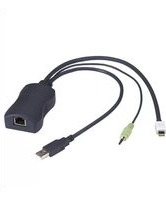
Converts a USB port into a DB9 male RS-232 serial port.
• Perfect for PDAs, cameras, modems, and mobile phones.
- Powered by the USB port.

natural_image
Two electronic devices: a USB serial converter connected via a transparent cable and a blue USB port, shown against a blue grid background (no text or symbols visible on the devices themselves).Trademarks Used in this Manual
Black Box and the Double Diamond logo are registered trademarks of BB Technologies, Inc.
Mac and Macintosh are registered trademarks of Apple Computer, Inc.
Pentium and Intel are registered trademarks of Intel Corporation.
IBM Is a registered trademark of International Business Machines Corporation.
Windows and Windows Vista are registered trademarks of Microsoft Corporation.
Any other trademarks mentioned in this manual are acknowledged to be the property of their respective owners.
We're here to help! If you have any questions about your application or our products, contact Black Box Tech Support at 724-746-5500
or go to blackbox.com and click on "Talk to Black Box."
You'll be live with one of our technical experts in less than 30 seconds.
Federal Communications Commission and Industry Canada Radio Frequency Interference Statements
This equipment generates, uses, and can radiate radio-frequency energy, and if not installed and used properly, that is, in strict accordance with the manufacturer's instructions, may cause interference to radio communication. It has been tested and found to comply with the limits for a Class A computing device in accordance with the specifications in Subpart B of Part 15 of FCC rules, which are designed to provide reasonable protection against such interference when the equipment is operated in a commercial environment. Operation of this equipment in a residential area is likely to cause interference, in which case the user at his own expense will be required to take whatever measures may be necessary to correct the interference.
Changes or modifications not expressly approved by the party responsible for compliance could void the user's authority to operate the equipment.
This digital apparatus does not exceed the Class A limits for radio noise emission from digital apparatus set out in the Radio Interference Regulation of Industry Canada.
This product complies with the EMC and Low Voltage directives of the European Community.
RoHS/WEEE
This product complies with the Restriction of Hazardous Substances (RoHS) and the Waste from Electrical and Electronic Equipment (WEEE).
natural_image
Symbol of a trash bin crossed with a diagonal line, representing waste sorting or restriction (no text present)
blackbox.com

- Specifications....6
- Overview 7
2.1 Introduction 7
2.2 Features....7
2.3 What's Included 7
2.4 System Requirements 7
- Installation 8
3.1 Windows Vista/Windows 7 8
3.2 Windows 2000/XP 9
3.3 Verifying the Driver Installation on Windows 10
3.4 Verifying the Driver Installation on Mac OS X....11
3.5 Connecting Serial Device 13
1. Specifications
Data Transfer Rate — 500 kbps
Operating Systems Supported — Windows® 98 SE/Me/2000/XP/7, Windows Vista® 32/64-bit, Mac® 10.x
Connectors — (1) USB Type A male, (1) DB9 male
Power — Bus-powered
Size — Length: 22" (55.9 cm)
2. Overview
2.1 Introduction
Use the USB to RS-232 DB9 Converter to connect your RS-232 serial devices to the USB port on your PC. Just connect the cable to the PC or hub's port, and connect the other end to an RS-232 device such as a PDA, scanner, or printer.
2.2 Features
- Complies with the USB 1.1 specification.
• Supports an RS-232 serial interface.
• Supports a 500-kbps data transfer rate. - USB suspend condition.
- Plug-and-play compatible.
- USB host device drivers available.
- Draws its power from the USB connection—no extra power adapter required.
- Supports Windows 2000/XP/7, Windows Vista2/64-bit, and Mac 10.x.
2.3 What's Included
Your package should contain the following items. If anything is missing or damaged, contact Black Box Technical Support at 724-746-5500 or info@blackbox.com.
• USB to RS-232 DB9 Converter
- CD-ROM containing software drivers and this user's manual
2.4 System Requirements
- IBM® compatible computer or Mac® computer
- Windows 2000/XP/7, Windows Vista 32/64-bit, or Mac 10.x
- An available USB port
- 64 MB of RAM or more
- Pentium® 233 MHz or higher
3. Installation
3.1 Windows Vista/Windows 7
NOTE: Do not connect the USB to RS-232 DB9 Converter to your computer before you install the software drivers.
- Insert the product CD into your CD-ROM drive. Figure 3-1 appears. Run the Setup file under E:\Driver, where E: is your CD-ROM drive letter.

Figure 3-1. AutoPlay screen.
When the Welcome screen appears, click "Next."

Figure 3-2. Welcome screen.
- Click "Finish" to complete the installation. See Figure 3-3.

Figure 3-3. Installation complete screen.
Once the installation is complete, connect the USB to RS-232 DB9 Converter to a free USB port on your computer.
3.2 Windows 2000/XP
NOTE: Do not connect the USB to RS-232 DB9 Converter to your computer before you install the software drivers.
- Insert the provided CD into your CD-ROM drive. When the Welcome screen appears, click "Next."
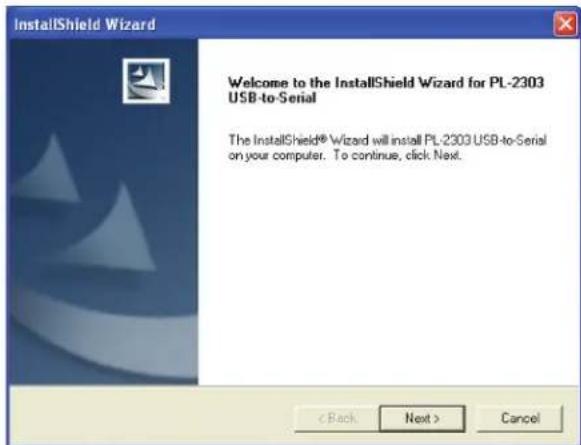
Figure 3-4. Welcome screen.
- When the screen shown in Figure 3-5 appears, click "Finish."
![InstallShield Wizard InstallShield Wizard Complete InstallShield already successfully to installed PL-2303 USB-to-Serial driver. Please press [Finish] button to close and out of InstallShield. If you have been plugged cable on PC before run this setup, please unplug and then plug cable again for system detect this device!](/content/2026/05/1032818/images/ed3db06638e47dd6e6e7f29524e1cda19267b7fade6f2477d88c60b6367cbe04.jpg)
Figure 3-5. Installation complete screen.
Once the installation is complete, connect the USB to RS-232 DB9 Converter to a free USB port on your computer.
3.3 Verifying the Driver Installation on Windows
To verify the converter installation, follow the instructions below to launch Device Manager.
- On Windows 2000/XP: Right-click the "My Computer" icon on the desktop and select "Properties > System > (Hardware) > Device Manager."
- On Windows Vista/Windows 7: Right-click the "Computer" icon on the desktop and select "Properties > Device Manager."
In the Ports (COM & LPT) group, a string similar to "USB to Serial Port" or "Prolific USB to Serial Comm Port" displays.
NOTE: If there is a question or exclamation mark next to that item, then the driver is not properly installed. Delete the item and repeat the installation steps.

Figure 3-6. Selecting the ports.
3.4 Verifying the Driver Installation on Mac OS X
The provided Mac X driver supports:
• Mac OS 10.1 and above for PowerPC based Mac
• Mac OS 10.4 and above for Intel® based Mac
To install the drivers:
- Insert the provided driver CD into your CD-ROM drive. Double-click the CD icon on the desktop and navigate to the \Driver\MacX directory. Copy and paste the PL2303_1.1.1r2.dmg file to the desktop.
- Double-click the dmg file on the desktop to extract the file. Then double-click the PL2303_1.2.1 file that is extracted.
- When the Welcome screen appears, click "Continue." See Figure 3-7.

Figure 3-7. Welcome screen.
- Select a destination disk to install the driver and click "Continue." See Figure 3-8.

Figure 3-8. Select a Destination screen.
- Click "Install."

Figure 3-9. Install screen.
- When the Authenticate screen appears, enter your password in the provided field and click "OK." See Figure 3-10.

Figure 3-10. Authenticate screen.
- Click "Continue Installation." See Figure 3-11.

Figure 3-11. Continue Installation screen.
- Click "Restart" to finish installing the driver and reboot your Mac.
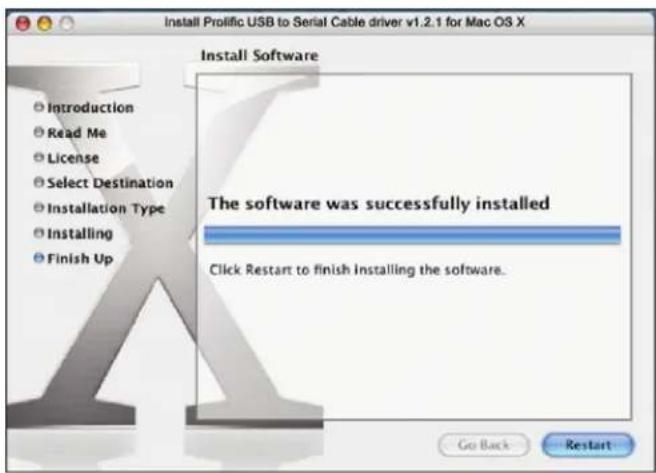
Figure 3-12. Restart button.
-
Connect the converter to a free USB port on your Mac.
-
To verify the installation: Go to "Apple System Profiler > Extensions." You should find ProlificUSBSerial among the list. This means that the installation is successful.
3.5 Connecting the Serial Device
Now you can connect your RS-232 device to the converter. If prompted to install the driver for your serial device, follow the instructions in the manual that you received with your serial device to complete the installation.

flowchart
graph TD
    A["IC188A"] --> B["PC"]
    A --> C["Notebook"]
    A --> D["Scanner"]
    A --> E["Printer"]
Figure 3-13. Serial device connection.
Black Box Tech Support: FREE! Live. 24/7.
Tech support the way it should be.

natural_image
Black-and-white portrait of a smiling woman wearing a headset, with a blue background (no text or symbols visible)Great tech support is just 30 seconds away at 724-746-5500 or blackbox.com.

BLACK BOX®
NETWORK SERVICES
About Black Box
Black Box provides an extensive range of networking and infrastructure products. You'll find everything from cabinets and racks and power and surge protection products to media converters and Ethernet switches all supported by free, live 24/7 Tech support available in 30 seconds or less.
© Copyright 2011. Black Box Corporation. All rights reserved.
IC188A, version 1
- Converts a USB port into a DB9 male RS-232 serial port.
- Trademarks Used in this Manual
- Federal Communications Commission and Industry Canada Radio Frequency Interference Statements
- RoHS/WEEE
- Specifications
- Overview
- Introduction
- Features
- What's Included
- System Requirements
- Installation
- Windows Vista/Windows 7
- Windows 2000/XP
- Verifying the Driver Installation on Windows
- Verifying the Driver Installation on Mac OS X
- Connecting the Serial Device
- Black Box Tech Support: FREE! Live. 24/7.
- BLACK BOX®
- NETWORK SERVICES
- About Black Box
Brand : Black Box
Model : USB to RS-232 DB9 Converter
Category : Computer Cable