
FUY30EUW - Air purifier SHARP - Free user manual and instructions
Find the device manual for free FUY30EUW SHARP in PDF.


| Product Type | Air Purifier |
| Brand | Sharp |
| Model | FUY30EUW |
| Color | White |
| Dimensions (W x D x H) | 39 x 21 x 56 cm |
| Net Weight | 5.2 kg |
| Power Supply | 220-240 V ~ 50/60 Hz |
| Power Consumption | 25 W (max) |
| Noise Level | 22 - 48 dB(A) |
| Coverage Area | Up to 30 m² |
| Filtration Technology | HEPA + Activated Carbon + Plasmacluster Ionizer |
| Filtration Efficiency | Fine particles (PM2.5), allergens, bacteria |
| Number of Speeds | 3 (Silent, Medium, High) |
| Ionizer Function | Yes, Plasmacluster 7000 |
| Timer | 2/4/8 hours |
| Air Quality Sensor | Dust Sensor |
| Filter Replacement Indicator | Yes, indicator light |
| Night Mode | Yes, silent operation |
| Maintenance | Clean pre-filter every month, replace HEPA/carbon filter every 2 years |
| Spare Parts | HEPA + carbon filter, remote control (optional) |
| Repairability | Repairability index not provided |
Frequently Asked Questions - FUY30EUW SHARP
User questions about FUY30EUW SHARP
0 question about this device. Answer the ones you know or ask your own.
Ask a new question about this device
Download the instructions for your Air purifier in PDF format for free! Find your manual FUY30EUW - SHARP and take your electronic device back in hand. On this page are published all the documents necessary for the use of your device. FUY30EUW by SHARP.
USER MANUAL FUY30EUW SHARP
* Plasmacluster is a trademark of Sharp Corporation.

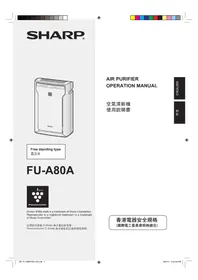
Free standing type
Please read before operating your new Air Purifier
Some odour ingredients absorbed by the filter may become separated and may be discharged through the air outlet and result in additional odour. Depending on the usage environment, especially when the product is used in a condition significantly more severe than household use, this odour may become strong in a shorter period than expected.
In this case we recommend purchasing the optional replacement filter.
NOTE
- The air purifier is designed to remove air-suspended dust and odour, but not harmful gases (for example, carbon monoxide contained in cigarette smoke.) If the odour sources still exist, it cannot completely remove the odour (for example, odours from construction materials and pet odours).
- It is suggested to open the window a bit when you are smoking in order to facilitate ventilation.

Dust collection / Deodorizing Filter
Elements removed by filter
Dust
pollen, dust, particles of cigarette smoke, pet dander
Odour
cigarette smoke odour, household odour (toilet / raw garbage / pet, etc.)
FEATURES
"Plasmacluster" technology
Plasmacluster technology uses plasma discharge to produce and release the same positive and negative ions as those found in nature ("Plasmacluster ions").
This is a unique air cleaning technology of the SHARP CORPORATION for breaking down and inactivating such potential allergens as the fecal matter or corpses of aerial mites1, viruses2, and mold and bacteria*3 suspended in the air, and has been substantiated by third-party organizations both in Japan and overseas.
When there is a high density of Plasmacluster ions in the air, the smell of cigarette smoke trapped in curtains or sofas is removed in about 80 minutes*4, and when clothing is hung in a place exposed to the direct air expelled from the unit generating Plasmacluster ions, the smell of sweat is reduced to a virtually imperceptible level in one night (about 6 hours).
*1 Graduate School of Advanced Sciences of Matter, Hiroshima University, Japan Measurement of action on the potential allergens of aerial mites in (13m²) *2 Retroscreen Virology, Ltd., London, UK Measurement of ratio of viruses eliminated from the air in a 1m³ box *3 Ishikawa Health Service Association, Japan Measurement of aerial mold and bacteria with an air sampler (13m²) *4 Japan Spinners Inspecting Foundation, Japan Evaluation of deodorizing effect on odor-imbued fragments of cloth
CONTENTS
IMPORTANT SAFETY INSTRUCTIONS..... E-2
- WARNING E-2 • CAUTIONS CONCERNING OPERATION ...E-3 • INSTALLATION GUIDELINES .....E-3 • FILTER GUIDELINES .....E-3
PART NAMES.....E-4
- MAIN UNIT DISPLAY ....E-4
- ILLUSTRATIVE DIAGRAM ......E-4 • INCLUDED ......E-5
- BACK E-5
PREPARATION.....E-6
• FILTER INSTALLATION .....E-6
OPERATION ...... E-8
- MAIN UNIT OPERATION .... E-8
CARE AND MAINTENANCE ...... E-9
- BACK PANEL ...... E-9 • UNIT E-9 • FILTER REPLACEMENT GUIDELINES .... E-10
TROUBLESHOOTING E-11
SPECIFICATIONS ...... E-12
Thank you for purchasing the SHARP Air Purifier. Please read this manual carefully for the correct usage information. Before using this product, be sure to read the section: "Important Safety Instructions."
After reading this manual, retain it in a convenient location for future reference.
IMPORTANT SAFETY INSTRUCTIONS
When using electrical appliances, basic safety precautions should be followed, including the following:
WARNING - To reduce the risk of electrical shock, fire or injury to persons:
- Read all instructions before using the unit. • Use only a 220-240 volt outlet.
- Do not use the unit if the power cord or plug is damaged or the connection to the wall outlet is loosened. • Periodically remove dust from the power plug.
- Do not insert fingers or foreign objects into the intake or air outlet.
- When removing the power plug, always hold the plug and never pull the cord.
Electrical shock and/or fire from short circuit may occur as a result.
- Do not remove the plug when your hands are wet.
- Do not use this unit near gas appliances or fireplaces.
- Remove the power plug from the wall outlet before cleaning the unit and when not using the unit.
Electrical shock from bad insulation and/or fire from short circuit may occur as a result.
- If the power cord is damaged, it must be replaced by the manufacturer, its service agent, Sharp Authorised Service Centre or similarly qualified person in order to avoid a hazard.
- Do not operate when using aerosol insecticides or in rooms where there is oily residue, incense, sparks from lit cigarettes, chemical fumes in the air or in very high humidity conditions, such as a bathroom.
- Be cautious when cleaning the unit. Corrosive cleansers may damage the exterior.
- Only Sharp Authorised Service Centre should service this air purifier. Contact the nearest Service Centre for any problems, adjustments, or repairs.
- This appliance is not intended for use by persons (including children) with reduced physical, sensory or mental capabilities, or lack of experience and knowledge, unless they have been given supervision or instruction concerning use of the appliance by a person responsible for their safety.
Children should be supervised to ensure they do not play with the appliance.
NOTE - Radio or TV Interference
If this air purifier should cause interference to radio or television reception, try to correct the interference by one or more of the following measures:
• Reorient or relocate the receiving antenna. - Increase the separation between the unit and radio/TV receiver. - Connect the equipment into an outlet on a circuit different from that to which the receiver is connected. - Consult the dealer or an experienced radio/TV technician for help.
IMPORTANT SAFETY INSTRUCTIONS
CAUTIONS CONCERNING OPERATION
- Do not block the intake and/or air outlet.
- Do not use the unit near or on hot objects, such as stoves or heaters, or where it may come into contact with steam.
- Do not lay the unit down when using. Always hold the handle on both sides of the unit when moving it.
Holding the back panel when carrying may cause it to detach, thus dropping the unit and resulting in bodily injury.
- Do not operate the unit without the filter.
- Do not wash and reuse the filter.
Not only does it not improve filter performance, but it may also cause electrical shock or malfunction.
Clean the exterior with a soft cloth only.
The unit surface may be damaged or cracked.
In addition, the sensors may malfunction as a result.
INSTALLATION GUIDELINES
- During the operation of the product, place the unit at least 2 m away from equipment utilizing electrical waves such as televisions, radios, or wave clocks.
- Avoid locations where curtains, etc., come into contact with the intake or air outlet.
Curtains, etc., may become dirty or a malfunction may occur.
- Avoid locations where the unit is exposed to condensation, due to rapid temperature changes.
(If it is unavoidable, please allow the unit to stand for 1 hour before switching on.)
(Use under appropriate conditions between 0 and 35°C in the room.)
- Place on a stable surface with sufficient air circulation. When placing the unit on a heavily carpeted area, it may cause the unit to vibrate slightly.
- Do not install where there is a possibility of soot, such as in a kitchen, etc.
The unit surface may crack as a result.
- Leave about 60cm of space from the wall.
The wall behind the air outlet may become dirty over time. When using the unit for an extended period in the same location, use a vinyl sheet, etc., to prevent the wall from becoming dirty. In addition, periodically clean the wall.
FILTER GUIDELINES
- Follow the instructions in this manual for correct care and maintenance of the filter. Use only filters designed for this product.
PART NAMES
MAIN UNIT DISPLAY

ILLUSTRATIVE DIAGRAM
E-4
INCLUDED
• Operation manual
ENGLISH

E-5
PREPARATION
Be sure to remove the power plug from the wall outlet.
FILTER INSTALLATION
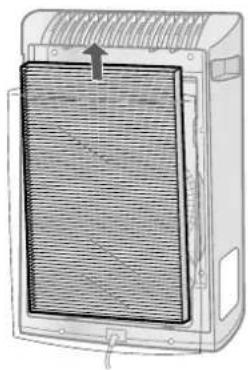
To maintain the quality of the filter, they are installed in the main unit and packed in plastic bag. Be sure to remove the filter from the plastic bag before using the unit.

Remove the filter
1 Remove the Back Panel. Pull the tab at the top of the Back Panel.
2 Remove the Filter from the plastic bag.


Install the filter
1 Place the Filter within the main unit. Do not install filter backwards or the unit will not operate properly.


2 Replace the Back Panel to the main unit.
Push until it clicks into place.

3 Fill in the usage start date on the Date Label.
Use the date as a guide for the filter replacement schedule.

| Starting date of use | |
| . . | . . |
| . . | . . |
| . . | . . |
Date Label
E-7
OPERATION
MAIN UNIT OPERATION


Power ON/OFF Button
- Press to start operation (short beep) and stop operation (long beep).
- Plasmacluster Indicator Light and Fan Speed Indicator Light turn on/off.
- Unless the power cord has been unplugged, the operation starts in the previous mode it was operated in.

MODE Button
- Press the MODE Button to select the desired fan speed. Indicator Lights will show the fan speed currently selected.
- The operation mode can be switched as below.
LOW operation
The unit will operate quietly using minimal air intake.

MEDIUM operation
The unit will operate at a fan speed of MEDIUM.

MAX operation
The unit will operate at a fan speed of MAX.


Plasmacluster Ion ON/OFF Button
Press the Plasmacluster Ion ON/OFF Button to turn Plasmacluster Ion Mode ON and OFF. When Plasmacluster is ON, the Plasmacluster Indicator Light will turn on (blue).
CARE AND MAINTENANCE
To maintain optimum performance of this air purifier, please clean the unit including the filter periodically.
When cleaning the unit, be sure to unplug the power cord, and never handle the plug with wet hands. Electrical shock and/or bodily injury may occur as a result.
BACK PANEL
Care Cycle
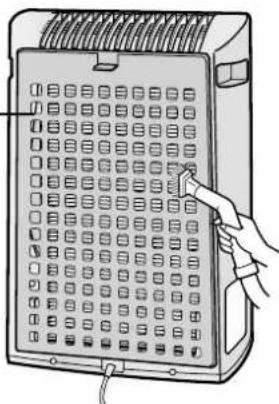
Whenever dust accumulates on the unit or every 2 weeks
Gently remove dust from the back panel, using a vacuum cleaner attachment or similar tool.
Back Panel
When the back panel has stubborn dirt
1. In case of heavy dirt, soak the back panel in water with kitchen detergent (approx. 10 min.). Avoid scrubbing the back panel hard when washing.
2 Rinse the back panel repeatedly with clean water to remove the solution residue.
3 Drip dry the filter to remove excess water.

UNIT
Care Cycle
Whenever dust accumulates on the unit or every 1 month
To prevent dirt or stains on the main unit, clean as often as necessary. If stains are allowed to remain, they may become difficult to remove.
Wipe with a dry, soft cloth
For stubborn stains or dirt, use a soft cloth dampened with warm water.
Do not use volatile fluids
Benzene, paint thinner, polishing powder, etc., may damage the surface.
Do not use detergents
Detergent ingredients may damage the unit.
CARE AND MAINTENANCE
FILTER REPLACEMENT GUIDELINES
Filter life varies depending on the room environment, usage, and location of the unit.
If dust or odour persist, replace the filter.
(Refer to "Please read before operating your new Air Purifier")
Guide for filter replacement timing
- The following filter life and replacement period is based on the condition of smoking 5 cigarettes per day and the dust collection/deodorization power is reduced by half compared with that of new filter.
We recommend to replace the filter more frequently if the product is used in a condition significantly severer than normal household use.
-Filter
About 2 years after opening
REPLACING THE FILTER
1 See page E-6,7 for directions on how to install the filter when replacing.
2 Fill in the usage start date of the filter on the Date Label.

Replacement Filters
Model : FZ-Y30SFE
•Dust Collection / Deodorizing Filter : 1 unit

Please consult your dealer for purchase of replacement filter.
Disposal of Filter
Please dispose of replaced filter according to the local disposal laws and regulations.
Filter materials:
-Filter: Polypropylene •Frame: Polyester •Deodorizer: Activated charcoal
TROUBLESHOOTING
Before calling for repair, please review the list below, since the problem may not be a unit malfunction.
| SYMPTOM | REMEDY (not a malfunction) |
| Odours and smoke are not removed. | Clean or replace the fi lter if they appear to be heavily soiled.(Refer to E-10) |
| A clicking or ticking sound is heard from the unit. | Clicking or ticking sounds may be audible when the unit is generating ions. |
| The discharged air has an odour. | Check to see if the fi lter are heavily soiled.Replace the fi lter.Plasmacluster Air Purifiers emit small traces of ozone which may produce an odour. These ozone emissions are well below safety levels. |
SPECIFICATIONS
| Model | FU-Y30EU | |||
| Power supply | 220-240V 50/60Hz | |||
| Fan Speed Operation | Fan Speed Adjustment | MAX | MED | LOW |
| Rated Power | 49W | 32W | 23W | |
| Fan Speed | 180m3/hour | 120m3/hour | 60m3/hour | |
| Recommended Room Size | ~21m2*1 | |||
| High density Plasmacluster ion recommended room size | ~13m2*2 | |||
| Filter type | Dust Collection (HEPA Filter*3) / Deodorising Filter | |||
| Cord Length | 2.0m | |||
| Dimensions | 356mm(W)x180mm(D)x510mm(H) | |||
| Weight | 5.0kg | |||
*1 Size of a room which is appropriate for operating the unit at maximum fan speed.
- It indicates the space where a certain amount of dust particles can be removed in 30 minutes (JEM1467).
*2 Size of a room in which approximately 7000 ions can be measured per cubic centimeter in the center of the room (at a height of approximately 1.2 meters from the floor) when the product is placed next to a wall and run at the MAX operation position.
Standby Power
In order to operate the electrical circuits while the power plug is inserted in the wall outlet, this product consumes about 1.0W of standby power. For energy saving, unplug the power cord when the unit is not in use.
*3 The class of the HEPA filter by EN 1822 is H10.

Attention: Your product is marked with this symbol. It means that used electrical and electronic products should not be mixed with general household waste. There is a separate collection system for these products.
A. Information on Disposal for Users (private households)
1. In the European Union
Attention: If you want to dispose of this equipment, please do not use the ordinary dust bin!
Used electrical and electronic equipment must be treated separately and in accordance with legislation that requires proper treatment, recovery and recycling of used electrical and electronic equipment.
Following the implementation by member states, private households within the EU states may return their used electrical and electronic equipment to designated collection facilities free of charge*. In some countries* your local retailer may also take back your old product free of charge if you purchase a similar new one.
*) Please contact your local authority for further details.
If your used electrical or electronic equipment has batteries or accumulators, please dispose of these separately beforehand according to local requirements.
By disposing of this product correctly you will help ensure that the waste undergoes the necessary treatment, recovery and recycling and thus prevent potential negative effects on the environment and human health which could otherwise arise due to inappropriate waste handling.
2. In other Countries outside the EU
If you wish to discard this product, please contact your local authorities and ask for the correct method of disposal.
For Switzerland: Used electrical or electronic equipment can be returned free of charge to the dealer, even if you don't purchase a new product. Further collection facilities are listed on the homepage of www.swico.ch or www.sens.ch.
B. Information on Disposal for Business Users.
1. In the European Union
If the product is used for business purposes and you want to discard it:
Please contact your SHARP dealer who will inform you about the take-back of the product. You might be charged for the costs arising from take-back and recycling. Small products (and small amounts) might be taken back by your local collection facilities.
For Spain: Please contact the established collection system or your local authority for take-back of your used products.
2. In other Countries outside the EU
If you wish to discard of this product, please contact your local authorities and ask for the correct method of disposal.
Dust removal /

Install filter
| Starting date of use | |
| . . | . . |
| . . | . . |
| . . | . . |
Date label
OPERATION
Back panel
UNIT

| Starting date of use | |
| . . | . . |
| . . | . . |
| . . | . . |
Date label
F-7
OPERATION
OPERATION OF THE MAIN UNIT

Back panel
UNIT
Dust collection / Odor filter

| Starting date of use | |
| . . | . . |
| . . | . . |
| . . | . . |
Date label
N-7
OPERATION
OPERATION OF THE MAIN UNIT


ON/OFF button

AIR PURIFIER
② Install the filter
| Starting date of use | |
| . . | . . |
| . . | . . |
| . . | . . |
Rear panel
MAIN UNIT
Service period
- FILTER INSTALLATION CZ-6
OPERATION....CZ-8
• OPERATION OF THE MAIN UNIT ......CZ-8
CARE AND MAINTENANCE.... CZ-9
• REAR PANEL CZ-9 • UNIT CZ-9 - FILTER REPLACEMENT INSTRUCTIONS ......CZ-10
TROUBLESHOOTING CZ-11
TECHNICAL DATA....CZ-12
② Installing the filter
| Starting date of use | |
| . . | . . |
| . . | . . |
| . . | . . |
Date label
CZ-7
OPERATION
OPERATION OF THE MAIN UNIT
![graph TD A["MODE"] --> B["ON/OFF"] B --> C["POWER"] D["sti ventilátoru"] --> A D --> B D --> C](/content/2026/06/1294286/images/f8df78dbcd25b05f1c07e76df3f0f00324e356f7160137eb3fc3f92f4ceb06f5.jpg)
IMPORTANT SAFETY INSTRUCTIONS ... SK-2
• WARNING SK-2 • OPERATING PRECAUTIONS.... SK-3 - INSTALLATION INSTRUCTIONS ...... SK-3 • FILTER GUIDELINES .....SK-3
PART NAMES.... SK-4
• MAIN UNIT DISPLAY ...... SK-4 • ILLUSTRATIVE DIAGRAM ......SK-4 • CONTENTS SK-5 • REAR PART....SK-5
PREPARATION....SK-6
• INSTALLING THE FILTER ......SK-6
OPERATION....SK-8
• OPERATING THE MAIN UNIT ......SK-8
CARE AND MAINTENANCE ......SK-9
• REAR PANEL ......SK-9 • SK-9 UNIT - FILTER REPLACEMENT INSTRUCTIONS ......SK-10
TROUBLESHOOTING ...... SK-11
TECHNICAL DATA.... SK-12
IMPORTANT SAFETY INSTRUCTIONS
IMPORTANT SAFETY INSTRUCTIONS
OPERATING PRECAUTIONS

Installing the filter
| Starting date of use | |
| . . | . . |
| . . | . . |
| . . | . . |
Date label
SK-7
OPERATION
OPERATING THE MAIN UNIT

MODE button
Plasmacluster ion on/off button
| Starting date of use | |
| . . | . . |
| . . | . . |
| . . | . . |
Date label
HU-7
OPERATION
OPERATING THE BASE UNIT

2
Install the filter
| Starting date of use | |
| . . | . . |
| . . | . . |
| . . | . . |
Date sticker
UA-7
FUNCTIONING
Back panel


* Plasmacluster is a trademark of Sharp Corporation.

Model without stand

- PLEASE READ BEFORE OPERATING YOUR NEW AIR PURIFIER
- NOTE
- DUST
- ODOUR
- FEATURES
- PLASMACLUSTER" TECHNOLOGY
- CONTENTS
- IMPORTANT SAFETY INSTRUCTIONS..... E
- PART NAMES.....E
- PREPARATION.....E
- OPERATION ...... E
- CARE AND MAINTENANCE ...... E
- TROUBLESHOOTING E
- SPECIFICATIONS ...... E
- IMPORTANT SAFETY INSTRUCTIONS
- NOTE - RADIO OR TV INTERFERENCE
- CAUTIONS CONCERNING OPERATION
- INSTALLATION GUIDELINES
- FILTER GUIDELINES
- PART NAMES
- MAIN UNIT DISPLAY
- INCLUDED
- PREPARATION
- FILTER INSTALLATION
- REMOVE THE FILTER
- INSTALL THE FILTER
- REPLACE THE BACK PANEL TO THE MAIN UNIT
- FILL IN THE USAGE START DATE ON THE DATE LABEL
- OPERATION
- MAIN UNIT OPERATION
- POWER ON/OFF BUTTON
- MODE BUTTON
- LOW OPERATION
- MEDIUM OPERATION
- MAX OPERATION
- PLASMACLUSTER ION ON/OFF BUTTON
- CARE AND MAINTENANCE
- BACK PANEL
- CARE CYCLE
- WHEN THE BACK PANEL HAS STUBBORN DIRT
- UNIT
- WIPE WITH A DRY, SOFT CLOTH
- DO NOT USE VOLATILE FLUIDS
- DO NOT USE DETERGENTS
- FILTER REPLACEMENT GUIDELINES
- GUIDE FOR FILTER REPLACEMENT TIMING
- REPLACING THE FILTER
- REPLACEMENT FILTERS
- DISPOSAL OF FILTER
- TROUBLESHOOTING
- SPECIFICATIONS
- STANDBY POWER
- INFORMATION ON DISPOSAL FOR USERS (PRIVATE HOUSEHOLDS)
- IN THE EUROPEAN UNION
- IN OTHER COUNTRIES OUTSIDE THE EU
- INFORMATION ON DISPOSAL FOR BUSINESS USERS
- INSTALL FILTER
- OPERATION OF THE MAIN UNIT
- DUST COLLECTION / ODOR FILTER
- ON/OFF BUTTON
- AIR PURIFIER
- ② INSTALL THE FILTER
- MAIN UNIT
- SERVICE PERIOD
- OPERATION....CZ
- CARE AND MAINTENANCE.... CZ
- TROUBLESHOOTING CZ
- TECHNICAL DATA....CZ
- ② INSTALLING THE FILTER
- IMPORTANT SAFETY INSTRUCTIONS ... SK
- PART NAMES.... SK
- PREPARATION....SK
- OPERATION....SK
- CARE AND MAINTENANCE ......SK
- TROUBLESHOOTING ...... SK
- TECHNICAL DATA.... SK
- OPERATING PRECAUTIONS
- INSTALLING THE FILTER
- OPERATING THE MAIN UNIT
- OPERATING THE BASE UNIT
- FUNCTIONING
Brand : SHARP
Model : FUY30EUW
Category : Air purifier