
BIGTEL 49 PLUS - Telephone AUDIOLINE - Free user manual and instructions
Find the device manual for free BIGTEL 49 PLUS AUDIOLINE in PDF.


| Product Type | Corded Telephone |
| Brand | Audioline |
| Model | BIGTEL 49 PLUS |
| Display | LCD display with large digits |
| Keypad | Large, easy-to-press buttons |
| Handsfree | Yes, with speakerphone |
| Volume Control | Adjustable ringer and handset volume |
| Memory | Speed dial memory for 10 numbers |
| Redial | Last number redial |
| Mute | Mute function |
| Ringtones | Multiple ringer melodies |
| Visual Indicator | LED for incoming calls |
| Wall Mountable | Yes |
| Power | Powered via phone line (no batteries needed) |
| Weight | Approximately 0.5 kg |
| Dimensions | Approx. 22 x 18 x 8 cm |
| Color | Black/White |
| Compatibility | Standard analog telephone line (PSTN) |
| Warranty | 2 years |
| Package Contents | Telephone, handset, coiled cord, user manual |
Frequently Asked Questions - BIGTEL 49 PLUS AUDIOLINE
User questions about BIGTEL 49 PLUS AUDIOLINE
0 question about this device. Answer the ones you know or ask your own.
Ask a new question about this device
Download the instructions for your Telephone in PDF format for free! Find your manual BIGTEL 49 PLUS - AUDIOLINE and take your electronic device back in hand. On this page are published all the documents necessary for the use of your device. BIGTEL 49 PLUS by AUDIOLINE.
USER MANUAL BIGTEL 49 PLUS AUDIOLINE
Notruftelefon
Emergency telephone

Operating Instructions 19
Inhaltsverzeichnis

3 Bedienelemente
Telefon
Please read this operating instruction manual thoroughly.
Intended use
The telephone is suitable for telephoning within a public telephone network system. Any other use is considered unintended use. Unauthorised modification or reconstruction is not permitted. Under no circumstances open the device or complete any repair work yourself.
Installation location
Prevent excessive exposure to smoke, dust, vibration, chemicals, moisture, heat and direct sunlight.
Power adapter plug (option)
Caution: No power adapter plug is enclosed with the product. Only use an original power adapter plug which can be ordered from out Service Hotline.
Hearing aid compatibility
Using the premium receiver, the telephone is perfectly compatible with most popular hearing aids on the market. However, due to the wide range of hearing aids available, there is no guarantee that the telephone will function problem-free with every model.
Caution: This telephone is capable of producing very volume levels when the amplifier is switched on and the volume control is set to maximum. Extreme caution should be taken if the handset is to be shared between users with normal hearing and those with hearing impairment.
Disposal
You are obliged to dispose of consumable goods properly in accordance with the applicable legal regulations. The adjacent symbol on the telephone indicates that electrical and electronic apparatus and batteries no longer required must be disposed of separate from domestic waste.
Electrical and electronic devices must be disposed of at suitable collection points provided by the public waste authorities.
Batteries must be disposed of at the point of sale or at the appropriate collection points provided by the public waste authorities.
Packaging materials must be disposed of according to local regulations.


2 Putting the Telephone into Operation
Safety notes

Caution: It is essential to read the safety information in Chapter 1 before preparing the telephone for use.
Checking the contents of the package
The package contains:
| Content | BIGTEL 49 PLUS |
| Base unit 1 | |
| Premium receiver 1 | |
| Coil cable for the receiver 1 | |
| Telephone connection cable 1 | |
| Batteries AA 1.5 V 4 | |
| Wall-mounting bracket 1 | |
| Operating manual 1 |
Putting the Telephone into Operation
Connecting the telephone
Connect the telephone as illustrated in the diagram. Only use the telephone connection line supplied because the equipment may not function if another telephone connection line is used.
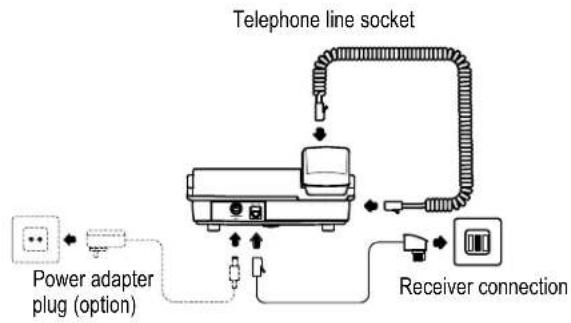
flowchart
graph TD
    A["Power adapter plug (option)"] --> B["Receiver connection"]
    B --> C["Telephone line socket"]
    C --> D["Switch"]
    D --> E["Switch"]
    E --> F["Switch"]
    F --> G["Switch"]
    G --> H["Switch"]
    H --> I["Switch"]
    I --> J["Switch"]
    J --> K["Switch"]
    K --> L["Switch"]
    L --> M["Switch"]
    M --> N["Switch"]
    N --> O["Switch"]
    O --> P["Switch"]
    P --> Q["Switch"]
    Q --> R["Switch"]
    R --> S["Switch"]
    S --> T["Switch"]
    T --> U["Switch"]
    U --> V["Switch"]
    V --> W["Switch"]
    W --> X["Switch"]
    X --> Y["Switch"]
    Y --> Z["Switch"]

range of telephone functions can only be used when the batteries are correctly inserted and are not empty.
It is also possible to use the optional power adapter plug instead of batteries.
Device type: BIGTEL 49 PLUS (9 V DC, 200 mA).
Putting the Telephone into Operation
Inserting the batteries
Insert the batteries in the open battery compartment. Only use batteries of the type AA 1.5 V. Pay attention to the correct polarity. Close the battery compartment cover.

The full range of telephone functions can only be used when the batteries are correctly inserted and are not empty.
Caution: Always ensure that the telephone is not connected to the telephone socket and/or power socket (option) when inserting or replacing batteries.
When the batteries are empty, the icon appears in the display. Replace the batteries.
Setting the time and date
The time and date are set via the menu. Refer to Page 28 for the sequence of menu option selections necessary.
Private branch exchanges
The information on Page 27 explains how to install your telephone in a private branch exchange.
Wall installation
The telephone can also be installed on a wall. You require two screws in order to fix the telephone on a wall. Feed the guide tabs (1) on the wall-mounting bracket (2) in the slots (3) on the rear side of the telephone. Slide the wall bracket (2) 10 mm upwards until it audibly snaps into place.
Warning: Ensure that there are no cables or pipes etc. under the surface of the wall where you want to drill the holes.
Drill two holes whose distance apart corresponds to the bracket to be used, insert the screws and allow them to project 5 mm from the wall. Position the telephone on the bracket, fit the screws in the slots and slide the telephone downwards a little.
Turn the receiver hook (4) in the receiver cradle 180° so that the receiver can be hooked in.

3 Operating Elements
Telephone
1 Call back button
2 One-touch dialling
button M1
(emergency call number 1)
3 Delete
4 One-touch dialling
button M2
(emergency call number 2)
5 Scroll upwards
6 Quick dial button
7 Scroll downwards
8 Calls list (CID 1) / Cancel 2
9 New call indication
10 Phone book
11 Save number button
12 R button
13 Redial button
14 LED, telephone is ringing
15 LED, handsfree mode
16 Handsfree mode button
17 Receiver +40 dB boost button
18 Volume boost on LED
19 Control knob,
receiver volume
(hidden under premium
handset)
20 "Ringing volume" slide control
21 "Tone" slide control
22 "Handsfree volume" slide control
The buttons in this operating manual are depicted with a uniform contour. Variations in the symbols on the telephone buttons compared to those depicted here are possible.

2 Each process is automatically cancelled if no input is made within a period of 60 seconds or if the CID button is pressed.
1 CID: Connection Identification = Displays the number of a caller.
Operating Elements


Service-Hotline Germany: Tel. 0180 5 001388, cost via German landline at time of going to print: 14 ct/min., different costs possible via mobile telephone systems
Operating the Telephone
4 Operating the Telephone
Display and explanation of operation sequences
Enter digits or letters
* Press the button depicted briefly
2 x * Press the button depicted twice, briefly
2 sec * Press the button depicted for
2 seconds
Press and hold ☒ Press and hold the button depicted
Release * Release the button depicted
Telephone rings
Lift the receiver
Replace the receiver on-hook
≥Text≤ Text flashes in the display
GERMAN or
Text or icon in the display
Icons and texts in the display
Icon Description
On: Replace the batteries.
14:45 Display of the time.
19/09 Display of the date.
The phone book is open Page 29.
CID The calls list is open ☐ Page 30.
NEW The entry in the calls list is new Page 30.
01 Position number in the call list.
TOTAL: There are XX entries in the call list.
XX
NEW: There are XX new entries in the call list. XX
Creating phone book entries - example
The example in Creating phone book entries explains how to navigate and make entries in the phone book. Proceed as in this example for all the settings.
Creating phone book entries
| Open the phone book | |
| SAVE? | Activate the saving process and |
| confirm it | |
| Enter the phone number(max. 22 digits) and confirm it | |
| Enter the name (max. 16 letters)and confirm it | |
| SAVED | Entry is saved |
Telephoning
5 Telephoning
Taking a call
Enter the phone number
(max. 22 digits)
⊗ Following incorrect input, press to
delete the last digit
or or Dial the number
It is also possible to lift the receiver first to obtain the dialling tone.
The digits in the phone number then entered are dialled immediately. It is not possible to correct wrong digits individually using this dialling procedure.
Redialling
Your telephone stores the last phone number dialled.
or 📋, Redial the last phone number dialled
Calling back missed calls
The telephone stores the numbers of the last 32 calls received in a calls
list.
▲ or ▼ Select an entry
or Dial the number
Dialling phone numbers from the phone book
There must be phone numbers stored in the phone book Page 29.
Open the phone book
▲ or ▼ Select an entry
or Dial the number
One-touch dialling
The quick dial buttons M1 or M2 can be used for normal quick dial numbers or as a memory location for automatic emergency call dialling. Phone numbers must have been stored as quick dial numbers. Page 31.
M1 or M2 Press the required quick dial button
or or Dial the number
Quick dialling
It is possible to store 10 phone numbers so that they are dialled simply by pressing three buttons (quick dialling).
Programming quick dial buttons
Press the Save number button
Enter the phone number
(max. 22 digits) and confirm it
Enter the name (max. 16 letters)
and confirm it
0 Enter the memory location number
(e.g. in this case, memory location 0)
Making calls using the quick dial buttons
or Lift the receiver or handsfree
→• Press the quick dial button
0 Enter the memory location number
(e.g. in this case, memory location 0)
The phone number stored is automatically dialled.
Adjusting the receiver volume
The receiver volume can be adjusted when the +40 dB volume boost button is activated.
0 1 2 3 Adjust the volume with the control knob
Telephoning
Increasing the receiver volume on +40 dB.
The receiver volume can be increased by pressing the left-hand side of the loudspeaker key marked +40 dB
+40dB Increasing the volume on + 40 dB
Tone control
The tone of the receiver can be adjusted using the corresponding slide control on the right-hand side of the housing.

Adjust the tone using the slide control
Tone adjustment is only possible when the receiver volume +40 dB boost button is on.
Ringing volume
The ringing volume can be adjusted using the corresponding slide control on the right-hand side of the housing.

Adjust the volume using the slide control
Talk time display
The duration of a call is displayed in minutes and seconds during the call.
Handsfree
Use this function to listen to the caller via the loudspeaker.
Switch on handsfree mode
Deactivate handsfree mode
Adjusting the handsfree volume
The handsfree volume can be adjusted using the corresponding slide control on the right-hand side of the housing.

Adjust the volume using the slide control
6 Private Branch Exchanges / Suppl. Services
R button on private branch exchanges
If the telephone is connected to a private branch exchange, functions such as transferring calls and automatic call back can be used via the R button. Please refer to the operating manual supplied with your private branch exchange to determine, whether the telephone will work properly with the exchange.
Dialling pause
In the case of private branch exchanges, it is necessary to enter an access code to get an outside line with its corresponding dialling tone. When using some older private branch exchanges, it takes a little time before the dialling tone becomes audible. Particularly in the case of such private branch exchanges, it is possible to insert a dialling pause after the number for the outside line so that the number can be dialled in a continuous process without having to wait for the dialling tone.
Insert a dialling pause
"P" is shown in the display.
After dialling the number for the outside line, the telephone then waits approx. 3 seconds before dialling the actual phone number.
The pause can also be entered with the phone number in the phone book.
R button and supplementary services
Your telephone supports the supplementary services offered by your telephone network provider, such as brokering, call waiting and conference calls. The supplementary services can be used in conjunction with the R button. Please contact the telephone network provider with regard to enabling the supplementary services.
Private Branch Exchanges / Suppl. Services
Caller number display (CID 1 )
If this function is available with your telephone line, the number of the caller appears in the display when the phone rings. If the caller has suppressed transmission of his phone number, a corresponding message appears in the display. The phone number is not displayed and, as a result, is not stored in the calls list.

caller number display function is a supplementary service offered by telephone network providers. Contact your network provider for further information.
1 CID: Connection Identification = Displays the number of a caller.
Menu Structure
7 Menu Structure
Main menu
Press button ▲ for 4 sec to open the main menu. Press button ▲ or ▼ to select the required setting. Press button ⊗ to confirm your selection.
LANGUAGE DEUTSCH
| FRANCAIS | ||
| ENGLISH | ||
| SVENSKA | ||
| POLSKI | ||
| NORSK | ||
| SUOMI | ||
| DANSK | ||
| LCD CONTRAST LCD CONTRAST 1-4 | ||
| SET TIME/DATE | ▲, ▼ENTER TIME | ▲, ▼ENTER DATE |
| DIALLING MODE | TONE | |
| PULSE | ||
| FLASH TIME 100, 300, 600 | ||
8 Phone Book
Thirty-two phone numbers can be stored in the phone book together with the associated names.
- Always enter the area access code with the phone numbers so that the telephone can also assign incoming local calls to a phone book entry.
- When the memory capacity of the phone book is used up, the message MEMORY FULL appears when an attempt is made to store another number. To create space, an existing entry must first be deleted.
•The phone book entries are arranged alphabetically. To skip to the required phone book entry directly, enter the first letter of the corresponding entry.
Entering a name
The digit keys are also labelled with letters for the entry of the respective letters. Pressing the respective key the necessary number of times enables capital letters and digits to be entered.
1 Space
Delete
To enter the same letter twice, press the button to enter the letter. Wait until the cursor skips one place forward. Enter the letter again.
Creating phone book entries
Open the phone book
→, SAVE?
→ confirm it
Enter the phone number
Activate the saving process and
Enter the name (max. 16 letters) and confirm it
SAVED
Entry is saved
Editing entries in the phone book
Open the phone book
▲ or ▼ Select a phone book entry
3 sec ➕ Activate the editing process
EDIT? , and confirm it
Edit the phone number
(max. 22 digits) and confirm it
附. Edit the name (max. 16 letters)
and confirm it
SAVED
Entry is saved
Deleting entries from the phone book
Deleting a single entry
Open the phone book
▲ or ▼ Select a phone book entry
DELETE?
4 sec ☒ or ▲ ▼
Activate the deleting process
Confirm the deleting process or Cancel the deleting process
Delete all entries
Open the phone book
▲ or ▼ Select any phone book entry
4 sec ☒ DELETE ALL? Activate the deleting process
4 sec ☒ or ▲ ▼ Confirm the deleting process or Cancel the deleting process
Calls List / CID
9 Calls List / CID
A total of 32 call numbers can be stored in the calls list. The flashing red LED indicates new calls in the calls list.
Displaying phone numbers in the calls list

Open the calls list and select an entry
Display messages:
Display Description
| NEW The entry in the calls list is new. | |
| The caller in the calls list has called several times. | |
| NO NUMBER The caller's | number is only received in part or is erroneous. The information on the caller's number is not available. |
| PRIVATE The caller has | suppressed transmission of his number or the call is from a PBX. |
| OUT OF AREA The call | concerns an international call or it is from a PBX. |
| As soon as the phone number in the phone book has been saved together with a name, the name entered appears in the call list. | |
Storing numbers from the calls list in the phone book
| A phone number stored in the calls list can be transferred directly to the phone book. | |
| ▲ or ▼ Open the calls list and select an entry | |
| ◇, COPY NUMBER? Activate the copy process and◇ confirm it | |
| SAVED | Entry is saved |
The phone number is stored in the phone book without a name being assigned. Then enter a name for the phone number. Editing entries in the phone book Page 29.
Deleting phone numbers from the calls list
Deleting phone numbers individually
| ▲ or ▼ | Open the calls list and select an entry |
| ⊗ DELETE? | Activate the deleting process |
| 4 sec ⊗ Confirm the deleting process | |
| or | |
| ▲ or ▼ | Cancel the deleting process |
| g all the phone numbers | |
| ▲ or ▼ | Open the calls list and select an entry |
| 4 sec ⊗ DELETE ALL? | Activate the deleting process |
| 4 sec ⊗ Confirm the deleting process | |
| or | |
| ▲ or ▼ | Cancel the deleting process |
| Before deleting the phone numbers, check that the entries have been viewed. | |
Emergency Call
10 Emergency Call
The emergency call unit can be used to dial an emergency services exchange or persons for assistance.
There are several appropriate emergency service call numbers available, such as the Red Cross, St. John's Ambulance Brigade, etc. In some countries emergency calls are not free of charge. The unit can also be used for private emergency calls within the family, for example.
Storing emergency call / quick dial numbers
The quick dial buttons M1 and M2 can be used for normal quick dial numbers or as memory locations for automatic emergency call dialling.
-, STORE NUMBER Activate the saving process
Enter the phone number (max. 22 digits) and confirm it
Edit the name (max. 16 letters) and confirm it
LOCATION? M1 or M2 Select the quick dial button
SAVED Entry is saved
The phone numbers assigned to the quick dial keys cannot be deleted. When storing new numbers, the existing entries are overwritten.
Starting the emergency call
M1 or M2 Select the quick dial button
or Dial the number
If Problems Occur
11 If Problems Occur
Service Hotline
Should problems arise with the telephone, please refer to the following information first. In the case of technical problems, you can also contact our hotline service, tel. 0180 5 001388 (cost via German landline at time of going to print:: 14 ct/min, different costs possible via mobile telephone systems). In the case of claims under the terms of guarantee, contact your sales outlet. There is a 2 year period of guarantee.
| Problems Reply | |
| No telephone calls possible - The | telephone line is not connected properly or is defective. Only use the telephone connection cable supplied. |
| Some functions eg +40 dB amplifier or handsfree not working | - Check the batteries are fitted and they are not exhausted. |
| The caller number display (CID 1 ) does not function | - The caller number display function is a supplementary service offered by telephone network providers. Contact your network provider for further information.- The caller has suppressed the transmission of their phone number. |
1 CID: Calling Identification
12 Maintenance / Guarantee
Maintenance
- Clean the housing surfaces with a soft, fluff-free cloth.
- Never use cleaning agents or solvents.
Guarantee
AUDIOLINE equipment is produced and tested according to the latest production methods. The implementation of carefully chosen materials and highly developed technologies ensure trouble-free functioning and a long service life. The terms of guarantee do not apply where the cause of equipment malfunction is the fault of the telephone network operator or any interposed private branch extension system. The terms of guarantee do not apply to the batteries, rechargeable batteries or power packs used in the products. The period of guarantee is 24 months from the date of purchase.
All deficiencies resulting from material or production faults which occur during the period of guarantee will be eliminated free of charge. Rights to claims under the terms of guarantee are annulled following intervention by the purchaser or third parties. Damage caused as a result of improper handling or operation, incorrect positioning or storing, improper connection or installation, Acts of God or other external influence are not covered by the terms of guarantee. In the case of complaints, we reserve the right to repair or replace defect parts or provide a replacement device. Replacement parts or devices become our property. Rights to compensation in the case of damage are excluded where there is no evidence of intent or gross negligence by the manufacturer.
If your equipment shows signs of defect during the period of guarantee, please return it to the sales outlet in which you purchased the AUDIOLINE equipment together with the purchase receipt. All rights to claims under the terms of guarantee in accordance with this agreement must be asserted exclusively with regard to your sales outlet. Two years after the purchase and transfer of our products, claims under the terms of guarantee can no longer be asserted.
Declaration of Conformity
This device fulfils the requirements stipulated in the EU directive:
1999/5/EU directive on radio equipment and telecommunications terminal equipment and the mutual recognition of their conformity. Conformity with the above mentioned directive is confirmed by the CE symbol on the device.
To view the complete Declaration of Conformity, please refer to the free download available on our web site www.audioline.de.

Index
13 Index
C
Caller number display, 27
Calling back missed calls, 25
Calls list, 30
CID, 30
Connecting the telephone, 21
Contrast setting, 28
Creating phone book entries, 24, 29
D
Date, 22
Date and time setting, 28
Declaration of Conformity, 33
Deleting entries from the phone book, 29
Deleting phone numbers from the calls list, 30
Dialling pause, 27
Dialling phone numbers from the phone book, 25
Display, 24
Displaying phone numbers in the calls list, 30
E
Editing entries in the phone book, 29
Emergency call unit, 31
Ending a call, 25
Entering a name, 29
Explanations, 24
G
Guarantee, 33
H
Handsfree, 26
Handsfree volume, 26
|
Icons and texts in the display, 24
Inserting batteries, 22
L
Language setting, 28
M
Main menu, 28
Maintenance, 33
Making a call, 25
Making calls using the quick dial buttons, 25
Menu structure, 28
0
One-touch dialling, 25
Operating elements, 23
Operating the Telephone, 24
P
Package contents, 21
Phone book, 29
Private branch exchanges, 27
Programming quick dial buttons, 25
Putting the telephone into operation, 21
Q
Quick dialling, 25
R
R button and supplementary services, 27
R button on private branch exchanges, 27
Receiver volume, 25
Redialling, 25
Reinforcement the receiver volume on +40 dB., 26
Ringing volume, 26
s
Safety information, 20
Service Hotline, 32
Storing emergency call numbers, 31
Storing numbers from the calls list in the phone book, 30
Storing quick dial numbers, 31
Supplementary services, 27
T
Taking a call, 25
Talk time, 26
Telephoning, 25
Time, 22
Tone control, 26
W
Wall installation, 22
Notes

- Inhaltsverzeichnis
- Bedienelemente
- Telefon
- Intended use
- Installation location
- Power adapter plug (option)
- Hearing aid compatibility
- Disposal
- Putting the Telephone into Operation
- Safety notes
- Checking the contents of the package
- Putting the Telephone into Operation
- Connecting the telephone
- Inserting the batteries
- Setting the time and date
- Private branch exchanges
- Wall installation
- Operating Elements
- Telephone
- Operating Elements
- Operating the Telephone
- Operating the Telephone
- Icons and texts in the display
- Creating phone book entries - example
- Telephoning
- Telephoning
- Taking a call
- Redialling
- Calling back missed calls
- Dialling phone numbers from the phone book
- One-touch dialling
- Quick dialling
- Adjusting the receiver volume
- Private Branch Exchanges / Suppl. Services
- R button on private branch exchanges
- Dialling pause
- R button and supplementary services
- Private Branch Exchanges / Suppl. Services
- Caller number display (CID 1 )
- Menu Structure
- Menu Structure
- Main menu
- Phone Book
- Entering a name
- Creating phone book entries
- Editing entries in the phone book
- Deleting entries from the phone book
- Delete all entries
- Calls List / CID
- Calls List / CID
- Deleting phone numbers from the calls list
- Emergency Call
- Emergency Call
- Storing emergency call / quick dial numbers
- Starting the emergency call
- If Problems Occur
- If Problems Occur
- Service Hotline
- Maintenance / Guarantee
- Maintenance
- Guarantee
- Declaration of Conformity
- Index
- Index
- C
- D
- E
- G
- H
- |
- L
- M
- 0
- P
- Q
- R
- s
- T
- W
Brand : AUDIOLINE
Model : BIGTEL 49 PLUS
Category : Telephone