
Ear Force PX24 - Earphones TURTLE BEACH - Free user manual and instructions
Find the device manual for free Ear Force PX24 TURTLE BEACH in PDF.


| Product Type | Over-Ear Gaming Headset |
| Brand | Turtle Beach |
| Model | Ear Force PX24 |
| Connectivity | 3.5mm Audio Jack (Wired) |
| Driver Size | 50mm Neodymium |
| Frequency Response | 20 Hz - 20 kHz |
| Impedance | 32 Ohms |
| Sensitivity | 105 dB |
| Microphone Type | Omnidirectional, Detachable Boom Mic |
| Microphone Frequency Response | 50 Hz - 15 kHz |
| Controls | In-Line Remote with Volume, Mute, and Bass Boost |
| Variable Bass Boost | Adjustable via In-Line Control |
| Amplification | Built-in Amplifier (Powered by USB or Batteries) |
| Compatibility | PS4, Xbox One, PC, Mac, Mobile Devices |
| Cable Length | Approximately 1.5 meters (5 feet) |
| Weight | Approximately 280 grams |
| Maintenance | Wipe ear pads with damp cloth; store in a dry place |
| Safety | Do not use at high volumes for extended periods |
| Spare Parts | Replacement ear pads and cables available |
| Repairability | Modular design; ear pads and cable user-replaceable |
Frequently Asked Questions - Ear Force PX24 TURTLE BEACH
User questions about Ear Force PX24 TURTLE BEACH
0 question about this device. Answer the ones you know or ask your own.
Ask a new question about this device
Download the instructions for your Earphones in PDF format for free! Find your manual Ear Force PX24 - TURTLE BEACH and take your electronic device back in hand. On this page are published all the documents necessary for the use of your device. Ear Force PX24 by TURTLE BEACH.
USER MANUAL Ear Force PX24 TURTLE BEACH
AMPLIFIED GAMING HEADSET
USER GUIDE
EAR FORCE PX24 MULTI-PLATFORM GAMING HEADSET

natural_image
Black and white photo of a retro-style headboard with audio jack and earpieces against a blue background (no text or symbols visible)Congratulations on your purchase of the Ear Force PX24 Multi-Platform Gaming headset from Turtle Beach. Turtle Beach brings over 45 years of expertise to transforming your listening experience.
In the Box
For our Knowledgebase and Technical Support please visit turtlebeach.com/support

natural_image
Line drawing of a multi-face headboard with earplands and warning symbols (no text or labels)Ear Force PX24 Headset
B

Ear Force SuperAmp™

natural_image
Close-up of a black headset with glowing light trails and a screwdriver, no visible text or symbolsTable of Contents
About the Ear Force PX24 P5
Firmware
Features and Controls P7
SuperAmp Charging P8
PS4 Setup P9
Xbox One Setup P10
PC/Mac & Mobile Setup P11
Adjusting Sound P12
Specifications
Troubleshooting Tips P15
Important Safety Information P16
P6
P14
About the Ear Force PX24

natural_image
Close-up of a black PX24 headboard with visible stereo effect and logo (no text or symbols on the headset itself)
natural_image
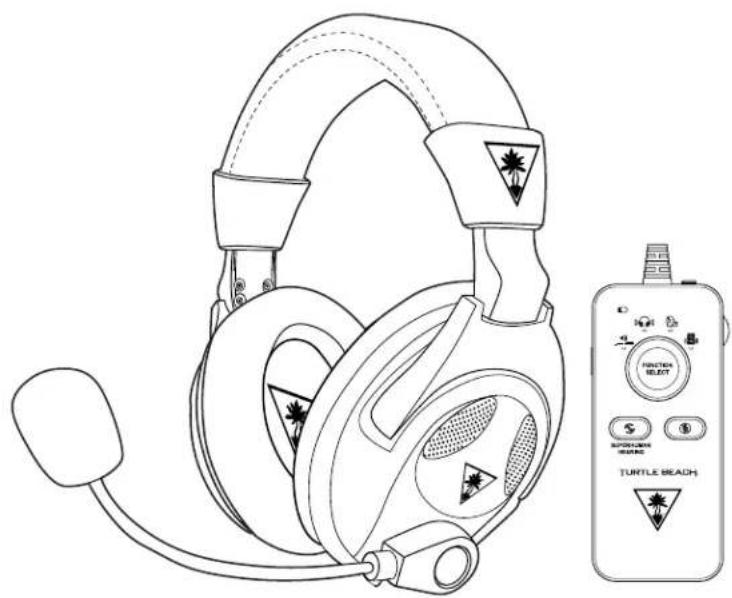
Black handheld electronic device with control buttons and antenna (no visible text or symbols)The Earforce® PX24 is a fully-loaded headset that gives you the power to dominate any game on any system. The exclusive Ear Force SuperAmp™ with Virtual Surround Sound delivers game-changing features like Superhuman Hearing™, Variable Mic Monitoring, Variable Bass Boost and more!
Firmware
natural_image
Line drawing of a headboard with earplands and a handheld device labeled TURTLE BEACH (no text or symbols on the devices themselves)
natural_image
Silhouette of a desktop computer monitor with keyboard and mouse (no text or symbols)It is important to always run the most up-to-date firmware. Download the Ear Force Audio Hub for Windows or Mac at turtlebeach.com/px24 to confirm you have the latest Firmware.
In order to check for new firmware, just connect your Ear Force SuperAmp to your PC/Mac with the provided USB Charge Cable while running the Ear Force Audio Hub.
Features and Controls
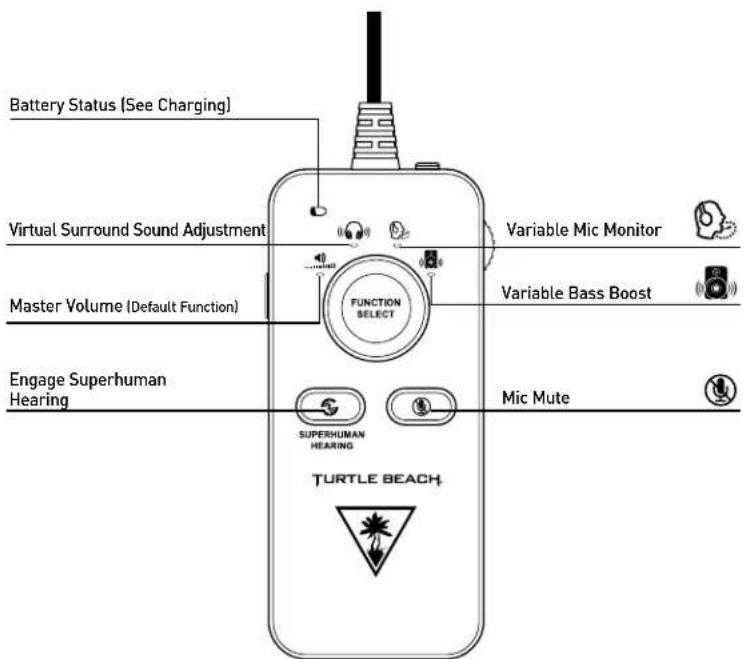
* To restore default levels hold function select button for 5 seconds
![XBOX ONE * PSA * PC MOBILE Select your Platform LEVEL ADJUST Turn to adjust selected function Power [On/Off]** Charge Battery TOP VIEW Headset Jack BOTTOM VIEW **Switch to Off to bypass all amplifier features](/content/2026/06/1293629/images/a3ee4470f85f2ad41c9508e1b47ae1284389a1e15f8cbcf83becd704030867b9.jpg)
SuperAmp Charging
The Ear Force SuperAmp uses an internal amplifier and so requires power from a rechargeable battery. The Ear Force SuperAmp gets up to 30 hours of Amplified gaming from a single charge and will charge to full within 3 hours. The amplifier can be bypassed by switching the Power Switch into the "Off" position, this allows Audio/Mic Functions with all Amplified Features bypassed.
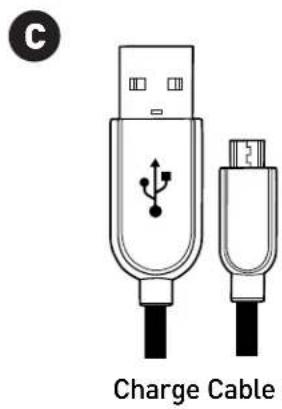
- Connect the included USB Charging Cable to the USB Port on the top of the Ear Force SuperAmp.
- Connect the other end of the USB Cable to any powered USB Port. The Battery LED will pulse green to indicate charging.
- Charging is complete when the Battery LED on the Headset changes to solid green.

Note: Make sure to charge your amplifier regularly.
Note: Always charge your amplifier before storing it for more than three months. Never store the headset in temperatures above 113 F/45 C.
PS4 Setup

- Set to PS4 Mode. Power On the Amplifier
- Go to Settings >> Devices >> Audio Devices
- Set Input & Output Device to Headset Connected to Controller
- Set Output to Headphones to All Audio
- Set Volume Control (Headphones) level to maximum
- Select Adjust Microphone Level and follow the on-screen instructions to calibrate your microphone
Xbox One Setup
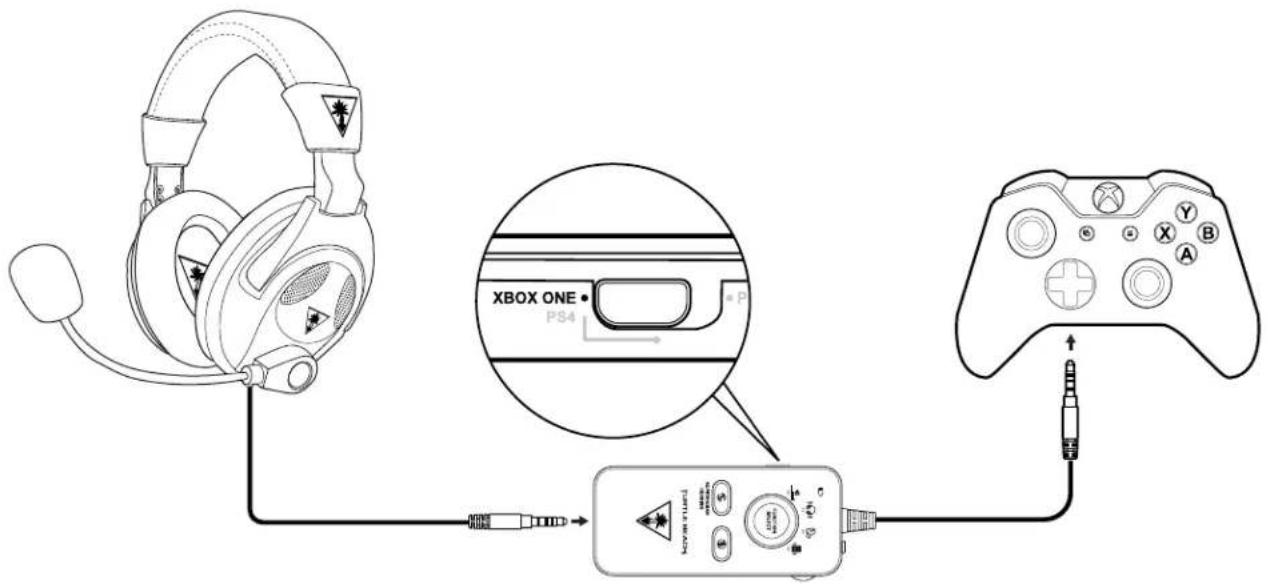
- Set to Xbox One Mode
- Power ON the Amplifier
- Go to Settings >> Devices and accessories >>
Xbox One Wireless Controller >> Volume
- Set Volume to Maximum
- Set Mic Monitor to Minimum

Note: The PX24 requires the NEW Xbox One Controller with 3.5mm headset jack. Purchase the Ear Force Audio Controller from Turtlebeach.com to use the PX24 with the original Xbox One Controller.
PC/Mac & Mobile Setup
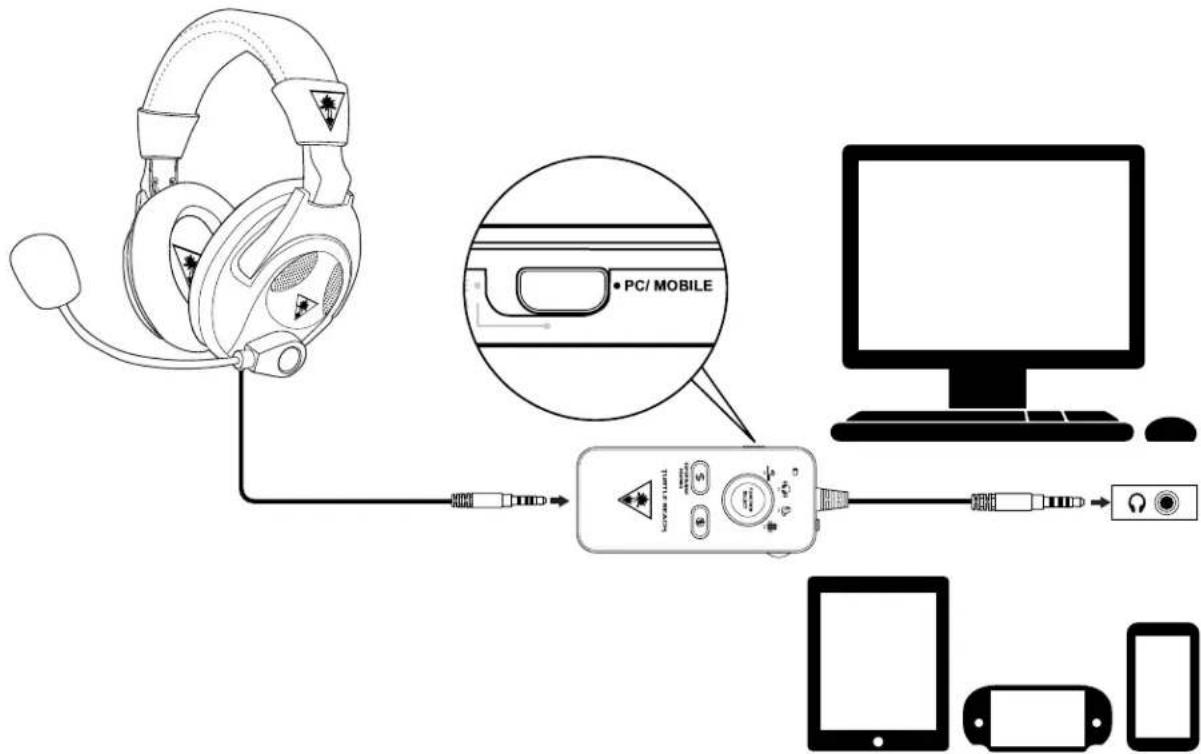

Note: If your PC uses separate Green/Pink connectors for audio you will need a PC Splitter Cable. This adapter is available online at turtlebeach.com
Adjusting Sound
| If you want to... Then... | |
| Switch Console Modes | Each Mode is designed for a specific platform. This means it is imperative for proper operation that you always check to make sure the appropriate mode is selected.1. Adjust the Mode Select Switch on the side of the Ear Force SuperAmp to the appropriate mode:a. Xbox Oneb. PS4c. PC/MobileNote: PS4 Mode can result in distorted audio when used on other platforms. |
| Adjust PS4 Console Audio Volume | On the PS4 Console:1. Go to Settings >> Audio Devices2. Adjust Volume Control (Headphones) |
| Adjust PS4 Console Mic Level | On the PS4 Console:1. Go to Settings >> Audio Devices2. Adjust Microphone Level |
| Adjust Xbox One Console Volume | When using the Xbox One Controller with 3.5mm jack: On the Xbox One Console:1. Go to Settings >> Devices and Accessories >> Xbox One Wireless Controller >> Volume2. Adjust VolumeWhen using a Headset Audio Controller:1. Adjust the levels right on the Headset Audio Controller connected to your Xbox One Controller |
| Turn the microphone on and off P | Press the Mic Mute Button on the Ear Force SuperAmp |
Adjust Virtual Surround Sound  | You can optimize the sound for your specific game, movie or music.1. Press the Function Select button until the LED below the Virtual Surround Sound icon is lit.2. Turn the Level Adjust on the side of the SuperAmp to adjust the intensity of Virtual Surround Sound Effect.The Maximum and Minimum settings are indicated with tones. At the Minimum Setting the audio played is Amplified Stereo, at the Maximum it is Full Virtual Surround Sound. |
Adjusting Sound
| If you want to... Then... | |
Adjust Mic Monitor | You can control the volume of your voice in the headset.1. Press the Function Select button until the LED below the Mic Monitor icon is lit.2. Turn the Level Adjust on the side of the SuperAmp to adjust the Mic Monitor Volume. |
Adjust Bass Boost | You can control the volume of your voice in the headset.1. Press the Function Select button until the LED below the Mic Monitor icon is lit.2. Turn the Level Adjust on the side of the SuperAmp to adjust the Mic Monitor Volume. |
Engage Superhuman Hearing | Were you ever curious what it would be like to be Superhuman? Now Turtle Beach can take you one step closer in that quest with Superhuman Hearing! From quiet footsteps coming up from behind, to the subtle sound of a gun reloading, Superhuman Hearing lets you hear it all.1. Press the Superhuman Hearing Icon on the Ear Force SuperAmp to engage this feature. |
Specifications
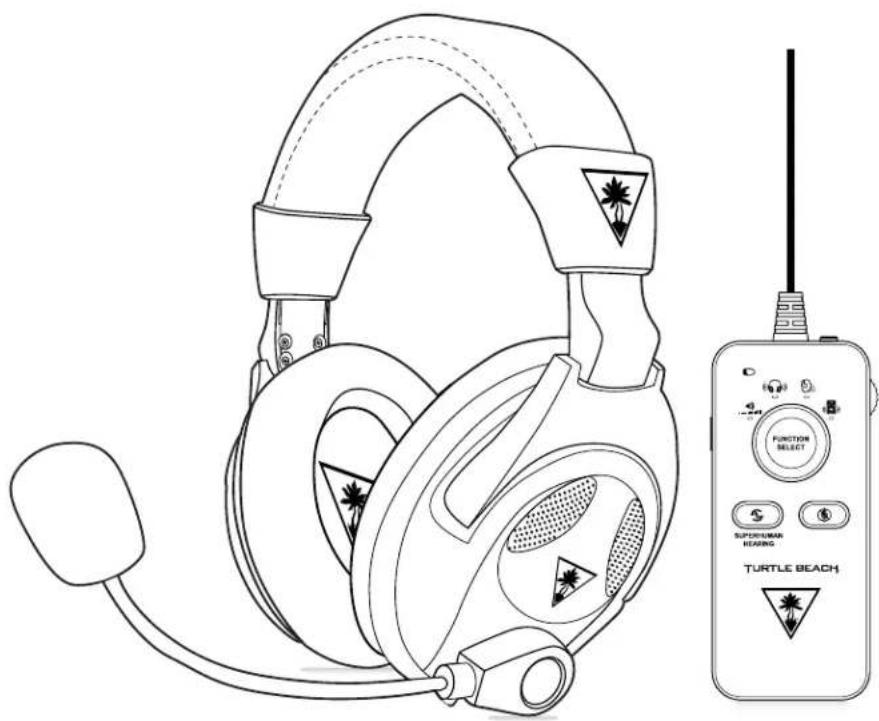
Headset
Speakers
50mm with Neodymium Magnets
· Frequency Response 20Hz - 20kHz
· Earpad Material Fabric(Black) with Foam Cushion
· Earcup Design Over-Ear (Closed)
- Microphone Design Removable Omni-Directional Microphone
- Cable Length 1.1m
Amplifier
• Game /Chat Input/Output 3.5mm
- Power Rechargeable Battery
· Cable Length 0.5m
natural_image
Line drawing of a headboard with headphones and a Tattle Beach handheld device (no text or symbols on the devices themselves)Troubleshooting Tips
No Sound
| Possible cause Solution | |
| Low Battery | Turn the Ear Force SuperAmp into the “Off” position, this should bypass the battery. If you can hear audio in this position then charge your Ear Force SuperAmp before switching it “On”. |
| Master Volume turned down | Confirm that your Master Volume Setting is turned up.1. Press the Function Select button until the LED below the Master Volume control is lit2. Turn the Level Adjust control counter-clockwise |
| Loose connection | Make sure the PX24 Headset is fully inserted into the Ear Force Super Amp. Also make sure the Super Amp is fully inserted into the audio source. |
Voice Chat Issues
| Possible cause Solution | |
| Incorrect Setup (PC) | Confirm that your Headset/Mic is selected as the default audio device in the Windows Playback/Recording Devices Tabs. |
| Incorrect Program Settings (PC) | Some programs have their own audio settings, if you encounter trouble with chat only in a certain program check that you are configured correctly. |
| Mic Muted Press the Mic Button on the Ear Force SuperAmp. | |
| Incorrect Setup (PS4) Check all of your settings are correct (pg 9) | |
| Incorrect Setup (Xbox One) Check all of your settings are correct (pg 10) | |
If your issue is not resolved by these steps, please visit turtlebeach.com/support
Important Safety Information
To avoid potential damage to the device, always disconnect all cables before transporting it.
WARNING: Permanent hearing damage can occur if a headset is used at high volumes for extended periods of time, so it is important to keep the volume at a safe level. Over time, your ears adapt to loud volume levels, so a level that may not cause initial discomfort can still damage your hearing. If you experience ringing in your ears after listening with the headset, it means the volume is set too loud.
The louder the volume is set, the less time it takes to affect your hearing. So, please take care to listen at moderate levels.
- Before placing a headset on your ears, turn the volume down completely, then slowly increase it to a comfortable level.
- Turn down the volume if you can't hear people speaking near you.
- Avoid turning up the volume to block out noisy surroundings.
Regulatory Compliance Statements for the EAR FORCE PX24 and EAR FORCE SuperAmp
Federal Communications Commission (FCC) Compliance Notices
Class B Interference Statement
This equipment has been tested and found to comply with the limits for a Class B digital device, pursuant to Part 15, Subpart B of the FCC Rules. These limits are designed to provide reasonable protection against harmful interference in a residential installation. This equipment generates, uses, and can radiate radio frequency energy and, if not installed and used in accordance with the instructions, may cause harmful interference to radio communications. However, there is no guarantee that interference will not occur in a particular installation. If this equipment does cause harmful interference to radio or television reception, which can be determined by turning the
equipment off and on, the user is encouraged to try to correct the interference by one or more of the following measures:
- Reorient or relocate the receiving antenna.
- Increase the separation between the equipment and receiver.
- Connect the equipment into an outlet on a circuit different from that to which the receiver is connected.
- Consult the dealer or an experienced radio/TV technician for help.
FCC Caution:
This device complies with Part 15 of the FCC Rules. Operation is subject to the following two conditions: (1) This device may not cause harmful interference, and (2) this device must accept any interference received, including interference that may cause undesired operation.
Canadian ICES Statements
Canadian Department of Communications Radio Interference Regulations
This digital apparatus does not exceed the Class B limits for radio-noise emissions from a digital apparatus as set out in the Radio Interference Regulations of the Canadian Department of Communications. This Class Bdigital apparatus complies with Canadian ICES-003.
European Union and European Fair Trade Association (EFTA) Regulatory Compliance
This equipment may be operated in the countries that comprise the member countries of the European Union and the European Fair Trade Association. These countries, listed below, are referred to as The European Community throughout this document: AUSTRIA, BELGIUM, BULGARIA, CYPRUS, CZECH REPUBLIC, DENMARK, ESTONIA, FINLAND, FRANCE, GERMANY, GREECE, HUNGARY, IRELAND, ITALY, LATVIA, LITHUANIA, LUXEMBOURG, MALTA, NETHERLANDS, POLAND, PORTUGAL, ROMANIA, SLOVAKIA, SLOVENIA, SPAIN, SWEDEN, UNITED KINGDOM, ICELAND, LICHTENSTEIN, NORWAY, SWITZERLAND
Declaration of Conformity
Marking by this symbol:

indicates compliance with the Essential Requirements of the R&TTE Directive of the European Union (1999/5/EC). This equipment meets the following conformance standards:
Safety: EN 60950-1: 2006 + A11: 2009 + A1: 2010 + A12: 2011 (T-Mark License).
IEC 60950-1: 2005 (2nd Edition) + Am 1: 2009 (CB Scheme Report/Certificate),
EN 50332-1: 2000, EN50332-2: 2003, EN 71-3: 2013.
EMC: EN 55022: 2010, EN 301 489-1 v1.9.2 (2011-09),
EN 301 489-17 v2.1.1 (2009-05), EN 61000-4-2: 2009,
EN 61000-4-3: 2010, EN 61000-4-8 (2010)
Radio: EN 300 328v1.8.1 (2012-06)
SAR: EN 62311: 2008
Environmental: Low Voltage Directive 2006/95/EC, RoHS 2011/65/EU, WEEE 2002/96/EC,
REACH 2006/1907/EC, Packaging 94/62/EC, Battery 2006/66/EC, Toys Safety Directive 2009/48/EC.
Warning!
This is a Class B product. In a domestic environment, this product may cause radio interference, in which case, the user may be required to take appropriate measures.
Achtung!
This symbol on the product or its packaging indicates that this product must not be disposed of with your other household waste. Instead, it is your responsibility to dispose of your waste equipment by handing it over to a designated collection point for the recycling of waste electrical and electronic equipment. The separate collection and recycling of your waste equipment at the time of disposal will help conserve natural resources and ensure that it is recycled in a manner that protects human health and the environment. For more information about where you can drop off your waste for recycling, please contact your local authority, or where you purchased your product.
LIMITED ONE YEAR WARRANTY FOR TURTLE BEACH PRODUCTS:
Voyetra Turtle Beach, Inc. ("VTB") warrants to the original end-user purchaser ("Purchaser") that the retail Turtle Beach hardware product herein ("Product") will be free of defects in materials and workmanship for a period of one year from the date of purchase by the Purchaser ("Warranty Period"). Any Extended Warranty or Service Plans purchased through a Retail store are not honored by VTB. The Warranty refers to the repair/replacement of a defective product during this period and not a refund.
This limited warranty is extended only to the original Purchaser of a new product, which was not sold "AS IS". It is not transferable or assignable to any subsequent purchaser. This limited warranty is applicable only in the country or territory where the Product was purchased from an authorized VTB retailer and does not apply to a Product that has been purchased as used or refurbished or was included as part of a non-VTB product.
WARRANTY SERVICE:
In the USA and CANADA Warranty Service is provided by our Turtle Beach USA offices and in all other Countries it is provided by our local International Distributors when available. Refurbished/Recertified products are sold on an AS IS basis with a 90-day Warranty or less in accordance with each vendor's policy.
VTB does not warrant uninterrupted or error-free operation of the Product and is under no obligation to support the Product for all computer operating systems or future versions of such operating systems.
If a defect should occur during the Warranty Period, Purchaser must contact VTB to obtain a Return Merchandise Authorization ("RMA") number on the basis of the dated purchase receipt. Purchaser will be responsible for shipping costs incurred in returning the defective Product to an authorized VTB service center, or to the repair facility located at VTB's corporate headquarters. VTB will not be responsible for other products or accessories included with the defective Product sent to VTB. The RMA number must be clearly indicated on the outside of the package. Packages without an RMA number will be refused by VTB or its representatives and returned to sender at the sender's expense.
In the event of a defect, Purchaser's sole and exclusive remedy, and VTB's sole liability, is expressly limited to the correction of the defect by adjustment, repair, or replacement of the Product at VTB's sole option and expense. VTB owns all Products it has replaced and all parts removed from repaired Products. VTB uses new and reconditioned parts made by various manufacturers in performing warranty repairs and building replacement products. If VTB repairs or replaces a product, the original Warranty Period is not extended, however, VTB warrants that repaired or replacement parts will be free from defects in material and workmanship for a period of thirty (30) days from the date of repair or replacement, or for the remainder of the Warranty Period, whichever is greater.
This warranty does not apply to any Product that has had its serial number altered, removed or defaced, or any Product damage caused by shipping, improper storage, accident, problems with electrical power, abuse, misuse, neglect, ordinary wear, acts of God (e.g. flood), failure to follow directions, improper maintenance, use not in accordance with product instructions, unauthorized modification or service of the Product or damage resulting from the use of the Product with hardware, software or other products not provided by or specifically recommended by VTB.
NOTES:
- Replacement Parts and accessories that are subject to "wear and tear" such as earpads, mic foam covers, talkback cables, etc. have a three (3) month Warranty.
- Replacement Parts for Discontinued Products are sold on an AS IS basis, they are not supported and come with a 30 day Warranty.
THIS LIMITED WARRANTY IS PURCHASER'S SOLE AND EXCLUSIVE REMEDY AND IS IN LIEU OF ALL OTHER WARRANTIES, EXPRESS OR IMPLIED. TO THE EXTENT PERMITTED BY APPLICABLE LAW, VTB HEREBY DISCLAIMS THE APPLICABILITY OF ANY IMPLIED WARRANTY OF MERCHANTABILITY, FITNESS FOR A PARTICULAR PURPOSE OR USE FOR THE PRODUCT. IF SUCH A DISCLAIMER IS PROHIBITED BY APPLICABLE LAW, THE IMPLIED WARRANTY IS LIMITED TO THE DURATION OF THE FOREGOING LIMITED WRITTEN WARRANTY.
IN NO EVENT SHALL VTB BE LIABLE FOR ANY INDIRECT, INCIDENTAL, SPECIAL, PUNITIVE OR CONSEQUENTIAL DAMAGES, OR DAMAGES, INCLUDING BUT NOT LIMITED TO ANY LOST PROFITS, DATA, OR LOSS OF USE, ANY THIRD PARTY CLAIMS, AND ANY INJURY TO PROPERTY OR BODILY INJURY (INCLUDING DEATH) TO ANY PERSON, ARISING FROM OR RELATING TO THE USE OF THIS PRODUCT OR ARISING FROM BREACH OF THE WARRANTY, BREACH OF CONTRACT, NEGLIGENCE, TORT, OR STRICT LIABILITY, EVEN IF VTB HAS BEEN ADVISED OF THE POSSIBILITY OF SUCH DAMAGES.
This warranty supersedes all prior agreements or understandings, oral or written, relating to the Product, and no representation, promise or condition not contained herein will modify these terms. Some states do not allow the exclusion or limitation of incidental or consequential damages, so the above exclusion or limitation may not apply to you. This warranty gives you specific legal rights. You may also have other rights, which vary from state to state. Any action or lawsuit for breach of warranty must be commenced within eighteen (18) months following the purchase of the Product.
EXCLUSIONS FROM LIMITED WARRANTY:
This Limited Warranty shall not apply and VTB has no liability under this Limited Warranty if the Turtle Beach Product:
- is used for commercial purposes such as "LAN, Call Centers" (including rental or lease);
- is modified or tampered with;
- is damaged by Acts of God, power surge, misuse, abuse, negligence, accident, wear and tear, mishandling, misapplication, or other causes unrelated to defective materials or workmanship;
- serial number is defaced, altered or removed;
- is not used in accordance with the documentation and use instructions; or
- is repaired, modified or altered by other than authorized repair centers.
- is no longer available because it was discarded.

youtube.com/TurtleBeachVideos

Product support and warranty information:
TurtleBeach.com/support


- AMPLIFIED GAMING HEADSET
- EAR FORCE PX24 MULTI-PLATFORM GAMING HEADSET
- In the Box
- Table of Contents
- About the Ear Force PX24
- Firmware
- Features and Controls
- SuperAmp Charging
- PS4 Setup
- Xbox One Setup
- Xbox One Wireless Controller >> Volume
- PC/Mac & Mobile Setup
- Adjusting Sound
- Specifications
- Headset
- Amplifier
- Troubleshooting Tips
- Important Safety Information
- Regulatory Compliance Statements for the EAR FORCE PX24 and EAR FORCE SuperAmp
- Federal Communications Commission (FCC) Compliance Notices
- Class B Interference Statement
- FCC Caution:
- Canadian ICES Statements
- European Union and European Fair Trade Association (EFTA) Regulatory Compliance
- Declaration of Conformity
- Warning!
- Achtung!
- LIMITED ONE YEAR WARRANTY FOR TURTLE BEACH PRODUCTS:
- WARRANTY SERVICE:
- NOTES:
- EXCLUSIONS FROM LIMITED WARRANTY:
Brand : TURTLE BEACH
Model : Ear Force PX24
Category : Earphones